PRESENTED BY
BARANITHARAN
COMPUTER SCIENCE AND ENGINEERING
KINGS COLLEGE OF ENGINEERING
Clipping
Outline
2
Review
Clipping Basics
Cohen-Sutherland Line Clipping
Clipping Polygons
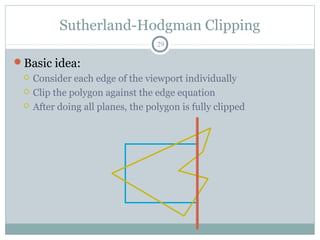
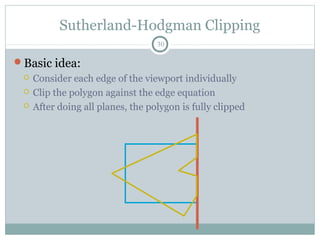
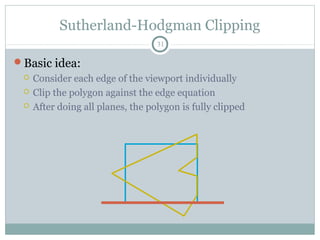
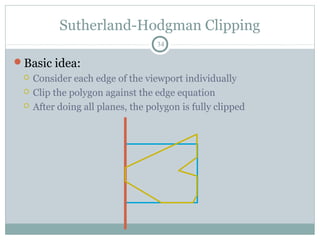
Sutherland-Hodgman Clipping
Perspective Clipping
Recap: Homogeneous Coords
3
Intuitively:
 The w coordinate of a homogeneous point is
typically 1
 Decreasing w makes the point “bigger”, meaning further from
the origin
 Homogeneous points with w = 0 are thus “points at infinity”,
meaning infinitely far away in some direction. (What
direction?)
 To help illustrate this, imagine subtracting two homogeneous
points: the result is (as expected) a vector
Recap: Perspective Projection
4
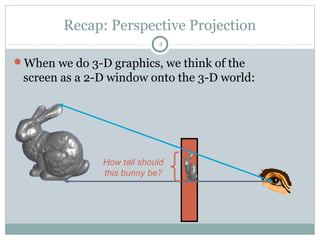
When we do 3-D graphics, we think of the
screen as a 2-D window onto the 3-D world:
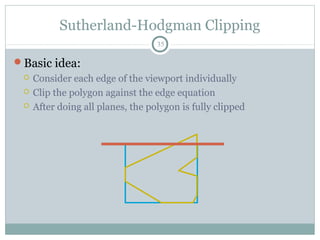
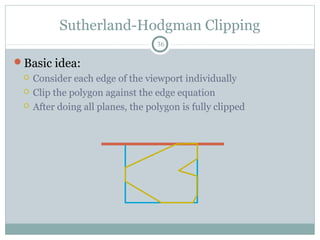
How tall should
this bunny be?
Recap: Perspective Projection
5
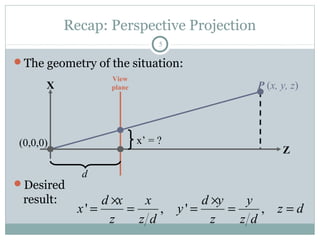
The geometry of the situation:
Desired
result:
P (x, y, z)X
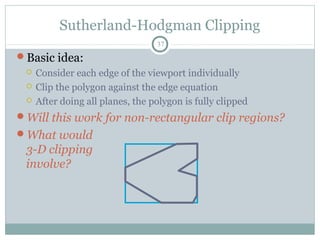
Z
View
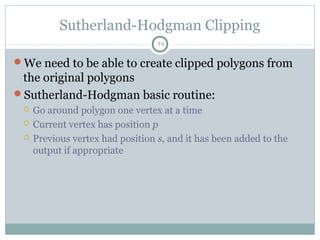
plane
d
(0,0,0) x’ = ?
' , ' ,
d x x d y y
x y z d
z z d z z d
× ×
= = = = =
Recap: Perspective Projection Matrix
6
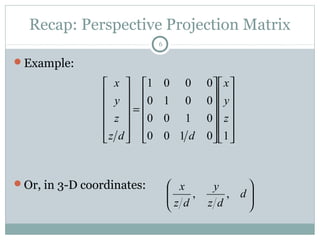
Example:
Or, in 3-D coordinates:
























=












10100
0100
0010
0001
z
y
x
ddz
z
y
x






d
dz
y
dz
x
,,
Recap: OpenGL’s Persp. Proj. Matrix
7
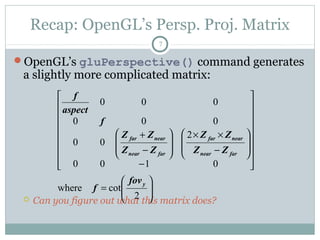
OpenGL’s gluPerspective() command generates
a slightly more complicated matrix:
 Can you figure out what this matrix does?






=


















−








−
××








−
+
2
cotwhere
0100
2
00
000
000
y
farnear
nearfar
farnear
nearfar
fov
f
ZZ
ZZ
ZZ
ZΖ
f
aspect
f
Projection Matrices
8
Now that we can express perspective foreshortening
as a matrix, we can composite it onto our other
matrices with the usual matrix multiplication
End result: can create a single matrix encapsulating
modeling, viewing, and projection transforms
 Though you will recall that in practice OpenGL separates the
modelview from projection matrix (why?)
Outline
9
Review
Clipping Basics
Cohen-Sutherland Line Clipping
Clipping Polygons
Sutherland-Hodgman Clipping
Perspective Clipping
Next Topic: Clipping
10
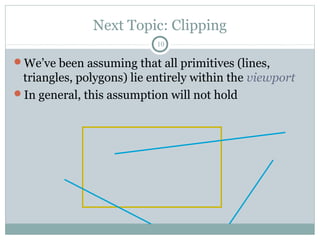
We’ve been assuming that all primitives (lines,
triangles, polygons) lie entirely within the viewport
In general, this assumption will not hold
Clipping
11
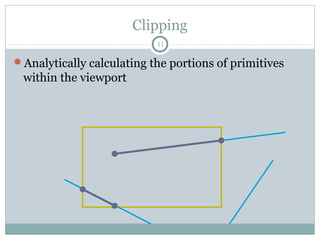
Analytically calculating the portions of primitives
within the viewport
Why Clip?
12
Bad idea to rasterize outside of framebuffer bounds
Also, don’t waste time scan converting pixels outside
window
Clipping
13
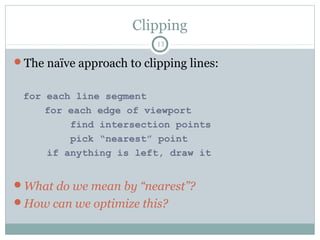
The naïve approach to clipping lines:
for each line segment
for each edge of viewport
find intersection points
pick “nearest” point
if anything is left, draw it
What do we mean by “nearest”?
How can we optimize this?
Trivial Accepts
14
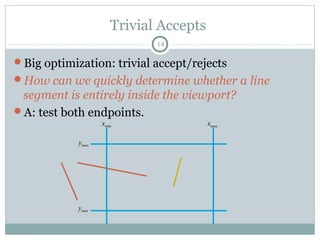
Big optimization: trivial accept/rejects
How can we quickly determine whether a line
segment is entirely inside the viewport?
A: test both endpoints.
xmin xmax
ymax
ymin
Trivial Rejects
15
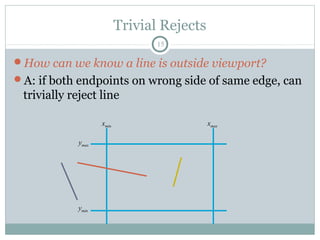
How can we know a line is outside viewport?
A: if both endpoints on wrong side of same edge, can
trivially reject line
xmin xmax
ymax
ymin
Outline
16
Review
Clipping Basics
Cohen-Sutherland Line Clipping
Clipping Polygons
Sutherland-Hodgman Clipping
Perspective Clipping
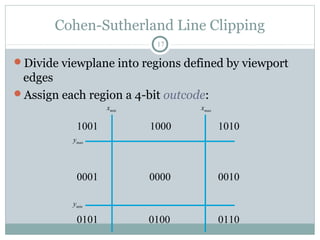
Cohen-Sutherland Line Clipping
17
Divide viewplane into regions defined by viewport
edges
Assign each region a 4-bit outcode:
0000 00100001
1001
0101 0100
1000 1010
0110
xmin xmax
ymax
ymin
Cohen-Sutherland Line Clipping
18
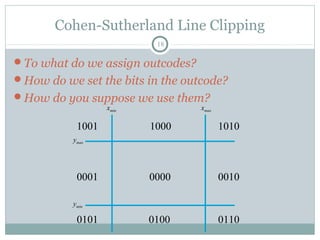
To what do we assign outcodes?
How do we set the bits in the outcode?
How do you suppose we use them?
xmin xmax
0000 00100001
1001
0101 0100
1000 1010
0110
ymax
ymin
Cohen-Sutherland Line Clipping
19
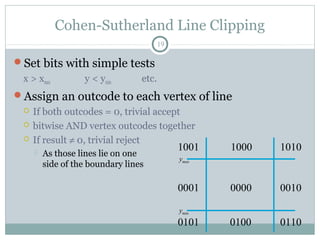
Set bits with simple tests
x > xmax y < ymin etc.
Assign an outcode to each vertex of line
 If both outcodes = 0, trivial accept
 bitwise AND vertex outcodes together
 If result ≠ 0, trivial reject
 As those lines lie on one
side of the boundary lines
0000 00100001
1001
0101 0100
1000 1010
0110
ymax
ymin
Cohen-Sutherland Line Clipping
20
If line cannot be trivially accepted or rejected,
subdivide so that one or both segments can be
discarded
Pick an edge that the line crosses (how?)
Intersect line with edge (how?)
Discard portion on wrong side of edge and assign
outcode to new vertex
Apply trivial accept/reject tests; repeat if necessary
Cohen-Sutherland Line Clipping
21
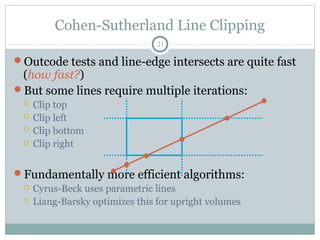
Outcode tests and line-edge intersects are quite fast
(how fast?)
But some lines require multiple iterations:
 Clip top
 Clip left
 Clip bottom
 Clip right
Fundamentally more efficient algorithms:
 Cyrus-Beck uses parametric lines
 Liang-Barsky optimizes this for upright volumes
Outline
22
Review
Clipping Basics
Cohen-Sutherland Line Clipping
Clipping Polygons
Sutherland-Hodgman Clipping
Perspective Clipping
Clipping Polygons
23
We know how to clip a single line segment
 How about a polygon in 2D?
 How about in 3D?
Clipping polygons is more complex than clipping the
individual lines
 Input: polygon
 Output: polygon, or nothing
When can we trivially accept/reject a polygon as
opposed to the line segments that make up the
polygon?
Why Is Clipping Hard?
24
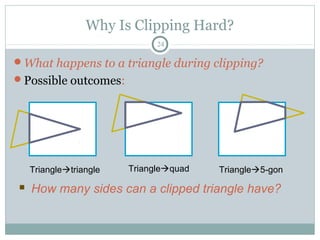
What happens to a triangle during clipping?
Possible outcomes:
Triangletriangle Trianglequad Triangle5-gon
 How many sides can a clipped triangle have?
Why Is Clipping Hard?
25
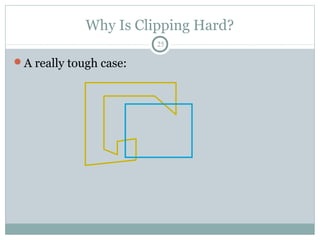
A really tough case:
Why Is Clipping Hard?
26
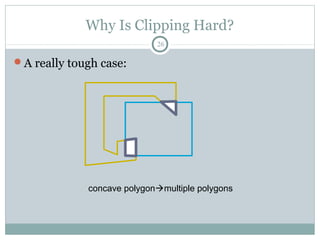
A really tough case:
concave polygonmultiple polygons
Outline
27
Review
Clipping Basics
Cohen-Sutherland Line Clipping
Clipping Polygons
Sutherland-Hodgman Clipping
Perspective Clipping
Sutherland-Hodgman Clipping
28
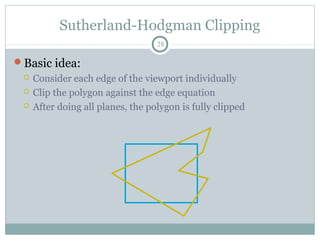
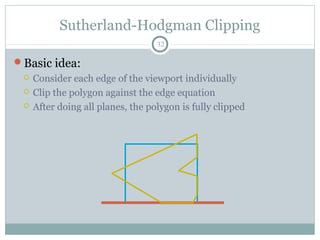
Basic idea:
 Consider each edge of the viewport individually
 Clip the polygon against the edge equation
 After doing all planes, the polygon is fully clipped
Sutherland-Hodgman Clipping
29
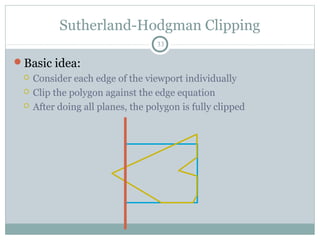
Basic idea:
 Consider each edge of the viewport individually
 Clip the polygon against the edge equation
 After doing all planes, the polygon is fully clipped
Sutherland-Hodgman Clipping
30
Basic idea:
 Consider each edge of the viewport individually
 Clip the polygon against the edge equation
 After doing all planes, the polygon is fully clipped
Sutherland-Hodgman Clipping
31
Basic idea:
 Consider each edge of the viewport individually
 Clip the polygon against the edge equation
 After doing all planes, the polygon is fully clipped
Sutherland-Hodgman Clipping
32
Basic idea:
 Consider each edge of the viewport individually
 Clip the polygon against the edge equation
 After doing all planes, the polygon is fully clipped
Sutherland-Hodgman Clipping
33
Basic idea:
 Consider each edge of the viewport individually
 Clip the polygon against the edge equation
 After doing all planes, the polygon is fully clipped
Sutherland-Hodgman Clipping
34
Basic idea:
 Consider each edge of the viewport individually
 Clip the polygon against the edge equation
 After doing all planes, the polygon is fully clipped
Sutherland-Hodgman Clipping
35
Basic idea:
 Consider each edge of the viewport individually
 Clip the polygon against the edge equation
 After doing all planes, the polygon is fully clipped
Sutherland-Hodgman Clipping
36
Basic idea:
 Consider each edge of the viewport individually
 Clip the polygon against the edge equation
 After doing all planes, the polygon is fully clipped
Sutherland-Hodgman Clipping
37
Basic idea:
 Consider each edge of the viewport individually
 Clip the polygon against the edge equation
 After doing all planes, the polygon is fully clipped
Will this work for non-rectangular clip regions?
What would
3-D clipping
involve?
Sutherland-Hodgman Clipping
38
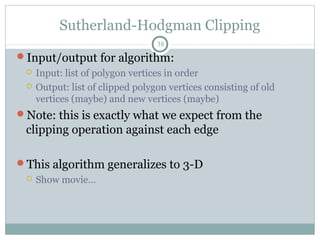
Input/output for algorithm:
 Input: list of polygon vertices in order
 Output: list of clipped polygon vertices consisting of old
vertices (maybe) and new vertices (maybe)
Note: this is exactly what we expect from the
clipping operation against each edge
This algorithm generalizes to 3-D
 Show movie…
Sutherland-Hodgman Clipping
39
We need to be able to create clipped polygons from
the original polygons
Sutherland-Hodgman basic routine:
 Go around polygon one vertex at a time
 Current vertex has position p
 Previous vertex had position s, and it has been added to the
output if appropriate
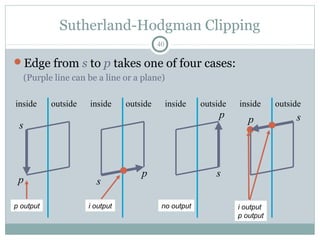
Sutherland-Hodgman Clipping
40
Edge from s to p takes one of four cases:
(Purple line can be a line or a plane)
inside outside
s
p
p output
inside outside
s
p
no output
inside outside
s
p
i output
inside outside
sp
i output
p output
Sutherland-Hodgman Clipping
41
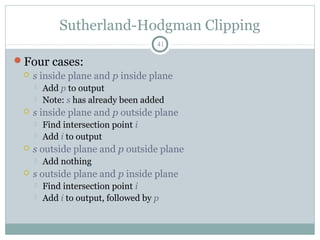
Four cases:
 s inside plane and p inside plane
 Add p to output
 Note: s has already been added
 s inside plane and p outside plane
 Find intersection point i
 Add i to output
 s outside plane and p outside plane
 Add nothing
 s outside plane and p inside plane
 Find intersection point i
 Add i to output, followed by p
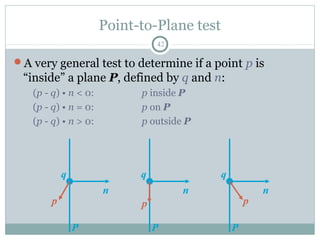
Point-to-Plane test
42
A very general test to determine if a point p is
“inside” a plane P, defined by q and n:
(p - q) • n < 0: p inside P
(p - q) • n = 0: p on P
(p - q) • n > 0: p outside P
P
n
p
q
P
n
p
q
P
n
p
q
Point-to-Plane Test
43
Dot product is relatively expensive
 3 multiplies
 5 additions
 1 comparison (to 0, in this case)
Think about how you might optimize or special-case
this
Finding Line-Plane Intersections
44
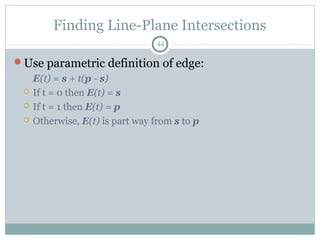
Use parametric definition of edge:
E(t) = s + t(p - s)
 If t = 0 then E(t) = s
 If t = 1 then E(t) = p
 Otherwise, E(t) is part way from s to p
Finding Line-Plane Intersections
45
Edge intersects plane P where E(t) is on P
 q is a point on P
 n is normal to P
(E(t) - q) • n = 0
(s + t(p - s) - q) • n = 0
t = [(q - s) • n] / [(p - s) • n]
 The intersection point i = E(t) for this value of t
Line-Plane Intersections
46
Note that the length of n doesn’t affect result:
t = [(q - s) • n] / [(p - s) • n]
Again, lots of opportunity for optimization
Outline
47
Review
Clipping Basics
Cohen-Sutherland Line Clipping
Clipping Polygons
Sutherland-Hodgman Clipping
Perspective Clipping
3-D Clipping
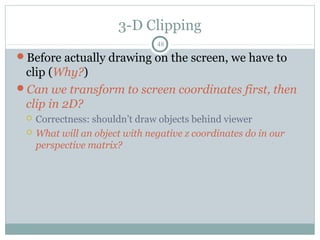
48
Before actually drawing on the screen, we have to
clip (Why?)
Can we transform to screen coordinates first, then
clip in 2D?
 Correctness: shouldn’t draw objects behind viewer
 What will an object with negative z coordinates do in our
perspective matrix?
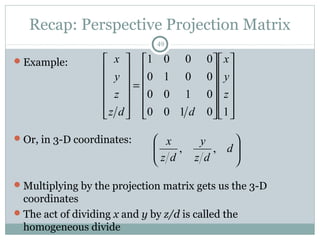
Recap: Perspective Projection Matrix
49
Example:
Or, in 3-D coordinates:
Multiplying by the projection matrix gets us the 3-D
coordinates
The act of dividing x and y by z/d is called the
homogeneous divide
























=












10100
0100
0010
0001
z
y
x
ddz
z
y
x






d
dz
y
dz
x
,,
Clipping Under Perspective
50
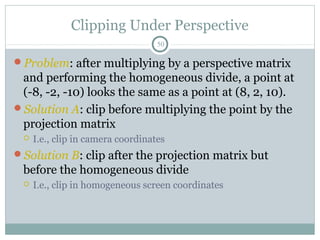
Problem: after multiplying by a perspective matrix
and performing the homogeneous divide, a point at
(-8, -2, -10) looks the same as a point at (8, 2, 10).
Solution A: clip before multiplying the point by the
projection matrix
 I.e., clip in camera coordinates
Solution B: clip after the projection matrix but
before the homogeneous divide
 I.e., clip in homogeneous screen coordinates
Clipping Under Perspective
51
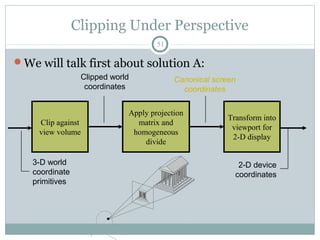
We will talk first about solution A:
Clip against
view volume
Apply projection
matrix and
homogeneous
divide
Transform into
viewport for
2-D display
3-D world
coordinate
primitives
Clipped world
coordinates
2-D device
coordinates
Canonical screen
coordinates
Recap: Perspective Projection
52
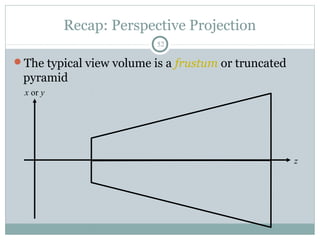
The typical view volume is a frustum or truncated
pyramid
x or y
z
Perspective Projection
53
The viewing frustum consists of six planes
The Sutherland-Hodgeman algorithm (clipping
polygons to a region one plane at a time) generalizes
to 3-D
 Clip polygons against six planes of view frustum
 So what’s the problem?
The problem: clipping a line segment to an arbitrary
plane is relatively expensive
 Dot products and such
Perspective Projection
54
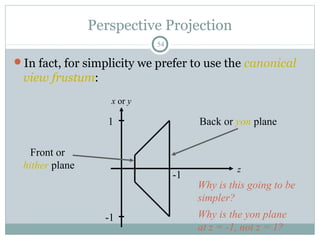
In fact, for simplicity we prefer to use the canonical
view frustum:
x or y
1
-1
z
-1
Front or
hither plane
Back or yon plane
Why is this going to be
simpler?
Why is the yon plane
at z = -1, not z = 1?
Clipping Under Perspective
55
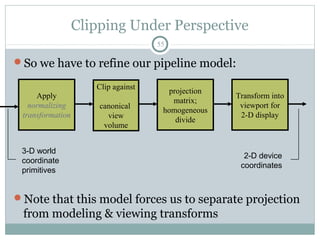
So we have to refine our pipeline model:
Note that this model forces us to separate projection
from modeling & viewing transforms
Apply
normalizing
transformation
projection
matrix;
homogeneous
divide
Transform into
viewport for
2-D display
3-D world
coordinate
primitives
2-D device
coordinates
Clip against
canonical
view
volume
Clipping Homogeneous Coords
56
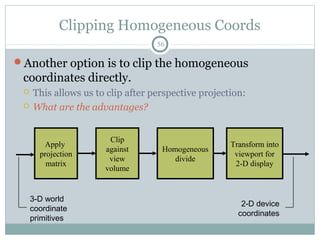
Another option is to clip the homogeneous
coordinates directly.
 This allows us to clip after perspective projection:
 What are the advantages?
Clip
against
view
volume
Apply
projection
matrix
Transform into
viewport for
2-D display
3-D world
coordinate
primitives
2-D device
coordinates
Homogeneous
divide
Clipping Homogeneous Coords
57
Other advantages:
 Can transform the canonical view volume for perspective
projections to the canonical view volume for parallel
projections
 Clip in the latter (only works in homogeneous coords)
 Allows an optimized (hardware) implementation
 Some primitives will have w ≠ 1
 For example, polygons that result from tesselating splines
 Without clipping in homogeneous coords, must perform divide
twice on such primitives
Clipping Homogeneous Coords
58
So how do we clip homogeneous coordinates?
Briefly, thus:
 Remember that we have applied a transform to normalized
device coordinates
 x, y  [-1, 1]
 z  [0, 1]
 When clipping to (say) right side of the screen (x = 1), instead
clip to (x = w)
Can find details in book or on web
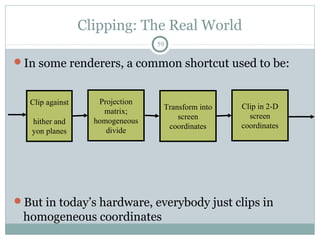
Clipping: The Real World
59
In some renderers, a common shortcut used to be:
But in today’s hardware, everybody just clips in
homogeneous coordinates
Projection
matrix;
homogeneous
divide
Clip in 2-D
screen
coordinates
Clip against
hither and
yon planes
Transform into
screen
coordinates

Clipping in Computer Graphics

  • 1.
    PRESENTED BY BARANITHARAN COMPUTER SCIENCEAND ENGINEERING KINGS COLLEGE OF ENGINEERING Clipping
  • 2.
    Outline 2 Review Clipping Basics Cohen-Sutherland LineClipping Clipping Polygons Sutherland-Hodgman Clipping Perspective Clipping
  • 3.
    Recap: Homogeneous Coords 3 Intuitively: The w coordinate of a homogeneous point is typically 1  Decreasing w makes the point “bigger”, meaning further from the origin  Homogeneous points with w = 0 are thus “points at infinity”, meaning infinitely far away in some direction. (What direction?)  To help illustrate this, imagine subtracting two homogeneous points: the result is (as expected) a vector
  • 4.
    Recap: Perspective Projection 4 Whenwe do 3-D graphics, we think of the screen as a 2-D window onto the 3-D world: How tall should this bunny be?
  • 5.
    Recap: Perspective Projection 5 Thegeometry of the situation: Desired result: P (x, y, z)X Z View plane d (0,0,0) x’ = ? ' , ' , d x x d y y x y z d z z d z z d × × = = = = =
  • 6.
    Recap: Perspective ProjectionMatrix 6 Example: Or, in 3-D coordinates:                         =             10100 0100 0010 0001 z y x ddz z y x       d dz y dz x ,,
  • 7.
    Recap: OpenGL’s Persp.Proj. Matrix 7 OpenGL’s gluPerspective() command generates a slightly more complicated matrix:  Can you figure out what this matrix does?       =                   −         − ××         − + 2 cotwhere 0100 2 00 000 000 y farnear nearfar farnear nearfar fov f ZZ ZZ ZZ ZΖ f aspect f
  • 8.
    Projection Matrices 8 Now thatwe can express perspective foreshortening as a matrix, we can composite it onto our other matrices with the usual matrix multiplication End result: can create a single matrix encapsulating modeling, viewing, and projection transforms  Though you will recall that in practice OpenGL separates the modelview from projection matrix (why?)
  • 9.
    Outline 9 Review Clipping Basics Cohen-Sutherland LineClipping Clipping Polygons Sutherland-Hodgman Clipping Perspective Clipping
  • 10.
    Next Topic: Clipping 10 We’vebeen assuming that all primitives (lines, triangles, polygons) lie entirely within the viewport In general, this assumption will not hold
  • 11.
    Clipping 11 Analytically calculating theportions of primitives within the viewport
  • 12.
    Why Clip? 12 Bad ideato rasterize outside of framebuffer bounds Also, don’t waste time scan converting pixels outside window
  • 13.
    Clipping 13 The naïve approachto clipping lines: for each line segment for each edge of viewport find intersection points pick “nearest” point if anything is left, draw it What do we mean by “nearest”? How can we optimize this?
  • 14.
    Trivial Accepts 14 Big optimization:trivial accept/rejects How can we quickly determine whether a line segment is entirely inside the viewport? A: test both endpoints. xmin xmax ymax ymin
  • 15.
    Trivial Rejects 15 How canwe know a line is outside viewport? A: if both endpoints on wrong side of same edge, can trivially reject line xmin xmax ymax ymin
  • 16.
    Outline 16 Review Clipping Basics Cohen-Sutherland LineClipping Clipping Polygons Sutherland-Hodgman Clipping Perspective Clipping
  • 17.
    Cohen-Sutherland Line Clipping 17 Divideviewplane into regions defined by viewport edges Assign each region a 4-bit outcode: 0000 00100001 1001 0101 0100 1000 1010 0110 xmin xmax ymax ymin
  • 18.
    Cohen-Sutherland Line Clipping 18 Towhat do we assign outcodes? How do we set the bits in the outcode? How do you suppose we use them? xmin xmax 0000 00100001 1001 0101 0100 1000 1010 0110 ymax ymin
  • 19.
    Cohen-Sutherland Line Clipping 19 Setbits with simple tests x > xmax y < ymin etc. Assign an outcode to each vertex of line  If both outcodes = 0, trivial accept  bitwise AND vertex outcodes together  If result ≠ 0, trivial reject  As those lines lie on one side of the boundary lines 0000 00100001 1001 0101 0100 1000 1010 0110 ymax ymin
  • 20.
    Cohen-Sutherland Line Clipping 20 Ifline cannot be trivially accepted or rejected, subdivide so that one or both segments can be discarded Pick an edge that the line crosses (how?) Intersect line with edge (how?) Discard portion on wrong side of edge and assign outcode to new vertex Apply trivial accept/reject tests; repeat if necessary
  • 21.
    Cohen-Sutherland Line Clipping 21 Outcodetests and line-edge intersects are quite fast (how fast?) But some lines require multiple iterations:  Clip top  Clip left  Clip bottom  Clip right Fundamentally more efficient algorithms:  Cyrus-Beck uses parametric lines  Liang-Barsky optimizes this for upright volumes
  • 22.
    Outline 22 Review Clipping Basics Cohen-Sutherland LineClipping Clipping Polygons Sutherland-Hodgman Clipping Perspective Clipping
  • 23.
    Clipping Polygons 23 We knowhow to clip a single line segment  How about a polygon in 2D?  How about in 3D? Clipping polygons is more complex than clipping the individual lines  Input: polygon  Output: polygon, or nothing When can we trivially accept/reject a polygon as opposed to the line segments that make up the polygon?
  • 24.
    Why Is ClippingHard? 24 What happens to a triangle during clipping? Possible outcomes: Triangletriangle Trianglequad Triangle5-gon  How many sides can a clipped triangle have?
  • 25.
    Why Is ClippingHard? 25 A really tough case:
  • 26.
    Why Is ClippingHard? 26 A really tough case: concave polygonmultiple polygons
  • 27.
    Outline 27 Review Clipping Basics Cohen-Sutherland LineClipping Clipping Polygons Sutherland-Hodgman Clipping Perspective Clipping
  • 28.
    Sutherland-Hodgman Clipping 28 Basic idea: Consider each edge of the viewport individually  Clip the polygon against the edge equation  After doing all planes, the polygon is fully clipped
  • 29.
    Sutherland-Hodgman Clipping 29 Basic idea: Consider each edge of the viewport individually  Clip the polygon against the edge equation  After doing all planes, the polygon is fully clipped
  • 30.
    Sutherland-Hodgman Clipping 30 Basic idea: Consider each edge of the viewport individually  Clip the polygon against the edge equation  After doing all planes, the polygon is fully clipped
  • 31.
    Sutherland-Hodgman Clipping 31 Basic idea: Consider each edge of the viewport individually  Clip the polygon against the edge equation  After doing all planes, the polygon is fully clipped
  • 32.
    Sutherland-Hodgman Clipping 32 Basic idea: Consider each edge of the viewport individually  Clip the polygon against the edge equation  After doing all planes, the polygon is fully clipped
  • 33.
    Sutherland-Hodgman Clipping 33 Basic idea: Consider each edge of the viewport individually  Clip the polygon against the edge equation  After doing all planes, the polygon is fully clipped
  • 34.
    Sutherland-Hodgman Clipping 34 Basic idea: Consider each edge of the viewport individually  Clip the polygon against the edge equation  After doing all planes, the polygon is fully clipped
  • 35.
    Sutherland-Hodgman Clipping 35 Basic idea: Consider each edge of the viewport individually  Clip the polygon against the edge equation  After doing all planes, the polygon is fully clipped
  • 36.
    Sutherland-Hodgman Clipping 36 Basic idea: Consider each edge of the viewport individually  Clip the polygon against the edge equation  After doing all planes, the polygon is fully clipped
  • 37.
    Sutherland-Hodgman Clipping 37 Basic idea: Consider each edge of the viewport individually  Clip the polygon against the edge equation  After doing all planes, the polygon is fully clipped Will this work for non-rectangular clip regions? What would 3-D clipping involve?
  • 38.
    Sutherland-Hodgman Clipping 38 Input/output foralgorithm:  Input: list of polygon vertices in order  Output: list of clipped polygon vertices consisting of old vertices (maybe) and new vertices (maybe) Note: this is exactly what we expect from the clipping operation against each edge This algorithm generalizes to 3-D  Show movie…
  • 39.
    Sutherland-Hodgman Clipping 39 We needto be able to create clipped polygons from the original polygons Sutherland-Hodgman basic routine:  Go around polygon one vertex at a time  Current vertex has position p  Previous vertex had position s, and it has been added to the output if appropriate
  • 40.
    Sutherland-Hodgman Clipping 40 Edge froms to p takes one of four cases: (Purple line can be a line or a plane) inside outside s p p output inside outside s p no output inside outside s p i output inside outside sp i output p output
  • 41.
    Sutherland-Hodgman Clipping 41 Four cases: s inside plane and p inside plane  Add p to output  Note: s has already been added  s inside plane and p outside plane  Find intersection point i  Add i to output  s outside plane and p outside plane  Add nothing  s outside plane and p inside plane  Find intersection point i  Add i to output, followed by p
  • 42.
    Point-to-Plane test 42 A verygeneral test to determine if a point p is “inside” a plane P, defined by q and n: (p - q) • n < 0: p inside P (p - q) • n = 0: p on P (p - q) • n > 0: p outside P P n p q P n p q P n p q
  • 43.
    Point-to-Plane Test 43 Dot productis relatively expensive  3 multiplies  5 additions  1 comparison (to 0, in this case) Think about how you might optimize or special-case this
  • 44.
    Finding Line-Plane Intersections 44 Useparametric definition of edge: E(t) = s + t(p - s)  If t = 0 then E(t) = s  If t = 1 then E(t) = p  Otherwise, E(t) is part way from s to p
  • 45.
    Finding Line-Plane Intersections 45 Edgeintersects plane P where E(t) is on P  q is a point on P  n is normal to P (E(t) - q) • n = 0 (s + t(p - s) - q) • n = 0 t = [(q - s) • n] / [(p - s) • n]  The intersection point i = E(t) for this value of t
  • 46.
    Line-Plane Intersections 46 Note thatthe length of n doesn’t affect result: t = [(q - s) • n] / [(p - s) • n] Again, lots of opportunity for optimization
  • 47.
    Outline 47 Review Clipping Basics Cohen-Sutherland LineClipping Clipping Polygons Sutherland-Hodgman Clipping Perspective Clipping
  • 48.
    3-D Clipping 48 Before actuallydrawing on the screen, we have to clip (Why?) Can we transform to screen coordinates first, then clip in 2D?  Correctness: shouldn’t draw objects behind viewer  What will an object with negative z coordinates do in our perspective matrix?
  • 49.
    Recap: Perspective ProjectionMatrix 49 Example: Or, in 3-D coordinates: Multiplying by the projection matrix gets us the 3-D coordinates The act of dividing x and y by z/d is called the homogeneous divide                         =             10100 0100 0010 0001 z y x ddz z y x       d dz y dz x ,,
  • 50.
    Clipping Under Perspective 50 Problem:after multiplying by a perspective matrix and performing the homogeneous divide, a point at (-8, -2, -10) looks the same as a point at (8, 2, 10). Solution A: clip before multiplying the point by the projection matrix  I.e., clip in camera coordinates Solution B: clip after the projection matrix but before the homogeneous divide  I.e., clip in homogeneous screen coordinates
  • 51.
    Clipping Under Perspective 51 Wewill talk first about solution A: Clip against view volume Apply projection matrix and homogeneous divide Transform into viewport for 2-D display 3-D world coordinate primitives Clipped world coordinates 2-D device coordinates Canonical screen coordinates
  • 52.
    Recap: Perspective Projection 52 Thetypical view volume is a frustum or truncated pyramid x or y z
  • 53.
    Perspective Projection 53 The viewingfrustum consists of six planes The Sutherland-Hodgeman algorithm (clipping polygons to a region one plane at a time) generalizes to 3-D  Clip polygons against six planes of view frustum  So what’s the problem? The problem: clipping a line segment to an arbitrary plane is relatively expensive  Dot products and such
  • 54.
    Perspective Projection 54 In fact,for simplicity we prefer to use the canonical view frustum: x or y 1 -1 z -1 Front or hither plane Back or yon plane Why is this going to be simpler? Why is the yon plane at z = -1, not z = 1?
  • 55.
    Clipping Under Perspective 55 Sowe have to refine our pipeline model: Note that this model forces us to separate projection from modeling & viewing transforms Apply normalizing transformation projection matrix; homogeneous divide Transform into viewport for 2-D display 3-D world coordinate primitives 2-D device coordinates Clip against canonical view volume
  • 56.
    Clipping Homogeneous Coords 56 Anotheroption is to clip the homogeneous coordinates directly.  This allows us to clip after perspective projection:  What are the advantages? Clip against view volume Apply projection matrix Transform into viewport for 2-D display 3-D world coordinate primitives 2-D device coordinates Homogeneous divide
  • 57.
    Clipping Homogeneous Coords 57 Otheradvantages:  Can transform the canonical view volume for perspective projections to the canonical view volume for parallel projections  Clip in the latter (only works in homogeneous coords)  Allows an optimized (hardware) implementation  Some primitives will have w ≠ 1  For example, polygons that result from tesselating splines  Without clipping in homogeneous coords, must perform divide twice on such primitives
  • 58.
    Clipping Homogeneous Coords 58 Sohow do we clip homogeneous coordinates? Briefly, thus:  Remember that we have applied a transform to normalized device coordinates  x, y  [-1, 1]  z  [0, 1]  When clipping to (say) right side of the screen (x = 1), instead clip to (x = w) Can find details in book or on web
  • 59.
    Clipping: The RealWorld 59 In some renderers, a common shortcut used to be: But in today’s hardware, everybody just clips in homogeneous coordinates Projection matrix; homogeneous divide Clip in 2-D screen coordinates Clip against hither and yon planes Transform into screen coordinates