E-BOOK MANAGEMENT SYSTEM
Presented by
M. Baranitharan
Computer Science and Engineering
Kings College of Engineering
INTRODUCTION:
The Main Obejective Of The Document Is To Illustrate The
Requirements Of Project E-book Management System.The
Document Gives The Detailed Description Of Both Functional And
Non Functional Requirements.It Will Also Explain About The
Features Of The Interface Of The System.It Will Operate And How
The System Will React To External Stimuli.
SCOPE OF THE E-BOOK:
The software provide the visitor,customer and
administrator a easy and efficient way to buy and
manage books in online:
software provides some facilities to customer:
facilities easy shopping online.
Provides e-mail facility for future correspondence.
Provides backup facility.
REQUIREMENTS:
FUNCTIONAL REQUIREMENTS:
REGISTER-Enter details in application form
LOGIN-Enter username and password.
SEARCH-Search book by attribute.
PAYMENT-Pay for books in different method.
NON FUNCTIONAL REQUIREMENTS:
BOOKMARK-Bookmark the website.
CATEGORIES-Book categories in website
OFFERS-Offer given by merchant.
CARTING-Mark and select multiple books.
HARDWARE REQUIREMENTS
PROCESSOR-Intel pentium 1V-2.0ghz.
HARDWARE-40 gb(segate)
RAM-512 mb
DVD RAM-1nos.
SOFTWARE REQUIREMENTS
OS-Windows XP/vista.
FRONT END TOOL-Rational Rose Enterprise suite.
BACK END TOOL-Oracle10i.
TECHNOLOGIES TO BE USED
HTML - Markup Language used for creating web
pages.
J2EE - Java 2 Enterprise Edition is a programming
platform and it is the part of the java platform
for developing and running distributed java
applications.
HTTP -Hyper Text Transfer Protocol
TCP/IP - Transmission Control Protocol/Internet
Protocol is the communication protocol used to
connect hosts on the Internet.
USE-CASE DIAGRAM:
The E-book use cases in our system are:
1. Login
2. Register
3. Search book
4. Download
5. Payment
6. Publisher
7. Update
Actors involved:
1. Register User
2. Visitor
3. Administrator
1. Add: a student record. Each student should have following attributes.
-> Student id
->Name
->Address
->Phone no
2. Update:
The record would be selected using the student id.
The updates can be made on full items only.
->name
->address
->phone no
3. Add to book item:
Each book should have following attribute
->call no
->title
->ISBN
->Author name
4. Query the book database:
The product shall let librarian query tools books detail
information by their ISBN number (or) author (or) title.
The search result would produce a list of books, which
match the search parameters.
5. Check out a book:
Librarians and member of the library can check out can
be initialized from a previous search operation where
user has selected a set of books.
6. Check in a book:
Librarians and member of the library can check in a
book using its call no.
CLASS DIAGRAM
The class diagram, also referred to as object modeling is the main
static analysis diagram. The main task of object modeling is to
graphically show what each object will do in the problem domain.
The problem domain describes the structure and the relationships
among objects.
The E-book Management system class diagram consists of five
classes:
1. Login
2. Registered User
3. Administrator
4. Book
5. Visitor
6. download
7.lay out
INTERACTION DIAGRAM:
A sequence diagram represents the sequence and
interactions of a given USE-CASE or scenario. Sequence
diagrams can capture most of the information about the
system. Most object to object interactions and
operations are considered events and events include
signals, inputs, decisions, interrupts, transitions and
actions to or from users or external devices.
An event also is considered to be any action by an
object that sends information. The event line represents
a message sent from one object to another.
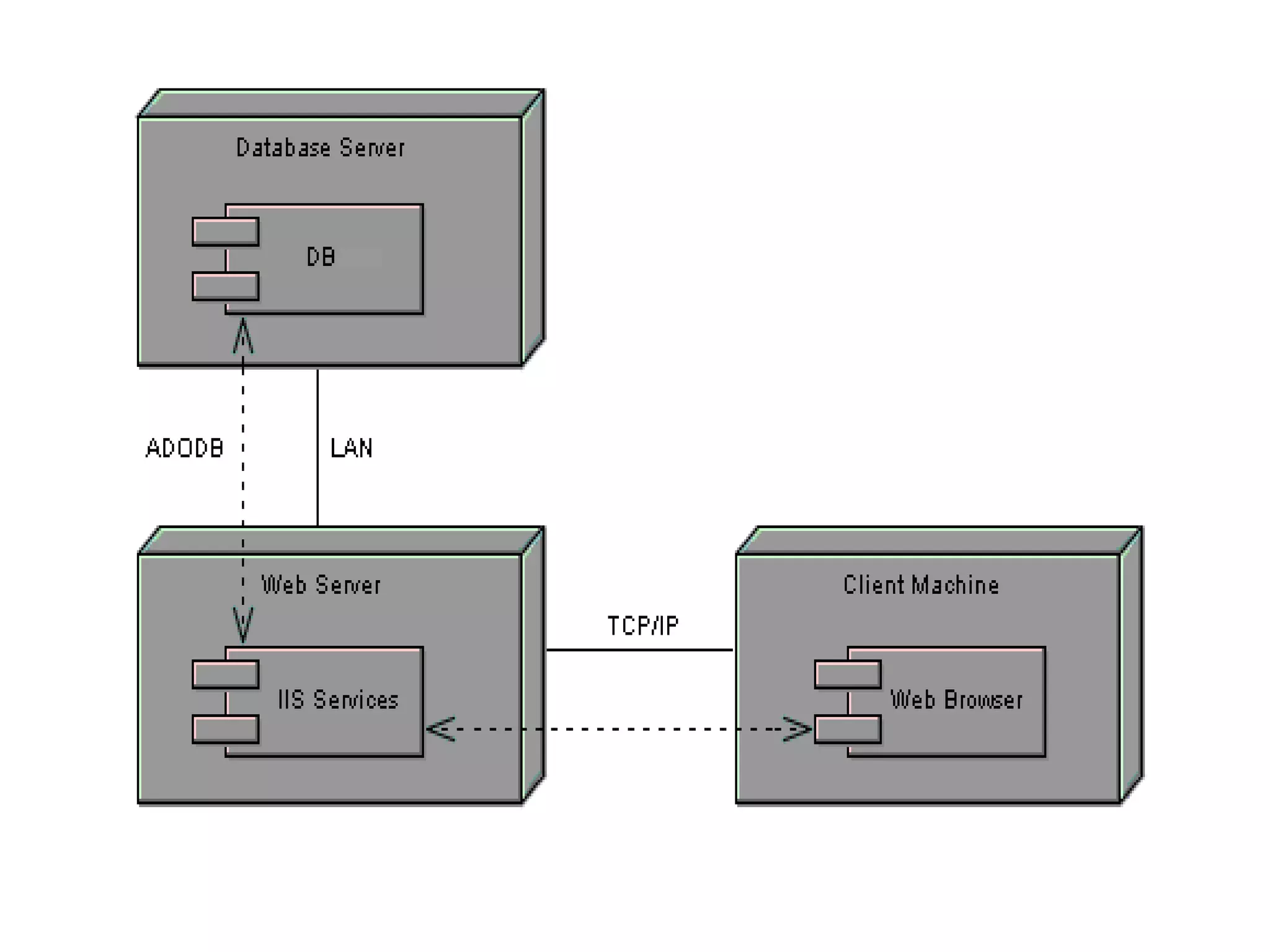
DEPLOYMENT DIAGRAM AND
COMPONENT DIAGRAM
Deployment diagrams are used to visualize the
topology of the physical components of a system
where the software components are deployed.
STATE CHART DIAGRAM:
The diagrams show first login to the system
and view the books and search for required
book is done and then required book is
downloaded and amount paid in online
Finally logout from the system.
Source file: book.java
public class book
{
private string bookid;
private string bookname;
private string author;
private int prize;
public visitors theVisitors;
/**
@roseuid 515D12350203
*/
public book()
{
}
/**
@roseuid 515D11E5005D
*/
public void add()
{
}
/**
@roseuid 515D11E800CB
public void update
{
}
}
CONCLUSION
To perform the testing for the generated code again
select the tools option from menu bar and choose
quality architecture option a sub window gets
opened.We are going to perform unit testing and
scenario testing for our project.Thus the E-BOOK
MANAGEMENT SYSTEM has been successfully executed
and codes are generated…

E book management system

  • 1.
    E-BOOK MANAGEMENT SYSTEM Presentedby M. Baranitharan Computer Science and Engineering Kings College of Engineering
  • 2.
    INTRODUCTION: The Main ObejectiveOf The Document Is To Illustrate The Requirements Of Project E-book Management System.The Document Gives The Detailed Description Of Both Functional And Non Functional Requirements.It Will Also Explain About The Features Of The Interface Of The System.It Will Operate And How The System Will React To External Stimuli.
  • 3.
    SCOPE OF THEE-BOOK: The software provide the visitor,customer and administrator a easy and efficient way to buy and manage books in online: software provides some facilities to customer: facilities easy shopping online. Provides e-mail facility for future correspondence. Provides backup facility.
  • 4.
    REQUIREMENTS: FUNCTIONAL REQUIREMENTS: REGISTER-Enter detailsin application form LOGIN-Enter username and password. SEARCH-Search book by attribute. PAYMENT-Pay for books in different method. NON FUNCTIONAL REQUIREMENTS: BOOKMARK-Bookmark the website. CATEGORIES-Book categories in website OFFERS-Offer given by merchant. CARTING-Mark and select multiple books.
  • 5.
    HARDWARE REQUIREMENTS PROCESSOR-Intel pentium1V-2.0ghz. HARDWARE-40 gb(segate) RAM-512 mb DVD RAM-1nos. SOFTWARE REQUIREMENTS OS-Windows XP/vista. FRONT END TOOL-Rational Rose Enterprise suite. BACK END TOOL-Oracle10i.
  • 6.
    TECHNOLOGIES TO BEUSED HTML - Markup Language used for creating web pages. J2EE - Java 2 Enterprise Edition is a programming platform and it is the part of the java platform for developing and running distributed java applications. HTTP -Hyper Text Transfer Protocol TCP/IP - Transmission Control Protocol/Internet Protocol is the communication protocol used to connect hosts on the Internet.
  • 7.
    USE-CASE DIAGRAM: The E-bookuse cases in our system are: 1. Login 2. Register 3. Search book 4. Download 5. Payment 6. Publisher 7. Update Actors involved: 1. Register User 2. Visitor 3. Administrator
  • 8.
    1. Add: astudent record. Each student should have following attributes. -> Student id ->Name ->Address ->Phone no 2. Update: The record would be selected using the student id. The updates can be made on full items only. ->name ->address ->phone no 3. Add to book item: Each book should have following attribute ->call no ->title ->ISBN ->Author name
  • 9.
    4. Query thebook database: The product shall let librarian query tools books detail information by their ISBN number (or) author (or) title. The search result would produce a list of books, which match the search parameters. 5. Check out a book: Librarians and member of the library can check out can be initialized from a previous search operation where user has selected a set of books. 6. Check in a book: Librarians and member of the library can check in a book using its call no.
  • 10.
    CLASS DIAGRAM The classdiagram, also referred to as object modeling is the main static analysis diagram. The main task of object modeling is to graphically show what each object will do in the problem domain. The problem domain describes the structure and the relationships among objects. The E-book Management system class diagram consists of five classes: 1. Login 2. Registered User 3. Administrator 4. Book 5. Visitor 6. download 7.lay out
  • 12.
    INTERACTION DIAGRAM: A sequencediagram represents the sequence and interactions of a given USE-CASE or scenario. Sequence diagrams can capture most of the information about the system. Most object to object interactions and operations are considered events and events include signals, inputs, decisions, interrupts, transitions and actions to or from users or external devices. An event also is considered to be any action by an object that sends information. The event line represents a message sent from one object to another.
  • 14.
    DEPLOYMENT DIAGRAM AND COMPONENTDIAGRAM Deployment diagrams are used to visualize the topology of the physical components of a system where the software components are deployed.
  • 15.
    STATE CHART DIAGRAM: Thediagrams show first login to the system and view the books and search for required book is done and then required book is downloaded and amount paid in online Finally logout from the system.
  • 18.
    Source file: book.java publicclass book { private string bookid; private string bookname; private string author; private int prize; public visitors theVisitors; /** @roseuid 515D12350203 */ public book() { } /** @roseuid 515D11E5005D */ public void add() { } /** @roseuid 515D11E800CB public void update { } }
  • 19.
    CONCLUSION To perform thetesting for the generated code again select the tools option from menu bar and choose quality architecture option a sub window gets opened.We are going to perform unit testing and scenario testing for our project.Thus the E-BOOK MANAGEMENT SYSTEM has been successfully executed and codes are generated…