1
Alamgir Hossain, CSE, JUST
Name of the Problem:
To write a Matlab program to evaluate the impulse response of the system. Objective:
To write a MATLAB program to evaluate the impulse response of the system using MATlab. Requirements:
Operating System - Windows XP
Constructor - Simulator
Software - CCStudio 3 & MATLAB 7.5
Source Program :
% Difference equation of a second order system % y(n)
= x(n)+0.5x(n-1)+0.85x(n-2)+y(n-1)+y(n-2)
b=input('enter the coefficients of x(n),x(n-1)-----');
a=input('enter the coefficients of y(n),y(n-1)----');
N=input('enter the number of samples of imp response ');
[h,t]=impz(b,a,N);
subplot(2,1,1); % figure(1);
plot(t,h); title('plot of impulse
response'); ylabel('amplitude');
xlabel('time index----->N');
subplot(2,1,2); % figure(2);
stem(t,h);
title('plot of impulse response');
ylabel('amplitude');
xlabel('time index----->N');
disp(h); grid on;
Input and Output :
Enter the coefficients of x(n),x(n-1)-----[1 0.5 0.85] enter the coefficients of y(n),y(n-1)-----[1 -1 -1] enter the
number of samples of imp respons 4
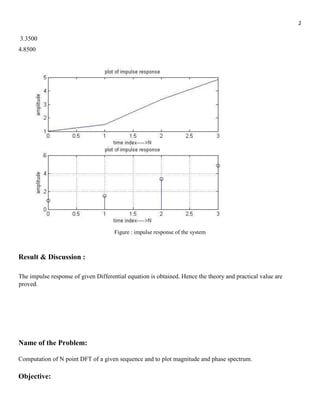
1.0000
1.5000
2
3.3500
4.8500
Figure : impulse response of the system
Result & Discussion :
The impulse response of given Differential equation is obtained. Hence the theory and practical value are
proved.
Name of the Problem:
Computation of N point DFT of a given sequence and to plot magnitude and phase spectrum.
Objective:
3
To Computation of N point DFT of a given sequence and to plot magnitude and phase spectrum.
Requirements:
Operating System - Windows XP
Constructor - Simulator
Software - CCStudio 3 & MATLAB 7.5
Source Program:
N = input('Enter the the value of N(Value of N in N-Point DFT)');
x = input('Enter the sequence for which DFT is to be calculated');
n=[0:1:N-1]; k=[0:1:N-1];
WN=exp(-1j*2*pi/N); % twiddle factor nk=n'*k;
WNnk=WN.^nk;
Xk=x*WNnk;
MagX=abs(Xk) % Magnitude of calculated DFT
PhaseX=angle(Xk)*180/pi % Phase of the calculated DFT figure(1);
subplot(2,1,1); plot(k,MagX); subplot(2,1,2); plot(k,PhaseX);
Input and Output :
Enter the the value of N(Value of N in N-Point DFT)4 Enter the sequence for which DFT is to be calculated [1
2 3 4]
MagX = 10.0000 2.8284 2.0000 2.8284
PhaseX = 0 135.0000 -180.0000 -135.0000
DFT of the given sequence is
10.0000 -2.0000 + 2.0000i -2.0000 - 0.0000i -2.0000 - 2.0000i
4
Figure : N point DFT
Result & Discussion:
The DFT of given sequence is obtained. Hence the theory and practical value are proved.
Name of the Problem:
To Generate continuous time sinusoidal signal, discrete time cosine signal.
Objective:
5
To Generate continuous time sinusoidal signal, Discrete time cosine signal using Matlab.
Requirements:
Computer with MATLAB software.
Source Program:
% Program start for Continuous time sigusoinal---------
t=-pi:.01:pi; y= sin(2*pi*t); subplot(2,1,1); plot(t,y);
ylabel('amp...'); xlabel('(a)n...'); title('Continuous Time
Sinusoidal ignal')
%Program for Discrete time cosine signal :
t=-pi:.03:pi/3; y=
cos(2*pi*t);
subplot(2,1,2);
stem(t,y);
xlabel('a(n)');
ylabel('Amplitude');
title('Discrete Time Cosine Signal');
Input and Output :
6
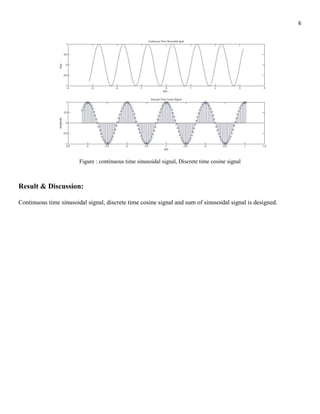
Figure : continuous time sinusoidal signal, Discrete time cosine signal
Result & Discussion:
Continuous time sinusoidal signal, discrete time cosine signal and sum of sinusoidal signal is designed.
7
Name of the Problem:
To find the DFT / IDFT of given signal.
Objective:
To find the DFT / IDFT of given signal using Matlab.
Requirements:
Operating System - Windows XP
Constructor - Simulator
Software - CCStudio 3 & MATLAB 7.5
Source Program:
%DFT of a given Signal---------
w = [0:500]*pi/500; z = exp(-
j*w); x = 3*(1-0.9*z).^(-1); a =
abs(x); b = angle(x)*180/pi;
subplot(2,1,1); plot(w/pi,a);
subplot(2,1,2); plot(w/pi,b);
Input and Output :
8
Figure: DFT Signal
Result and Discussion:
The DFT of given sequence is obtained. Hence the theory and practical value are proved.
9
Name of the Problem:
Program for generation of Sine sequence.
Objective:
To generate sine sequence using Matlab.
Requirements:
Computer with MATLAB software.
Source Program:
%program to generate sine wave sequence
f= input('Please enter the frequency in hertz of the sine wave : ');
t=0:.0001:5; y=sin(2*pi*f*t); plot(t,y); ylabel ('Amplitude');
xlabel ('Time Index'); title ('Sine wave');
Input and Output:
10
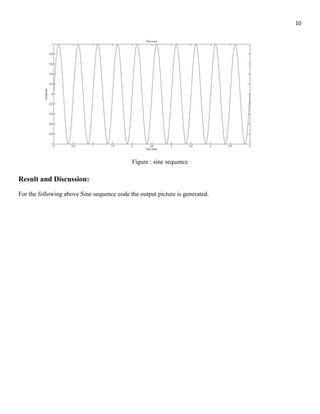
Figure : sine sequence
Result and Discussion:
For the following above Sine sequence code the output picture is generated.
11
Name of the Problem:
Program for generation of Cosine sequence.
Objective:
To generate Cosine sequence using Matlab.
Requirements:
Computer with MATLAB software.
Source Program:
%program to generate cosine wave f= input('Enter the
frequency in hertz of the Cosine wave : '); t=0:.0001:5;
y=cos(2*pi*f*t); plot(t,y); ylabel ('Amplitude'); xlabel
('Time Index'); TITLE ('cosine wave');
Input and Output:
12
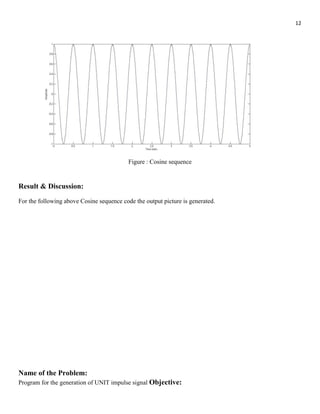
Figure : Cosine sequence
Result & Discussion:
For the following above Cosine sequence code the output picture is generated.
Name of the Problem:
Program for the generation of UNIT impulse signal Objective:
13
To generate basic signals like unit impulse signals using MATLab.
Source Program:
t=-2:1:2;
y=[zeros(1,2),ones(1,1),zeros(1,2)];
subplot(2,2,1); stem(t,y);
title('Unit Impulse');
Input and Output:
Figure: Unit Impulse Signals Result
and Discussion:
For the following above unit impulse signal code the output picture is generated.
Name of the Problem:
Program for the generation of UNIT step signal Objective:
To generate basic signals like unit step signals using MATLab.
Source Program:
14
n=input('enter the n value');
t=0:1:n-1; y=ones(1,n);
subplot(2,2,2); stem(t,y);
title('Unit Step');
Input and Output:
Figure: Unit Step signal Result
and Discussion:
For the following above unit step source code the output unit step signal is generated
Name of the problem:
Program for the generation of unit RAMP signal Objective:
To generate basic signals like unit RAMP signals using MATLab.
Source Program:
clc; close all; clear all;
n=input('Enter the n value');
t=0:n; y=ones(1,n);
15
figure(3) subplot(2,2,3);
stem(t,t); title('unit ramp');
Input and Output:
Figure: unit RAMP signals Result
and Discussion:
For the following above source code the output unit RAMP signal is generated using in MATLab.
Name of the Problem:
Program for the generation of Exponential signal. Objective:
To generate basic signals like Exponential signals using MATLab.
Source Program:
clc; close all; clear all; n=input('The
length of i/p sequency'); t=0:n
a=input('Enter the a value');
y=exp(a*t); subplot(2,2,4);
stem(t,y); xlabel('x-axis'); ylabel('y-
axis'); title('Unit exponential');
16
Input and Output:
The length of i/p sequence: 5
Enter the value of a: 1
Figure: Exponential signals Result
and Discussion:
For the following above source code the output unit Exponential signal is generated using in MATLab.
17
Md. Alamgir Hossain
Department of Computer Science & Engineering
Jessore University of Science and Technology
Mail : Alamgir.cse14.just@gmail.com
Facebook Youtube

Digital signal Processing all matlab code with Lab report

  • 1.
    1 Alamgir Hossain, CSE,JUST Name of the Problem: To write a Matlab program to evaluate the impulse response of the system. Objective: To write a MATLAB program to evaluate the impulse response of the system using MATlab. Requirements: Operating System - Windows XP Constructor - Simulator Software - CCStudio 3 & MATLAB 7.5 Source Program : % Difference equation of a second order system % y(n) = x(n)+0.5x(n-1)+0.85x(n-2)+y(n-1)+y(n-2) b=input('enter the coefficients of x(n),x(n-1)-----'); a=input('enter the coefficients of y(n),y(n-1)----'); N=input('enter the number of samples of imp response '); [h,t]=impz(b,a,N); subplot(2,1,1); % figure(1); plot(t,h); title('plot of impulse response'); ylabel('amplitude'); xlabel('time index----->N'); subplot(2,1,2); % figure(2); stem(t,h); title('plot of impulse response'); ylabel('amplitude'); xlabel('time index----->N'); disp(h); grid on; Input and Output : Enter the coefficients of x(n),x(n-1)-----[1 0.5 0.85] enter the coefficients of y(n),y(n-1)-----[1 -1 -1] enter the number of samples of imp respons 4 1.0000 1.5000
  • 2.
    2 3.3500 4.8500 Figure : impulseresponse of the system Result & Discussion : The impulse response of given Differential equation is obtained. Hence the theory and practical value are proved. Name of the Problem: Computation of N point DFT of a given sequence and to plot magnitude and phase spectrum. Objective:
  • 3.
    3 To Computation ofN point DFT of a given sequence and to plot magnitude and phase spectrum. Requirements: Operating System - Windows XP Constructor - Simulator Software - CCStudio 3 & MATLAB 7.5 Source Program: N = input('Enter the the value of N(Value of N in N-Point DFT)'); x = input('Enter the sequence for which DFT is to be calculated'); n=[0:1:N-1]; k=[0:1:N-1]; WN=exp(-1j*2*pi/N); % twiddle factor nk=n'*k; WNnk=WN.^nk; Xk=x*WNnk; MagX=abs(Xk) % Magnitude of calculated DFT PhaseX=angle(Xk)*180/pi % Phase of the calculated DFT figure(1); subplot(2,1,1); plot(k,MagX); subplot(2,1,2); plot(k,PhaseX); Input and Output : Enter the the value of N(Value of N in N-Point DFT)4 Enter the sequence for which DFT is to be calculated [1 2 3 4] MagX = 10.0000 2.8284 2.0000 2.8284 PhaseX = 0 135.0000 -180.0000 -135.0000 DFT of the given sequence is 10.0000 -2.0000 + 2.0000i -2.0000 - 0.0000i -2.0000 - 2.0000i
  • 4.
    4 Figure : Npoint DFT Result & Discussion: The DFT of given sequence is obtained. Hence the theory and practical value are proved. Name of the Problem: To Generate continuous time sinusoidal signal, discrete time cosine signal. Objective:
  • 5.
    5 To Generate continuoustime sinusoidal signal, Discrete time cosine signal using Matlab. Requirements: Computer with MATLAB software. Source Program: % Program start for Continuous time sigusoinal--------- t=-pi:.01:pi; y= sin(2*pi*t); subplot(2,1,1); plot(t,y); ylabel('amp...'); xlabel('(a)n...'); title('Continuous Time Sinusoidal ignal') %Program for Discrete time cosine signal : t=-pi:.03:pi/3; y= cos(2*pi*t); subplot(2,1,2); stem(t,y); xlabel('a(n)'); ylabel('Amplitude'); title('Discrete Time Cosine Signal'); Input and Output :
  • 6.
    6 Figure : continuoustime sinusoidal signal, Discrete time cosine signal Result & Discussion: Continuous time sinusoidal signal, discrete time cosine signal and sum of sinusoidal signal is designed.
  • 7.
    7 Name of theProblem: To find the DFT / IDFT of given signal. Objective: To find the DFT / IDFT of given signal using Matlab. Requirements: Operating System - Windows XP Constructor - Simulator Software - CCStudio 3 & MATLAB 7.5 Source Program: %DFT of a given Signal--------- w = [0:500]*pi/500; z = exp(- j*w); x = 3*(1-0.9*z).^(-1); a = abs(x); b = angle(x)*180/pi; subplot(2,1,1); plot(w/pi,a); subplot(2,1,2); plot(w/pi,b); Input and Output :
  • 8.
    8 Figure: DFT Signal Resultand Discussion: The DFT of given sequence is obtained. Hence the theory and practical value are proved.
  • 9.
    9 Name of theProblem: Program for generation of Sine sequence. Objective: To generate sine sequence using Matlab. Requirements: Computer with MATLAB software. Source Program: %program to generate sine wave sequence f= input('Please enter the frequency in hertz of the sine wave : '); t=0:.0001:5; y=sin(2*pi*f*t); plot(t,y); ylabel ('Amplitude'); xlabel ('Time Index'); title ('Sine wave'); Input and Output:
  • 10.
    10 Figure : sinesequence Result and Discussion: For the following above Sine sequence code the output picture is generated.
  • 11.
    11 Name of theProblem: Program for generation of Cosine sequence. Objective: To generate Cosine sequence using Matlab. Requirements: Computer with MATLAB software. Source Program: %program to generate cosine wave f= input('Enter the frequency in hertz of the Cosine wave : '); t=0:.0001:5; y=cos(2*pi*f*t); plot(t,y); ylabel ('Amplitude'); xlabel ('Time Index'); TITLE ('cosine wave'); Input and Output:
  • 12.
    12 Figure : Cosinesequence Result & Discussion: For the following above Cosine sequence code the output picture is generated. Name of the Problem: Program for the generation of UNIT impulse signal Objective:
  • 13.
    13 To generate basicsignals like unit impulse signals using MATLab. Source Program: t=-2:1:2; y=[zeros(1,2),ones(1,1),zeros(1,2)]; subplot(2,2,1); stem(t,y); title('Unit Impulse'); Input and Output: Figure: Unit Impulse Signals Result and Discussion: For the following above unit impulse signal code the output picture is generated. Name of the Problem: Program for the generation of UNIT step signal Objective: To generate basic signals like unit step signals using MATLab. Source Program:
  • 14.
    14 n=input('enter the nvalue'); t=0:1:n-1; y=ones(1,n); subplot(2,2,2); stem(t,y); title('Unit Step'); Input and Output: Figure: Unit Step signal Result and Discussion: For the following above unit step source code the output unit step signal is generated Name of the problem: Program for the generation of unit RAMP signal Objective: To generate basic signals like unit RAMP signals using MATLab. Source Program: clc; close all; clear all; n=input('Enter the n value'); t=0:n; y=ones(1,n);
  • 15.
    15 figure(3) subplot(2,2,3); stem(t,t); title('unitramp'); Input and Output: Figure: unit RAMP signals Result and Discussion: For the following above source code the output unit RAMP signal is generated using in MATLab. Name of the Problem: Program for the generation of Exponential signal. Objective: To generate basic signals like Exponential signals using MATLab. Source Program: clc; close all; clear all; n=input('The length of i/p sequency'); t=0:n a=input('Enter the a value'); y=exp(a*t); subplot(2,2,4); stem(t,y); xlabel('x-axis'); ylabel('y- axis'); title('Unit exponential');
  • 16.
    16 Input and Output: Thelength of i/p sequence: 5 Enter the value of a: 1 Figure: Exponential signals Result and Discussion: For the following above source code the output unit Exponential signal is generated using in MATLab.
  • 17.
    17 Md. Alamgir Hossain Departmentof Computer Science & Engineering Jessore University of Science and Technology Mail : Alamgir.cse14.just@gmail.com Facebook Youtube