CS 354 More Graphics Pipeline Mark Kilgard University of Texas January 24, 2012
Today’s material Homework status In-class quiz Lecture topic: more graphics pipeline How do clipped primitives in NDC space get rasterized and drawn onto the screen? Assignment Reading Finish “Project 0” homework programming task
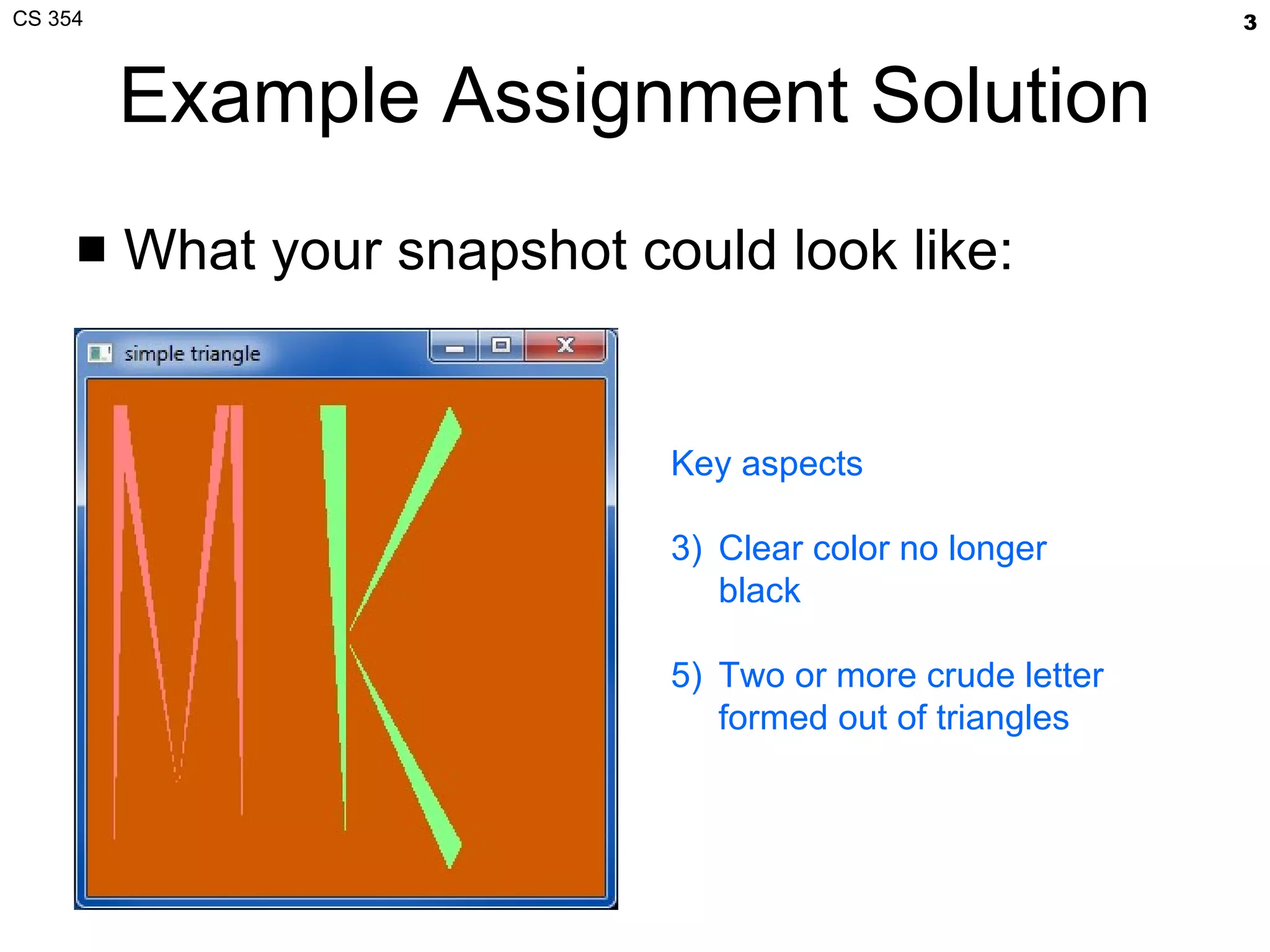
Example Assignment Solution What your snapshot could look like: Key aspects Clear color no longer black Two or more crude letter formed out of triangles
Course Information Reminders Piazza Active place to get answers Used last semester too https://piazza.com/utexas/cs354 Public CS course web site http://www.cs.utexas.edu/~mjk/teaching/cs354_s12/ Lecture slides in PDF form Now has class lecture schedule Slideshare.net http://www.slideshare.net/Mark_Kilgard Lecture slides for web browser viewing
My Office Hours Tuesday, before class Painter (PAI) 5.35 8:30 a.m. to 9:30 Thursday, after class ACE 6.302 11:00 a.m. to 12:00
Last time, this time Last lecture, we discussed How a triangle is specified in OpenGL Directly in Normalized Device Coordinate (NDC) space How a triangle gets clipped if necessary How a triangle gets mapped to window space This lecture Let’s look at that program in more detail How does a triangle described by numbers become pixels viewed on the scene? Along the way Practical advice for novice OpenGL programmers
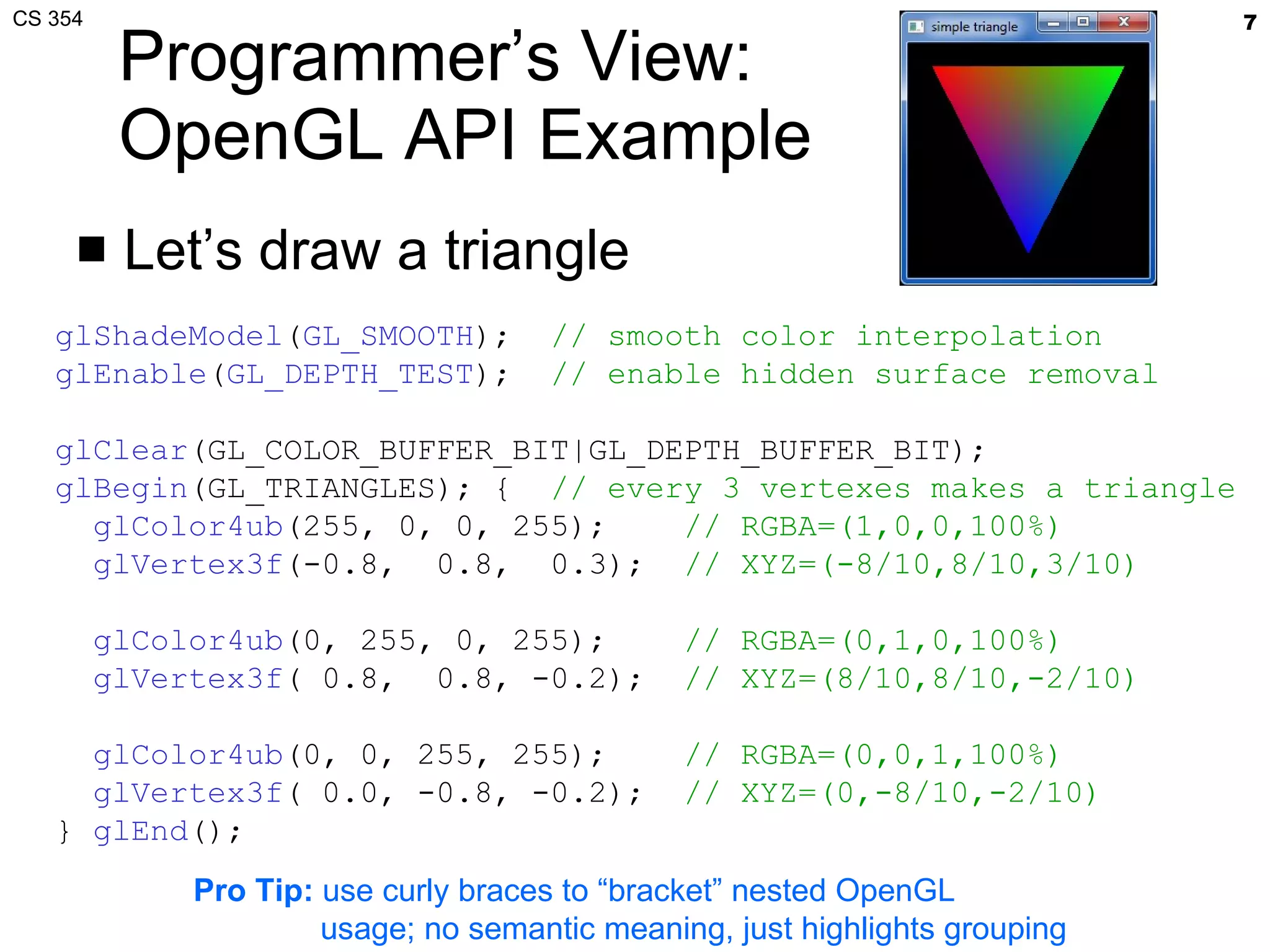
Programmer’s View: OpenGL API Example Let’s draw a triangle glShadeModel ( GL_SMOOTH );  // smooth color interpolation glEnable ( GL_DEPTH_TEST );  // enable hidden surface removal glClear (GL_COLOR_BUFFER_BIT|GL_DEPTH_BUFFER_BIT); glBegin (GL_TRIANGLES); {  // every 3 vertexes makes a triangle glColor4ub (255, 0, 0, 255);  // RGBA=(1,0,0,100%) glVertex3f (-0.8,  0.8,  0.3);  // XYZ=(-8/10,8/10,3/10) glColor4ub (0, 255, 0, 255);  // RGBA=(0,1,0,100%) glVertex3f ( 0.8,  0.8, -0.2);  // XYZ=(8/10,8/10,-2/10) glColor4ub (0, 0, 255, 255);  // RGBA=(0,0,1,100%) glVertex3f ( 0.0, -0.8, -0.2);  // XYZ=(0,-8/10,-2/10) }  glEnd (); Pro Tip:  use curly braces to “bracket” nested OpenGL usage; no semantic meaning, just highlights grouping
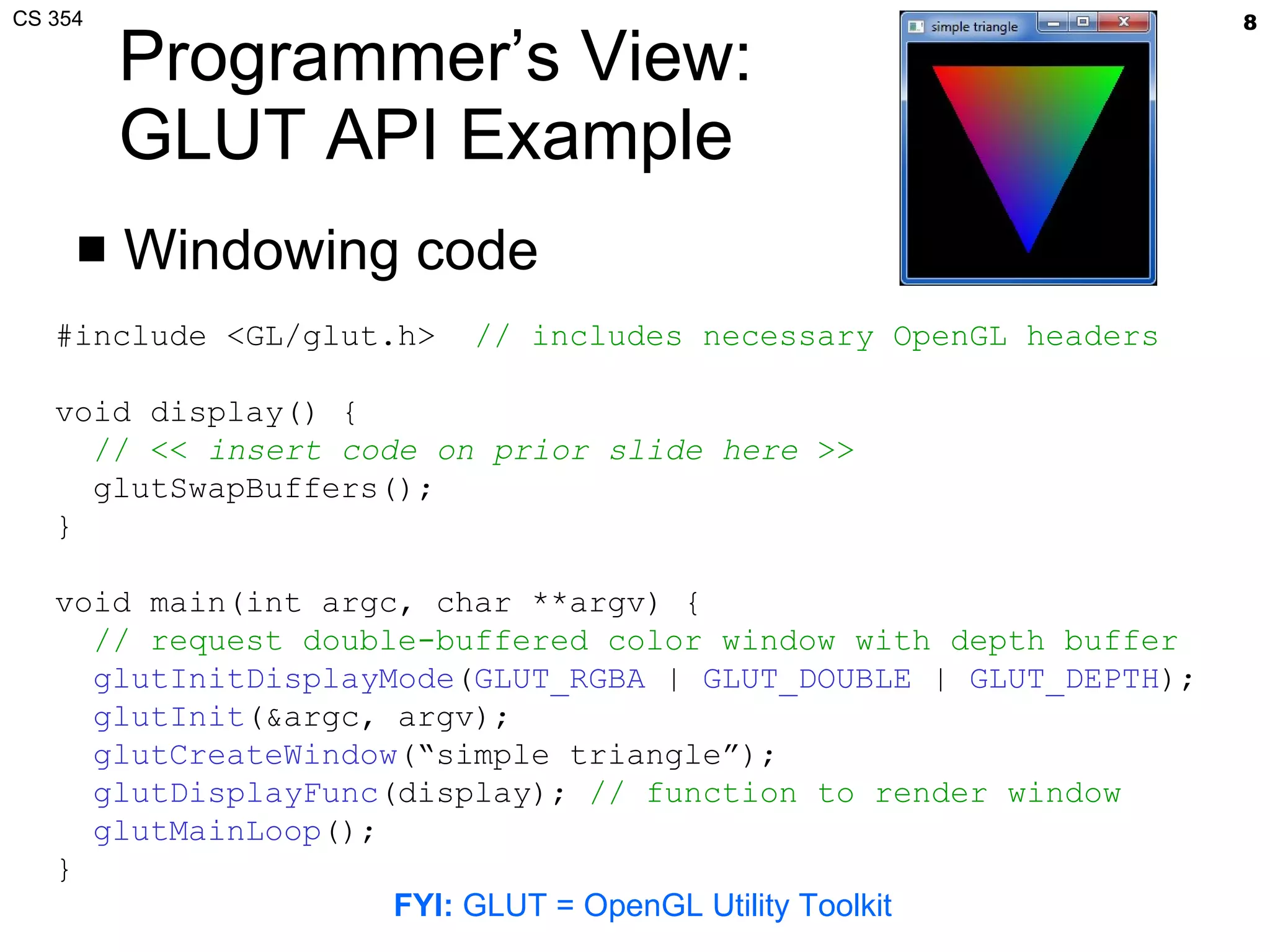
Programmer’s View: GLUT API Example Windowing code #include <GL/glut.h>  // includes necessary OpenGL headers void display() { // <<  insert code on prior slide here  >> glutSwapBuffers(); } void main(int argc, char **argv) {   // request double-buffered color window with depth buffer glutInitDisplayMode ( GLUT_RGBA  |  GLUT_DOUBLE  |  GLUT_DEPTH ); glutInit (&argc, argv); glutCreateWindow (“simple triangle”); glutDisplayFunc (display);  // function to render window glutMainLoop (); } FYI:  GLUT = OpenGL Utility Toolkit
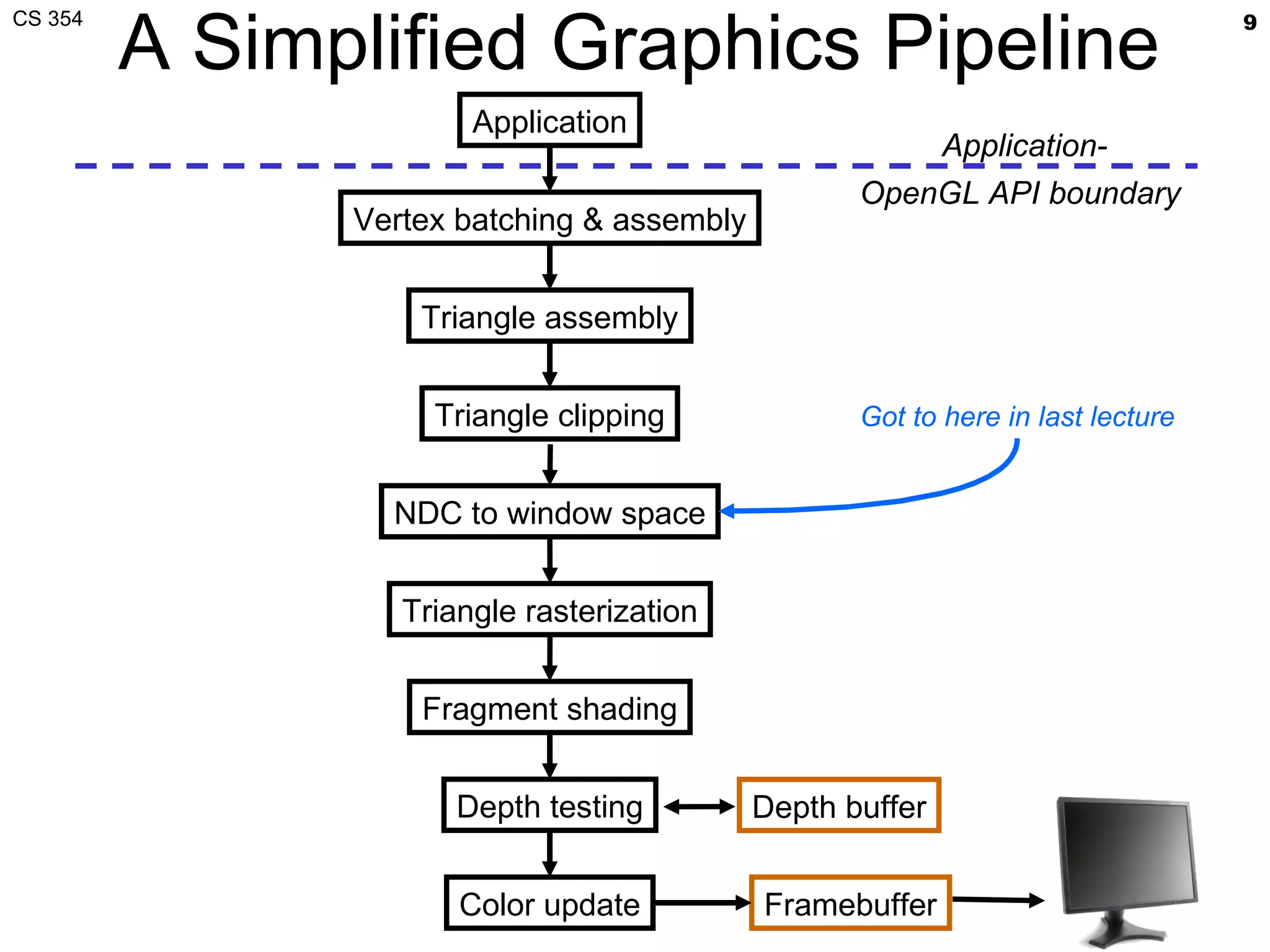
A Simplified Graphics Pipeline Application Vertex batching & assembly Triangle assembly Triangle clipping Triangle rasterization Fragment shading Depth testing Color update Application- OpenGL API boundary  Framebuffer NDC to window space Got to here in last lecture Depth buffer
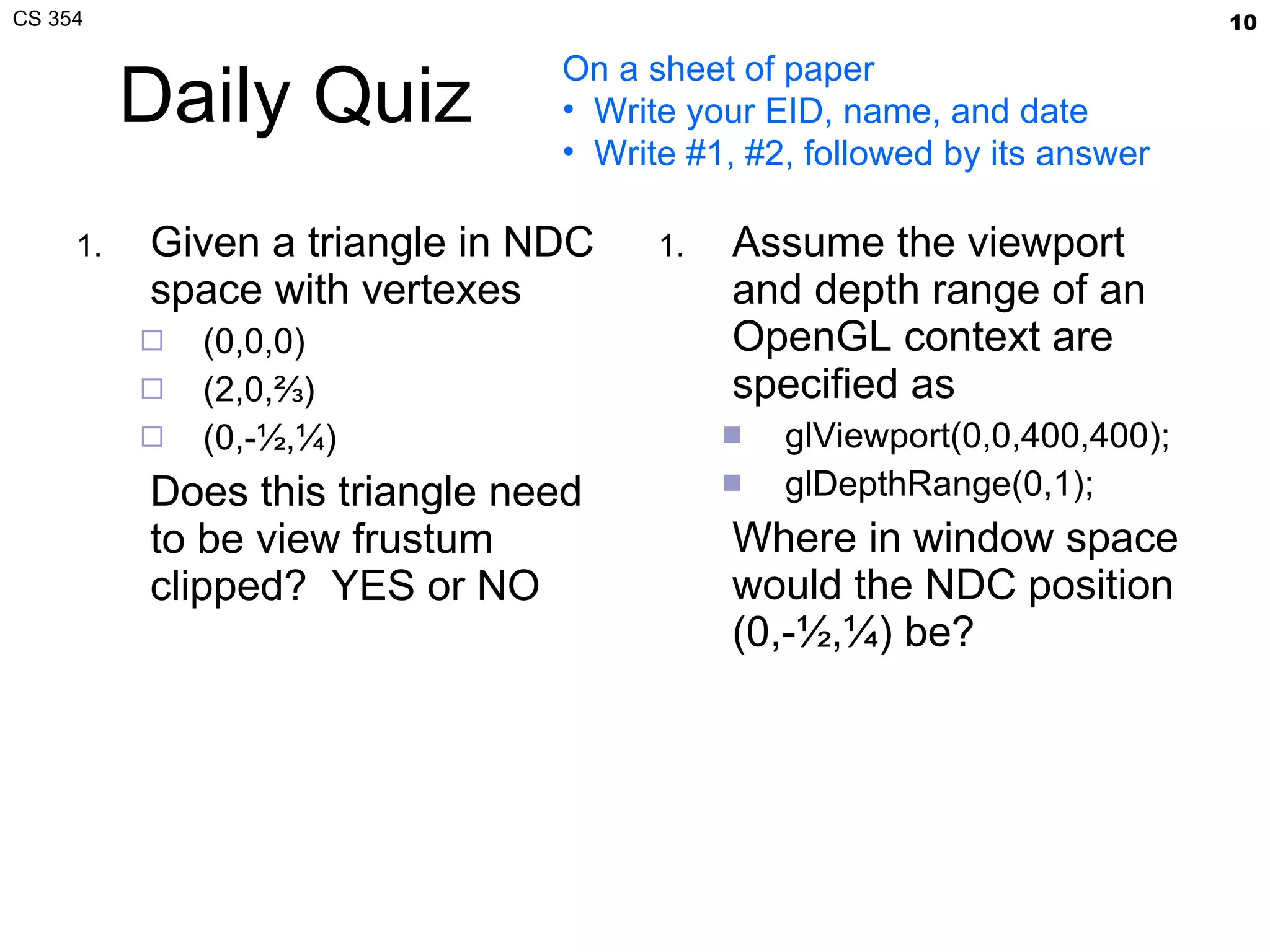
Daily Quiz Given a triangle in NDC space with vertexes (0,0,0) (2,0,⅔) (0,-½,¼) Does this triangle need to be view frustum clipped?  YES or NO Assume the viewport and depth range of an OpenGL context are specified as glViewport(0,0,400,400); glDepthRange(0,1); Where in window space would the NDC position (0,-½,¼) be? On a sheet of paper Write your EID, name, and date Write #1, #2, followed by its answer
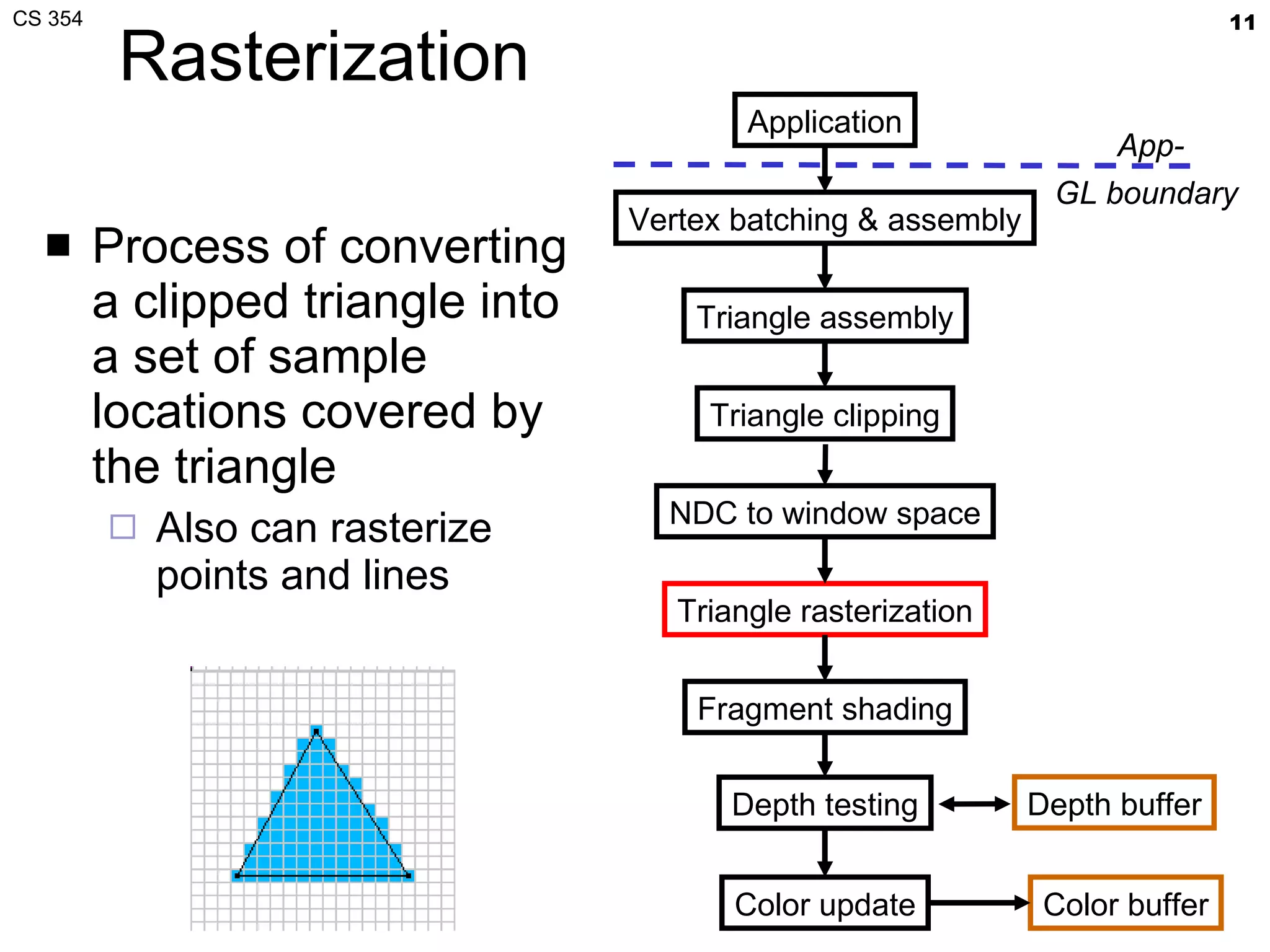
Rasterization Process of converting a clipped triangle into a set of sample locations covered by the triangle Also can rasterize points and lines Application Vertex batching & assembly Triangle assembly Triangle clipping Triangle rasterization Fragment shading Depth testing Color update Color buffer NDC to window space App- GL boundary  Depth buffer
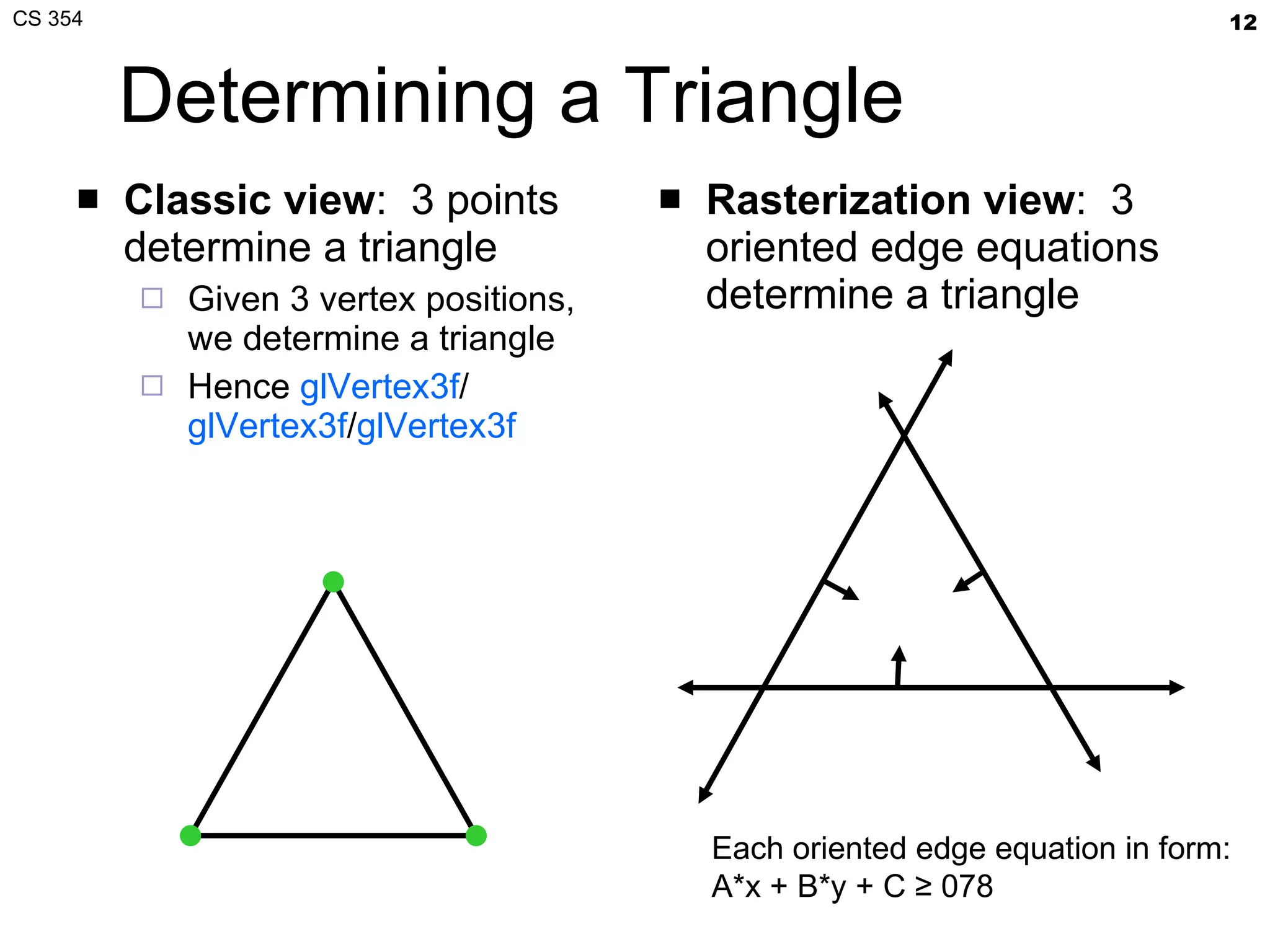
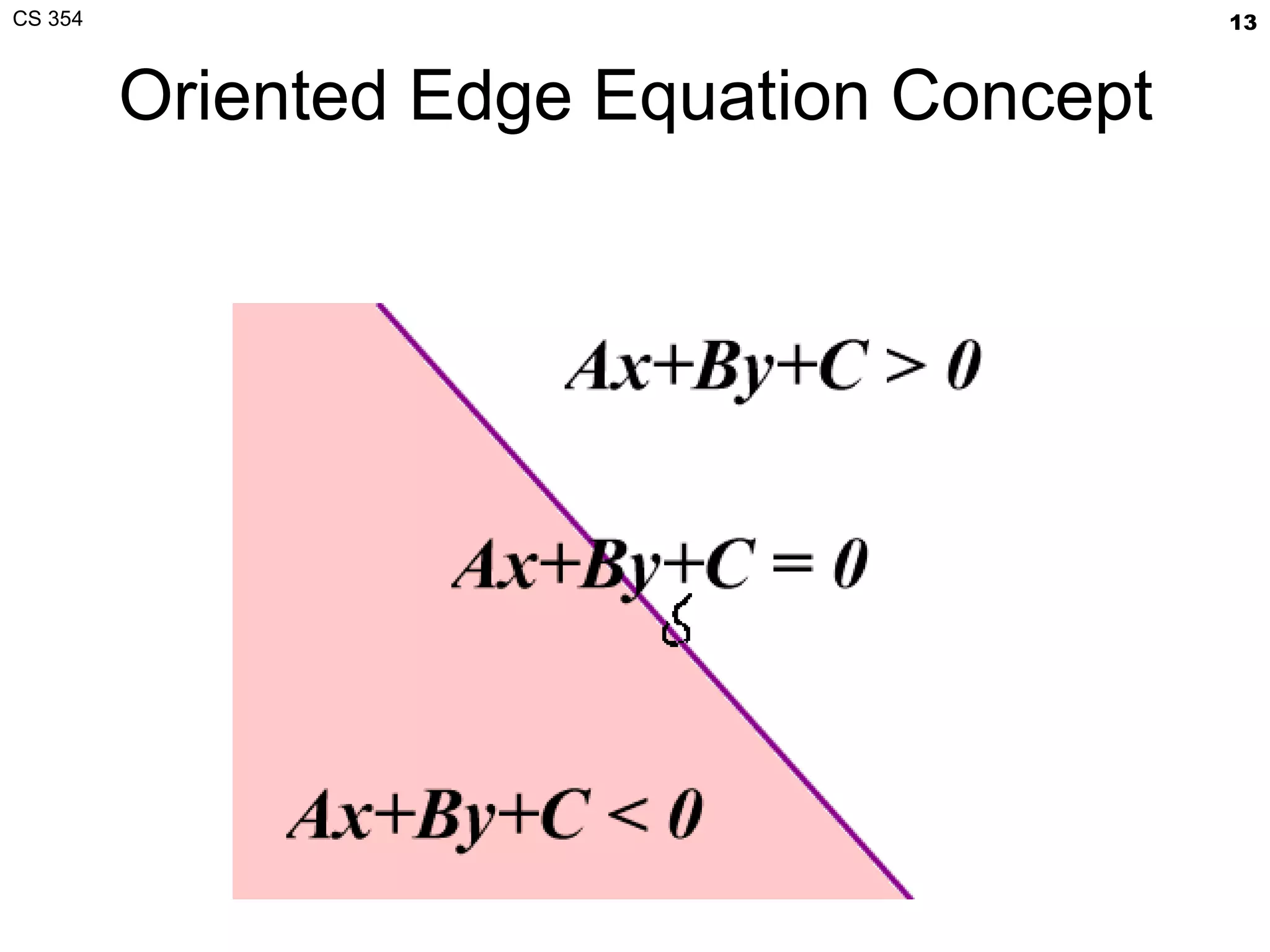
Determining a Triangle Classic view :  3 points determine a triangle Given 3 vertex positions, we determine a triangle Hence  glVertex3f / glVertex3f / glVertex3f Rasterization view :  3 oriented edge equations determine a triangle Each oriented edge equation in form: A*x + B*y + C ≥ 078
Oriented Edge Equation Concept
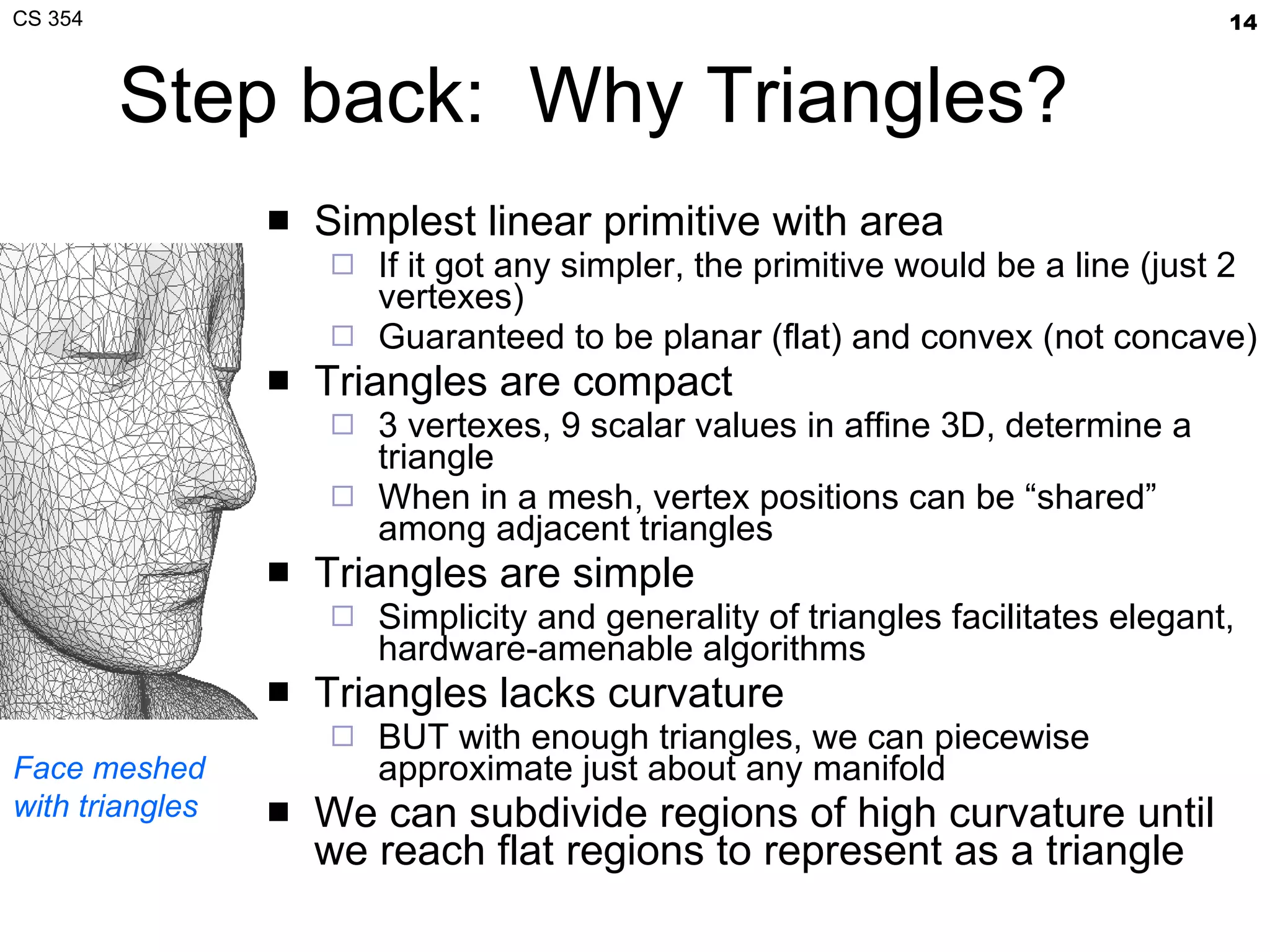
Step back:  Why Triangles? Simplest linear primitive with area If it got any simpler, the primitive would be a line (just 2 vertexes) Guaranteed to be planar (flat) and convex (not concave) Triangles are compact 3 vertexes, 9 scalar values in affine 3D, determine a triangle When in a mesh, vertex positions can be “shared” among adjacent triangles Triangles are simple Simplicity and generality of triangles facilitates elegant, hardware-amenable algorithms Triangles lacks curvature BUT with enough triangles, we can piecewise approximate just about any manifold We can subdivide regions of high curvature until we reach flat regions to represent as a triangle Face meshed with triangles
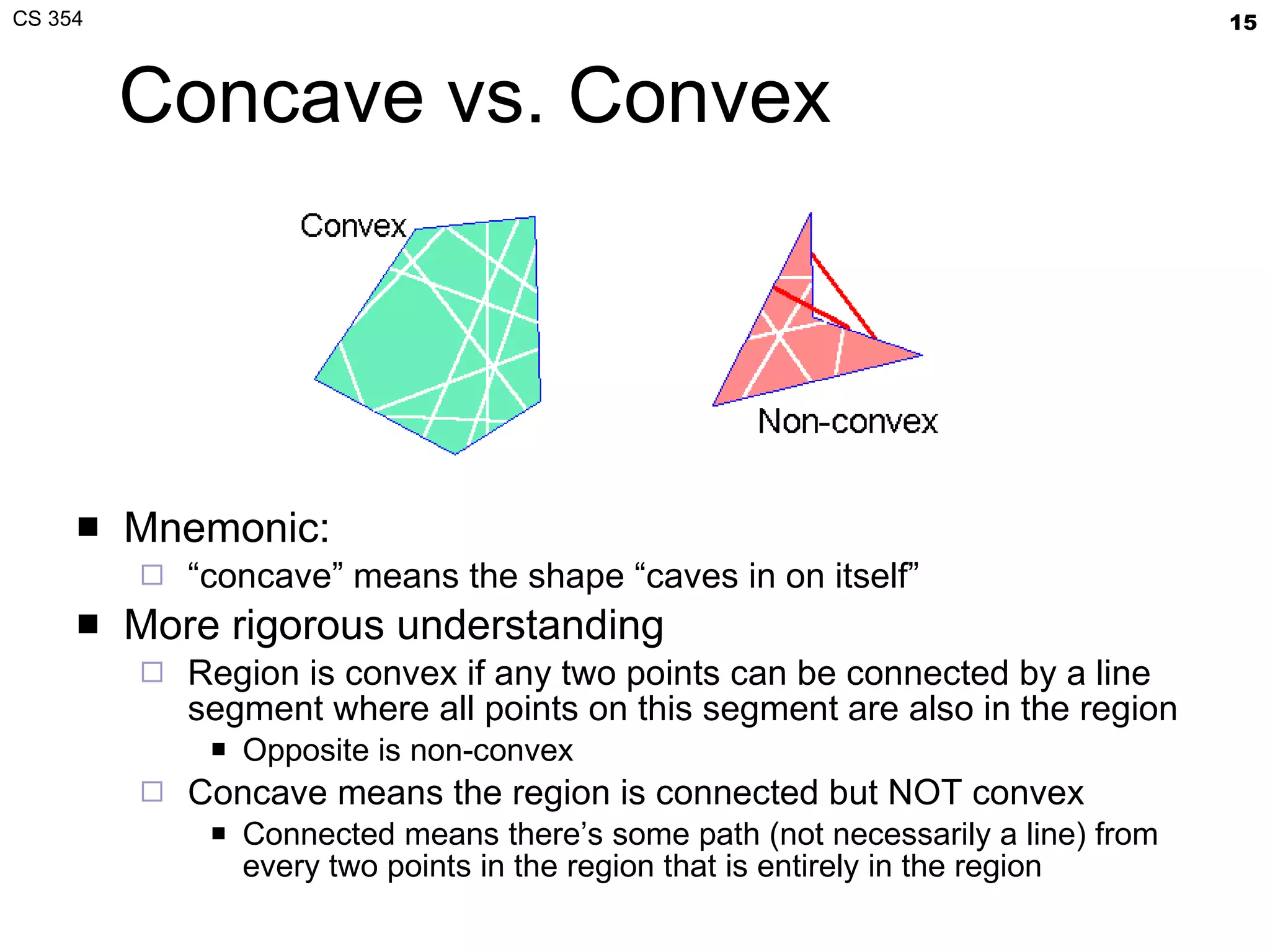
Concave vs. Convex Mnemonic: “ concave” means the shape “caves in on itself” More rigorous understanding Region is convex if any two points can be connected by a line segment where all points on this segment are also in the region Opposite is non-convex Concave means the region is connected but NOT convex Connected means there’s some path (not necessarily a line) from every two points in the region that is entirely in the region
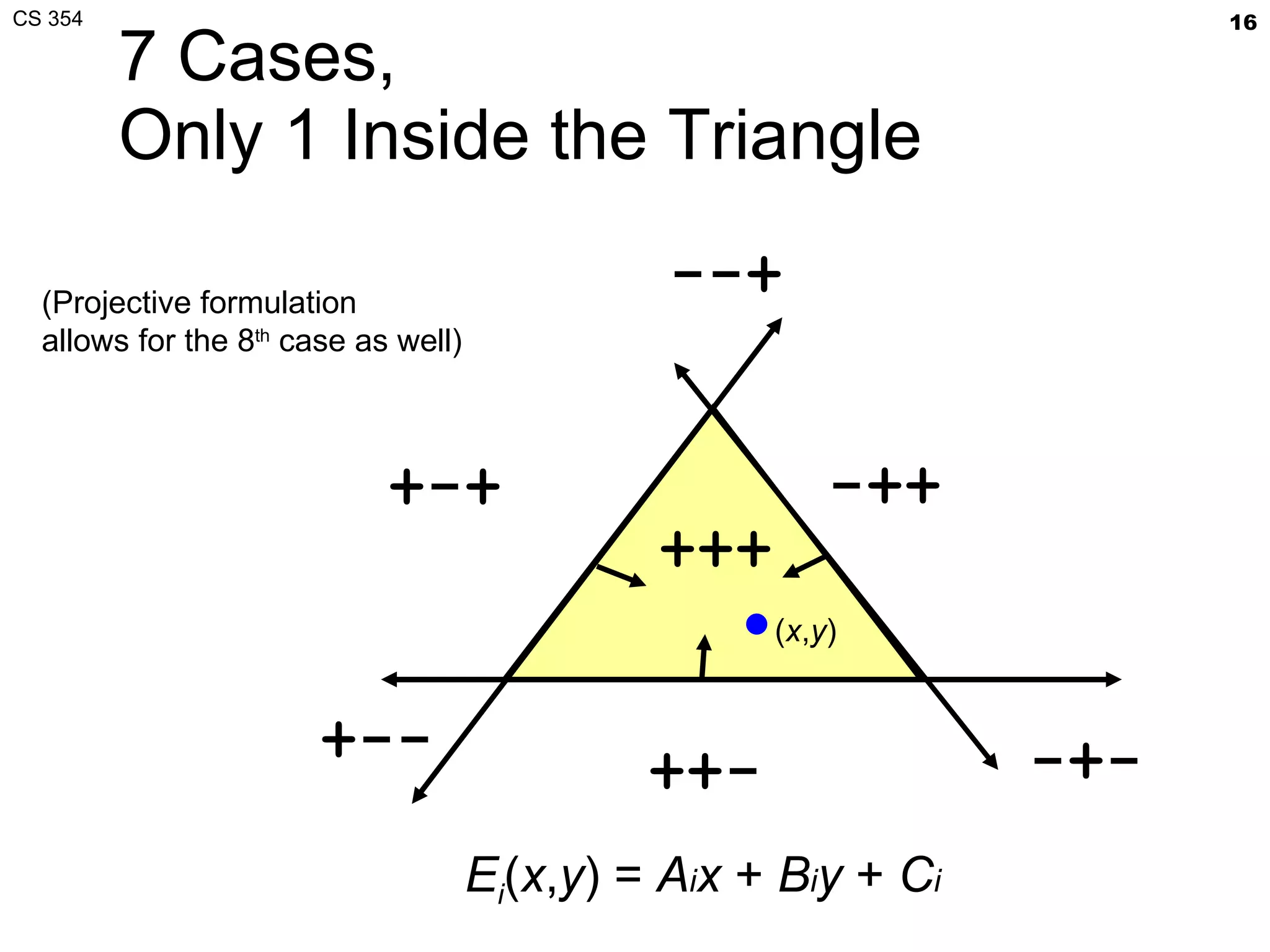
7 Cases, Only 1 Inside the Triangle +-+ ++- -++ +++ -+- --+ +-- ( x , y ) E i ( x , y ) =  A i x  +  B i y  +  C i (Projective formulation allows for the 8 th  case as well)
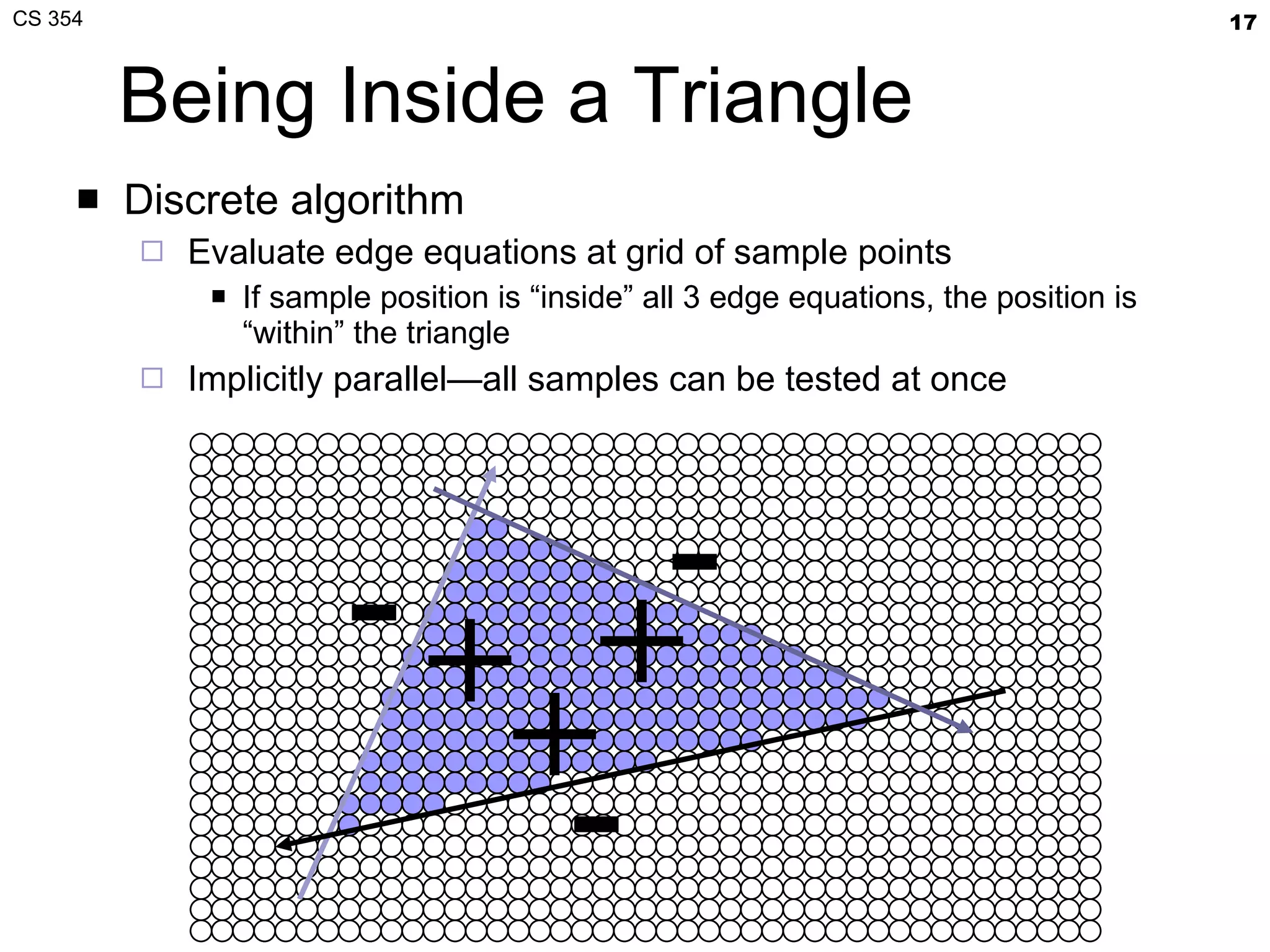
Being Inside a Triangle Discrete algorithm Evaluate edge equations at grid of sample points If sample position is “inside” all 3 edge equations, the position is “within” the triangle Implicitly parallel—all samples can be tested at once + + + - - -
Friendly for Hardware Implementation Used by Pixel Planes [1981+] architecture Developed by University of North Carolina (UNC) Massively parallel, every sample evaluates every sample location in parallel Extremely hardware intensive approach Refined by Juan Pineda [Apollo 1988] Recognized you could conservatively step over triangle in tiles for “coarse” rasterization Then use edge equation evaluation for “fine” rasterization of each tile Variations of this approach used by modern GPUs
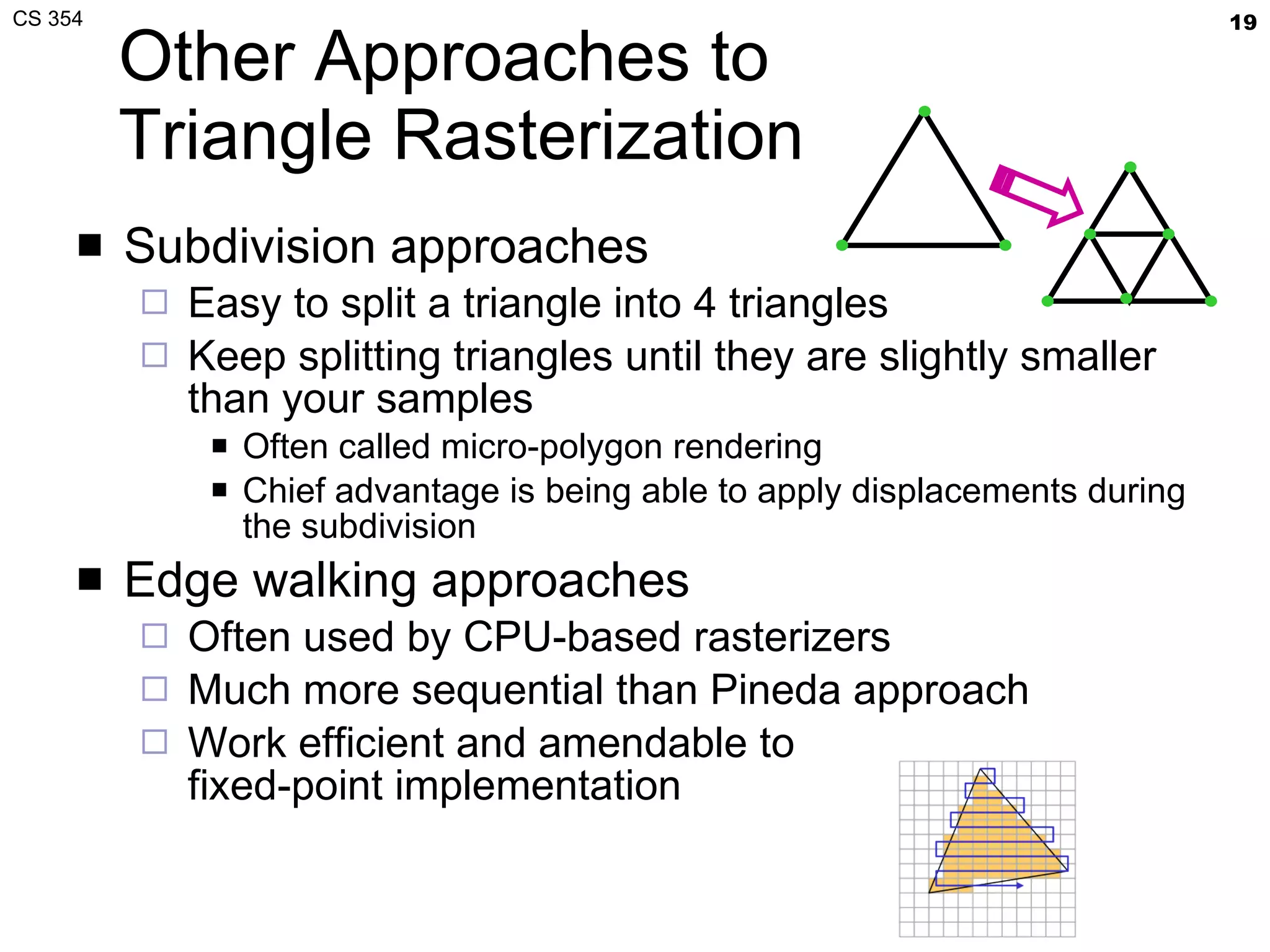
Other Approaches to Triangle Rasterization Subdivision approaches Easy to split a triangle into 4 triangles Keep splitting triangles until they are slightly smaller than your samples Often called micro-polygon rendering Chief advantage is being able to apply displacements during the subdivision Edge walking approaches Often used by CPU-based rasterizers Much more sequential than Pineda approach Work efficient and amendable to fixed-point implementation
Micro-polygons Rasterization becomes a geometry dicing process Approach taken by Pixar For production rendering when scene detail and quality is at a premium; interactivity, not so much Subdivision = Recursive algorithms Conceptually nice Not particularly amenable to fast hardware High-level representation is generally patches rather than mere triangles Example of displacement mapping of a meshed sphere [Pixar, RenderMan]
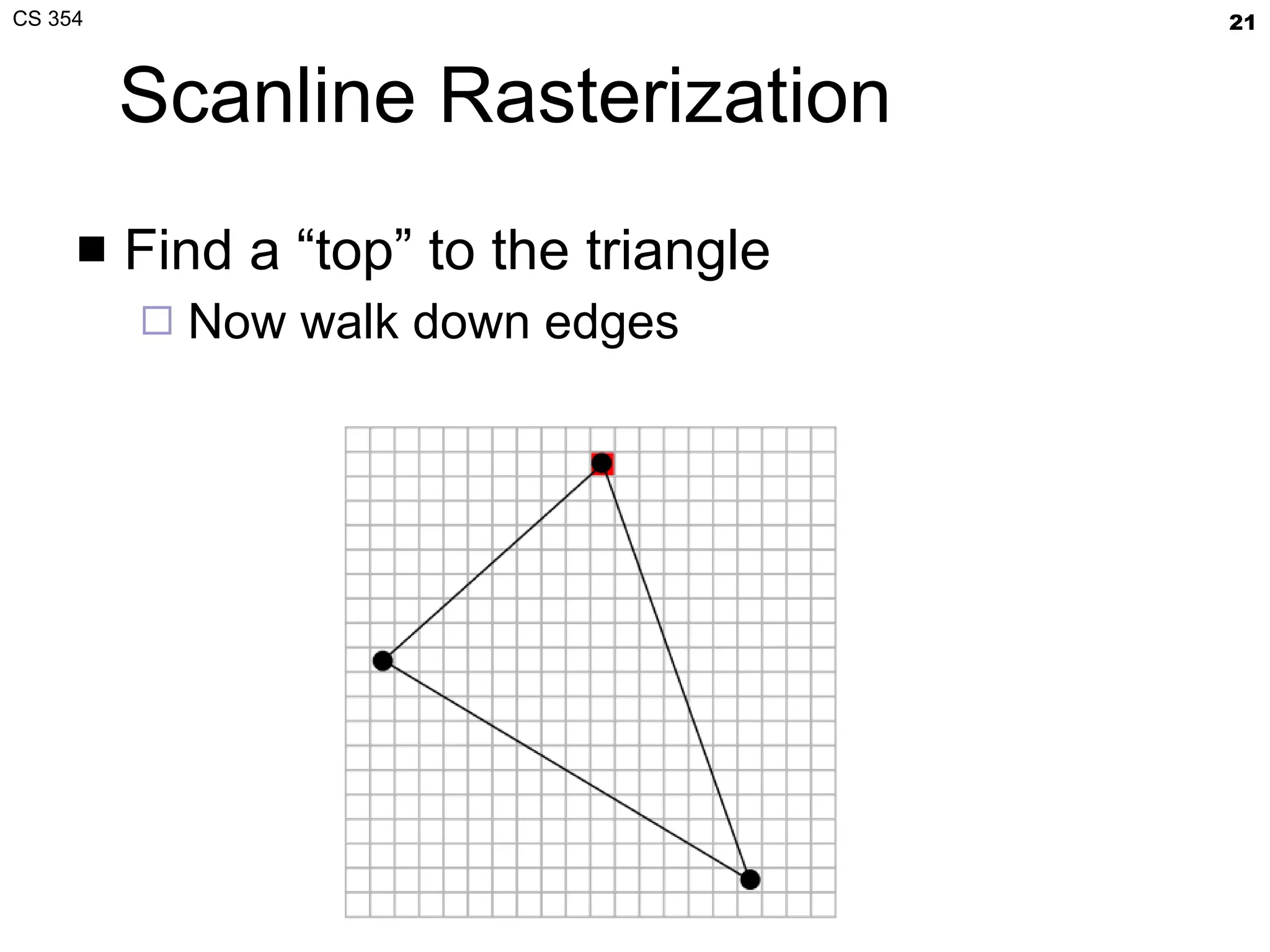
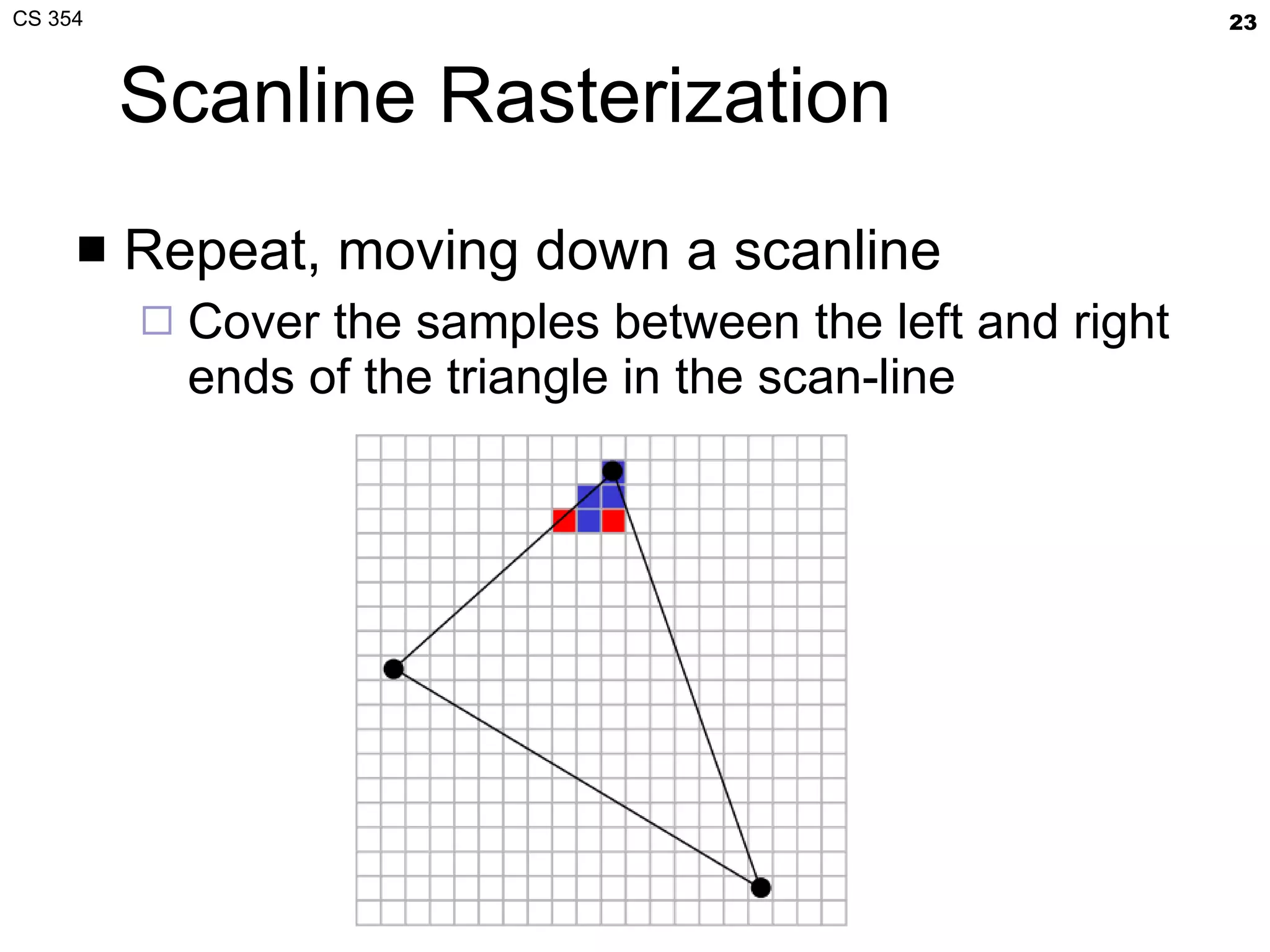
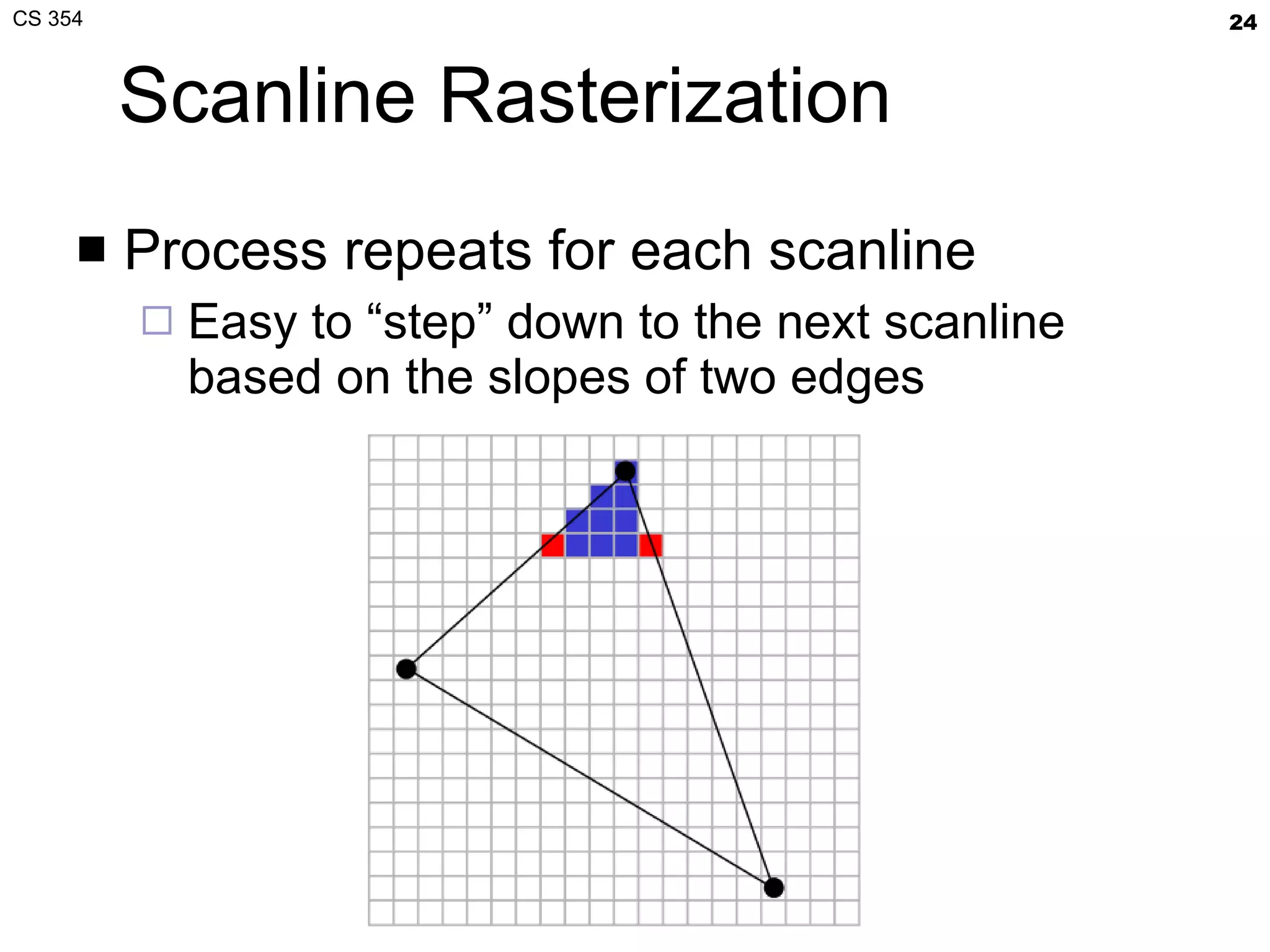
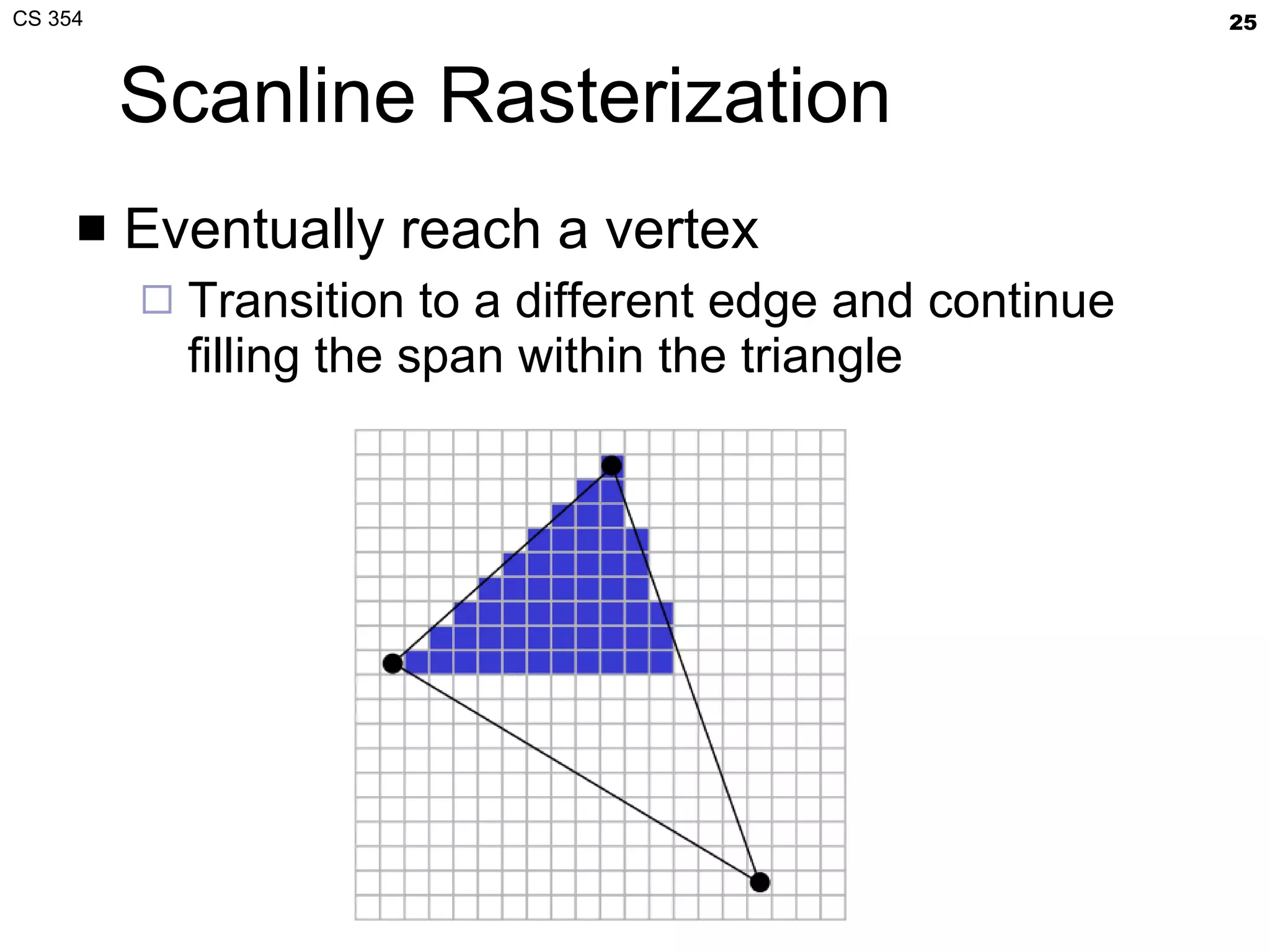
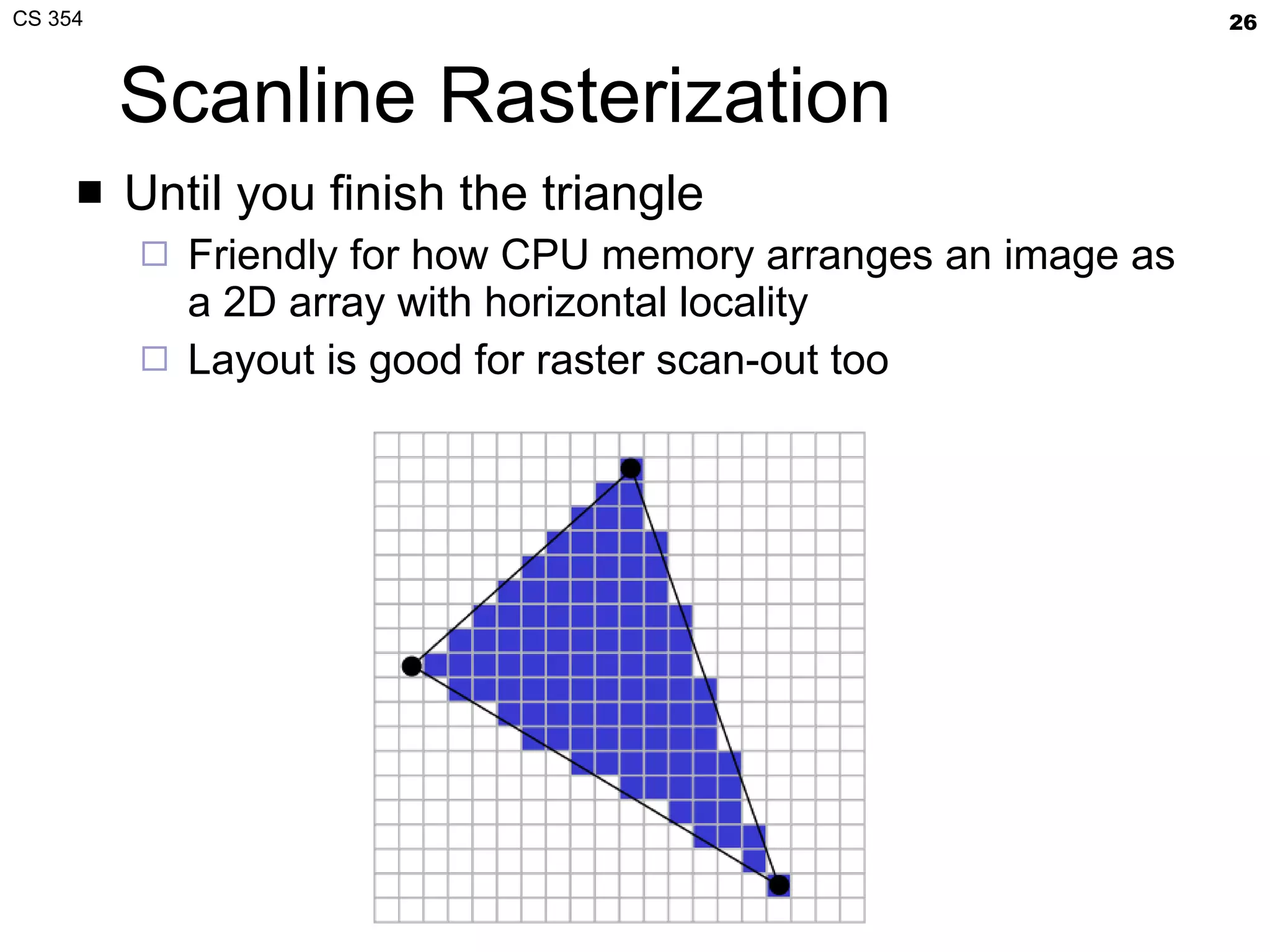
Scanline Rasterization Find a “top” to the triangle Now walk down edges
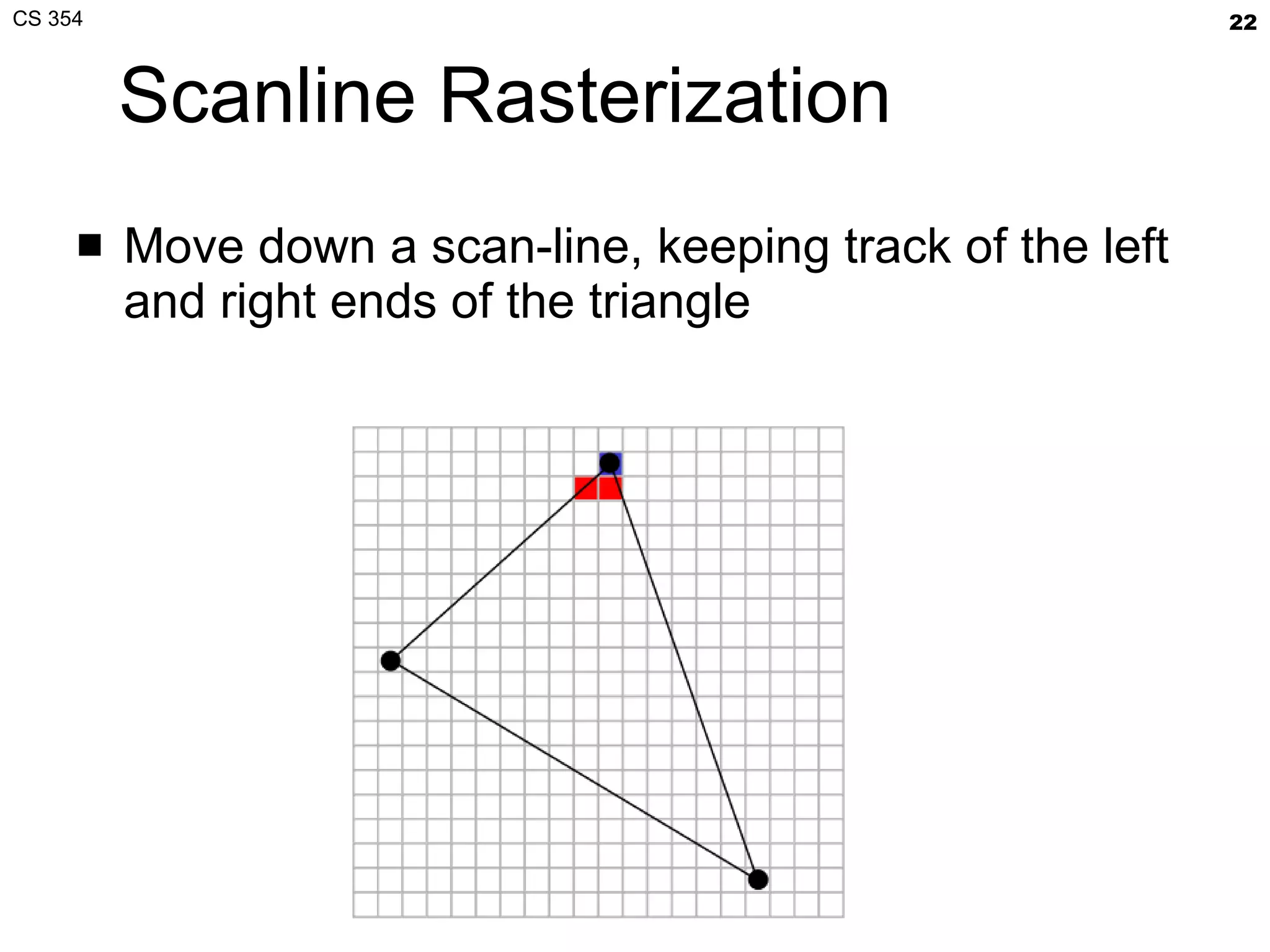
Scanline Rasterization Move down a scan-line, keeping track of the left and right ends of the triangle
Scanline Rasterization Repeat, moving down a scanline Cover the samples between the left and right ends of the triangle in the scan-line
Scanline Rasterization Process repeats for each scanline Easy to “step” down to the next scanline based on the slopes of two edges
Scanline Rasterization Eventually reach a vertex Transition to a different edge and continue filling the span within the triangle
Scanline Rasterization Until you finish the triangle Friendly for how CPU memory arranges an image as a 2D array with horizontal locality Layout is good for raster scan-out too
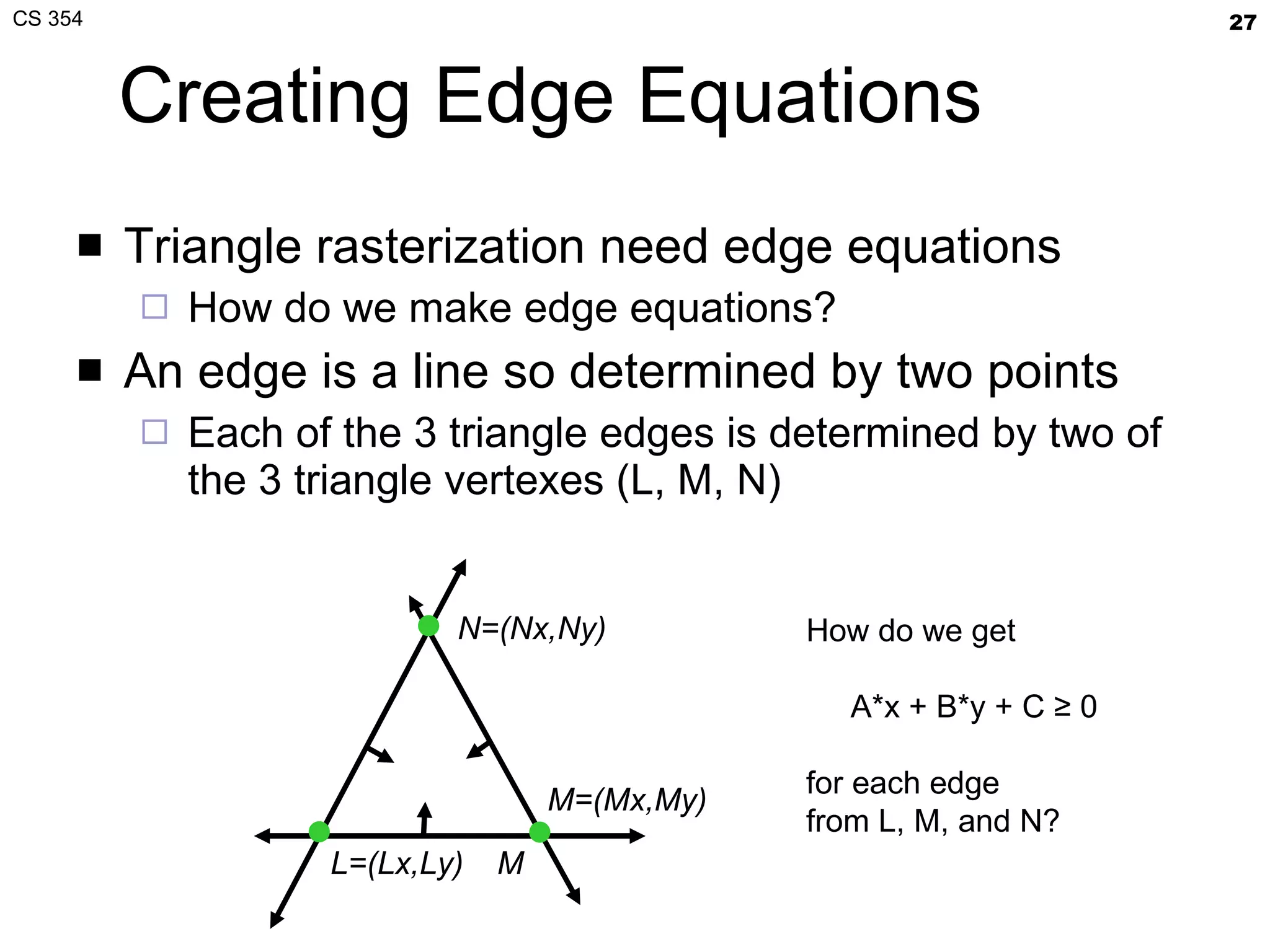
Creating Edge Equations Triangle rasterization need edge equations How do we make edge equations? An edge is a line so determined by two points Each of the 3 triangle edges is determined by two of the 3 triangle vertexes (L, M, N) L=(Lx,Ly) M N=(Nx,Ny) M=(Mx,My) How do we get A*x + B*y + C ≥ 0 for each edge from L, M, and N?
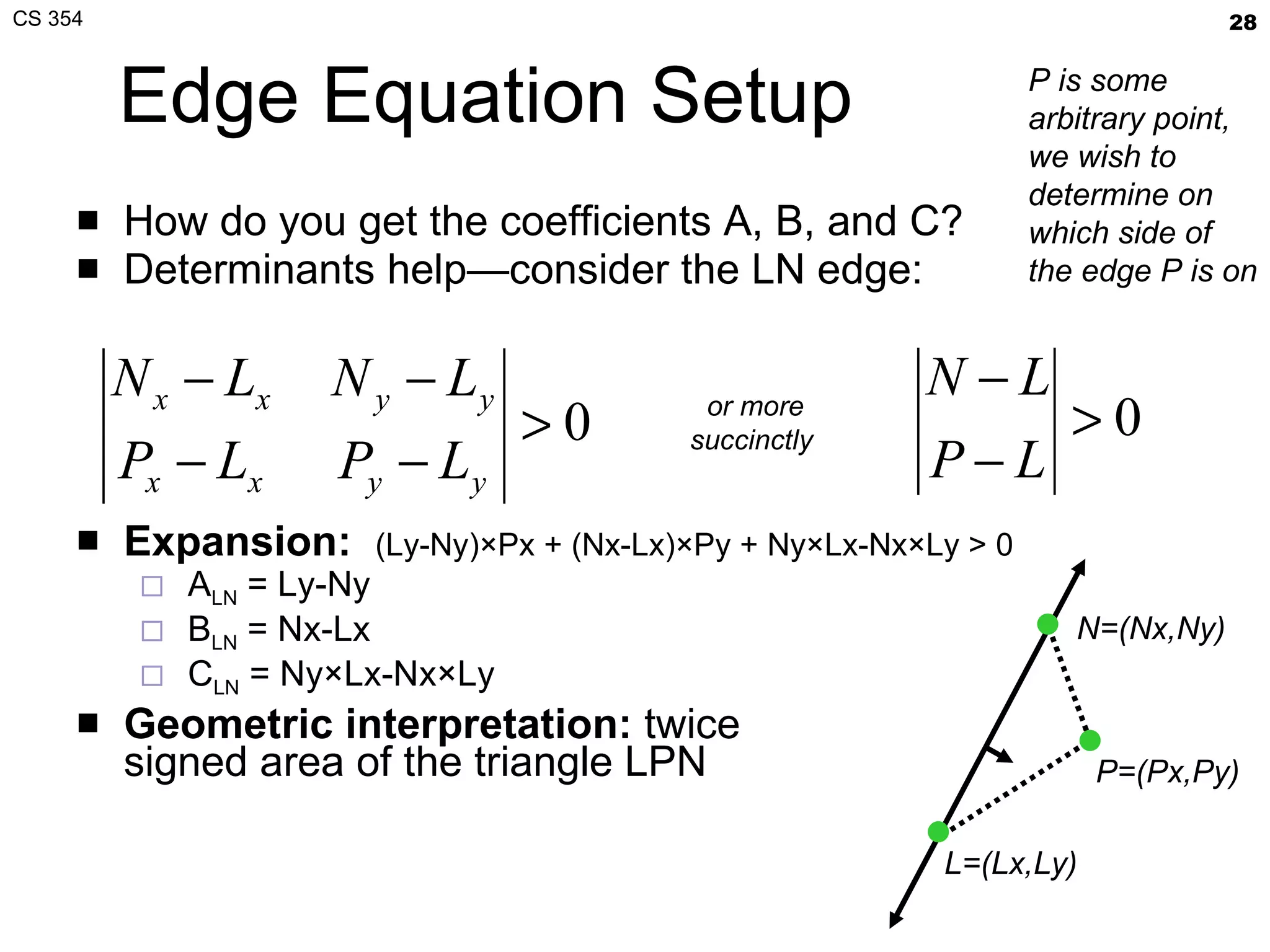
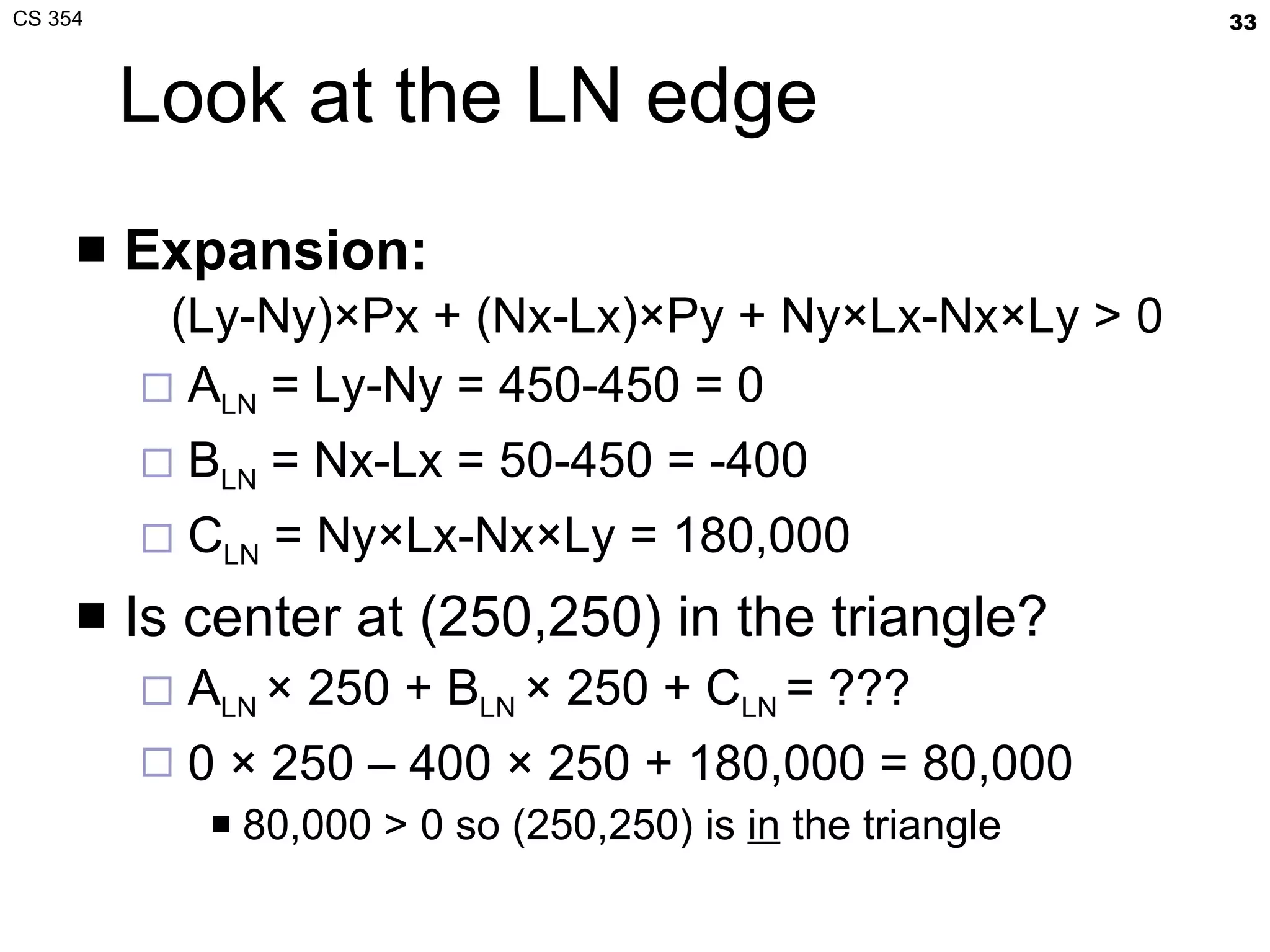
Edge Equation Setup How do you get the coefficients A, B, and C? Determinants help—consider the LN edge: Expansion:   (Ly-Ny)×Px + (Nx-Lx)×Py + Ny×Lx-Nx×Ly > 0 A LN  = Ly-Ny B LN  = Nx-Lx C LN  = Ny×Lx-Nx×Ly  Geometric interpretation:  twice signed area of the triangle LPN or more succinctly  L=(Lx,Ly) N=(Nx,Ny) P=(Px,Py) P is some arbitrary point, we wish to determine on which side of the edge P is on
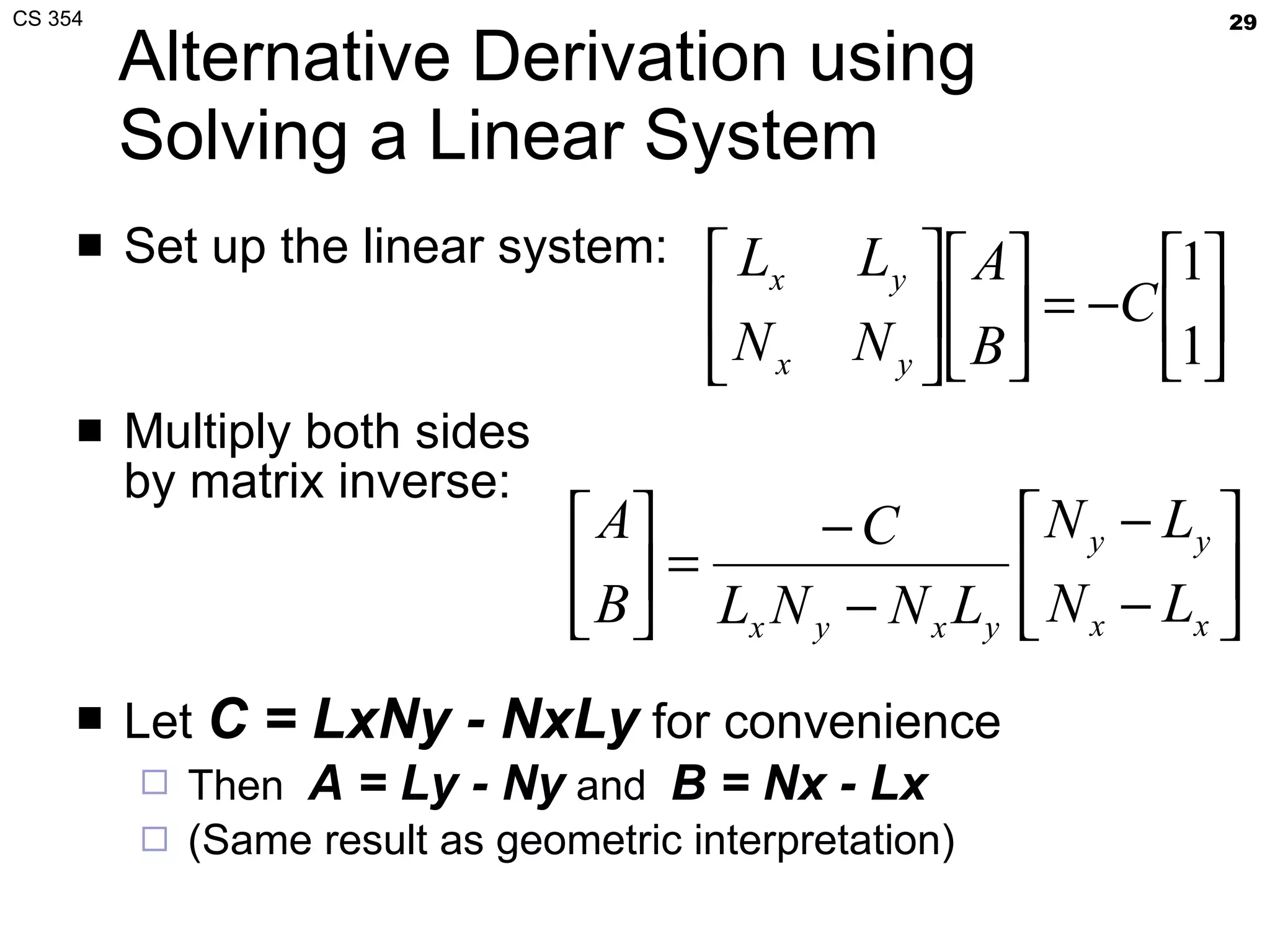
Alternative Derivation using Solving a Linear System Set up the linear system: Multiply both sides by matrix inverse: Let  C = LxNy - NxLy  for convenience Then  A = Ly - Ny  and  B = Nx - Lx   (Same result as geometric interpretation)
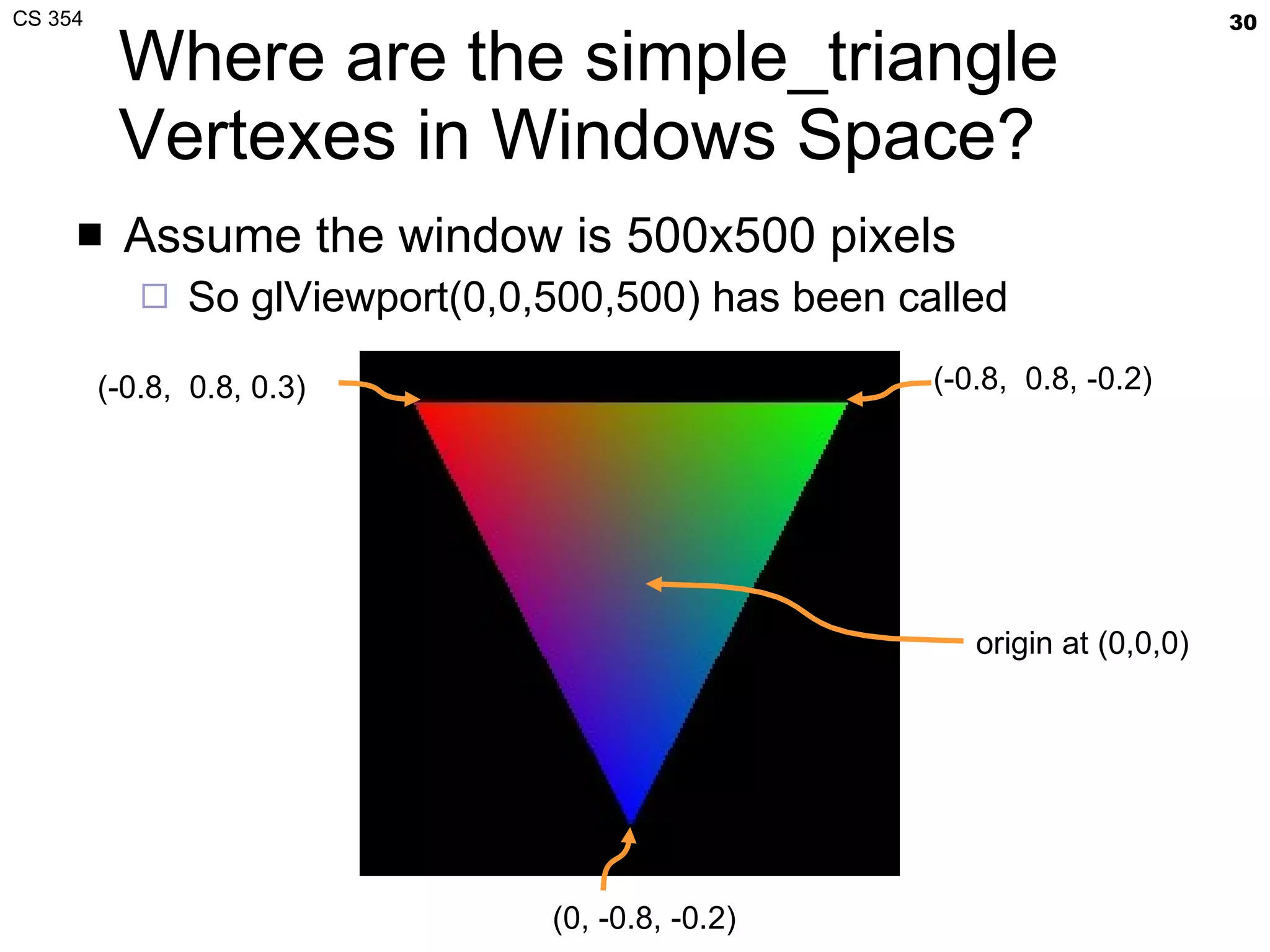
Where are the  simple_triangle  Vertexes in Windows Space? Assume the window is 500x500 pixels So  glViewport(0,0,500,500)  has been called (-0.8,  0.8, 0.3) (-0.8,  0.8, -0.2) (0, -0.8, -0.2) origin at (0,0,0)
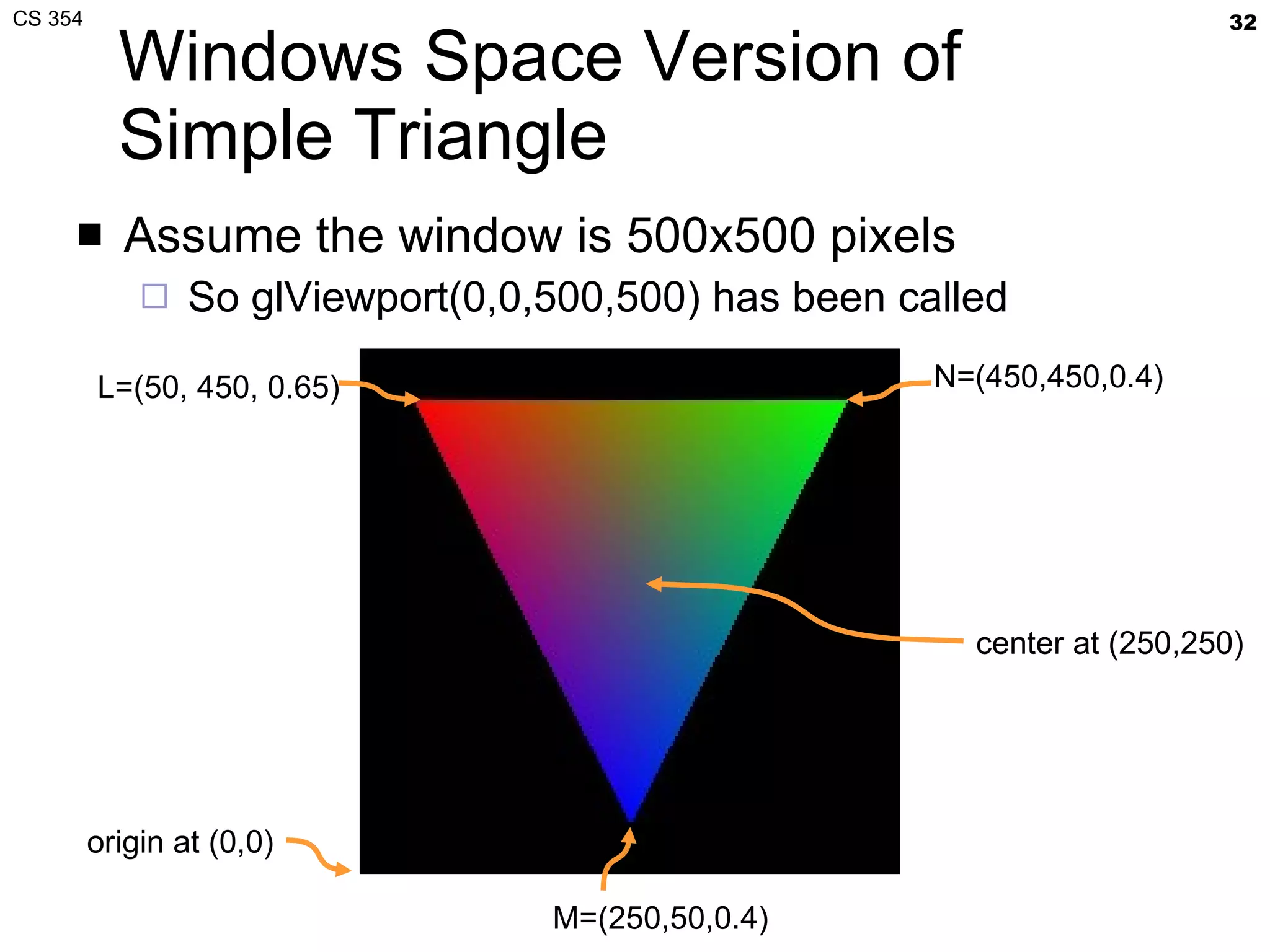
Apply the Transforms First vertex :: (-0.8, 0.8, 0.3) w x  = (w/2)×x + v x  + w/2 = 250×(-0.8) + 250 =  50 w y  = (h/2)y + v y  + h/2 = 250×(0.8) + 250 =  450 w z  = [(f-n)/2]×z + (n+f)/2 =  0.65 Second vertex :: (0.8, 0.8, -0.2) w x  = (w/2)×x + v x  + w/2 = 250×(0.8) + 250 =  450 w y  = (h/2)y + v y  + h/2 = 250×(0.8) + 250 =  450 w z  = [(f-n)/2]×z + (n+f)/2 =  0.4 Third vertex :: (0, -0.8, -0.2) w x  = (w/2)×x + v x  + w/2 = 250×0 + 250 =  250 w y  = (h/2)y + v y  + h/2 = 250×(-0.8) + 250 =  50 w z  = [(f-n)/2]×z + (n+f)/2 =  0.4
Windows Space Version of Simple Triangle Assume the window is 500x500 pixels So  glViewport(0,0,500,500)  has been called L=(50, 450, 0.65) N=(450,450,0.4) M=(250,50,0.4) center at (250,250) origin at (0,0)
Look at the LN edge Expansion:   (Ly-Ny)×Px + (Nx-Lx)×Py + Ny×Lx-Nx×Ly > 0 A LN  = Ly-Ny = 450-450 = 0 B LN  = Nx-Lx = 50-450 = -400 C LN  = Ny×Lx-Nx×Ly = 180,000 Is center at (250,250) in the triangle? A LN  × 250 + B LN  × 250 + C LN  = ???  0 × 250 – 400 × 250 + 180,000 = 80,000 80,000 > 0 so (250,250) is  in  the triangle
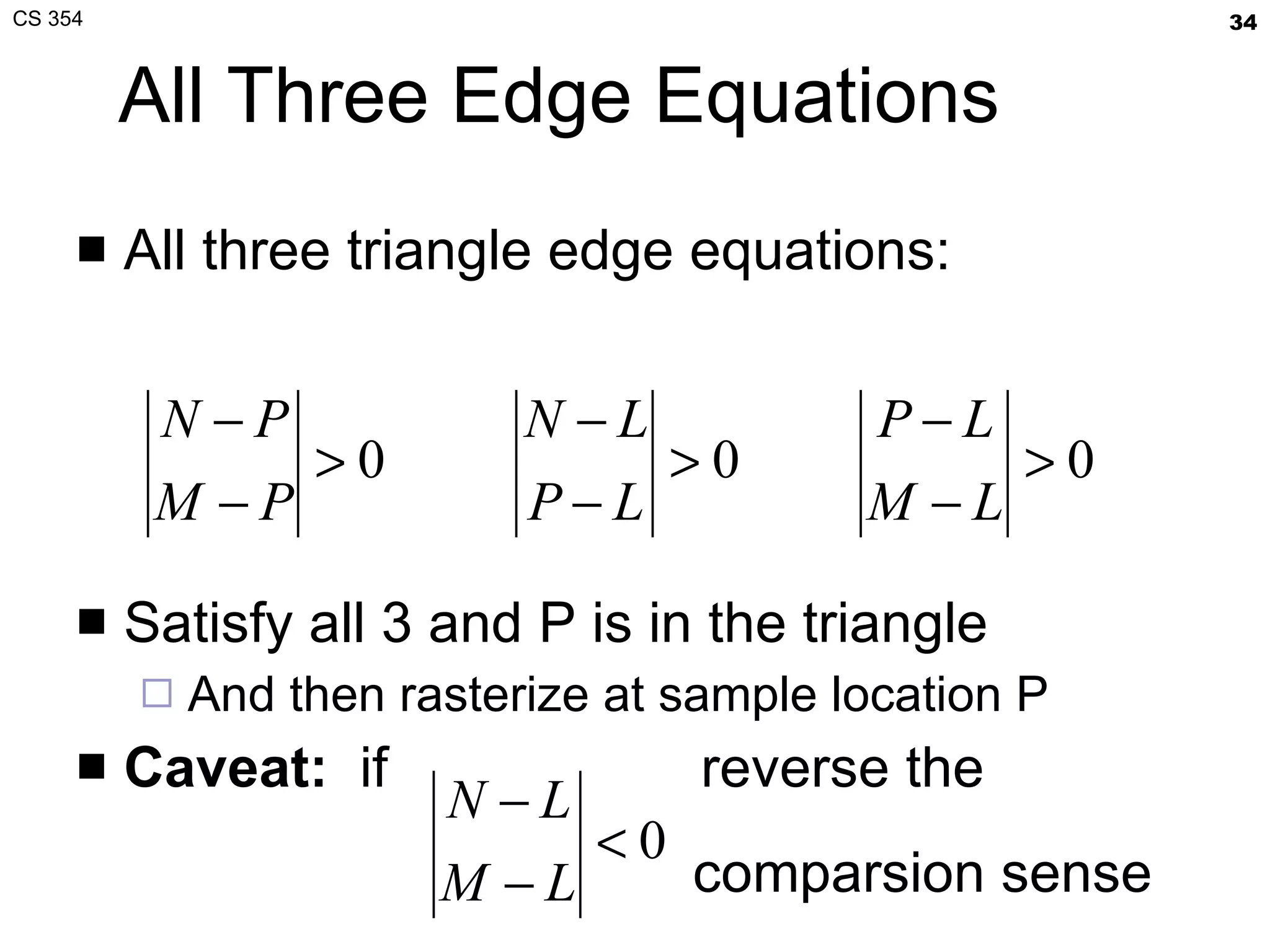
All Three Edge Equations All three triangle edge equations: Satisfy all 3 and P is in the triangle And then rasterize at sample location P Caveat:   if  reverse the  comparsion sense
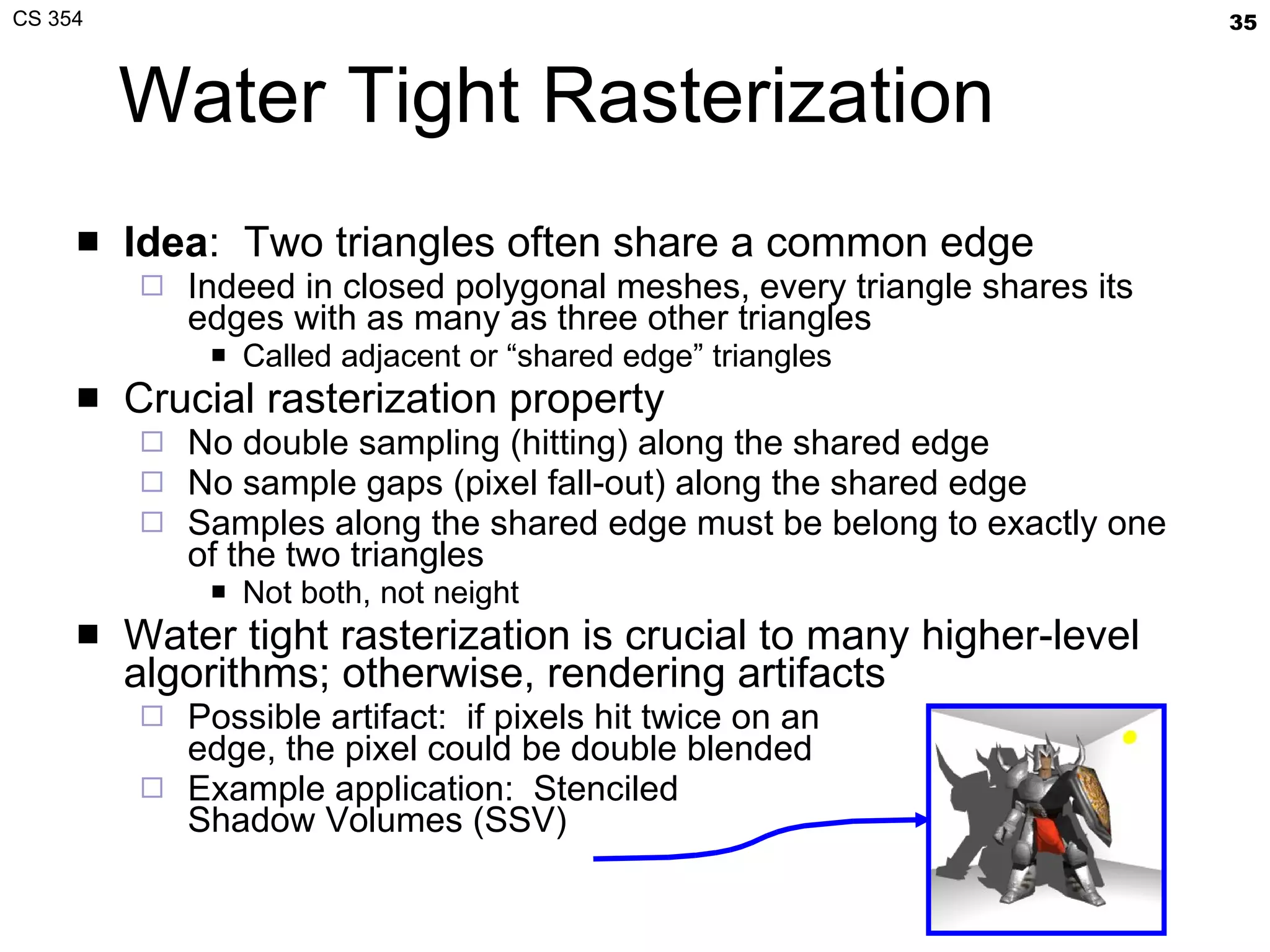
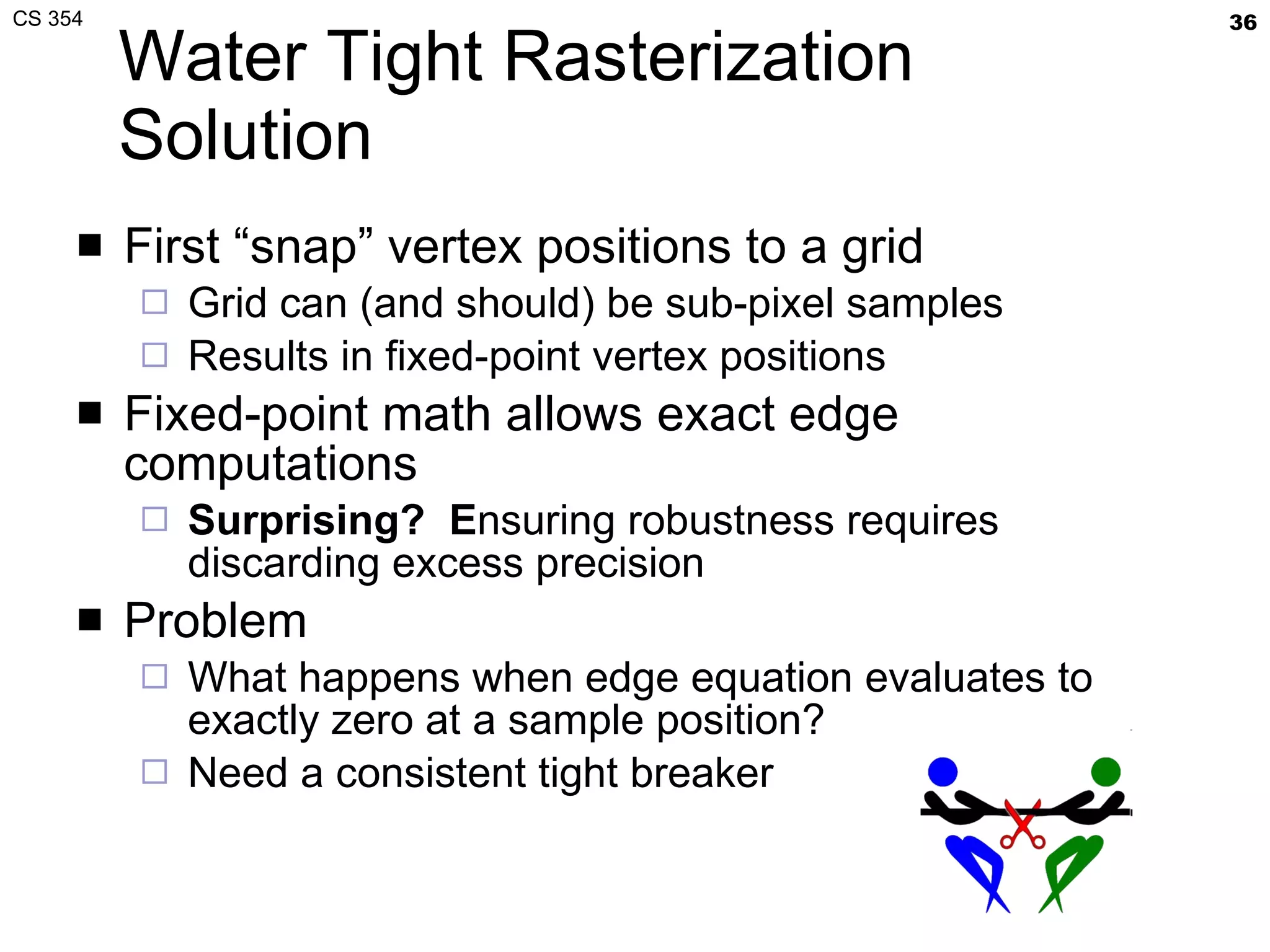
Water Tight Rasterization Idea :  Two triangles often share a common edge Indeed in closed polygonal meshes, every triangle shares its edges with as many as three other triangles Called adjacent or “shared edge” triangles Crucial rasterization property No double sampling (hitting) along the shared edge No sample gaps (pixel fall-out) along the shared edge Samples along the shared edge must be belong to exactly one of the two triangles Not both, not neight Water tight rasterization is crucial to many higher-level algorithms; otherwise, rendering artifacts Possible artifact:  if pixels hit twice on an edge, the pixel could be double blended Example application:  Stenciled Shadow Volumes (SSV)
Water Tight Rasterization Solution First “snap” vertex positions to a grid Grid can (and should) be sub-pixel samples Results in fixed-point vertex positions Fixed-point math allows exact edge computations Surprising?  E nsuring robustness requires discarding excess precision Problem What happens when edge equation evaluates to exactly zero at a sample position? Need a consistent tight breaker
Tie Breaker Rule Look at edge equation coefficients Tie-breaker rule when edge equation evaluates to zero “ Inside” edge when edge equation is zero  and  A > 0 when A ≠ 0, or B > 0 when A = 0 Complete coverage determination rule if (E(x,y) > 0 || (E(x,y)==0 && (A != 0 ? A > 0 : B > 0)))   sample at (x,y) is inside edge
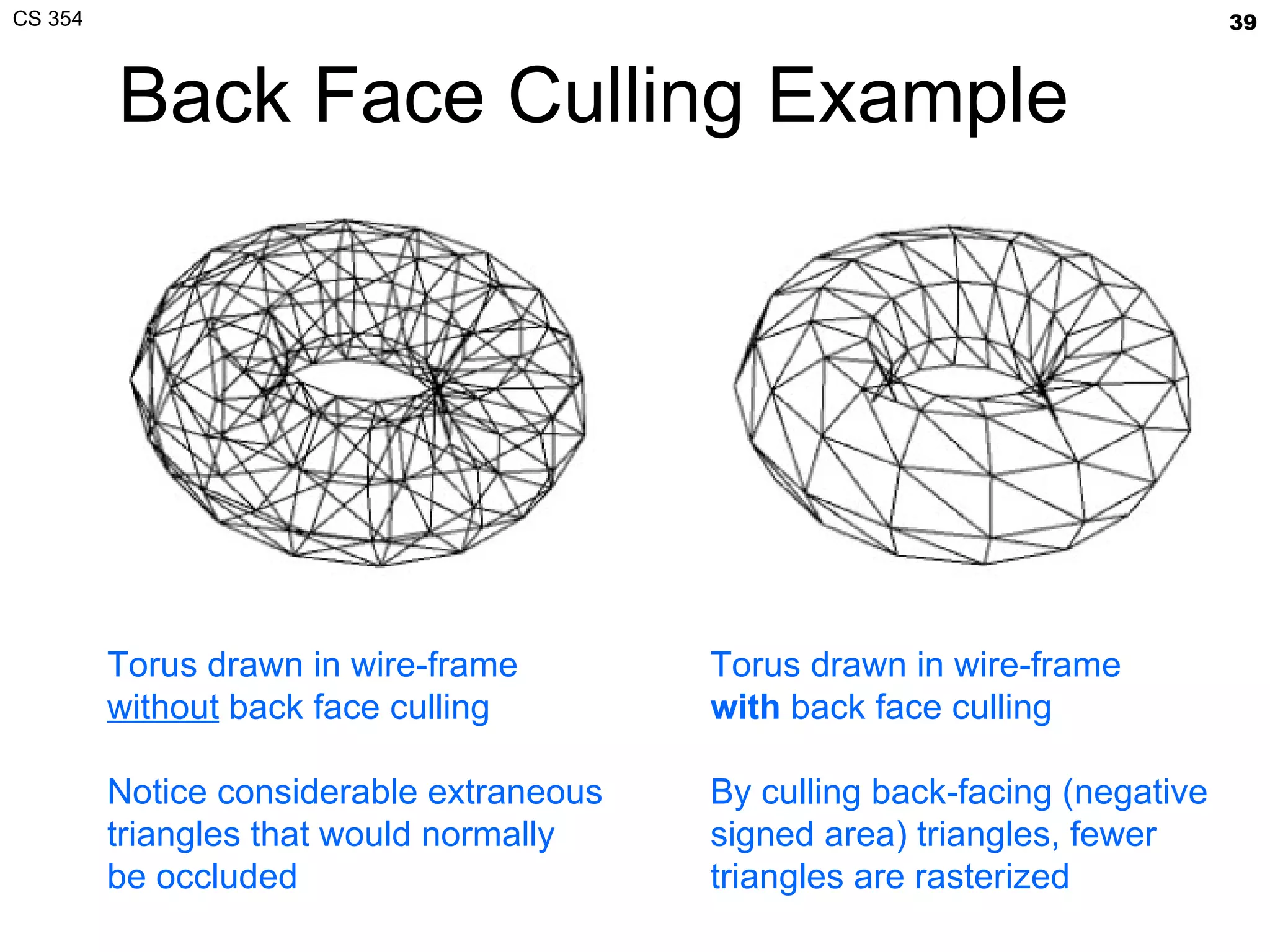
Zero Area Triangles We reverse the edge equation comparison sense if the (signed) area of the triangle is negative What if the area is zero? Linear algebra indicates a singular matrix Need to cull the primitive Also useful to cull primitives when area is negative OpenGL calls this face culling Enabled with  glEnable(GL_CULL_FACE) When drawing closed meshes, back face culling can avoid drawing primitives assured to be occluded by front faces
Back Face Culling Example Torus drawn in wire-frame without  back face culling Notice considerable extraneous triangles that would normally be occluded Torus drawn in wire-frame with  back face culling By culling back-facing (negative signed area) triangles, fewer triangles are rasterized
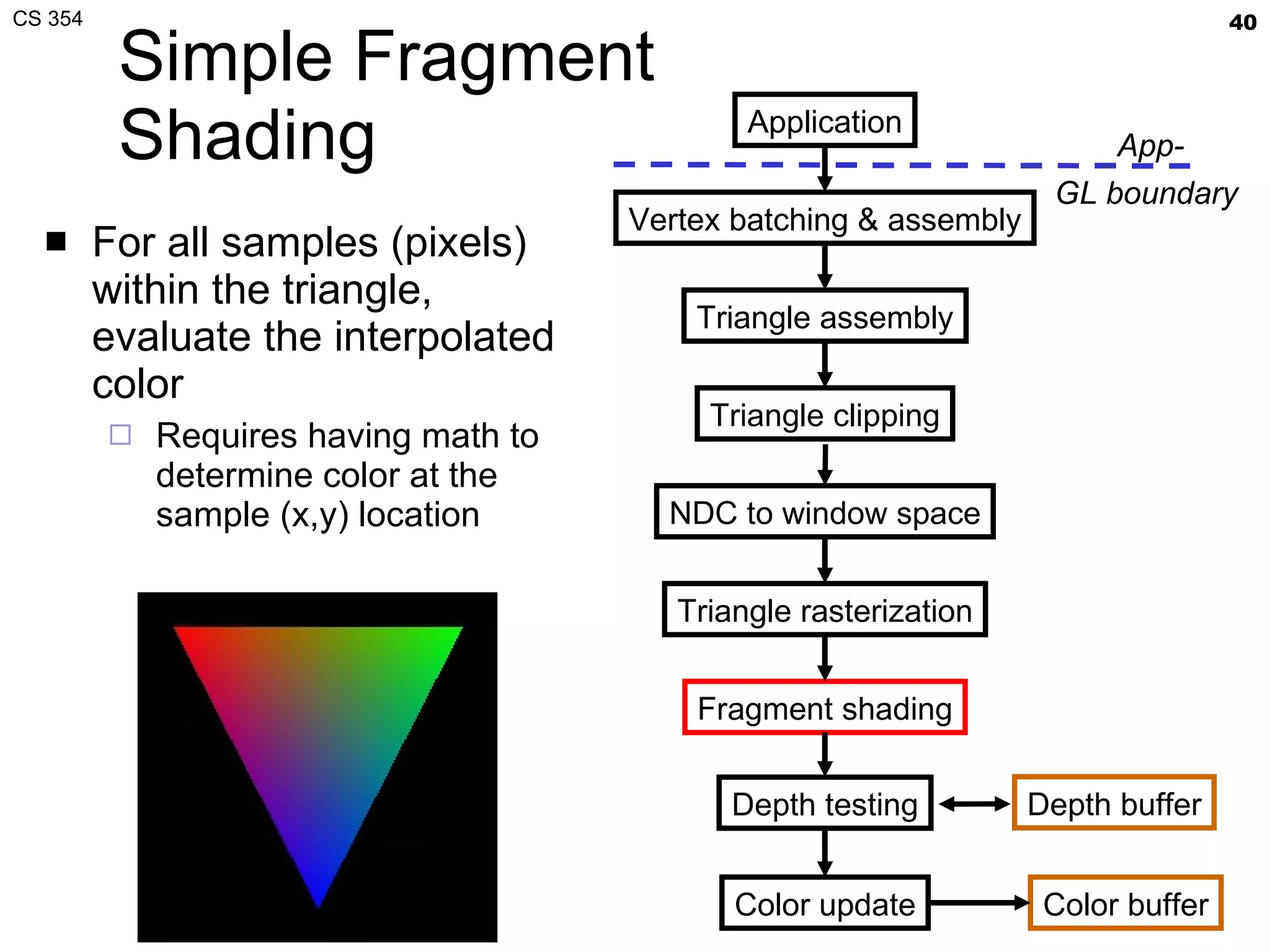
Simple Fragment Shading For all samples (pixels) within the triangle, evaluate the interpolated color Requires having math to determine color at the sample (x,y) location Application Vertex batching & assembly Triangle assembly Triangle clipping Triangle rasterization Fragment shading Depth testing Color update Color buffer NDC to window space App- GL boundary  Depth buffer
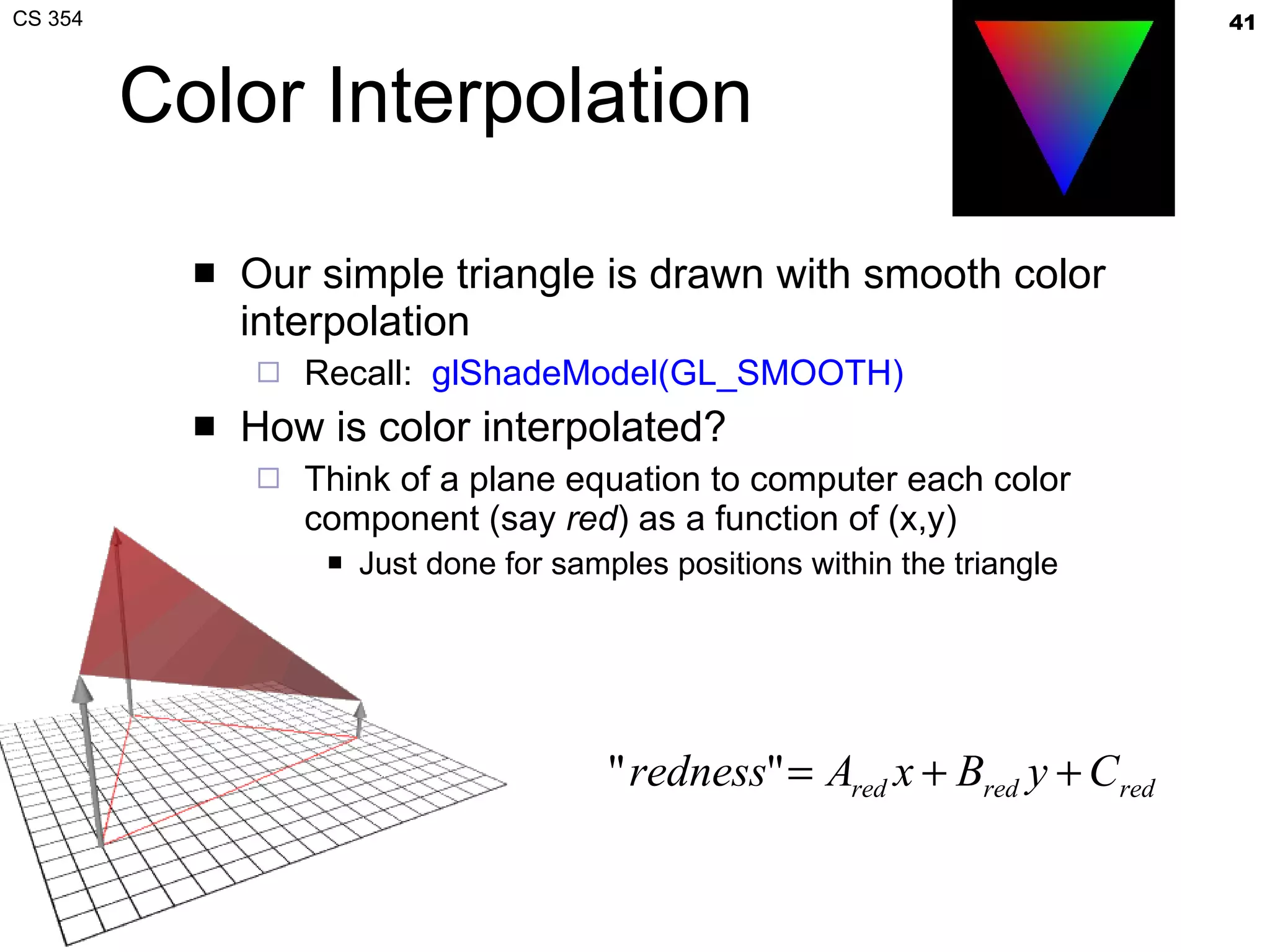
Color Interpolation Our simple triangle is drawn with smooth color interpolation Recall:  glShadeModel(GL_SMOOTH) How is color interpolated? Think of a plane equation to computer each color component (say  red ) as a function of (x,y) Just done for samples positions within the triangle
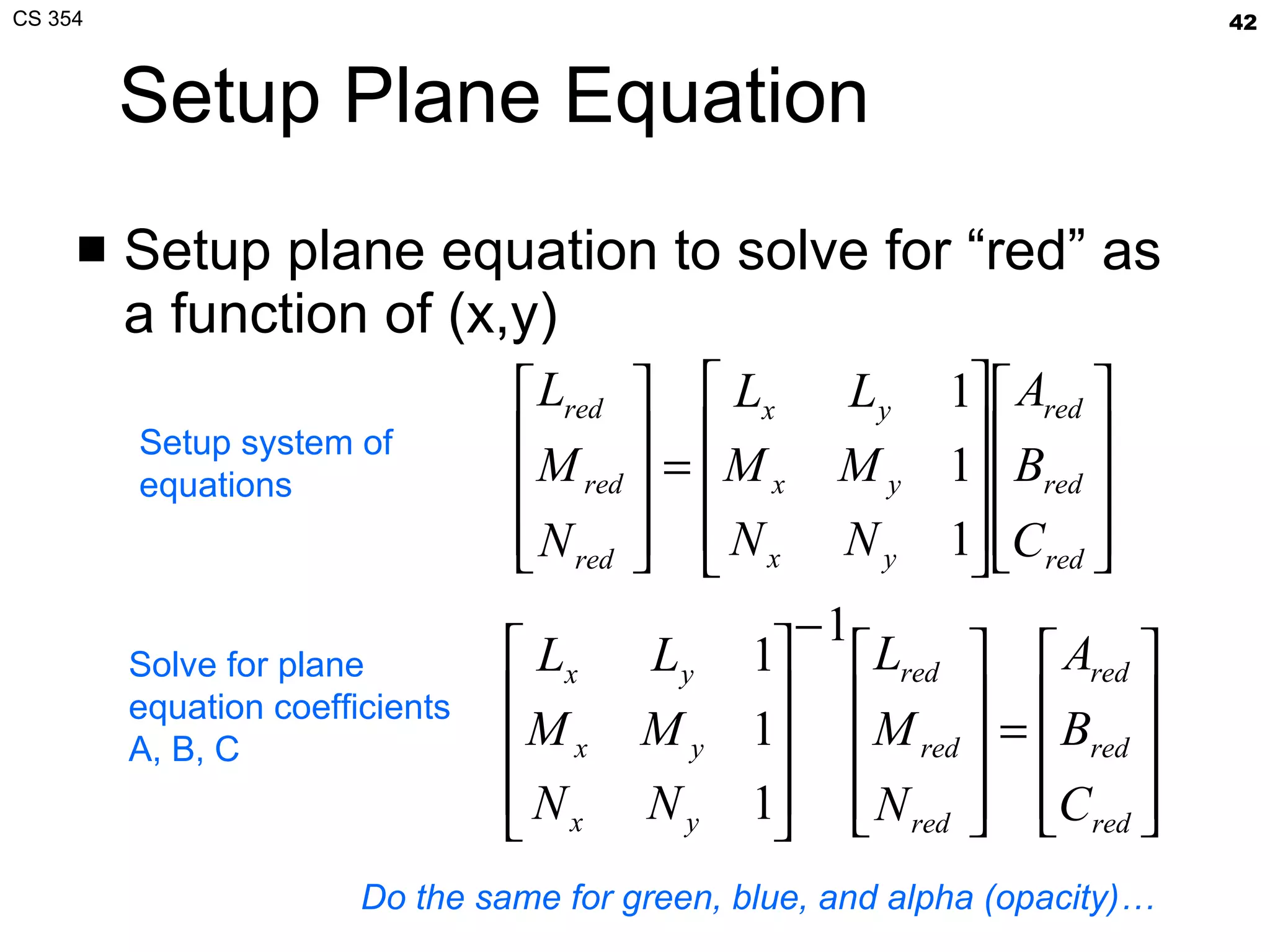
Setup Plane Equation Setup plane equation to solve for “red” as a function of (x,y) Setup system of equations Solve for plane equation coefficients A, B, C Do the same for green, blue, and alpha (opacity)…
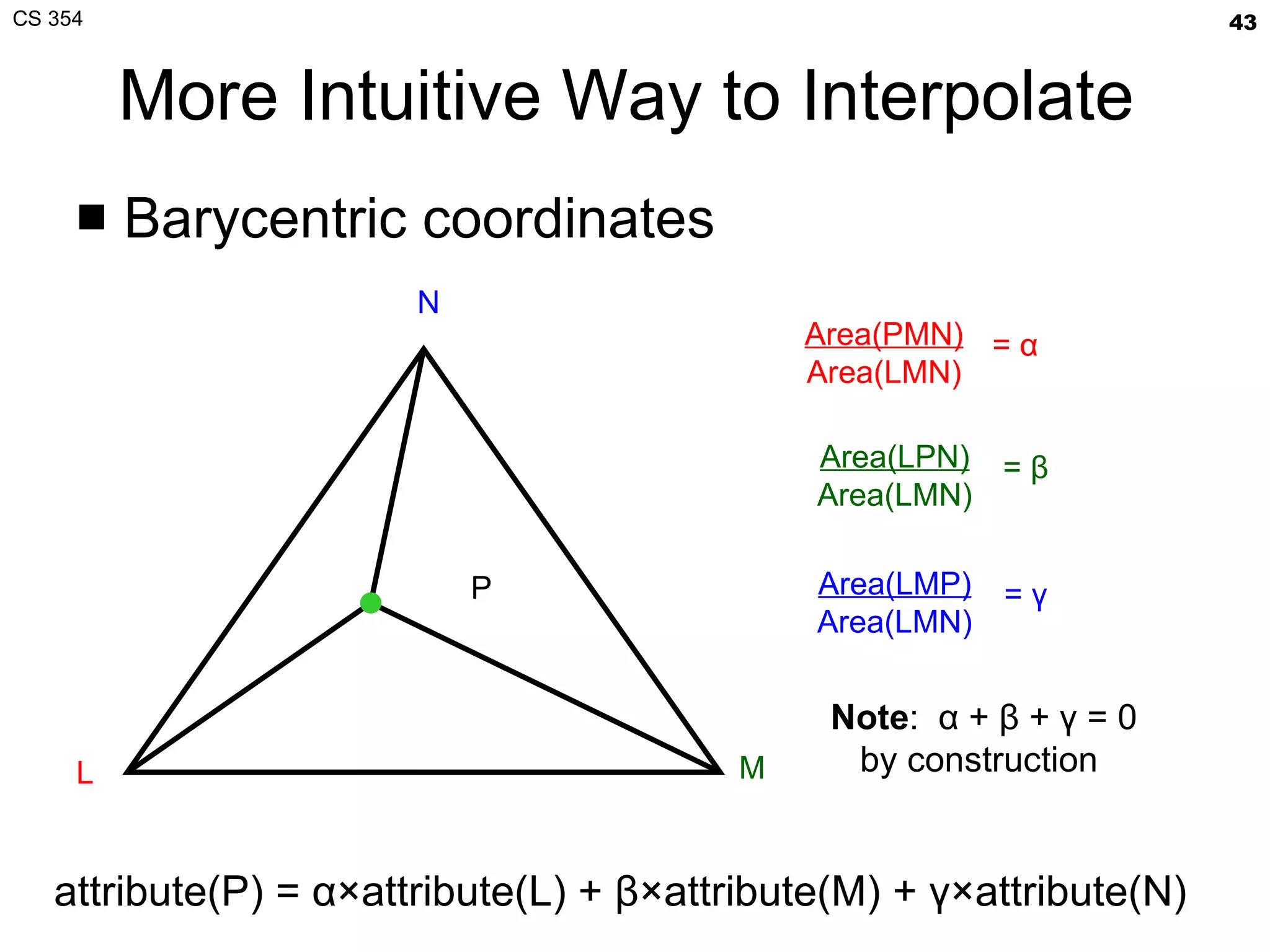
More Intuitive Way to Interpolate Barycentric coordinates L M N P Area(PMN) Area(LMN) =  α Area(LPN) Area(LMN) =  β Area(LMP) Area(LMN) =  γ Note :  α  +  β  +  γ  = 0 by construction attribute(P) =  α ×attribute(L) +  β ×attribute(M) +  γ ×attribute(N)
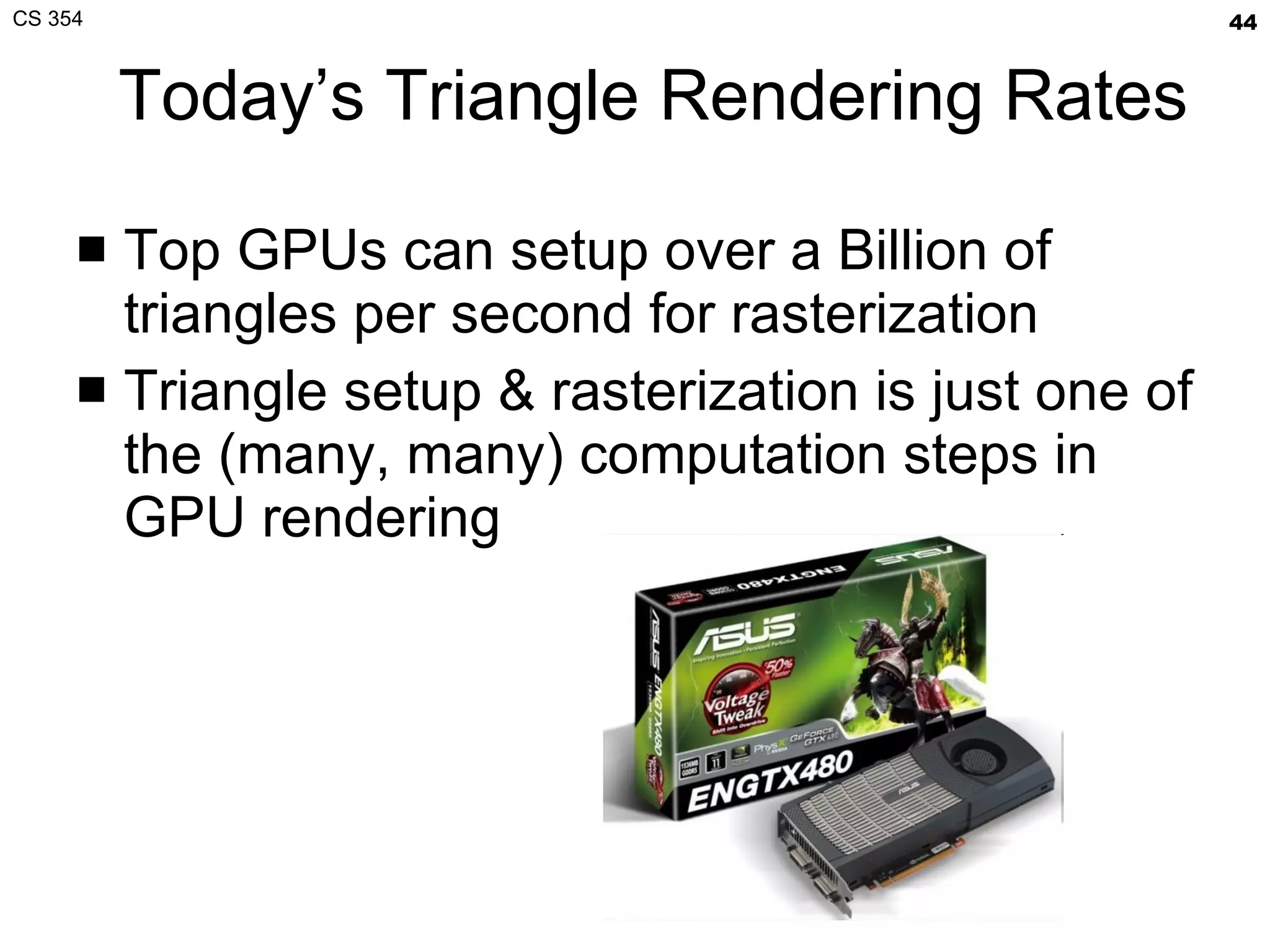
Today’s Triangle Rendering Rates Top GPUs can setup over a Billion of triangles per second for rasterization Triangle setup & rasterization is just one of the (many, many) computation steps in GPU rendering
Remaining Steps Depth interpolation Color update Scan-out to the display Next time…
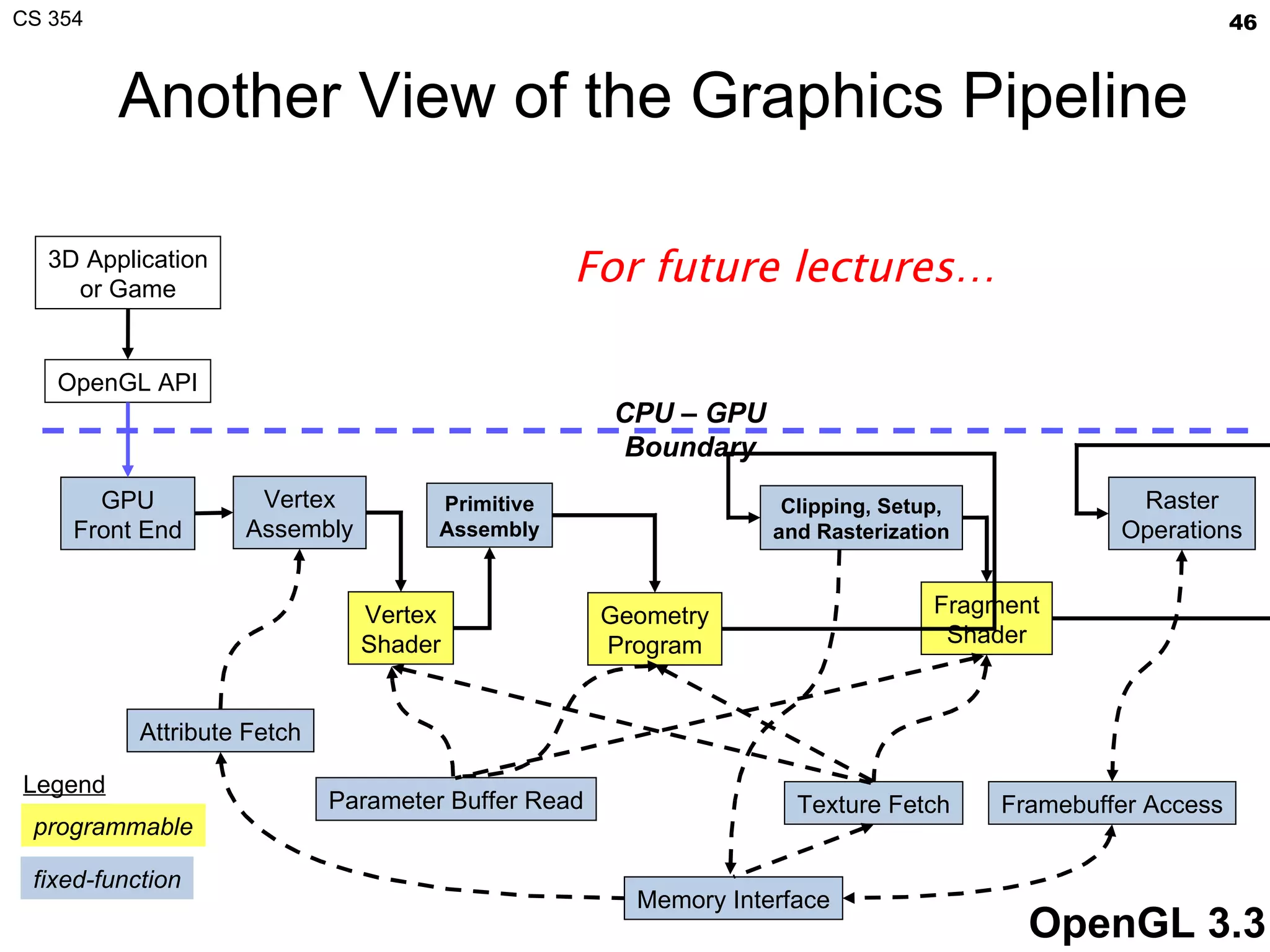
Another View of the Graphics Pipeline Geometry Program 3D Application or Game OpenGL API GPU Front End Vertex Assembly Vertex Shader Clipping, Setup, and Rasterization Fragment Shader Texture Fetch Raster Operations Framebuffer Access Memory Interface CPU – GPU Boundary OpenGL 3.3 Attribute Fetch Primitive Assembly Parameter Buffer Read programmable fixed-function Legend For future lectures…
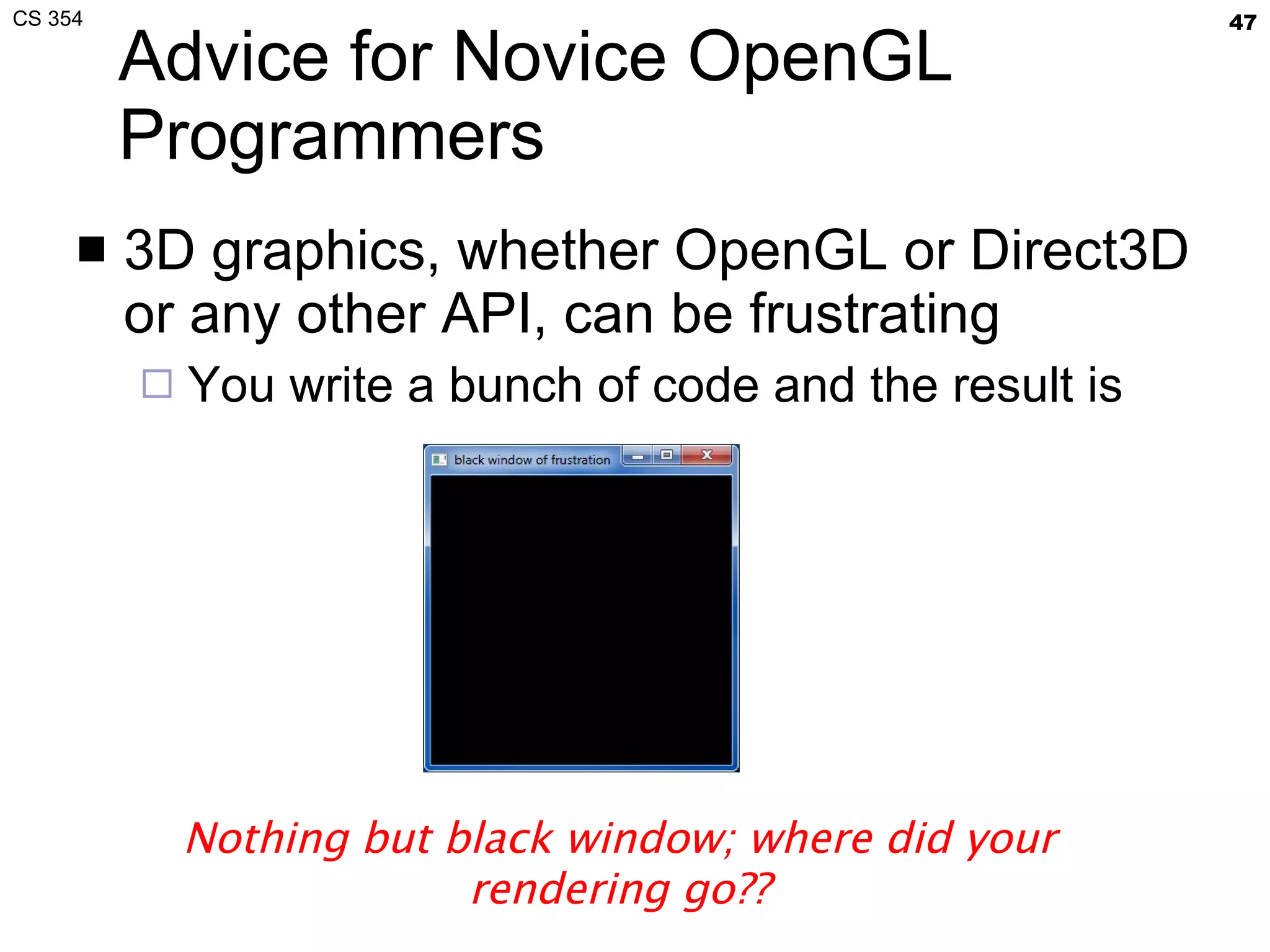
Advice for Novice OpenGL Programmers 3D graphics, whether OpenGL or Direct3D or any other API, can be frustrating You write a bunch of code and the result is Nothing but black window; where did your rendering go??
Things to Try Set your clear color to something other than black! It is easy to draw things black accidentally so don’t make black the clear color But black is the initial clear color Did you draw something for one frame, but the next frame draws nothing? Are you using depth buffering?  Did you forget to clear the depth buffer? Remember there are near and far clip planes so clipping in Z, not just X & Y Have you checked for  glGetError ? Call  glGetError  once per frame while debugging so you can see errors that occur For release code, take out the glGetError calls Not sure what state you are in? Use  glGetIntegerv  or  glGetFloatv  or other query functions to make sure that OpenGL’s state is what you think it is Use  glutSwapBuffers  to flush your rendering and show to the visible window Likewise  glFinish  makes sure all pending commands have finished Try reading http://www.slideshare.net/Mark_Kilgard/avoiding-19-common-opengl-pitfalls This is well worth the time wasted debugging a problem that could be avoided
Next Lecture Graphics Math Interpolation, vector math, and number representations for computer graphics As usual, expect a short quiz on today’s lecture Know how to determine if a point is within a triangle Know how to interpolate colors from an RGB plane equation Assignments Reading from “Interactive Computer Graphics” (Angel) Chapter 3, 115-145 Chapter 6, 303-309 Homework (a.k.a. Project Zero),  DUE tomorrow  January 25 th Purpose Gain familiarity with OpenGL programming and submitting projects Expect 2nd homework, a math problem set Thursday
Thanks Presentation approach and figures from David Luebke [2003] Brandon Lloyd [2007] Geometric Algebra for Computer Science  [Dorst, Fontijne, Mann]

CS 354 More Graphics Pipeline

  • 1.
    CS 354 MoreGraphics Pipeline Mark Kilgard University of Texas January 24, 2012
  • 2.
    Today’s material Homeworkstatus In-class quiz Lecture topic: more graphics pipeline How do clipped primitives in NDC space get rasterized and drawn onto the screen? Assignment Reading Finish “Project 0” homework programming task
  • 3.
    Example Assignment SolutionWhat your snapshot could look like: Key aspects Clear color no longer black Two or more crude letter formed out of triangles
  • 4.
    Course Information RemindersPiazza Active place to get answers Used last semester too https://piazza.com/utexas/cs354 Public CS course web site http://www.cs.utexas.edu/~mjk/teaching/cs354_s12/ Lecture slides in PDF form Now has class lecture schedule Slideshare.net http://www.slideshare.net/Mark_Kilgard Lecture slides for web browser viewing
  • 5.
    My Office HoursTuesday, before class Painter (PAI) 5.35 8:30 a.m. to 9:30 Thursday, after class ACE 6.302 11:00 a.m. to 12:00
  • 6.
    Last time, thistime Last lecture, we discussed How a triangle is specified in OpenGL Directly in Normalized Device Coordinate (NDC) space How a triangle gets clipped if necessary How a triangle gets mapped to window space This lecture Let’s look at that program in more detail How does a triangle described by numbers become pixels viewed on the scene? Along the way Practical advice for novice OpenGL programmers
  • 7.
    Programmer’s View: OpenGLAPI Example Let’s draw a triangle glShadeModel ( GL_SMOOTH ); // smooth color interpolation glEnable ( GL_DEPTH_TEST ); // enable hidden surface removal glClear (GL_COLOR_BUFFER_BIT|GL_DEPTH_BUFFER_BIT); glBegin (GL_TRIANGLES); { // every 3 vertexes makes a triangle glColor4ub (255, 0, 0, 255); // RGBA=(1,0,0,100%) glVertex3f (-0.8, 0.8, 0.3); // XYZ=(-8/10,8/10,3/10) glColor4ub (0, 255, 0, 255); // RGBA=(0,1,0,100%) glVertex3f ( 0.8, 0.8, -0.2); // XYZ=(8/10,8/10,-2/10) glColor4ub (0, 0, 255, 255); // RGBA=(0,0,1,100%) glVertex3f ( 0.0, -0.8, -0.2); // XYZ=(0,-8/10,-2/10) } glEnd (); Pro Tip: use curly braces to “bracket” nested OpenGL usage; no semantic meaning, just highlights grouping
  • 8.
    Programmer’s View: GLUTAPI Example Windowing code #include <GL/glut.h> // includes necessary OpenGL headers void display() { // << insert code on prior slide here >> glutSwapBuffers(); } void main(int argc, char **argv) { // request double-buffered color window with depth buffer glutInitDisplayMode ( GLUT_RGBA | GLUT_DOUBLE | GLUT_DEPTH ); glutInit (&argc, argv); glutCreateWindow (“simple triangle”); glutDisplayFunc (display); // function to render window glutMainLoop (); } FYI: GLUT = OpenGL Utility Toolkit
  • 9.
    A Simplified GraphicsPipeline Application Vertex batching & assembly Triangle assembly Triangle clipping Triangle rasterization Fragment shading Depth testing Color update Application- OpenGL API boundary Framebuffer NDC to window space Got to here in last lecture Depth buffer
  • 10.
    Daily Quiz Givena triangle in NDC space with vertexes (0,0,0) (2,0,⅔) (0,-½,¼) Does this triangle need to be view frustum clipped? YES or NO Assume the viewport and depth range of an OpenGL context are specified as glViewport(0,0,400,400); glDepthRange(0,1); Where in window space would the NDC position (0,-½,¼) be? On a sheet of paper Write your EID, name, and date Write #1, #2, followed by its answer
  • 11.
    Rasterization Process ofconverting a clipped triangle into a set of sample locations covered by the triangle Also can rasterize points and lines Application Vertex batching & assembly Triangle assembly Triangle clipping Triangle rasterization Fragment shading Depth testing Color update Color buffer NDC to window space App- GL boundary Depth buffer
  • 12.
    Determining a TriangleClassic view : 3 points determine a triangle Given 3 vertex positions, we determine a triangle Hence glVertex3f / glVertex3f / glVertex3f Rasterization view : 3 oriented edge equations determine a triangle Each oriented edge equation in form: A*x + B*y + C ≥ 078
  • 13.
  • 14.
    Step back: Why Triangles? Simplest linear primitive with area If it got any simpler, the primitive would be a line (just 2 vertexes) Guaranteed to be planar (flat) and convex (not concave) Triangles are compact 3 vertexes, 9 scalar values in affine 3D, determine a triangle When in a mesh, vertex positions can be “shared” among adjacent triangles Triangles are simple Simplicity and generality of triangles facilitates elegant, hardware-amenable algorithms Triangles lacks curvature BUT with enough triangles, we can piecewise approximate just about any manifold We can subdivide regions of high curvature until we reach flat regions to represent as a triangle Face meshed with triangles
  • 15.
    Concave vs. ConvexMnemonic: “ concave” means the shape “caves in on itself” More rigorous understanding Region is convex if any two points can be connected by a line segment where all points on this segment are also in the region Opposite is non-convex Concave means the region is connected but NOT convex Connected means there’s some path (not necessarily a line) from every two points in the region that is entirely in the region
  • 16.
    7 Cases, Only1 Inside the Triangle +-+ ++- -++ +++ -+- --+ +-- ( x , y ) E i ( x , y ) = A i x + B i y + C i (Projective formulation allows for the 8 th case as well)
  • 17.
    Being Inside aTriangle Discrete algorithm Evaluate edge equations at grid of sample points If sample position is “inside” all 3 edge equations, the position is “within” the triangle Implicitly parallel—all samples can be tested at once + + + - - -
  • 18.
    Friendly for HardwareImplementation Used by Pixel Planes [1981+] architecture Developed by University of North Carolina (UNC) Massively parallel, every sample evaluates every sample location in parallel Extremely hardware intensive approach Refined by Juan Pineda [Apollo 1988] Recognized you could conservatively step over triangle in tiles for “coarse” rasterization Then use edge equation evaluation for “fine” rasterization of each tile Variations of this approach used by modern GPUs
  • 19.
    Other Approaches toTriangle Rasterization Subdivision approaches Easy to split a triangle into 4 triangles Keep splitting triangles until they are slightly smaller than your samples Often called micro-polygon rendering Chief advantage is being able to apply displacements during the subdivision Edge walking approaches Often used by CPU-based rasterizers Much more sequential than Pineda approach Work efficient and amendable to fixed-point implementation
  • 20.
    Micro-polygons Rasterization becomesa geometry dicing process Approach taken by Pixar For production rendering when scene detail and quality is at a premium; interactivity, not so much Subdivision = Recursive algorithms Conceptually nice Not particularly amenable to fast hardware High-level representation is generally patches rather than mere triangles Example of displacement mapping of a meshed sphere [Pixar, RenderMan]
  • 21.
    Scanline Rasterization Finda “top” to the triangle Now walk down edges
  • 22.
    Scanline Rasterization Movedown a scan-line, keeping track of the left and right ends of the triangle
  • 23.
    Scanline Rasterization Repeat,moving down a scanline Cover the samples between the left and right ends of the triangle in the scan-line
  • 24.
    Scanline Rasterization Processrepeats for each scanline Easy to “step” down to the next scanline based on the slopes of two edges
  • 25.
    Scanline Rasterization Eventuallyreach a vertex Transition to a different edge and continue filling the span within the triangle
  • 26.
    Scanline Rasterization Untilyou finish the triangle Friendly for how CPU memory arranges an image as a 2D array with horizontal locality Layout is good for raster scan-out too
  • 27.
    Creating Edge EquationsTriangle rasterization need edge equations How do we make edge equations? An edge is a line so determined by two points Each of the 3 triangle edges is determined by two of the 3 triangle vertexes (L, M, N) L=(Lx,Ly) M N=(Nx,Ny) M=(Mx,My) How do we get A*x + B*y + C ≥ 0 for each edge from L, M, and N?
  • 28.
    Edge Equation SetupHow do you get the coefficients A, B, and C? Determinants help—consider the LN edge: Expansion: (Ly-Ny)×Px + (Nx-Lx)×Py + Ny×Lx-Nx×Ly > 0 A LN = Ly-Ny B LN = Nx-Lx C LN = Ny×Lx-Nx×Ly Geometric interpretation: twice signed area of the triangle LPN or more succinctly L=(Lx,Ly) N=(Nx,Ny) P=(Px,Py) P is some arbitrary point, we wish to determine on which side of the edge P is on
  • 29.
    Alternative Derivation usingSolving a Linear System Set up the linear system: Multiply both sides by matrix inverse: Let C = LxNy - NxLy for convenience Then A = Ly - Ny and B = Nx - Lx (Same result as geometric interpretation)
  • 30.
    Where are the simple_triangle Vertexes in Windows Space? Assume the window is 500x500 pixels So glViewport(0,0,500,500) has been called (-0.8, 0.8, 0.3) (-0.8, 0.8, -0.2) (0, -0.8, -0.2) origin at (0,0,0)
  • 31.
    Apply the TransformsFirst vertex :: (-0.8, 0.8, 0.3) w x = (w/2)×x + v x + w/2 = 250×(-0.8) + 250 = 50 w y = (h/2)y + v y + h/2 = 250×(0.8) + 250 = 450 w z = [(f-n)/2]×z + (n+f)/2 = 0.65 Second vertex :: (0.8, 0.8, -0.2) w x = (w/2)×x + v x + w/2 = 250×(0.8) + 250 = 450 w y = (h/2)y + v y + h/2 = 250×(0.8) + 250 = 450 w z = [(f-n)/2]×z + (n+f)/2 = 0.4 Third vertex :: (0, -0.8, -0.2) w x = (w/2)×x + v x + w/2 = 250×0 + 250 = 250 w y = (h/2)y + v y + h/2 = 250×(-0.8) + 250 = 50 w z = [(f-n)/2]×z + (n+f)/2 = 0.4
  • 32.
    Windows Space Versionof Simple Triangle Assume the window is 500x500 pixels So glViewport(0,0,500,500) has been called L=(50, 450, 0.65) N=(450,450,0.4) M=(250,50,0.4) center at (250,250) origin at (0,0)
  • 33.
    Look at theLN edge Expansion: (Ly-Ny)×Px + (Nx-Lx)×Py + Ny×Lx-Nx×Ly > 0 A LN = Ly-Ny = 450-450 = 0 B LN = Nx-Lx = 50-450 = -400 C LN = Ny×Lx-Nx×Ly = 180,000 Is center at (250,250) in the triangle? A LN × 250 + B LN × 250 + C LN = ??? 0 × 250 – 400 × 250 + 180,000 = 80,000 80,000 > 0 so (250,250) is in the triangle
  • 34.
    All Three EdgeEquations All three triangle edge equations: Satisfy all 3 and P is in the triangle And then rasterize at sample location P Caveat: if reverse the comparsion sense
  • 35.
    Water Tight RasterizationIdea : Two triangles often share a common edge Indeed in closed polygonal meshes, every triangle shares its edges with as many as three other triangles Called adjacent or “shared edge” triangles Crucial rasterization property No double sampling (hitting) along the shared edge No sample gaps (pixel fall-out) along the shared edge Samples along the shared edge must be belong to exactly one of the two triangles Not both, not neight Water tight rasterization is crucial to many higher-level algorithms; otherwise, rendering artifacts Possible artifact: if pixels hit twice on an edge, the pixel could be double blended Example application: Stenciled Shadow Volumes (SSV)
  • 36.
    Water Tight RasterizationSolution First “snap” vertex positions to a grid Grid can (and should) be sub-pixel samples Results in fixed-point vertex positions Fixed-point math allows exact edge computations Surprising? E nsuring robustness requires discarding excess precision Problem What happens when edge equation evaluates to exactly zero at a sample position? Need a consistent tight breaker
  • 37.
    Tie Breaker RuleLook at edge equation coefficients Tie-breaker rule when edge equation evaluates to zero “ Inside” edge when edge equation is zero and A > 0 when A ≠ 0, or B > 0 when A = 0 Complete coverage determination rule if (E(x,y) > 0 || (E(x,y)==0 && (A != 0 ? A > 0 : B > 0))) sample at (x,y) is inside edge
  • 38.
    Zero Area TrianglesWe reverse the edge equation comparison sense if the (signed) area of the triangle is negative What if the area is zero? Linear algebra indicates a singular matrix Need to cull the primitive Also useful to cull primitives when area is negative OpenGL calls this face culling Enabled with glEnable(GL_CULL_FACE) When drawing closed meshes, back face culling can avoid drawing primitives assured to be occluded by front faces
  • 39.
    Back Face CullingExample Torus drawn in wire-frame without back face culling Notice considerable extraneous triangles that would normally be occluded Torus drawn in wire-frame with back face culling By culling back-facing (negative signed area) triangles, fewer triangles are rasterized
  • 40.
    Simple Fragment ShadingFor all samples (pixels) within the triangle, evaluate the interpolated color Requires having math to determine color at the sample (x,y) location Application Vertex batching & assembly Triangle assembly Triangle clipping Triangle rasterization Fragment shading Depth testing Color update Color buffer NDC to window space App- GL boundary Depth buffer
  • 41.
    Color Interpolation Oursimple triangle is drawn with smooth color interpolation Recall: glShadeModel(GL_SMOOTH) How is color interpolated? Think of a plane equation to computer each color component (say red ) as a function of (x,y) Just done for samples positions within the triangle
  • 42.
    Setup Plane EquationSetup plane equation to solve for “red” as a function of (x,y) Setup system of equations Solve for plane equation coefficients A, B, C Do the same for green, blue, and alpha (opacity)…
  • 43.
    More Intuitive Wayto Interpolate Barycentric coordinates L M N P Area(PMN) Area(LMN) = α Area(LPN) Area(LMN) = β Area(LMP) Area(LMN) = γ Note : α + β + γ = 0 by construction attribute(P) = α ×attribute(L) + β ×attribute(M) + γ ×attribute(N)
  • 44.
    Today’s Triangle RenderingRates Top GPUs can setup over a Billion of triangles per second for rasterization Triangle setup & rasterization is just one of the (many, many) computation steps in GPU rendering
  • 45.
    Remaining Steps Depthinterpolation Color update Scan-out to the display Next time…
  • 46.
    Another View ofthe Graphics Pipeline Geometry Program 3D Application or Game OpenGL API GPU Front End Vertex Assembly Vertex Shader Clipping, Setup, and Rasterization Fragment Shader Texture Fetch Raster Operations Framebuffer Access Memory Interface CPU – GPU Boundary OpenGL 3.3 Attribute Fetch Primitive Assembly Parameter Buffer Read programmable fixed-function Legend For future lectures…
  • 47.
    Advice for NoviceOpenGL Programmers 3D graphics, whether OpenGL or Direct3D or any other API, can be frustrating You write a bunch of code and the result is Nothing but black window; where did your rendering go??
  • 48.
    Things to TrySet your clear color to something other than black! It is easy to draw things black accidentally so don’t make black the clear color But black is the initial clear color Did you draw something for one frame, but the next frame draws nothing? Are you using depth buffering? Did you forget to clear the depth buffer? Remember there are near and far clip planes so clipping in Z, not just X & Y Have you checked for glGetError ? Call glGetError once per frame while debugging so you can see errors that occur For release code, take out the glGetError calls Not sure what state you are in? Use glGetIntegerv or glGetFloatv or other query functions to make sure that OpenGL’s state is what you think it is Use glutSwapBuffers to flush your rendering and show to the visible window Likewise glFinish makes sure all pending commands have finished Try reading http://www.slideshare.net/Mark_Kilgard/avoiding-19-common-opengl-pitfalls This is well worth the time wasted debugging a problem that could be avoided
  • 49.
    Next Lecture GraphicsMath Interpolation, vector math, and number representations for computer graphics As usual, expect a short quiz on today’s lecture Know how to determine if a point is within a triangle Know how to interpolate colors from an RGB plane equation Assignments Reading from “Interactive Computer Graphics” (Angel) Chapter 3, 115-145 Chapter 6, 303-309 Homework (a.k.a. Project Zero), DUE tomorrow January 25 th Purpose Gain familiarity with OpenGL programming and submitting projects Expect 2nd homework, a math problem set Thursday
  • 50.
    Thanks Presentation approachand figures from David Luebke [2003] Brandon Lloyd [2007] Geometric Algebra for Computer Science [Dorst, Fontijne, Mann]