Building Models
1
Objectives
• Introduce simple data structures for building polygonal models
• Vertex lists
• Edge lists
• OpenGL vertex arrays
2
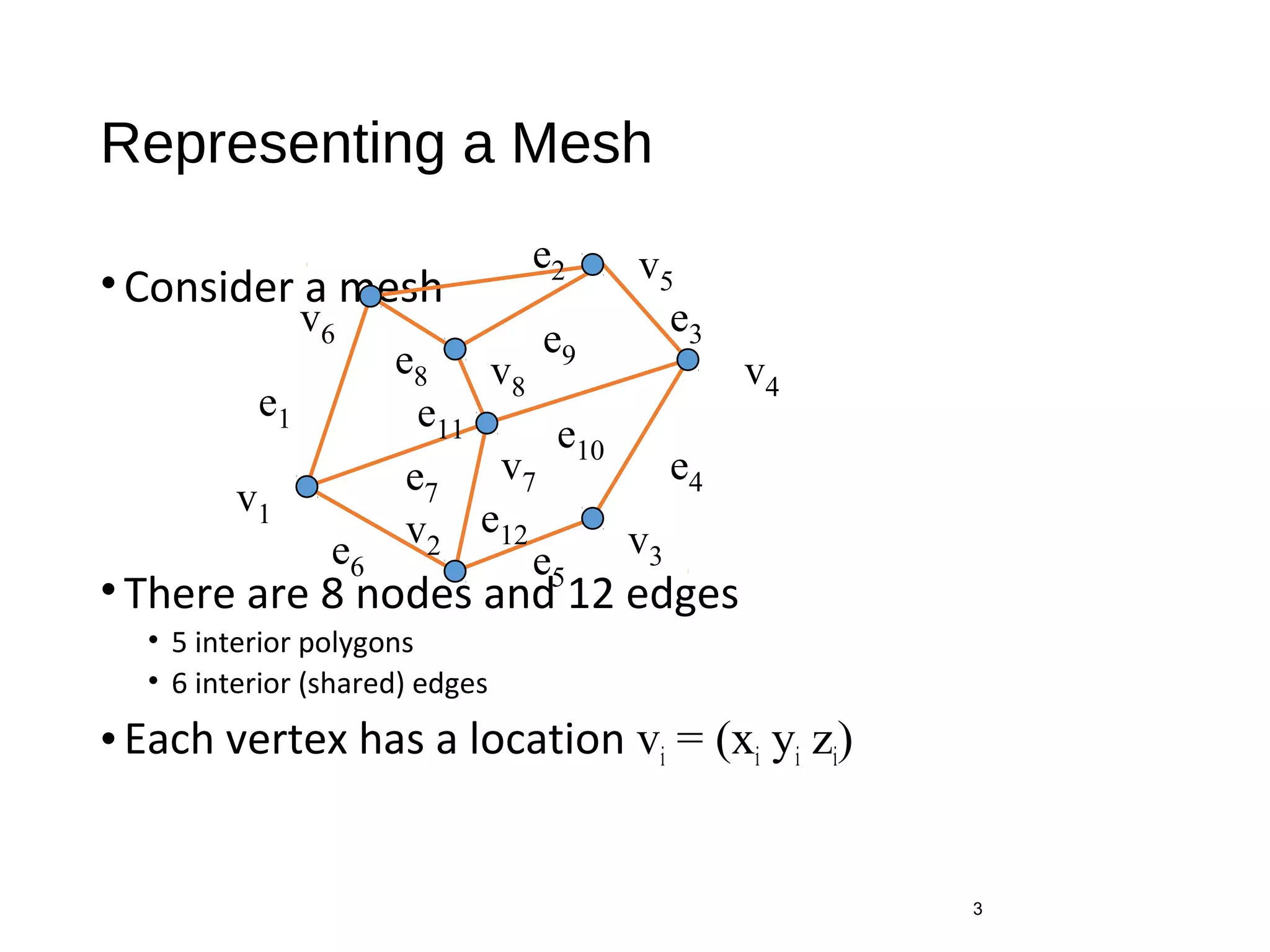
Representing a Mesh
•Consider a mesh
•There are 8 nodes and 12 edges
• 5 interior polygons
• 6 interior (shared) edges
•Each vertex has a location vi = (xi yi zi)
3
v1
v2
v7
v6
v8
v5
v4
v3
e1
e8
e3
e2
e11
e6
e7
e10
e5
e4
e9
e12
Simple Representation
•Define each polygon by the geometric locations of its
vertices
•Leads to OpenGL code such as
•Inefficient and unstructured
• Consider moving a vertex to a new location
• Must search for all occurrences
4
glBegin(GL_POLYGON);
glVertex3f(x1, x1, x1);
glVertex3f(x6, x6, x6);
glVertex3f(x7, x7, x7);
glEnd();
Inward and Outward Facing Polygons
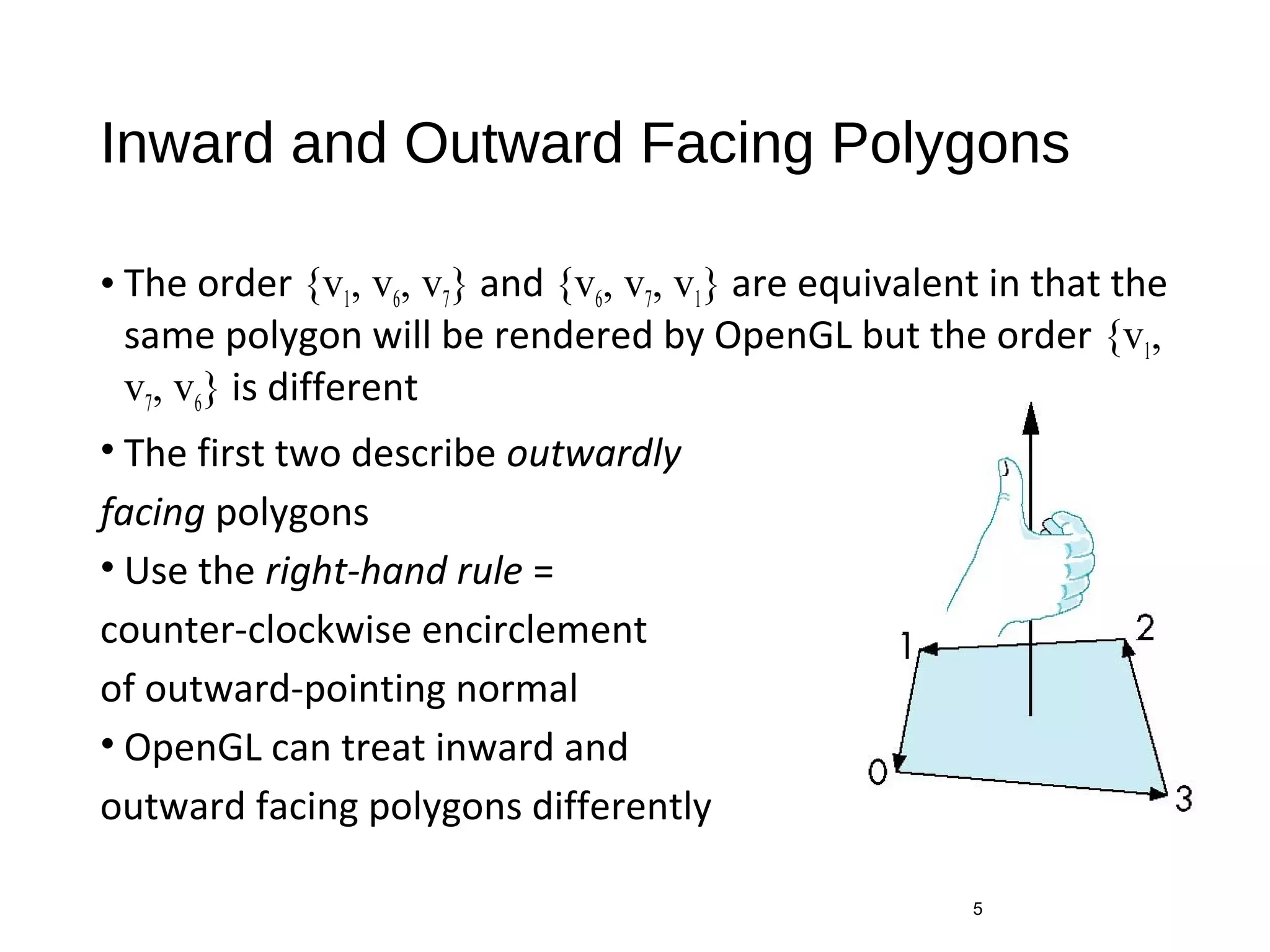
• The order {v1, v6, v7} and {v6, v7, v1} are equivalent in that the
same polygon will be rendered by OpenGL but the order {v1,
v7, v6} is different
• The first two describe outwardly
facing polygons
• Use the right-hand rule =
counter-clockwise encirclement
of outward-pointing normal
• OpenGL can treat inward and
outward facing polygons differently
5
Geometry vs Topology
• Generally it is a good idea to look for data structures that separate
the geometry from the topology
• Geometry: locations of the vertices
• Topology: organization of the vertices and edges
• Example: a polygon is an ordered list of vertices with an edge connecting
successive pairs of vertices and the last to the first
• Topology holds even if geometry changes
6
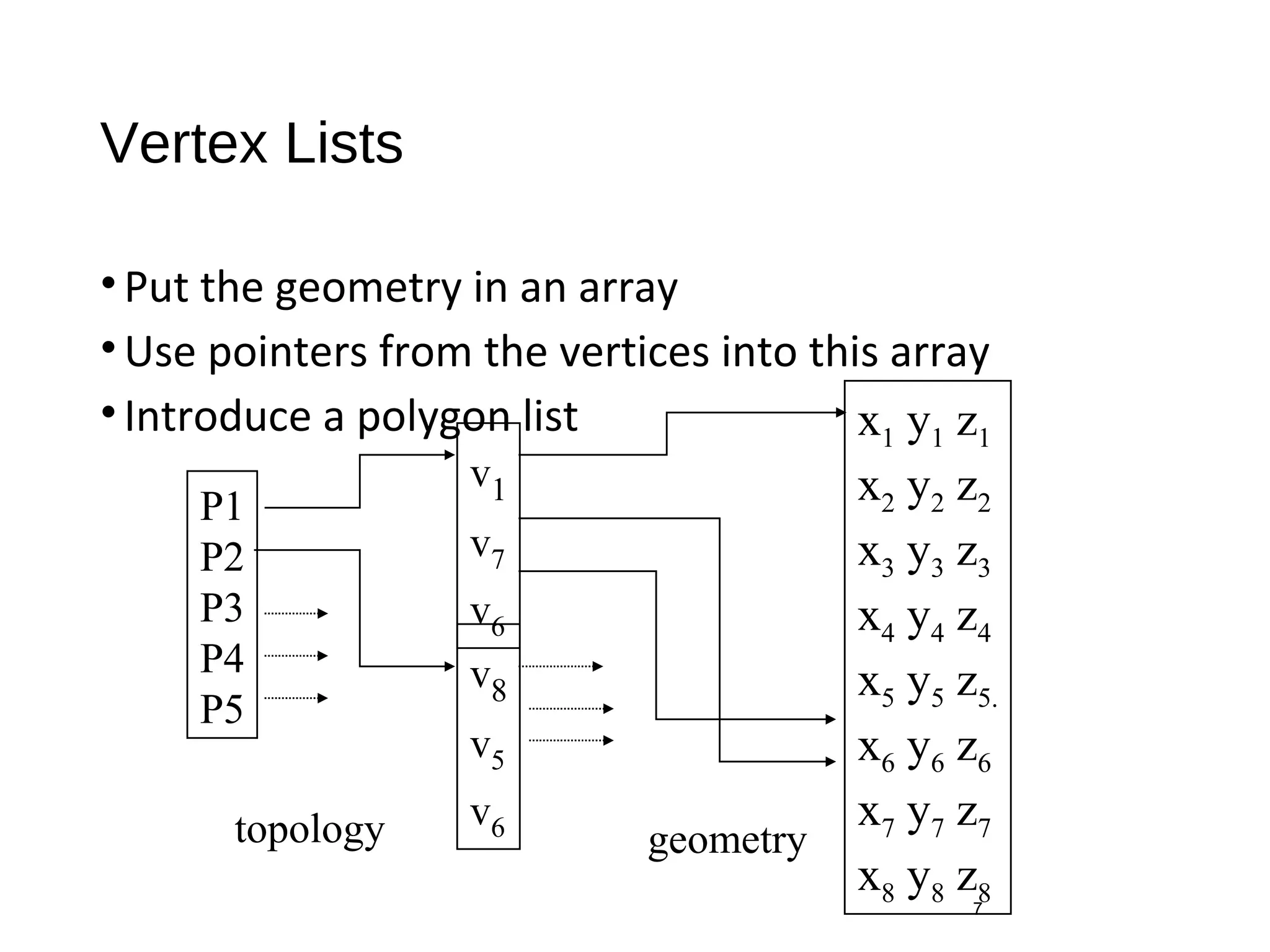
Vertex Lists
•Put the geometry in an array
•Use pointers from the vertices into this array
•Introduce a polygon list
7
x1 y1 z1
x2 y2 z2
x3 y3 z3
x4 y4 z4
x5 y5 z5.
x6 y6 z6
x7 y7 z7
x8 y8 z8
P1
P2
P3
P4
P5
v1
v7
v6
v8
v5
v6topology geometry
Shared Edges
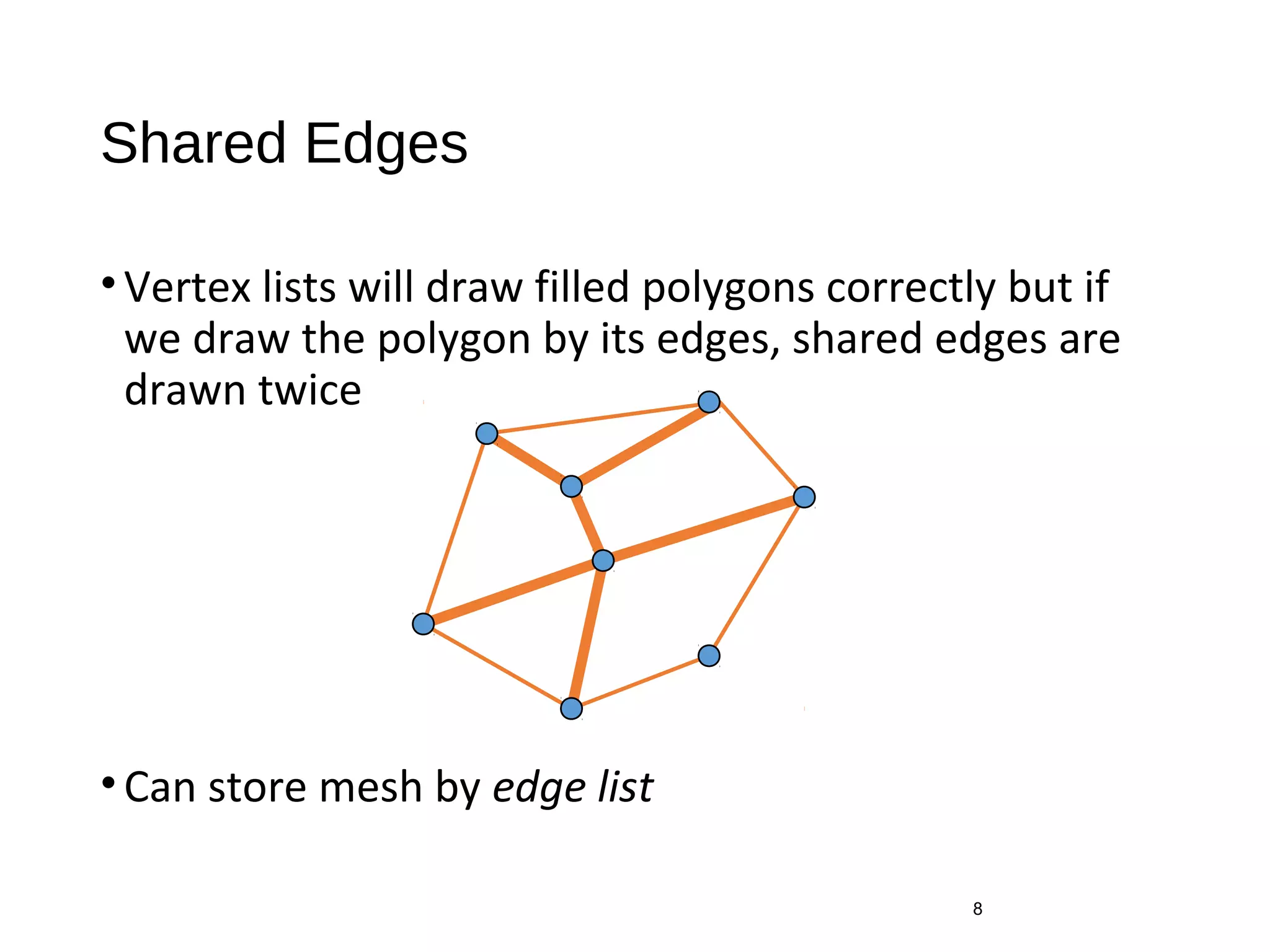
•Vertex lists will draw filled polygons correctly but if
we draw the polygon by its edges, shared edges are
drawn twice
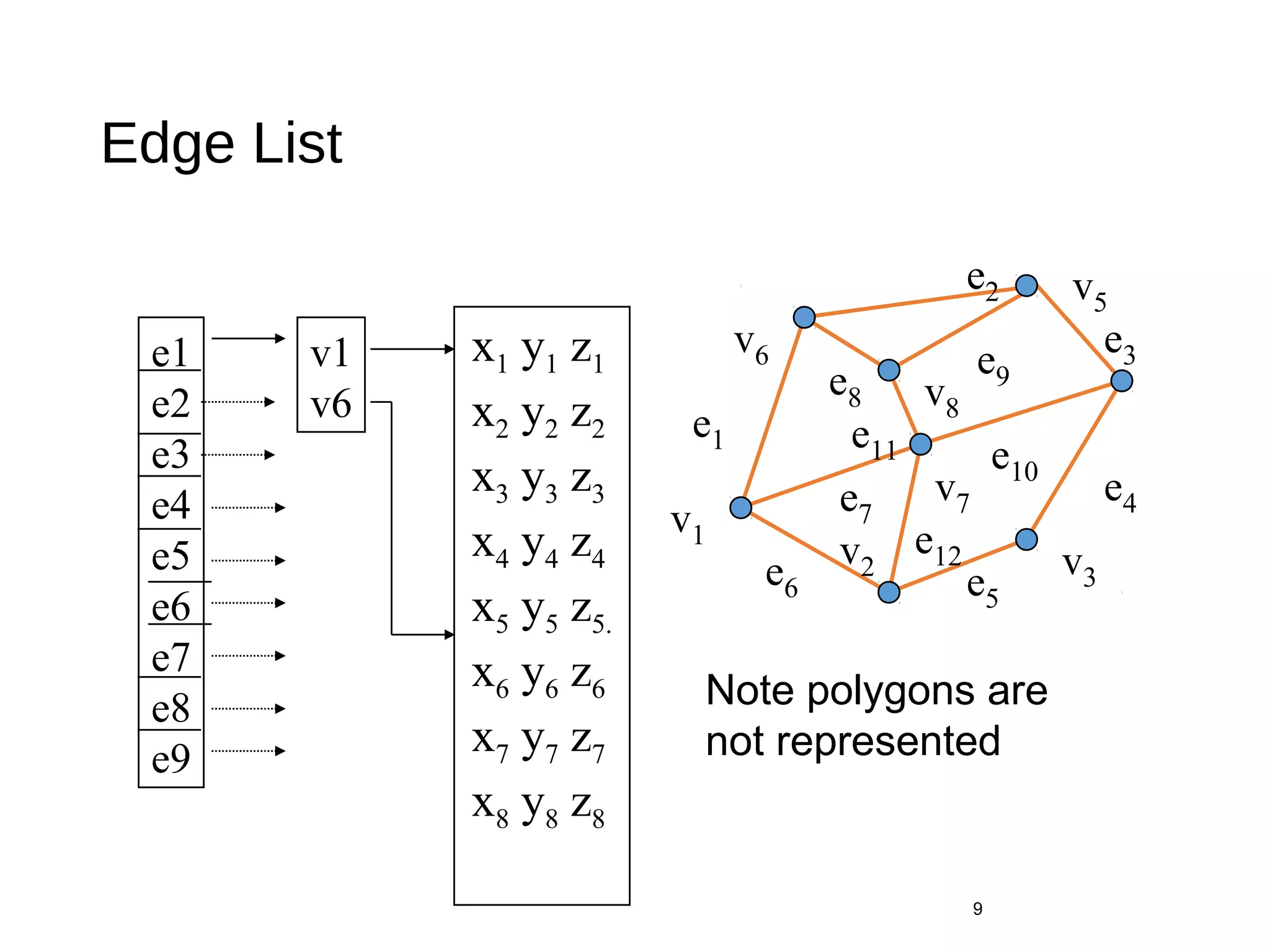
•Can store mesh by edge list
8
Edge List
9
v1
v2
v7
v6
v8
v5
v3
e1
e8
e3
e2
e11
e6
e7
e10
e5
e4
e9
e12
e1
e2
e3
e4
e5
e6
e7
e8
e9
x1 y1 z1
x2 y2 z2
x3 y3 z3
x4 y4 z4
x5 y5 z5.
x6 y6 z6
x7 y7 z7
x8 y8 z8
v1
v6
Note polygons are
not represented
Modeling a Cube
GLfloat vertices[][3] = {{-1.0,-1.0,-1.0},{1.0,-1.0,-1.0},
{1.0,1.0,-1.0}, {-1.0,1.0,-1.0}, {-1.0,-1.0,1.0},
{1.0,-1.0,1.0}, {1.0,1.0,1.0}, {-1.0,1.0,1.0}};
10
GLfloat colors[][3] = {{0.0,0.0,0.0},{1.0,0.0,0.0},
{1.0,1.0,0.0}, {0.0,1.0,0.0}, {0.0,0.0,1.0},
{1.0,0.0,1.0}, {1.0,1.0,1.0}, {0.0,1.0,1.0}};
Model a color cube for rotating cube program
Define global arrays for vertices and colors
Drawing a polygon from a list of indices
Draw a quadrilateral from a list of indices into the
array vertices and use color corresponding to first
index
11
void polygon(int a, int b, int
c , int d)
{
glBegin(GL_POLYGON);
glColor3fv(colors[a]);
glVertex3fv(vertices[a]);
glVertex3fv(vertices[b]);
glVertex3fv(vertices[c]);
glVertex3fv(vertices[d]);
glEnd();
}
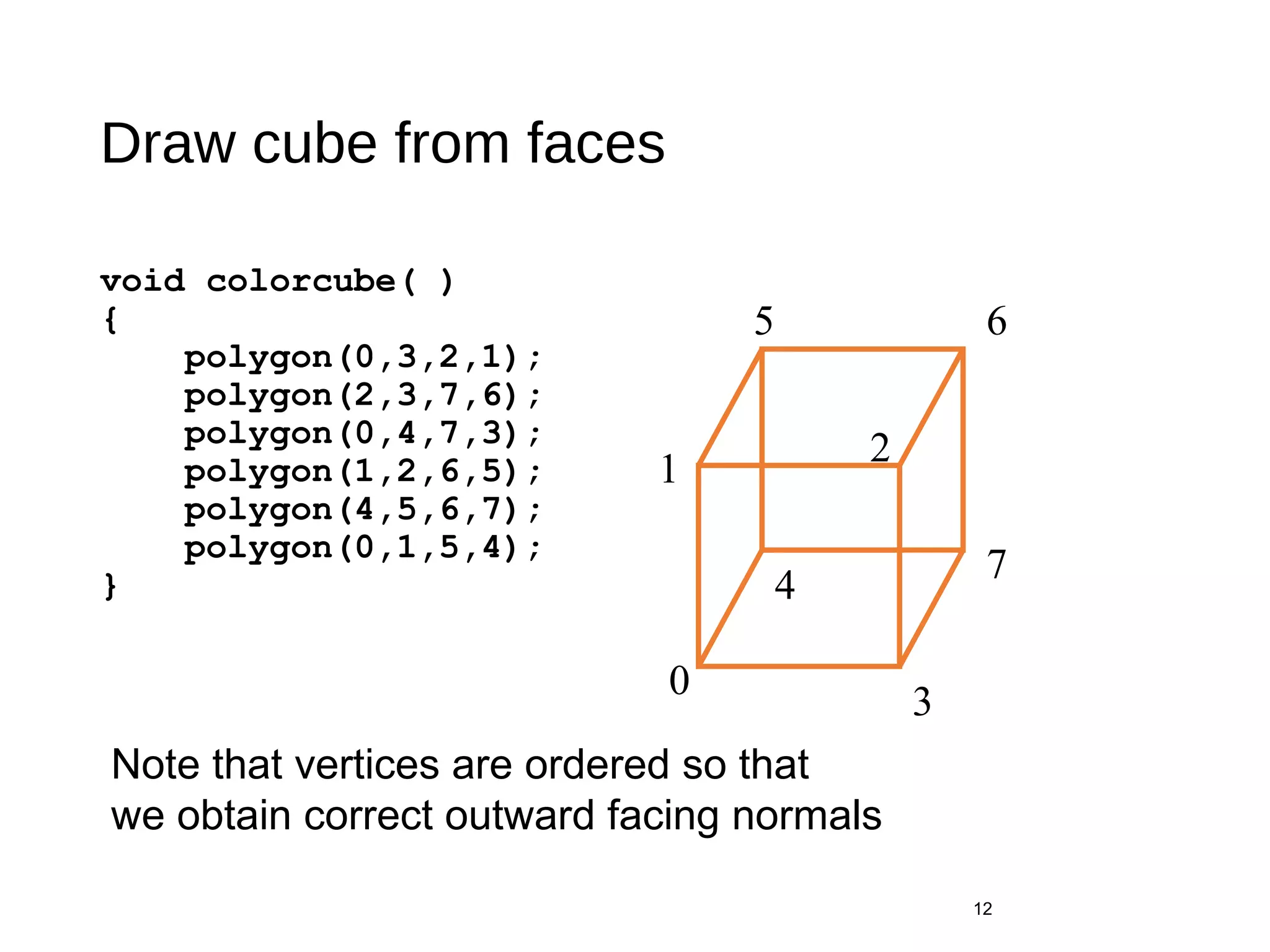
Draw cube from faces
void colorcube( )
{
polygon(0,3,2,1);
polygon(2,3,7,6);
polygon(0,4,7,3);
polygon(1,2,6,5);
polygon(4,5,6,7);
polygon(0,1,5,4);
}
12
0
5 6
2
4
7
1
3
Note that vertices are ordered so that
we obtain correct outward facing normals
Efficiency
• The weakness of our approach is that we are building the model in
the application and must do many function calls to draw the cube
• Drawing a cube by its faces in the most straight forward way requires
• 6 glBegin, 6 glEnd
• 6 glColor
• 24 glVertex
• More if we use texture and lighting
13
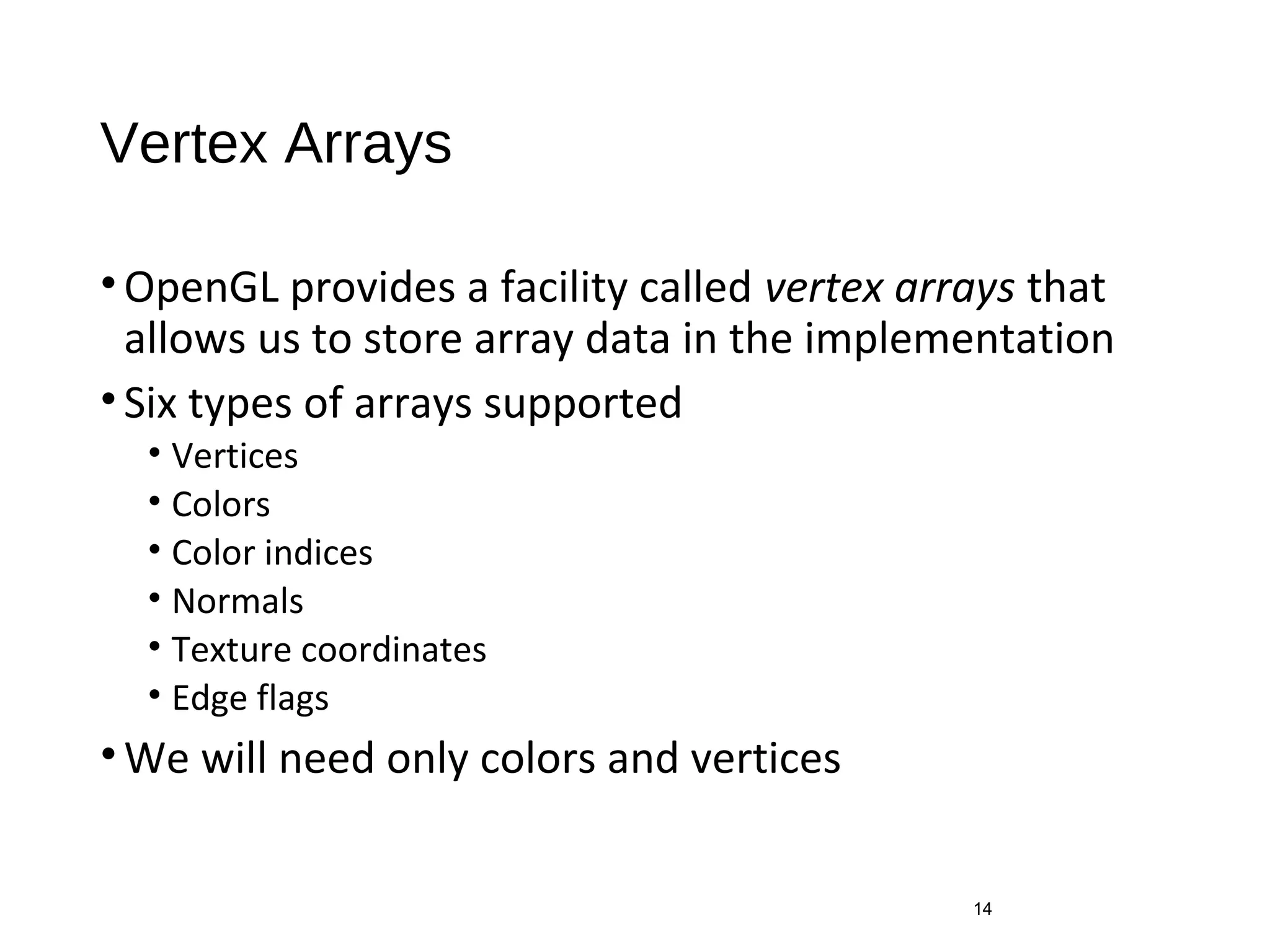
Vertex Arrays
•OpenGL provides a facility called vertex arrays that
allows us to store array data in the implementation
•Six types of arrays supported
• Vertices
• Colors
• Color indices
• Normals
• Texture coordinates
• Edge flags
•We will need only colors and vertices
14
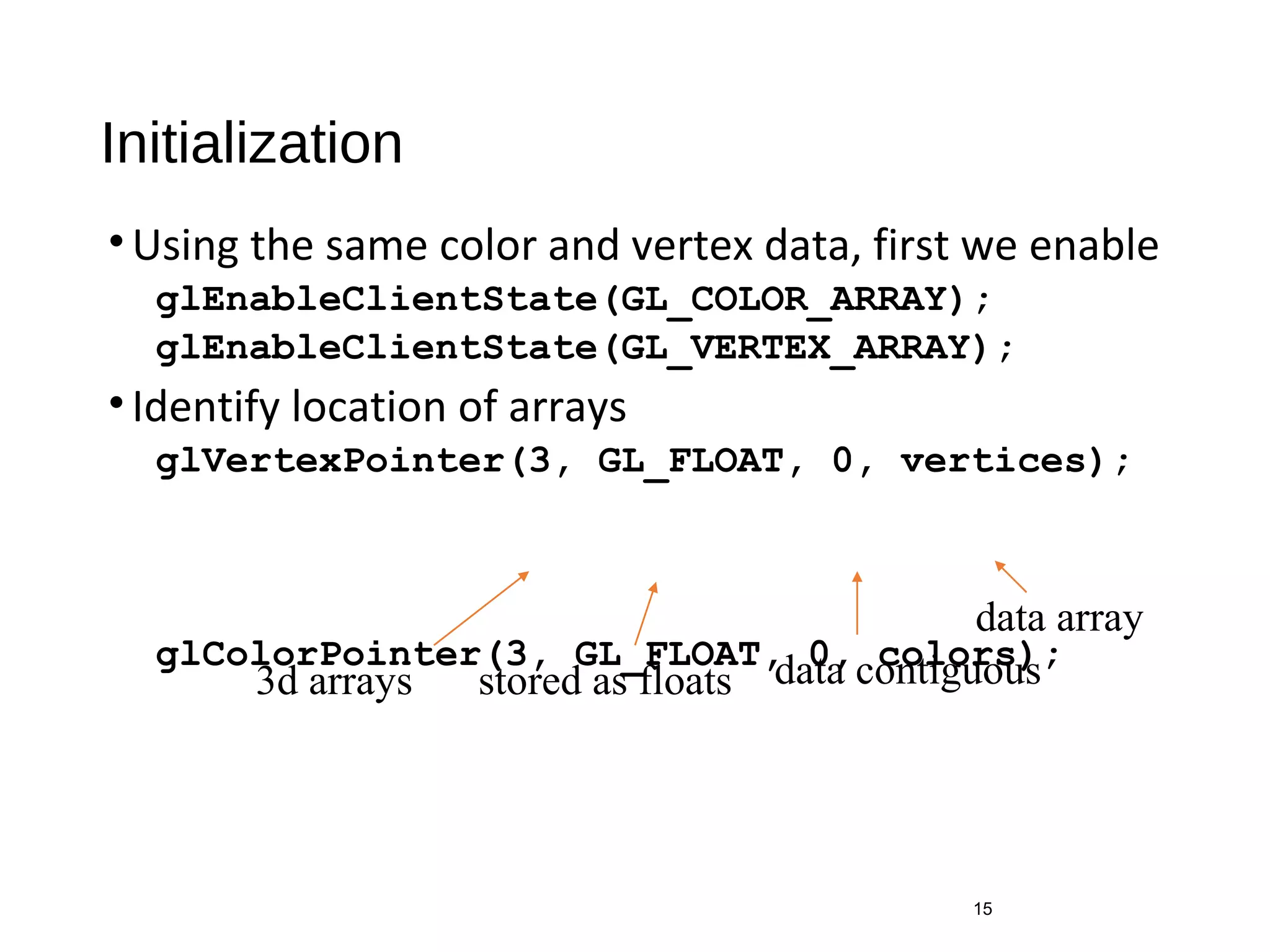
Initialization
•Using the same color and vertex data, first we enable
glEnableClientState(GL_COLOR_ARRAY);
glEnableClientState(GL_VERTEX_ARRAY);
•Identify location of arrays
glVertexPointer(3, GL_FLOAT, 0, vertices);
glColorPointer(3, GL_FLOAT, 0, colors);
15
3d arrays stored as floats data contiguous
data array
Mapping indices to faces
• Form an array of face indices
• Each successive four indices describe a face of the cube
• Draw through glDrawElements which replaces all
glVertex and glColor calls in the display callback
16
GLubyte cubeIndices[24] = {0,3,2,1,2,3,7,6
0,4,7,3,1,2,6,5,4,5,6,7,0,1,5,4};
Drawing the cube
•Method 1:
•Method 2:
17
for(i=0; i<6; i++) glDrawElements(GL_POLYGON, 4,
GL_UNSIGNED_BYTE, &cubeIndices[4*i]);
format of index data start of index data
what to draw
number of indices
glDrawElements(GL_QUADS, 24,
GL_UNSIGNED_BYTE, cubeIndices);
Draws cube with 1 function call!!

Building Models

  • 1.
  • 2.
    Objectives • Introduce simpledata structures for building polygonal models • Vertex lists • Edge lists • OpenGL vertex arrays 2
  • 3.
    Representing a Mesh •Considera mesh •There are 8 nodes and 12 edges • 5 interior polygons • 6 interior (shared) edges •Each vertex has a location vi = (xi yi zi) 3 v1 v2 v7 v6 v8 v5 v4 v3 e1 e8 e3 e2 e11 e6 e7 e10 e5 e4 e9 e12
  • 4.
    Simple Representation •Define eachpolygon by the geometric locations of its vertices •Leads to OpenGL code such as •Inefficient and unstructured • Consider moving a vertex to a new location • Must search for all occurrences 4 glBegin(GL_POLYGON); glVertex3f(x1, x1, x1); glVertex3f(x6, x6, x6); glVertex3f(x7, x7, x7); glEnd();
  • 5.
    Inward and OutwardFacing Polygons • The order {v1, v6, v7} and {v6, v7, v1} are equivalent in that the same polygon will be rendered by OpenGL but the order {v1, v7, v6} is different • The first two describe outwardly facing polygons • Use the right-hand rule = counter-clockwise encirclement of outward-pointing normal • OpenGL can treat inward and outward facing polygons differently 5
  • 6.
    Geometry vs Topology •Generally it is a good idea to look for data structures that separate the geometry from the topology • Geometry: locations of the vertices • Topology: organization of the vertices and edges • Example: a polygon is an ordered list of vertices with an edge connecting successive pairs of vertices and the last to the first • Topology holds even if geometry changes 6
  • 7.
    Vertex Lists •Put thegeometry in an array •Use pointers from the vertices into this array •Introduce a polygon list 7 x1 y1 z1 x2 y2 z2 x3 y3 z3 x4 y4 z4 x5 y5 z5. x6 y6 z6 x7 y7 z7 x8 y8 z8 P1 P2 P3 P4 P5 v1 v7 v6 v8 v5 v6topology geometry
  • 8.
    Shared Edges •Vertex listswill draw filled polygons correctly but if we draw the polygon by its edges, shared edges are drawn twice •Can store mesh by edge list 8
  • 9.
    Edge List 9 v1 v2 v7 v6 v8 v5 v3 e1 e8 e3 e2 e11 e6 e7 e10 e5 e4 e9 e12 e1 e2 e3 e4 e5 e6 e7 e8 e9 x1 y1z1 x2 y2 z2 x3 y3 z3 x4 y4 z4 x5 y5 z5. x6 y6 z6 x7 y7 z7 x8 y8 z8 v1 v6 Note polygons are not represented
  • 10.
    Modeling a Cube GLfloatvertices[][3] = {{-1.0,-1.0,-1.0},{1.0,-1.0,-1.0}, {1.0,1.0,-1.0}, {-1.0,1.0,-1.0}, {-1.0,-1.0,1.0}, {1.0,-1.0,1.0}, {1.0,1.0,1.0}, {-1.0,1.0,1.0}}; 10 GLfloat colors[][3] = {{0.0,0.0,0.0},{1.0,0.0,0.0}, {1.0,1.0,0.0}, {0.0,1.0,0.0}, {0.0,0.0,1.0}, {1.0,0.0,1.0}, {1.0,1.0,1.0}, {0.0,1.0,1.0}}; Model a color cube for rotating cube program Define global arrays for vertices and colors
  • 11.
    Drawing a polygonfrom a list of indices Draw a quadrilateral from a list of indices into the array vertices and use color corresponding to first index 11 void polygon(int a, int b, int c , int d) { glBegin(GL_POLYGON); glColor3fv(colors[a]); glVertex3fv(vertices[a]); glVertex3fv(vertices[b]); glVertex3fv(vertices[c]); glVertex3fv(vertices[d]); glEnd(); }
  • 12.
    Draw cube fromfaces void colorcube( ) { polygon(0,3,2,1); polygon(2,3,7,6); polygon(0,4,7,3); polygon(1,2,6,5); polygon(4,5,6,7); polygon(0,1,5,4); } 12 0 5 6 2 4 7 1 3 Note that vertices are ordered so that we obtain correct outward facing normals
  • 13.
    Efficiency • The weaknessof our approach is that we are building the model in the application and must do many function calls to draw the cube • Drawing a cube by its faces in the most straight forward way requires • 6 glBegin, 6 glEnd • 6 glColor • 24 glVertex • More if we use texture and lighting 13
  • 14.
    Vertex Arrays •OpenGL providesa facility called vertex arrays that allows us to store array data in the implementation •Six types of arrays supported • Vertices • Colors • Color indices • Normals • Texture coordinates • Edge flags •We will need only colors and vertices 14
  • 15.
    Initialization •Using the samecolor and vertex data, first we enable glEnableClientState(GL_COLOR_ARRAY); glEnableClientState(GL_VERTEX_ARRAY); •Identify location of arrays glVertexPointer(3, GL_FLOAT, 0, vertices); glColorPointer(3, GL_FLOAT, 0, colors); 15 3d arrays stored as floats data contiguous data array
  • 16.
    Mapping indices tofaces • Form an array of face indices • Each successive four indices describe a face of the cube • Draw through glDrawElements which replaces all glVertex and glColor calls in the display callback 16 GLubyte cubeIndices[24] = {0,3,2,1,2,3,7,6 0,4,7,3,1,2,6,5,4,5,6,7,0,1,5,4};
  • 17.
    Drawing the cube •Method1: •Method 2: 17 for(i=0; i<6; i++) glDrawElements(GL_POLYGON, 4, GL_UNSIGNED_BYTE, &cubeIndices[4*i]); format of index data start of index data what to draw number of indices glDrawElements(GL_QUADS, 24, GL_UNSIGNED_BYTE, cubeIndices); Draws cube with 1 function call!!