Your 'traditional'
    social media toolkit
The old school tools in a new media space
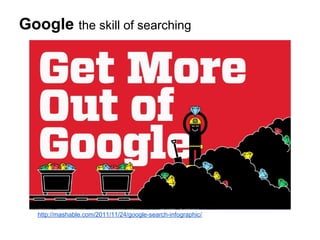
Google the skill of searching


   http://mashable.com/2011/11/24/google-search-infographic/
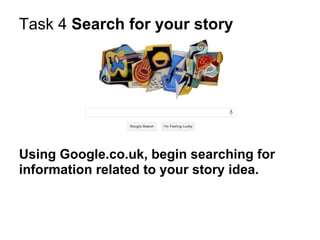
Task 4 Search for your story


Using Google.co.uk, begin searching for
information related to your story idea.
Google the skill of searching


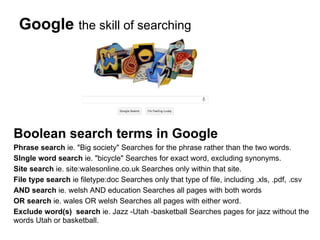
Boolean search terms in Google
Phrase search ie. "Big society" Searches for the phrase rather than the two words.
SIngle word search ie. "bicycle" Searches for exact word, excluding synonyms.
Site search ie. site:walesonline.co.uk Searches only within that site.
File type search ie filetype:doc Searches only that type of file, including .xls, .pdf, .csv
AND search ie. welsh AND education Searches all pages with both words
OR search ie. wales OR welsh Searches all pages with either word.
Exclude word(s) search ie. Jazz -Utah -basketball Searches pages for jazz without the
words Utah or basketball.
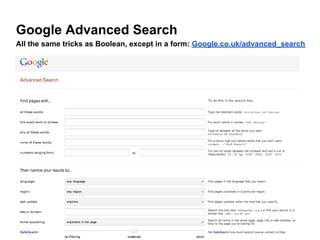
Google Advanced Search
All the same tricks as Boolean, except in a form: Google.co.uk/advanced_search
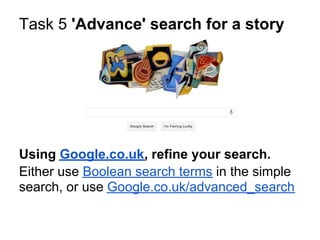
Task 5 'Advance' search for a story


Using Google.co.uk, refine your search.
Either use Boolean search terms in the simple
search, or use Google.co.uk/advanced_search
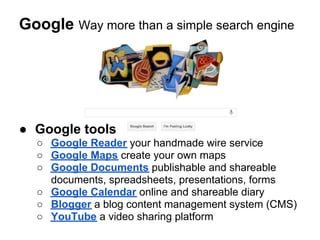
Google Way more than a simple search engine


● Google tools
  ○ Google Reader your handmade wire service
  ○ Google Maps create your own maps
  ○ Google Documents publishable and shareable
    documents, spreadsheets, presentations, forms
  ○ Google Calendar online and shareable diary
  ○ Blogger a blog content management system (CMS)
  ○ YouTube a video sharing platform
What is an RSS feed? really simple syndication
RSS tells subscribers when a
strand of posts updates without you
having to visit the specific website.
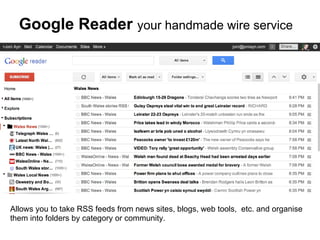
Google Reader your handmade wire service


Allows you to take RSS feeds from news sites, blogs, web tools, etc. and organise
them into folders by category or community.
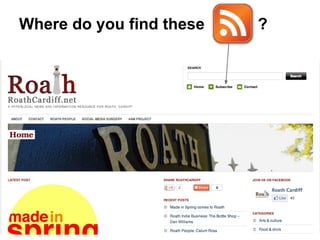
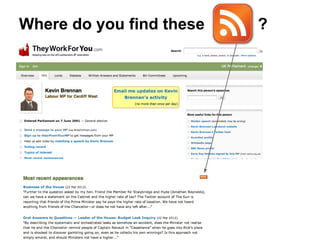
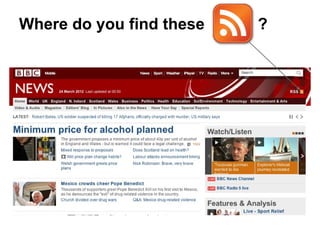
Where do you find these   ?
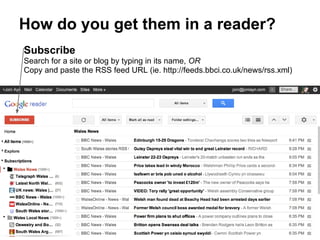
How do you get them in a reader?
Subscribe
Search for a site or blog by typing in its name, OR
Copy and paste the RSS feed URL (ie. http://feeds.bbci.co.uk/news/rss.xml)
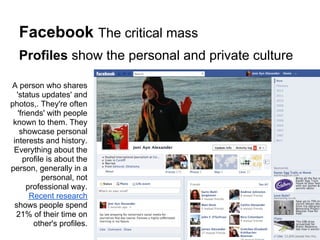
Facebook The critical mass
  Profiles show the personal and private culture

A person who shares
  'status updates' and
photos,. They're often
   'friends' with people
 known to them. They
    showcase personal
 interests and history.
 Everything about the
     profile is about the
person, generally in a
           personal, not
       professional way.
        Recent research
 shows people spend
  21% of their time on
         other's profiles.
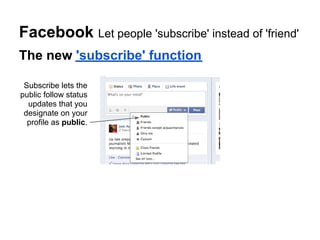
Facebook Let people 'subscribe' instead of 'friend'
The new 'subscribe' function

 Subscribe lets the
public follow status
  updates that you
 designate on your
  profile as public.
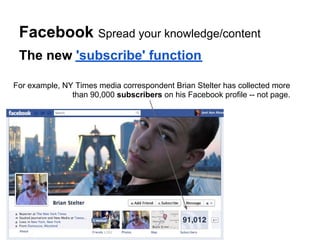
Facebook Spread your knowledge/content
 The new 'subscribe' function

For example, NY Times media correspondent Brian Stelter has collected more
               than 90,000 subscribers on his Facebook profile -- not page.
Facebook The critical mass
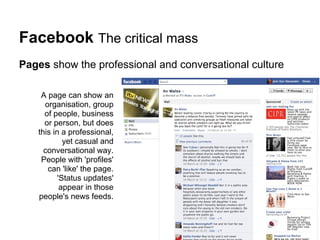
Pages show the professional and conversational culture

    A page can show an
     organisation, group
     of people, business
     or person, but does
   this in a professional,
            yet casual and
     conversational way.
    People with 'profiles'
      can 'like' the page.
          'Status updates'
           appear in those
   people's news feeds.
Facebook The critical mass
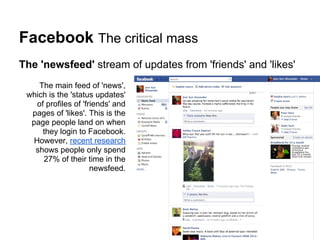
The 'newsfeed' stream of updates from 'friends' and 'likes'
     The main feed of 'news',
 which is the 'status updates'
    of profiles of 'friends' and
  pages of 'likes'. This is the
  page people land on when
      they login to Facebook.
   However, recent research
   shows people only spend
      27% of their time in the
                      newsfeed.
Task 6 Are your communities using
Facebook?
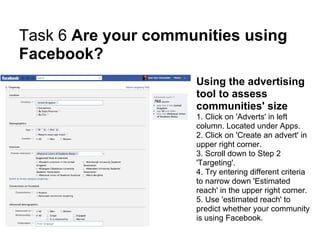
                     Using the advertising
                     tool to assess
                     communities' size
                     1. Click on 'Adverts' in left
                     column. Located under Apps.
                     2. Click on 'Create an advert' in
                     upper right corner.
                     3. Scroll down to Step 2
                     'Targeting'.
                     4. Try entering different criteria
                     to narrow down 'Estimated
                     reach' in the upper right corner.
                     5. Use 'estimated reach' to
                     predict whether your community
                     is using Facebook.
Task 7 Search for your story
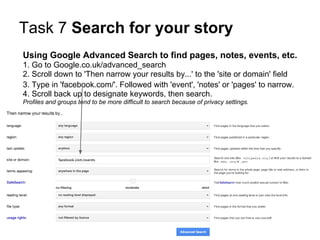
Using Google Advanced Search to find pages, notes, events, etc.
1. Go to Google.co.uk/advanced_search
2. Scroll down to 'Then narrow your results by...' to the 'site or domain' field
3. Type in 'facebook.com/'. Followed with 'event', 'notes' or 'pages' to narrow.
4. Scroll back up to designate keywords, then search.
Profiles and groups tend to be more difficult to search because of privacy settings.
Twitter The hacks, flacks, wackos, politicos + some regular joes...


The most public and immediate
social media space online.
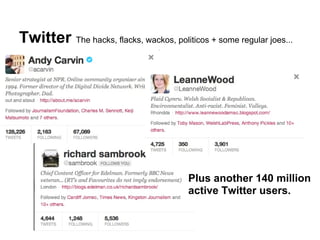
Twitter The hacks, flacks, wackos, politicos + some regular joes...


                                         Plus another 140 million
                                         active Twitter users.
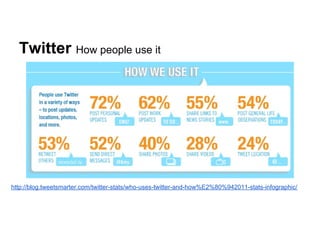
Twitter How people use it


http://blog.tweetsmarter.com/twitter-stats/who-uses-twitter-and-how%E2%80%942011-stats-infographic/
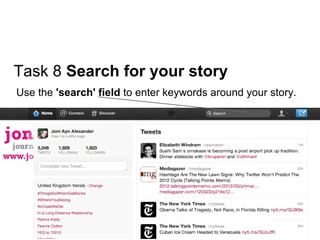
Task 8 Search for your story
Use the 'search' field to enter keywords around your story.
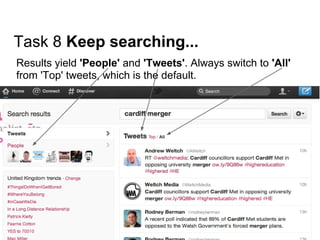
Task 8 Keep searching...
Results yield 'People' and 'Tweets'. Always switch to 'All'
from 'Top' tweets, which is the default.
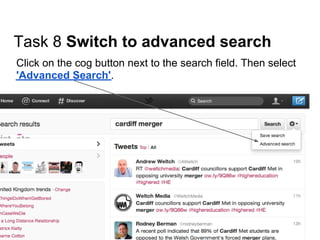
Task 8 Switch to advanced search
Click on the cog button next to the search field. Then select
'Advanced Search'.
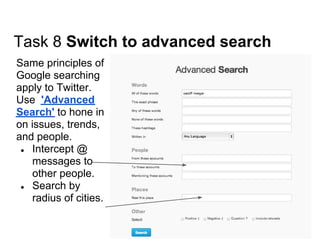
Task 8 Switch to advanced search
Same principles of
Google searching
apply to Twitter.
Use 'Advanced
Search' to hone in
on issues, trends,
and people.
 ● Intercept @
    messages to
    other people.
 ● Search by
    radius of cities.
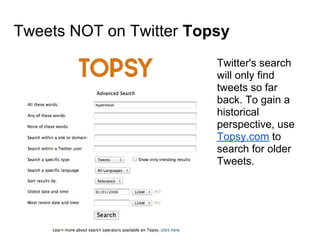
Tweets NOT on Twitter Topsy
                         Twitter's search
                         will only find
                         tweets so far
                         back. To gain a
                         historical
                         perspective, use
                         Topsy.com to
                         search for older
                         Tweets.
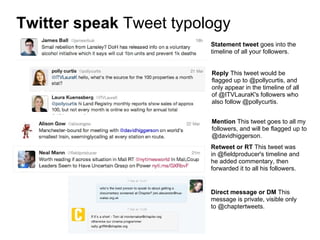
Twitter speak Tweet typology
                         Statement tweet goes into the
                         timeline of all your followers.


                         Reply This tweet would be
                         flagged up to @pollycurtis, and
                         only appear in the timeline of all
                         of @ITVLauraK's followers who
                         also follow @pollycurtis.


                         Mention This tweet goes to all my
                         followers, and will be flagged up to
                         @davidhiggerson.
                         Retweet or RT This tweet was
                         in @fieldproducer's timeline and
                         he added commentary, then
                         forwarded it to all his followers.


                         Direct message or DM This
                         message is private, visible only
                         to @chaptertweets.
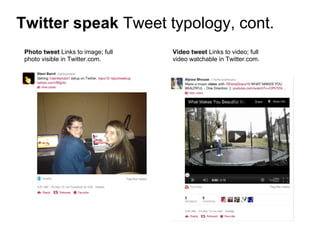
Twitter speak Tweet typology, cont.
 Photo tweet Links to image; full   Video tweet Links to video; full
 photo visible in Twitter.com.      video watchable in Twitter.com.
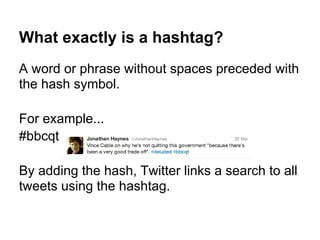
What exactly is a hashtag?
A word or phrase without spaces preceded with
the hash symbol.

For example...
#bbcqt

By adding the hash, Twitter links a search to all
tweets using the hashtag.
Can I make a hashtag?
Probably not.
● Hashtags are not usernames, like @joniayn.
● We can name ourselves, but not always the
  topics, trends and events up for discussion.

But, you can find out if there is a hashtag.
Task 9 Does your story have a hashtag?

Using the advanced search tool on Twitter.
com, find out if there are any existing
hashtags related to your story.
Why use a hashtag?

● Find relevant people and information.
● Join conversations with people you don't
  know who don't follow you.
● Spread your work and reputation to new
  people.
● Build your followers and extend the reach of
  your content.
BUT, hashtags are not for every tweet

● Don't put a hash symbol in front of every
  keyword.
● Don't make up a hashtag if...
  ○ the tweet is a one off on a topic, issue or event
  ○ you haven't ruled out that a hashtag already exists
  ○ the topic is unlikely to gain momentum in
      conversation and debate
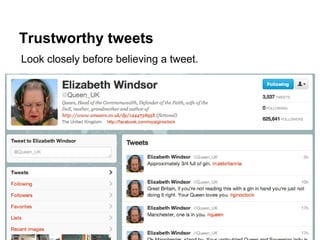
Trustworthy tweets
Look closely before believing a tweet.
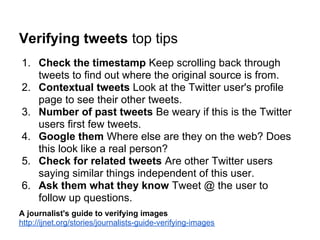
Verifying tweets top tips
1. Check the timestamp Keep scrolling back through
   tweets to find out where the original source is from.
2. Contextual tweets Look at the Twitter user's profile
   page to see their other tweets.
3. Number of past tweets Be weary if this is the Twitter
   users first few tweets.
4. Google them Where else are they on the web? Does
   this look like a real person?
5. Check for related tweets Are other Twitter users
   saying similar things independent of this user.
6. Ask them what they know Tweet @ the user to
   follow up questions.
A journalist's guide to verifying images
http://ijnet.org/stories/journalists-guide-verifying-images
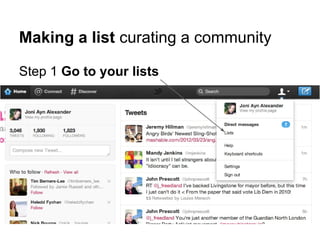
Making a list curating a community

Step 1 Go to your lists
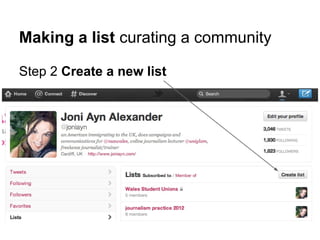
Making a list curating a community

Step 2 Create a new list
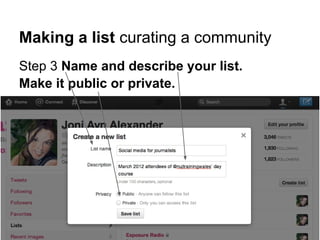
Making a list curating a community
Step 3 Name and describe your list.
Make it public or private.
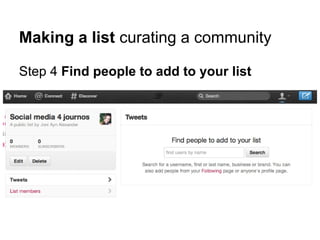
Making a list curating a community

Step 4 Find people to add to your list
Task 10 Curate a list for your story

Find at least five Twitter users to curate.
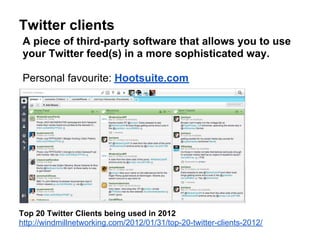
Twitter clients
 A piece of third-party software that allows you to use
 your Twitter feed(s) in a more sophisticated way.

 Personal favourite: Hootsuite.com


Top 20 Twitter Clients being used in 2012
http://windmillnetworking.com/2012/01/31/top-20-twitter-clients-2012/
1 hour for lunch...
Then a tour of the 'new' tools in the kit +
Reporting with social media

Your 'traditional' social media toolkit

  • 1.
    Your 'traditional' social media toolkit The old school tools in a new media space
  • 2.
    Google the skillof searching http://mashable.com/2011/11/24/google-search-infographic/
  • 3.
    Task 4 Searchfor your story Using Google.co.uk, begin searching for information related to your story idea.
  • 4.
    Google the skillof searching Boolean search terms in Google Phrase search ie. "Big society" Searches for the phrase rather than the two words. SIngle word search ie. "bicycle" Searches for exact word, excluding synonyms. Site search ie. site:walesonline.co.uk Searches only within that site. File type search ie filetype:doc Searches only that type of file, including .xls, .pdf, .csv AND search ie. welsh AND education Searches all pages with both words OR search ie. wales OR welsh Searches all pages with either word. Exclude word(s) search ie. Jazz -Utah -basketball Searches pages for jazz without the words Utah or basketball.
  • 5.
    Google Advanced Search Allthe same tricks as Boolean, except in a form: Google.co.uk/advanced_search
  • 6.
    Task 5 'Advance'search for a story Using Google.co.uk, refine your search. Either use Boolean search terms in the simple search, or use Google.co.uk/advanced_search
  • 7.
    Google Way morethan a simple search engine ● Google tools ○ Google Reader your handmade wire service ○ Google Maps create your own maps ○ Google Documents publishable and shareable documents, spreadsheets, presentations, forms ○ Google Calendar online and shareable diary ○ Blogger a blog content management system (CMS) ○ YouTube a video sharing platform
  • 8.
    What is anRSS feed? really simple syndication RSS tells subscribers when a strand of posts updates without you having to visit the specific website.
  • 9.
    Google Reader yourhandmade wire service Allows you to take RSS feeds from news sites, blogs, web tools, etc. and organise them into folders by category or community.
  • 10.
    Where do youfind these ?
  • 11.
    Where do youfind these ?
  • 12.
    Where do youfind these ?
  • 13.
    How do youget them in a reader? Subscribe Search for a site or blog by typing in its name, OR Copy and paste the RSS feed URL (ie. http://feeds.bbci.co.uk/news/rss.xml)
  • 14.
    Facebook The criticalmass Profiles show the personal and private culture A person who shares 'status updates' and photos,. They're often 'friends' with people known to them. They showcase personal interests and history. Everything about the profile is about the person, generally in a personal, not professional way. Recent research shows people spend 21% of their time on other's profiles.
  • 15.
    Facebook Let people'subscribe' instead of 'friend' The new 'subscribe' function Subscribe lets the public follow status updates that you designate on your profile as public.
  • 16.
    Facebook Spread yourknowledge/content The new 'subscribe' function For example, NY Times media correspondent Brian Stelter has collected more than 90,000 subscribers on his Facebook profile -- not page.
  • 17.
    Facebook The criticalmass Pages show the professional and conversational culture A page can show an organisation, group of people, business or person, but does this in a professional, yet casual and conversational way. People with 'profiles' can 'like' the page. 'Status updates' appear in those people's news feeds.
  • 18.
    Facebook The criticalmass The 'newsfeed' stream of updates from 'friends' and 'likes' The main feed of 'news', which is the 'status updates' of profiles of 'friends' and pages of 'likes'. This is the page people land on when they login to Facebook. However, recent research shows people only spend 27% of their time in the newsfeed.
  • 19.
    Task 6 Areyour communities using Facebook? Using the advertising tool to assess communities' size 1. Click on 'Adverts' in left column. Located under Apps. 2. Click on 'Create an advert' in upper right corner. 3. Scroll down to Step 2 'Targeting'. 4. Try entering different criteria to narrow down 'Estimated reach' in the upper right corner. 5. Use 'estimated reach' to predict whether your community is using Facebook.
  • 20.
    Task 7 Searchfor your story Using Google Advanced Search to find pages, notes, events, etc. 1. Go to Google.co.uk/advanced_search 2. Scroll down to 'Then narrow your results by...' to the 'site or domain' field 3. Type in 'facebook.com/'. Followed with 'event', 'notes' or 'pages' to narrow. 4. Scroll back up to designate keywords, then search. Profiles and groups tend to be more difficult to search because of privacy settings.
  • 21.
    Twitter The hacks,flacks, wackos, politicos + some regular joes... The most public and immediate social media space online.
  • 22.
    Twitter The hacks,flacks, wackos, politicos + some regular joes... Plus another 140 million active Twitter users.
  • 23.
    Twitter How peopleuse it http://blog.tweetsmarter.com/twitter-stats/who-uses-twitter-and-how%E2%80%942011-stats-infographic/
  • 24.
    Task 8 Searchfor your story Use the 'search' field to enter keywords around your story.
  • 25.
    Task 8 Keepsearching... Results yield 'People' and 'Tweets'. Always switch to 'All' from 'Top' tweets, which is the default.
  • 26.
    Task 8 Switchto advanced search Click on the cog button next to the search field. Then select 'Advanced Search'.
  • 27.
    Task 8 Switchto advanced search Same principles of Google searching apply to Twitter. Use 'Advanced Search' to hone in on issues, trends, and people. ● Intercept @ messages to other people. ● Search by radius of cities.
  • 28.
    Tweets NOT onTwitter Topsy Twitter's search will only find tweets so far back. To gain a historical perspective, use Topsy.com to search for older Tweets.
  • 29.
    Twitter speak Tweettypology Statement tweet goes into the timeline of all your followers. Reply This tweet would be flagged up to @pollycurtis, and only appear in the timeline of all of @ITVLauraK's followers who also follow @pollycurtis. Mention This tweet goes to all my followers, and will be flagged up to @davidhiggerson. Retweet or RT This tweet was in @fieldproducer's timeline and he added commentary, then forwarded it to all his followers. Direct message or DM This message is private, visible only to @chaptertweets.
  • 30.
    Twitter speak Tweettypology, cont. Photo tweet Links to image; full Video tweet Links to video; full photo visible in Twitter.com. video watchable in Twitter.com.
  • 31.
    What exactly isa hashtag? A word or phrase without spaces preceded with the hash symbol. For example... #bbcqt By adding the hash, Twitter links a search to all tweets using the hashtag.
  • 32.
    Can I makea hashtag? Probably not. ● Hashtags are not usernames, like @joniayn. ● We can name ourselves, but not always the topics, trends and events up for discussion. But, you can find out if there is a hashtag.
  • 33.
    Task 9 Doesyour story have a hashtag? Using the advanced search tool on Twitter. com, find out if there are any existing hashtags related to your story.
  • 34.
    Why use ahashtag? ● Find relevant people and information. ● Join conversations with people you don't know who don't follow you. ● Spread your work and reputation to new people. ● Build your followers and extend the reach of your content.
  • 35.
    BUT, hashtags arenot for every tweet ● Don't put a hash symbol in front of every keyword. ● Don't make up a hashtag if... ○ the tweet is a one off on a topic, issue or event ○ you haven't ruled out that a hashtag already exists ○ the topic is unlikely to gain momentum in conversation and debate
  • 36.
    Trustworthy tweets Look closelybefore believing a tweet.
  • 37.
    Verifying tweets toptips 1. Check the timestamp Keep scrolling back through tweets to find out where the original source is from. 2. Contextual tweets Look at the Twitter user's profile page to see their other tweets. 3. Number of past tweets Be weary if this is the Twitter users first few tweets. 4. Google them Where else are they on the web? Does this look like a real person? 5. Check for related tweets Are other Twitter users saying similar things independent of this user. 6. Ask them what they know Tweet @ the user to follow up questions. A journalist's guide to verifying images http://ijnet.org/stories/journalists-guide-verifying-images
  • 38.
    Making a listcurating a community Step 1 Go to your lists
  • 39.
    Making a listcurating a community Step 2 Create a new list
  • 40.
    Making a listcurating a community Step 3 Name and describe your list. Make it public or private.
  • 41.
    Making a listcurating a community Step 4 Find people to add to your list
  • 42.
    Task 10 Curatea list for your story Find at least five Twitter users to curate.
  • 43.
    Twitter clients Apiece of third-party software that allows you to use your Twitter feed(s) in a more sophisticated way. Personal favourite: Hootsuite.com Top 20 Twitter Clients being used in 2012 http://windmillnetworking.com/2012/01/31/top-20-twitter-clients-2012/
  • 44.
    1 hour forlunch... Then a tour of the 'new' tools in the kit + Reporting with social media