Session IV:
                Beginning Social Media


       Professional Certificate in Digital & Social Media
Instructor: Yadira Galindo         galindoyadira@gmail.com
                                                             1
Session IV Overview


                      2
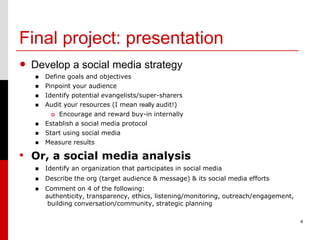
Final project: presentation
• Develop a social media strategy
      Define goals and objectives
      Pinpoint your audience
      Identify potential evangelists/super-sharers
      Audit your resources (I mean really audit!)
           Encourage and reward buy-in internally
      Establish a social media protocol
      Start using social media
      Measure results

• Or, a social media analysis
      Identify an organization that participates in social media
      Describe the org (target audience & message) & its social media efforts
      Comment on 4 of the following:
       authenticity, transparency, ethics, listening/monitoring, outreach/engagement,
        building conversation/community, strategic planning

                                                                                        4
Social Media 101: Instagram
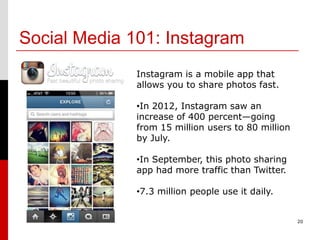
              Instagram is a mobile app that
              allows you to share photos fast.

              •In 2012, Instagram saw an
              increase of 400 percent—going
              from 15 million users to 80 million
              by July.

              •In September, this photo sharing
              app had more traffic than Twitter.

              •7.3 million people use it daily.


                                                    20
Social Media 101: Instagram
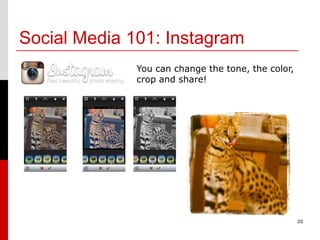
              You can change the tone, the color,
              crop and share!


                                                    20
Social Media 101: Instagram
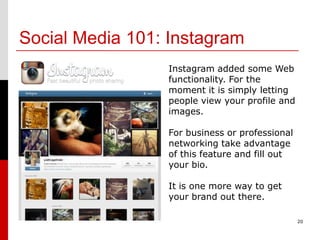
                 Instagram added some Web
                 functionality. For the
                 moment it is simply letting
                 people view your profile and
                 images.

                 For business or professional
                 networking take advantage
                 of this feature and fill out
                 your bio.

                 It is one more way to get
                 your brand out there.

                                                20
Social Media 101: Instagram

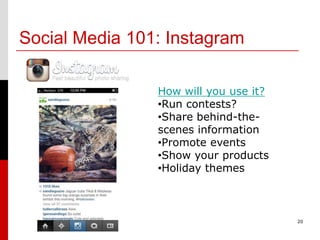
                How will you use it?
                •Run contests?
                •Share behind-the-
                scenes information
                •Promote events
                •Show your products
                •Holiday themes


                                       20
Social Media 101: Others

     •Flickr
     •Yelp
     •Skype
     •Foursquare
     •Blogs:
     WordPress, Tumblr, Posterous
     •MySpace -- really?!
     •And many, many more!


                                    20
Social Media 101: Social Media Crisis
  Have an angry customer using social media to
  air grievances? Here is what to do:
  1. Respond quickly, but only with facts or
      approval to make good on problem
  2. Respond as you would someone you are
      “talking” with, not robotic
  3. Don’t be defensive
  4. Send a direct/private message if
      appropriate
  5. Reach out through the social media
      channel used

            SOURCE: http://www.lifehealthpro.com/2012/11/19/5-steps-to-combat-your-worst-social-   20
            media-pr-night?t=annuity-sales-strategies&utm_source=buffer&buffer_share=87d04
Social Media 101: Social Media Crisis
Sprint wireless
Situation: It’s Black Friday and Sprint is offering a dynamite and
highly marketed deal on three Samsung phones, including one of the
leading ones on the market. Demand is high causing its website to
crash and phone lines are tied up. Customers are upset and saying it.
Sprint Michael Adsit Jr - With such a hot deal the webpage is extremely busy. I really appreciate your patience with the site.
Please don't hesitate to let me know if you have any further questions and I'll be happy to help as much as I can. I sincerely
hope your friend's dad gets better soon, he is in my thoughts! *Ben

Sprint Letitia Monsey - I'm sorry about the issues with sprint.com. Were you able to get your order processed? Also, for the
activation fee wavier, was this a new line of service or an upgrade? Please let me know and I can help you complete the order
if need be. Thank you *KC

Jeff Teamdeadlyhertz Lockhart Thats BS, you just tried and got through? Are you kidding me, I have been trying non stop
now since 3PM eastern and every time I get an error...now I get this message that you all are enhancing the site...how is it
you just get through? I have been with Nextel since 1998 and with Sprint ever since the merger, with 4 lines on my account.
If I cant get through in the next 15 minutes. Me and my 4 lines wont be a Sprint issue anymore. This is crazy

Michael Howard Schine Turned away at store because they are sold out. Called 800SPRINT1 on the flyer; they are closed.
Tried sprint.com/holiday, but the purchase section is temporarily unavailable. Tried 8668667509, told 15 minutes wait and
press "1" to hold, received a rapid busy signal. Store implied offer is limited quanities. Seems like Sprint, a
telecommunication company, does not have telecommunication capability to handle current customers. Very disappointed.

Sprint Kasey Ann - I'm here for you! I would need to look at your account to check for the order. Can you please email me
your phone#, PIN and any order details you are willing to provide to Sprintcares@sprint.com Attn:KC. I want to get to the 20
bottom of this for you. Thank you *KC
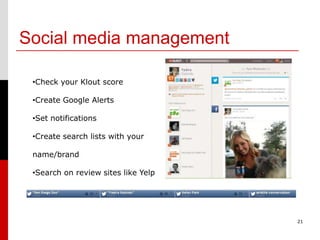
Social media management

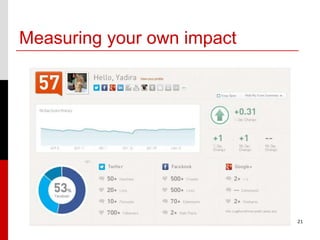
 •Check your Klout score

 •Create Google Alerts

 •Set notifications

 •Create search lists with your

 name/brand

 •Search on review sites like Yelp


                                     21
Measuring your own impact


                            21
Managing multiple profiles


               Vs.


   Hootsuite          TweetDeck

                                  21
Managing multiple profiles
             Hootsuite
             •Manage multiple social profiles
             •Schedule messages
             •Track brand mentions
             •Analyze social media impact
             •Create and monitor lists, search terms


                                                       21
Class Review


               2
More than a wallflower:
Engagement & quality content
    Define goals and objectives
    Pinpoint your audience
    Identify potential evangelists/super-sharers
    Audit your resources (I mean really audit!)
       Encourage and reward buy-in internally
    Establish a social media protocol and strategy
    Start using social media
         Post photos, video and other original content
    Measure results

                                     From How the heck do I start building a social
                                     media marketing strategy?, Green Buzz Agency


                                                                                      4
Social Media 101: Facebook
DO’s
1. Use video
2. Use original photos
3. Post links that brand you
4. Post content from other
   reliable sources                   It’s your brand/name.
                                      Protect it. Promote it.
                                      Have fun.
Don’ts
1. Inappropriate photos        Not seeing notifications from Pages
2. Confessionals               you’ve “Liked”?
3. Risky behaviors             To ensure that you're receiving timely
4. Talk bad about your         updates place your cursor over the
                               LIKED button on the Facebook page and
   employer                    click on GET NOTIFICATIONS. You will be
                               notified of new posts!                    20
Social Media 101: Google+
         • It’s got a long way to go before it can rival
            the likes of Facebook, but don’t discount it.
            Keep an eye on it.
         • Earlier this year, it reported 100 million
            users and 60 percent daily engagement.
         • As of February, Google+ users are only
            spending 3.3 minutes monthly and trending
            down. By comparison, Facebook users
            currently spending 7.5 hours using monthly.
         • If you use it, it can benefit your SEO.
         • Hangouts and Circles are its best features.


                                                            15
Social Media 101: LinkedIn
         • The world’s largest professional social network.
         • It isn’t just for people looking for a job. It is for
            people who want to network.
         • Great place to learn more about potential
            clients, customers and sources if you’re a
            reporter.
         • Good way to keep up with what the industry is
            doing and news relevant to your business.
         • What tools are other like-minded professionals
            or businesses using?
         • You’re more likely to be accepted as a contact
            here than on Facebook if you are “cold-calling”
            someone you have never met.
         • Make sure to use a professional photo and
            complete as much of your online profile as
            possible to brand yourself.                            15

         • Join groups.
Social Media 101: Pinterest
         • Fastest growing social network ever. Site had
            11.7 million unique U.S. visitors in Jan.
            2012, making it the fastest site ever to break
            through the 10 million unique visitor mark.
         • It’s not for everyone, but since it’s growing by
            leaps and bounds. Play with it. Find out if your
            audience is using it.
         • Popular with American women and, in 2012, it
            was reported that 83% of the U.S. users were
            women.
         • You need lots of good quality photos and video.
         • Don’t just share your content. Repin other
            people’s content also.
         • Great for contests.

                                                               15

Bsm wk iv_f12

  • 1.
    Session IV: Beginning Social Media Professional Certificate in Digital & Social Media Instructor: Yadira Galindo galindoyadira@gmail.com 1
  • 2.
  • 3.
    Final project: presentation •Develop a social media strategy  Define goals and objectives  Pinpoint your audience  Identify potential evangelists/super-sharers  Audit your resources (I mean really audit!)  Encourage and reward buy-in internally  Establish a social media protocol  Start using social media  Measure results • Or, a social media analysis  Identify an organization that participates in social media  Describe the org (target audience & message) & its social media efforts  Comment on 4 of the following: authenticity, transparency, ethics, listening/monitoring, outreach/engagement, building conversation/community, strategic planning 4
  • 4.
    Social Media 101:Instagram Instagram is a mobile app that allows you to share photos fast. •In 2012, Instagram saw an increase of 400 percent—going from 15 million users to 80 million by July. •In September, this photo sharing app had more traffic than Twitter. •7.3 million people use it daily. 20
  • 5.
    Social Media 101:Instagram You can change the tone, the color, crop and share! 20
  • 6.
    Social Media 101:Instagram Instagram added some Web functionality. For the moment it is simply letting people view your profile and images. For business or professional networking take advantage of this feature and fill out your bio. It is one more way to get your brand out there. 20
  • 7.
    Social Media 101:Instagram How will you use it? •Run contests? •Share behind-the- scenes information •Promote events •Show your products •Holiday themes 20
  • 8.
    Social Media 101:Others •Flickr •Yelp •Skype •Foursquare •Blogs: WordPress, Tumblr, Posterous •MySpace -- really?! •And many, many more! 20
  • 9.
    Social Media 101:Social Media Crisis Have an angry customer using social media to air grievances? Here is what to do: 1. Respond quickly, but only with facts or approval to make good on problem 2. Respond as you would someone you are “talking” with, not robotic 3. Don’t be defensive 4. Send a direct/private message if appropriate 5. Reach out through the social media channel used SOURCE: http://www.lifehealthpro.com/2012/11/19/5-steps-to-combat-your-worst-social- 20 media-pr-night?t=annuity-sales-strategies&utm_source=buffer&buffer_share=87d04
  • 10.
    Social Media 101:Social Media Crisis Sprint wireless Situation: It’s Black Friday and Sprint is offering a dynamite and highly marketed deal on three Samsung phones, including one of the leading ones on the market. Demand is high causing its website to crash and phone lines are tied up. Customers are upset and saying it. Sprint Michael Adsit Jr - With such a hot deal the webpage is extremely busy. I really appreciate your patience with the site. Please don't hesitate to let me know if you have any further questions and I'll be happy to help as much as I can. I sincerely hope your friend's dad gets better soon, he is in my thoughts! *Ben Sprint Letitia Monsey - I'm sorry about the issues with sprint.com. Were you able to get your order processed? Also, for the activation fee wavier, was this a new line of service or an upgrade? Please let me know and I can help you complete the order if need be. Thank you *KC Jeff Teamdeadlyhertz Lockhart Thats BS, you just tried and got through? Are you kidding me, I have been trying non stop now since 3PM eastern and every time I get an error...now I get this message that you all are enhancing the site...how is it you just get through? I have been with Nextel since 1998 and with Sprint ever since the merger, with 4 lines on my account. If I cant get through in the next 15 minutes. Me and my 4 lines wont be a Sprint issue anymore. This is crazy Michael Howard Schine Turned away at store because they are sold out. Called 800SPRINT1 on the flyer; they are closed. Tried sprint.com/holiday, but the purchase section is temporarily unavailable. Tried 8668667509, told 15 minutes wait and press "1" to hold, received a rapid busy signal. Store implied offer is limited quanities. Seems like Sprint, a telecommunication company, does not have telecommunication capability to handle current customers. Very disappointed. Sprint Kasey Ann - I'm here for you! I would need to look at your account to check for the order. Can you please email me your phone#, PIN and any order details you are willing to provide to Sprintcares@sprint.com Attn:KC. I want to get to the 20 bottom of this for you. Thank you *KC
  • 11.
    Social media management •Check your Klout score •Create Google Alerts •Set notifications •Create search lists with your name/brand •Search on review sites like Yelp 21
  • 12.
  • 13.
    Managing multiple profiles Vs. Hootsuite TweetDeck 21
  • 14.
    Managing multiple profiles Hootsuite •Manage multiple social profiles •Schedule messages •Track brand mentions •Analyze social media impact •Create and monitor lists, search terms 21
  • 15.
  • 16.
    More than awallflower: Engagement & quality content  Define goals and objectives  Pinpoint your audience  Identify potential evangelists/super-sharers  Audit your resources (I mean really audit!)  Encourage and reward buy-in internally  Establish a social media protocol and strategy  Start using social media  Post photos, video and other original content  Measure results From How the heck do I start building a social media marketing strategy?, Green Buzz Agency 4
  • 17.
    Social Media 101:Facebook DO’s 1. Use video 2. Use original photos 3. Post links that brand you 4. Post content from other reliable sources It’s your brand/name. Protect it. Promote it. Have fun. Don’ts 1. Inappropriate photos Not seeing notifications from Pages 2. Confessionals you’ve “Liked”? 3. Risky behaviors To ensure that you're receiving timely 4. Talk bad about your updates place your cursor over the LIKED button on the Facebook page and employer click on GET NOTIFICATIONS. You will be notified of new posts! 20
  • 18.
    Social Media 101:Google+ • It’s got a long way to go before it can rival the likes of Facebook, but don’t discount it. Keep an eye on it. • Earlier this year, it reported 100 million users and 60 percent daily engagement. • As of February, Google+ users are only spending 3.3 minutes monthly and trending down. By comparison, Facebook users currently spending 7.5 hours using monthly. • If you use it, it can benefit your SEO. • Hangouts and Circles are its best features. 15
  • 19.
    Social Media 101:LinkedIn • The world’s largest professional social network. • It isn’t just for people looking for a job. It is for people who want to network. • Great place to learn more about potential clients, customers and sources if you’re a reporter. • Good way to keep up with what the industry is doing and news relevant to your business. • What tools are other like-minded professionals or businesses using? • You’re more likely to be accepted as a contact here than on Facebook if you are “cold-calling” someone you have never met. • Make sure to use a professional photo and complete as much of your online profile as possible to brand yourself. 15 • Join groups.
  • 20.
    Social Media 101:Pinterest • Fastest growing social network ever. Site had 11.7 million unique U.S. visitors in Jan. 2012, making it the fastest site ever to break through the 10 million unique visitor mark. • It’s not for everyone, but since it’s growing by leaps and bounds. Play with it. Find out if your audience is using it. • Popular with American women and, in 2012, it was reported that 83% of the U.S. users were women. • You need lots of good quality photos and video. • Don’t just share your content. Repin other people’s content also. • Great for contests. 15