Making Twitter Your
News Wire
        1) Overall strategy
        2) Finding people
        3) Building lists
        4) Creating good searches
Your Overall Strategy:
Go from general to specific
Start by following broad topics and people…
Check in on these on a regular basis. They will be your
daily news digest and your early warning system.

When something catches your eye, filter down to follow
that topic more closely…
Use lists and advanced searches to get more specific in
what you’re tracking.
Making people your
   newswire…
To recap:
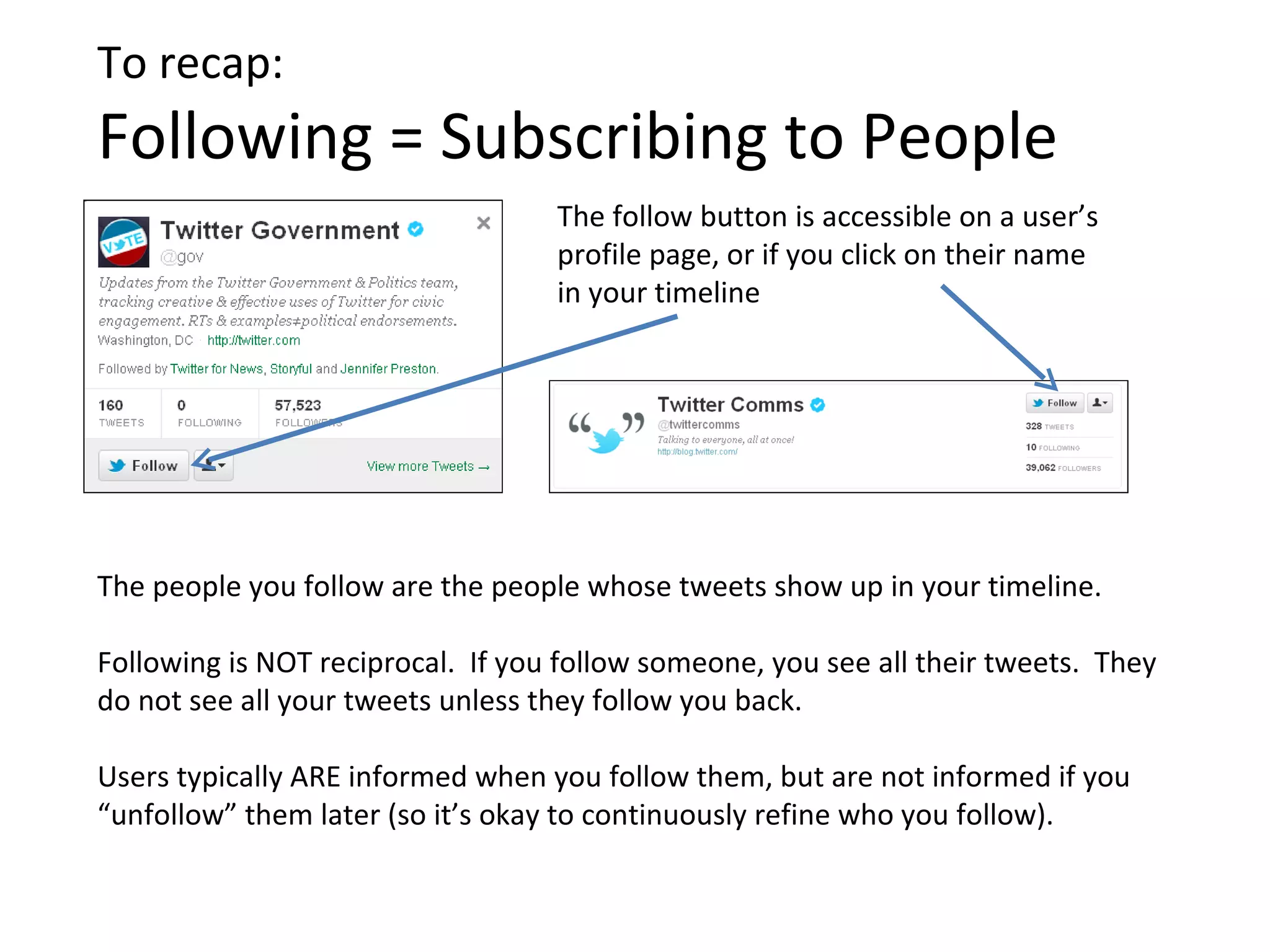
Following = Subscribing to People
                                   The follow button is accessible on a user’s
                                   profile page, or if you click on their name
                                   in your timeline


The people you follow are the people whose tweets show up in your timeline.

Following is NOT reciprocal. If you follow someone, you see all their tweets. They
do not see all your tweets unless they follow you back.

Users typically ARE informed when you follow them, but are not informed if you
“unfollow” them later (so it’s okay to continuously refine who you follow).
Start by following people you trust…

Use Twitter’s search bar to find people and organizations you already know are
useful or already rely on.

                                Try: current sources, other journalists, major
                                news organizations, NGOs


You’ll probably find you end up getting more value out of people than
organizations – people tend to be better curators than companies.
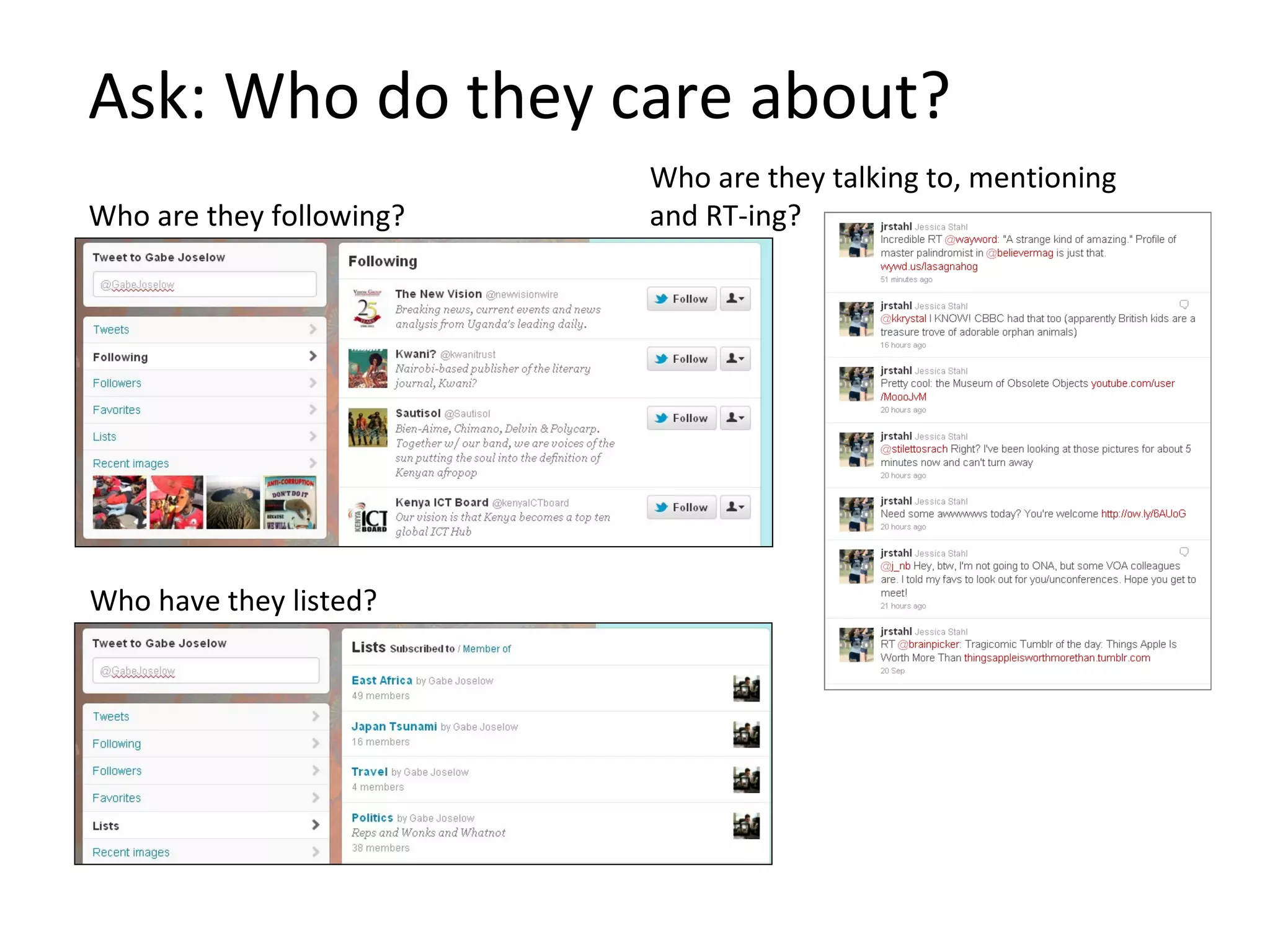
Ask: Who do they care about?
                          Who are they talking to, mentioning
Who are they following?   and RT-ing?


Who have they listed?
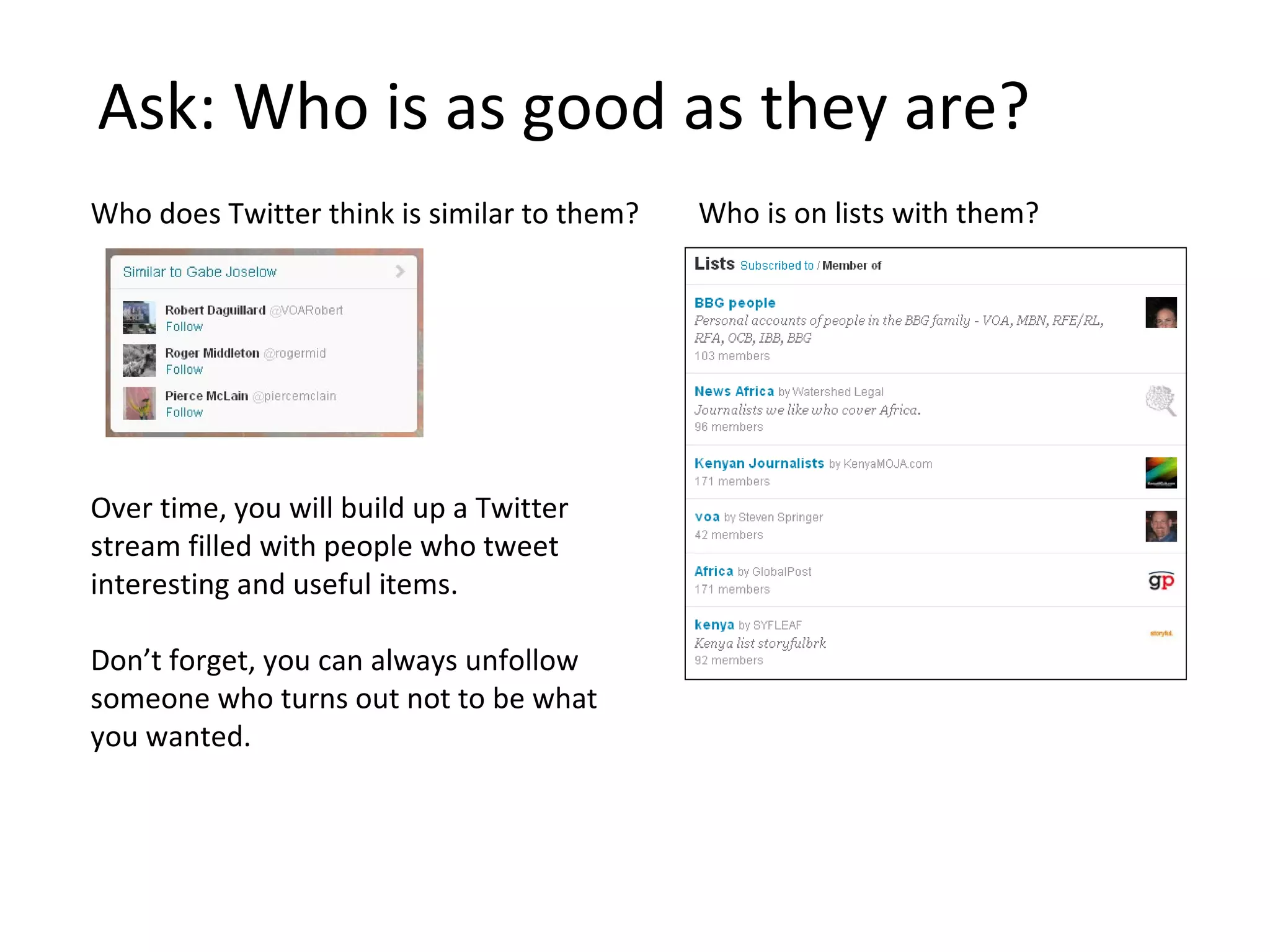
Ask: Who is as good as they are?
Who does Twitter think is similar to them?   Who is on lists with them?


Over time, you will build up a Twitter
stream filled with people who tweet
interesting and useful items.

Don’t forget, you can always unfollow
someone who turns out not to be what
you wanted.
Cues For Evaluating Authority
Is this person worth following? Or even who they say they are?

  How many tweets has this person sent?
  Have they been on Twitter a while or did they just set up this account to tweet
  about one single event?
  Number of followers and ratio of followers to following:
  A legitimate Twitter account will have more followers than following or
  approximately 1:1.
  Is this person often retweeted and @mentioned?
  Do a Twitter search for @username to see if anyone else is paying attention to
  what they say.
  Has this person been listed by others?
  Lists are a symbol of trust.
  Can you tell where this person is located?
  Look at their bio and any geo information on their tweets. Make sure this
  information is consistent over time and they haven’t just written a location to
  coincide with major events.
                                              More tips:
                                              http://irevolution.net/2011/06/21/information-forensics/
Use lists to create specialized streams
Lists let you curate users into categories,
and then view their tweets in a separate
stream.*


                                              *You don’t have to follow
                                              someone to put them in a list


Access your lists from your profile
page or from your head icon
Or follow lists curated by others
Why reinvent the wheel when you can piggyback on the work others have done
to find and filter Twitter users?
Making search your
   newswire…
To recap:
Search = Find Tweets by Keyword
                                 Search for tweets, people, and media using
                                 the search bar at the top of the screen.


    Toggle between “Top” and “All” to see what the most important Twitter
    users are saying and what everyone is saying.
To recap:
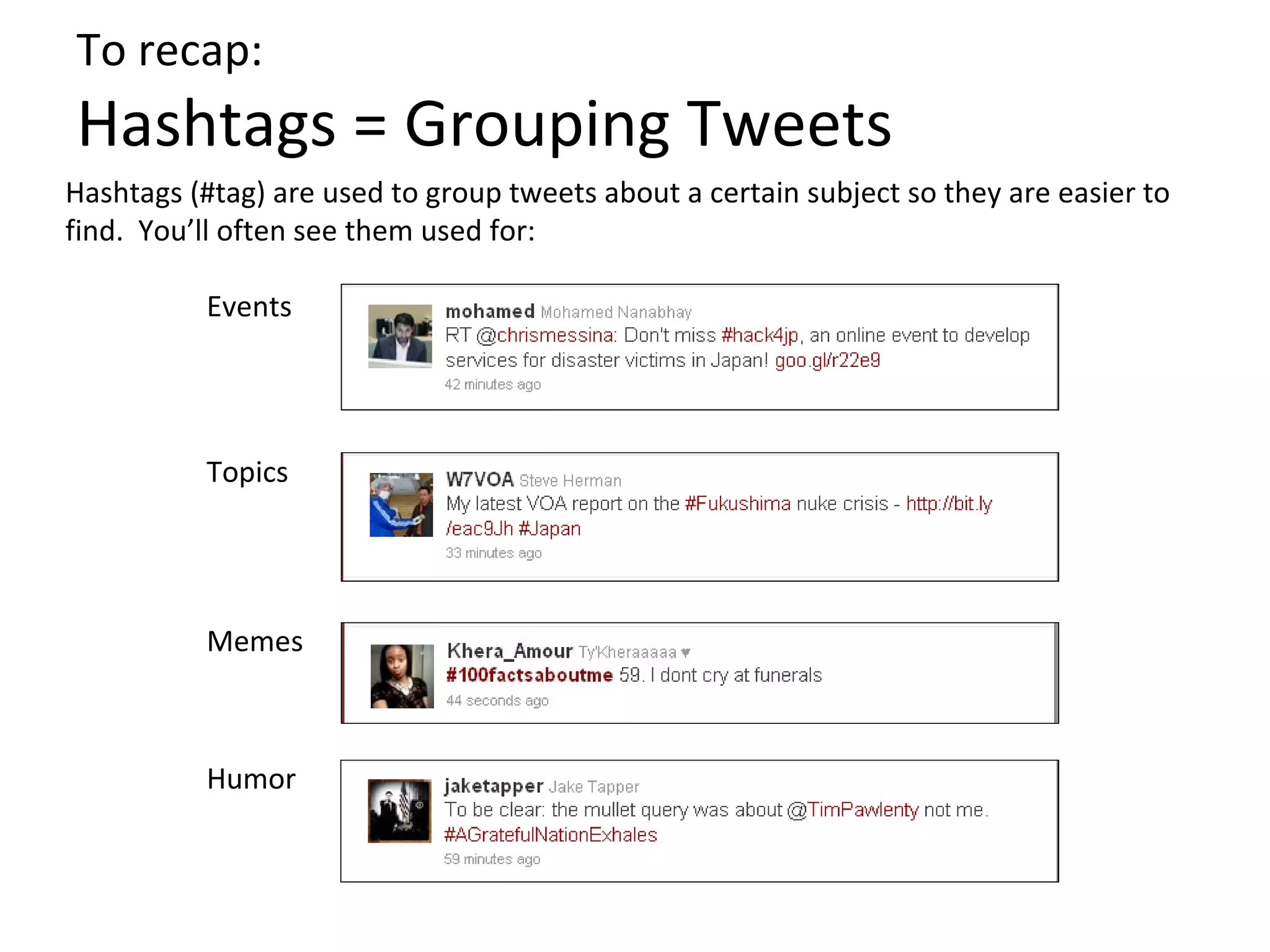
Hashtags = Grouping Tweets
Hashtags (#tag) are used to group tweets about a certain subject so they are easier to
find. You’ll often see them used for:

          Events


          Topics


          Memes


          Humor
To recap:
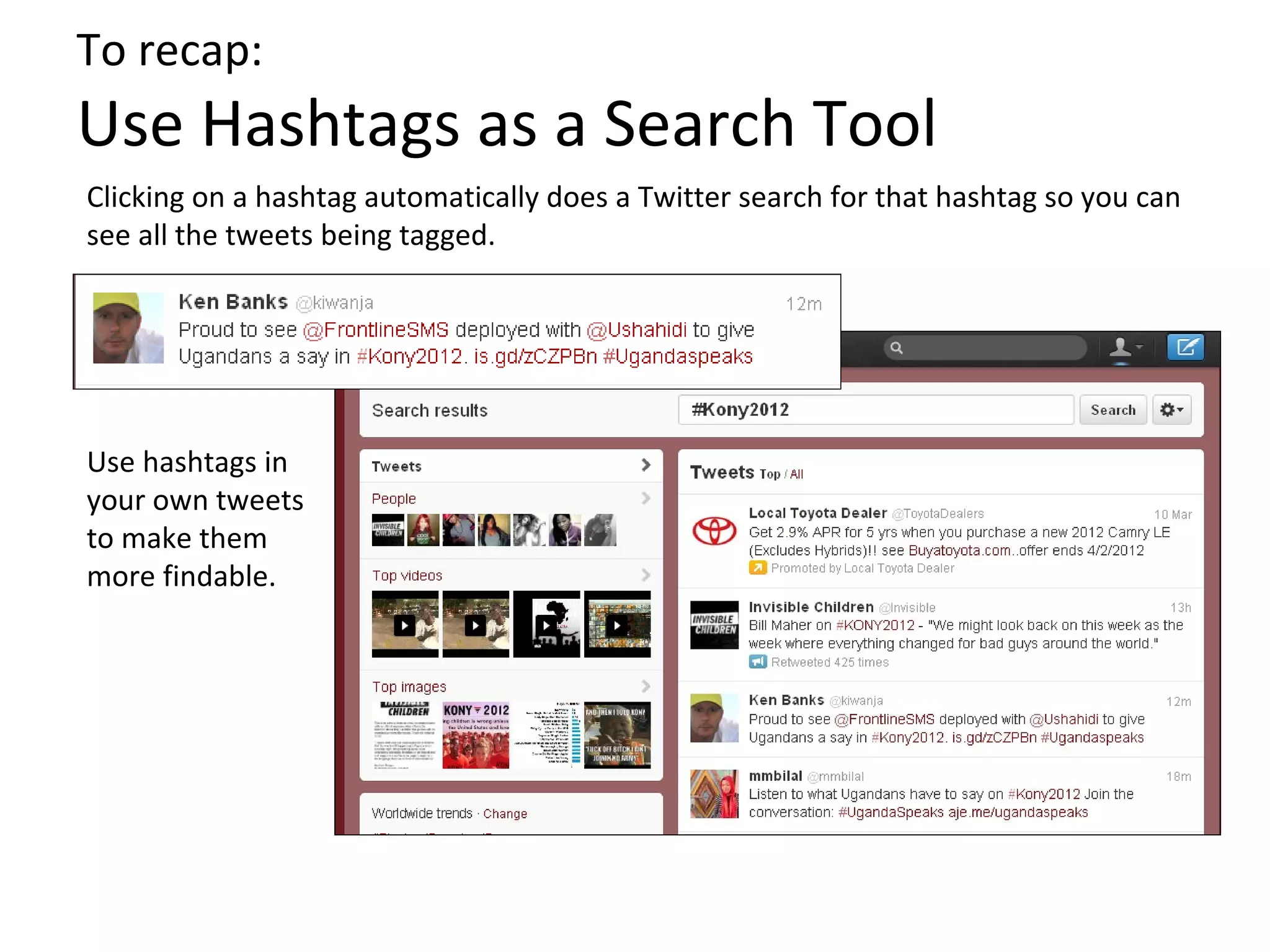
Use Hashtags as a Search Tool
Clicking on a hashtag automatically does a Twitter search for that hashtag so you can
see all the tweets being tagged.


Use hashtags in
your own tweets
to make them
more findable.
Save searches to track them over time


Return to any of your saved searches by
clicking on the search bar at the top of
the screen. You will see the most recent
results for that search.
Go advanced for better results


Once you’ve done your search,
click “Advanced search.”

Now you can exclude terms, see
tweets only in a certain language,
search by location, etc.
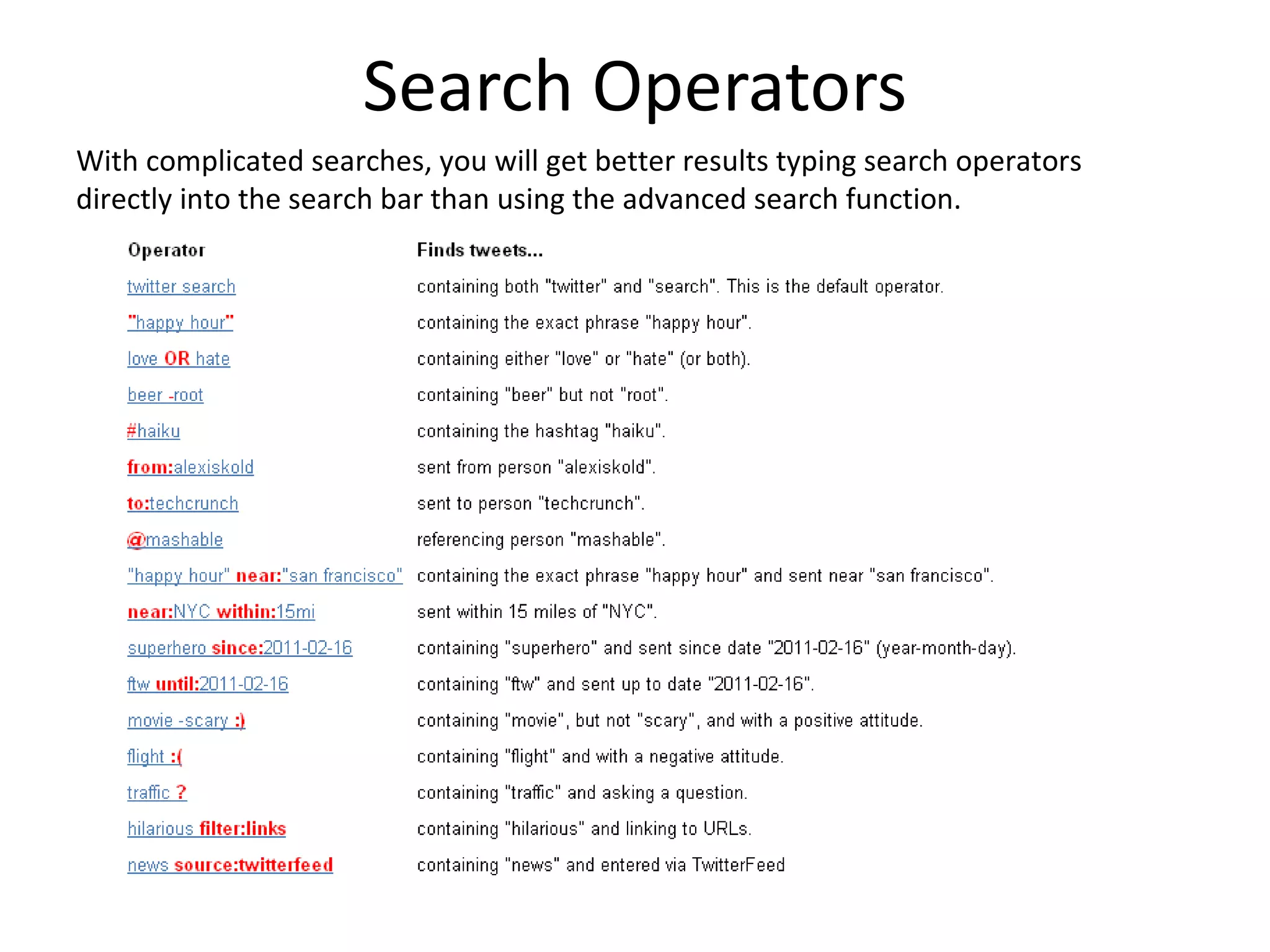
Search Operators
With complicated searches, you will get better results typing search operators
directly into the search bar than using the advanced search function.
Or use an outside search engine
Twitter search only goes back a few days. Try Topsy
(topsy.com) to search older tweets.


                            More websites to try:
                            http://blog.tweetsmarter.com/twitter-search/10-ways-
                            and-20-features-for-searching-old-tweets/
Bring it all together…
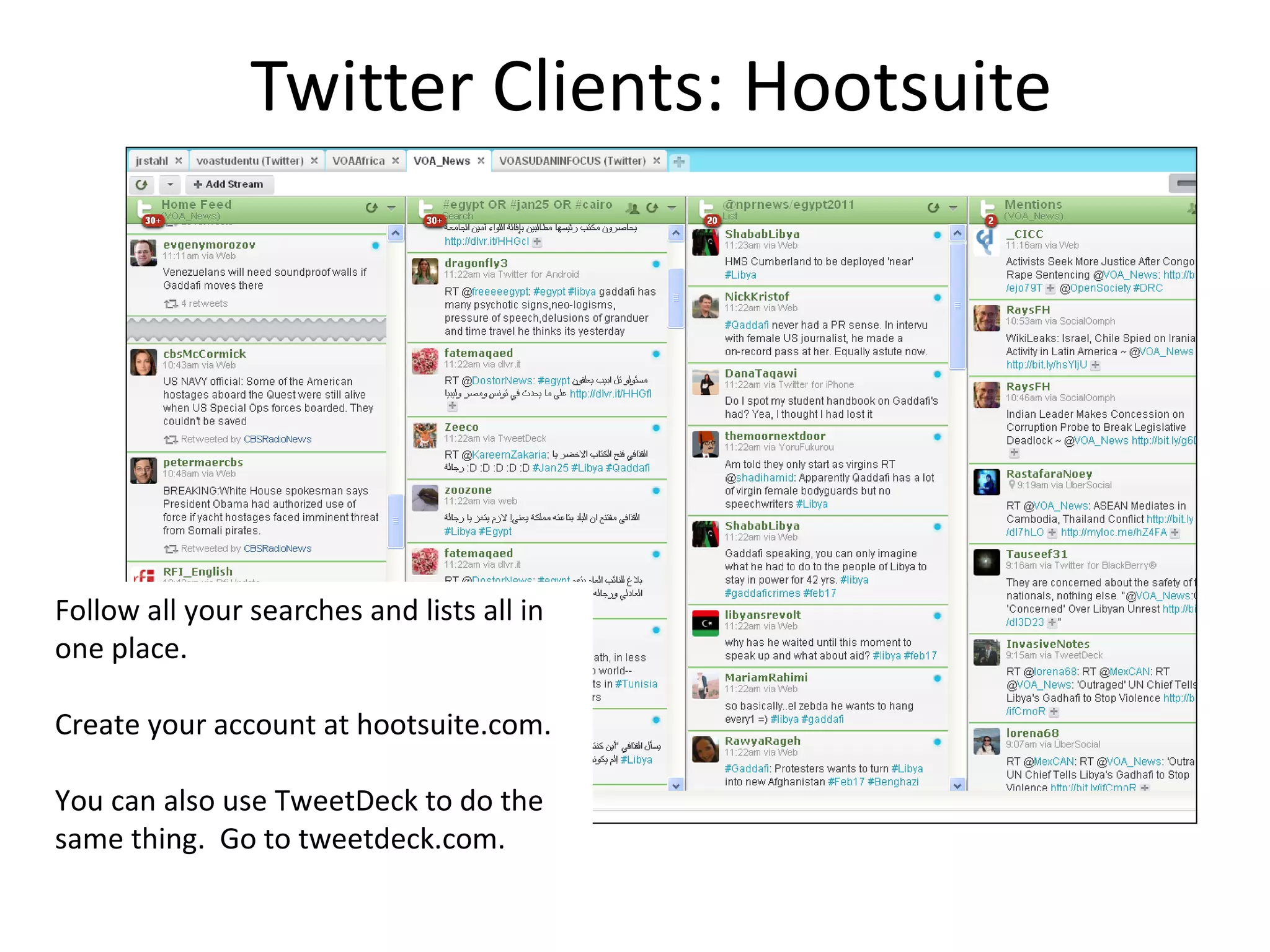
Twitter Clients: Hootsuite


Follow all your searches and lists all in
one place.

Create your account at hootsuite.com.

You can also use TweetDeck to do the
same thing. Go to tweetdeck.com.
You didn’t say anything about what I
               should tweet!
It’s all part of an iterative process. Share what you find on your Twitter newswire, share
the research you do because of it, and share the content you produce as a result. And
keep listening all the way through to refine your ideas and get new ones.
                                      Listen


 Produce                                                                Research


                                      Share
Ready for more?
Check out “Search Techniques: Twitter and
Web”
http://www.slideshare.net/JessicaStahl/search-techniques-10257159

Making Twitter Your Newswire

  • 1.
    Making Twitter Your NewsWire 1) Overall strategy 2) Finding people 3) Building lists 4) Creating good searches
  • 2.
    Your Overall Strategy: Gofrom general to specific Start by following broad topics and people… Check in on these on a regular basis. They will be your daily news digest and your early warning system. When something catches your eye, filter down to follow that topic more closely… Use lists and advanced searches to get more specific in what you’re tracking.
  • 3.
  • 4.
    To recap: Following =Subscribing to People The follow button is accessible on a user’s profile page, or if you click on their name in your timeline The people you follow are the people whose tweets show up in your timeline. Following is NOT reciprocal. If you follow someone, you see all their tweets. They do not see all your tweets unless they follow you back. Users typically ARE informed when you follow them, but are not informed if you “unfollow” them later (so it’s okay to continuously refine who you follow).
  • 5.
    Start by followingpeople you trust… Use Twitter’s search bar to find people and organizations you already know are useful or already rely on. Try: current sources, other journalists, major news organizations, NGOs You’ll probably find you end up getting more value out of people than organizations – people tend to be better curators than companies.
  • 6.
    Ask: Who dothey care about? Who are they talking to, mentioning Who are they following? and RT-ing? Who have they listed?
  • 7.
    Ask: Who isas good as they are? Who does Twitter think is similar to them? Who is on lists with them? Over time, you will build up a Twitter stream filled with people who tweet interesting and useful items. Don’t forget, you can always unfollow someone who turns out not to be what you wanted.
  • 8.
    Cues For EvaluatingAuthority Is this person worth following? Or even who they say they are? How many tweets has this person sent? Have they been on Twitter a while or did they just set up this account to tweet about one single event? Number of followers and ratio of followers to following: A legitimate Twitter account will have more followers than following or approximately 1:1. Is this person often retweeted and @mentioned? Do a Twitter search for @username to see if anyone else is paying attention to what they say. Has this person been listed by others? Lists are a symbol of trust. Can you tell where this person is located? Look at their bio and any geo information on their tweets. Make sure this information is consistent over time and they haven’t just written a location to coincide with major events. More tips: http://irevolution.net/2011/06/21/information-forensics/
  • 9.
    Use lists tocreate specialized streams Lists let you curate users into categories, and then view their tweets in a separate stream.* *You don’t have to follow someone to put them in a list Access your lists from your profile page or from your head icon
  • 10.
    Or follow listscurated by others Why reinvent the wheel when you can piggyback on the work others have done to find and filter Twitter users?
  • 11.
  • 12.
    To recap: Search =Find Tweets by Keyword Search for tweets, people, and media using the search bar at the top of the screen. Toggle between “Top” and “All” to see what the most important Twitter users are saying and what everyone is saying.
  • 13.
    To recap: Hashtags =Grouping Tweets Hashtags (#tag) are used to group tweets about a certain subject so they are easier to find. You’ll often see them used for: Events Topics Memes Humor
  • 14.
    To recap: Use Hashtagsas a Search Tool Clicking on a hashtag automatically does a Twitter search for that hashtag so you can see all the tweets being tagged. Use hashtags in your own tweets to make them more findable.
  • 15.
    Save searches totrack them over time Return to any of your saved searches by clicking on the search bar at the top of the screen. You will see the most recent results for that search.
  • 16.
    Go advanced forbetter results Once you’ve done your search, click “Advanced search.” Now you can exclude terms, see tweets only in a certain language, search by location, etc.
  • 17.
    Search Operators With complicatedsearches, you will get better results typing search operators directly into the search bar than using the advanced search function.
  • 18.
    Or use anoutside search engine Twitter search only goes back a few days. Try Topsy (topsy.com) to search older tweets. More websites to try: http://blog.tweetsmarter.com/twitter-search/10-ways- and-20-features-for-searching-old-tweets/
  • 19.
    Bring it alltogether…
  • 20.
    Twitter Clients: Hootsuite Followall your searches and lists all in one place. Create your account at hootsuite.com. You can also use TweetDeck to do the same thing. Go to tweetdeck.com.
  • 21.
    You didn’t sayanything about what I should tweet! It’s all part of an iterative process. Share what you find on your Twitter newswire, share the research you do because of it, and share the content you produce as a result. And keep listening all the way through to refine your ideas and get new ones. Listen Produce Research Share
  • 22.
    Ready for more? Checkout “Search Techniques: Twitter and Web” http://www.slideshare.net/JessicaStahl/search-techniques-10257159