Virtualised MikroTik

MikroTik in a Virtualised Hardware Environment
Speaker:
Event:

Tom Smyth
CTO
Wireless Connect Ltd.
MUM Krackow Feb 2008

http://wirelessconnect.eu/ Copyright 2008

1
Objectives
●
●

●

Understand What is Virtualisation
Receive a high-level overview of Vmware
Server
Understand how to configure a virtual machine
for use with Router OS 2.9 & Router OS 3

●

Understand how to configure a virtual machine

●

Identify where Virtualisation can help

●

Identify where Virtualisation can not help
http://wirelessconnect.eu/ Copyright 2008

2
Virtualisation
in a nut shell
●

●

●

●

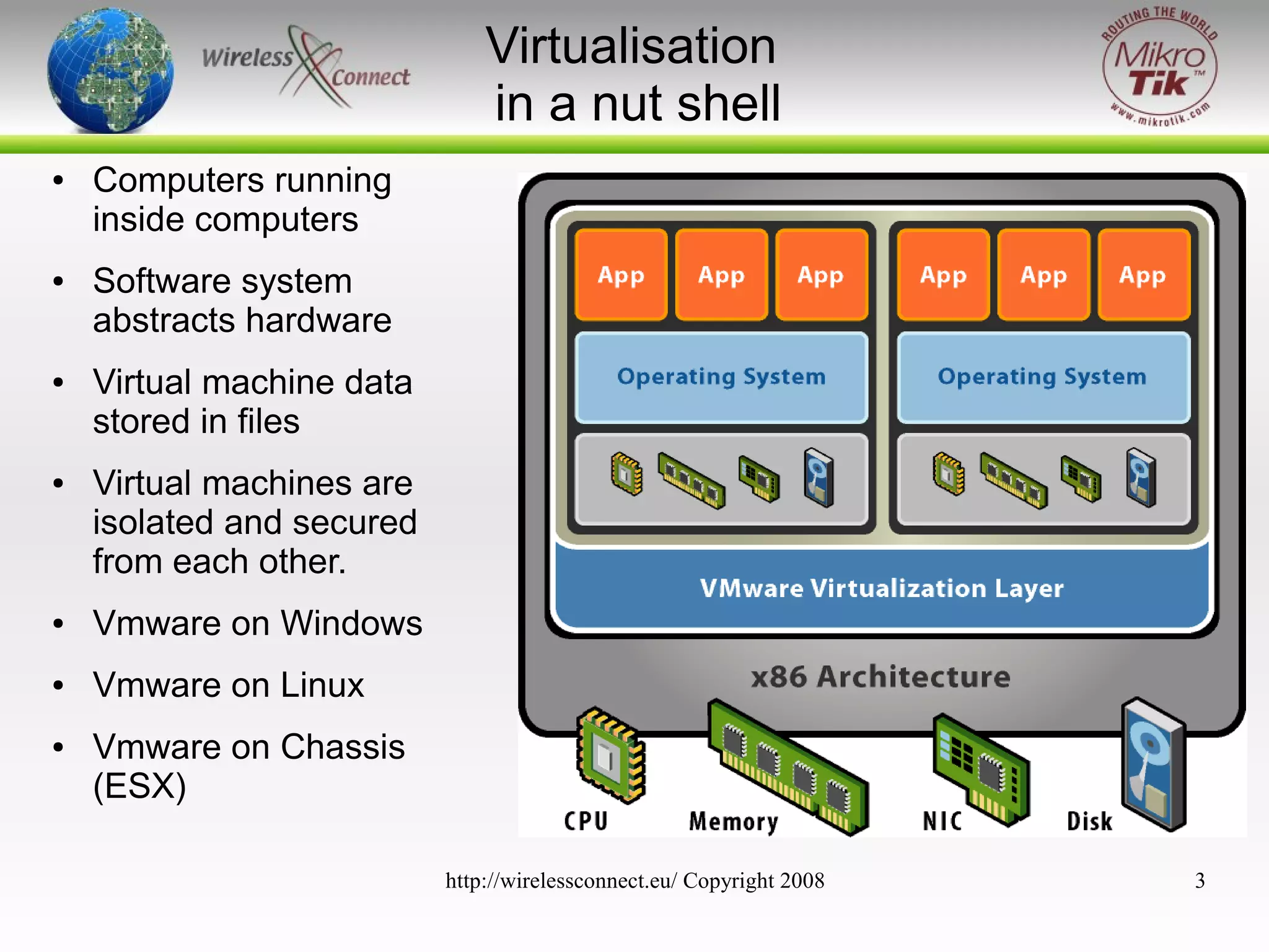
Computers running
inside computers
Software system
abstracts hardware
Virtual machine data
stored in files
Virtual machines are
isolated and secured
from each other.

●

Vmware on Windows

●

Vmware on Linux

●

Vmware on Chassis
(ESX)
http://wirelessconnect.eu/ Copyright 2008

3
Virtualisation?

http://wirelessconnect.eu/ Copyright 2008

4
Virtualisation?
●

Abstraction of physical hardware
–

–
●

The same virtual hardware is presented to the
guest operating system despite the underlying
hardware of the server
(X86 & x86-64 CPU + Extensions available on host)

Logical division of physical hardware
–

single powerful host server can be divided into
many discrete separate virtual servers.

–

Each of these servers can run different operating
systems.

–

Each System can be interconnected via Multiple
http://wirelessconnect.eu/ Copyright 2008
Virtual Networks

5
Vmware Server
●

●

●

●

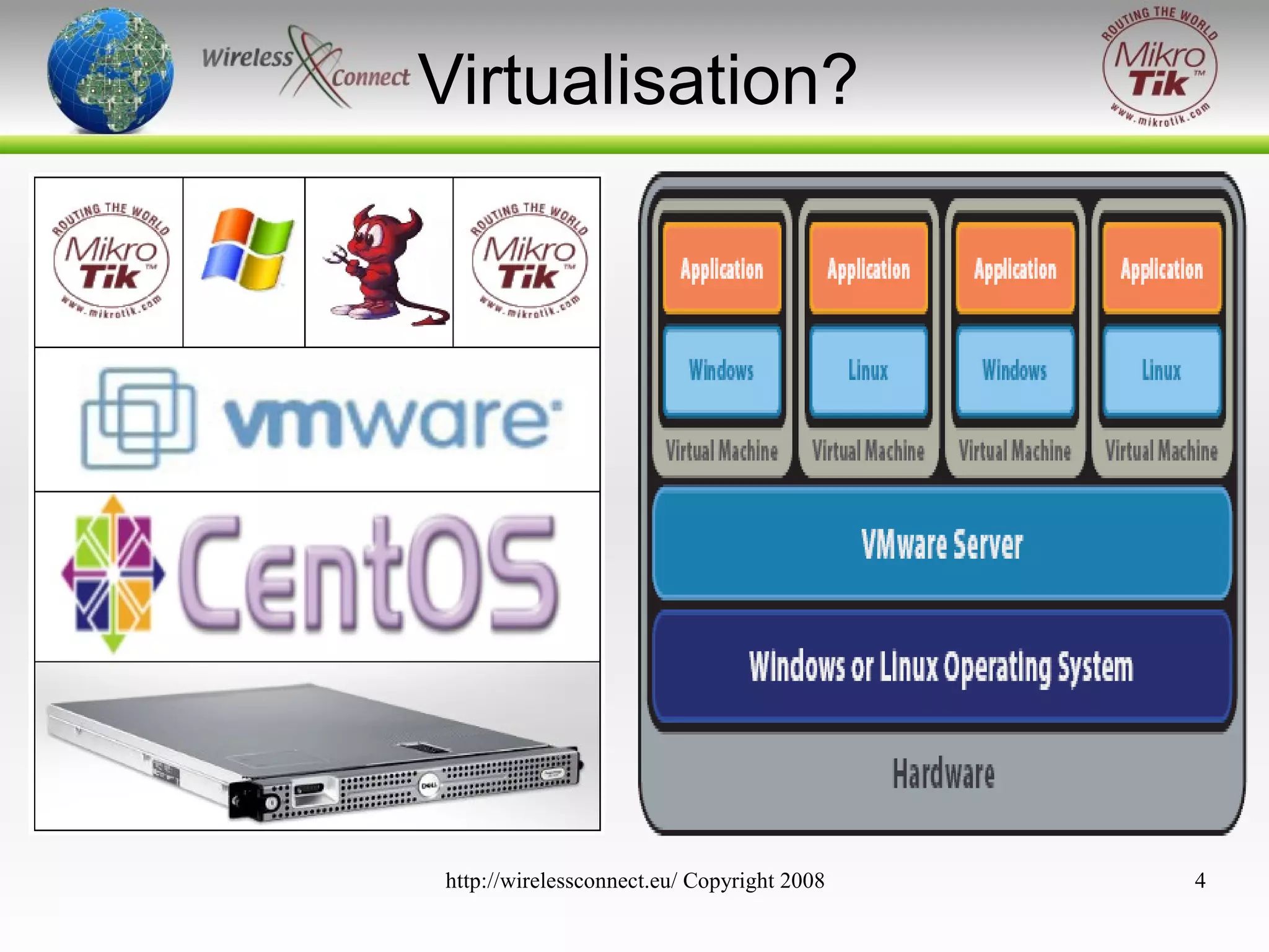
Vmware server installs and runs as a service on
top of a host Windows or Linux operating
system.
A thin virtualisation layer partitions the physical
server so that multiple virtual machines can be
run simultaneously on a single server.
Vmware Server isolates each virtual machine
from its host and other virtual machines.
Data does not leak across virtual machines and
applications can only communicate over
configured network connections
http://wirelessconnect.eu/ Copyright 2008

6
Virtual Machines
●

A virtual machine is like a server, but instead of an
electronic mother board it uses a software mother
board & BIOS.

●

Execution is native

●

All configuration and data are stored as files.

●

●

●

All VMs are hardware independent and run on
Vmware server on any x86 physical server.
Can access physical host hardware resources through
emulated hardware with native execution
Completely isolated and secure.
http://wirelessconnect.eu/ Copyright 2008

7
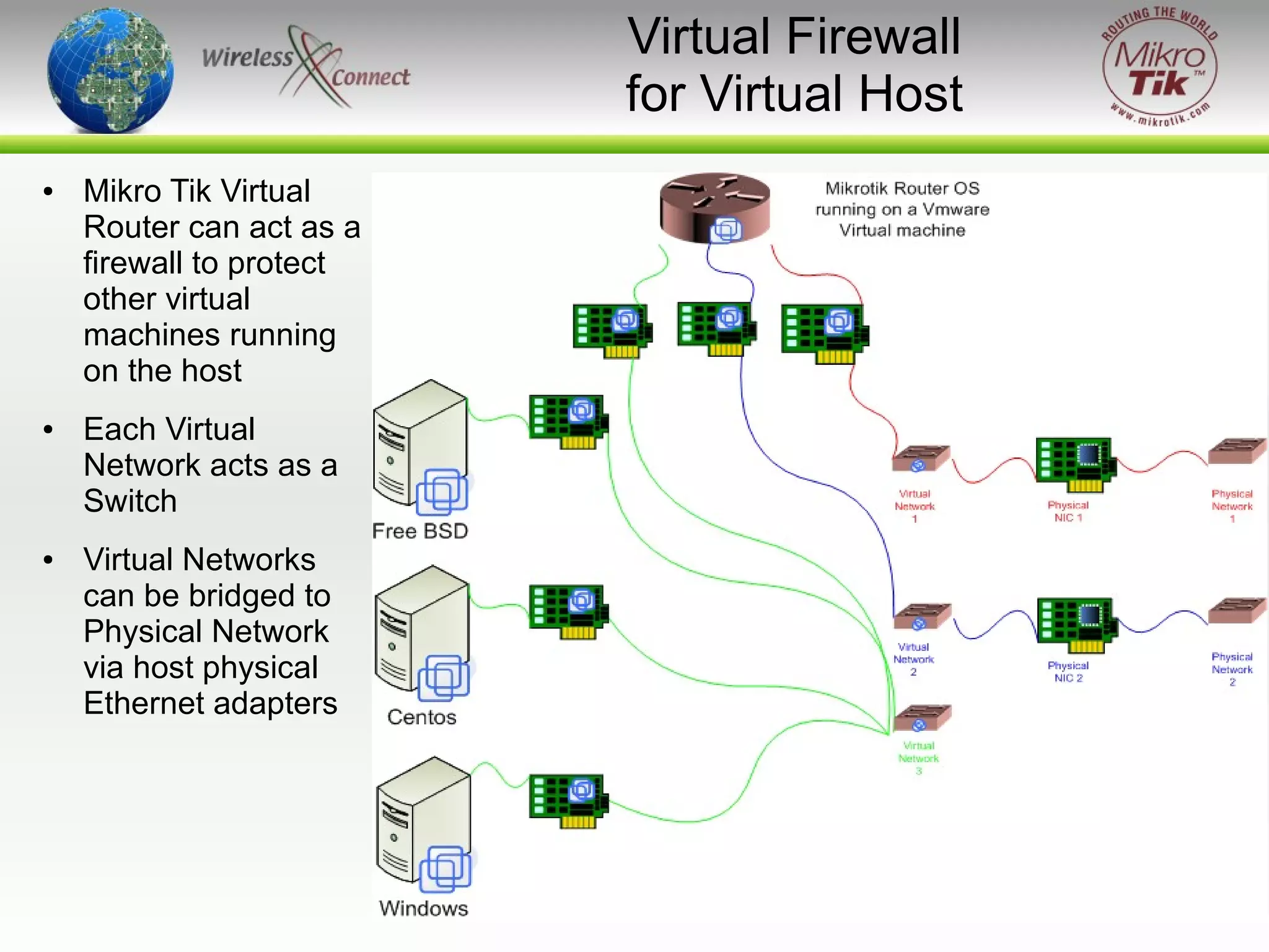
Virtual Firewall
for Virtual Host
●

●

●

Mikro Tik Virtual
Router can act as a
firewall to protect
other virtual
machines running
on the host
Each Virtual
Network acts as a
Switch
Virtual Networks
can be bridged to
Physical Network
via host physical
Ethernet adapters

http://wirelessconnect.eu/ Copyright 2008

8
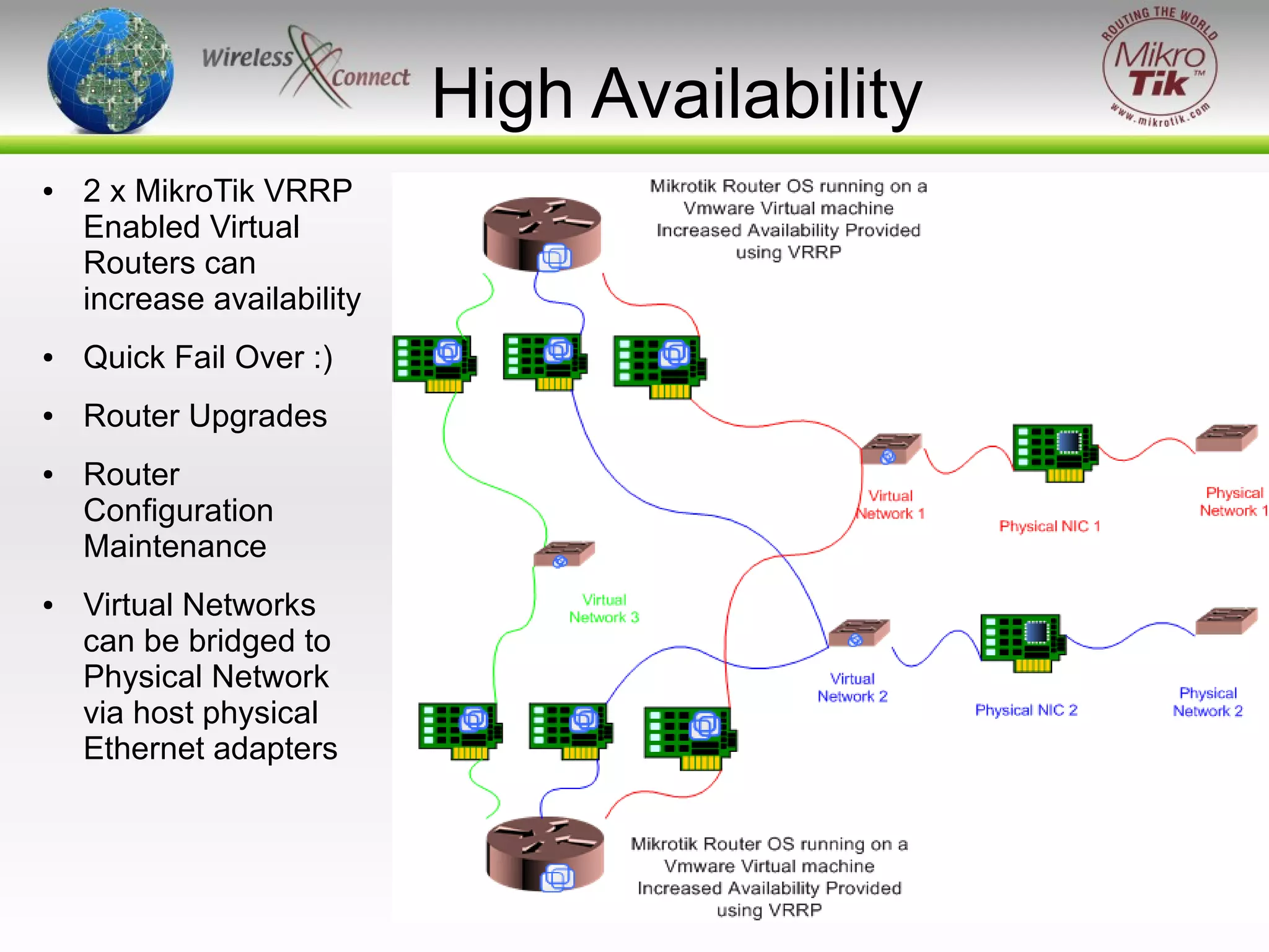
High Availability
●

2 x MikroTik VRRP
Enabled Virtual
Routers can
increase availability

●

Quick Fail Over :)

●

Router Upgrades

●

●

Router
Configuration
Maintenance
Virtual Networks
can be bridged to
Physical Network
via host physical
Ethernet adapters

http://wirelessconnect.eu/ Copyright 2008

9
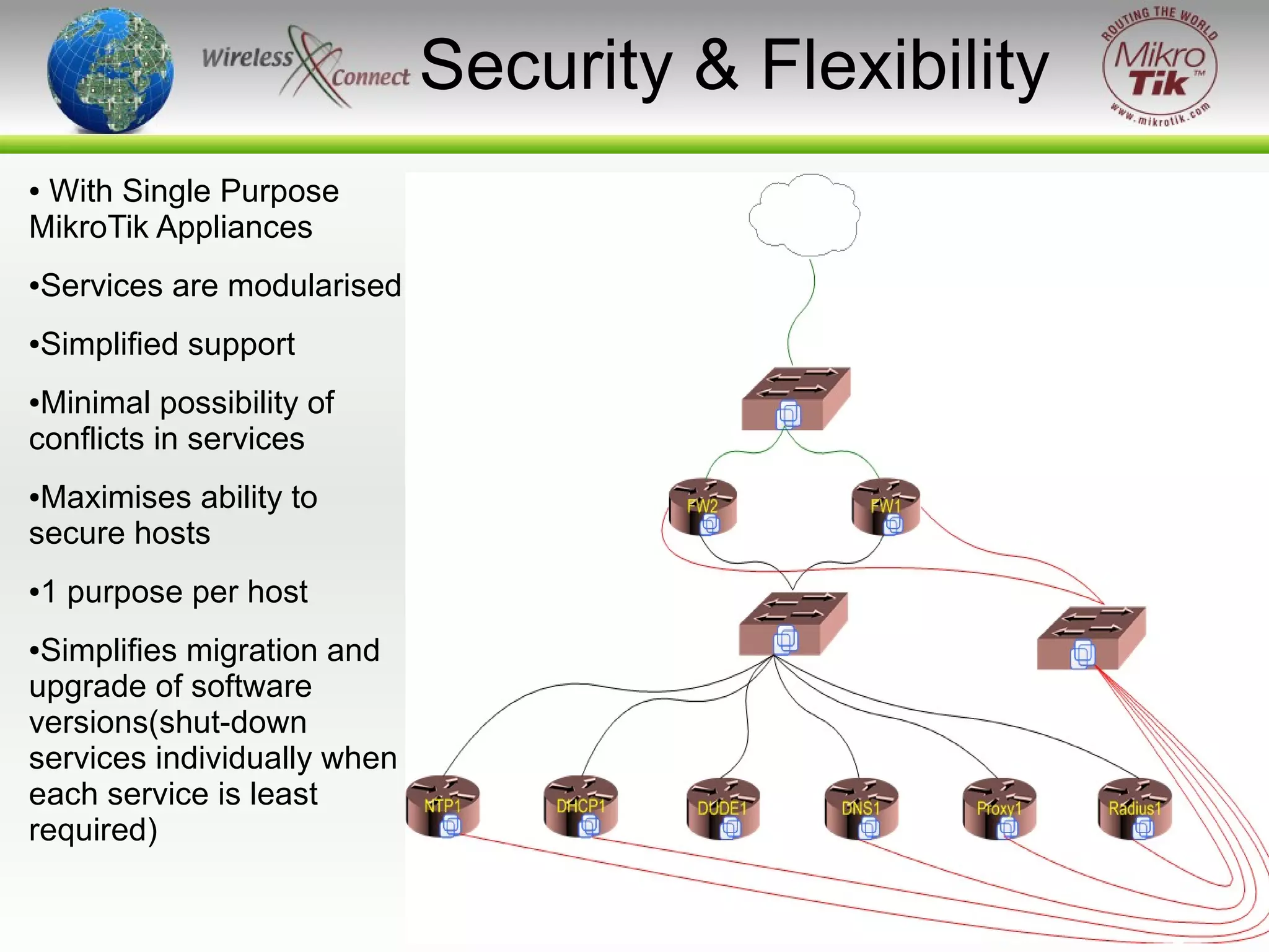
Security & Flexibility
With Single Purpose
MikroTik Appliances
●

●

Services are modularised

●

Simplified support

Minimal possibility of
conflicts in services
●

Maximises ability to
secure hosts
●

●

1 purpose per host

Simplifies migration and
upgrade of software
versions(shut-down
services individually when
each service is least
required)
●

http://wirelessconnect.eu/ Copyright 2008

10
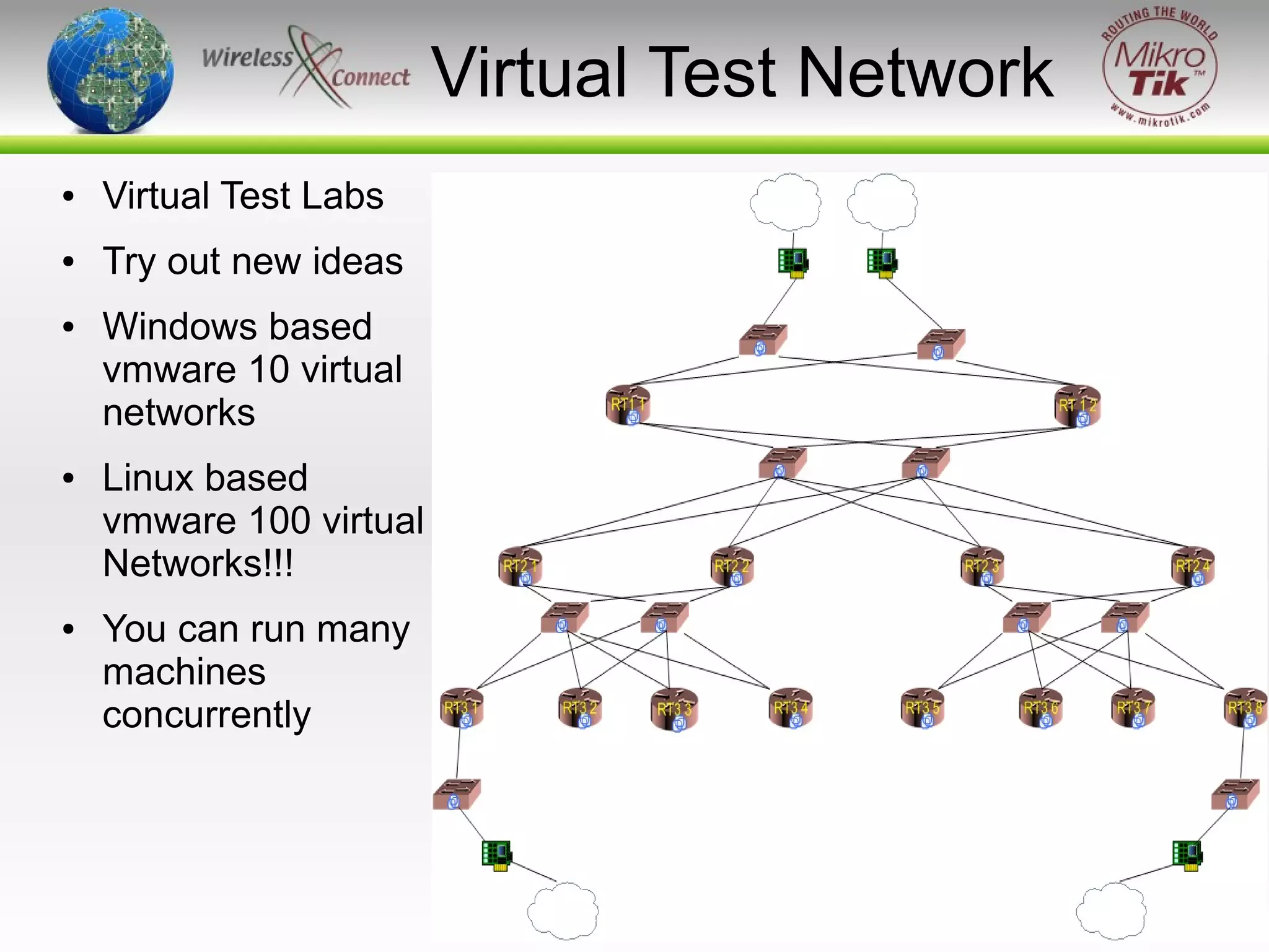
Virtual Test Network
●

Virtual Test Labs

●

Try out new ideas

●

●

●

Windows based
vmware 10 virtual
networks
Linux based
vmware 100 virtual
Networks!!!
You can run many
machines
concurrently

http://wirelessconnect.eu/ Copyright 2008

11
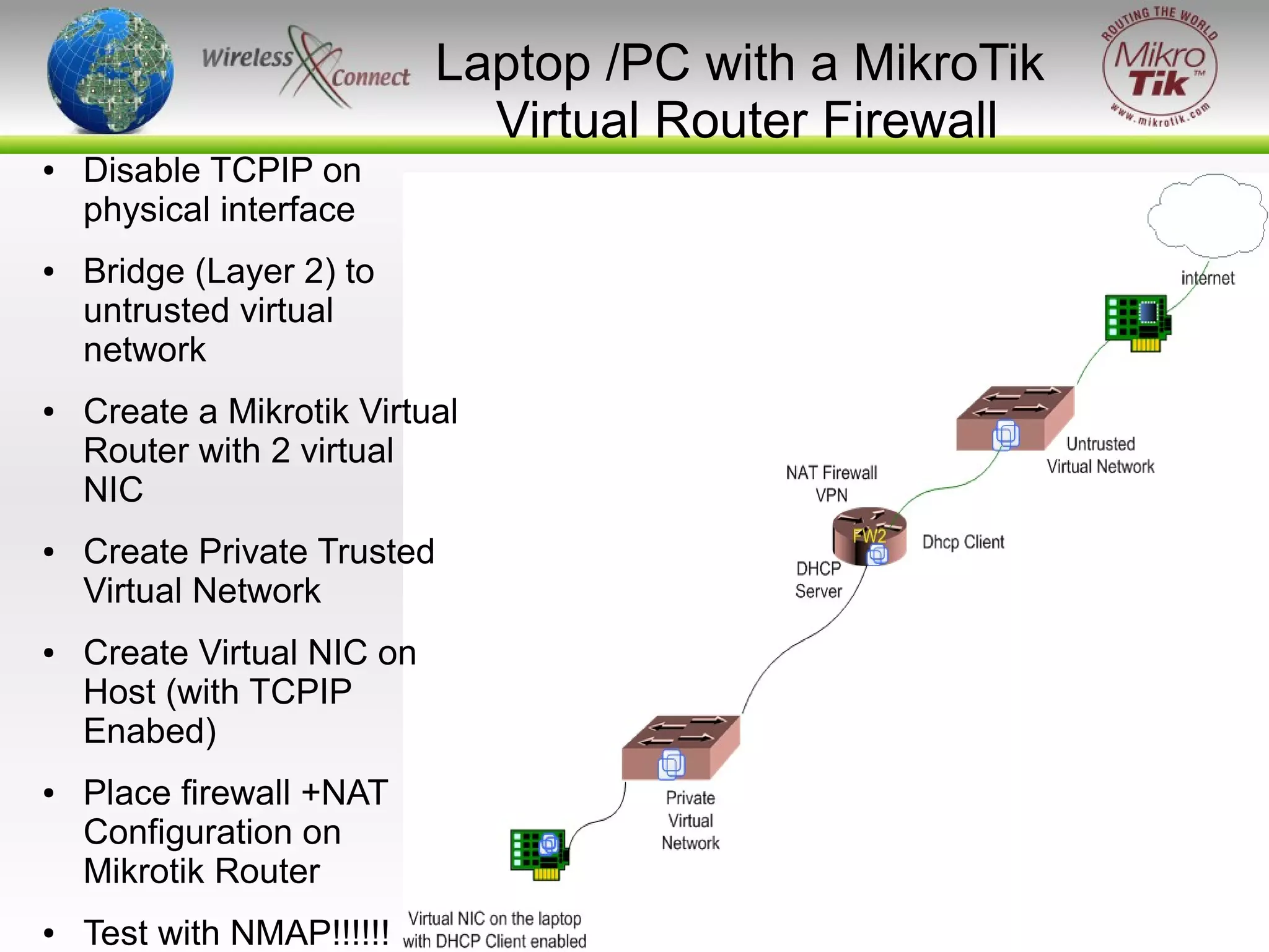
Laptop /PC with a MikroTik
Virtual Router Firewall
●

●

●

●

●

●

●

Disable TCPIP on
physical interface
Bridge (Layer 2) to
untrusted virtual
network
Create a Mikrotik Virtual
Router with 2 virtual
NIC
Create Private Trusted
Virtual Network
Create Virtual NIC on
Host (with TCPIP
Enabed)
Place firewall +NAT
Configuration on
Mikrotik Router
Test with NMAP!!!!!!

http://wirelessconnect.eu/ Copyright 2008

12
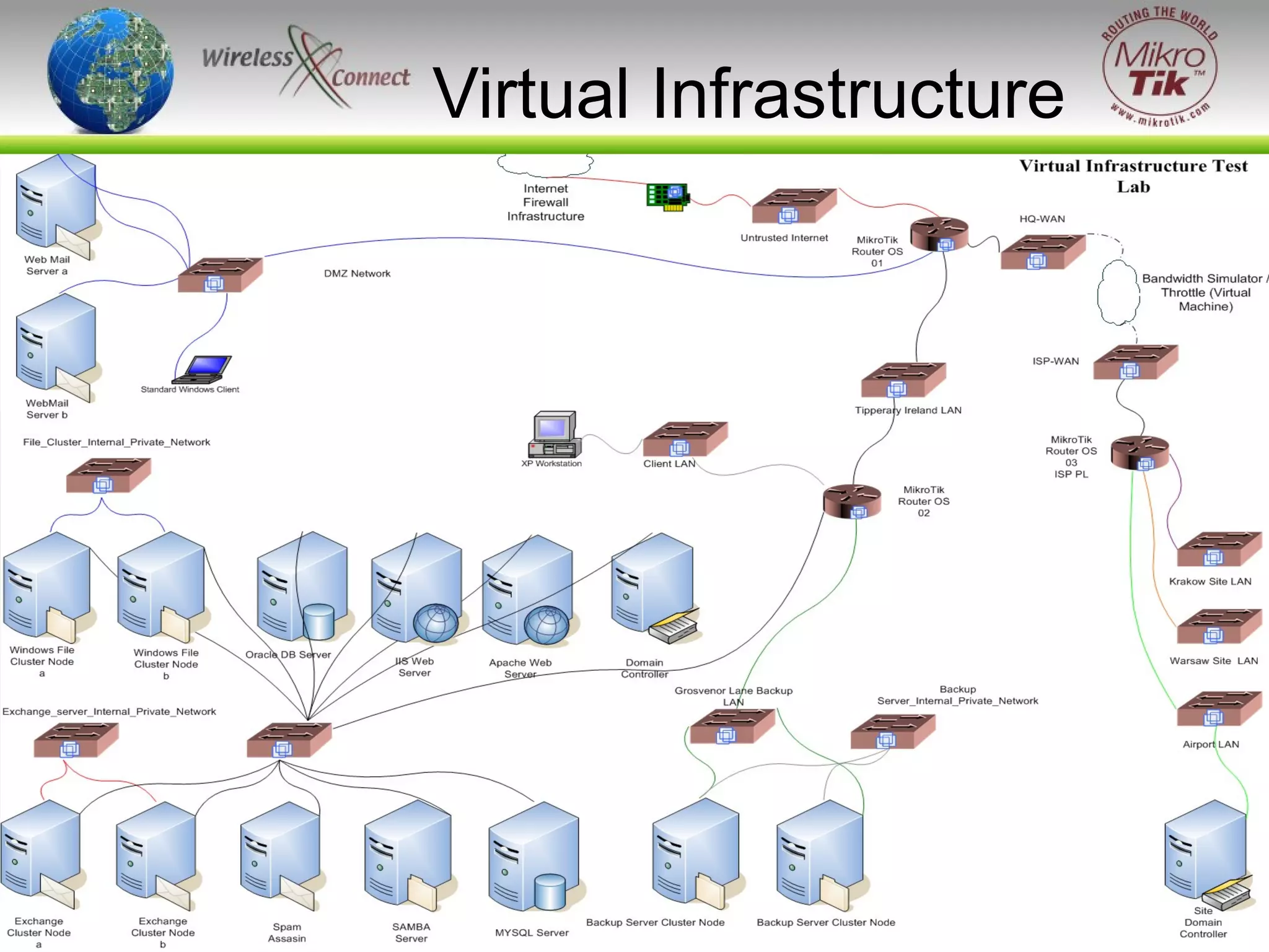
Virtual Infrastructure

http://wirelessconnect.eu/ Copyright 2008

13
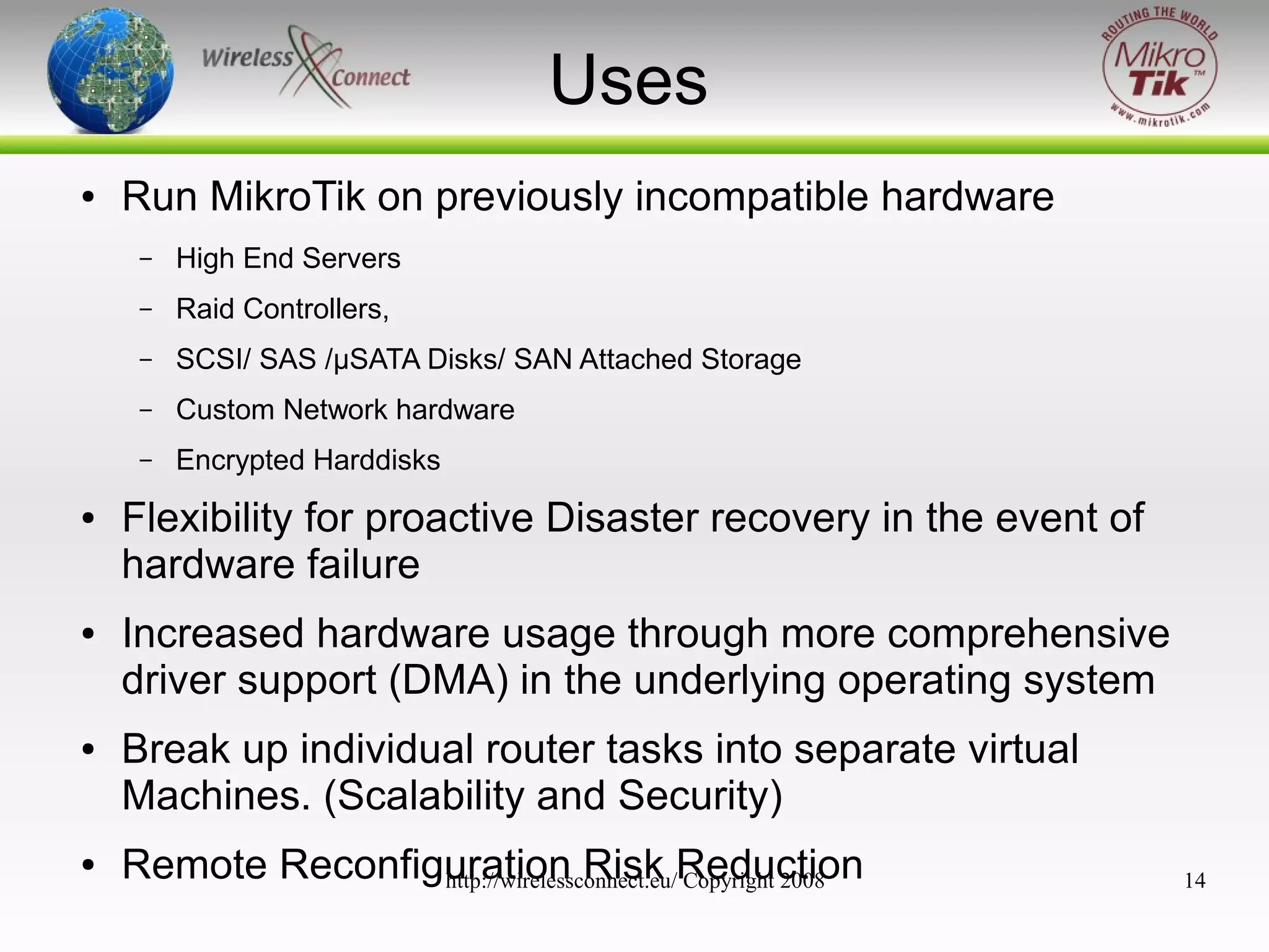
Uses
●

Run MikroTik on previously incompatible hardware
–
–

●

Custom Network hardware

–

●

SCSI/ SAS /μSATA Disks/ SAN Attached Storage

–

●

Raid Controllers,

–

●

High End Servers

Encrypted Harddisks

Flexibility for proactive Disaster recovery in the event of
hardware failure
Increased hardware usage through more comprehensive
driver support (DMA) in the underlying operating system
Break up individual router tasks into separate virtual
Machines. (Scalability and Security)
Remote Reconfiguration Risk Reduction
http://wirelessconnect.eu/ Copyright 2008

14
Increased Flexibility
●

●

●

Responsive DR functionality, full systems can
be easily moved from one physical server to
another, even while in operation. (Snap Shots)
Can be built and distributed as plug-and-play
virtual appliances (help sales and expose
product to new markets and new customers)
New Infrastructure services can be introduced
remotely without compromising stability of
existing services (function isolation)

http://wirelessconnect.eu/ Copyright 2008

15
Application
●

Core of Networks
–

Using VRRP for increased availability

–

Linux Clusters for maximum availability

–

Provide an end to end MikroTik Solutions

–

Provide high performance multigigabit throughput**
●

–

●

Provide Multi purpose logically separate services

Laptops (fire walling & Security)
–
–

●

VPN
Secure Remote Assistance

Test labs
–

Testing Dynamic Routing Protocol Configuration

–

Testing QOS policies

http://wirelessconnect.eu/ Copyright 2008

16
Virtualisation
Not Always an option :(
●

Virtualisation is not practical in all cases
–

ROI ?

–

Do you need to have scalability ?

–

Do you need to add complexity ?

–

RB1000 better applied in Distribution Networks

–

Cluster 2x RB 1000s for high availability

http://wirelessconnect.eu/ Copyright 2008

17
Hardware Requirements
●

Virtualisation requires good hardware to function

●

Xeon / Opteron Processors

●

Hardware Virtualisation Support If possible (Not Essential)

●

Multiple PCI/X buses

●

Multiple PCIExpress lanes (1x 2.5Gb/s... 8x 20Gb/s)

●

Memory Capacity on the host server must be adequate

●

Memory bandwidth determines Virtual Network bandwidth

http://wirelessconnect.eu/ Copyright 2008

18
Virtual Machine
Core Specifications
●

Virtual Processor
–

–

Intel EMT64VT (experimental support)

–

Single and multiprocessor per virtual machine on symmetric
multiprocessor (SMP) systems.

–

●

Intel Pentium II or later, or AMD Athlon or later, depending on host
processor;

Virtual Machine Load is not dedicated to one processor or core, virtual
machines are executed across all available CPUs which can be very
helpful in maintaining high performance under high loads

Virtual Chipset
–

●

Intel 440BX based motherboard with NS338 SIO chip and 82093AA
IOAPIC

Virtual BIOS
–

PhoenixBIOS 4.0 Release 6 with VESA BIOS

–

http://wirelessconnect.eu/ Copyright 2008
DMI/SMBIOS compliant for system management agent support

19
Virtual Machine
Storage Specifications
●

Virtual Memory
–

●

Up to 3600MB of memory per virtual machine,
depending on the host system's configuration and
the amount of memory on the physical host

Virtual IDE Drives
–

Up to four devices: IDE HDDs, CDROM or DVD

–

Hard disks can be virtual disks or physical
disks.IDE virtual disks up to 950GB

–

CDROM can be a physical device or an ISO image
file
http://wirelessconnect.eu/ Copyright 2008

20
Virtual Machine
Network Specifications
●

Virtual Ethernet Card
–
–

AMD Pcnet PCI II compatible (100Mb/s)**

–
●

Up to four virtual Ethernet cards
PXE ROM version 2.0 (you can use net install)

Virtual Networking
–

10 Virtual Ethernet switches (virtual Networks /
Vmnets) windows OS Host

–

100 Virtual Ethernet switches (virtual Networks /
Vmnets) Linux Based Host

http://wirelessconnect.eu/ Copyright 2008

21
Virtual Machine Remote
Management
●

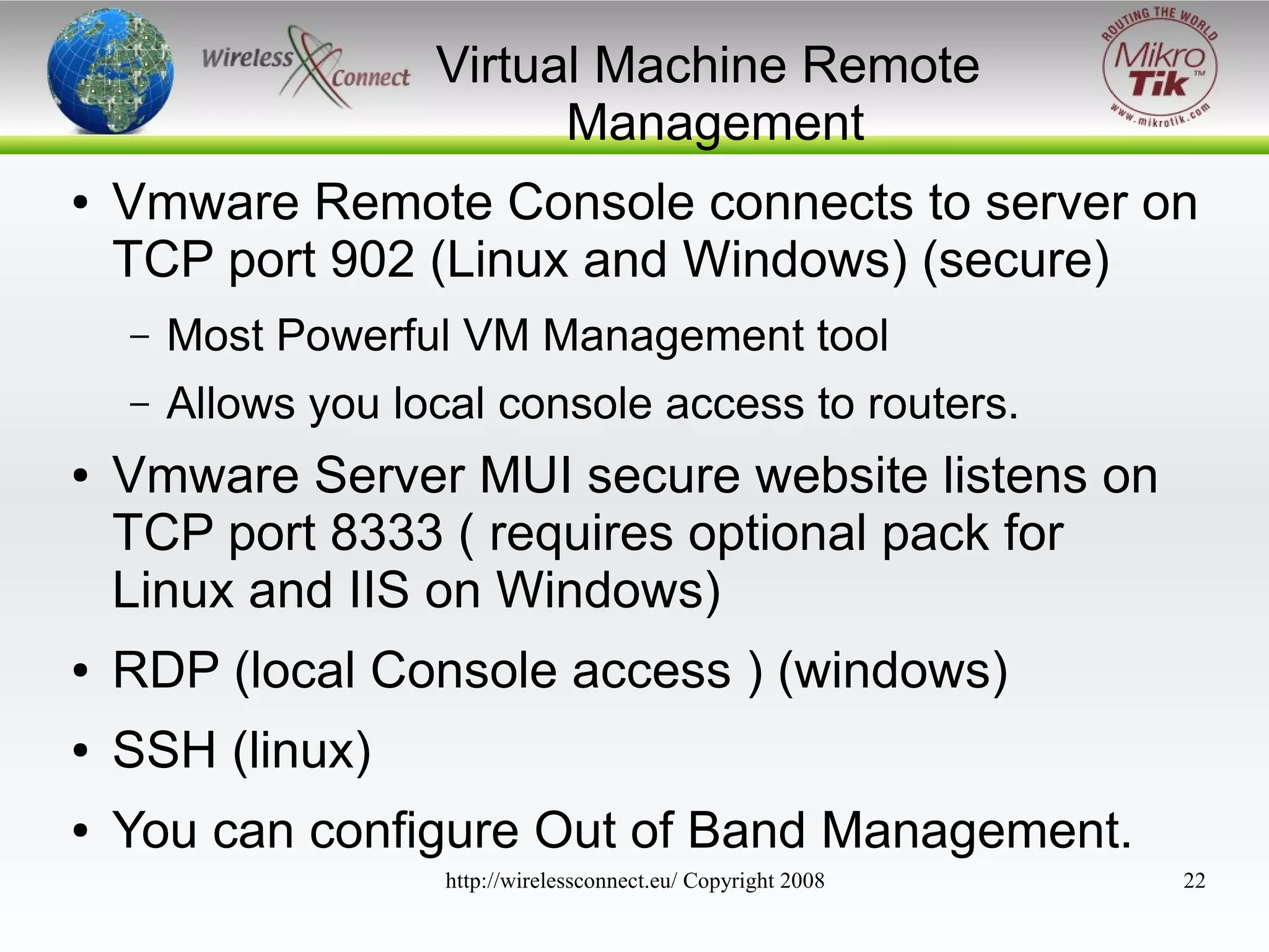
Vmware Remote Console connects to server on
TCP port 902 (Linux and Windows) (secure)
–
–

●

Most Powerful VM Management tool
Allows you local console access to routers.

Vmware Server MUI secure website listens on
TCP port 8333 ( requires optional pack for
Linux and IIS on Windows)

●

RDP (local Console access ) (windows)

●

SSH (linux)

●

You can configure Out of Band Management.
http://wirelessconnect.eu/ Copyright 2008

22
Vmware Server
Preparation
●

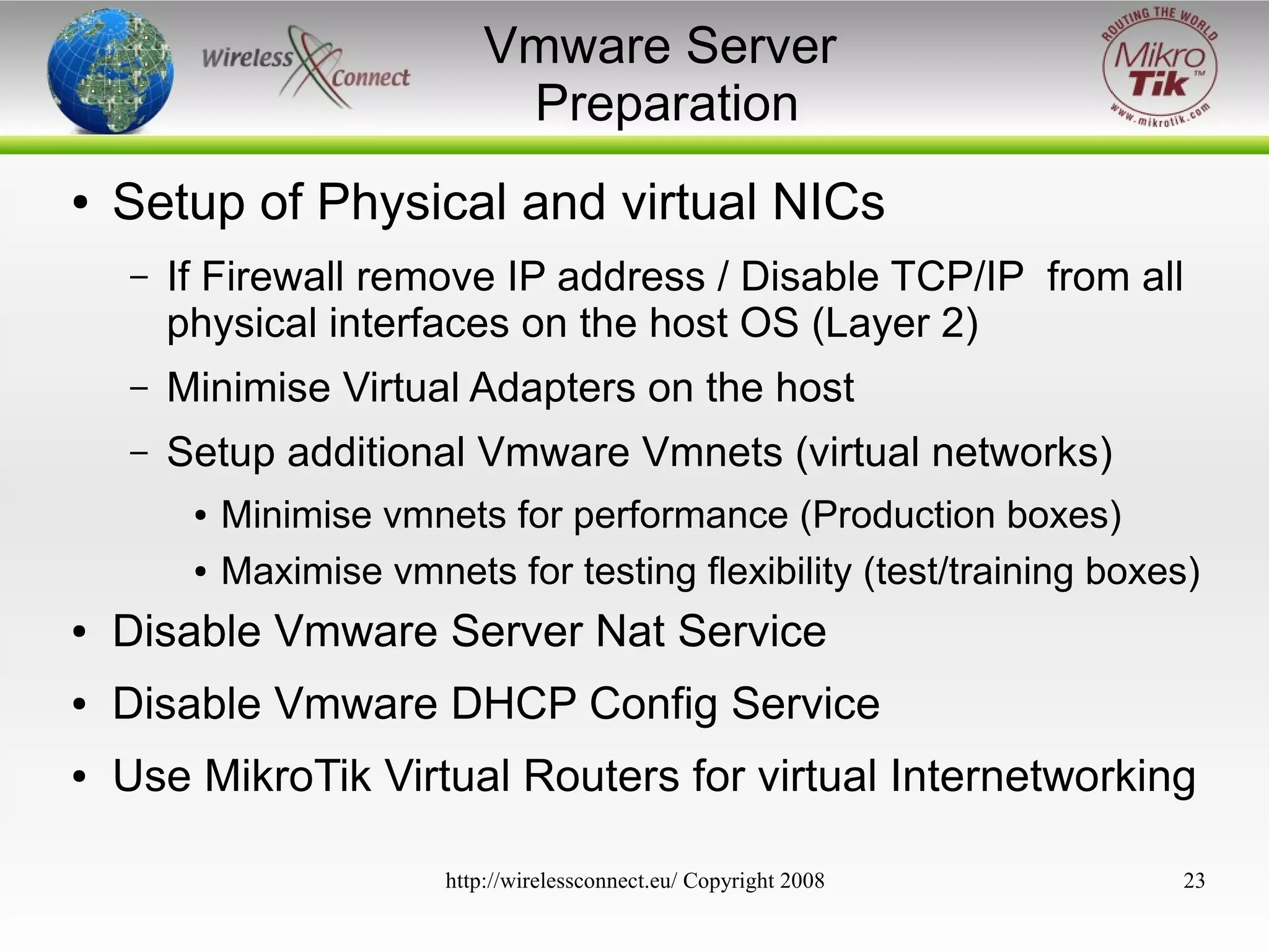
Setup of Physical and virtual NICs
–

If Firewall remove IP address / Disable TCP/IP from all
physical interfaces on the host OS (Layer 2)

–

Minimise Virtual Adapters on the host

–

Setup additional Vmware Vmnets (virtual networks)
●
●

Minimise vmnets for performance (Production boxes)
Maximise vmnets for testing flexibility (test/training boxes)

●

Disable Vmware Server Nat Service

●

Disable Vmware DHCP Config Service

●

Use MikroTik Virtual Routers for virtual Internetworking
http://wirelessconnect.eu/ Copyright 2008

23
Virtual Machine for
MikroTik ROS 2.9.XX
●

●
●

●
●

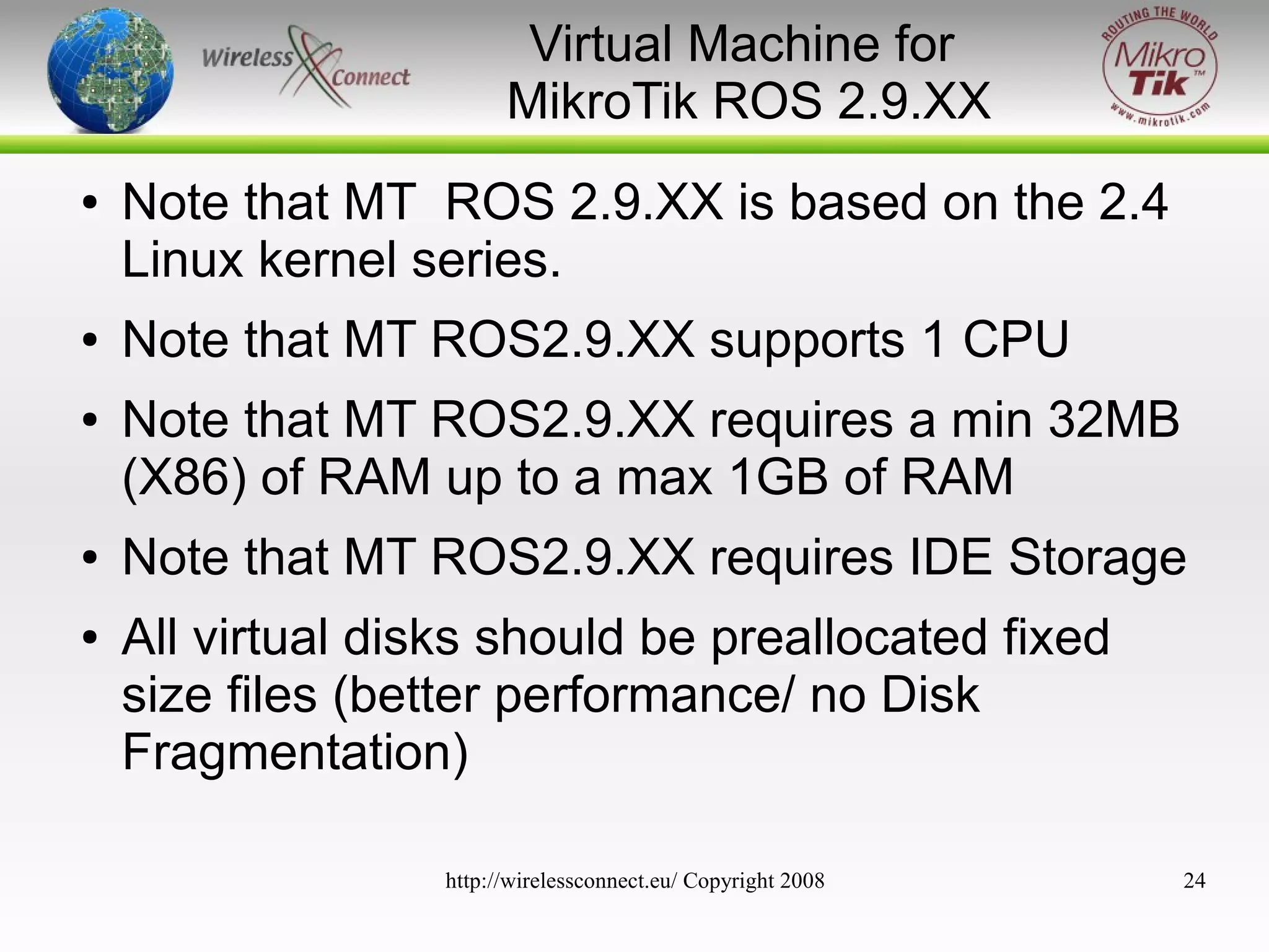
Note that MT ROS 2.9.XX is based on the 2.4
Linux kernel series.
Note that MT ROS2.9.XX supports 1 CPU
Note that MT ROS2.9.XX requires a min 32MB
(X86) of RAM up to a max 1GB of RAM
Note that MT ROS2.9.XX requires IDE Storage
All virtual disks should be preallocated fixed
size files (better performance/ no Disk
Fragmentation)
http://wirelessconnect.eu/ Copyright 2008

24
Virtual Machine for
MikroTik ROS 3.x
●

●

●

●

●

Note that MT ROS 3 is based on the 2.6 Linux
kernel series.
Note that MT ROS 3 supports 1 CPU – Multi
Core/ Multi CPU (SMP Support)
Note that MT ROS3.XX requires a min 32MB
(X86) of RAM up to a max 2GB of RAM
Note that MT ROS 3 supports IDE & SATA
Storage
All virtual disks should be preallocated fixed
size files (better performance/ no Disk
Fragmentation)
http://wirelessconnect.eu/ Copyright 2008

25
Further Reading
●

http://mikrotik.com/

●

http://wirelessconnect.eu/store/

●

http://vmware.com/

●

http://centos.org/

●

http://redhat.com/

●

http://microsoft.com/virtualserver/

http://wirelessconnect.eu/ Copyright 2008

26

Wirelessconnect

  • 1.
    Virtualised MikroTik MikroTik ina Virtualised Hardware Environment Speaker: Event: Tom Smyth CTO Wireless Connect Ltd. MUM Krackow Feb 2008 http://wirelessconnect.eu/ Copyright 2008 1
  • 2.
    Objectives ● ● ● Understand What isVirtualisation Receive a high-level overview of Vmware Server Understand how to configure a virtual machine for use with Router OS 2.9 & Router OS 3 ● Understand how to configure a virtual machine ● Identify where Virtualisation can help ● Identify where Virtualisation can not help http://wirelessconnect.eu/ Copyright 2008 2
  • 3.
    Virtualisation in a nutshell ● ● ● ● Computers running inside computers Software system abstracts hardware Virtual machine data stored in files Virtual machines are isolated and secured from each other. ● Vmware on Windows ● Vmware on Linux ● Vmware on Chassis (ESX) http://wirelessconnect.eu/ Copyright 2008 3
  • 4.
  • 5.
    Virtualisation? ● Abstraction of physicalhardware – – ● The same virtual hardware is presented to the guest operating system despite the underlying hardware of the server (X86 & x86-64 CPU + Extensions available on host) Logical division of physical hardware – single powerful host server can be divided into many discrete separate virtual servers. – Each of these servers can run different operating systems. – Each System can be interconnected via Multiple http://wirelessconnect.eu/ Copyright 2008 Virtual Networks 5
  • 6.
    Vmware Server ● ● ● ● Vmware serverinstalls and runs as a service on top of a host Windows or Linux operating system. A thin virtualisation layer partitions the physical server so that multiple virtual machines can be run simultaneously on a single server. Vmware Server isolates each virtual machine from its host and other virtual machines. Data does not leak across virtual machines and applications can only communicate over configured network connections http://wirelessconnect.eu/ Copyright 2008 6
  • 7.
    Virtual Machines ● A virtualmachine is like a server, but instead of an electronic mother board it uses a software mother board & BIOS. ● Execution is native ● All configuration and data are stored as files. ● ● ● All VMs are hardware independent and run on Vmware server on any x86 physical server. Can access physical host hardware resources through emulated hardware with native execution Completely isolated and secure. http://wirelessconnect.eu/ Copyright 2008 7
  • 8.
    Virtual Firewall for VirtualHost ● ● ● Mikro Tik Virtual Router can act as a firewall to protect other virtual machines running on the host Each Virtual Network acts as a Switch Virtual Networks can be bridged to Physical Network via host physical Ethernet adapters http://wirelessconnect.eu/ Copyright 2008 8
  • 9.
    High Availability ● 2 xMikroTik VRRP Enabled Virtual Routers can increase availability ● Quick Fail Over :) ● Router Upgrades ● ● Router Configuration Maintenance Virtual Networks can be bridged to Physical Network via host physical Ethernet adapters http://wirelessconnect.eu/ Copyright 2008 9
  • 10.
    Security & Flexibility WithSingle Purpose MikroTik Appliances ● ● Services are modularised ● Simplified support Minimal possibility of conflicts in services ● Maximises ability to secure hosts ● ● 1 purpose per host Simplifies migration and upgrade of software versions(shut-down services individually when each service is least required) ● http://wirelessconnect.eu/ Copyright 2008 10
  • 11.
    Virtual Test Network ● VirtualTest Labs ● Try out new ideas ● ● ● Windows based vmware 10 virtual networks Linux based vmware 100 virtual Networks!!! You can run many machines concurrently http://wirelessconnect.eu/ Copyright 2008 11
  • 12.
    Laptop /PC witha MikroTik Virtual Router Firewall ● ● ● ● ● ● ● Disable TCPIP on physical interface Bridge (Layer 2) to untrusted virtual network Create a Mikrotik Virtual Router with 2 virtual NIC Create Private Trusted Virtual Network Create Virtual NIC on Host (with TCPIP Enabed) Place firewall +NAT Configuration on Mikrotik Router Test with NMAP!!!!!! http://wirelessconnect.eu/ Copyright 2008 12
  • 13.
  • 14.
    Uses ● Run MikroTik onpreviously incompatible hardware – – ● Custom Network hardware – ● SCSI/ SAS /μSATA Disks/ SAN Attached Storage – ● Raid Controllers, – ● High End Servers Encrypted Harddisks Flexibility for proactive Disaster recovery in the event of hardware failure Increased hardware usage through more comprehensive driver support (DMA) in the underlying operating system Break up individual router tasks into separate virtual Machines. (Scalability and Security) Remote Reconfiguration Risk Reduction http://wirelessconnect.eu/ Copyright 2008 14
  • 15.
    Increased Flexibility ● ● ● Responsive DRfunctionality, full systems can be easily moved from one physical server to another, even while in operation. (Snap Shots) Can be built and distributed as plug-and-play virtual appliances (help sales and expose product to new markets and new customers) New Infrastructure services can be introduced remotely without compromising stability of existing services (function isolation) http://wirelessconnect.eu/ Copyright 2008 15
  • 16.
    Application ● Core of Networks – UsingVRRP for increased availability – Linux Clusters for maximum availability – Provide an end to end MikroTik Solutions – Provide high performance multigigabit throughput** ● – ● Provide Multi purpose logically separate services Laptops (fire walling & Security) – – ● VPN Secure Remote Assistance Test labs – Testing Dynamic Routing Protocol Configuration – Testing QOS policies http://wirelessconnect.eu/ Copyright 2008 16
  • 17.
    Virtualisation Not Always anoption :( ● Virtualisation is not practical in all cases – ROI ? – Do you need to have scalability ? – Do you need to add complexity ? – RB1000 better applied in Distribution Networks – Cluster 2x RB 1000s for high availability http://wirelessconnect.eu/ Copyright 2008 17
  • 18.
    Hardware Requirements ● Virtualisation requiresgood hardware to function ● Xeon / Opteron Processors ● Hardware Virtualisation Support If possible (Not Essential) ● Multiple PCI/X buses ● Multiple PCIExpress lanes (1x 2.5Gb/s... 8x 20Gb/s) ● Memory Capacity on the host server must be adequate ● Memory bandwidth determines Virtual Network bandwidth http://wirelessconnect.eu/ Copyright 2008 18
  • 19.
    Virtual Machine Core Specifications ● VirtualProcessor – – Intel EMT64VT (experimental support) – Single and multiprocessor per virtual machine on symmetric multiprocessor (SMP) systems. – ● Intel Pentium II or later, or AMD Athlon or later, depending on host processor; Virtual Machine Load is not dedicated to one processor or core, virtual machines are executed across all available CPUs which can be very helpful in maintaining high performance under high loads Virtual Chipset – ● Intel 440BX based motherboard with NS338 SIO chip and 82093AA IOAPIC Virtual BIOS – PhoenixBIOS 4.0 Release 6 with VESA BIOS – http://wirelessconnect.eu/ Copyright 2008 DMI/SMBIOS compliant for system management agent support 19
  • 20.
    Virtual Machine Storage Specifications ● VirtualMemory – ● Up to 3600MB of memory per virtual machine, depending on the host system's configuration and the amount of memory on the physical host Virtual IDE Drives – Up to four devices: IDE HDDs, CDROM or DVD – Hard disks can be virtual disks or physical disks.IDE virtual disks up to 950GB – CDROM can be a physical device or an ISO image file http://wirelessconnect.eu/ Copyright 2008 20
  • 21.
    Virtual Machine Network Specifications ● VirtualEthernet Card – – AMD Pcnet PCI II compatible (100Mb/s)** – ● Up to four virtual Ethernet cards PXE ROM version 2.0 (you can use net install) Virtual Networking – 10 Virtual Ethernet switches (virtual Networks / Vmnets) windows OS Host – 100 Virtual Ethernet switches (virtual Networks / Vmnets) Linux Based Host http://wirelessconnect.eu/ Copyright 2008 21
  • 22.
    Virtual Machine Remote Management ● VmwareRemote Console connects to server on TCP port 902 (Linux and Windows) (secure) – – ● Most Powerful VM Management tool Allows you local console access to routers. Vmware Server MUI secure website listens on TCP port 8333 ( requires optional pack for Linux and IIS on Windows) ● RDP (local Console access ) (windows) ● SSH (linux) ● You can configure Out of Band Management. http://wirelessconnect.eu/ Copyright 2008 22
  • 23.
    Vmware Server Preparation ● Setup ofPhysical and virtual NICs – If Firewall remove IP address / Disable TCP/IP from all physical interfaces on the host OS (Layer 2) – Minimise Virtual Adapters on the host – Setup additional Vmware Vmnets (virtual networks) ● ● Minimise vmnets for performance (Production boxes) Maximise vmnets for testing flexibility (test/training boxes) ● Disable Vmware Server Nat Service ● Disable Vmware DHCP Config Service ● Use MikroTik Virtual Routers for virtual Internetworking http://wirelessconnect.eu/ Copyright 2008 23
  • 24.
    Virtual Machine for MikroTikROS 2.9.XX ● ● ● ● ● Note that MT ROS 2.9.XX is based on the 2.4 Linux kernel series. Note that MT ROS2.9.XX supports 1 CPU Note that MT ROS2.9.XX requires a min 32MB (X86) of RAM up to a max 1GB of RAM Note that MT ROS2.9.XX requires IDE Storage All virtual disks should be preallocated fixed size files (better performance/ no Disk Fragmentation) http://wirelessconnect.eu/ Copyright 2008 24
  • 25.
    Virtual Machine for MikroTikROS 3.x ● ● ● ● ● Note that MT ROS 3 is based on the 2.6 Linux kernel series. Note that MT ROS 3 supports 1 CPU – Multi Core/ Multi CPU (SMP Support) Note that MT ROS3.XX requires a min 32MB (X86) of RAM up to a max 2GB of RAM Note that MT ROS 3 supports IDE & SATA Storage All virtual disks should be preallocated fixed size files (better performance/ no Disk Fragmentation) http://wirelessconnect.eu/ Copyright 2008 25
  • 26.