Shared Memory Based Inter-VM
Communication Introduction
Chen Jian Jun <jian.jun.chen@intelcom>
ACRN vMeet-Up Europe 2021
Agenda
▹Ivshmem Overview
▹Ivshmem DM-Land Introduction
▹Ivshmem HV-Land Introduction
▹Ivshmem Usage
Ivshmem Overview
▹Shared memory is exposed to guest VM as a PCI BAR
▹Shared memory is allocated from host or hypervisor
▹Two device types
▹ Ivshmem-plain: just shared memory
▹ Ivshmem-doorbell: shared memory plus interrupts
▹Linux guests can use UIO driver to probe the device
▹Windows guests can use dedicated driver to communicate with the
device
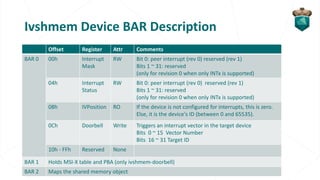
Ivshmem Device BAR Description
Offset Register Attr Comments
BAR 0 00h Interrupt
Mask
RW Bit 0: peer interrupt (rev 0) reserved (rev 1)
Bits 1 ~ 31: reserved
(only for revision 0 when only INTx is supported)
04h Interrupt
Status
RW Bit 0: peer interrupt (rev 0) reserved (rev 1)
Bits 1 ~ 31: reserved
(only for revision 0 when only INTx is supported)
08h IVPosition RO If the device is not configured for interrupts, this is zero.
Else, it is the device's ID (between 0 and 65535).
0Ch Doorbell Write Triggers an interrupt vector in the target device
Bits 0 ~ 15 Vector Number
Bits 16 ~ 31 Target ID
10h - FFh Reserved None
BAR 1 Holds MSI-X table and PBA (only ivshmem-doorbell)
BAR 2 Maps the shared memory object
Design Philosophy
▹Inter-VM applications are compatible between KVM and ACRN.
▹Reuse existing drivers for Linux/Windows guest.
▹Consistent with the development direction of the KVM community.
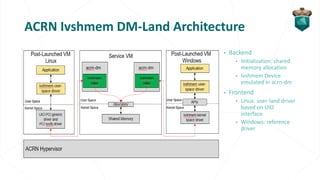
ACRN Ivshmem DM-Land Architecture
▹ Backend
▹ Initialization: shared
memory allocation
▹ Ivshmem Device
emulated in acrn-dm
▹ Frontend
▹ Linux: user-land driver
based on UIO
interface
▹ Windows: reference
driver
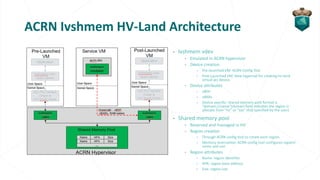
ACRN Ivshmem HV-Land Architecture
▹ Ivshmem vdev
▹ Emulated in ACRN hypervisor
▹ Device creation
▹ Pre-launched VM: ACRN Config Tool
▹ Post-Launched VM: New hypercall for creating hv-land
virtual pci device.
▹ Device attributes
▹ vBDF
▹ vBARs
▹ Device specific: shared memory path format is
“domain://name”(domain field indicates the region is
allocate from “hv” or “sos” that specified by the user)
▹ Shared memory pool
▹ Reserved and managed in HV
▹ Region creation
▹ Through ACRN config tool to create each region.
▹ Memory reservation: ACRN config tool configures regions’
name and size
▹ Region attributes
▹ Name: region identifier
▹ HPA: region base address
▹ Size: region size
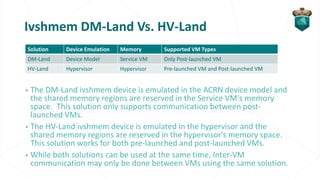
Ivshmem DM-Land Vs. HV-Land
▹The DM-Land ivshmem device is emulated in the ACRN device model and
the shared memory regions are reserved in the Service VM's memory
space. This solution only supports communication between post-
launched VMs.
▹The HV-Land ivshmem device is emulated in the hypervisor and the
shared memory regions are reserved in the hypervisor's memory space.
This solution works for both pre-launched and post-launched VMs.
▹While both solutions can be used at the same time, Inter-VM
communication may only be done between VMs using the same solution.
Solution Device Emulation Memory Supported VM Types
DM-Land Device Model Service VM Only Post-launched VM
HV-Land Hypervisor Hypervisor Pre-launched VM and Post-launched VM
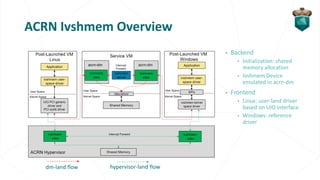
ACRN Ivshmem Overview
▹ Backend
▹ Initialization: shared
memory allocation
▹ Ivshmem Device
emulated in acrn-dm
▹ Frontend
▹ Linux: user-land driver
based on UIO interface
▹ Windows: reference
driver
dm-land flow hypervisor-land flow
UIO (User Space I/O) Introduction
▹ Shared Memory API
▹ Use mmap to access registers or RAM
▹ Use read/write/select for interrupts.
▹ Two Types Drivers
▹ Generic PCI UIO Driver
▹ Specific PCI Device Driver
Ivshmem HV-Land Limitations
▹The shared memory is reserved and cannot be reclaimed by the
system.
▹The shared memory size is fixed, determined at build time.
▹The ownership of all regions are determined at build time, it is not
possible to change their assignments at runtime.
ACRN Ivshmem Usage
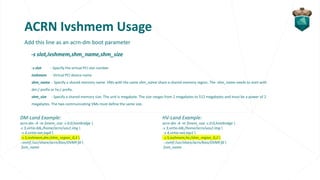
Add this line as an acrn-dm boot parameter
-s slot,ivshmem,shm_name,shm_size
-s slot - Specify the virtual PCI slot number
ivshmem - Virtual PCI device name
shm_name - Specify a shared memory name. VMs with the same shm_name share a shared memory region. The shm_name needs to start with
dm:/ prefix or hv:/ prefix.
shm_size - Specify a shared memory size. The unit is megabyte. The size ranges from 2 megabytes to 512 megabytes and must be a power of 2
megabytes. The two communicating VMs must define the same size.
DM-Land Example:
acrn-dm -A -m $mem_size -s 0:0,hostbridge 
-s 3,virtio-blk,/home/acrn/uos1.img 
-s 4,virtio-net,tap0 
-s 5,ivshmem,dm:/shm_region_0,2 
--ovmf /usr/share/acrn/bios/OVMF.fd 
$vm_name
HV-Land Example:
acrn-dm -A -m $mem_size -s 0:0,hostbridge 
-s 3,virtio-blk,/home/acrn/uos2.img 
-s 4,virtio-net,tap1 
-s 5,ivshmem,hv:/shm_region_0,2 
--ovmf /usr/share/acrn/bios/OVMF.fd 
$vm_name
ACRN Ivshmem Usage
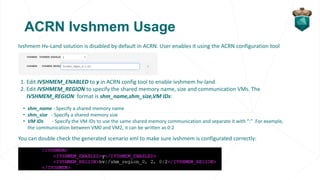
Ivshmem Hv-Land solution is disabled by default in ACRN. User enables it using the ACRN configuration tool
1. Edit IVSHMEM_ENABLED to y in ACRN config tool to enable ivshmem hv-land
2. Edit IVSHMEM_REGION to specify the shared memory name, size and communication VMs. The
IVSHMEM_REGION format is shm_name,shm_size,VM IDs:
• shm_name - Specify a shared memory name
• shm_size - Specify a shared memory size
• VM IDs - Specify the VM IDs to use the same shared memory communication and separate it with “:” .For example,
the communication between VM0 and VM2, it can be written as 0:2
You can double check the generated scenario xml to make sure ivshmem is configurated correctly:
ACRN Ivshmem Usage
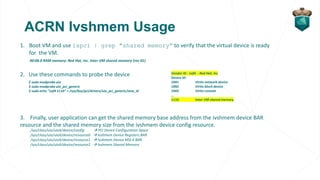
1. Boot VM and use lspci | grep "shared memory” to verify that the virtual device is ready
for the VM.
00:06.0 RAM memory: Red Hat, Inc. Inter-VM shared memory (rev 01)
2. Use these commands to probe the device
3. Finally, user application can get the shared memory base address from the ivshmem device BAR
resource and the shared memory size from the ivshmem device config resource.
/sys/class/uio/uioX/device/config → PCI Device Configuration Space
/sys/class/uio/uioX/device/resource0 → Ivshmem Device Registers BAR
/sys/class/uio/uioX/device/resource1 → Ivshmem Device MSI-X BAR
/sys/class/uio/uioX/device/resource2 → Ivshmem Shared Memory
$ sudo modprobe uio
$ sudo modprobe uio_pci_generic
$ sudo echo "1af4 1110“ > /sys/bus/pci/drivers/uio_pci_generic/new_id
Vendor ID : 1af4 - Red Hat, Inc
Device ID:
1041 Virtio network device
1042 Virtio block device
1043 Virtio console
...
1110 Inter-VM shared memory
Thank You

ACRN vMeet-Up EU 2021 - shared memory based inter-vm communication introduction

  • 1.
    Shared Memory BasedInter-VM Communication Introduction Chen Jian Jun <jian.jun.chen@intelcom> ACRN vMeet-Up Europe 2021
  • 2.
    Agenda ▹Ivshmem Overview ▹Ivshmem DM-LandIntroduction ▹Ivshmem HV-Land Introduction ▹Ivshmem Usage
  • 3.
    Ivshmem Overview ▹Shared memoryis exposed to guest VM as a PCI BAR ▹Shared memory is allocated from host or hypervisor ▹Two device types ▹ Ivshmem-plain: just shared memory ▹ Ivshmem-doorbell: shared memory plus interrupts ▹Linux guests can use UIO driver to probe the device ▹Windows guests can use dedicated driver to communicate with the device
  • 4.
    Ivshmem Device BARDescription Offset Register Attr Comments BAR 0 00h Interrupt Mask RW Bit 0: peer interrupt (rev 0) reserved (rev 1) Bits 1 ~ 31: reserved (only for revision 0 when only INTx is supported) 04h Interrupt Status RW Bit 0: peer interrupt (rev 0) reserved (rev 1) Bits 1 ~ 31: reserved (only for revision 0 when only INTx is supported) 08h IVPosition RO If the device is not configured for interrupts, this is zero. Else, it is the device's ID (between 0 and 65535). 0Ch Doorbell Write Triggers an interrupt vector in the target device Bits 0 ~ 15 Vector Number Bits 16 ~ 31 Target ID 10h - FFh Reserved None BAR 1 Holds MSI-X table and PBA (only ivshmem-doorbell) BAR 2 Maps the shared memory object
  • 5.
    Design Philosophy ▹Inter-VM applicationsare compatible between KVM and ACRN. ▹Reuse existing drivers for Linux/Windows guest. ▹Consistent with the development direction of the KVM community.
  • 6.
    ACRN Ivshmem DM-LandArchitecture ▹ Backend ▹ Initialization: shared memory allocation ▹ Ivshmem Device emulated in acrn-dm ▹ Frontend ▹ Linux: user-land driver based on UIO interface ▹ Windows: reference driver
  • 7.
    ACRN Ivshmem HV-LandArchitecture ▹ Ivshmem vdev ▹ Emulated in ACRN hypervisor ▹ Device creation ▹ Pre-launched VM: ACRN Config Tool ▹ Post-Launched VM: New hypercall for creating hv-land virtual pci device. ▹ Device attributes ▹ vBDF ▹ vBARs ▹ Device specific: shared memory path format is “domain://name”(domain field indicates the region is allocate from “hv” or “sos” that specified by the user) ▹ Shared memory pool ▹ Reserved and managed in HV ▹ Region creation ▹ Through ACRN config tool to create each region. ▹ Memory reservation: ACRN config tool configures regions’ name and size ▹ Region attributes ▹ Name: region identifier ▹ HPA: region base address ▹ Size: region size
  • 8.
    Ivshmem DM-Land Vs.HV-Land ▹The DM-Land ivshmem device is emulated in the ACRN device model and the shared memory regions are reserved in the Service VM's memory space. This solution only supports communication between post- launched VMs. ▹The HV-Land ivshmem device is emulated in the hypervisor and the shared memory regions are reserved in the hypervisor's memory space. This solution works for both pre-launched and post-launched VMs. ▹While both solutions can be used at the same time, Inter-VM communication may only be done between VMs using the same solution. Solution Device Emulation Memory Supported VM Types DM-Land Device Model Service VM Only Post-launched VM HV-Land Hypervisor Hypervisor Pre-launched VM and Post-launched VM
  • 9.
    ACRN Ivshmem Overview ▹Backend ▹ Initialization: shared memory allocation ▹ Ivshmem Device emulated in acrn-dm ▹ Frontend ▹ Linux: user-land driver based on UIO interface ▹ Windows: reference driver dm-land flow hypervisor-land flow
  • 10.
    UIO (User SpaceI/O) Introduction ▹ Shared Memory API ▹ Use mmap to access registers or RAM ▹ Use read/write/select for interrupts. ▹ Two Types Drivers ▹ Generic PCI UIO Driver ▹ Specific PCI Device Driver
  • 11.
    Ivshmem HV-Land Limitations ▹Theshared memory is reserved and cannot be reclaimed by the system. ▹The shared memory size is fixed, determined at build time. ▹The ownership of all regions are determined at build time, it is not possible to change their assignments at runtime.
  • 12.
    ACRN Ivshmem Usage Addthis line as an acrn-dm boot parameter -s slot,ivshmem,shm_name,shm_size -s slot - Specify the virtual PCI slot number ivshmem - Virtual PCI device name shm_name - Specify a shared memory name. VMs with the same shm_name share a shared memory region. The shm_name needs to start with dm:/ prefix or hv:/ prefix. shm_size - Specify a shared memory size. The unit is megabyte. The size ranges from 2 megabytes to 512 megabytes and must be a power of 2 megabytes. The two communicating VMs must define the same size. DM-Land Example: acrn-dm -A -m $mem_size -s 0:0,hostbridge -s 3,virtio-blk,/home/acrn/uos1.img -s 4,virtio-net,tap0 -s 5,ivshmem,dm:/shm_region_0,2 --ovmf /usr/share/acrn/bios/OVMF.fd $vm_name HV-Land Example: acrn-dm -A -m $mem_size -s 0:0,hostbridge -s 3,virtio-blk,/home/acrn/uos2.img -s 4,virtio-net,tap1 -s 5,ivshmem,hv:/shm_region_0,2 --ovmf /usr/share/acrn/bios/OVMF.fd $vm_name
  • 13.
    ACRN Ivshmem Usage IvshmemHv-Land solution is disabled by default in ACRN. User enables it using the ACRN configuration tool 1. Edit IVSHMEM_ENABLED to y in ACRN config tool to enable ivshmem hv-land 2. Edit IVSHMEM_REGION to specify the shared memory name, size and communication VMs. The IVSHMEM_REGION format is shm_name,shm_size,VM IDs: • shm_name - Specify a shared memory name • shm_size - Specify a shared memory size • VM IDs - Specify the VM IDs to use the same shared memory communication and separate it with “:” .For example, the communication between VM0 and VM2, it can be written as 0:2 You can double check the generated scenario xml to make sure ivshmem is configurated correctly:
  • 14.
    ACRN Ivshmem Usage 1.Boot VM and use lspci | grep "shared memory” to verify that the virtual device is ready for the VM. 00:06.0 RAM memory: Red Hat, Inc. Inter-VM shared memory (rev 01) 2. Use these commands to probe the device 3. Finally, user application can get the shared memory base address from the ivshmem device BAR resource and the shared memory size from the ivshmem device config resource. /sys/class/uio/uioX/device/config → PCI Device Configuration Space /sys/class/uio/uioX/device/resource0 → Ivshmem Device Registers BAR /sys/class/uio/uioX/device/resource1 → Ivshmem Device MSI-X BAR /sys/class/uio/uioX/device/resource2 → Ivshmem Shared Memory $ sudo modprobe uio $ sudo modprobe uio_pci_generic $ sudo echo "1af4 1110“ > /sys/bus/pci/drivers/uio_pci_generic/new_id Vendor ID : 1af4 - Red Hat, Inc Device ID: 1041 Virtio network device 1042 Virtio block device 1043 Virtio console ... 1110 Inter-VM shared memory
  • 15.