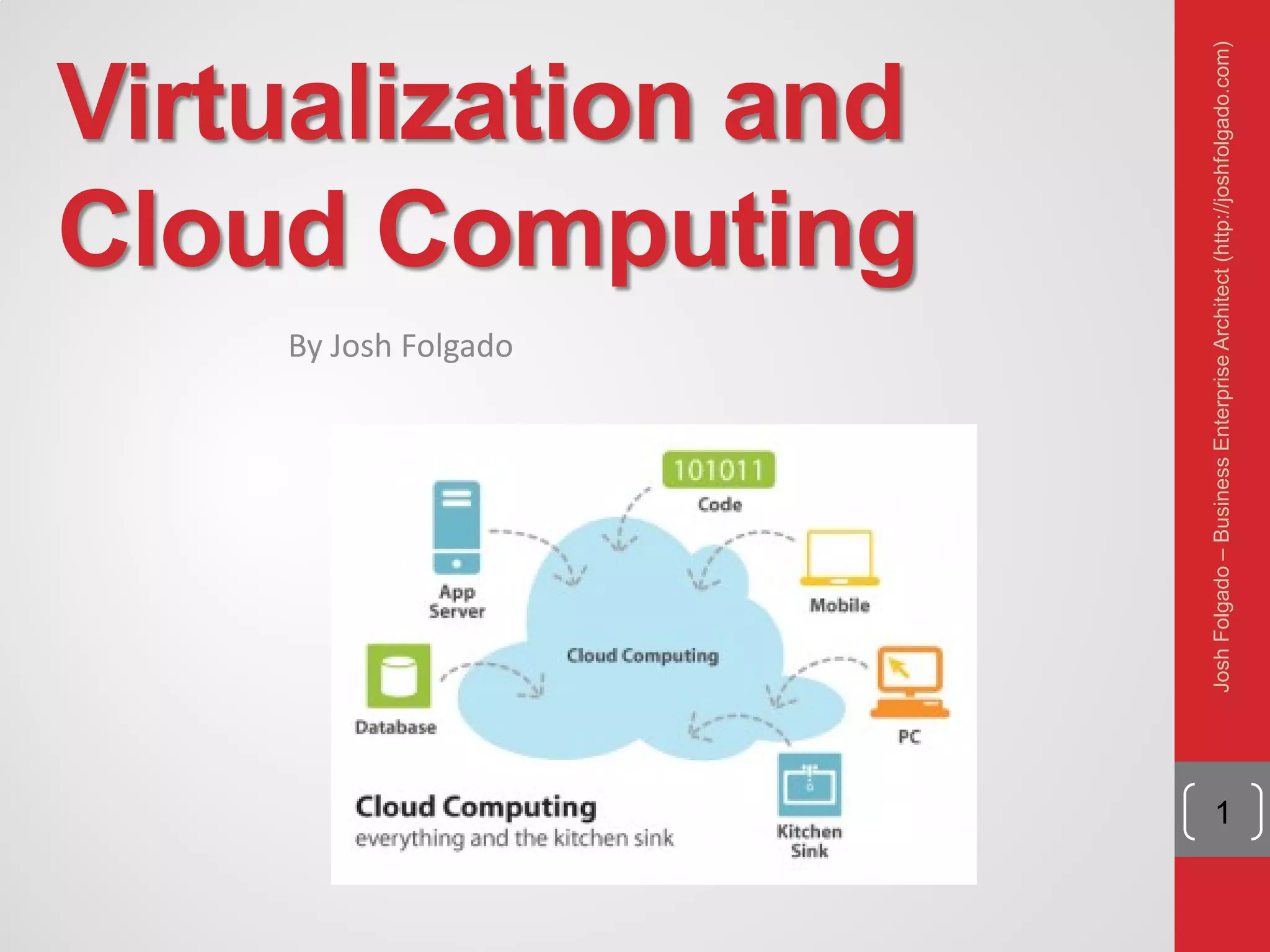
Virtualization and
Cloud Computing
By Josh Folgado
1
JoshFolgado–BusinessEnterpriseArchitect(http://joshfolgado.com)
JoshFolgado–BusinessEnterpriseArchitect
2
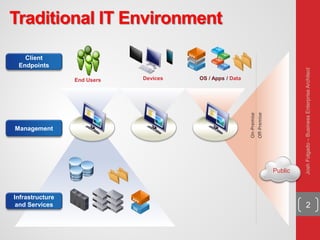
Client
Endpoints
Devices
Public
End Users
Management
OS / Apps / Data
Infrastructure
and Services
On-Premise
Off-Premise
Traditional IT Environment
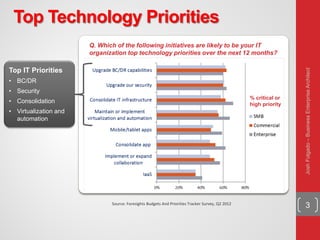
3Source: Foresights Budgets And Priorities Tracker Survey, Q2 2012
Q. Which of the following initiatives are likely to be your IT
organization top technology priorities over the next 12 months?
% critical or
high priority
Top IT Priorities
• BC/DR
• Security
• Consolidation
• Virtualization and
automation
Top Technology Priorities
JoshFolgado–BusinessEnterpriseArchitect
4
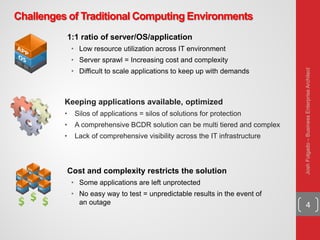
Challenges of Traditional Computing Environments
Cost and complexity restricts the solution
• Some applications are left unprotected
• No easy way to test = unpredictable results in the event of
an outage
1:1 ratio of server/OS/application
• Low resource utilization across IT environment
• Server sprawl = Increasing cost and complexity
• Difficult to scale applications to keep up with demands
Keeping applications available, optimized
• Silos of applications = silos of solutions for protection
• A comprehensive BCDR solution can be multi tiered and complex
• Lack of comprehensive visibility across the IT infrastructure
JoshFolgado–BusinessEnterpriseArchitect
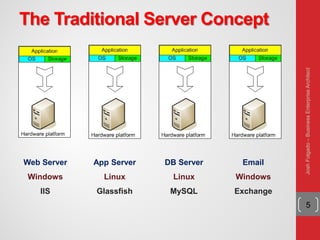
The Traditional Server Concept
5
Web Server
Windows
IIS
App Server
Linux
Glassfish
DB Server
Linux
MySQL
Email
Windows
Exchange
JoshFolgado–BusinessEnterpriseArchitect
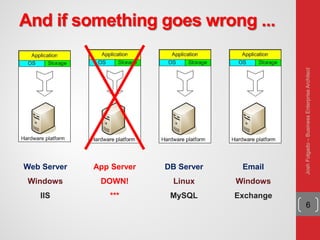
And if something goes wrong ...
6
Web Server
Windows
IIS
App Server
DOWN!
***
DB Server
Linux
MySQL
Email
Windows
Exchange
JoshFolgado–BusinessEnterpriseArchitect
The Traditional Server Concept
System Administrators often talk about servers as
a whole unit that includes the hardware, the OS,
the storage and the applications
Servers are often referred to by their function i.e.
the Exchange Server, the SQL Server, the File
Server, etc.
If the File server fills up, or the Exchange Server
exceeds capacity then the System Administrators
must add in a new server
7
JoshFolgado–BusinessEnterpriseArchitect
The Traditional Server Concept
Unless there are multiple servers, if a service
experiences a hardware failure then the service is
down
System Admins can implement clusters of servers
to make them more fault tolerant. However, even
clusters have limits on their scalability and not all
applications work in a clustered environment
8
JoshFolgado–BusinessEnterpriseArchitect
The Traditional Server Concept
• Pros
Easy to conceptualize
Fairly easy to deploy
Easy to backup
Virtually any
application/service can
be run from this type of
setup
• Cons
Expensive to acquire and
maintain hardware
Not very scalable
Difficult to replicate
Redundancy is difficult to
implement
Vulnerable to hardware
outages
In many cases, processor is
under-utilized
9
JoshFolgado–BusinessEnterpriseArchitect
Two Technologies for Agility
Virtualization:
The ability to run multiple operating systems on a
single physical system and share the underlying
hardware resources*
Cloud Computing:
“The provisioning of services in a timely (near on
instant), on-demand manner, to allow the scaling up
and down of resources”**
10
* VMware white paper, Virtualization Overview
** Alan Williamson, quoted in Cloud BootCamp March 2009
JoshFolgado–BusinessEnterpriseArchitect
11
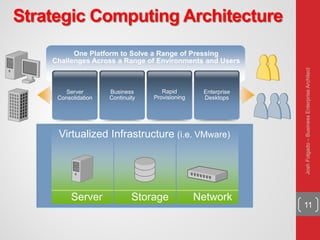
Strategic Computing Architecture
One Platform to Solve a Range of Pressing
Challenges Across a Range of Environments and Users
Server
Consolidation
Virtualized Infrastructure (i.e. VMware)
Business
Continuity
Rapid
Provisioning
Enterprise
Desktops
Server Storage Network
JoshFolgado–BusinessEnterpriseArchitect
Definitons
12
 Virtualization
A layer mapping its visible interface and resources onto the interface and
resources of the underlying layer or system on which it is implemented
Purposes:
 Abstraction – to simplify the use of the underlying resource (e.g.,
by removing details of the resource’s structure)
 Replication – to create multiple instances of the resource (e.g., to
simplify management or allocation)
 Isolation – to separate the uses which clients make of the
underlying resources (e.g., to improve security)
 Virtual Machine Monitor (VMM)
A virtualization system that partitions a single physical “machine” into
multiple virtual machines.
Terminology:
 Host – the machine and/or software on which the VMM is
implemented
 Guest – the OS which executes under the control of the VMM
JoshFolgado–BusinessEnterpriseArchitect
What is Virtualization
Virtualization allows one computer to do the job
of multiple computers
Virtual environments let one computer host
multiple operating systems at the same time
13
JoshFolgado–BusinessEnterpriseArchitect
How does Virtualization work
Virtualization transforms hardware into software
It is the creation of a fully functional virtual
computer that can run its own applications and
operating system
Creates virtual elements of the CPU, RAM, and
hard disk
14
JoshFolgado–BusinessEnterpriseArchitect
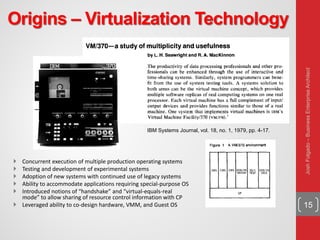
Origins – Virtualization Technology
15
 Concurrent execution of multiple production operating systems
 Testing and development of experimental systems
 Adoption of new systems with continued use of legacy systems
 Ability to accommodate applications requiring special-purpose OS
 Introduced notions of “handshake” and “virtual-equals-real
mode” to allow sharing of resource control information with CP
 Leveraged ability to co-design hardware, VMM, and Guest OS
IBM Systems Journal, vol. 18, no. 1, 1979, pp. 4-17.
JoshFolgado–BusinessEnterpriseArchitect
Virtualization
Architecture & Interfaces
16
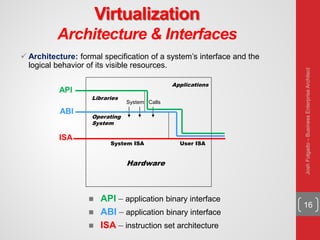
 Architecture: formal specification of a system’s interface and the
logical behavior of its visible resources.
Hardware
System ISA User ISA
Operating
System
System Calls
Libraries
Applications
ISA
ABI
API
 API – application binary interface
 ABI – application binary interface
 ISA – instruction set architecture
JoshFolgado–BusinessEnterpriseArchitect
Virtualization
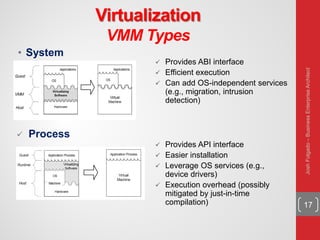
VMM Types
17
• System
 Process
 Provides ABI interface
 Efficient execution
 Can add OS-independent services
(e.g., migration, intrusion
detection)
 Provides API interface
 Easier installation
 Leverage OS services (e.g.,
device drivers)
 Execution overhead (possibly
mitigated by just-in-time
compilation)
JoshFolgado–BusinessEnterpriseArchitect
Virtualization
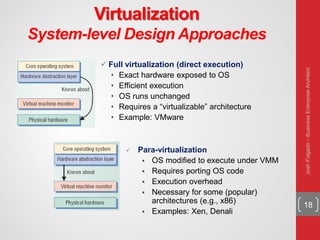
System-level Design Approaches
18
 Full virtualization (direct execution)
• Exact hardware exposed to OS
• Efficient execution
• OS runs unchanged
• Requires a “virtualizable” architecture
• Example: VMware
 Para-virtualization
 OS modified to execute under VMM
 Requires porting OS code
 Execution overhead
 Necessary for some (popular)
architectures (e.g., x86)
 Examples: Xen, Denali
JoshFolgado–BusinessEnterpriseArchitect
Virtualization
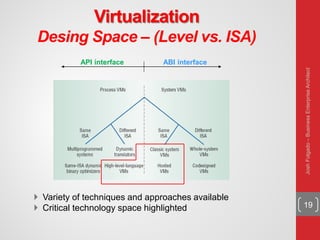
Desing Space – (Level vs. ISA)
19
 Variety of techniques and approaches available
 Critical technology space highlighted
API interface ABI interface
JoshFolgado–BusinessEnterpriseArchitect
Virtualization
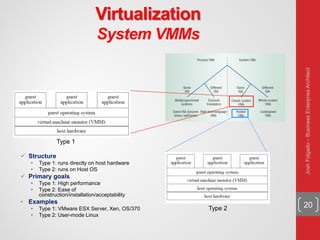
System VMMs
20
 Structure
• Type 1: runs directly on host hardware
• Type 2: runs on Host OS
 Primary goals
• Type 1: High performance
• Type 2: Ease of
construction/installation/acceptability
• Examples
• Type 1: VMware ESX Server, Xen, OS/370
• Type 2: User-mode Linux
Type 1
Type 2
JoshFolgado–BusinessEnterpriseArchitect
Virtualization
Hosted VMMs
21
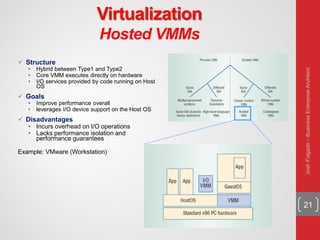
 Structure
• Hybrid between Type1 and Type2
• Core VMM executes directly on hardware
• I/O services provided by code running on Host
OS
 Goals
• Improve performance overall
• leverages I/O device support on the Host OS
 Disadvantages
• Incurs overhead on I/O operations
• Lacks performance isolation and
performance guarantees
Example: VMware (Workstation)
JoshFolgado–BusinessEnterpriseArchitect
Virtualization
Whole-System VMMs
22
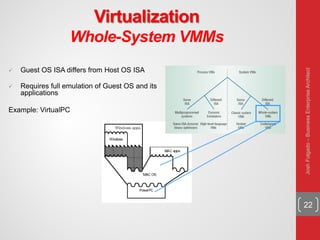
 Guest OS ISA differs from Host OS ISA
 Requires full emulation of Guest OS and its
applications
Example: VirtualPC
JoshFolgado–BusinessEnterpriseArchitect
Virtualization
Strategies
23
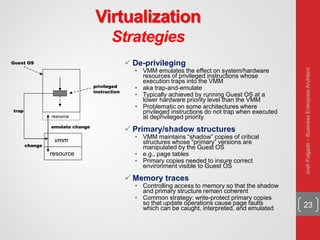
 De-privileging
• VMM emulates the effect on system/hardware
resources of privileged instructions whose
execution traps into the VMM
• aka trap-and-emulate
• Typically achieved by running Guest OS at a
lower hardware priority level than the VMM
• Problematic on some architectures where
privileged instructions do not trap when executed
at deprivileged priority
 Primary/shadow structures
• VMM maintains “shadow” copies of critical
structures whose “primary” versions are
manipulated by the Guest OS
• e.g., page tables
• Primary copies needed to insure correct
environment visible to Guest OS
 Memory traces
• Controlling access to memory so that the shadow
and primary structure remain coherent
• Common strategy: write-protect primary copies
so that update operations cause page faults
which can be caught, interpreted, and emulated
resource
vmm
privileged
instruction
trap
Guest OS
resource
emulate change
change
JoshFolgado–BusinessEnterpriseArchitect
Virtualization
Memory Management
24
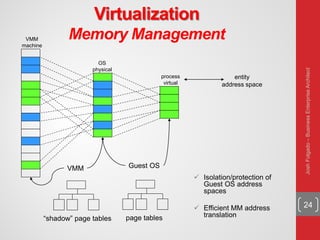
 Isolation/protection of
Guest OS address
spaces
 Efficient MM address
translation
VMM
machine
VMM Guest OS
“shadow” page tables page tables
process
virtual
OS
physical
entity
address space
JoshFolgado–BusinessEnterpriseArchitect
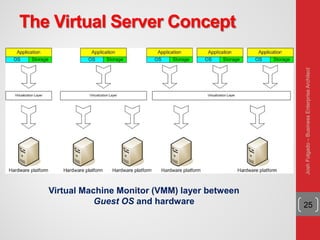
The Virtual Server Concept
25
Virtual Machine Monitor (VMM) layer between
Guest OS and hardware
JoshFolgado–BusinessEnterpriseArchitect
The Virtual Server Concept
Virtual servers can still be referred to by their
function i.e. File Server, Email Server, Database
Server, etc.
If the environment is built correctly, virtual servers
will not be affected by the loss of a host
Hosts may be removed and introduced almost at
will to accommodate maintenance
26
JoshFolgado–BusinessEnterpriseArchitect
The Virtual Server Concept
Virtual servers can be easily scaled out
If the administrators find that the resources supporting a
virtual server are being taxed too much, they can adjust the
amount of resources allocated to that virtual server
Server templates can be created in a virtual
environment to be used to create multiple,
identical virtual servers
Virtual servers themselves can be migrated
from host to host almost at will
27
JoshFolgado–BusinessEnterpriseArchitect
The Virtual Server Concept
• Pros
Resource pooling
Highly redundant
Highly available
Rapidly deploy new
servers
Easy to deploy
Reconfigurable while
services are running
Optimizes physical
resources by doing more
with less
• Cons
Slightly harder to
conceptualize
Slightly more costly
(must buy hardware, OS,
Apps, and now the
abstraction layer)
28
JoshFolgado–BusinessEnterpriseArchitect
Virtualization Status
Offerings from many companies
e.g. VMware, Microsoft, Sun, ...
Hardware support
 Fits well with the move to 64 bit (very large memories)
multi-core (concurrency) processors.
 Intel VT (Virtualization Technology) provides hardware to
support the Virtual Machine Monitor layer
Virtualization is now a well-established technology
29
JoshFolgado–BusinessEnterpriseArchitect
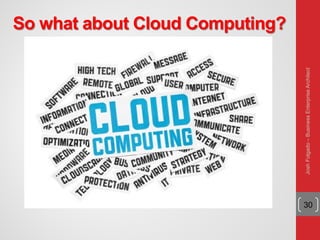
So what about Cloud Computing?
30
JoshFolgado–BusinessEnterpriseArchitect
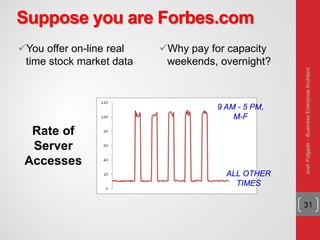
Suppose you are Forbes.com
You offer on-line real
time stock market data
Why pay for capacity
weekends, overnight?
31
9 AM - 5 PM,
M-F
ALL OTHER
TIMES
Rate of
Server
Accesses
JoshFolgado–BusinessEnterpriseArchitect
Forbes' Solution
Host the web site in Amazon's EC2 Elastic Compute
Cloud
Provision new servers every day and de-provision them
every night
Pay just $0.10* per server per hour
* more for higher capacity servers
Let Amazon worry about the hardware!
32
JoshFolgado–BusinessEnterpriseArchitect
Cloud Computing takes
Virtualization to the next step
You don’t have to own the hardware
You “rent” it as needed from a cloud
There are public clouds
e.g. Amazon EC2, and now many others
(Microsoft, IBM, Sun, and others ...)
A company can create a private one
With more control over security, etc. 33
JoshFolgado–BusinessEnterpriseArchitect
Goal 1 – Cost Control
Cost
• Many systems have variable demands
• Batch processing (e.g. New York Times)
• Web sites with peaks (e.g. Forbes)
• Startups with unknown demand (e.g. the Cash
for Clunkers program)
• Reduce risk
• Don't need to buy hardware until you need it
34
JoshFolgado–BusinessEnterpriseArchitect
Goal 2 - Business Agility
More than scalability - elasticity!
• Ely Lilly in rapidly changing health care business
• Used to take 3 - 4 months to give a department a
server cluster, then they would hoard it!
• Using EC2, about 5 minutes!
• And they give it back when they are done
Scaling back is as important as scaling up
35
JoshFolgado–BusinessEnterpriseArchitect
Goal 3 - Stick to Your Business
Most companies don't WANT to do system
administration
• Forbes says:
• We are is a publishing company, not a software
company
But beware:
• Do you really save much on sys admin?
• You don't have the hardware, but you still need
to manage the OS!
36
JoshFolgado–BusinessEnterpriseArchitect
How Cloud Computing Works
Various providers let you create virtual servers
• Set up an account, as easily as using a credit card
You create virtual servers ("Virtualization")
• Choose the OS and software each "instance" will have
• It will run on a large server farm located somewhere
• You can instantiate more on a few minutes' notice
• You can shut down instances in a minute or so
They send you a bill for what you use
37
JoshFolgado–BusinessEnterpriseArchitect
Cloud Computing Status
Rapidly becoming a mainstream practice
Numerous providers
• Amazon EC2 imitators ...
• Just about every major industry name
• IBM, Sun, Microsoft, ...
Major buzz at industry meetings
38
JoshFolgado–BusinessEnterpriseArchitect

Virtualization and Cloud Computing

  • 1.
    Virtualization and Cloud Computing ByJosh Folgado 1 JoshFolgado–BusinessEnterpriseArchitect(http://joshfolgado.com)
  • 2.
    JoshFolgado–BusinessEnterpriseArchitect 2 Client Endpoints Devices Public End Users Management OS /Apps / Data Infrastructure and Services On-Premise Off-Premise Traditional IT Environment
  • 3.
    3Source: Foresights BudgetsAnd Priorities Tracker Survey, Q2 2012 Q. Which of the following initiatives are likely to be your IT organization top technology priorities over the next 12 months? % critical or high priority Top IT Priorities • BC/DR • Security • Consolidation • Virtualization and automation Top Technology Priorities JoshFolgado–BusinessEnterpriseArchitect
  • 4.
    4 Challenges of TraditionalComputing Environments Cost and complexity restricts the solution • Some applications are left unprotected • No easy way to test = unpredictable results in the event of an outage 1:1 ratio of server/OS/application • Low resource utilization across IT environment • Server sprawl = Increasing cost and complexity • Difficult to scale applications to keep up with demands Keeping applications available, optimized • Silos of applications = silos of solutions for protection • A comprehensive BCDR solution can be multi tiered and complex • Lack of comprehensive visibility across the IT infrastructure JoshFolgado–BusinessEnterpriseArchitect
  • 5.
    The Traditional ServerConcept 5 Web Server Windows IIS App Server Linux Glassfish DB Server Linux MySQL Email Windows Exchange JoshFolgado–BusinessEnterpriseArchitect
  • 6.
    And if somethinggoes wrong ... 6 Web Server Windows IIS App Server DOWN! *** DB Server Linux MySQL Email Windows Exchange JoshFolgado–BusinessEnterpriseArchitect
  • 7.
    The Traditional ServerConcept System Administrators often talk about servers as a whole unit that includes the hardware, the OS, the storage and the applications Servers are often referred to by their function i.e. the Exchange Server, the SQL Server, the File Server, etc. If the File server fills up, or the Exchange Server exceeds capacity then the System Administrators must add in a new server 7 JoshFolgado–BusinessEnterpriseArchitect
  • 8.
    The Traditional ServerConcept Unless there are multiple servers, if a service experiences a hardware failure then the service is down System Admins can implement clusters of servers to make them more fault tolerant. However, even clusters have limits on their scalability and not all applications work in a clustered environment 8 JoshFolgado–BusinessEnterpriseArchitect
  • 9.
    The Traditional ServerConcept • Pros Easy to conceptualize Fairly easy to deploy Easy to backup Virtually any application/service can be run from this type of setup • Cons Expensive to acquire and maintain hardware Not very scalable Difficult to replicate Redundancy is difficult to implement Vulnerable to hardware outages In many cases, processor is under-utilized 9 JoshFolgado–BusinessEnterpriseArchitect
  • 10.
    Two Technologies forAgility Virtualization: The ability to run multiple operating systems on a single physical system and share the underlying hardware resources* Cloud Computing: “The provisioning of services in a timely (near on instant), on-demand manner, to allow the scaling up and down of resources”** 10 * VMware white paper, Virtualization Overview ** Alan Williamson, quoted in Cloud BootCamp March 2009 JoshFolgado–BusinessEnterpriseArchitect
  • 11.
    11 Strategic Computing Architecture OnePlatform to Solve a Range of Pressing Challenges Across a Range of Environments and Users Server Consolidation Virtualized Infrastructure (i.e. VMware) Business Continuity Rapid Provisioning Enterprise Desktops Server Storage Network JoshFolgado–BusinessEnterpriseArchitect
  • 12.
    Definitons 12  Virtualization A layermapping its visible interface and resources onto the interface and resources of the underlying layer or system on which it is implemented Purposes:  Abstraction – to simplify the use of the underlying resource (e.g., by removing details of the resource’s structure)  Replication – to create multiple instances of the resource (e.g., to simplify management or allocation)  Isolation – to separate the uses which clients make of the underlying resources (e.g., to improve security)  Virtual Machine Monitor (VMM) A virtualization system that partitions a single physical “machine” into multiple virtual machines. Terminology:  Host – the machine and/or software on which the VMM is implemented  Guest – the OS which executes under the control of the VMM JoshFolgado–BusinessEnterpriseArchitect
  • 13.
    What is Virtualization Virtualizationallows one computer to do the job of multiple computers Virtual environments let one computer host multiple operating systems at the same time 13 JoshFolgado–BusinessEnterpriseArchitect
  • 14.
    How does Virtualizationwork Virtualization transforms hardware into software It is the creation of a fully functional virtual computer that can run its own applications and operating system Creates virtual elements of the CPU, RAM, and hard disk 14 JoshFolgado–BusinessEnterpriseArchitect
  • 15.
    Origins – VirtualizationTechnology 15  Concurrent execution of multiple production operating systems  Testing and development of experimental systems  Adoption of new systems with continued use of legacy systems  Ability to accommodate applications requiring special-purpose OS  Introduced notions of “handshake” and “virtual-equals-real mode” to allow sharing of resource control information with CP  Leveraged ability to co-design hardware, VMM, and Guest OS IBM Systems Journal, vol. 18, no. 1, 1979, pp. 4-17. JoshFolgado–BusinessEnterpriseArchitect
  • 16.
    Virtualization Architecture & Interfaces 16 Architecture: formal specification of a system’s interface and the logical behavior of its visible resources. Hardware System ISA User ISA Operating System System Calls Libraries Applications ISA ABI API  API – application binary interface  ABI – application binary interface  ISA – instruction set architecture JoshFolgado–BusinessEnterpriseArchitect
  • 17.
    Virtualization VMM Types 17 • System Process  Provides ABI interface  Efficient execution  Can add OS-independent services (e.g., migration, intrusion detection)  Provides API interface  Easier installation  Leverage OS services (e.g., device drivers)  Execution overhead (possibly mitigated by just-in-time compilation) JoshFolgado–BusinessEnterpriseArchitect
  • 18.
    Virtualization System-level Design Approaches 18 Full virtualization (direct execution) • Exact hardware exposed to OS • Efficient execution • OS runs unchanged • Requires a “virtualizable” architecture • Example: VMware  Para-virtualization  OS modified to execute under VMM  Requires porting OS code  Execution overhead  Necessary for some (popular) architectures (e.g., x86)  Examples: Xen, Denali JoshFolgado–BusinessEnterpriseArchitect
  • 19.
    Virtualization Desing Space –(Level vs. ISA) 19  Variety of techniques and approaches available  Critical technology space highlighted API interface ABI interface JoshFolgado–BusinessEnterpriseArchitect
  • 20.
    Virtualization System VMMs 20  Structure •Type 1: runs directly on host hardware • Type 2: runs on Host OS  Primary goals • Type 1: High performance • Type 2: Ease of construction/installation/acceptability • Examples • Type 1: VMware ESX Server, Xen, OS/370 • Type 2: User-mode Linux Type 1 Type 2 JoshFolgado–BusinessEnterpriseArchitect
  • 21.
    Virtualization Hosted VMMs 21  Structure •Hybrid between Type1 and Type2 • Core VMM executes directly on hardware • I/O services provided by code running on Host OS  Goals • Improve performance overall • leverages I/O device support on the Host OS  Disadvantages • Incurs overhead on I/O operations • Lacks performance isolation and performance guarantees Example: VMware (Workstation) JoshFolgado–BusinessEnterpriseArchitect
  • 22.
    Virtualization Whole-System VMMs 22  GuestOS ISA differs from Host OS ISA  Requires full emulation of Guest OS and its applications Example: VirtualPC JoshFolgado–BusinessEnterpriseArchitect
  • 23.
    Virtualization Strategies 23  De-privileging • VMMemulates the effect on system/hardware resources of privileged instructions whose execution traps into the VMM • aka trap-and-emulate • Typically achieved by running Guest OS at a lower hardware priority level than the VMM • Problematic on some architectures where privileged instructions do not trap when executed at deprivileged priority  Primary/shadow structures • VMM maintains “shadow” copies of critical structures whose “primary” versions are manipulated by the Guest OS • e.g., page tables • Primary copies needed to insure correct environment visible to Guest OS  Memory traces • Controlling access to memory so that the shadow and primary structure remain coherent • Common strategy: write-protect primary copies so that update operations cause page faults which can be caught, interpreted, and emulated resource vmm privileged instruction trap Guest OS resource emulate change change JoshFolgado–BusinessEnterpriseArchitect
  • 24.
    Virtualization Memory Management 24  Isolation/protectionof Guest OS address spaces  Efficient MM address translation VMM machine VMM Guest OS “shadow” page tables page tables process virtual OS physical entity address space JoshFolgado–BusinessEnterpriseArchitect
  • 25.
    The Virtual ServerConcept 25 Virtual Machine Monitor (VMM) layer between Guest OS and hardware JoshFolgado–BusinessEnterpriseArchitect
  • 26.
    The Virtual ServerConcept Virtual servers can still be referred to by their function i.e. File Server, Email Server, Database Server, etc. If the environment is built correctly, virtual servers will not be affected by the loss of a host Hosts may be removed and introduced almost at will to accommodate maintenance 26 JoshFolgado–BusinessEnterpriseArchitect
  • 27.
    The Virtual ServerConcept Virtual servers can be easily scaled out If the administrators find that the resources supporting a virtual server are being taxed too much, they can adjust the amount of resources allocated to that virtual server Server templates can be created in a virtual environment to be used to create multiple, identical virtual servers Virtual servers themselves can be migrated from host to host almost at will 27 JoshFolgado–BusinessEnterpriseArchitect
  • 28.
    The Virtual ServerConcept • Pros Resource pooling Highly redundant Highly available Rapidly deploy new servers Easy to deploy Reconfigurable while services are running Optimizes physical resources by doing more with less • Cons Slightly harder to conceptualize Slightly more costly (must buy hardware, OS, Apps, and now the abstraction layer) 28 JoshFolgado–BusinessEnterpriseArchitect
  • 29.
    Virtualization Status Offerings frommany companies e.g. VMware, Microsoft, Sun, ... Hardware support  Fits well with the move to 64 bit (very large memories) multi-core (concurrency) processors.  Intel VT (Virtualization Technology) provides hardware to support the Virtual Machine Monitor layer Virtualization is now a well-established technology 29 JoshFolgado–BusinessEnterpriseArchitect
  • 30.
    So what aboutCloud Computing? 30 JoshFolgado–BusinessEnterpriseArchitect
  • 31.
    Suppose you areForbes.com You offer on-line real time stock market data Why pay for capacity weekends, overnight? 31 9 AM - 5 PM, M-F ALL OTHER TIMES Rate of Server Accesses JoshFolgado–BusinessEnterpriseArchitect
  • 32.
    Forbes' Solution Host theweb site in Amazon's EC2 Elastic Compute Cloud Provision new servers every day and de-provision them every night Pay just $0.10* per server per hour * more for higher capacity servers Let Amazon worry about the hardware! 32 JoshFolgado–BusinessEnterpriseArchitect
  • 33.
    Cloud Computing takes Virtualizationto the next step You don’t have to own the hardware You “rent” it as needed from a cloud There are public clouds e.g. Amazon EC2, and now many others (Microsoft, IBM, Sun, and others ...) A company can create a private one With more control over security, etc. 33 JoshFolgado–BusinessEnterpriseArchitect
  • 34.
    Goal 1 –Cost Control Cost • Many systems have variable demands • Batch processing (e.g. New York Times) • Web sites with peaks (e.g. Forbes) • Startups with unknown demand (e.g. the Cash for Clunkers program) • Reduce risk • Don't need to buy hardware until you need it 34 JoshFolgado–BusinessEnterpriseArchitect
  • 35.
    Goal 2 -Business Agility More than scalability - elasticity! • Ely Lilly in rapidly changing health care business • Used to take 3 - 4 months to give a department a server cluster, then they would hoard it! • Using EC2, about 5 minutes! • And they give it back when they are done Scaling back is as important as scaling up 35 JoshFolgado–BusinessEnterpriseArchitect
  • 36.
    Goal 3 -Stick to Your Business Most companies don't WANT to do system administration • Forbes says: • We are is a publishing company, not a software company But beware: • Do you really save much on sys admin? • You don't have the hardware, but you still need to manage the OS! 36 JoshFolgado–BusinessEnterpriseArchitect
  • 37.
    How Cloud ComputingWorks Various providers let you create virtual servers • Set up an account, as easily as using a credit card You create virtual servers ("Virtualization") • Choose the OS and software each "instance" will have • It will run on a large server farm located somewhere • You can instantiate more on a few minutes' notice • You can shut down instances in a minute or so They send you a bill for what you use 37 JoshFolgado–BusinessEnterpriseArchitect
  • 38.
    Cloud Computing Status Rapidlybecoming a mainstream practice Numerous providers • Amazon EC2 imitators ... • Just about every major industry name • IBM, Sun, Microsoft, ... Major buzz at industry meetings 38 JoshFolgado–BusinessEnterpriseArchitect