CLOUD TECHNOLOGY - VIRTUALIZATION
Spencer Lin
What is a Virtual Machine?
 A virtual machine (VM) is a software computer that, like a
physical computer, runs an operating system and
applications. Every virtual machine has virtual devices that
provide the same functionality as physical hardware and
have additional benefits in terms of portability,
manageability, and security.
What is Virtualization?
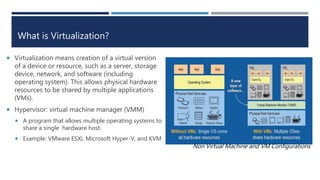
 Virtualization means creation of a virtual version
of a device or resource, such as a server, storage
device, network, and software (including
operating system). This allows physical hardware
resources to be shared by multiple applications
(VMs).
 Hypervisor: virtual machine manager (VMM)
 A program that allows multiple operating systems to
share a single hardware host.
 Example: VMware ESXi, Microsoft Hyper-V, and KVM
Non Virtual Machine and VM Configurations
Advantages of Virtualization
 Reduce capital and operating costs
 Deliver high application availability
 Minimize or eliminate downtime.
 Increase IT productivity, efficiency, agility and responsiveness
 Speed and simplify application and resource provisioning
 Support business continuity and disaster recovery
 Enable centralized management
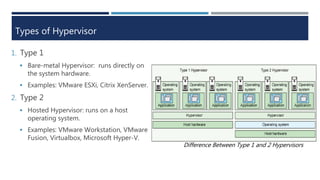
Types of Hypervisor
1. Type 1
 Bare-metal Hypervisor: runs directly on
the system hardware.
 Examples: VMware ESXi, Citrix XenServer.
2. Type 2
 Hosted Hypervisor: runs on a host
operating system.
 Examples: VMware Workstation, VMware
Fusion, Virtualbox, Microsoft Hyper-V.
Difference Between Type 1 and 2 Hypervisors
Server Virtualization – What is it?
 Server virtualization is a virtualization technique that
presents a physical server as if partitioned into a number
of small, virtual servers with the help of virtualization
software. In server virtualization, each physical server runs
multiple operating system instances at the same time.
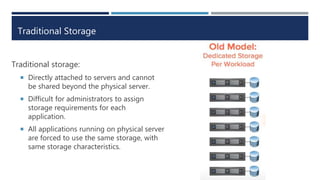
Traditional Storage
Traditional storage:
 Directly attached to servers and cannot
be shared beyond the physical server.
 Difficult for administrators to assign
storage requirements for each
application.
 All applications running on physical server
are forced to use the same storage, with
same storage characteristics.
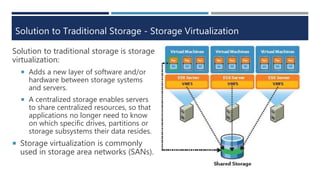
Solution to Traditional Storage - Storage Virtualization
Solution to traditional storage is storage
virtualization:
 Adds a new layer of software and/or
hardware between storage systems
and servers.
 A centralized storage enables servers
to share centralized resources, so that
applications no longer need to know
on which specific drives, partitions or
storage subsystems their data resides.
 Storage virtualization is commonly
used in storage area networks (SANs).
Storage Area Network (SAN)
 Storage Area Networks are the most comprehensive centralized
storage solution. It allows for true storage sharing since data is
stored at the block level. This means applications, including the OS
can directly access the storage device as if it was locally attached.
 Each block can be controlled as an individual hard drive. These Blocks are
controlled by server based operating systems and each block can be
individually formatted with the required file system.
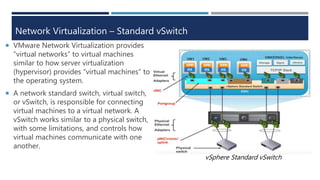
Network Virtualization – Standard vSwitch
 VMware Network Virtualization provides
“virtual networks” to virtual machines
similar to how server virtualization
(hypervisor) provides “virtual machines” to
the operating system.
 A network standard switch, virtual switch,
or vSwitch, is responsible for connecting
virtual machines to a virtual network. A
vSwitch works similar to a physical switch,
with some limitations, and controls how
virtual machines communicate with one
another.
vSphere Standard vSwitch
Network Virtualization – Distributed vSwitch
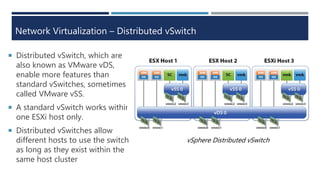
 Distributed vSwitch, which are
also known as VMware vDS,
enable more features than
standard vSwitches, sometimes
called VMware vSS.
 A standard vSwitch works within
one ESXi host only.
 Distributed vSwitches allow
different hosts to use the switch
as long as they exist within the
same host cluster
vSphere Distributed vSwitch
Summary
 A virtual machine (VM) is a software computer that, like a physical computer, runs an
operating system and applications.
 Virtualization means creation of a virtual version of a device or resource, such as a
server, storage device, network, and software (including operating system).
 Two types of Hypervisor: Bare-metal Hypervisor and Hosted Hypervisor.
 Server virtualization is a virtualization technique that presents a physical server as if
partitioned into a number of small, virtual servers with the help of virtualization
software.
 Solution to traditional storage is storage virtualization which adds a new layer of
software and/or hardware between storage systems and servers.
 Network Virtualization provides “virtual networks” to virtual machines similar to how
server virtualization (hypervisor) provides “virtual machines” to the operating system.
Virtualization and the Cloud
 The encapsulation offered in virtualization and the mobility
found in this technology enables a live virtual machine to be
moved with no downtime for the application – the
dependency on the Cloud infrastructure is minimal.
 Virtualization powers cloud computing and increases IT
scalability, agility, flexibility and performance while creating a
major cost savings. With server, storage, and network
virtualization, cloud computing enables companies to react
faster to the needs of business, while driving greater
operational efficiencies.
References
"Virtualization." VMware. N.p., n.d. Web. 14 Oct. 2015. <http://www.vmware.com/virtualization.html>.
"CLOUD COMPUTING AND VIRTUALIZATION." JAN KREMER CONSULTING SERVICES. N.p., n.d. Web. 14 Oct. 2015.
<http://jkremer.com/White%20Papers/Cloud%20Computing%20and%20Virtualization%20White%20Paper%20JKCS.pdf>
.
Freeman, Bill. "Best Hardware for Server Virtualisation." TouchPoint. N.p., 17 Feb. 2015. Web. 20 Nov. 2015.
<http://touchpoint.com.au/blog/best-hardware-for-server-virtualisation/>.
Siebert, Eric. "Selecting CPU, processors and memory for virtualized environments." TechTarget. N.p., n.d. Web. 20 Nov.
2015. <http://searchservervirtualization.techtarget.com/tip/Selecting-CPU-processors-and-memory-for-virtualized-
environments>.
"Centralized Storage." Netcal. N.p., n.d. Web. 20 Nov. 2015. <http://www.netcal.com/centralized-storage/>.
Jorgenson, Petra. "Virtual Networking 101: Understanding VMware Networking." Pluralsight. N.p., 30 May 2012. Web. 20
Nov. 2015. <http://blog.pluralsight.com/virtual-networking-101-understanding-vmware-networking>.
Davis, David. "VMware's standard and distributed virtual switches: What resellers need to know." TechTarget. N.p., Feb.
2010. Web. 20 Nov. 2015. <http://searchitchannel.techtarget.com/tip/VMwares-standard-and-distributed-virtual-
switches-What-resellers-need-to-know>.
"How do switches, vSwitches and distributed vSwitches differ?" TechTarget. N.p., 11 June 2013. Web. 20 Nov. 2015.
<http://searchvmware.techtarget.com/photostory/2240185944/Getting-VMware-terminology-straight/9/How-do-
switches-vSwitches-and-distributed-vSwitches-differ>.
Technical Details
Server Virtualization – Software Requirements
Software Vendors: VMware vSphere, Microsoft Hyper-V, Citrix XenServer
 More similarities between all of the software vendors than differences
 All those software platforms have the ability to manage processor, memory, network, and disk
resources.
 All support both Microsoft Windows and Linux operating environments, and some support Solaris
Unix as well
 The only possible difference between software vendors are performance, reliability, and advanced
management.
 VMware is obviously the leader in virtualization platform
Server Virtualization – Hardware Requirements
 Choosing the best hardware for virtualization begins with a server’s memory and CPU. The
lack of memory or CPU can directly affect performance.
Memory:
 Memory is often the most limiting factor in the number of virtual machines a server can host.
Ensuring an adequate amount of fast RAM plays a huge role in the server’s virtualization
capabilities.
CPU:
 Selecting a CPU with multiple cores can significantly increase performance and throughput.
There are two major CPU brands in the market, Intel and AMD. Both Intel and AMD have
integrated virtualization extensions, Intel Virtualization Technology (Intel-VT) and AMD
Virtualization (AMD-V).
 Choosing a right CPU brand depends on your current environment. If your current servers
already use a particular brand, it is a good idea to just stick with it because one VM running
on Intel can not be moved to AMD, and vice verse.
Network Virtualization - Standard vSwitch features
The standard vSwitch offers following features:
 Layer 2 forwarding
 802.1Q VLAN tagging
 Multicast support
 EtherChannel
 Load balancing
 Tx rate limiting
 Port security
 CDP
 ……..
Network Virtualization – Distributed vSwitch features
Unlike standard vSwitches, which can be managed from the local host, DvSwitches must be
created and controlled through vCenter Server.
 VMware vCenter Server provides centralized management of vSphere virtual infrastructure.
 IT administrators can ensure security and availability, simplify day-to-day tasks, and reduce
the complexity of managing virtual infrastructure).
Distributed vSwitch offers all features standard vSwitch have + following features:
 Centralized configuration for all network switch ports, across the entire virtual infrastructure.
 Private VLANs.
 Support for third-party switches (with the only option today being the Cisco Nexus 1000-V).

Cloud Technology: Virtualization

  • 1.
    CLOUD TECHNOLOGY -VIRTUALIZATION Spencer Lin
  • 2.
    What is aVirtual Machine?  A virtual machine (VM) is a software computer that, like a physical computer, runs an operating system and applications. Every virtual machine has virtual devices that provide the same functionality as physical hardware and have additional benefits in terms of portability, manageability, and security.
  • 3.
    What is Virtualization? Virtualization means creation of a virtual version of a device or resource, such as a server, storage device, network, and software (including operating system). This allows physical hardware resources to be shared by multiple applications (VMs).  Hypervisor: virtual machine manager (VMM)  A program that allows multiple operating systems to share a single hardware host.  Example: VMware ESXi, Microsoft Hyper-V, and KVM Non Virtual Machine and VM Configurations
  • 4.
    Advantages of Virtualization Reduce capital and operating costs  Deliver high application availability  Minimize or eliminate downtime.  Increase IT productivity, efficiency, agility and responsiveness  Speed and simplify application and resource provisioning  Support business continuity and disaster recovery  Enable centralized management
  • 5.
    Types of Hypervisor 1.Type 1  Bare-metal Hypervisor: runs directly on the system hardware.  Examples: VMware ESXi, Citrix XenServer. 2. Type 2  Hosted Hypervisor: runs on a host operating system.  Examples: VMware Workstation, VMware Fusion, Virtualbox, Microsoft Hyper-V. Difference Between Type 1 and 2 Hypervisors
  • 6.
    Server Virtualization –What is it?  Server virtualization is a virtualization technique that presents a physical server as if partitioned into a number of small, virtual servers with the help of virtualization software. In server virtualization, each physical server runs multiple operating system instances at the same time.
  • 7.
    Traditional Storage Traditional storage: Directly attached to servers and cannot be shared beyond the physical server.  Difficult for administrators to assign storage requirements for each application.  All applications running on physical server are forced to use the same storage, with same storage characteristics.
  • 8.
    Solution to TraditionalStorage - Storage Virtualization Solution to traditional storage is storage virtualization:  Adds a new layer of software and/or hardware between storage systems and servers.  A centralized storage enables servers to share centralized resources, so that applications no longer need to know on which specific drives, partitions or storage subsystems their data resides.  Storage virtualization is commonly used in storage area networks (SANs).
  • 9.
    Storage Area Network(SAN)  Storage Area Networks are the most comprehensive centralized storage solution. It allows for true storage sharing since data is stored at the block level. This means applications, including the OS can directly access the storage device as if it was locally attached.  Each block can be controlled as an individual hard drive. These Blocks are controlled by server based operating systems and each block can be individually formatted with the required file system.
  • 10.
    Network Virtualization –Standard vSwitch  VMware Network Virtualization provides “virtual networks” to virtual machines similar to how server virtualization (hypervisor) provides “virtual machines” to the operating system.  A network standard switch, virtual switch, or vSwitch, is responsible for connecting virtual machines to a virtual network. A vSwitch works similar to a physical switch, with some limitations, and controls how virtual machines communicate with one another. vSphere Standard vSwitch
  • 11.
    Network Virtualization –Distributed vSwitch  Distributed vSwitch, which are also known as VMware vDS, enable more features than standard vSwitches, sometimes called VMware vSS.  A standard vSwitch works within one ESXi host only.  Distributed vSwitches allow different hosts to use the switch as long as they exist within the same host cluster vSphere Distributed vSwitch
  • 12.
    Summary  A virtualmachine (VM) is a software computer that, like a physical computer, runs an operating system and applications.  Virtualization means creation of a virtual version of a device or resource, such as a server, storage device, network, and software (including operating system).  Two types of Hypervisor: Bare-metal Hypervisor and Hosted Hypervisor.  Server virtualization is a virtualization technique that presents a physical server as if partitioned into a number of small, virtual servers with the help of virtualization software.  Solution to traditional storage is storage virtualization which adds a new layer of software and/or hardware between storage systems and servers.  Network Virtualization provides “virtual networks” to virtual machines similar to how server virtualization (hypervisor) provides “virtual machines” to the operating system.
  • 13.
    Virtualization and theCloud  The encapsulation offered in virtualization and the mobility found in this technology enables a live virtual machine to be moved with no downtime for the application – the dependency on the Cloud infrastructure is minimal.  Virtualization powers cloud computing and increases IT scalability, agility, flexibility and performance while creating a major cost savings. With server, storage, and network virtualization, cloud computing enables companies to react faster to the needs of business, while driving greater operational efficiencies.
  • 14.
    References "Virtualization." VMware. N.p.,n.d. Web. 14 Oct. 2015. <http://www.vmware.com/virtualization.html>. "CLOUD COMPUTING AND VIRTUALIZATION." JAN KREMER CONSULTING SERVICES. N.p., n.d. Web. 14 Oct. 2015. <http://jkremer.com/White%20Papers/Cloud%20Computing%20and%20Virtualization%20White%20Paper%20JKCS.pdf> . Freeman, Bill. "Best Hardware for Server Virtualisation." TouchPoint. N.p., 17 Feb. 2015. Web. 20 Nov. 2015. <http://touchpoint.com.au/blog/best-hardware-for-server-virtualisation/>. Siebert, Eric. "Selecting CPU, processors and memory for virtualized environments." TechTarget. N.p., n.d. Web. 20 Nov. 2015. <http://searchservervirtualization.techtarget.com/tip/Selecting-CPU-processors-and-memory-for-virtualized- environments>. "Centralized Storage." Netcal. N.p., n.d. Web. 20 Nov. 2015. <http://www.netcal.com/centralized-storage/>. Jorgenson, Petra. "Virtual Networking 101: Understanding VMware Networking." Pluralsight. N.p., 30 May 2012. Web. 20 Nov. 2015. <http://blog.pluralsight.com/virtual-networking-101-understanding-vmware-networking>. Davis, David. "VMware's standard and distributed virtual switches: What resellers need to know." TechTarget. N.p., Feb. 2010. Web. 20 Nov. 2015. <http://searchitchannel.techtarget.com/tip/VMwares-standard-and-distributed-virtual- switches-What-resellers-need-to-know>. "How do switches, vSwitches and distributed vSwitches differ?" TechTarget. N.p., 11 June 2013. Web. 20 Nov. 2015. <http://searchvmware.techtarget.com/photostory/2240185944/Getting-VMware-terminology-straight/9/How-do- switches-vSwitches-and-distributed-vSwitches-differ>.
  • 15.
  • 16.
    Server Virtualization –Software Requirements Software Vendors: VMware vSphere, Microsoft Hyper-V, Citrix XenServer  More similarities between all of the software vendors than differences  All those software platforms have the ability to manage processor, memory, network, and disk resources.  All support both Microsoft Windows and Linux operating environments, and some support Solaris Unix as well  The only possible difference between software vendors are performance, reliability, and advanced management.  VMware is obviously the leader in virtualization platform
  • 17.
    Server Virtualization –Hardware Requirements  Choosing the best hardware for virtualization begins with a server’s memory and CPU. The lack of memory or CPU can directly affect performance. Memory:  Memory is often the most limiting factor in the number of virtual machines a server can host. Ensuring an adequate amount of fast RAM plays a huge role in the server’s virtualization capabilities. CPU:  Selecting a CPU with multiple cores can significantly increase performance and throughput. There are two major CPU brands in the market, Intel and AMD. Both Intel and AMD have integrated virtualization extensions, Intel Virtualization Technology (Intel-VT) and AMD Virtualization (AMD-V).  Choosing a right CPU brand depends on your current environment. If your current servers already use a particular brand, it is a good idea to just stick with it because one VM running on Intel can not be moved to AMD, and vice verse.
  • 18.
    Network Virtualization -Standard vSwitch features The standard vSwitch offers following features:  Layer 2 forwarding  802.1Q VLAN tagging  Multicast support  EtherChannel  Load balancing  Tx rate limiting  Port security  CDP  ……..
  • 19.
    Network Virtualization –Distributed vSwitch features Unlike standard vSwitches, which can be managed from the local host, DvSwitches must be created and controlled through vCenter Server.  VMware vCenter Server provides centralized management of vSphere virtual infrastructure.  IT administrators can ensure security and availability, simplify day-to-day tasks, and reduce the complexity of managing virtual infrastructure). Distributed vSwitch offers all features standard vSwitch have + following features:  Centralized configuration for all network switch ports, across the entire virtual infrastructure.  Private VLANs.  Support for third-party switches (with the only option today being the Cisco Nexus 1000-V).