VMware Overview


 VMware Server Virtualization


                  Sayyed Mehdi Poustchi Amin
                  SICSR – July 2010
Speaker


Mehdi Poustchi Amin poustchi@yahoo.com
         CCNA,MCTS,MCITP,MCSE, MCSA,MCP
     Network Administrator
     Azad University of Mashhad.
     Mashhad, Iran
     Founder of Iran’s honeynet project www.Honeynet.ir
     Research Assistant at SICSR
Agenda

 Introduction to VMware and Server Virtualization
 VMware Solutions Overview
 VMware Product Line Overview
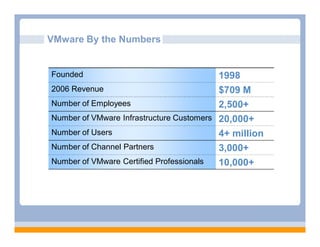
VMware By the Numbers


Founded                                   1998
2006 Revenue                              $709 M
Number of Employees                       2,500+
Number of VMware Infrastructure Customers 20,000+
Number of Users                           4+ million
Number of Channel Partners                3,000+
Number of VMware Certified Professionals  10,000+
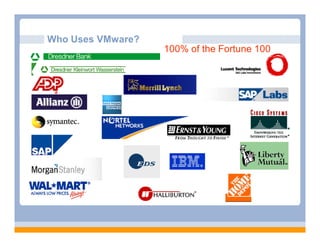
Who Uses VMware?
                   100% of the Fortune 100
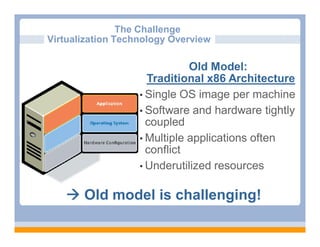
The Challenge
Virtualization Technology Overview

                              Old Model:
                     Traditional x86 Architecture
                   • Single OS image per machine
                   • Software and hardware tightly
                     coupled
                   • Multiple applications often
                     conflict
                   • Underutilized resources


    Old model is challenging!
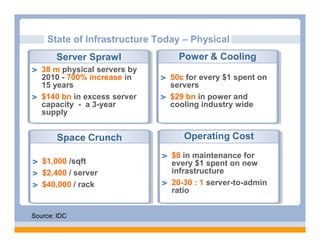
State of Infrastructure Today – Physical
       Server Sprawl            Power & Cooling
   38 m physical servers by
   2010 - 700% increase in    50c for every $1 spent on
   15 years                   servers
   $140 bn in excess server   $29 bn in power and
   capacity - a 3-year        cooling industry wide
   supply


       Space Crunch               Operating Cost
                               $8 in maintenance for
   $1,000 /sqft                every $1 spent on new
   $2,400 / server             infrastructure
   $40,000 / rack              20-30 : 1 server-to-admin
                               ratio


Source: IDC
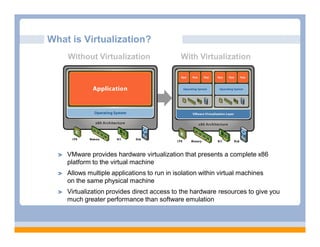
What is Virtualization?
    Without Virtualization                   With Virtualization

       Application


    Operating System


        Hardware


    VMware provides hardware virtualization that presents a complete x86
    platform to the virtual machine
    Allows multiple applications to run in isolation within virtual machines
    on the same physical machine
    Virtualization provides direct access to the hardware resources to give you
    much greater performance than software emulation
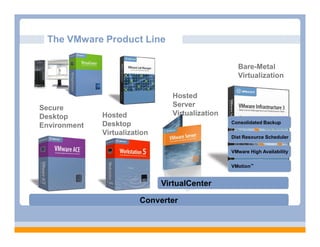
The VMware Product Line

                                                    Bare-Metal
                                                    Virtualization

                                 Hosted
Secure                           Server
Desktop       Hosted             Virtualization
              Desktop                             Consolidated Backup
Environment
              Virtualization
                                                  Dist Resource Scheduler


                                                  VMware High Availability


                                                  VMotion™


                               VirtualCenter

                         Converter
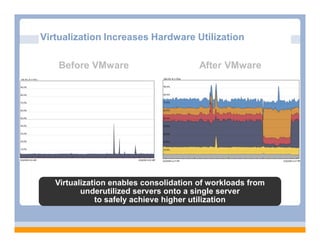
Virtualization Increases Hardware Utilization

    Before VMware                       After VMware


   Virtualization enables consolidation of workloads from
          underutilized servers onto a single server
              to safely achieve higher utilization
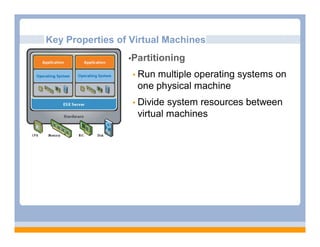
Key Properties of Virtual Machines
                 •Partitioning

                   Runmultiple operating systems on
                   one physical machine
                   Divide system resources between
                   virtual machines
Key Properties of Virtual Machines
         •Partitioning

             Run multiple operating systems on one physical machine
             Divide system resources between virtual machines


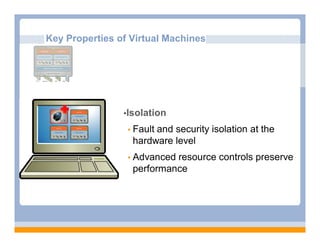
                     •Isolation

                       Fault and security isolation at the
                         hardware level
                       Advanced  resource controls preserve
                         performance
Key Properties of Virtual Machines
         •Partitioning

             Run multiple operating systems on one physical machine
             Divide system resources between virtual machines

         •Isolation

             Fault and security isolation at the hardware level
             Advanced resource controls preserve performance


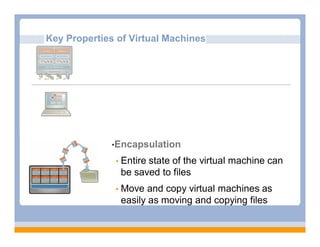
                 •Encapsulation

                    Entire state of the virtual machine can
                      be saved to files
                    Move    and copy virtual machines as
                      easily as moving and copying files
Key Properties of Virtual Machines
         •Partitioning
             Run multiple operating systems on one physical machine
             Divide system resources between virtual machines

         •Isolation
             Fault and security isolation at the hardware level
             Advanced resource controls preserve performance

         •Encapsulation
             Entire state of the virtual machine can be saved to files
             Move and copy virtual machines as easily as moving and copying
              files

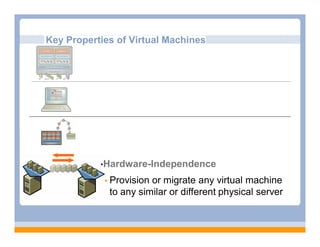
              •Hardware-Independence

                Provisionor migrate any virtual machine
                to any similar or different physical server
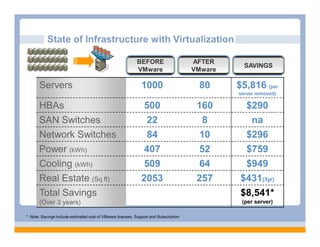
State of Infrastructure with Virtualization

                                                            BEFORE                    AFTER
                                                                                                 SAVINGS
                                                            VMware                    VMware

       Servers                                                1000                     80      $5,816 (per
                                                                                               server removed)

       HBAs                                                    500                     160       $290
       SAN Switches                                             22                       8        na
       Network Switches                                         84                      10       $296
       Power (kWh)                                             407                      52       $759
       Cooling (kWh)                                           509                      64       $949
       Real Estate (Sq ft)                                    2053                     257      $431(3yr)
       Total Savings                                                                            $8,541*
       (Over 3 years)                                                                           (per server)

* Note: Savings include estimated cost of VMware licenses, Support and Subscription
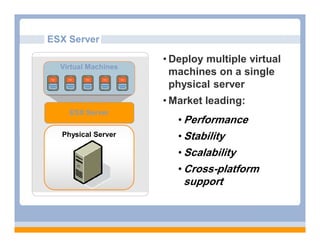
ESX Server

                     • Deploy multiple virtual
  Virtual Machines
                       machines on a single
                       physical server
                     • Market leading:
    ESX Server
                        • Performance
  Physical Server       • Stability
                        • Scalability
                        • Cross-platform
                         support
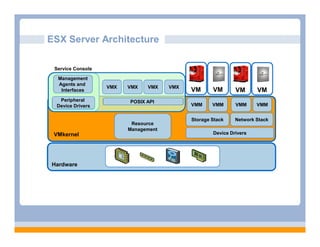
ESX Server Architecture

 Service Console
  Management
  Agents and
                   VMX   VMX   VMX    VMX
   Interfaces                               VM      VM       VM      VM
  Peripheral             POSIX API
 Device Drivers                             VMM     VMM      VMM     VMM


                                            Storage Stack    Network Stack
                          Resource
                         Management
 VMkernel                                           Device Drivers


Hardware
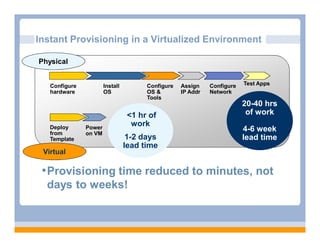
Instant Provisioning in a Virtualized Environment

Physical


   Configure           Install         Configure   Assign    Configure   Test Apps
   hardware            OS              OS &        IP Addr   Network
                                       Tools
                                                                         20-40 hrs
                                  <1 hr of                                of work
   Deploy      Power
                                   work
   from        on VM
                                                                         4-6 week
   Template                       1-2 days                               lead time
                                 lead time
 Virtual

 • Provisioning time reduced to minutes, not
  days to weeks!
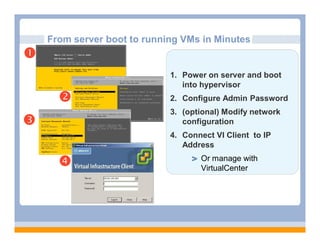
From server boot to running VMs in Minutes
          3i



                             1. Power on server and boot
                                into hypervisor
                            2. Configure Admin Password
                             3. (optional) Modify network
                               configuration
                             4. Connect VI Client to IP
                                Address

                                   Or manage with
                                    VirtualCenter
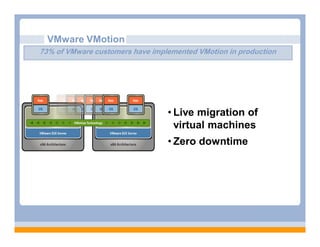
VMware VMotion
73% of VMware customers have implemented VMotion in production


                                 • Live migration of
                                   virtual machines
                                 • Zero downtime
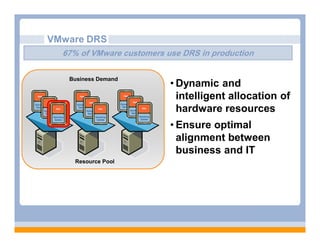
VMware DRS
  67% of VMware customers use DRS in production

   Business Demand
                           • Dynamic and
                             intelligent allocation of
                             hardware resources
                           • Ensure optimal
                             alignment between
                             business and IT
    Resource Pool
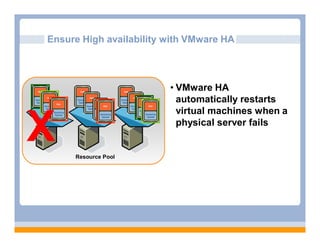
Ensure High availability with VMware HA


                         • VMware HA
                           automatically restarts
                           virtual machines when a

X    Resource Pool
                           physical server fails
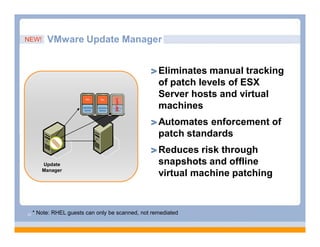
NEW!      VMware Update Manager


                                                    Eliminates manual tracking
                                                    of patch levels of ESX
                                                    Server hosts and virtual
                                    OFFLINE
                                                    machines
                                                    Automates enforcement of
                                                    patch standards
                                                    Reduces risk through
        Update                                      snapshots and offline
        Manager
                                                    virtual machine patching


23   * Note: RHEL guests can only be scanned, not remediated
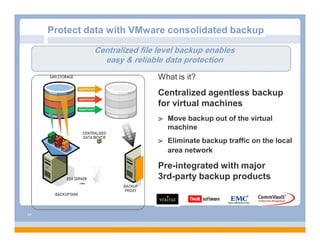
Protect data with VMware consolidated backup

                         Centralized file level backup enables
                           easy & reliable data protection
                                           What is it?
                                           Centralized agentless backup
                                           for virtual machines
                                             Move backup out of the virtual
                                             machine
                    CENTRALIZED
                    DATA MOVER
                                             Eliminate backup traffic on the local
                                             area network

                                           Pre-integrated with major
                                           3rd-party backup products
                                  BACKUP
                                   PROXY
      BACKUP DISK


24
CONFIDENTIAL

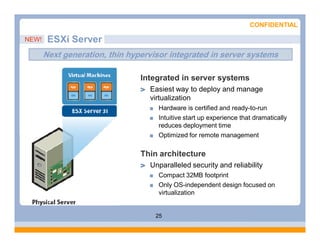
NEW!    ESXi Server
       Next generation, thin hypervisor integrated in server systems

                                Integrated in server systems
                                  Easiest way to deploy and manage
                                  virtualization
                                     Hardware is certified and ready-to-run
                                     Intuitive start up experience that dramatically
                                     reduces deployment time
                                     Optimized for remote management

                                Thin architecture
                                  Unparalleled security and reliability
                                     Compact 32MB footprint
                                     Only OS-independent design focused on
                                     virtualization


                                    25
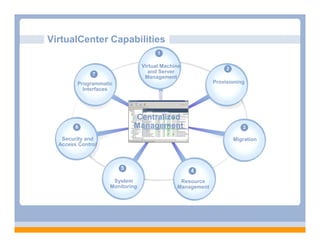
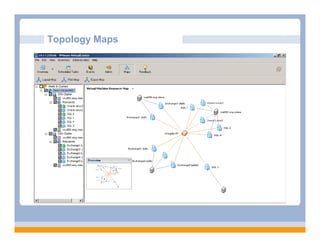
VirtualCenter Capabilities
                                      1

                                Virtual Machine                2
              7                   and Server
                                 Management
        Programmatic                                      Provisioning
          Interfaces


                           Centralized
        6                  Management                                 3

   Security and                                                    Migration
  Access Control


                       5                          4
                    System                    Resource
                   Monitoring                Management
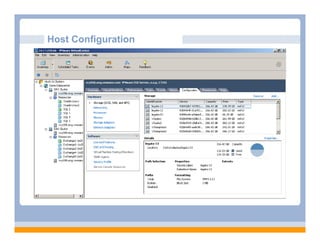
Host Configuration
Topology Maps
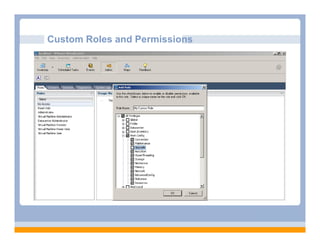
Custom Roles and Permissions
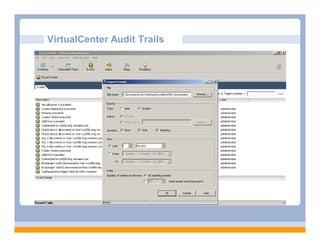
VirtualCenter Audit Trails
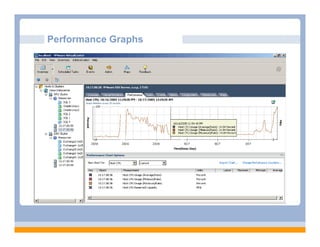
Performance Graphs
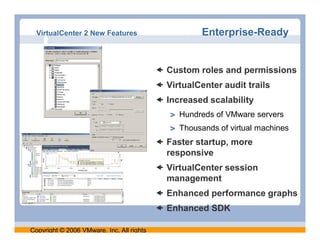
VirtualCenter 2 New Features                        Enterprise-Ready


                                            Custom roles and permissions
                                            VirtualCenter audit trails
                                            Increased scalability
                                                Hundreds of VMware servers
                                                Thousands of virtual machines
                                            Faster startup, more
                                             responsive
                                            VirtualCenter session
                                             management
                                            Enhanced performance graphs
                                            Enhanced SDK

Copyright © 2006 VMware, Inc. All rights
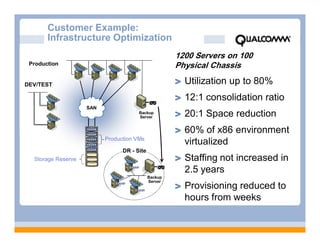
Customer Example:
       Infrastructure Optimization
                                                     1200 Servers on 100
 Production                                          Physical Chassis

DEV/TEST                                               Utilization up to 80%
                                                       12:1 consolidation ratio
                    SAN
                                      Backup
                                      Server           20:1 Space reduction
                                                       60% of x86 environment
                          Production VMs
                                                       virtualized
                                DR - Site
  Storage Reserve                                      Staffing not increased in
                                                       2.5 years
                                            Backup
                                            Server
                                                       Provisioning reduced to
                                                       hours from weeks
Thank you!
Download a free VMware product evaluation copy:
     http://www.vmware.com/download


        Sayyed Mehdi Poustchi Amin
        Poustchi@Yahoo.com

Virtualization

  • 1.
    VMware Overview VMwareServer Virtualization Sayyed Mehdi Poustchi Amin SICSR – July 2010
  • 2.
    Speaker Mehdi Poustchi Aminpoustchi@yahoo.com CCNA,MCTS,MCITP,MCSE, MCSA,MCP Network Administrator Azad University of Mashhad. Mashhad, Iran Founder of Iran’s honeynet project www.Honeynet.ir Research Assistant at SICSR
  • 3.
    Agenda Introduction toVMware and Server Virtualization VMware Solutions Overview VMware Product Line Overview
  • 4.
    VMware By theNumbers Founded 1998 2006 Revenue $709 M Number of Employees 2,500+ Number of VMware Infrastructure Customers 20,000+ Number of Users 4+ million Number of Channel Partners 3,000+ Number of VMware Certified Professionals 10,000+
  • 5.
    Who Uses VMware? 100% of the Fortune 100
  • 6.
    The Challenge Virtualization TechnologyOverview Old Model: Traditional x86 Architecture • Single OS image per machine • Software and hardware tightly coupled • Multiple applications often conflict • Underutilized resources  Old model is challenging!
  • 7.
    State of InfrastructureToday – Physical Server Sprawl Power & Cooling 38 m physical servers by 2010 - 700% increase in 50c for every $1 spent on 15 years servers $140 bn in excess server $29 bn in power and capacity - a 3-year cooling industry wide supply Space Crunch Operating Cost $8 in maintenance for $1,000 /sqft every $1 spent on new $2,400 / server infrastructure $40,000 / rack 20-30 : 1 server-to-admin ratio Source: IDC
  • 8.
    What is Virtualization? Without Virtualization With Virtualization Application Operating System Hardware VMware provides hardware virtualization that presents a complete x86 platform to the virtual machine Allows multiple applications to run in isolation within virtual machines on the same physical machine Virtualization provides direct access to the hardware resources to give you much greater performance than software emulation
  • 9.
    The VMware ProductLine Bare-Metal Virtualization Hosted Secure Server Desktop Hosted Virtualization Desktop Consolidated Backup Environment Virtualization Dist Resource Scheduler VMware High Availability VMotion™ VirtualCenter Converter
  • 10.
    Virtualization Increases HardwareUtilization Before VMware After VMware Virtualization enables consolidation of workloads from underutilized servers onto a single server to safely achieve higher utilization
  • 11.
    Key Properties ofVirtual Machines •Partitioning  Runmultiple operating systems on one physical machine  Divide system resources between virtual machines
  • 12.
    Key Properties ofVirtual Machines •Partitioning  Run multiple operating systems on one physical machine  Divide system resources between virtual machines •Isolation  Fault and security isolation at the hardware level  Advanced resource controls preserve performance
  • 13.
    Key Properties ofVirtual Machines •Partitioning  Run multiple operating systems on one physical machine  Divide system resources between virtual machines •Isolation  Fault and security isolation at the hardware level  Advanced resource controls preserve performance •Encapsulation  Entire state of the virtual machine can be saved to files  Move and copy virtual machines as easily as moving and copying files
  • 14.
    Key Properties ofVirtual Machines •Partitioning  Run multiple operating systems on one physical machine  Divide system resources between virtual machines •Isolation  Fault and security isolation at the hardware level  Advanced resource controls preserve performance •Encapsulation  Entire state of the virtual machine can be saved to files  Move and copy virtual machines as easily as moving and copying files •Hardware-Independence  Provisionor migrate any virtual machine to any similar or different physical server
  • 15.
    State of Infrastructurewith Virtualization BEFORE AFTER SAVINGS VMware VMware Servers 1000 80 $5,816 (per server removed) HBAs 500 160 $290 SAN Switches 22 8 na Network Switches 84 10 $296 Power (kWh) 407 52 $759 Cooling (kWh) 509 64 $949 Real Estate (Sq ft) 2053 257 $431(3yr) Total Savings $8,541* (Over 3 years) (per server) * Note: Savings include estimated cost of VMware licenses, Support and Subscription
  • 16.
    ESX Server • Deploy multiple virtual Virtual Machines machines on a single physical server • Market leading: ESX Server • Performance Physical Server • Stability • Scalability • Cross-platform support
  • 17.
    ESX Server Architecture Service Console Management Agents and VMX VMX VMX VMX Interfaces VM VM VM VM Peripheral POSIX API Device Drivers VMM VMM VMM VMM Storage Stack Network Stack Resource Management VMkernel Device Drivers Hardware
  • 18.
    Instant Provisioning ina Virtualized Environment Physical Configure Install Configure Assign Configure Test Apps hardware OS OS & IP Addr Network Tools 20-40 hrs <1 hr of of work Deploy Power work from on VM 4-6 week Template 1-2 days lead time lead time Virtual • Provisioning time reduced to minutes, not days to weeks!
  • 19.
    From server bootto running VMs in Minutes 3i  1. Power on server and boot into hypervisor  2. Configure Admin Password 3. (optional) Modify network  configuration 4. Connect VI Client to IP Address  Or manage with VirtualCenter
  • 20.
    VMware VMotion 73% ofVMware customers have implemented VMotion in production • Live migration of virtual machines • Zero downtime
  • 21.
    VMware DRS 67% of VMware customers use DRS in production Business Demand • Dynamic and intelligent allocation of hardware resources • Ensure optimal alignment between business and IT Resource Pool
  • 22.
    Ensure High availabilitywith VMware HA • VMware HA automatically restarts virtual machines when a X Resource Pool physical server fails
  • 23.
    NEW! VMware Update Manager Eliminates manual tracking of patch levels of ESX Server hosts and virtual OFFLINE machines Automates enforcement of patch standards Reduces risk through Update snapshots and offline Manager virtual machine patching 23 * Note: RHEL guests can only be scanned, not remediated
  • 24.
    Protect data withVMware consolidated backup Centralized file level backup enables easy & reliable data protection What is it? Centralized agentless backup for virtual machines Move backup out of the virtual machine CENTRALIZED DATA MOVER Eliminate backup traffic on the local area network Pre-integrated with major 3rd-party backup products BACKUP PROXY BACKUP DISK 24
  • 25.
    CONFIDENTIAL NEW! ESXi Server Next generation, thin hypervisor integrated in server systems Integrated in server systems Easiest way to deploy and manage virtualization Hardware is certified and ready-to-run Intuitive start up experience that dramatically reduces deployment time Optimized for remote management Thin architecture Unparalleled security and reliability Compact 32MB footprint Only OS-independent design focused on virtualization 25
  • 26.
    VirtualCenter Capabilities 1 Virtual Machine 2 7 and Server Management Programmatic Provisioning Interfaces Centralized 6 Management 3 Security and Migration Access Control 5 4 System Resource Monitoring Management
  • 27.
  • 28.
  • 29.
    Custom Roles andPermissions
  • 30.
  • 31.
  • 32.
    VirtualCenter 2 NewFeatures Enterprise-Ready  Custom roles and permissions  VirtualCenter audit trails  Increased scalability Hundreds of VMware servers Thousands of virtual machines  Faster startup, more responsive  VirtualCenter session management  Enhanced performance graphs  Enhanced SDK Copyright © 2006 VMware, Inc. All rights
  • 33.
    Customer Example: Infrastructure Optimization 1200 Servers on 100 Production Physical Chassis DEV/TEST Utilization up to 80% 12:1 consolidation ratio SAN Backup Server 20:1 Space reduction 60% of x86 environment Production VMs virtualized DR - Site Storage Reserve Staffing not increased in 2.5 years Backup Server Provisioning reduced to hours from weeks
  • 34.
    Thank you! Download afree VMware product evaluation copy: http://www.vmware.com/download Sayyed Mehdi Poustchi Amin Poustchi@Yahoo.com