
Topic of wi-fi
Wi-fi
What is wi-fi?
 Wi-Fi, which stands for wireless fidelity, in a play
  on the older term Hi-Fi, is a wireless networking
  technology used across the globe.
 Wi-Fi refers to any system that uses the 802.11
  standard, which was developed by the Institute
  of Electrical and Electronics Engineers (IEEE)
  and released in 1997.
 The term Wi-Fi, which is alternatively spelled
  WiFi, Wi-fi, Wifi, or wifi, was pushed by the Wi-Fi
  Alliance, a trade group that pioneered
  commercialization of the technology.
Definition of wi-fi
 Definitionof Wifi: a local area network that
  uses high frequency radio signals to
  transmit and receive data over distances
  of a few hundred feet; uses ethernet
  protocol
Advantages of wi-fi
 Itallows local area networks (LANs) to be
  setup with cabling. The can reduce
  associated costs of network connection
  and expansions.
 Places where cables cannot be run, such
  as outdoor areas and historical buildings
  can use wireless LANs.
 WiFi products are extensively available in
  the market.
• There are different brands of access points and user's
network interfaces are able to inter-operate at a very basic
service level.

•Prices are considerably lower as competition amongst
vendors' increases.

•WiFi networks can support roaming. This allows mobile
users with laptop computer to be able to move from one
access point to another.
Dis-advantage of wi-fi
   WiFi uses the unlicensed 2.4GHz spectrum, which often crowded
    with other devices such as Bluetooth, microwave ovens, cordless
    phones, or video sender devices, and among many others. This
    may cause degradation in performance.

   WiFi networks have limited range. A typical WiFi home router might
    have a range of 45m (150ft) indoors and 90m (300ft) outdoors.
    Ranges may also vary as WiFi is no exception to the physics of
    radio wave propagation with frequency band.

   The most common wireless encryption standard, wired equivalent
    privacy or WEP has been shown to be breakable even when it has
    been correctly configured.

   Access points could be used to steal personal and confidential
    information transmitted from WiFi consumers.
How to use wi-fi
   Step 1
   It is necessary to understand Wi-Fi Certified Devices or Equipment. The Wi-
    Fi Alliance-produced devices assure that users and customers can easily
    access Wi-Fi networks. Look for the Wi-Fi logo to determine Wi-Fi certified
    products.

   Step 2
   Make sure that an Internet connection is available. Check Internet access,
    settings, and the connection to the modem.

   Step 3
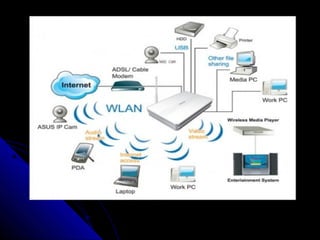
   Connect the router to the modem. The diverse brands and models of routers
    available have different methods of connecting to the modem. Although
    hooking up the router to the modem is easy, try to follow the instructions on
    the User’s manual. Make sure all connectors are in place and follow trouble-
    shooting directions for optimum performance.
    Step 4
   Configure the router to protect the wireless network. Refer to your
    User’s manual and configure your wireless network setting by
    installing a password. The network may also be protected by turning
    off the router’s SSID or server set identifier that tells any device with
    Wi-Fi access the existence of the network.


   Step 5
   Connect the Wi-Fi device. Most new Wi-Fi devices are compatible
    with each other and have a feature that makes the initial Wi-Fi
    access easy. If the Wi-Fi device does not have an easy access
    feature, refer to the User’s Manual and follow directions to access
    the wireless network through the device.
Thank you


      By vidhi panchal
      Sy bba (itm)
      Roll no : 56

Wi fi

  • 1.
  • 2.
  • 3.
    What is wi-fi? Wi-Fi, which stands for wireless fidelity, in a play on the older term Hi-Fi, is a wireless networking technology used across the globe.  Wi-Fi refers to any system that uses the 802.11 standard, which was developed by the Institute of Electrical and Electronics Engineers (IEEE) and released in 1997.  The term Wi-Fi, which is alternatively spelled WiFi, Wi-fi, Wifi, or wifi, was pushed by the Wi-Fi Alliance, a trade group that pioneered commercialization of the technology.
  • 4.
    Definition of wi-fi Definitionof Wifi: a local area network that uses high frequency radio signals to transmit and receive data over distances of a few hundred feet; uses ethernet protocol
  • 5.
    Advantages of wi-fi Itallows local area networks (LANs) to be setup with cabling. The can reduce associated costs of network connection and expansions.  Places where cables cannot be run, such as outdoor areas and historical buildings can use wireless LANs.  WiFi products are extensively available in the market.
  • 6.
    • There aredifferent brands of access points and user's network interfaces are able to inter-operate at a very basic service level. •Prices are considerably lower as competition amongst vendors' increases. •WiFi networks can support roaming. This allows mobile users with laptop computer to be able to move from one access point to another.
  • 7.
    Dis-advantage of wi-fi  WiFi uses the unlicensed 2.4GHz spectrum, which often crowded with other devices such as Bluetooth, microwave ovens, cordless phones, or video sender devices, and among many others. This may cause degradation in performance.  WiFi networks have limited range. A typical WiFi home router might have a range of 45m (150ft) indoors and 90m (300ft) outdoors. Ranges may also vary as WiFi is no exception to the physics of radio wave propagation with frequency band.  The most common wireless encryption standard, wired equivalent privacy or WEP has been shown to be breakable even when it has been correctly configured.  Access points could be used to steal personal and confidential information transmitted from WiFi consumers.
  • 8.
    How to usewi-fi  Step 1  It is necessary to understand Wi-Fi Certified Devices or Equipment. The Wi- Fi Alliance-produced devices assure that users and customers can easily access Wi-Fi networks. Look for the Wi-Fi logo to determine Wi-Fi certified products.  Step 2  Make sure that an Internet connection is available. Check Internet access, settings, and the connection to the modem.  Step 3  Connect the router to the modem. The diverse brands and models of routers available have different methods of connecting to the modem. Although hooking up the router to the modem is easy, try to follow the instructions on the User’s manual. Make sure all connectors are in place and follow trouble- shooting directions for optimum performance.
  • 9.
    Step 4  Configure the router to protect the wireless network. Refer to your User’s manual and configure your wireless network setting by installing a password. The network may also be protected by turning off the router’s SSID or server set identifier that tells any device with Wi-Fi access the existence of the network.  Step 5  Connect the Wi-Fi device. Most new Wi-Fi devices are compatible with each other and have a feature that makes the initial Wi-Fi access easy. If the Wi-Fi device does not have an easy access feature, refer to the User’s Manual and follow directions to access the wireless network through the device.
  • 11.
    Thank you  By vidhi panchal  Sy bba (itm)  Roll no : 56