Wi – Fi ( 802.11)
Why we go for Wi - Fi
 Data Transfer rate is about 250-600 Mbps
 Coverage Distance is about 100m.
 Here More number of devices can be connected
( Depending upon the Router ) whereas in
Bluetooth only 7 devices are supported for
transmission
Definition of Wi - Fi
 It is a Wireless Technology that uses “ Radio
Waves” to provide high speed Internet Access.
 It has no physical cables like Coaxial, UTP, STP
etc.
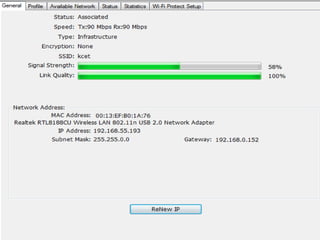
Built In Wireless Transmitter
 The Pc’s and Laptops which are available
today all have Built In Wireless Transmitter.
(i.e. It is very easy to connect to a Wi – Fi ).
 If the Pc’s and Laptops does not have a Built
In Wireless Transmitter, the Wi-Fi can be
accessed by using Wi- Fi Dongle which should
be connected in any USB ports.
d
Hotspot
The area or location where a Wi – Fi access is
available is called a Hotspot.
SSID
 An SSID is the name of a wireless local area
network (WLAN).
 All wireless devices on a WLAN must employ
the same SSID in order to communicate with
each other.
 SSID is a 32 alphanumeric character unique
identifier.
Types of 802.11
a) 802.11 a -> It can support upto a data rate of
54 Mbps.
b) 802.11 b -> It is the low speed version of Wi-
Fi. It supports upto a speed of 11 Mbps.
Types of 802.11
c) 802.11 n -> It can support upto a data rate of
110 Mbps. It is a Backward Compatible and
Forward Compatible one.
Backward Compatible is defined as suppose if
the Wi – Fi Dongle is designed for Windows 8
OS, the same Dongle must also supports
Windows 7, Windows XP, Linux, Fedora OS.
Types of 802.11
d) 802.11 AC
-> It was introduced in the year 2013.
-> It can support upto a data rate of 450
Mbps.
-> It is also a Backward Compatible one.
Access Point
 It is a device that allows Wireless devices to
connect to wired network.
 It is also called as a Base Station because it
transmit and receive signal from it.
 It also provides Security Mechanisms so that
only Authenticated users can able to access
the Network.
Access Point
-> The data rate of Access Point depends upon
the number of users using the network (i.e.
Data rate is shared amongst all the users)
( Ex) If the data rate speed of Access Point is 10
Mbps, suppose if there are 5 users are there
each will get 2 Mbps data rate.
Access Point
-> A single Access Point can support upto a
maximum of 20-25 users ( or) clients at a time.
-> If the number of users are increasing the data
rate is going to be greatly reduced.
Hidden Station Problem
Explanation
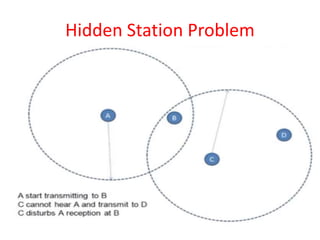
 B is called the Access Point ( otherwise called a
Base Station).
A, C and D are within the range of Access Point.
 Suppose if A wants to access the channel and at
the same time C wants to access the same
channel, A doesn’t knows C and C doesn’t knows
A.
B can provide channel to any one either A or C.
How to resolve the Hidden Station
Problem
RTS, CTS and NAV
 RTS -> Request to Send ( I capture the
channel)
 CTS -> Clear to Send ( I don’t hear any other
requests you can use my channel).
 NAV -> Negative Allocation Vector ( Keeps
other Station Quiet).
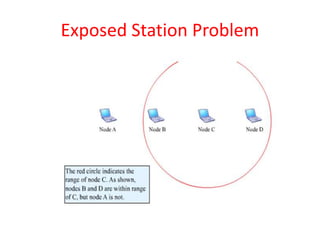
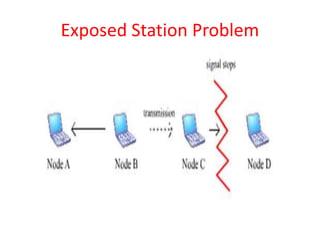
Exposed Station Problem
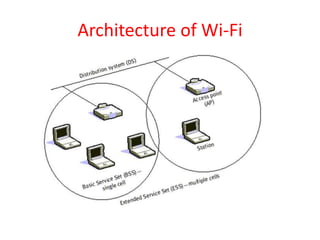
Architecture of Wi-Fi
Architecture of Wi - Fi
 Each computer, mobile, portable or fixed, is
referred to as a station in 802.11
 When two or more stations come together to
communicate with each other, they form a
Basic Service Set (BSS).
Architecture of Wi - Fi
 A BSS that stands alone and is not connected
to a base station ( or ) Access Point is called
an Independent Basic Service Set (IBSS).
 Two or more BSS's are interconnected using a
Distribution System or DS. Entry to the DS is
accomplished with the use of Access Points
(AP).
Architecture of Wi - Fi
 A Portal is the logical integration between
wired LANs and 802.11.
 All data going to an 802.11 LAN from an 802.X
LAN must pass through a portal.
Security Measures in Wi - Fi
1) Media Access Control Address Filtering
 It never asks any password to authendicate to
wi – fi access, instead all the Machine Address
are registered first, so that only registered
users can access the network others not.
Security Measures in Wi - Fi
2) Wired Equivalent Privacy ( WEP)
The goal of WEP is to make Wireless network a
more secure one.
Types of WEP
a) OFF -> No security Mechanisms is provided
here. (i.e.) Everyone can access the Wi-Fi
network without any Authentication
mechanism.
Security Measures in Wi - Fi
b) 128 Bit
 Client sends an Authentication request to
Access Point (i.e. Username and Password )
If the Client request matches it sends a
positive reply to your device to you to access
to the network.
Pros of Wi - Fi
 The Internet access can be accessed
anywhere where the wi fi signalexists.
 Low cost when compared to wired network.
 Wi – Fi is compatible with all OS.
 Simple Setup.
Cons of Wi - Fi
 Security is the greatest disadvantage in
Wireless network.
 Scalability is the main problem ( i.e.) The
number of users are limited here to use the
Wi- Fi.
 Coverage distance of an Access Point is very
low here.

Wi – fi ( 802.11)

  • 1.
    Wi – Fi( 802.11)
  • 2.
    Why we gofor Wi - Fi  Data Transfer rate is about 250-600 Mbps  Coverage Distance is about 100m.  Here More number of devices can be connected ( Depending upon the Router ) whereas in Bluetooth only 7 devices are supported for transmission
  • 3.
    Definition of Wi- Fi  It is a Wireless Technology that uses “ Radio Waves” to provide high speed Internet Access.  It has no physical cables like Coaxial, UTP, STP etc.
  • 4.
    Built In WirelessTransmitter  The Pc’s and Laptops which are available today all have Built In Wireless Transmitter. (i.e. It is very easy to connect to a Wi – Fi ).  If the Pc’s and Laptops does not have a Built In Wireless Transmitter, the Wi-Fi can be accessed by using Wi- Fi Dongle which should be connected in any USB ports.
  • 5.
  • 6.
    Hotspot The area orlocation where a Wi – Fi access is available is called a Hotspot.
  • 7.
    SSID  An SSIDis the name of a wireless local area network (WLAN).  All wireless devices on a WLAN must employ the same SSID in order to communicate with each other.  SSID is a 32 alphanumeric character unique identifier.
  • 8.
    Types of 802.11 a)802.11 a -> It can support upto a data rate of 54 Mbps. b) 802.11 b -> It is the low speed version of Wi- Fi. It supports upto a speed of 11 Mbps.
  • 9.
    Types of 802.11 c)802.11 n -> It can support upto a data rate of 110 Mbps. It is a Backward Compatible and Forward Compatible one. Backward Compatible is defined as suppose if the Wi – Fi Dongle is designed for Windows 8 OS, the same Dongle must also supports Windows 7, Windows XP, Linux, Fedora OS.
  • 10.
    Types of 802.11 d)802.11 AC -> It was introduced in the year 2013. -> It can support upto a data rate of 450 Mbps. -> It is also a Backward Compatible one.
  • 11.
    Access Point  Itis a device that allows Wireless devices to connect to wired network.  It is also called as a Base Station because it transmit and receive signal from it.  It also provides Security Mechanisms so that only Authenticated users can able to access the Network.
  • 12.
    Access Point -> Thedata rate of Access Point depends upon the number of users using the network (i.e. Data rate is shared amongst all the users) ( Ex) If the data rate speed of Access Point is 10 Mbps, suppose if there are 5 users are there each will get 2 Mbps data rate.
  • 13.
    Access Point -> Asingle Access Point can support upto a maximum of 20-25 users ( or) clients at a time. -> If the number of users are increasing the data rate is going to be greatly reduced.
  • 14.
  • 15.
    Explanation  B iscalled the Access Point ( otherwise called a Base Station). A, C and D are within the range of Access Point.  Suppose if A wants to access the channel and at the same time C wants to access the same channel, A doesn’t knows C and C doesn’t knows A. B can provide channel to any one either A or C.
  • 16.
    How to resolvethe Hidden Station Problem
  • 17.
    RTS, CTS andNAV  RTS -> Request to Send ( I capture the channel)  CTS -> Clear to Send ( I don’t hear any other requests you can use my channel).  NAV -> Negative Allocation Vector ( Keeps other Station Quiet).
  • 18.
  • 19.
  • 20.
  • 21.
    Architecture of Wi- Fi  Each computer, mobile, portable or fixed, is referred to as a station in 802.11  When two or more stations come together to communicate with each other, they form a Basic Service Set (BSS).
  • 22.
    Architecture of Wi- Fi  A BSS that stands alone and is not connected to a base station ( or ) Access Point is called an Independent Basic Service Set (IBSS).  Two or more BSS's are interconnected using a Distribution System or DS. Entry to the DS is accomplished with the use of Access Points (AP).
  • 23.
    Architecture of Wi- Fi  A Portal is the logical integration between wired LANs and 802.11.  All data going to an 802.11 LAN from an 802.X LAN must pass through a portal.
  • 24.
    Security Measures inWi - Fi 1) Media Access Control Address Filtering  It never asks any password to authendicate to wi – fi access, instead all the Machine Address are registered first, so that only registered users can access the network others not.
  • 25.
    Security Measures inWi - Fi 2) Wired Equivalent Privacy ( WEP) The goal of WEP is to make Wireless network a more secure one. Types of WEP a) OFF -> No security Mechanisms is provided here. (i.e.) Everyone can access the Wi-Fi network without any Authentication mechanism.
  • 26.
    Security Measures inWi - Fi b) 128 Bit  Client sends an Authentication request to Access Point (i.e. Username and Password ) If the Client request matches it sends a positive reply to your device to you to access to the network.
  • 27.
    Pros of Wi- Fi  The Internet access can be accessed anywhere where the wi fi signalexists.  Low cost when compared to wired network.  Wi – Fi is compatible with all OS.  Simple Setup.
  • 28.
    Cons of Wi- Fi  Security is the greatest disadvantage in Wireless network.  Scalability is the main problem ( i.e.) The number of users are limited here to use the Wi- Fi.  Coverage distance of an Access Point is very low here.