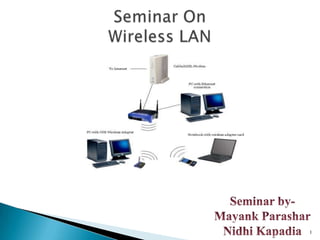
1
2
Introduction


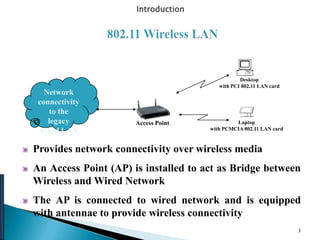
                                                 Desktop
                                         with PCI 802.11 LAN card
   Network
 connectivity
    to the
    legacy            Access Point             Laptop
 wired LAN                            with PCMCIA 802.11 LAN card


Provides network connectivity over wireless media
An Access Point (AP) is installed to act as Bridge between
Wireless and Wired Network
The AP is connected to wired network and is equipped
with antennae to provide wireless connectivity
                                                                    3
LAN Technologies


      Range ( Distance between Access Point and WLAN client)
      depends on structural hindrances and RF gain of the
      antenna at the Access Point
      To service larger areas, multiple APs may be installed with
      a 20-30% overlap
      A client is always associated with one AP and when the
      client moves closer to another AP, it associates with the
      new AP (Hand-Off)
      Three flavors:
        802.11b
        802.11a
        802.11g                                                 4
• Difficult media Difficult media
–interference and noise
–quality varies over space and time
–shared with Unwanted 802.11 devices
–shared with non-802 devices (unlicensed spectrum: microwave
ovens, microwave ovens, bluetooth bluetooth, etc., , etc.,)

•Full connectivity cannot be assumed
–Hidden node problem Hidden node problem
•Multipinternational regulatory requirements

•Mobility
–variation in link reliability
–batteryusage: requires power management
–want seamlessconnections
.Power management
•Security
–no physical boundaries

                                                               5
1.802.11 a

2.802.11b

3.802.11g


             6
   The bit rate for the original IEEE 802.11 standard is
    2 Mbps using the FHSS transmission scheme and the
    S-Band Industrial, Scientific, and Medical (ISM)
    frequency band, which operates in the frequency range
    of 2.4 to 2.5 GHz. However, under less-than-ideal
    conditions, a lower bit rate speed of 1 Mbps is used.


                                                            7
IEEE 802.11a (the first standard to be ratified, but just now
being widely sold and deployed) operates at a bit rate as high
as 54 Mbps and uses the C-Band ISM, which operates in the
frequency range of 5.725 to 5.875 GHz. Instead of
DSSS, 802.11a uses OFDM, which allows data to be
transmitted by subfrequencies in parallel and provides greater
resistance to interference and greater throughput. This higher-
speed technology enables wireless LAN networking to perform
better for video and conferencing applications.


                                                                  8
The major enhancement to IEEE 802.11 by IEEE 802.11b is the
standardization of the physical layer to support higher bit rates. IEEE
802.11b supports two additional speeds, 5.5 Mbps and 11 Mbps, using the
S-Band ISM. The DSSS transmission scheme is used in order to provide the
higher bit rates. The bit rate of 11 Mbps is achievable in ideal conditions. In
less-than-ideal conditions, the slower speeds of 5.5 Mbps, 2 Mbps, and 1
Mbps are used.
Note
802.11b uses the same frequency band as that used by microwave
ovens, cordless phones, baby monitors, wireless video cameras, and
Bluetooth devices.


                                                                                  9
IEEE 802.11g operates at a bit rate as high as 54 Mbps, but uses the S-Band
ISM and OFDM. 802.11g is also backward-compatible with 802.11b and
can operate at the 802.11b bit rates and use DSSS. 802.11g wireless
network adapters can connect to an 802.11b wireless AP, and 802.11b
wireless network adapters can connect to an 802.11g wireless AP. Thus,
802.11g provides a migration path for 802.11b networks to a frequency-
compatible standard technology with a higher bit rate. Existing 802.11b
wireless network adapters cannot be upgraded to 802.11g by updating the
firmware of the adapter — they must be replaced. Unlike migrating from
802.11b to 802.11a (in which all the network adapters in both the wireless
clients and the wireless APs must be replaced at the same time), migrating
from 802.11b to 802.11g can be done incrementally.

Like 802.11a, 802.11g uses 54 Mbps in ideal conditions and the slower
speeds of 48 Mbps, 36 Mbps, 24 Mbps, 18 Mbps, 12 Mbps, and 6 Mbps in
less-than-ideal conditions

                                                                              10
   The IEEE 802.11 protocol is a network access technology for providing
    connectivity between wireless stations and wired networking
    infrastructures.

   By deploying the IEEE 802.11 protocol and associated technologies, you
    enable the mobile user to travel to various places — meeting rooms,
    hallways, lobbies, cafeterias, classrooms, and so forth — and still have
    access to networked data. Also, beyond the corporate workplace, you
    enable access to the Internet and even corporate sites can be made available
    through public wireless ―hot spot‖ networks. Airports, restaurants, rail
    stations, and common areas throughout cities can be configured to provide
    this service.

   This section provides an in-depth view of how IEEE 802.11 works,
    including the architecture, related protocols, and technologies.


                                                                                   11
12
13
   Doctors and nurses in hospitals are more productive because hand-held or notebook
    computers with wireless LAN capability deliver patient information instantly.
   Consulting or accounting audit engagement teams or small workgroups increase
    productivity with quick network setup.
   Network managers in dynamic environments minimize the overhead of moves, adds, and
    changes with wireless LANs, thereby reducing the cost of LAN ownership.
   Training sites at corporations and students at universities use wireless connectivity to
    facilitate access to information, information exchanges, and learning.
   Network managers installing networked computers in older buildings find that wireless
    LANs are a cost-effective network infrastructure solution.
   Retail store owners use wireless networks to simply frequent network reconfiguration.
   Trade show and branch office workers minimize setup requirements by installing
    preconfigured wireless LANs needing no local MIS support.
   Warehouse workers use wireless LANs to exchange information with central databases and
    increase their productivity.
   Network managers implement wireless LANs to provide backup for mission-critical
    applications running on wired networks.
   Senior executives in conference rooms make quicker decisions because they have real-time
    information at their fingertips.


                                                                                               14
   Mobility-Wireless LAN systems can provide LAN users with access to real-
    time information anywhere in their organization. This mobility supports
    productivity and service opportunities not possible with wired networks.
   Installation Speed and Simplicity-Installing a wireless LAN system can be fast
    and easy and can eliminate the need to pull cable through walls and ceilings.
   Installation Flexibility-Wireless technology allows the network to go where
    wire cannot go.
   Reduced Cost-of-Ownership-While the initial investment required for wireless
    LAN hardware can be higher than the cost of wired LAN hardware, overall
    installation expenses and life-cycle costs can be significantly lower. Long-term
    cost benefits are greatest in dynamic environments requiring frequent
    moves, adds, and changes.
   Scalability-Wireless LAN systems can be configured in a variety of topologies
    to meet the needs of specific applications and installations. Configurations are
    easily changed and range from peer-to-peer networks suitable for a small
    number of users to full infrastructure networks of thousands of users that allows
    roaming over a broad area.
                                                                                    15
16

wirless lan 802.11

  • 1.
  • 2.
  • 3.
    Introduction Desktop with PCI 802.11 LAN card Network connectivity to the legacy Access Point Laptop wired LAN with PCMCIA 802.11 LAN card Provides network connectivity over wireless media An Access Point (AP) is installed to act as Bridge between Wireless and Wired Network The AP is connected to wired network and is equipped with antennae to provide wireless connectivity 3
  • 4.
    LAN Technologies Range ( Distance between Access Point and WLAN client) depends on structural hindrances and RF gain of the antenna at the Access Point To service larger areas, multiple APs may be installed with a 20-30% overlap A client is always associated with one AP and when the client moves closer to another AP, it associates with the new AP (Hand-Off) Three flavors: 802.11b 802.11a 802.11g 4
  • 5.
    • Difficult mediaDifficult media –interference and noise –quality varies over space and time –shared with Unwanted 802.11 devices –shared with non-802 devices (unlicensed spectrum: microwave ovens, microwave ovens, bluetooth bluetooth, etc., , etc.,) •Full connectivity cannot be assumed –Hidden node problem Hidden node problem •Multipinternational regulatory requirements •Mobility –variation in link reliability –batteryusage: requires power management –want seamlessconnections .Power management •Security –no physical boundaries 5
  • 6.
  • 7.
    The bit rate for the original IEEE 802.11 standard is 2 Mbps using the FHSS transmission scheme and the S-Band Industrial, Scientific, and Medical (ISM) frequency band, which operates in the frequency range of 2.4 to 2.5 GHz. However, under less-than-ideal conditions, a lower bit rate speed of 1 Mbps is used. 7
  • 8.
    IEEE 802.11a (thefirst standard to be ratified, but just now being widely sold and deployed) operates at a bit rate as high as 54 Mbps and uses the C-Band ISM, which operates in the frequency range of 5.725 to 5.875 GHz. Instead of DSSS, 802.11a uses OFDM, which allows data to be transmitted by subfrequencies in parallel and provides greater resistance to interference and greater throughput. This higher- speed technology enables wireless LAN networking to perform better for video and conferencing applications. 8
  • 9.
    The major enhancementto IEEE 802.11 by IEEE 802.11b is the standardization of the physical layer to support higher bit rates. IEEE 802.11b supports two additional speeds, 5.5 Mbps and 11 Mbps, using the S-Band ISM. The DSSS transmission scheme is used in order to provide the higher bit rates. The bit rate of 11 Mbps is achievable in ideal conditions. In less-than-ideal conditions, the slower speeds of 5.5 Mbps, 2 Mbps, and 1 Mbps are used. Note 802.11b uses the same frequency band as that used by microwave ovens, cordless phones, baby monitors, wireless video cameras, and Bluetooth devices. 9
  • 10.
    IEEE 802.11g operatesat a bit rate as high as 54 Mbps, but uses the S-Band ISM and OFDM. 802.11g is also backward-compatible with 802.11b and can operate at the 802.11b bit rates and use DSSS. 802.11g wireless network adapters can connect to an 802.11b wireless AP, and 802.11b wireless network adapters can connect to an 802.11g wireless AP. Thus, 802.11g provides a migration path for 802.11b networks to a frequency- compatible standard technology with a higher bit rate. Existing 802.11b wireless network adapters cannot be upgraded to 802.11g by updating the firmware of the adapter — they must be replaced. Unlike migrating from 802.11b to 802.11a (in which all the network adapters in both the wireless clients and the wireless APs must be replaced at the same time), migrating from 802.11b to 802.11g can be done incrementally. Like 802.11a, 802.11g uses 54 Mbps in ideal conditions and the slower speeds of 48 Mbps, 36 Mbps, 24 Mbps, 18 Mbps, 12 Mbps, and 6 Mbps in less-than-ideal conditions 10
  • 11.
    The IEEE 802.11 protocol is a network access technology for providing connectivity between wireless stations and wired networking infrastructures.  By deploying the IEEE 802.11 protocol and associated technologies, you enable the mobile user to travel to various places — meeting rooms, hallways, lobbies, cafeterias, classrooms, and so forth — and still have access to networked data. Also, beyond the corporate workplace, you enable access to the Internet and even corporate sites can be made available through public wireless ―hot spot‖ networks. Airports, restaurants, rail stations, and common areas throughout cities can be configured to provide this service.  This section provides an in-depth view of how IEEE 802.11 works, including the architecture, related protocols, and technologies. 11
  • 12.
  • 13.
  • 14.
    Doctors and nurses in hospitals are more productive because hand-held or notebook computers with wireless LAN capability deliver patient information instantly.  Consulting or accounting audit engagement teams or small workgroups increase productivity with quick network setup.  Network managers in dynamic environments minimize the overhead of moves, adds, and changes with wireless LANs, thereby reducing the cost of LAN ownership.  Training sites at corporations and students at universities use wireless connectivity to facilitate access to information, information exchanges, and learning.  Network managers installing networked computers in older buildings find that wireless LANs are a cost-effective network infrastructure solution.  Retail store owners use wireless networks to simply frequent network reconfiguration.  Trade show and branch office workers minimize setup requirements by installing preconfigured wireless LANs needing no local MIS support.  Warehouse workers use wireless LANs to exchange information with central databases and increase their productivity.  Network managers implement wireless LANs to provide backup for mission-critical applications running on wired networks.  Senior executives in conference rooms make quicker decisions because they have real-time information at their fingertips. 14
  • 15.
    Mobility-Wireless LAN systems can provide LAN users with access to real- time information anywhere in their organization. This mobility supports productivity and service opportunities not possible with wired networks.  Installation Speed and Simplicity-Installing a wireless LAN system can be fast and easy and can eliminate the need to pull cable through walls and ceilings.  Installation Flexibility-Wireless technology allows the network to go where wire cannot go.  Reduced Cost-of-Ownership-While the initial investment required for wireless LAN hardware can be higher than the cost of wired LAN hardware, overall installation expenses and life-cycle costs can be significantly lower. Long-term cost benefits are greatest in dynamic environments requiring frequent moves, adds, and changes.  Scalability-Wireless LAN systems can be configured in a variety of topologies to meet the needs of specific applications and installations. Configurations are easily changed and range from peer-to-peer networks suitable for a small number of users to full infrastructure networks of thousands of users that allows roaming over a broad area. 15
  • 16.