WINDOWS OS
About Windows
An operating system and Graphical User
Interface (GUI) created by Microsoft and found
on most computer systems .
MS-DOS (Microsoft Disk Operating
System)
Windows 1.0 was Microsoft’s first attempt at a
GUI (Graphical User Interface).
Since Windows 1.0 was still based on DOS, only
one application ran at a time.
Microsoft Windows 2.0
Windows 2.0 supported the VGA display system,
which allowed you to use 16 colors at 640x480
resolution.
Windows 3.1
It added multimedia functionality, which
included support for connecting to external
musical instruments and MIDI devices.
Windows 3.1 added the ability to close
applications by pressing Ctrl+Alt+Del and
terminating hung applications from the list of
running programs.
Windows 95
Windows 95 had features such as Plug-and-Play
to make hardware installations easier, and dial-
up networking for connecting to the Internet or
another network via a modem.
Windows 98
It was the retail upgrade to Windows 95 that
provided support for reading DVDs and using
USB devices.
Windows 98 SE machine to function as a
Network Address Translation (NAT) server for
other machines on the home network
Microsoft Windows XP Home Edition
Home Edition supports the Internet Connection
Firewall (ICF), which protects your computer
while you are connected to the Internet.
Remote Desktop is a new feature.
Microsoft Windows Vista
Microsoft Windows Vista was released in
January 2007 and included many changes and
added new features such as the updated
graphical user interfacevisual style called
Windows Aero
Windows 7
It also faster startup time and runs programs
faster than Vista although it still requires a
higher end hardware to run up to its potential.
Windows 7 comes in a many editions including
Starter, Home Premium, Professional, Ultimate
and Enterprise
Windows 8
Windows 8 PC to load and start up in a matter of
seconds rather than in minutes.
The Metro user interface primarily consists of a
"Start screen" made up of "Live Tiles”.
Cortona (Voice Control application )was
introduced in Windows 8.1
TILES
Windows 10
Edge is the only Browser that supports Windows
10
Suppose if you are developing any Extensions
for IE you can develop it by means of Edge It
present only in Windows 10.
OPEN SOURCE OS
Open source software is software with source
code that anyone can inspect, modify, and
enhance.
Also it does not ask any License Key or
Activation Key to install OS.
Free of Cost
OPEN SOURCE OS
Example of Open Source OS are
1) FEDORA
2) LINUX
3) RASPIAN
4) WHIZZY
5) BOSS (IIT MADRAS)
Why we need to go for Open Source
OS ?
Security
Any Open Source OS Does not need any Antivirus
software or any Malware Software.
Cost Effectiveness
Any Software which you install in Open Source OS is
free of cost. Because the software which you are
installing in Open Source OS is free of cost.
Why we need to go for Open Source
OS ?
High Speed
Most number of Server in any colleges or in any
companies the Web Server runs only in Open
Source OS.
Uptime and availability of web server is very
high when compared to Windows.
Why we need to go for Open Source
OS ?
Runs in any Hardware ?
It can run in Smart Watch (Tizen OS)
In can run in your smart phone (Android)
It can run in your Circuit Board (Raspberry PI)
It can run in Super Computer (Param 8000)
What the reason to not go for Open
Source ?
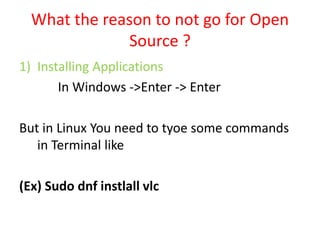
1) Installing Applications
In Windows ->Enter -> Enter
But in Linux You need to tyoe some commands
in Terminal like
(Ex) Sudo dnf instlall vlc
What the reason to not go for Open
Source ?
2) User Interface
It is not too good when compared to Windows.
(Ex) Suppose if you buy a printer in your home
Need to type some commands to install prior
that the corresponding file should be
executable one.
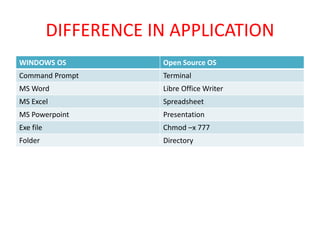
DIFFERENCE IN APPLICATION
WINDOWS OS Open Source OS
Command Prompt Terminal
MS Word Libre Office Writer
MS Excel Spreadsheet
MS Powerpoint Presentation
Exe file Chmod –x 777
Folder Directory
FILE SYSTEMS
FILE
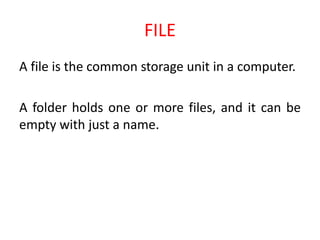
A file is the common storage unit in a computer.
A folder holds one or more files, and it can be
empty with just a name.
FILE NAMING
A file is named for the convenience of the users.
Whenever process creates a file, it gives file a
name. When the process terminates the file
continues to exist and can be accessed by other
process.
In UNIX OS File System the file names are Case
sensitive. (i.e.) Ram, ram, RAM are different files.
FILE EXTENSION
When a user Double click a file name first the OS
see the name of the extension and loads the
corresponding application.
(For Ex) if it is Sam.doc it loads MS Office
application.
FILE EXTENSION
FILE ATTRIBUTES
FILE ATTRIBUTES
FILE ATTRIBUTES
FILE ATTRIBUTES
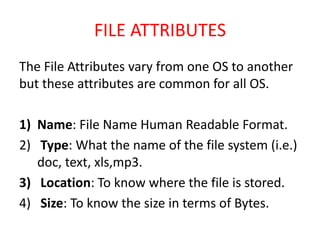
The File Attributes vary from one OS to another
but these attributes are common for all OS.
1) Name: File Name Human Readable Format.
2) Type: What the name of the file system (i.e.)
doc, text, xls,mp3.
3) Location: To know where the file is stored.
4) Size: To know the size in terms of Bytes.
FILE ATTRIBUTES
5) Protection: It determines who can execute,
read and write the corresponding file.
6) Time Date and User Information like Last
Accessed time, Last Modified time etc.
FILE OPERATIONS
FILE SYSTEM
FAT (File Allocation Table)
Works with all kinds of Open Source and
Windows OS.
We can create a single file of size upto 4GB
We can create a maximum partition size of 8TB
FILE SYSTEM
NTFS (NEW TECHNOLOGY FILE SYSTEM)
It provides file level security such as we can encrypt a file etc.
File name can be up to 255 characters.
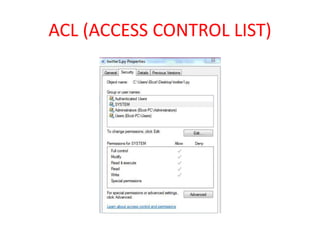
ACL Concept is provided here. File size and partition size is
much larger than FAT
Encryption of file system is avilable so that you can list whom
the persons can view the file etc.
ACL (ACCESS CONTROL LIST)
FILE SYSTEM
Ext file system
Stands for Extended File system.
Max file name is 255 characters.
Max file size is 2GB.
No Time stamp Information (Date and Time when the file
was modified etc.)
FILE SYSTEM
Ext2 File system
Maximum File size is 4TB
Max file characters 255 characters
No need to mention the Environment and System
Variables when any software is installed
SAMBA FILE SYSTEM
Samba is software that can be run on a platform
other than Microsoft Windows. (i.e.)
UNIX, Linux, IBM System 390, OpenVMS, and
other operating systems.
SAMBA FILE SYSTEM
It allows the host to interact with a Microsoft
Windows client or server as if it is a Windows
file.
(Ex) smb://192.168.2.6

Linux and windows

  • 1.
  • 2.
    About Windows An operatingsystem and Graphical User Interface (GUI) created by Microsoft and found on most computer systems .
  • 9.
    MS-DOS (Microsoft DiskOperating System) Windows 1.0 was Microsoft’s first attempt at a GUI (Graphical User Interface). Since Windows 1.0 was still based on DOS, only one application ran at a time.
  • 10.
    Microsoft Windows 2.0 Windows2.0 supported the VGA display system, which allowed you to use 16 colors at 640x480 resolution.
  • 11.
    Windows 3.1 It addedmultimedia functionality, which included support for connecting to external musical instruments and MIDI devices. Windows 3.1 added the ability to close applications by pressing Ctrl+Alt+Del and terminating hung applications from the list of running programs.
  • 12.
    Windows 95 Windows 95had features such as Plug-and-Play to make hardware installations easier, and dial- up networking for connecting to the Internet or another network via a modem.
  • 13.
    Windows 98 It wasthe retail upgrade to Windows 95 that provided support for reading DVDs and using USB devices. Windows 98 SE machine to function as a Network Address Translation (NAT) server for other machines on the home network
  • 14.
    Microsoft Windows XPHome Edition Home Edition supports the Internet Connection Firewall (ICF), which protects your computer while you are connected to the Internet. Remote Desktop is a new feature.
  • 15.
    Microsoft Windows Vista MicrosoftWindows Vista was released in January 2007 and included many changes and added new features such as the updated graphical user interfacevisual style called Windows Aero
  • 16.
    Windows 7 It alsofaster startup time and runs programs faster than Vista although it still requires a higher end hardware to run up to its potential. Windows 7 comes in a many editions including Starter, Home Premium, Professional, Ultimate and Enterprise
  • 17.
    Windows 8 Windows 8PC to load and start up in a matter of seconds rather than in minutes. The Metro user interface primarily consists of a "Start screen" made up of "Live Tiles”. Cortona (Voice Control application )was introduced in Windows 8.1
  • 18.
  • 19.
    Windows 10 Edge isthe only Browser that supports Windows 10 Suppose if you are developing any Extensions for IE you can develop it by means of Edge It present only in Windows 10.
  • 20.
    OPEN SOURCE OS Opensource software is software with source code that anyone can inspect, modify, and enhance. Also it does not ask any License Key or Activation Key to install OS. Free of Cost
  • 21.
    OPEN SOURCE OS Exampleof Open Source OS are 1) FEDORA 2) LINUX 3) RASPIAN 4) WHIZZY 5) BOSS (IIT MADRAS)
  • 22.
    Why we needto go for Open Source OS ? Security Any Open Source OS Does not need any Antivirus software or any Malware Software. Cost Effectiveness Any Software which you install in Open Source OS is free of cost. Because the software which you are installing in Open Source OS is free of cost.
  • 23.
    Why we needto go for Open Source OS ? High Speed Most number of Server in any colleges or in any companies the Web Server runs only in Open Source OS. Uptime and availability of web server is very high when compared to Windows.
  • 24.
    Why we needto go for Open Source OS ? Runs in any Hardware ? It can run in Smart Watch (Tizen OS) In can run in your smart phone (Android) It can run in your Circuit Board (Raspberry PI) It can run in Super Computer (Param 8000)
  • 25.
    What the reasonto not go for Open Source ? 1) Installing Applications In Windows ->Enter -> Enter But in Linux You need to tyoe some commands in Terminal like (Ex) Sudo dnf instlall vlc
  • 26.
    What the reasonto not go for Open Source ? 2) User Interface It is not too good when compared to Windows. (Ex) Suppose if you buy a printer in your home Need to type some commands to install prior that the corresponding file should be executable one.
  • 27.
    DIFFERENCE IN APPLICATION WINDOWSOS Open Source OS Command Prompt Terminal MS Word Libre Office Writer MS Excel Spreadsheet MS Powerpoint Presentation Exe file Chmod –x 777 Folder Directory
  • 28.
  • 29.
    FILE A file isthe common storage unit in a computer. A folder holds one or more files, and it can be empty with just a name.
  • 31.
    FILE NAMING A fileis named for the convenience of the users. Whenever process creates a file, it gives file a name. When the process terminates the file continues to exist and can be accessed by other process. In UNIX OS File System the file names are Case sensitive. (i.e.) Ram, ram, RAM are different files.
  • 32.
    FILE EXTENSION When auser Double click a file name first the OS see the name of the extension and loads the corresponding application. (For Ex) if it is Sam.doc it loads MS Office application.
  • 33.
  • 34.
  • 35.
  • 36.
  • 37.
    FILE ATTRIBUTES The FileAttributes vary from one OS to another but these attributes are common for all OS. 1) Name: File Name Human Readable Format. 2) Type: What the name of the file system (i.e.) doc, text, xls,mp3. 3) Location: To know where the file is stored. 4) Size: To know the size in terms of Bytes.
  • 38.
    FILE ATTRIBUTES 5) Protection:It determines who can execute, read and write the corresponding file. 6) Time Date and User Information like Last Accessed time, Last Modified time etc.
  • 39.
  • 40.
    FILE SYSTEM FAT (FileAllocation Table) Works with all kinds of Open Source and Windows OS. We can create a single file of size upto 4GB We can create a maximum partition size of 8TB
  • 41.
    FILE SYSTEM NTFS (NEWTECHNOLOGY FILE SYSTEM) It provides file level security such as we can encrypt a file etc. File name can be up to 255 characters. ACL Concept is provided here. File size and partition size is much larger than FAT Encryption of file system is avilable so that you can list whom the persons can view the file etc.
  • 42.
  • 43.
    FILE SYSTEM Ext filesystem Stands for Extended File system. Max file name is 255 characters. Max file size is 2GB. No Time stamp Information (Date and Time when the file was modified etc.)
  • 44.
    FILE SYSTEM Ext2 Filesystem Maximum File size is 4TB Max file characters 255 characters No need to mention the Environment and System Variables when any software is installed
  • 45.
    SAMBA FILE SYSTEM Sambais software that can be run on a platform other than Microsoft Windows. (i.e.) UNIX, Linux, IBM System 390, OpenVMS, and other operating systems.
  • 46.
    SAMBA FILE SYSTEM Itallows the host to interact with a Microsoft Windows client or server as if it is a Windows file. (Ex) smb://192.168.2.6