Drake Patrick MirembeDrake Patrick Mirembe
Wi-Fi Technologies
Drake Patrick Mirembe
Date: September 2014
Drake Patrick MirembeDrake Patrick Mirembe
Recap: Mobile computing systems deal with three basic
Components
Wireless communications and
Mobile Networks
Mobile Computing
Platform
Mobile Services &
Applications
Wireless LAN,
GSM/GPRS, BlueTooth,
Ad Hoc Mobile
networks Wireless
ATM, …, and Wi-Fi
SMS, WAP,I-
mode,
J2ME&J2EE
Mobile phone,
Internet, and other
new, …, so many
Network
management
“Mobility”
We handle
this
Drake Patrick MirembeDrake Patrick Mirembe
Lecture Summary

Wireless Channels

Wi-Fi Technology

EAP and 802.1x
4
Frequencies for Communications
VLF = Very Low Frequency UHF = Ultra High Frequency
LF = Low Frequency SHF = Super High Frequency
MF = Medium Frequency EHF = Extra High Frequency
HF = High Frequency UV = Ultraviolet Light
VHF = Very High Frequency
Frequency and wave length:
λ = c/f
wave length λ, speed of light c ≅ 3x10⁸
m/s, frequency f
1 Mm
300 Hz
10 km
30 kHz
100 m
3 MHz
1 m
300 MHz
10 mm
30 GHz
100 µm
3 THz
1 µm
300 THz
visible lightVLF LF MF HF VHF UHF SHF EHF infrared UV
optical transmissioncoax cabletwisted
pair
5
ITU-R holds auctions for new frequencies, manages frequency
bands worldwide (WRC, World Radio Conferences)
Frequencies and Regulations
Europe USA Japan
Cellular
Phones
GSM 450- 457, 479 -
486/460 - 467,489 -
496, 890 - 915/935 -
960,
1710 - 1785/1805 -
1880
UMTS (FDD) 1920 -
1980, 2110 -2190
UMTS (TDD) 1900 -
1920, 2020 -2025
AMPS , TDMA , CDMA
824- 849,
869-894
TDMA , CDMA , GSM
1850 - 1910,
1930 -1990
PDC
810- 826,
940-956,
1429 - 1465,
1477 - 1513
Cordless
Phones
CT1+ 885- 887, 930 -
932
CT2
864-868
DECT
1880 -1900
PACS 1850 - 1910, 1930 -
1990
PACS -UB 1910 -1930
PHS
1895 - 1918
JCT
254-380
Wireless
LANs
IEEE 802.11
2400 -2483
HIPERLAN 2
5150 - 5350, 5470 -
5725
902-928
I EEE 802.11
2400 -2483
5150 - 5350, 5725 - 5825
IEEE 802.11
2471 - 2497
5150 - 5250
Others RF- Control
27, 128, 418, 433,
868
RF- Control
315, 915
RF- Control
426, 868
6
Spectrum and Bandwidth: Shannon Channel Capacity
The maximum number of bits that can be
transmitted per second by a physical channel
is:
where W is the frequency range of the channel,
and S/N is the signal noise ratio, assuming
Gaussian noise
W log2(1+
S
N
)
Section 2: Antennas
 For wireless communications, signals are transmitted
through space without guidance. We have to couple
the electromagnetic energy from transmitter to the
outside world and, in reverse, from the outside world
to the receiver. This is exactly what antennas do.
 A theoretical reference antenna
 Simple antennas
 Sectorized antennas
 Smart antennas
Theoretical & Simple Antenna
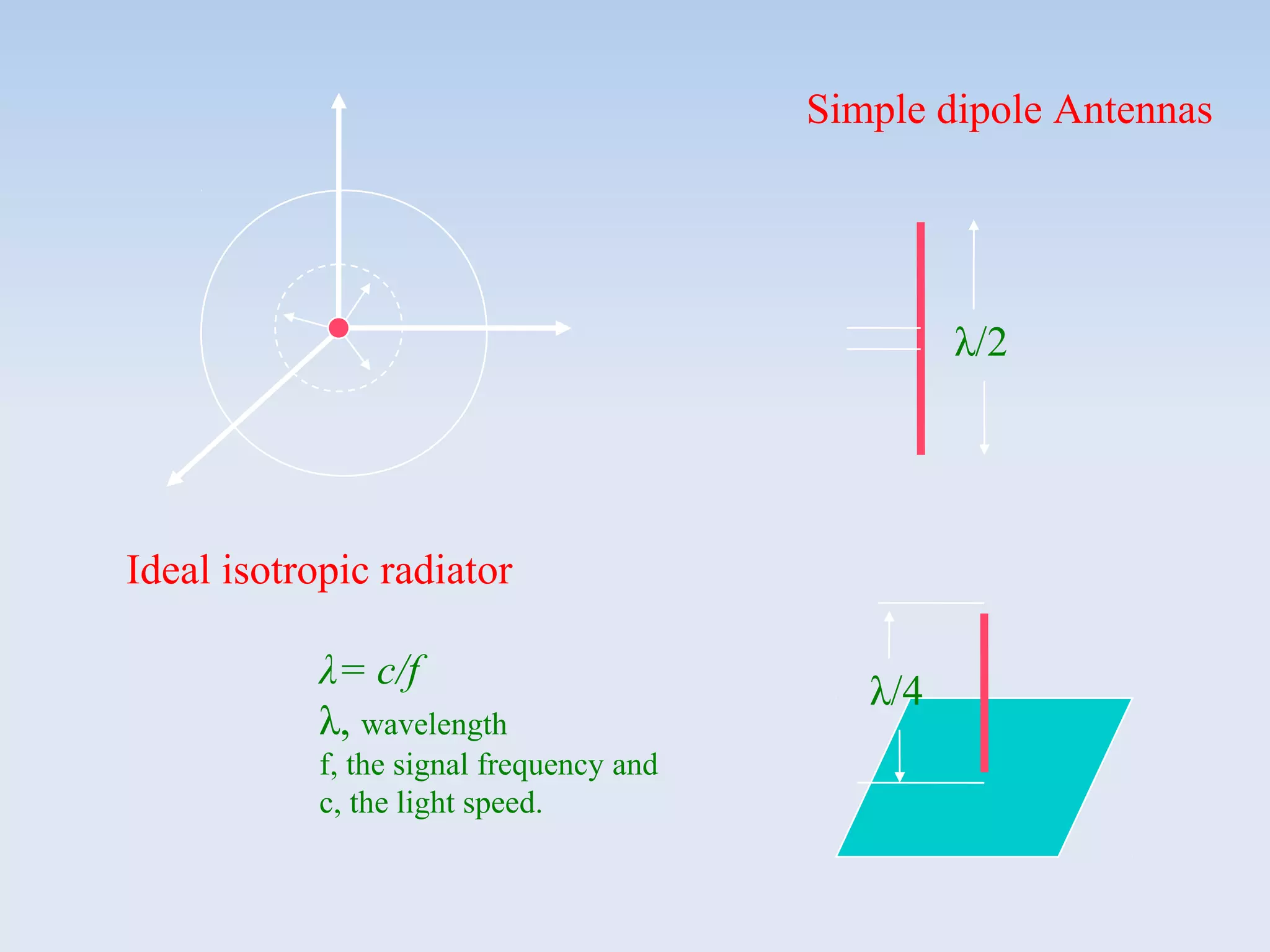
 Its also called isotropic radiator. A point in space
radiating with equal power in all directions, i.e., all
points with equal power are located on a sphere
with antenna as its center.
 However, such as antenna does not exist in reality
due to directive effects.
 The simplest real antenna is a thin, center fed
dipole, also called Hertzian dipole. The length of
the dipole is not arbitrary, but for example, half the
wavelength λ of the signal to transmit results in a
very efficient radiation of the energy. If mounted on
the roof of a car, the length of λ/4 is efficient.
Ideal isotropic radiator
Simple dipole Antennas
λ/4
λ/2
λ= c/f
λ, wavelength
f, the signal frequency and
c, the light speed.
If an antenna is positioned, e.g., in a valley or between buildings, an
omnidirectional radiation pattern is not very useful. So, Directional
Antenna, with certain fixed preferential transmission and reception directions
can be used.
y (or z)
x
Also, a special example of
directional antennas is
constructed by satellite dishes.
y
z
The radiation pattern of a
directional antenna with the main
lobe in direction of the x-axis.
Two or more antennas can also be combined to improve reception by counteracting
the negative effects of multipath propagation. So, Multi-Element Antenna Arrays,
allow different diversity scheme. One such scheme is Switched or Selection
Diversity, where the receiver always uses the antenna element with large output.
λ/2 λ/2
λ/4 •Flexibility
•Coverage
A more advanced solution is provided by Smart Antennas which
combine multiple antenna elements with signal processing to
optimize the radiation/reception pattern in response to the signal
environment.
These antennas can adapt to changes in reception power,
transmission conditions and many signal propagation effects as
discussed in the following slides.
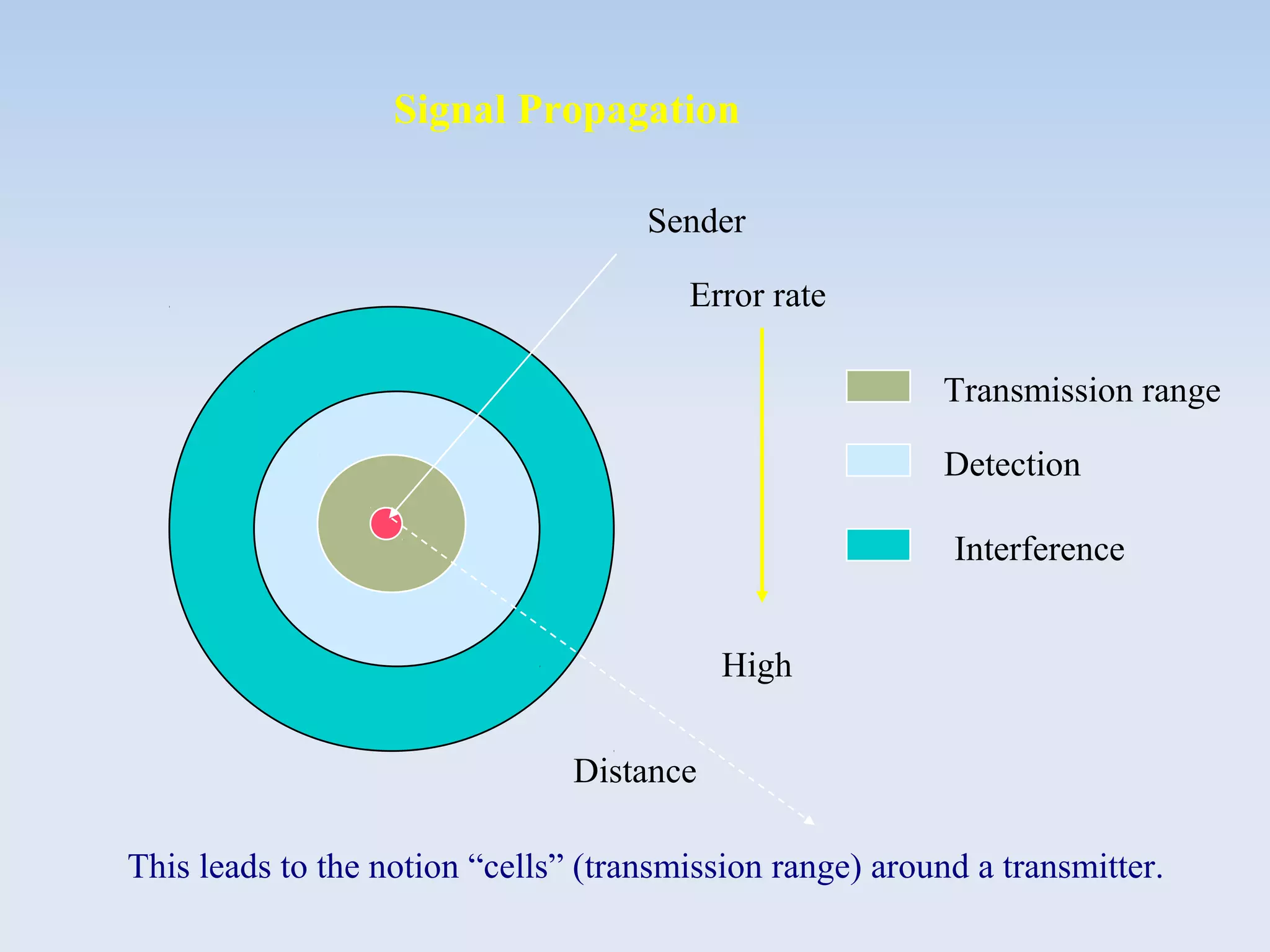
Signal Propagation
Sender
Transmission range
Detection
Interference
Distance
Error rate
High
This leads to the notion “cells” (transmission range) around a transmitter.
Path Loss of Radio Signals
In free space, a radio signal propagates as light, follows a straight
line (line-of-sight, LOS)
Inverse Square law: the received power Pr = 1/d2
. It’s called “Path
loss or attenuation” due to inverse square law;
Weather conditions such as heavy rain, much of the radiated
energy of the antenna is absorbed;
Depending on the frequency, radio waves can also penetrate
objects. Generally, the lower the frequency is, the better the
penetration will be.
Additional signal propagation effects: blocking, reflection
and diffraction.
Drake Patrick MirembeDrake Patrick Mirembe

Wireless devices deliver different qualities of voice
and data over the air. These qualities are based on
the physics of radio waves and the science of the
spectrum.

In this section, we introduce the basis for building
wireless technology and understanding spectrum,
bandwidth, and qualities.
Wireless Channels & Characteristics
Wireless Spectrum
The electromagnetic spectrum, or simply spectrum, is the
entire range of energy waves over which communicating
devices transmit.
Drake Patrick MirembeDrake Patrick Mirembe

Higher frequencies travel short distances. They take more
power to transmit; with enough power, they can be life
threatening.

Higher frequencies can be modulated to carry more bits per
second than longer waves, but they are subject to atmosphere
interference.

Broadcasters generally prefer owning a lower frequency
because it costs less to transmit a signal, it carries farther, and
it is generally “safe”.

The ITU make frequency agreements so devices will operate
clearly. Regulating radio interference is necessary so that
wireless devices do not interfere with one another. For
example, “FCC Spectrum Allocation”;

The owner of popular mobile cellular bands must obtain a
license from the authority.
Some interesting properties of the spectrum
Drake Patrick MirembeDrake Patrick Mirembe

Spectrum in Hertz, for examples
1.9 GHz, this is where CDMA PCS operates on the spectrum
2.4 GHz, it’s used by wireless Ethernet (or LAN), Bluetooth,
HomeRF, and other protocols

Bandwidth and Date Rate (we have learnt in NC1)
Although bandwidth traditionally describes the width of a
spectrum channel for wireless Internet engineers, bandwidth
also measures data capacity, so the bandwidth indicates how
many bits can be transferred per second

Converting voice to data: Hertz to Megabits
Cellular networks carry both voice and data. The human voice
can convey understandable speech in 300Hz –to 3300 Hz.
Telephone companies use 4KHz as the allocated bandwidth for
speech: 4KHz talk = 64 kbps (based on PCM learnt in NC1).
Drake Patrick MirembeDrake Patrick Mirembe
Common Wireless Data rates and Devices
PDAs using a wireless LAN11 Mbps
PADs using Ricochet128 kbps
Pagers19.2 kbps
Pagers, Web phones14.4 kbps
Web phones9.6 kbps
Wireless DevicesWireless data rate
Drake Patrick MirembeDrake Patrick Mirembe

Wireless broadband is 200 kbps or better in both
directions. The term broadband is often used for data
bandwidth wider than a voice call.
Although it has a number of meanings, when
wireless engineers speak of broadband, they mean
wireless broadband rather than 45 Mbps or greater
wired broadband multichannel service.
In conversations about wireless band, engineers
rarely use wideband. Today’s cell phone wireless
bandwidth is implemented as sub-narrowband
network and also called wireless narrowband,
referring to data overlays of circuit-switched cellular
phone data at 14.4 kbps or slower.

Refer to the last slide, you may classify common
wireless data rates as wireless broadband or not.
Wireless Bands
Drake Patrick MirembeDrake Patrick Mirembe

To make wireless broadband terminology more
“interesting”, former fixed wireless services are
experimenting with mobile terminals. These services
currently require dishes or line-of-sight (LoS)
antennas.

They are useful as fixed wireless Internet “on ramps”
and provide service. For the technically minded, all
these fixed wireless access services are grouped
under the IEEE 802.16 standard.

The most prominent broadband wireless access
(BWA) technologies are described in the next slide.
Drake Patrick MirembeDrake Patrick Mirembe

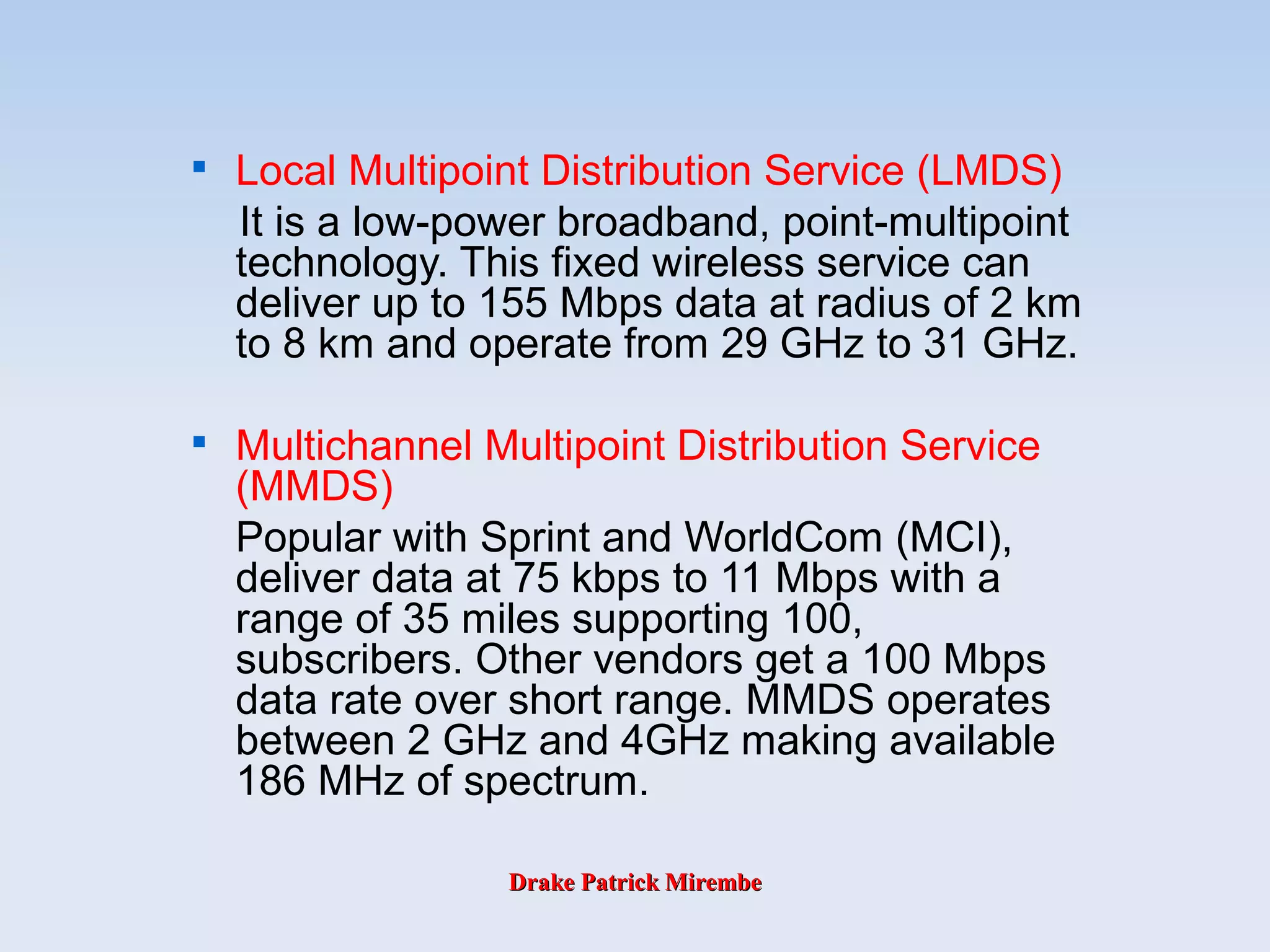
Local Multipoint Distribution Service (LMDS)
It is a low-power broadband, point-multipoint
technology. This fixed wireless service can
deliver up to 155 Mbps data at radius of 2 km
to 8 km and operate from 29 GHz to 31 GHz.

Multichannel Multipoint Distribution Service
(MMDS)
Popular with Sprint and WorldCom (MCI),
deliver data at 75 kbps to 11 Mbps with a
range of 35 miles supporting 100,
subscribers. Other vendors get a 100 Mbps
data rate over short range. MMDS operates
between 2 GHz and 4GHz making available
186 MHz of spectrum.
Drake Patrick MirembeDrake Patrick Mirembe
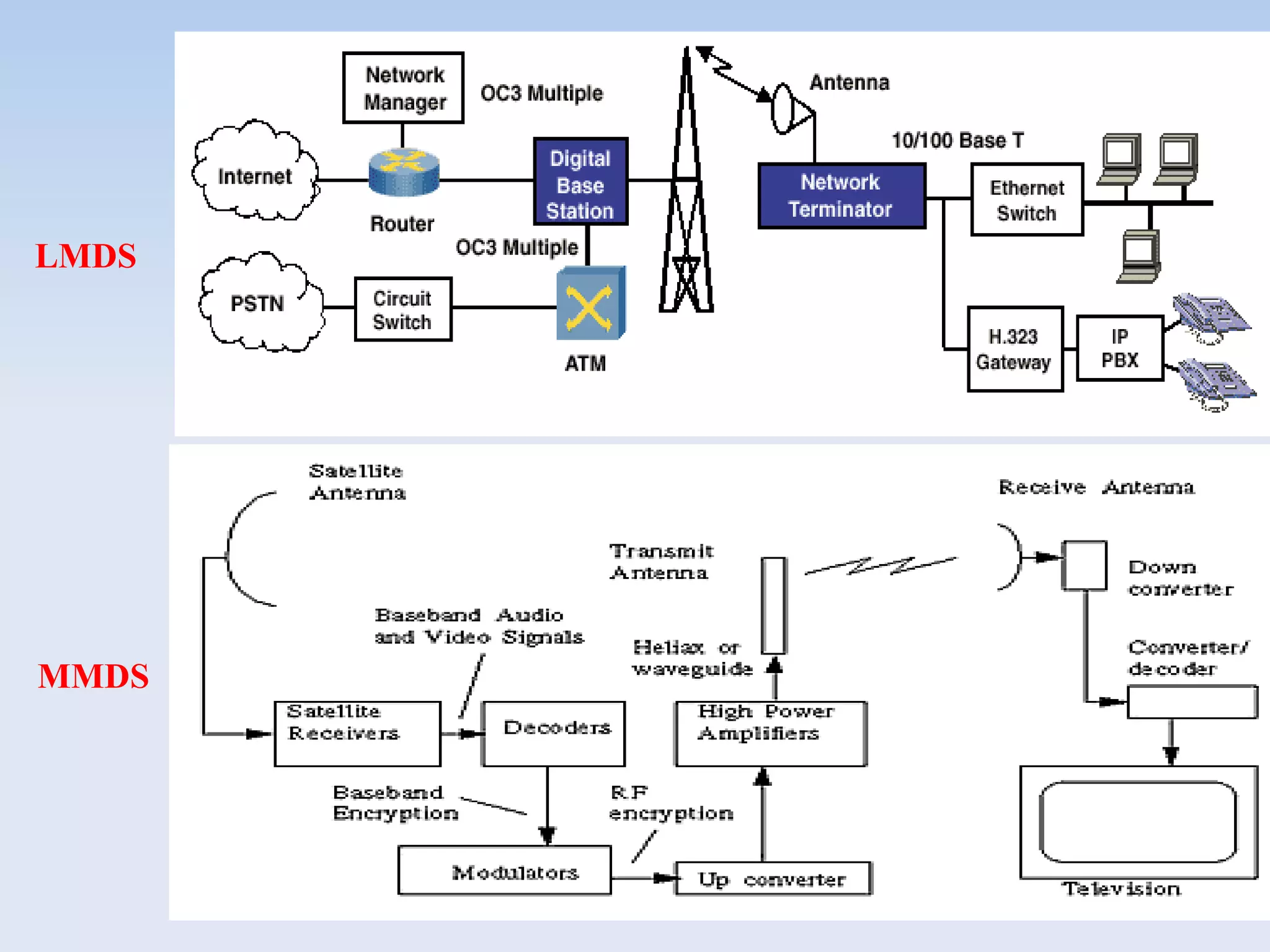
LMDS
MMDS
Drake Patrick MirembeDrake Patrick Mirembe
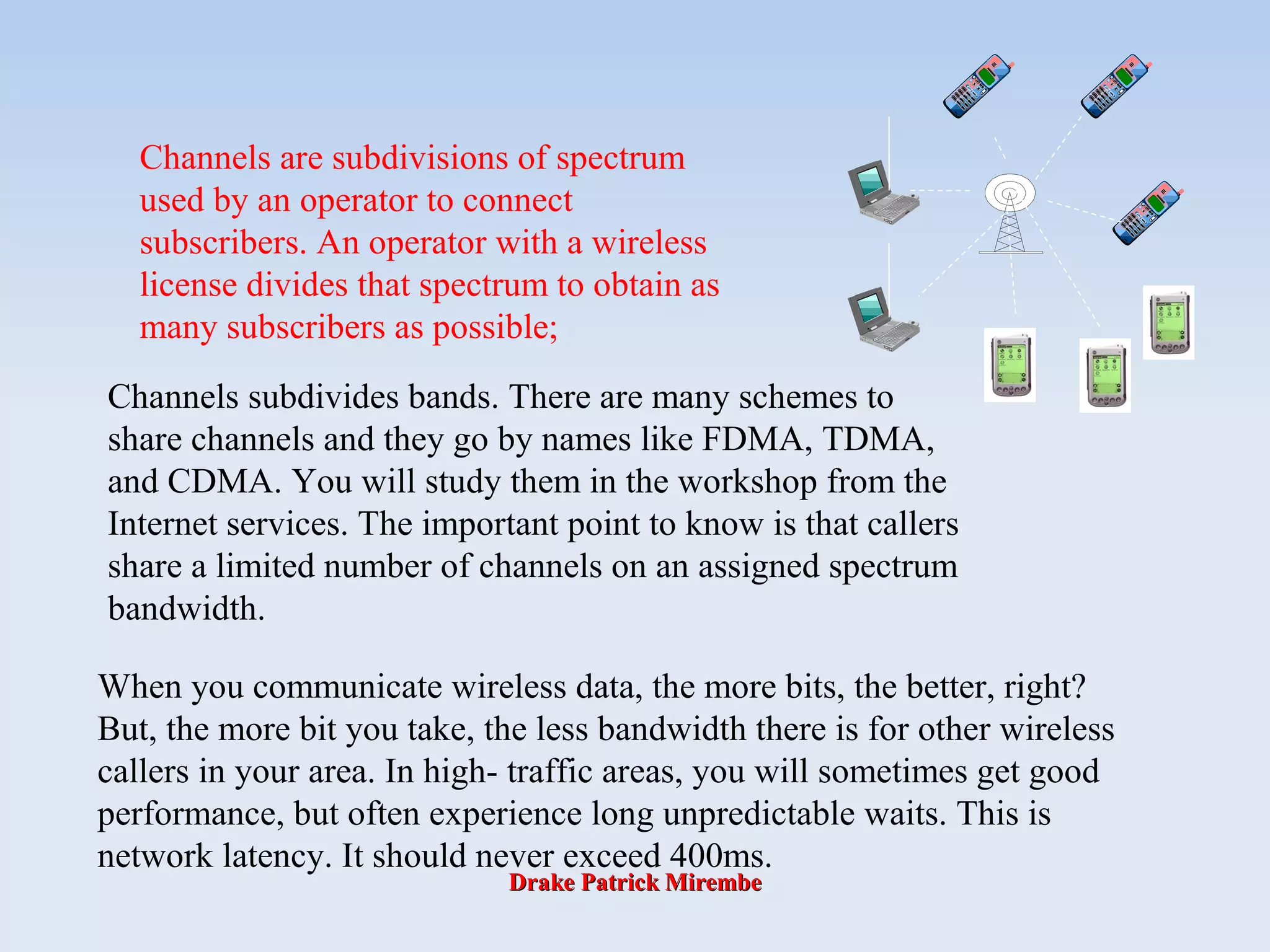
Channels are subdivisions of spectrum
used by an operator to connect
subscribers. An operator with a wireless
license divides that spectrum to obtain as
many subscribers as possible;
Channels subdivides bands. There are many schemes to
share channels and they go by names like FDMA, TDMA,
and CDMA. You will study them in the workshop from the
Internet services. The important point to know is that callers
share a limited number of channels on an assigned spectrum
bandwidth.
When you communicate wireless data, the more bits, the better, right?
But, the more bit you take, the less bandwidth there is for other wireless
callers in your area. In high- traffic areas, you will sometimes get good
performance, but often experience long unpredictable waits. This is
network latency. It should never exceed 400ms.
Drake Patrick MirembeDrake Patrick Mirembe
Wireless LAN Overview
Wi-Fi Technology

Wireless Fidelity (Wi-Fi)

Channels

Basic Security&Practices

Vulnerabilities

WEP

WPA

802.11a/b/g
Drake Patrick MirembeDrake Patrick Mirembe
PANs, LANs & WANs
PAN: Personal
Area Network LAN
WAN
10 m 100 m 2,500 m
Drake Patrick MirembeDrake Patrick Mirembe
Wi-Fi Technology
Drake Patrick MirembeDrake Patrick Mirembe
Wi-Fi
• Wi-Fi (short for “Wireless Fidelity") is the popular
term for a high-frequency wireless local area
network (WLAN)
– Promoted by the Wi-Fi Alliance (Formerly WECA -
Wireless Ethernet Carriers Association)
• Used generically when referring to any type of
802.11 network, whether 802.11a, 802.11b,
802.11g, dual-band, etc. The term is promulgated
by the Wi-Fi Alliance
Drake Patrick MirembeDrake Patrick Mirembe
Wi-Fi
• Wi-Fi standards use the Ethernet protocol and
CSMA/CA (carrier sense multiple access with
collision avoidance) for path sharing
• The 802.11b (Wi-Fi) technology operates in the
2.4 GHz range offering data speeds up to 11
megabits per second. The modulation used in
802.11 has historically been phase-shift keying
(PSK).
– Note, unless adequately protected, a Wi-Fi wireless
LAN is easily accessible by unauthorized users
Drake Patrick MirembeDrake Patrick Mirembe
Wireless LAN Topology
• Wireless LAN is typically deployed as an extension of
an existing wired network as shown below.
Drake Patrick MirembeDrake Patrick Mirembe
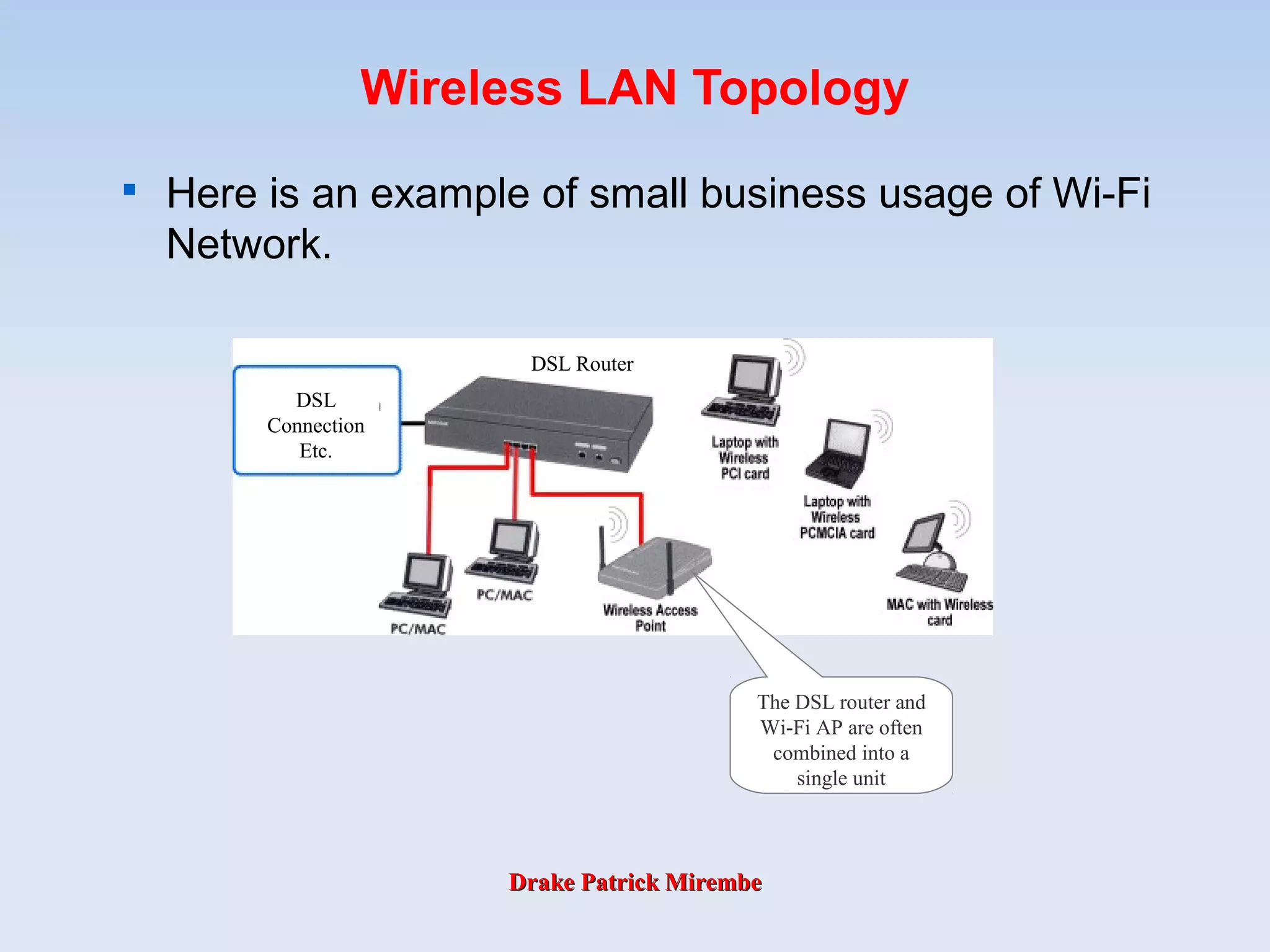
Wireless LAN Topology

Here is an example of small business usage of Wi-Fi
Network.
DSL
Connection
Etc.
DSL Router
The DSL router and
Wi-Fi AP are often
combined into a
single unit
Drake Patrick MirembeDrake Patrick Mirembe
What is 802.11?
• 802.11 refers to a family of specifications
developed by the IEEE for wireless LAN
technology. 802.11 specifies an over-the-air
interface between a wireless client and a base
station or between two wireless clients.
• The IEEE accepted the specification in 1997.
Drake Patrick MirembeDrake Patrick Mirembe
802.11 Family Members

There are several specifications in the 802.11 family:

802.11

Applies to wireless LANs and provides 1 or 2 Mbps transmission in the
2.4 GHz band using either frequency hopping spread spectrum (FHSS)
or direct sequence spread spectrum (DSSS).

802.11a

An extension to 802.11 that applies to wireless LANs and provides up
to 54 Mbps in the 5GHz band. 802.11a uses an orthogonal frequency
division multiplexing encoding scheme rather than FHSS or DSSS.

802.11b

(also referred to as 802.11 High Rate or Wi-Fi) is an extension to
802.11 that applies to wireless LANs and provides 11 Mbps
transmission (with a fallback to 5.5, 2 and 1 Mbps) in the 2.4 GHz
band. 802.11b uses only DSSS. 802.11b was a 1999 ratification to the
original 802.11 standard, allowing wireless functionality comparable to
Ethernet.

802.11g

Applies to wireless LANs and provides 20+ Mbps in the 2.4 GHz band.
Drake Patrick MirembeDrake Patrick Mirembe
802.11 Standards
802.11 The original WLAN Standard. Supports 1 Mbps to 2 Mbps.
802.11a High speed WLAN standard for 5 Ghz band. Supports 54 Mbps.
802.11b WLAN standard for 2.4 Ghz band. Supports 11 Mbps.
802.11e Address quality of service requirements for all IEEE WLAN radio
interfaces.
802.11f Defines inter-access point communications to facilitate multiple
vendor-distributed WLAN networks.
802.11g Establishes an additional modulation technique for 2.4 Ghz band.
Intended to provide speeds up to 54 Mbps. Includes much
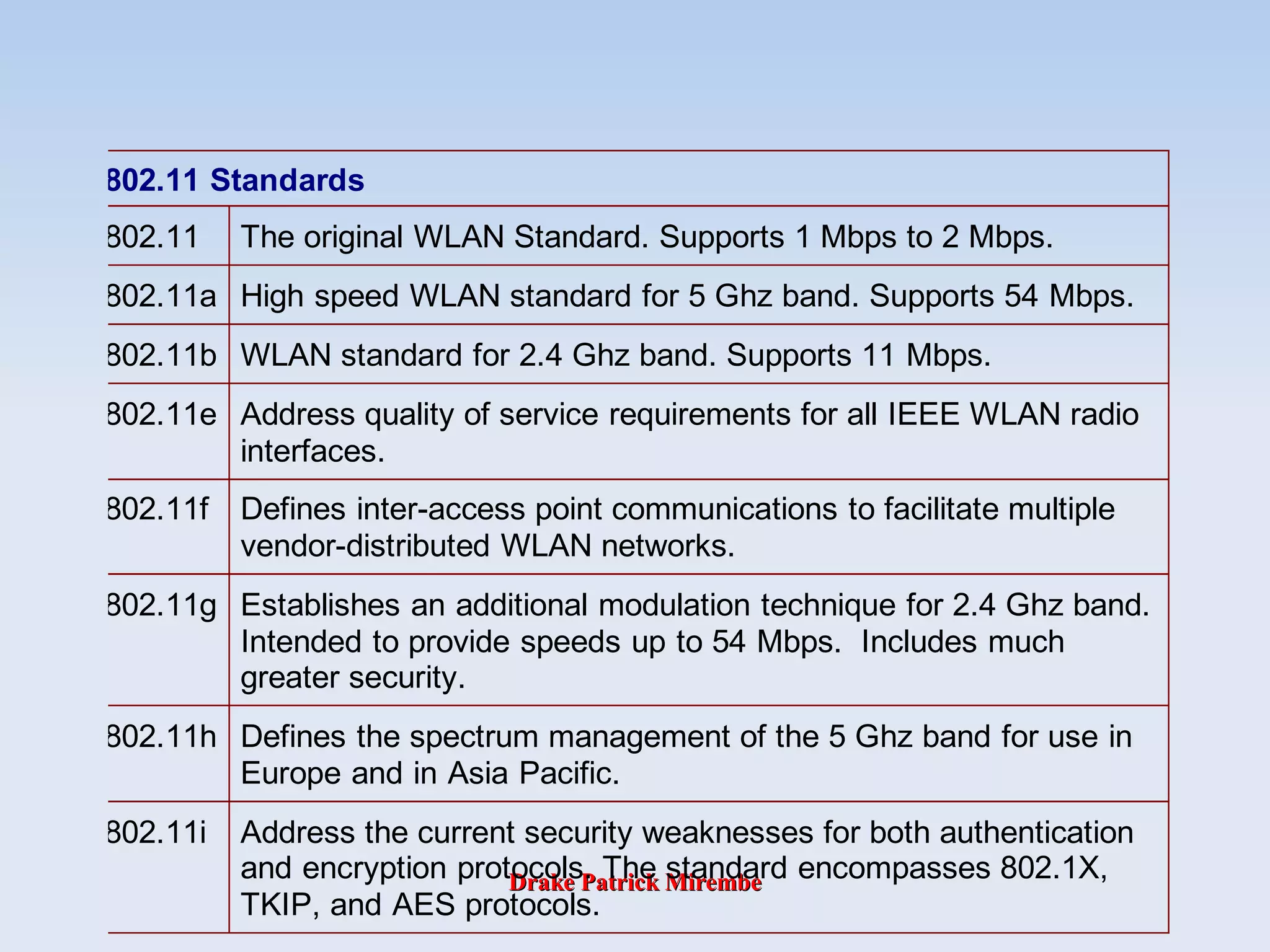
greater security.
802.11h Defines the spectrum management of the 5 Ghz band for use in
Europe and in Asia Pacific.
802.11i Address the current security weaknesses for both authentication
and encryption protocols. The standard encompasses 802.1X,
TKIP, and AES protocols.
Drake Patrick MirembeDrake Patrick Mirembe
802.11Range Comparisons
Drake Patrick MirembeDrake Patrick Mirembe
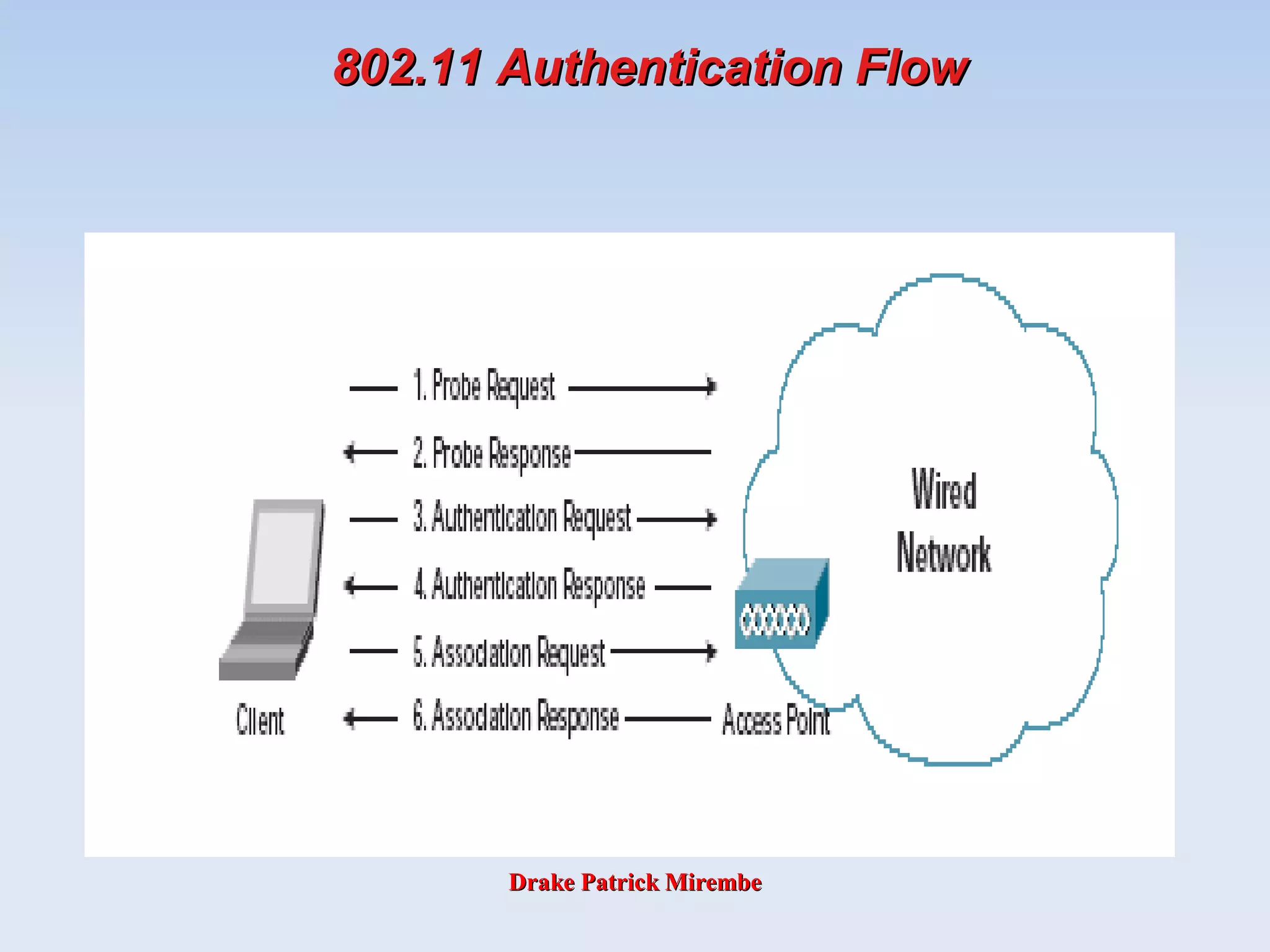
802.11 Authentication
• The 802.11 standard defines several services
that govern how two 802.11 devices
communicate. The following events must occur
before an 802.11 station can communicate with
an Ethernet network through a wireless access
point provides:
– Turn on the wireless Client
– Client listens for messages from any access points (AP) that are
in range
– Client finds a message from an AP that has a matching SSID
– Client sends an authentication request to the AP
– AP authenticates the station
– Client sends an association request to the AP
– AP associates with the station
– Client can now communicate with the Ethernet network thru the
Drake Patrick MirembeDrake Patrick Mirembe
What Exactly Is 802.1x?
• Standard set by the IEEE 802.1 working group.
• Describes a standard link layer protocol used for
transporting higher-level authentication
protocols.
• Works between the Supplicant (Client Software)
and the Authenticator (Network Device).
• Maintains backend communication to an
Authentication (Typically RADIUS) Server.
Drake Patrick MirembeDrake Patrick Mirembe
What Does it Do?
• Transport authentication information in the form of
Extensible Authentication Protocol (EAP) payloads.
• The authenticator (switch) becomes the middleman for
relaying EAP received in 802.1x packets to an
authentication server by using RADIUS to carry the EAP
information.
• Several EAP types are specified in the standard.
• Three common forms of EAP are
–EAP-MD5 – MD5 Hashed Username/Password
–EAP-OTP – One-Time Passwords
–EAP-TLS – Strong PKI Authenticated Transport Layer
Security (SSL)
802.1x Header EAP Payload
Drake Patrick MirembeDrake Patrick Mirembe
What is RADIUS?
• RADIUS – The Remote Authentication Dial In User Service
• A protocol used to communicate between a network device
and an authentication server or database.
• Allows the communication of login and authentication
information. i.e. Username/Password, OTP, etc. using
Attribute/Value pairs (Attribute = Value)
• Allows the communication of extended attribute value pairs
using “Vendor Specific Attributes” (VSAs).
• Can also act as a transport for EAP messages.
• RFC2865, RFC2866 and others
RADIUS Header EAP PayloadUDP Header
Drake Patrick MirembeDrake Patrick Mirembe
802.11 Authentication Flow802.11 Authentication Flow
Drake Patrick MirembeDrake Patrick Mirembe
Wi-Fi Channels

Wireless LAN communications are based on the
use of radio signals to exchange information
through an association between a wireless LAN
card and a nearby access point.

Each access point in an 802.11b/g network is
configured to use one radio frequency (RF)
channel.

Although the 802.11b/g specifications indicate that
there are fourteen (14) channels that can be
utilized for wireless communications, in the U.S.,
there are only eleven channels allowed for AP use.
In addition, since there is frequency overlap
among many of the channels, there must be 22
MHz separation between any two channels in use.
Drake Patrick MirembeDrake Patrick Mirembe
Wi-Fi Channels

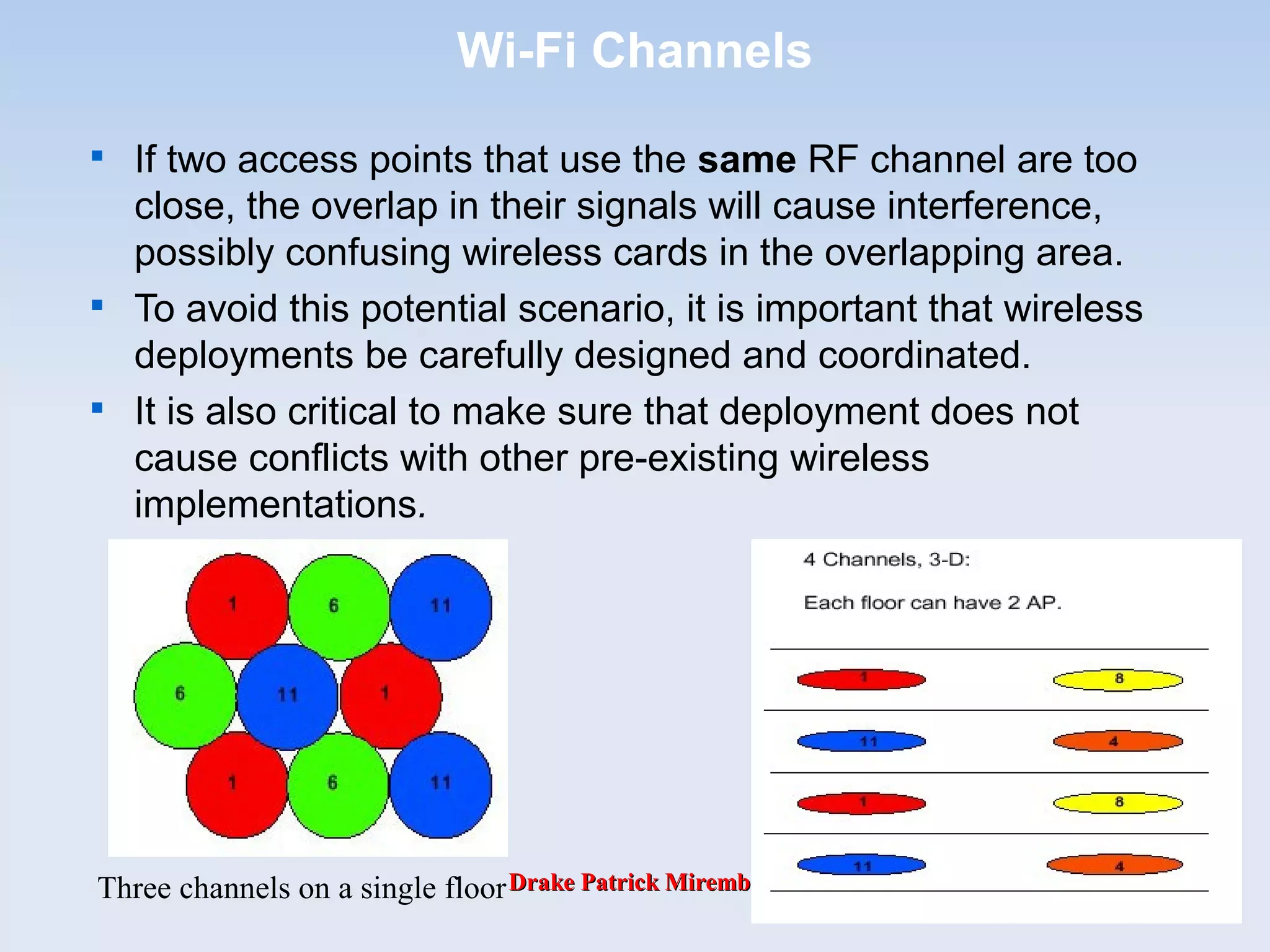
In a multi-access point installation, where
overlapping channels can cause interference, dead-
spots and other problems, Channels 1, 6 and 11 are
generally regarded as the only safe channels to use.
Since there are 5 5MHz channels between 1 and 6,
and between 6 and 11, or 25MHz of total bandwidth,
that leaves three MHz of buffer zone between
channels.

In practice, this constraint limits the number of
useable channels to three (channels 1, 6, and 11).
802.11a wireless networks have eight non-
overlapping channels which provide more flexibility
in terms of channel assignment.
Drake Patrick MirembeDrake Patrick Mirembe
Wi-Fi Channels

For example, 802.11a - An extension to the IEEE
802.11 standard that applies to wireless LANs
and provides up to 54 Mbps in the 5GHz band.

For the North American users, equipment available
today operates between 5.15 and 5.35GHz.

This bandwidth supports eight separate, non-
overlapping 200 MHz channels.

These channels allow users to install up to eight
access points set to different channels without
interference, making access point channel
assignment much easier and significantly
increasing the level of throughput the wireless
LAN can deliver within a given area.
Drake Patrick MirembeDrake Patrick Mirembe
Wi-Fi Channels

If two access points that use the same RF channel are too
close, the overlap in their signals will cause interference,
possibly confusing wireless cards in the overlapping area.

To avoid this potential scenario, it is important that wireless
deployments be carefully designed and coordinated.

It is also critical to make sure that deployment does not
cause conflicts with other pre-existing wireless
implementations.
Three channels on a single floor
Drake Patrick MirembeDrake Patrick Mirembe
Basic 802.11 Security
• SSID (Service Set Identifier) or ESSID (Extended
Service Set Identifier)

Each AP has an SSID that it uses to identify itself.
Network configuration requires each wireless client to
know the SSID of the AP to which it wants to connect.

SSID provides a very modest amount of control. It
keeps a client from accidentally connecting to a
neighboring AP only. It does not keep an attacker out.
Drake Patrick MirembeDrake Patrick Mirembe
SSID
• SSID (Service Set Identifier) or ESSID
(Extended Service Set Identifier)
– The SSID is a token that identifies an 802.11
network. The SSID is a secret key that is set by
the network administrator. Clients must know the
SSID to join an 802.11 network; however, network
sniffing can discover the SSID.
– The fact that the SSID is a secret key instead of a
public key creates a management problem for the
network administrator.
• Every user of the network must configure the SSID into
their system. If the network administrator seeks to lock a
user out of the network, the administrator must change
the SSID of the network, which requires reconfiguration
of every network node. Some 802.11 NICs allow you to
configure several SSIDs at one time.
Drake Patrick MirembeDrake Patrick Mirembe
Basic 802.11 Security

MAC filters

Some APs provide the capability for checking the MAC
address of the client before allowing it to connect to the
network.

Using MAC filters is considered to be very weak
security because with many Wi-Fi client
implementations it is possible to change the MAC
address by reconfiguring the card.

An attacker could sniff a valid MAC address from the
wireless network traffic .
Drake Patrick MirembeDrake Patrick Mirembe
Basic 802.11 Security

Static WEP keys

Wired Equivalent Privacy (WEP) is part of the 802.11
specification.

Static WEP key operation requires keys on the client and
AP that are used to encrypt data sent between them. With
WEP encryption, sniffing is eliminated and session hijacking
is difficult (or impossible).

Client and AP are configured with a set of 4 keys, and when
decrypting each are used in turn until decryption is
successful. This allows keys to be changed dynamically.

Keys are the same in all clients and AP. This means that
there is a “community” key shared by everyone using the
same AP. The danger is that if any one in the community is
compromised, the community key, and hence the network
and everyone else using it, is at risk.
Drake Patrick MirembeDrake Patrick Mirembe
Authentication Type
• An access point must authenticate a station before the
station can associate with the access point or
communicate with the network. The IEEE 802.11
standard defines two types of authentication:
– Open System Authentication
– Shared Key Authentication
Drake Patrick MirembeDrake Patrick Mirembe
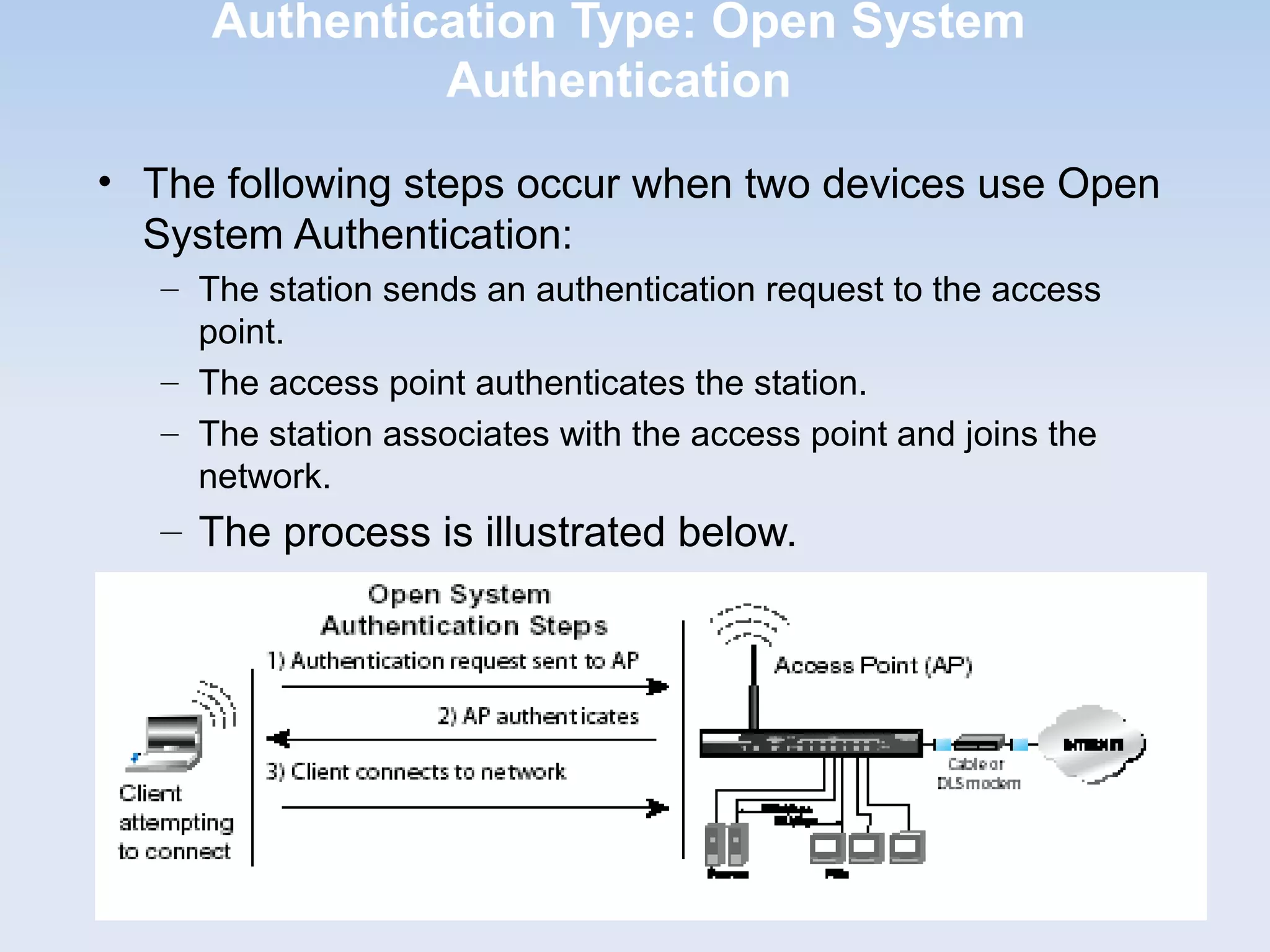
Authentication Type: Open System
Authentication
• The following steps occur when two devices use Open
System Authentication:
– The station sends an authentication request to the access
point.
– The access point authenticates the station.
– The station associates with the access point and joins the
network.
– The process is illustrated below.
Drake Patrick MirembeDrake Patrick Mirembe
Authentication Type: Shared Key Authentication
• The following steps occur when two devices
use Shared Key Authentication:
1. The station sends an authentication request to the access
point.
2. The access point sends challenge text to the station.
3. The station uses its configured 64-bit or 128-bit default key to
encrypt the challenge text, and sends the encrypted text to the
access point.
4. The access point decrypts the encrypted text using its
configured WEP Key that corresponds to the station’s default
key.
5. The access point compares the decrypted text with the original
challenge text. If the decrypted text matches the original
challenge text, then the access point and the station share the
same WEP Key and the access point authenticates the
station.
6. The station connects to the network.
Drake Patrick MirembeDrake Patrick Mirembe
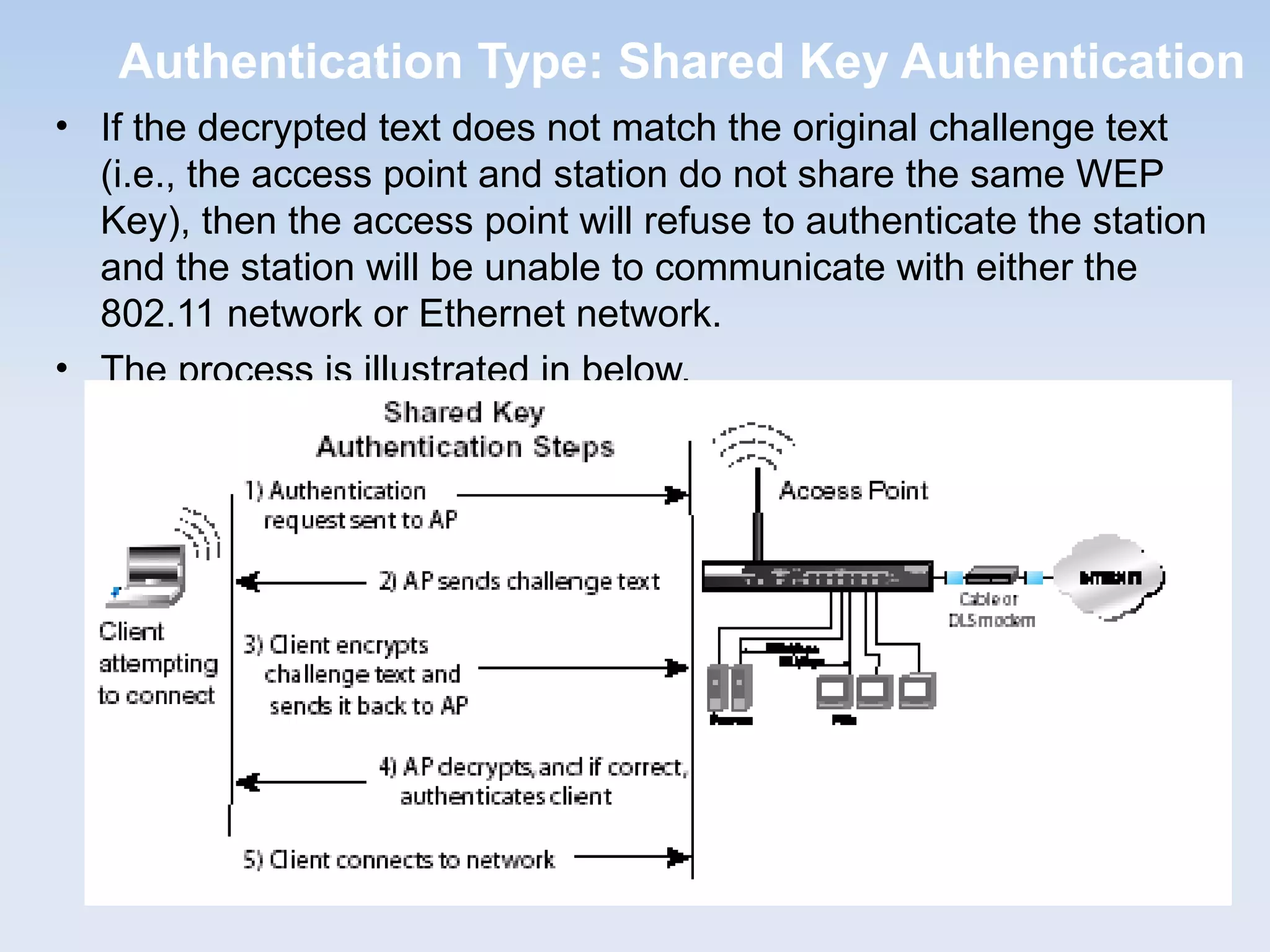
Authentication Type: Shared Key Authentication
• If the decrypted text does not match the original challenge text
(i.e., the access point and station do not share the same WEP
Key), then the access point will refuse to authenticate the station
and the station will be unable to communicate with either the
802.11 network or Ethernet network.
• The process is illustrated in below.
Drake Patrick MirembeDrake Patrick Mirembe
Overview of WEP Parameters
• Before enabling WEP on an 802.11 network, you must first
consider what type of encryption you require and the key size
you want to use. Typically, there are three WEP Encryption
options available for 802.11 products:
– Do Not Use WEP: The 802.11 network does not encrypt data. For
authentication purposes, the network uses Open System
Authentication.
– Use WEP for Encryption: A transmitting 802.11 device encrypts the
data portion of every packet it sends using a configured WEP Key.
The receiving device decrypts the data using the same WEP Key.
For authentication purposes, the wireless network uses Open
System Authentication.
– Use WEP for Authentication and Encryption: A transmitting
802.11 device encrypts the data portion of every packet it sends
using a configured WEP Key. The receiving 802.11 device decrypts
the data using the same WEP Key. For authentication purposes, the
802.11 network uses Shared Key Authentication.
• Note: Some 802.11 access points also support Use WEP for
Authentication Only (Shared Key Authentication without data
encryption).
Drake Patrick MirembeDrake Patrick Mirembe
Recommended 802.11 Security Practices
• Change the default password for the Admin account
• SSID
• Change the default
• Disable Broadcast
• Make it unique
• If possible, Change it often
• Enable MAC Address Filtering
• Enable WEP 128-bit Data Encryption. Please note that
this will reduce your network performance
• Use the highest level of encryption possible
• Use a “Shared” Key
• Use multiple WEP keys
• Change it regularly
• Turn off DHCP
• Refrain from using the default IP subnet
Drake Patrick MirembeDrake Patrick Mirembe
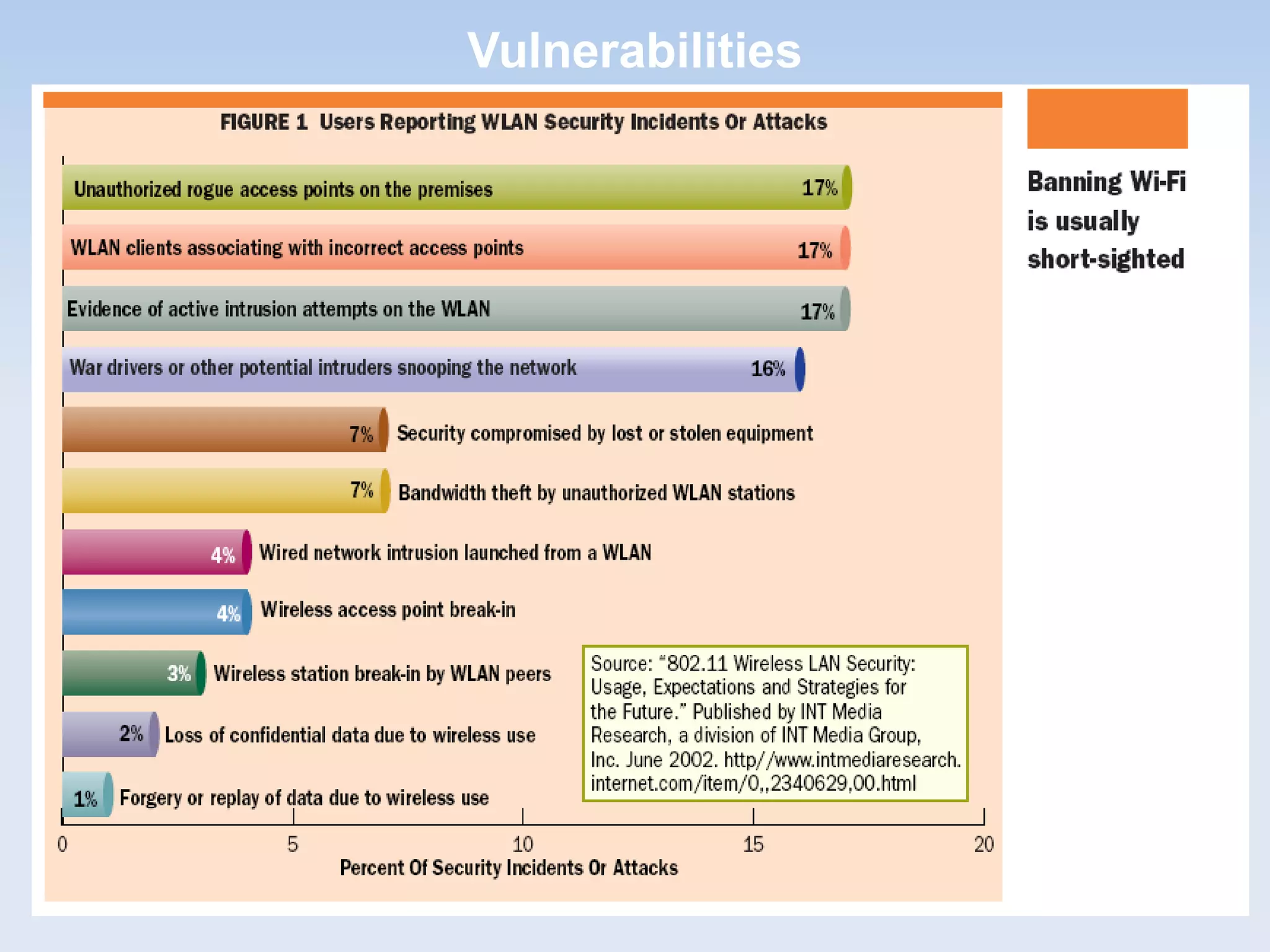
Vulnerabilities
Drake Patrick MirembeDrake Patrick Mirembe
Vulnerabilities
• There are several known types of wireless attacks
that must be protected against:
– SSID (network name) sniffing
– WEP encryption key recovery attacks
– ARP poisoning (“man in the middle attacks”)
– MAC address spoofing
– Access Point management password and SNMP attacks
– Wireless end user (station) attacks
– Rogue AP attacks (AP impersonation)
– DOS (denial of service) wireless attacks
Drake Patrick MirembeDrake Patrick Mirembe
Diversity Antenna Attacks
• If diversity antennas A and B are attached to an AP, they are setup to cover both
sides of tan area independently. Alice is on the left side of the area, so the AP will
choose antenna A for the sending and receiving frames. Bob is on the opposite
side of the area from Alice and will therefore send and receive frames with
antenna B.
• Bob can take Alice off the network by changing his MAC address to be the same
as Alice's. Bob can also guarantee that his signal is stronger on antenna B than
Alice's signal on antenna A by using an amplifier or other enhancement
mechanism.
• Once Bob's signal has been detected as the stronger signal on antenna B, the AP
will send and receive frames for the MAC address on antenna B. As long as Bob
continues to send traffic to the AP, Alice's frames will be ignored.
Drake Patrick MirembeDrake Patrick Mirembe
Malicious AP overpowering valid AP
• If a client is not using WEP authentication (or an attacker has knowledge of
the WEP key), then the client is vulnerable to DoS attacks from spoofed APs.
• Clients can generally be configured to associate with any access point or to
associate to an access point in a particular ESSID.
– If a client is configured to associate to any available AP, it will select the
AP with the strongest signal regardless of the ESSID.
– If the client is configured to associate to a particular ESSID, it will select
the AP in the ESSID with the strongest signal strength.
• Either way, a malicious AP can effectively black-hole traffic from a victim by
spoofing the desired AP.
Drake Patrick MirembeDrake Patrick Mirembe
Man-in-the-Middle Attacks
• Man-in-the-middle (MITM) attacks have two major forms: eavesdropping and
manipulation.
– Eavesdropping occurs when an attacker receives a data
communication stream. This is not so much a direct attack as much as it
is a leaking of information. An eavesdropper can record and analyze the
data that he is listening to.
– A manipulation attack requires the attacker to not only have the ability to
receive the victim's data but then be able to retransmit the data after
changing it.
Drake Patrick MirembeDrake Patrick Mirembe
WEP – What?
• WEP (Wired Equivalent Privacy) referring to the intent to
provide a privacy service to wireless LAN users similar to
that provided by the physical security inherent in a wired
LAN.
• WEP is the privacy protocol specified in IEEE 802.11 to
provide wireless LAN users protection against casual
eavesdropping.
Drake Patrick MirembeDrake Patrick Mirembe
IV Key Hashing/Temporal Key
WEP Encryption Today
IV BASE KEY
STREAM CIPHER
PLAINTEXT DATA
CIPHERTEXT DATAXORRC4
Drake Patrick MirembeDrake Patrick Mirembe
WEP – How?
• When WEP is active in a wireless LAN, each 802.11 packet is
encrypted separately with a RC4 cipher stream generated by
a 64 bit RC4 key. This key is composed of a 24 bit initialization
vector (IV) and a 40 bit WEP key.
• The encrypted packet is generated with a bit-wise exclusive
OR (XOR) of the original packet and the RC4 stream.
• The IV is chosen by the sender and should be changed so
that every packet won't be encrypted with the same cipher
stream.
• The IV is sent in the clear with each packet.
• An additional 4 byte Integrity Check Value (ICV) is computed
on the original packet using the CRC-32 checksum algorithm
and appended to the end.
• The ICV (be careful not to confuse this with the IV) is also
encrypted with the RC4 cipher stream.
Drake Patrick MirembeDrake Patrick Mirembe
WEP - Weaknesses

Key Management and Key Size

Key management is not specified in the WEP standard, and
therefore is one of its weaknesses, because without
interoperable key management, keys will tend to be long-
lived and of poor quality.

The Initialization Vector (IV) is Too Small

WEP’s IV size of 24 bits provides for 16,777,216 different
RC4 cipher streams for a given WEP key, for any key size.
Remember that the RC4 cipher stream is XOR-ed with the
original packet to give the encrypted packet which is
transmitted, and the IV is sent in the clear with each packet.

The Integrity Check Value (ICV) algorithm is not appropriate

The WEP ICV is based on CRC-32, an algorithm for
detecting noise and common errors in transmission. CRC-
32 is an excellent checksum for detecting errors, but an
awful choice for a cryptographic hash.
Drake Patrick MirembeDrake Patrick Mirembe
WEP - Weaknesses

WEP’s use of RC4 is weak

RC4 in its implementation in WEP has been found to have
weak keys. Having a weak key means that there is more
correlation between the key and the output than there
should be for good security. Determining which packets
were encrypted with weak keys is easy because the first
three bytes of the key are taken from the IV that is sent
unencrypted in each packet.

This weakness can be exploited by a passive attack. All the
attacker needs to do is be within a hundred feet or so of the
AP.

Authentication Messages can be easily forged

802.11 defines two forms of authentication:

Open System (no authentication) and

Shared Key authentication.

These are used to authenticate the client to the access
point.

The idea was that authentication would be better than no
authentication because the user has to prove knowledge of
Drake Patrick MirembeDrake Patrick Mirembe
WPA
• Wi-Fi Protected Access (WPA) is a new security guideline
issued by the Wi-Fi Alliance.

The goal is to strengthen security over the current WEP
standards by including mechanisms from the emerging
802.11i standard for both data encryption and network
access control.

Path: WEP -> WPA -> 802.11i

WPA = TKIP(Temporal Key Integrity Protocol) + IEEE
802.1x

For encryption, WPA has TKIP, which uses the same
encryption algorithm as WEP, but constructs keys in a
different way.

For access control, WPA will use the IEEE 802.1x
protocol.
Drake Patrick MirembeDrake Patrick Mirembe
802.11i – Future Wireless Security Standard
• Task group "i" within the IEEE 802.11 is responsible for
developing a new standard for WLAN security to replace
the weak WEP (Wired Equivalent Privacy).
• The IEEE 802.11i standard utilizes the authentication
schemes of 802.1x and EAP(Extensible Authentication
Protocol) in addition to a new encryption scheme – AES
(Advanced Encryption Standard) and dynamic key
distribution scheme - TKIP(Temporal Key Integrity
Protocol).

802.11i = TKIP + IEEE 802.1x + AES
Drake Patrick MirembeDrake Patrick Mirembe
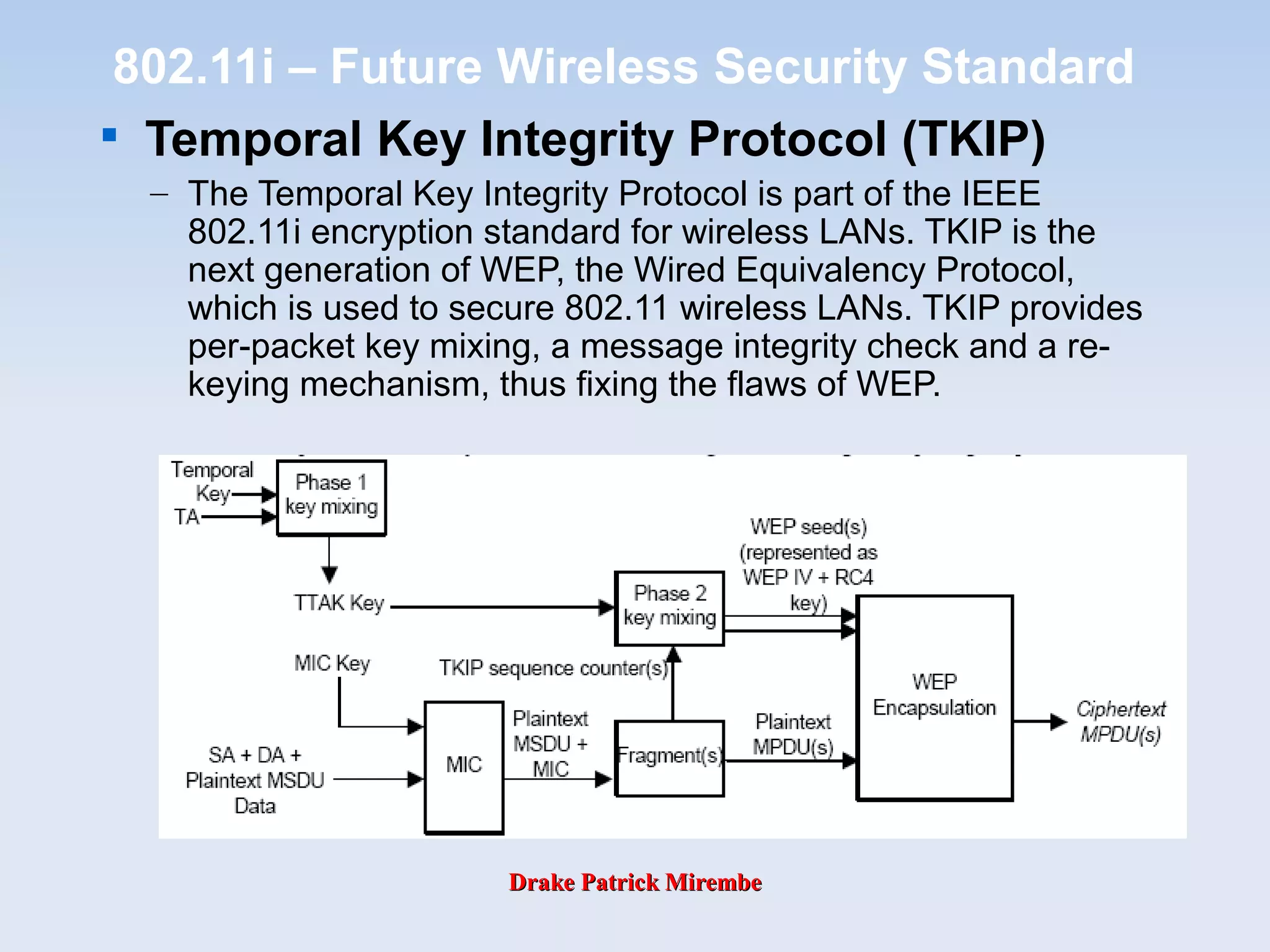
802.11i – Future Wireless Security Standard

Temporal Key Integrity Protocol (TKIP)
– The Temporal Key Integrity Protocol is part of the IEEE
802.11i encryption standard for wireless LANs. TKIP is the
next generation of WEP, the Wired Equivalency Protocol,
which is used to secure 802.11 wireless LANs. TKIP provides
per-packet key mixing, a message integrity check and a re-
keying mechanism, thus fixing the flaws of WEP.
Drake Patrick MirembeDrake Patrick Mirembe
802.11i – Future Wireless Security Standard

Advanced Encryption Standard (AES)
– AES is the U.S. government's next-generation cryptography algorithm,
which will replace DES and 3DES.
AES vs. Triple-DES
AES Triple-DES
Type of algorithm Symmetric, block cipher Symmetric, feistel cipher
128, 192, 256 112 or 168
Speed High Low
149 trillion years 4.6 billion years
Resource consumption Low Medium
Key size (in bits)
Time to crack (assume a
machine could try 255 keys
per second - NIST)
Drake Patrick MirembeDrake Patrick Mirembe
EAP and 802.1x
(Self Study Material)
Drake Patrick MirembeDrake Patrick Mirembe
802.1x

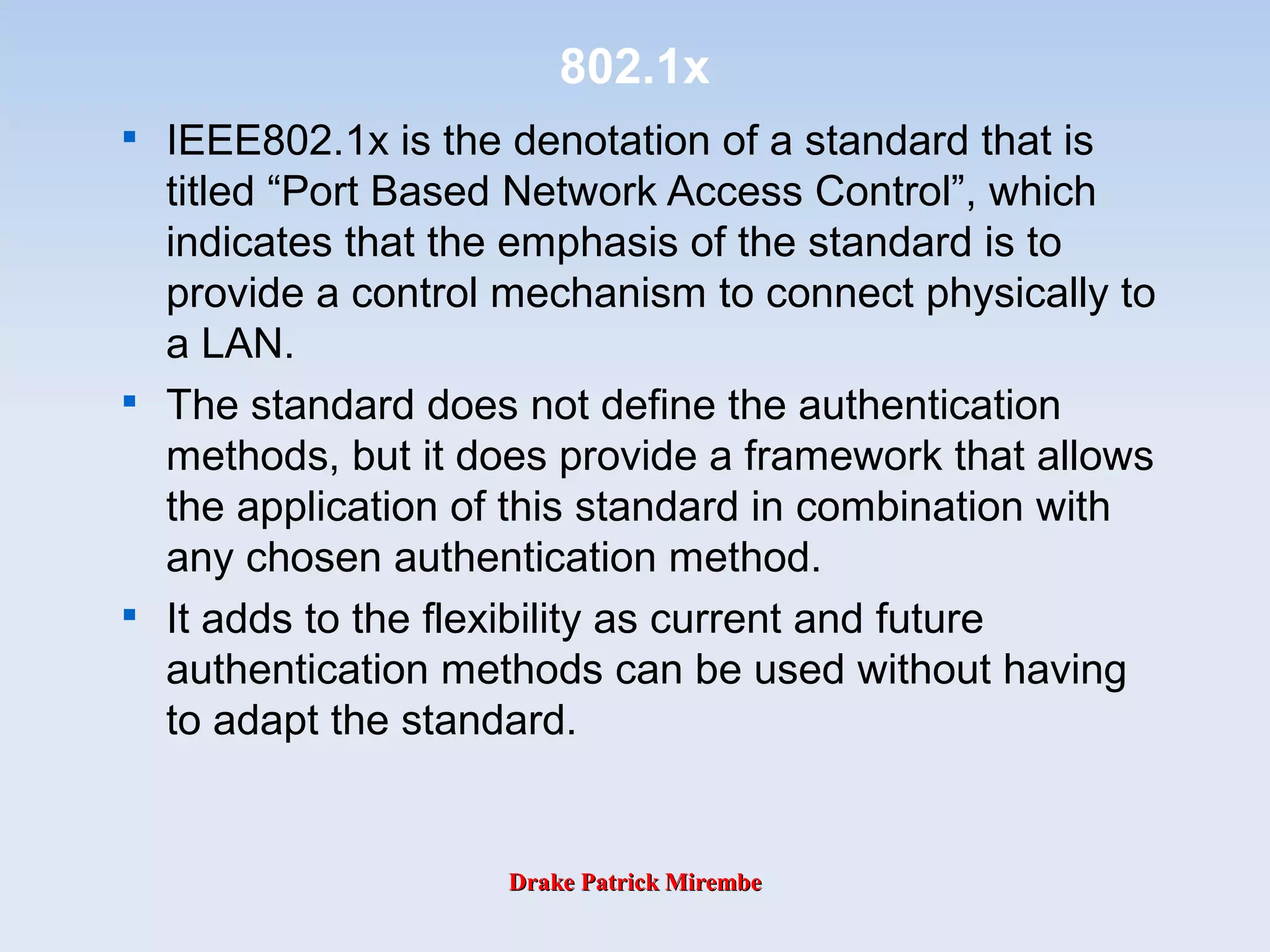
IEEE802.1x is the denotation of a standard that is
titled “Port Based Network Access Control”, which
indicates that the emphasis of the standard is to
provide a control mechanism to connect physically to
a LAN.

The standard does not define the authentication
methods, but it does provide a framework that allows
the application of this standard in combination with
any chosen authentication method.

It adds to the flexibility as current and future
authentication methods can be used without having
to adapt the standard.
Drake Patrick MirembeDrake Patrick Mirembe
802.1x Components

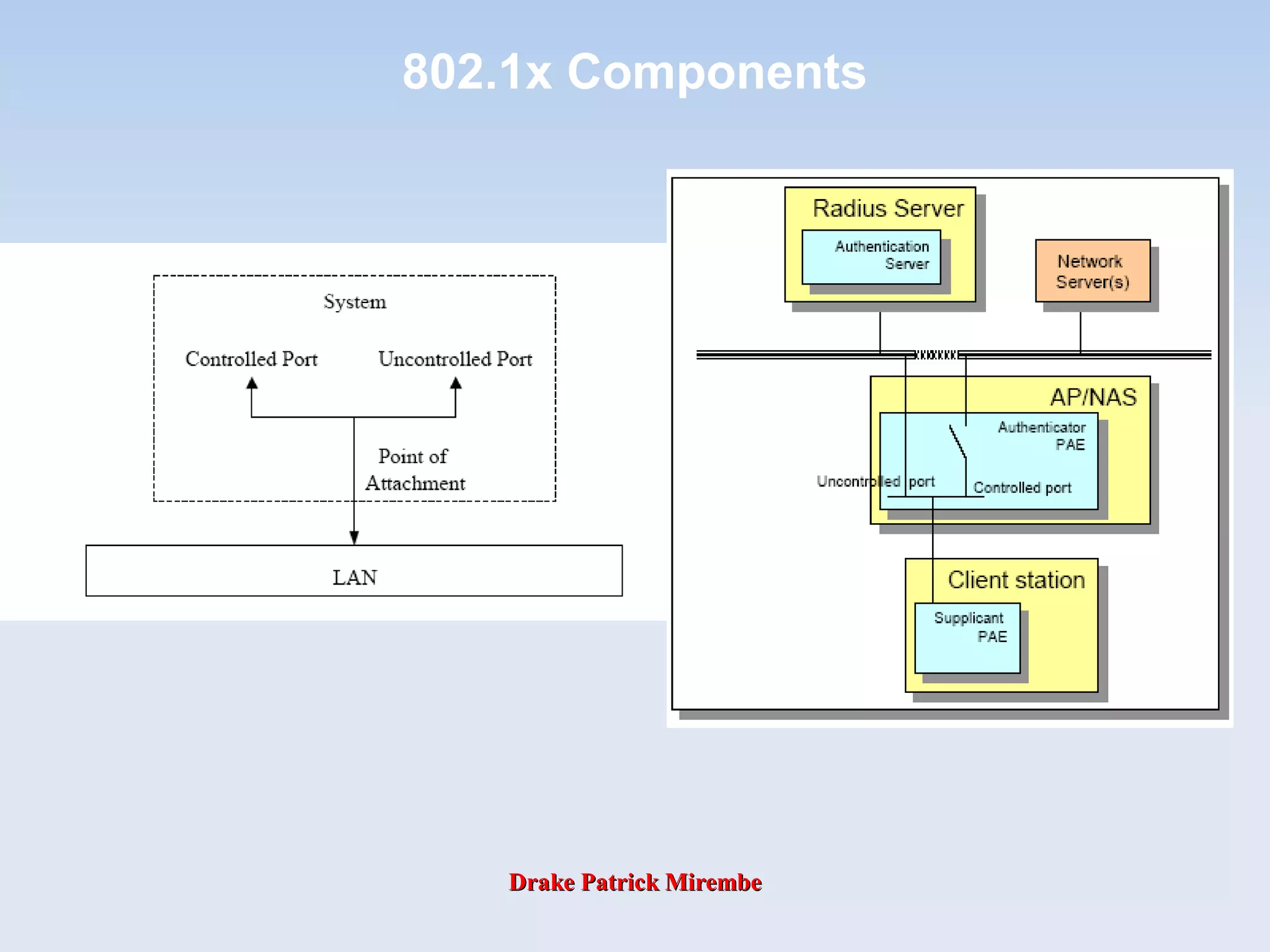
The 802.1x standard recognizes the following
concepts:

Port Access Entity (PAE)

which refers to the mechanism (algorithms and protocols)
associated with a LAN port (residing in either a Bridge or a
Station)

Supplicant PAE

which refers to the entity that requires authentication before
getting access to the LAN (typically in the client station)

Authenticator PAE

which refers to the entity facilitating authentication of a
supplicant (typically in bridge or AP)

Authentication server

which refers to the entity that provides authentication service to
the Authenticators in the LAN (could be a RADIUS server)
Drake Patrick MirembeDrake Patrick Mirembe
802.1x Components
Drake Patrick MirembeDrake Patrick Mirembe
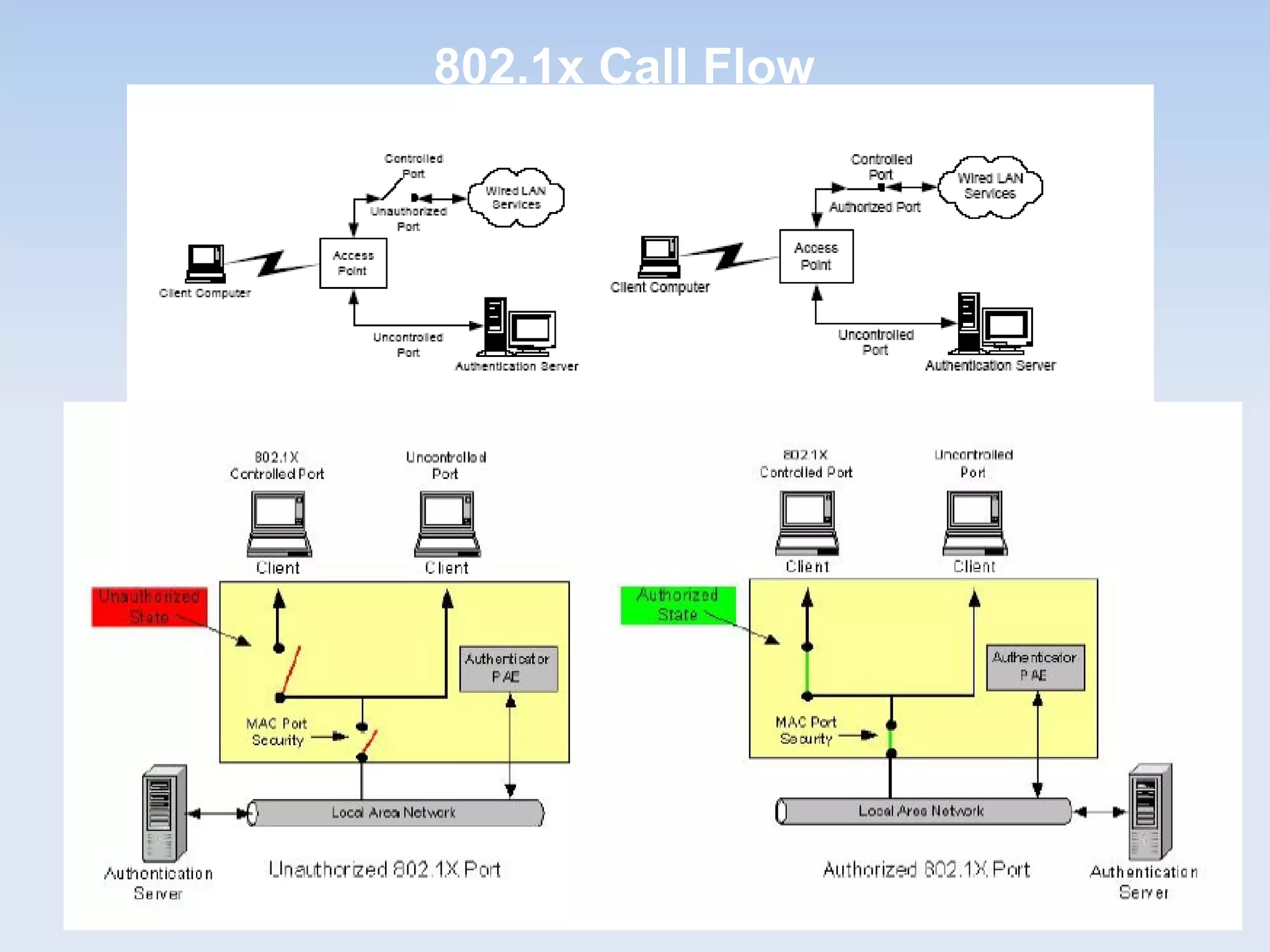
802.1x Call Flow
Drake Patrick MirembeDrake Patrick Mirembe
802.1x Call Flow
Drake Patrick MirembeDrake Patrick Mirembe
802.1x Traffic
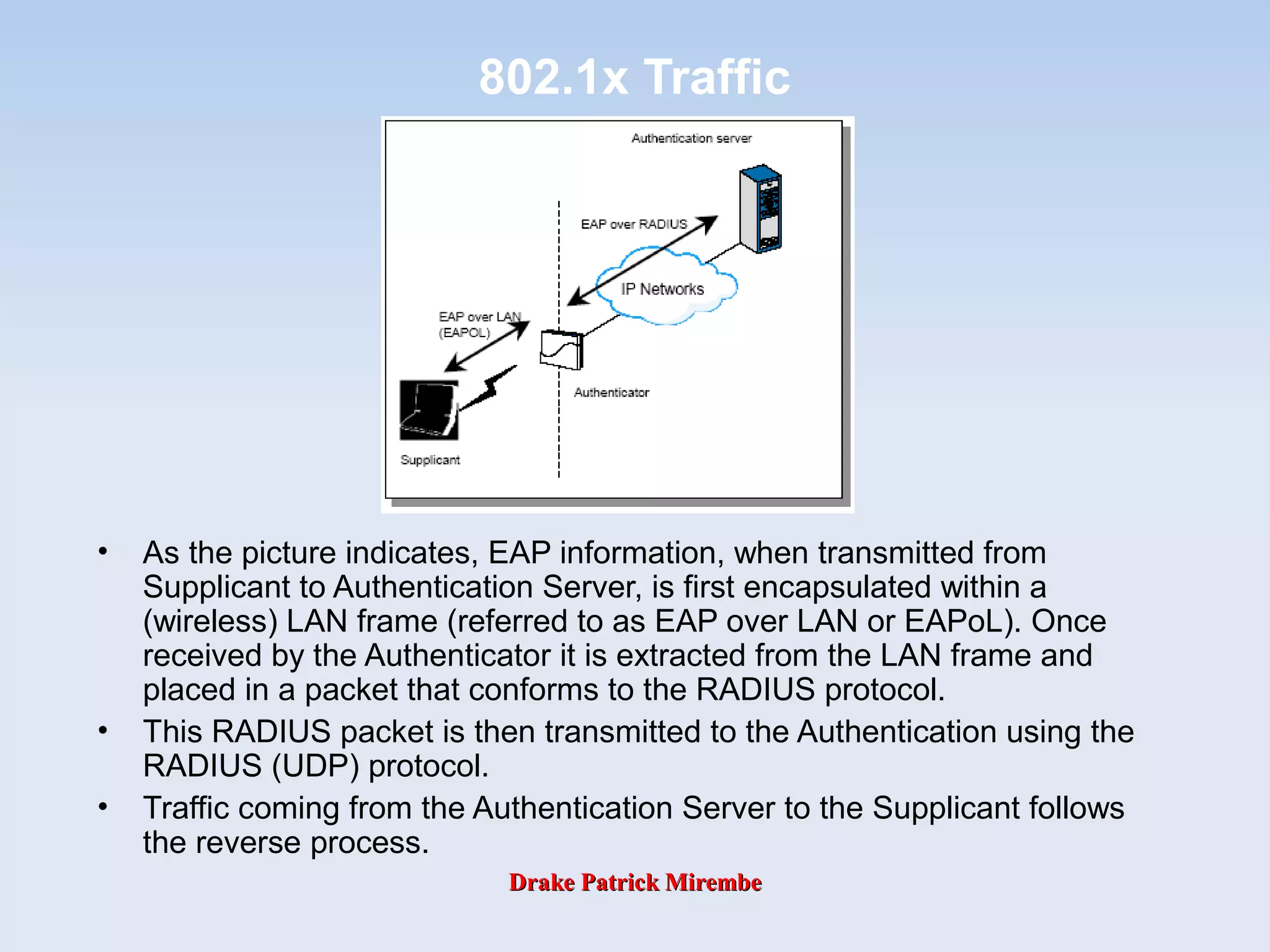
• As the picture indicates, EAP information, when transmitted from
Supplicant to Authentication Server, is first encapsulated within a
(wireless) LAN frame (referred to as EAP over LAN or EAPoL). Once
received by the Authenticator it is extracted from the LAN frame and
placed in a packet that conforms to the RADIUS protocol.
• This RADIUS packet is then transmitted to the Authentication using the
RADIUS (UDP) protocol.
• Traffic coming from the Authentication Server to the Supplicant follows
the reverse process.
Drake Patrick MirembeDrake Patrick Mirembe
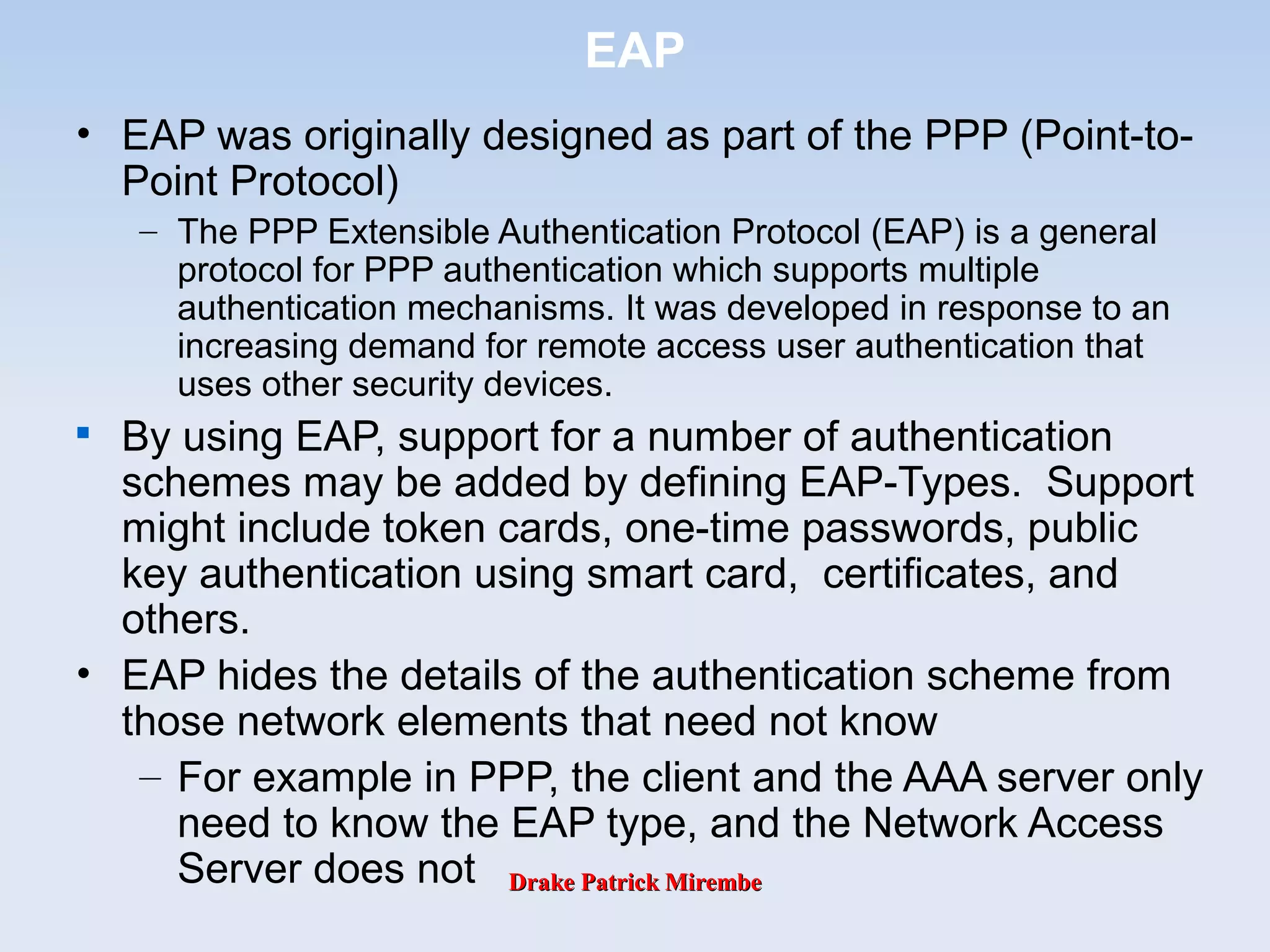
EAP
• EAP was originally designed as part of the PPP (Point-to-
Point Protocol)
– The PPP Extensible Authentication Protocol (EAP) is a general
protocol for PPP authentication which supports multiple
authentication mechanisms. It was developed in response to an
increasing demand for remote access user authentication that
uses other security devices.

By using EAP, support for a number of authentication
schemes may be added by defining EAP-Types. Support
might include token cards, one-time passwords, public
key authentication using smart card, certificates, and
others.
• EAP hides the details of the authentication scheme from
those network elements that need not know
– For example in PPP, the client and the AAA server only
need to know the EAP type, and the Network Access
Server does not
Drake Patrick MirembeDrake Patrick Mirembe
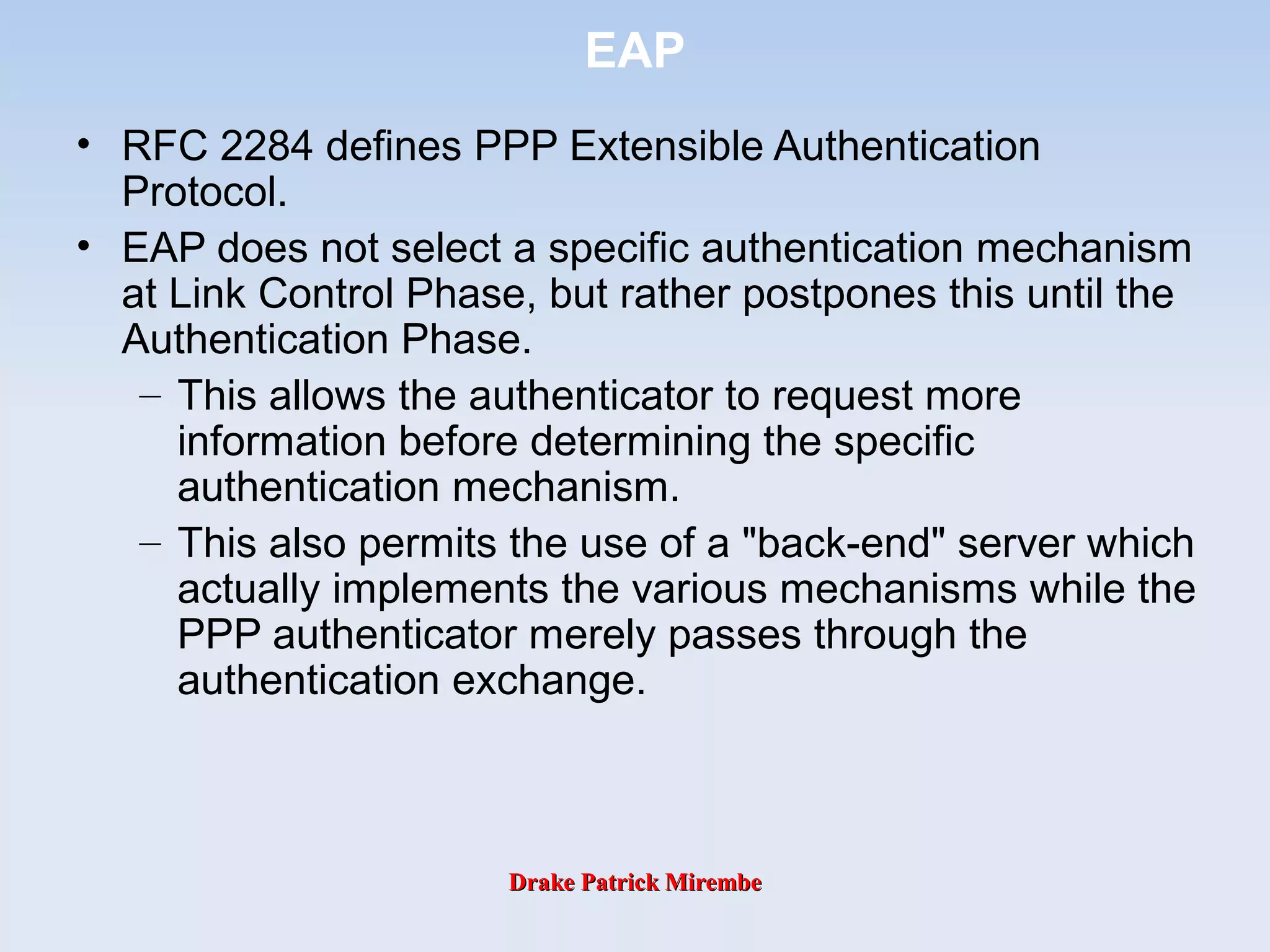
EAP
• RFC 2284 defines PPP Extensible Authentication
Protocol.
• EAP does not select a specific authentication mechanism
at Link Control Phase, but rather postpones this until the
Authentication Phase.
– This allows the authenticator to request more
information before determining the specific
authentication mechanism.
– This also permits the use of a "back-end" server which
actually implements the various mechanisms while the
PPP authenticator merely passes through the
authentication exchange.
Drake Patrick MirembeDrake Patrick Mirembe
EAP Architecture
Other
EAP
Types
Drake Patrick MirembeDrake Patrick Mirembe
EAP Architecture
Drake Patrick MirembeDrake Patrick Mirembe
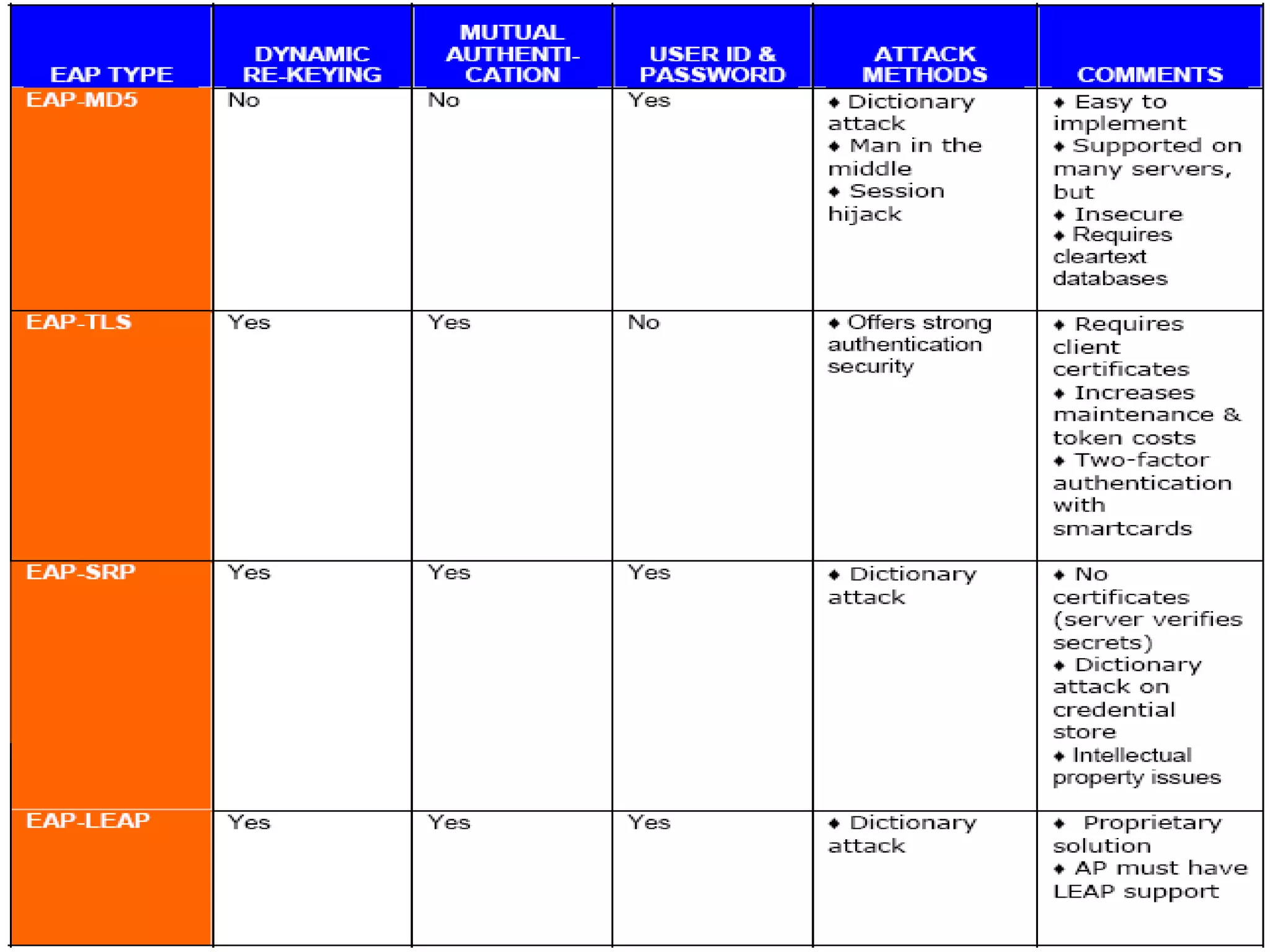
EAP Comparison
Drake Patrick MirembeDrake Patrick Mirembe
EAP Comparison
Drake Patrick MirembeDrake Patrick Mirembe
EAP Elements

EAP basically consists of four different protocol
elements:

Request packets (from Authenticator [AP] to client
[Supplicant])

Response packets (from Client to Authenticator)

Success packet

Failure packet
May originate from an AAA server
{
Drake Patrick MirembeDrake Patrick Mirembe
EAP Elements
Drake Patrick MirembeDrake Patrick Mirembe
EAP Message

All EAP messages have a common
format:
Code Identifier Length
0 1 2 3 4 5 6 7 8 9 0 1 2 3 4 5 6 7 8 9 0 1 2 3 4 5 6 7 8 9 0 1
0 1 2 3
Data...
Code: 1 byte,
representing the
type of EAP
message
Data: any size,
The message’s data
ID: 1 byte,
Used for matching
requests and
responses
Length: 2 byte,
The total message
length
Drake Patrick MirembeDrake Patrick Mirembe
EAP Message 2
• EAP request and response messages have
the same format , with code=1 for requests
and code=2 for responses
Code Identifier Length
0 1 2 3 4 5 6 7 8 9 0 1 2 3 4 5 6 7 8 9 0 1 2 3 4 5 6 7 8 9 0 1
0 1 2 3
Type Data.Type
Type: 1 byte,
The type of
authentication protocol
used
Data: any size,
Data used for the
authentication process
Drake Patrick MirembeDrake Patrick Mirembe
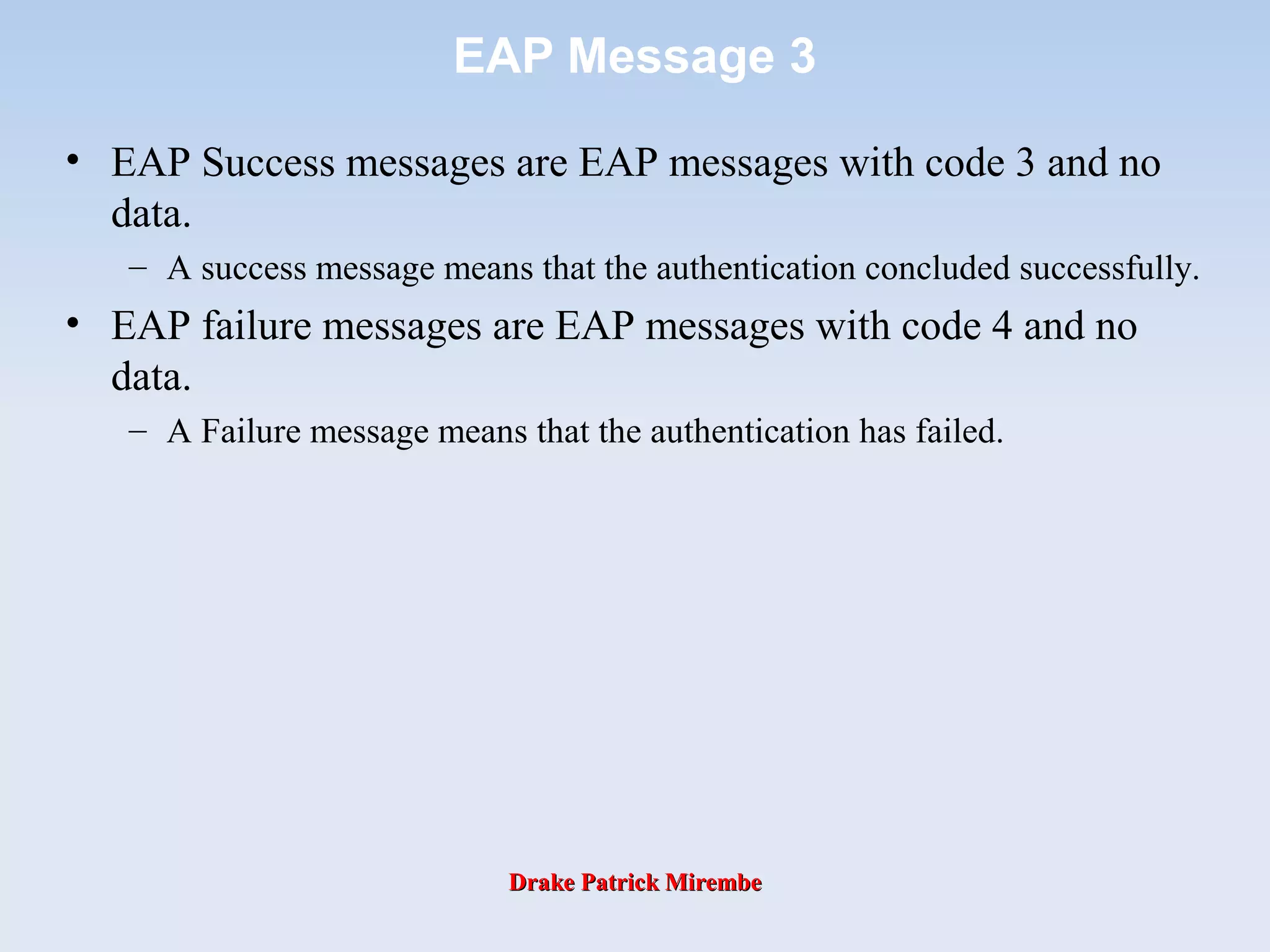
EAP Message 3
• EAP Success messages are EAP messages with code 3 and no
data.
– A success message means that the authentication concluded successfully.
• EAP failure messages are EAP messages with code 4 and no
data.
– A Failure message means that the authentication has failed.
Drake Patrick MirembeDrake Patrick Mirembe
General Description of
IEEE 802.1x Terminology
Supplicant Authentication ServerAuthenticator
Operates on client Processes EAP requestsOperates on devices
at network edge, like
APs and switches
wireless networkwireless network enterprise networkenterprise networkenterprise edgeenterprise edge
EAP over wirelessEAP over wireless EAP over RADIUSEAP over RADIUS
RADIUS
server
Drake Patrick MirembeDrake Patrick Mirembe
Before EAP Start
normal data
authentication traffic
802.1X traffic RADIUS traffic
(IP/UDP over
Layer 2 protocol
(Eg. Ethernet)
• 802.11 association between client and authenticator
• IP connection blocked by AP
AP transfers data from 802.1x EAP
messages into RADIUS messages,
and visa versa
AP blocks IP connection until
RADIUS access-accept is received
EAP over wirelessEAP over wireless EAP over RADIUSEAP over RADIUS
RADIUS
server
Drake Patrick MirembeDrake Patrick Mirembe
802.1x Call Flow
Drake Patrick MirembeDrake Patrick Mirembe
EAP Flow
• After the Link Establishment phase is complete, the
authenticator sends one or more Requests to
authenticate the peer.
• The Request has a type field to indicate what is being
requested. Examples of Request types include Identity,
MD5-challenge, One-Time Passwords, Generic Token
Card, etc.
– The MD5-challenge type corresponds closely to the CHAP
authentication protocol.
• Typically, the authenticator will send an initial Identity
Request followed by one or more Requests for
authentication information. However, an initial Identity
Request is not required, and MAY be bypassed in cases
where the identity is presumed (leased lines, dedicated
dial-ups, etc.).
Drake Patrick MirembeDrake Patrick Mirembe
EAP Flow
• The peer sends a Response packet in reply to each
Request. As with the Request packet, the Response
packet contains a type field which corresponds to the
type field of the Request.
• The authenticator ends the authentication phase with a
Success or Failure packet.
Drake Patrick MirembeDrake Patrick Mirembe
Generic EAP Authentication Flow
AuthenticatorPeer
Repeated as many
times as needed
EAP Request
EAP Response with the same type or a Nak
EAP Success or EAP Failure message
EAP Request
EAP Response with the same type or a Nak
EAP Success or failure message
Repeated
as
needed
If mutual
Auth
Is required
Identity Request
Identity Response
Identity Request
Identity Response
Drake Patrick MirembeDrake Patrick Mirembe
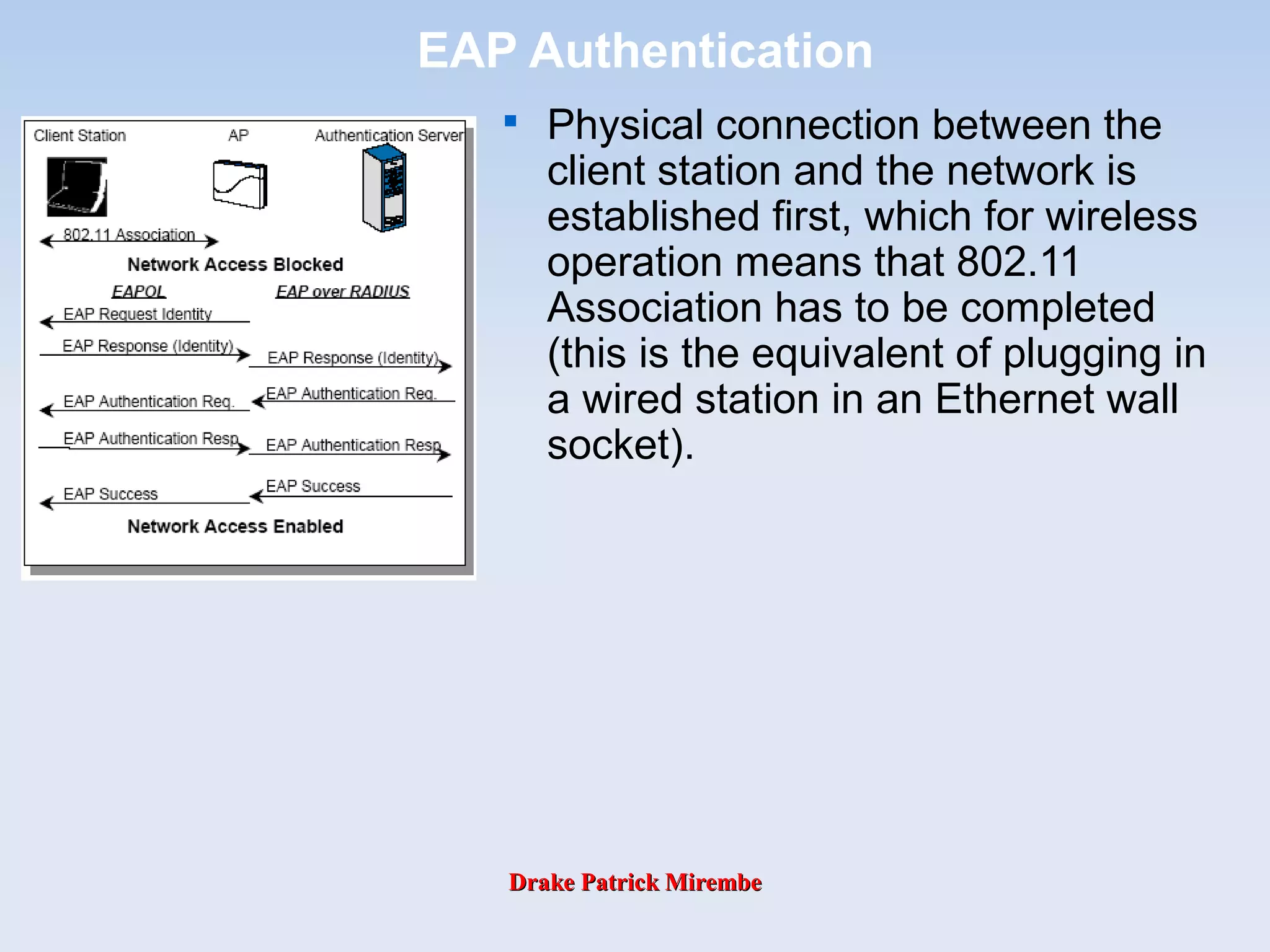
EAP Authentication

Physical connection between the
client station and the network is
established first, which for wireless
operation means that 802.11
Association has to be completed
(this is the equivalent of plugging in
a wired station in an Ethernet wall
socket).
Drake Patrick MirembeDrake Patrick Mirembe
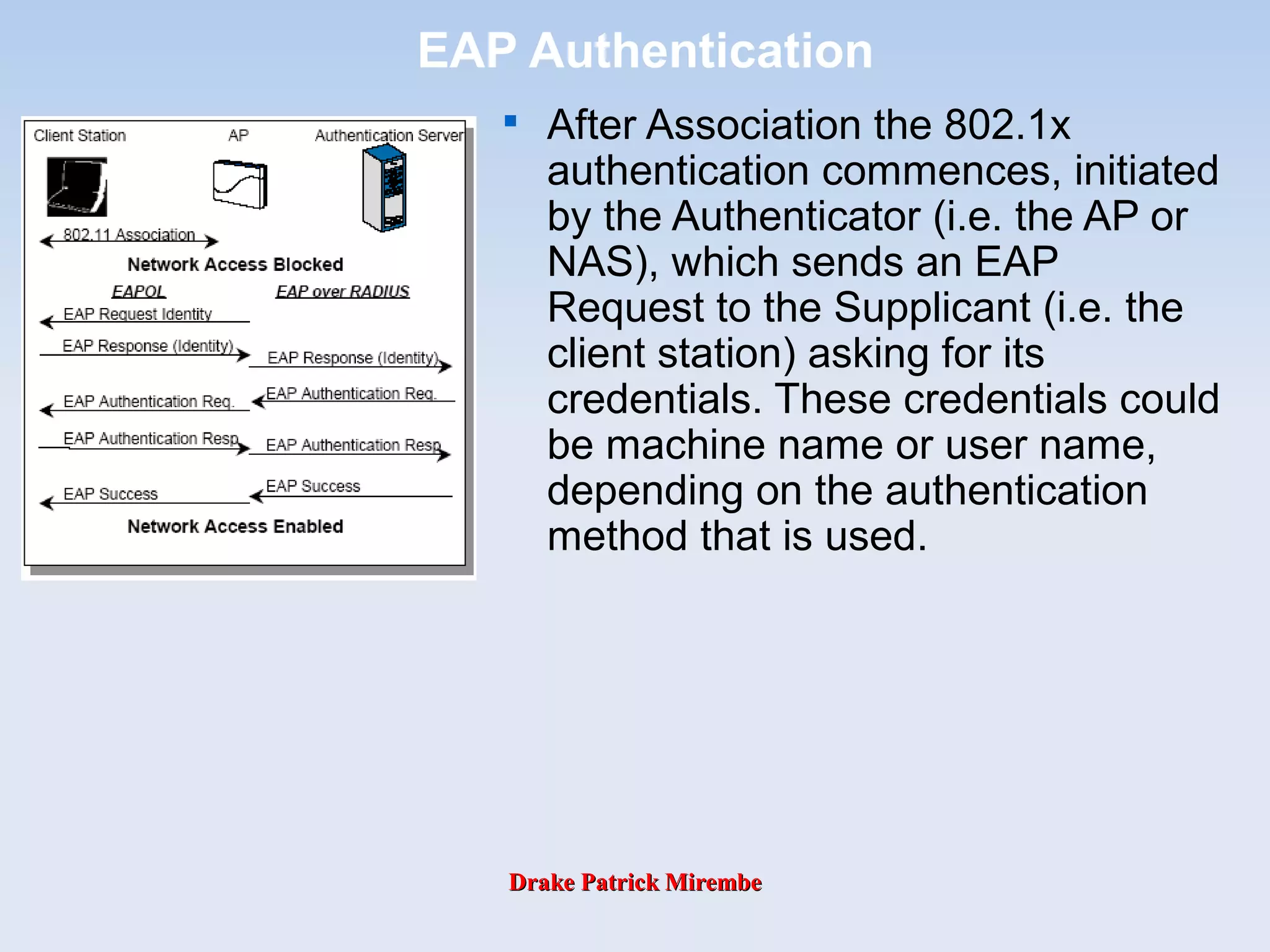
EAP Authentication

After Association the 802.1x
authentication commences, initiated
by the Authenticator (i.e. the AP or
NAS), which sends an EAP
Request to the Supplicant (i.e. the
client station) asking for its
credentials. These credentials could
be machine name or user name,
depending on the authentication
method that is used.
Drake Patrick MirembeDrake Patrick Mirembe
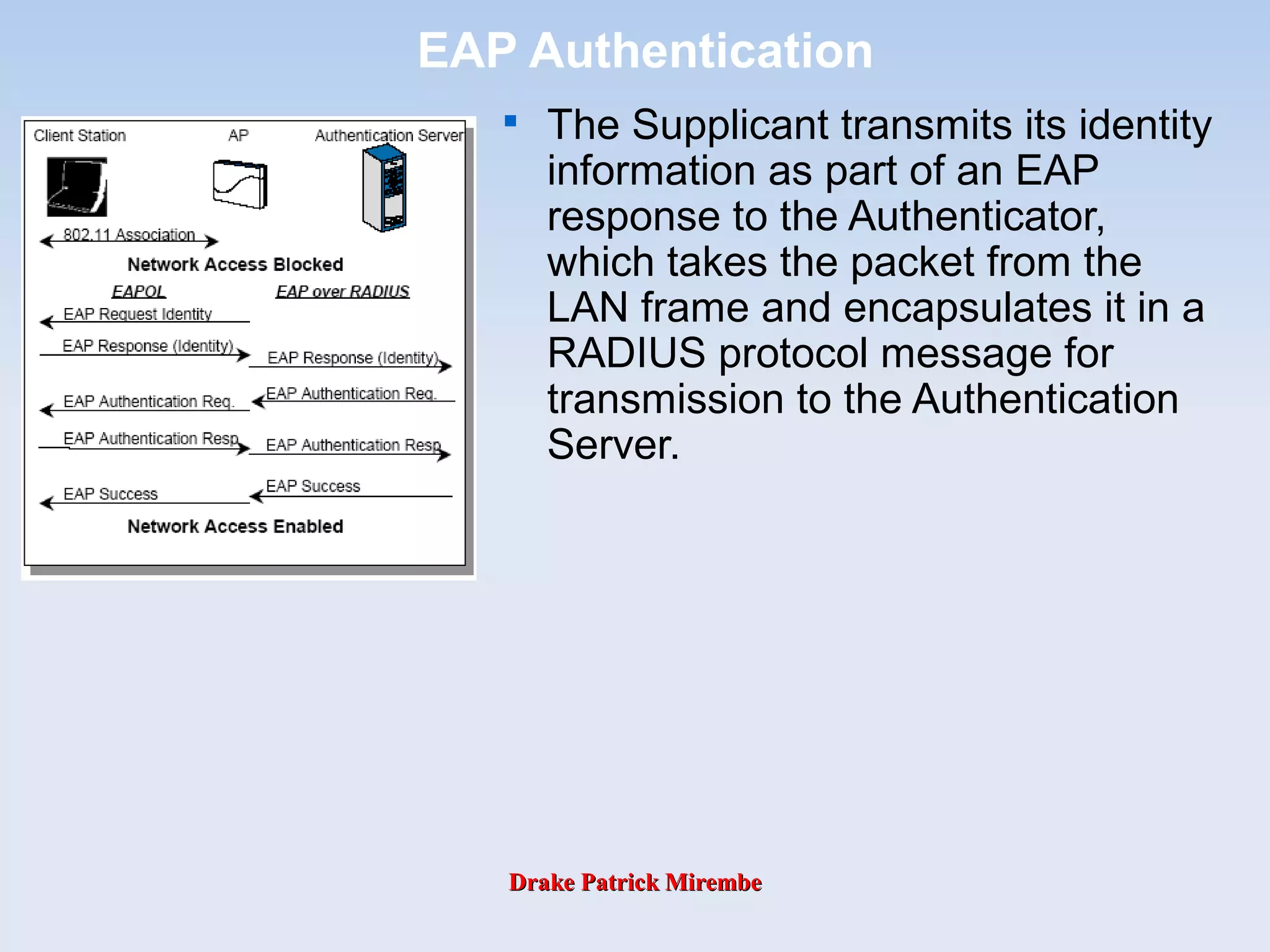
EAP Authentication

The Supplicant transmits its identity
information as part of an EAP
response to the Authenticator,
which takes the packet from the
LAN frame and encapsulates it in a
RADIUS protocol message for
transmission to the Authentication
Server.
Drake Patrick MirembeDrake Patrick Mirembe
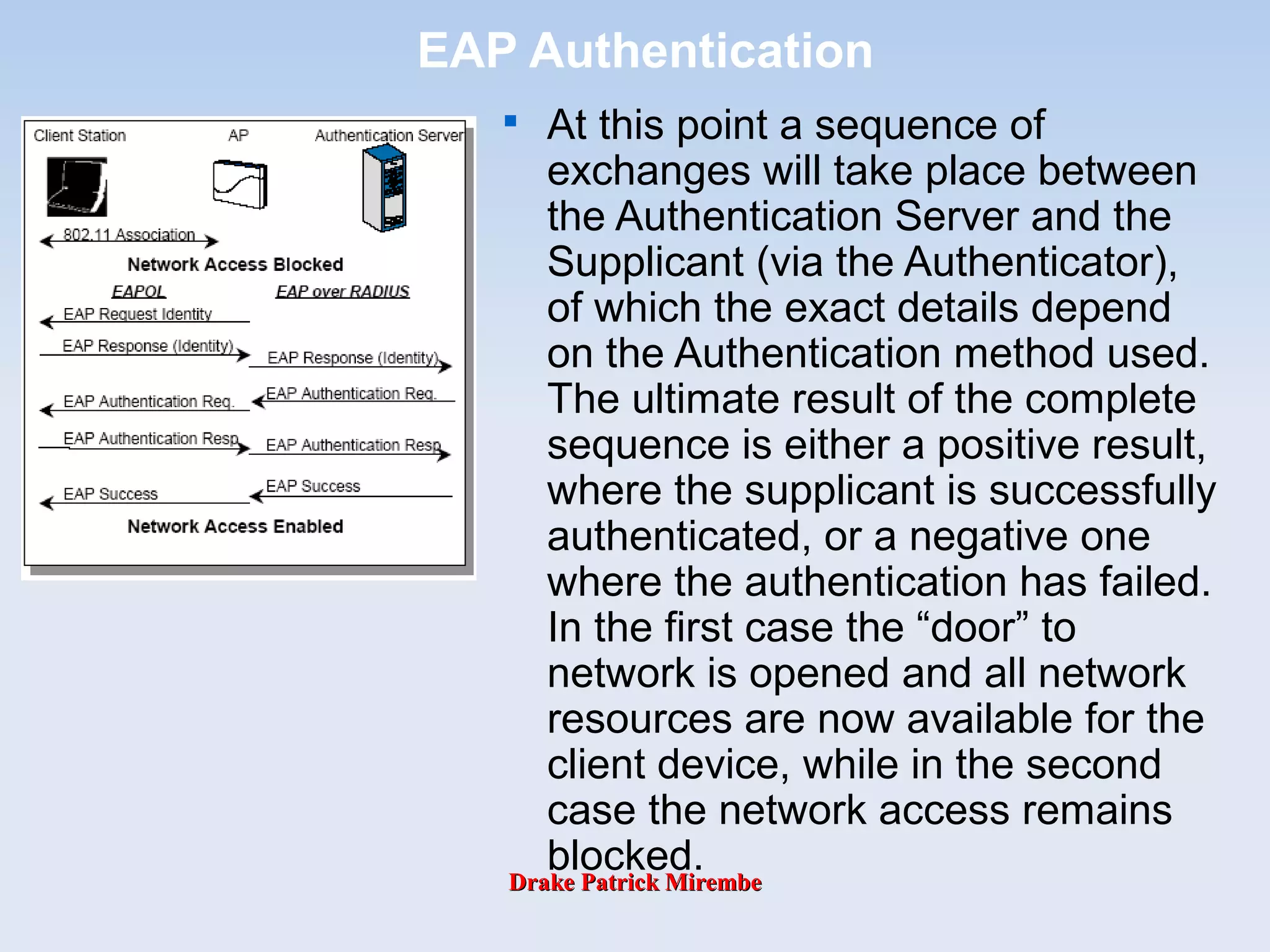
EAP Authentication

At this point a sequence of
exchanges will take place between
the Authentication Server and the
Supplicant (via the Authenticator),
of which the exact details depend
on the Authentication method used.
The ultimate result of the complete
sequence is either a positive result,
where the supplicant is successfully
authenticated, or a negative one
where the authentication has failed.
In the first case the “door” to
network is opened and all network
resources are now available for the
client device, while in the second
case the network access remains
blocked.
Drake Patrick MirembeDrake Patrick Mirembe
EAP Authentication Methods – MD5
• EAP-Message Digest 5 uses the same challenge
handshake protocol as PPP-based CHAP, but the
challenges and responses are sent as EAP messages.
– MD5 can be considered as the “lowest common denominator”
EAP type.
– EAP-MD5 does not support the use of per session WEP keys,
or mutual authentication of Access Point and client.
– It also does not support encrypted links for user data, so
cannot be used in an 802.11i environment.

The EAP-MD5 authentication algorithm provides one-
way password based network authentication of the
client.
Drake Patrick MirembeDrake Patrick Mirembe
EAP Authentication Methods – MD5

This algorithm can also be used for wireless
applications with less stringent wireless LAN security
requirements.

Advantage of using EAP-MD5 is that it is simple to
administer for an operator, re-using the database of
usernames and passwords which may exist currently.

Disadvantage of using EAP-MD5 in wireless LAN
applications is that no encryption keys are generated. Also,
while the protocol can be used by the client to authenticate
the network, it is typically used only for the network to
authenticate the client.
Drake Patrick MirembeDrake Patrick Mirembe
EAP Authentication Methods – MD5
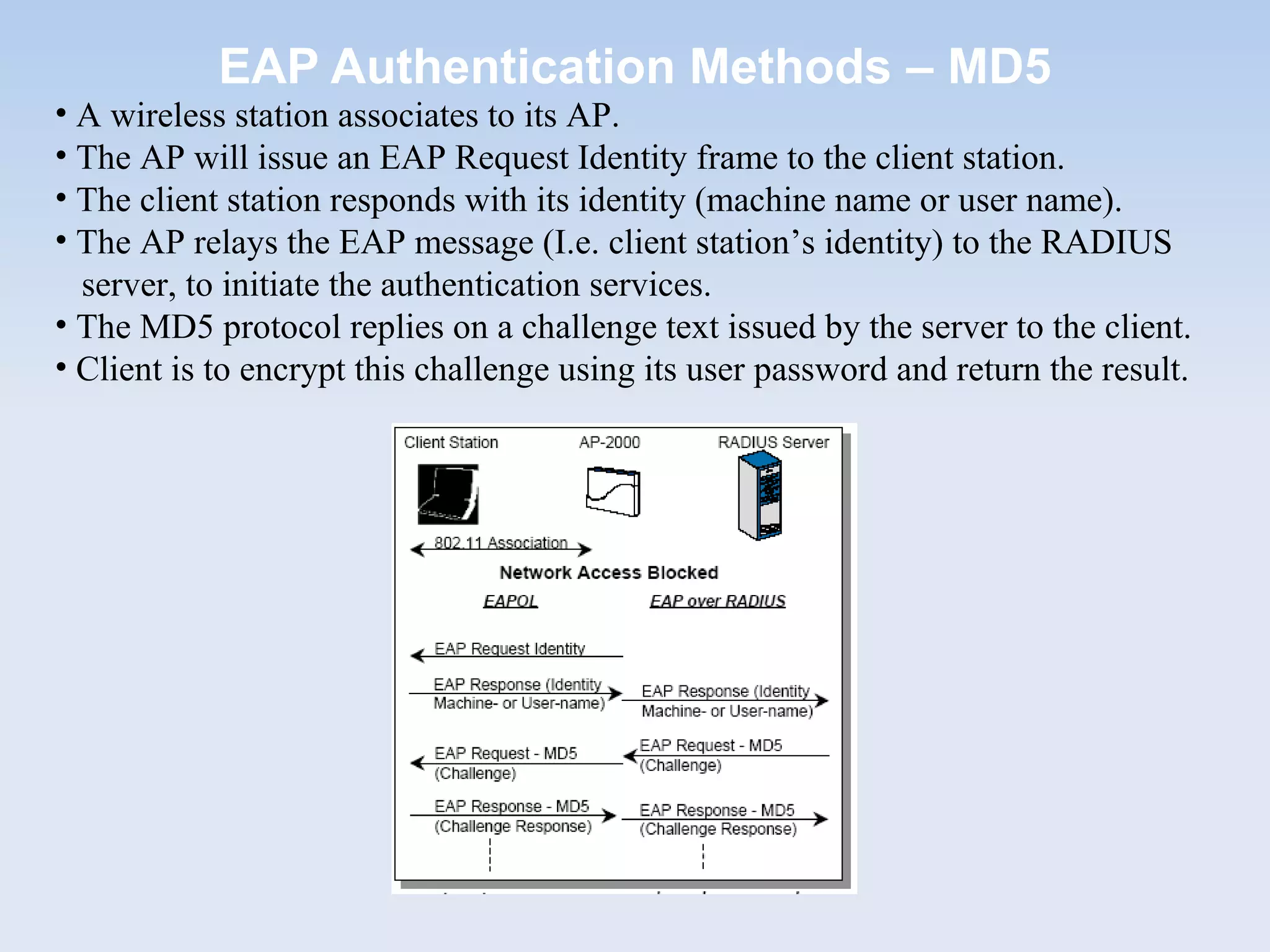
• A wireless station associates to its AP.
• The AP will issue an EAP Request Identity frame to the client station.
• The client station responds with its identity (machine name or user name).
• The AP relays the EAP message (I.e. client station’s identity) to the RADIUS
server, to initiate the authentication services.
• The MD5 protocol replies on a challenge text issued by the server to the client.
• Client is to encrypt this challenge using its user password and return the result.
Drake Patrick MirembeDrake Patrick Mirembe
EAP Authentication Methods – MD5

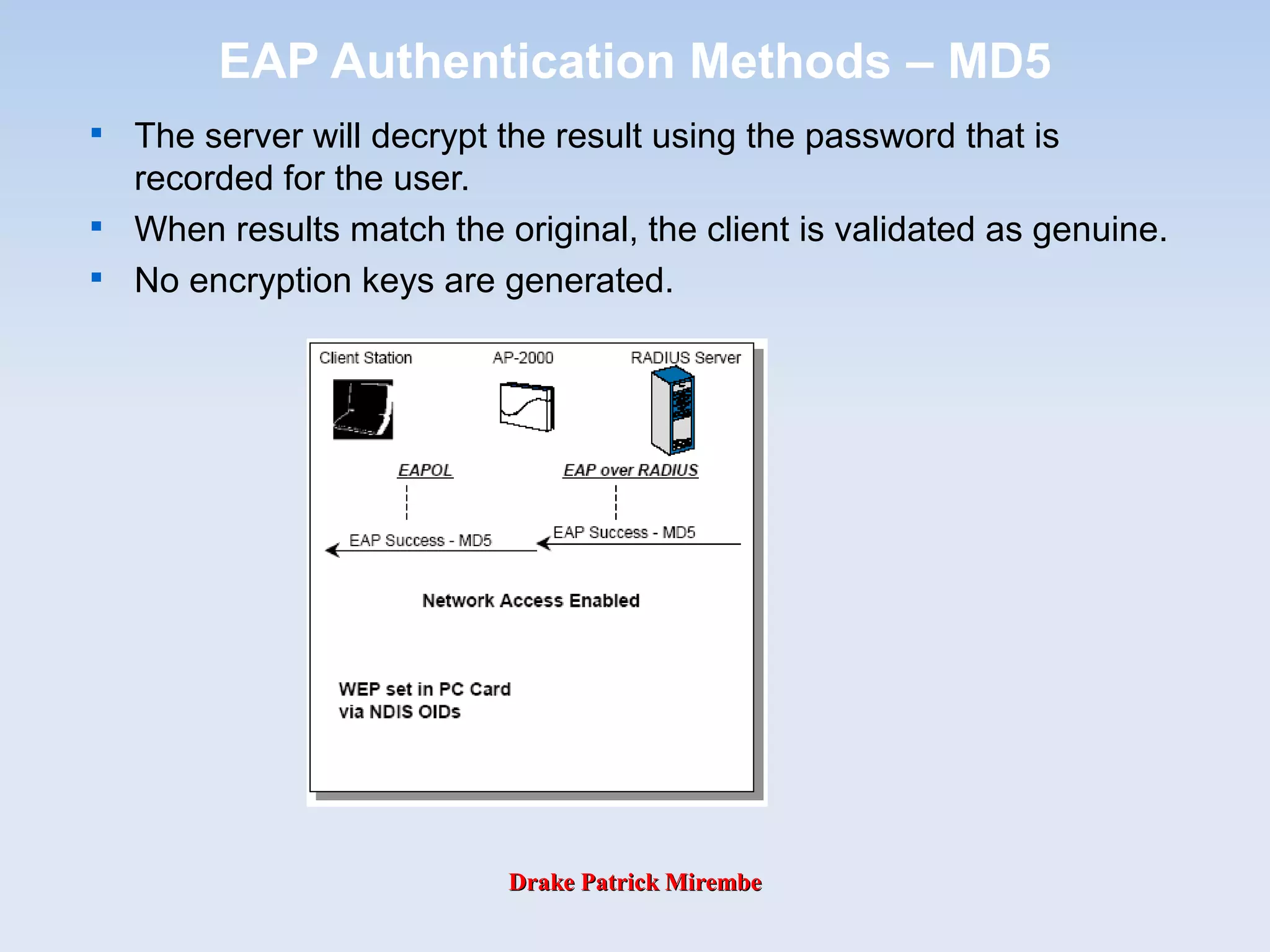
The server will decrypt the result using the password that is
recorded for the user.

When results match the original, the client is validated as genuine.

No encryption keys are generated.
Drake Patrick MirembeDrake Patrick Mirembe
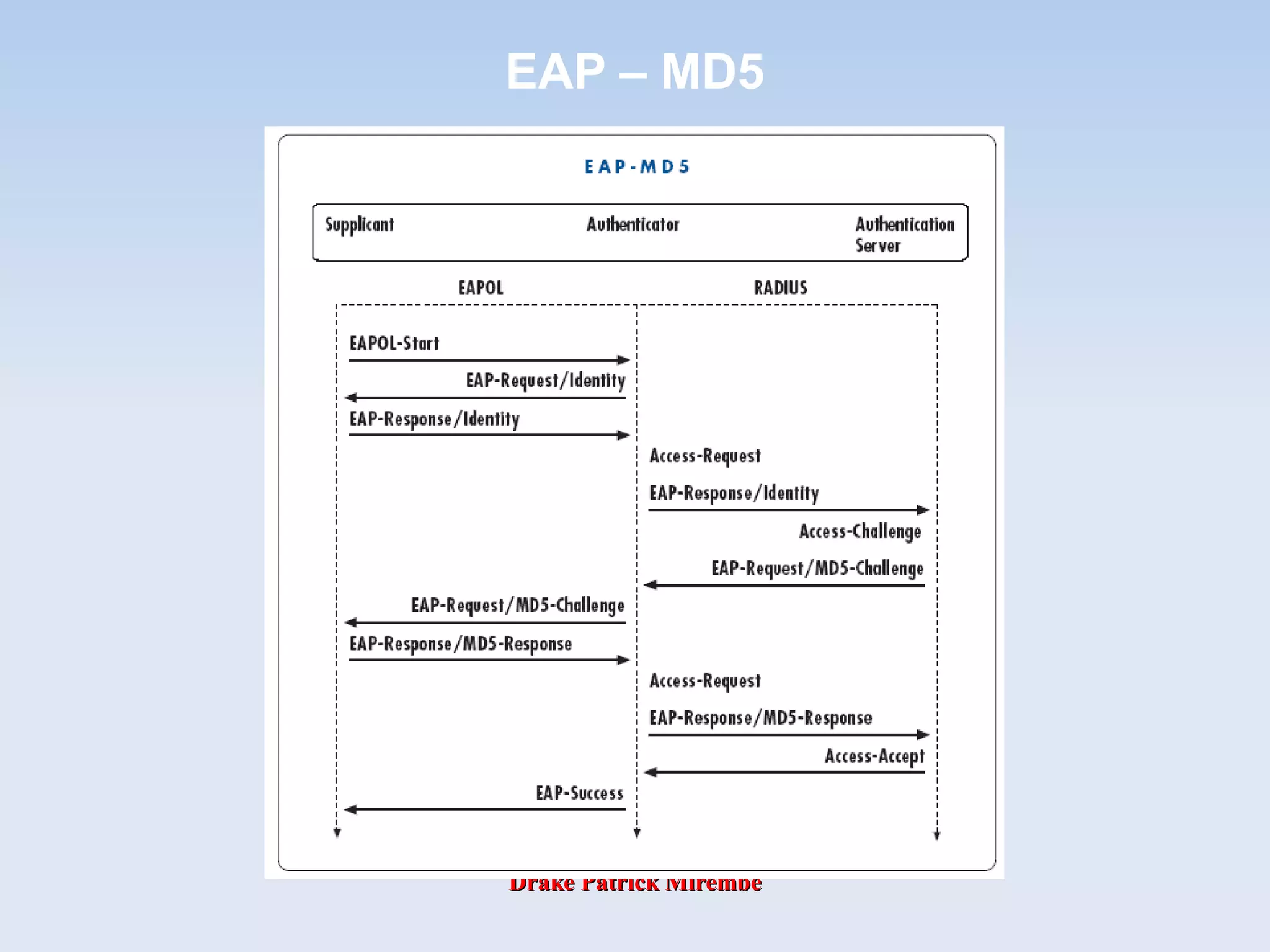
EAP – MD5
Drake Patrick MirembeDrake Patrick Mirembe
EAP Authentication Methods – TLS
• Transport Layer Security (TLS) is a certificate based
authentication protocol. RFC 2716 provides mutual
authentication and supports per-session WEP keys .
• Certificate based authentication provides a highly
secure digital equivalent of ID cards used by both the
client and network so they can authenticate each other.
Public Key Infrastructure (PKI) digital signature
techniques are used to prove each party’s authenticity.
Drake Patrick MirembeDrake Patrick Mirembe
EAP Authentication Methods – TLS

A digital certificate is comprised of the following fields:

a version

certificate serial number

signature algorithm identifier

name of the issuer

validity period

name

public key

optional unique identifiers

a signature value.
Drake Patrick MirembeDrake Patrick Mirembe
Certificate Authority
Drake Patrick MirembeDrake Patrick Mirembe
EAP Authentication Methods – TLS

A wireless station
associates to its AP.

The AP will issue an EAP
Request
Identity frame to the client
station.
Drake Patrick MirembeDrake Patrick Mirembe
EAP Authentication Methods – TLS

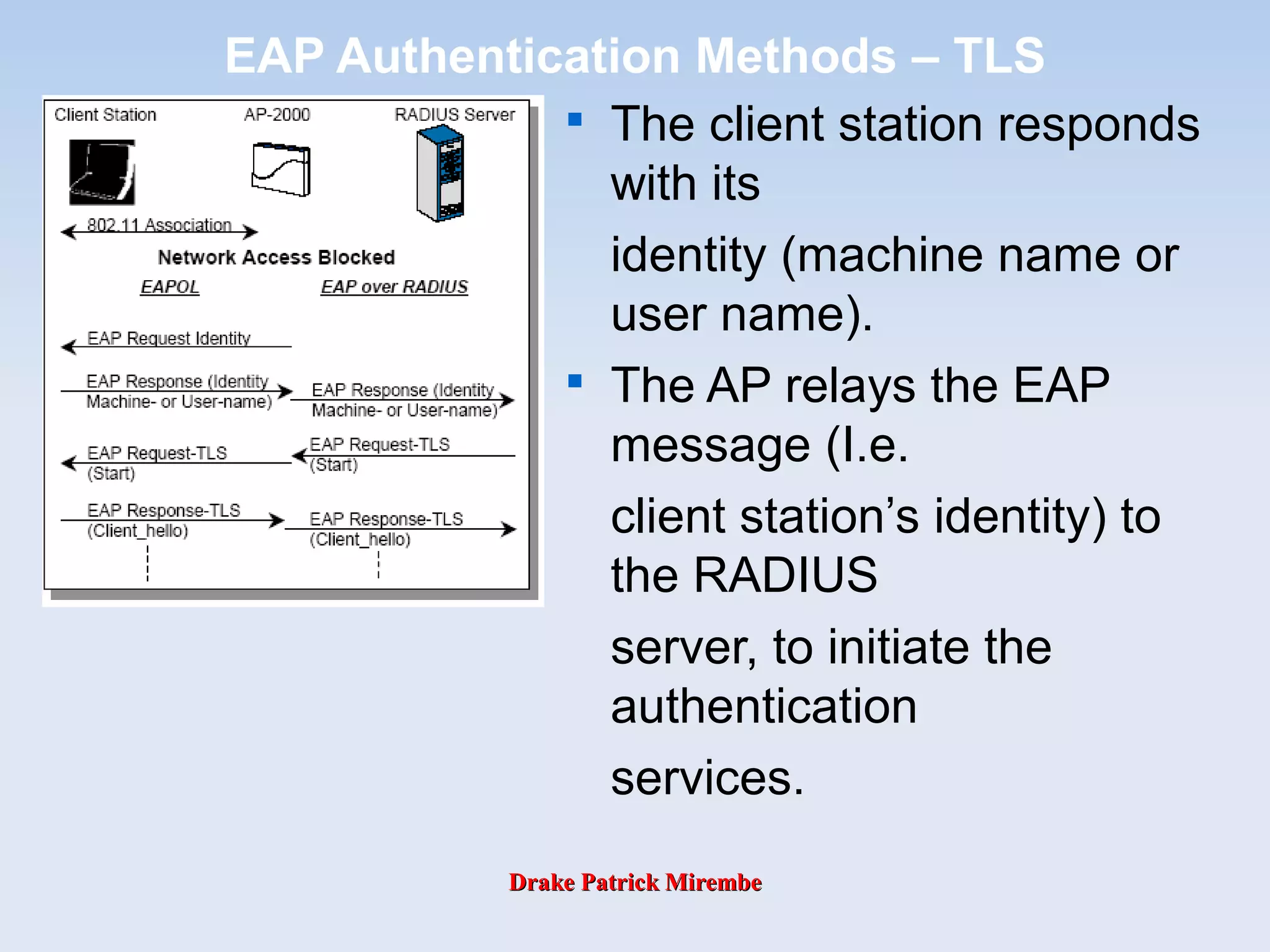
The client station responds
with its
identity (machine name or
user name).

The AP relays the EAP
message (I.e.
client station’s identity) to
the RADIUS
server, to initiate the
authentication
services.
Drake Patrick MirembeDrake Patrick Mirembe
EAP Authentication Methods – TLS

The RADIUS server
requests credentials
from the client station to
confirm the
identity, by sending the
EAP request via
the AP.

The client replies sending
its credentials
relayed by the AP.
Drake Patrick MirembeDrake Patrick Mirembe
EAP Authentication Methods – TLS
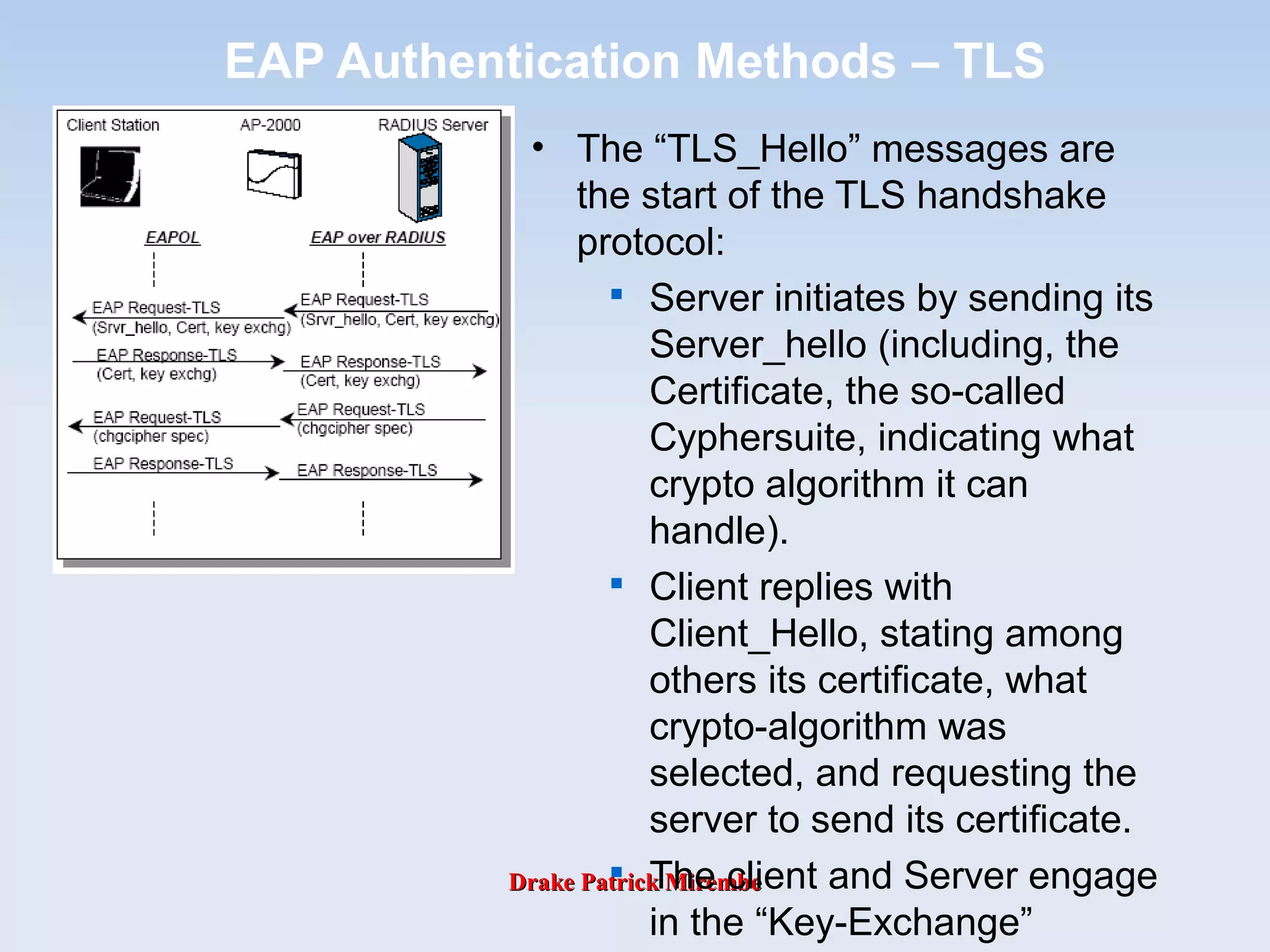
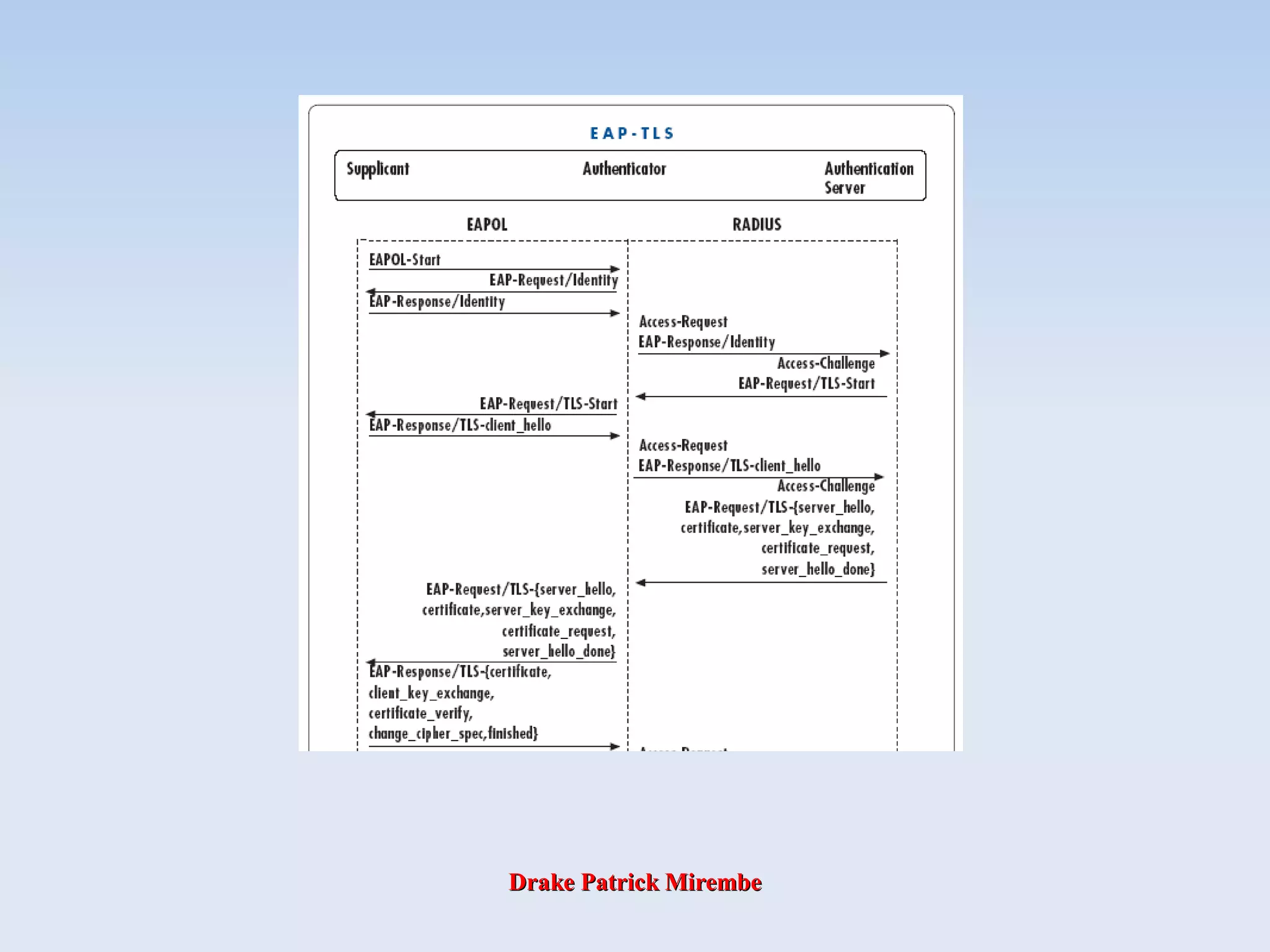
• The “TLS_Hello” messages are
the start of the TLS handshake
protocol:

Server initiates by sending its
Server_hello (including, the
Certificate, the so-called
Cyphersuite, indicating what
crypto algorithm it can
handle).

Client replies with
Client_Hello, stating among
others its certificate, what
crypto-algorithm was
selected, and requesting the
server to send its certificate.

The client and Server engage
in the “Key-Exchange”
Drake Patrick MirembeDrake Patrick Mirembe
EAP Authentication Methods – TLS

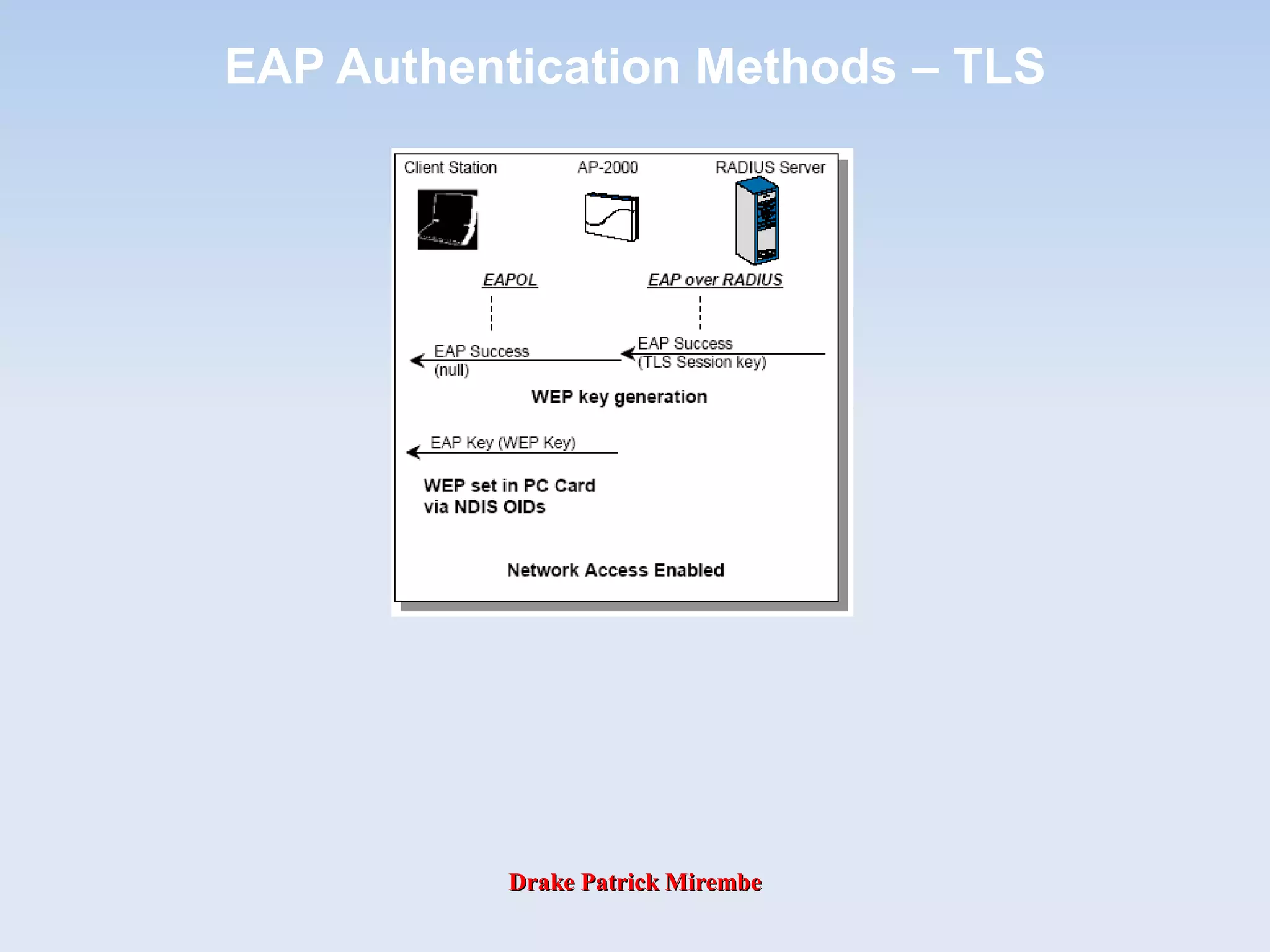
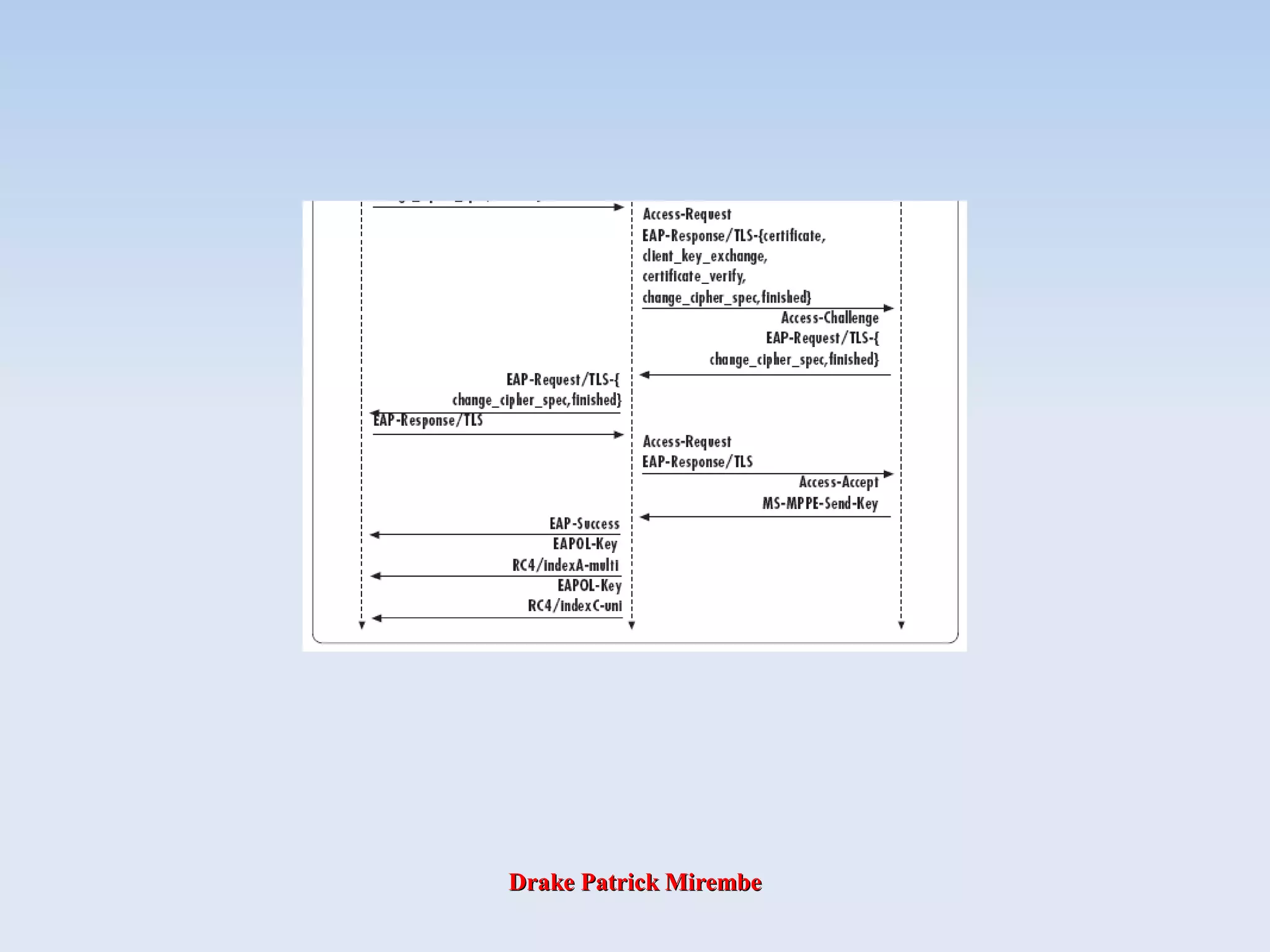
On completion of the DH Key exchange between server and client,
the server transmits its keys to the AP.

To encrypt subsequent IEEE 802.11 frames exchanged between
the AP and the client, a WEP key pair is used, that is generated by
the AP, and is the same for all clients associated to this particular
AP.

The AP will transmit this key pair to the client and uses the key
received from the server to encrypt this message.

Once the client received the WEP keys it will pass them to the PC
card via the NDIS interface and the driver.

Station and AP will use these WEP keys until station logs off or
until re-authentication timer has expired (for period re-
authentication).

When station roams to another AP a re-authentication is required
and new WEP keys are established.
Drake Patrick MirembeDrake Patrick Mirembe
EAP Authentication Methods – TLS
Drake Patrick MirembeDrake Patrick Mirembe
EAP Authentication Methods – TTLS
• Tunneled Transport Layer Security (TTLS) and Protected Extensible
Authentication Protocol (PEAP) are similar in operation and support
both secure username/password and mutual authentication.

EAP-TTLS a combination of both EAP-TLS, and traditional password-
based methods such as Challenge Handshake Authentication Protocol
(CHAP), and One Time Password (OTP). On the client side merely
passwords are required instead of digital certificates, which relieves the
administrator of the systems to manage and distribute certificates. On
the authentication server side a certificate is required.
• Certificates do not have to be installed in each client device. This is
because PKI techniques are used to first allow the client to authenticate
the server (via a certificate installed on the server) and form a secured
connection between client and server. Then the server authenticates
the client over the secured connection with the user providing a
username and password pair.
• This principle is much like the way in which browser based commerce
takes place today over web browsers. Secure connections are
established before the user’s authentication information is exchanged.
Users see this typically as a padlock symbol in their browsers.
Drake Patrick MirembeDrake Patrick Mirembe
EAP Authentication Methods – TTLS

In EAP-TTLS a secure TLS tunnel is first established between
the supplicant and the authentication server.

The client authenticates the network to which it is connecting by
authenticating the digital certificate provided by the TTLS
server. This is exactly analogous to the techniques used to
connect to a secure web server. Once an authenticated “tunnel”
is established, the authentication of the end user occurs.

EAP-TTLS has the added benefit of protecting the identity of
the end user from view over the wireless medium. In this way
anonymity of the end user, a desirable attribute is provided.

EAP-TTLS also enables existing end-user authentication
systems to be reused. Two key advantages of EAP-TTLS are
that anonymity of the end user is provided, and that any
existing RADIUS server and its associated database can be re-
used.

EAP-TTLS is the only EAP type to date which provides end
user anonymity.
Drake Patrick MirembeDrake Patrick Mirembe
EAP Authentication Methods – TTLS

A wireless station associates to its AP.

The AP will issue an EAP Request Identity frame to the client
station.

The client station responds with its identity (machine name or user
name).

The AP relays the EAP message (I.e. client station’s identity) to the
RADIUS server, to initiate the authentication services.

The authentication protocol between the RADIUS server and the
client station is still TLS and used to allow the client to authenticate
the server.
Drake Patrick MirembeDrake Patrick Mirembe
EAP Authentication Methods – TTLS
• The “TLS_Hello” messages are the
start of the TLS handshake
protocol:

Server initiates by sending its
Server_hello (including its
certificate and Cyphersuite,
indicating what crypto
algorithm it can handle).

Client responds by sending its
acknowledgement for the
crypto protocol to use (no
certificates).

The client and Server engage
in the “Key-Exchange”
sequence (Diffie-Hellman).

Now the tunnel is established
and secure, the additional user
credentials are exchanged
(using OTP or CHAP).
Drake Patrick MirembeDrake Patrick Mirembe
EAP Authentication Methods – TTLS

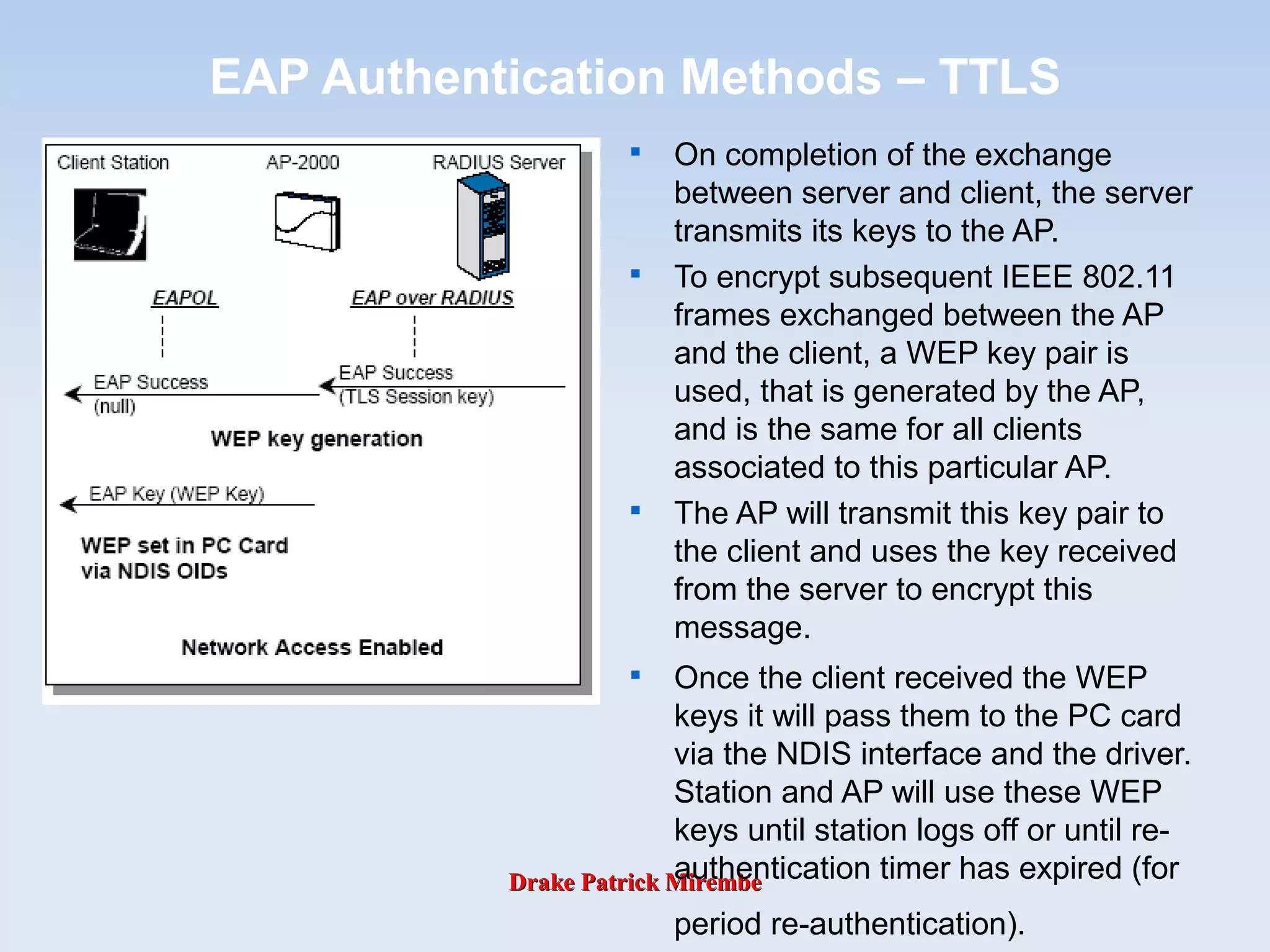
On completion of the exchange
between server and client, the server
transmits its keys to the AP.

To encrypt subsequent IEEE 802.11
frames exchanged between the AP
and the client, a WEP key pair is
used, that is generated by the AP,
and is the same for all clients
associated to this particular AP.

The AP will transmit this key pair to
the client and uses the key received
from the server to encrypt this
message.

Once the client received the WEP
keys it will pass them to the PC card
via the NDIS interface and the driver.
Station and AP will use these WEP
keys until station logs off or until re-
authentication timer has expired (for
period re-authentication).
Drake Patrick MirembeDrake Patrick Mirembe
EAP Authentication Methods – TTLS
Drake Patrick MirembeDrake Patrick Mirembe
EAP Authentication Methods – SRP

SRP (Secure Remote Password) is a secure password-
based authentication and key-exchange protocol.

It solves the problem of authenticating clients to servers
securely, in cases where the user of the client software
must memorize a small secret (like a password) and
carries no other secret information.

The server stores a verifier for each user, which allows it
to authenticate the client but which, if compromised,
would not allow the attacker to impersonate the client.
SRP also exchanges a cryptographically-strong secret as
a byproduct of successful authentication, which enables
the two parties to communicate securely.

A key advantage of SRP is that the user’s password need
not be stored in the RADIUS database. SRP is also a
completely password based authentication system. No
certificates are required.
Drake Patrick MirembeDrake Patrick Mirembe
EAP Authentication Methods – SRP

A wireless station associates to its AP.

The AP will issue an EAP Request Identity frame to the client station.

The client station responds with its identity (machine name or user
name).

The AP relays the EAP message (I.e. client station’s identity) to the
RADIUS server, to initiate the authentication services.

The server initiates a key exchange by transmitting a Generator
Value, a Modulus number and a salt value (to prevent re-occurring
keys).
Drake Patrick MirembeDrake Patrick Mirembe
EAP Authentication Methods – SRP

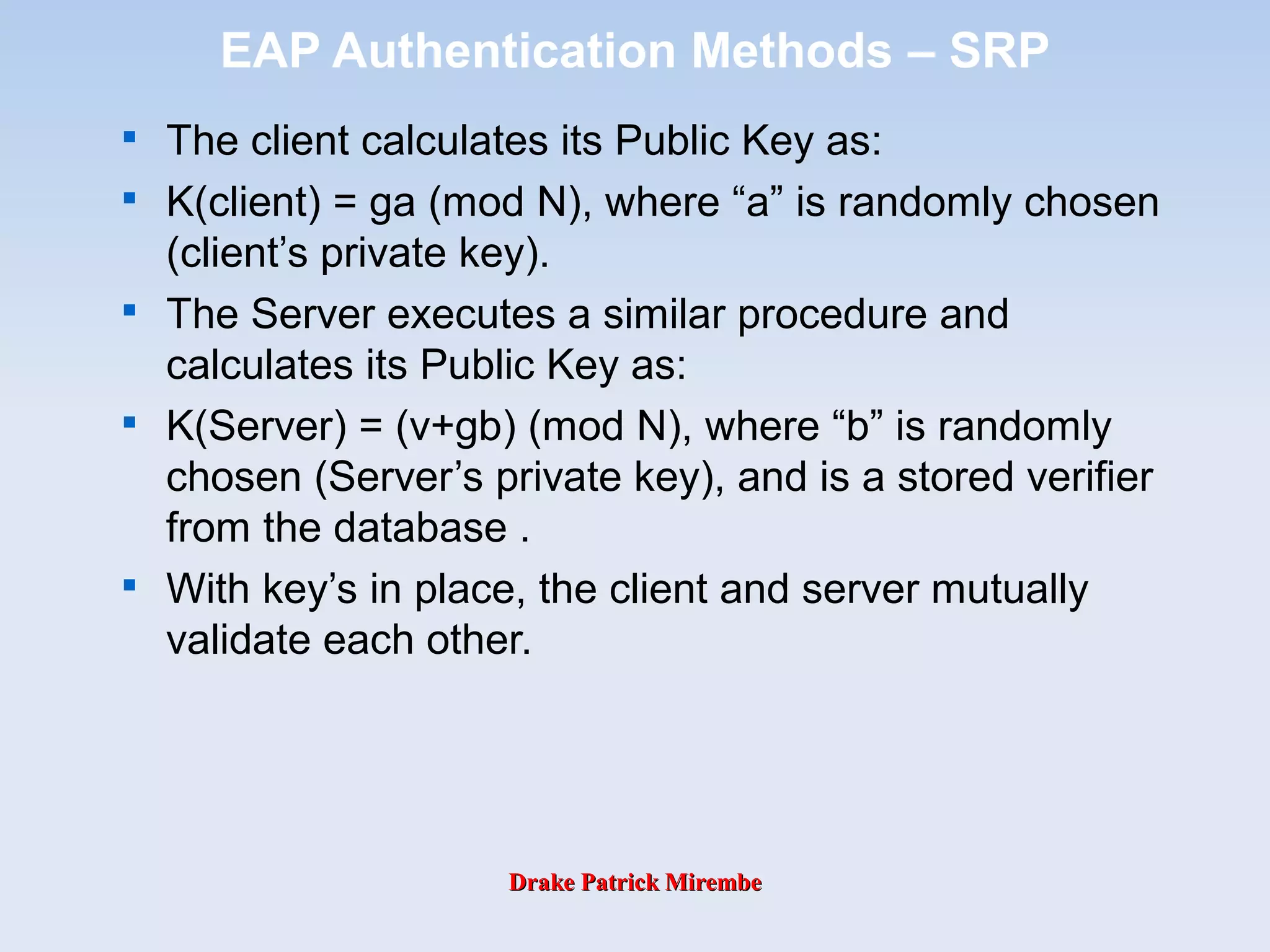
The client calculates its Public Key as:

K(client) = ga (mod N), where “a” is randomly chosen
(client’s private key).

The Server executes a similar procedure and
calculates its Public Key as:

K(Server) = (v+gb) (mod N), where “b” is randomly
chosen (Server’s private key), and is a stored verifier
from the database .

With key’s in place, the client and server mutually
validate each other.
Drake Patrick MirembeDrake Patrick Mirembe
EAP Authentication Methods – SRP

On completion of the exchange between
server and client, the server transmits its
keys to the AP.

To encrypt subsequent IEEE 802.11
frames exchanged between the AP and the
client, a WEP key pair is used, that is
generated by the AP, and is the same for
all clients associated to this particular AP.

The AP will transmit this key pair to the
client and uses the key received from the
server to encrypt this message.

Once the client received the WEP keys it
will pass them to the PC card via the NDIS
interface and the driver.

Station and AP will use these WEP keys
until station logs off or until re-
authentication timer has expired (for period
re-authentication).

When station roams to another AP new
WEPs are established.
Drake Patrick MirembeDrake Patrick Mirembe
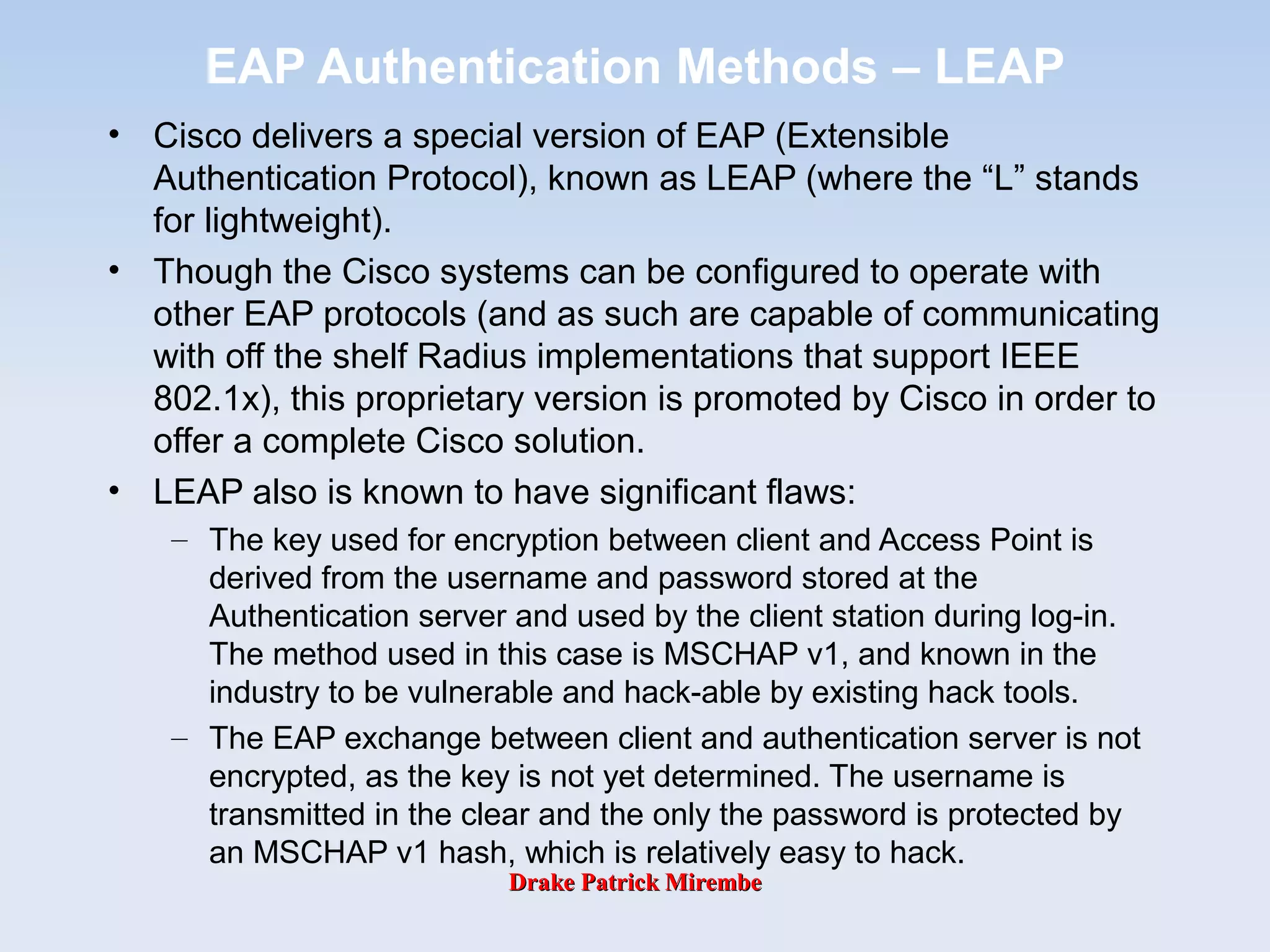
EAP Authentication Methods – LEAP
• Cisco delivers a special version of EAP (Extensible
Authentication Protocol), known as LEAP (where the “L” stands
for lightweight).
• Though the Cisco systems can be configured to operate with
other EAP protocols (and as such are capable of communicating
with off the shelf Radius implementations that support IEEE
802.1x), this proprietary version is promoted by Cisco in order to
offer a complete Cisco solution.
• LEAP also is known to have significant flaws:
– The key used for encryption between client and Access Point is
derived from the username and password stored at the
Authentication server and used by the client station during log-in.
The method used in this case is MSCHAP v1, and known in the
industry to be vulnerable and hack-able by existing hack tools.
– The EAP exchange between client and authentication server is not
encrypted, as the key is not yet determined. The username is
transmitted in the clear and the only the password is protected by
an MSCHAP v1 hash, which is relatively easy to hack.
Drake Patrick MirembeDrake Patrick Mirembe
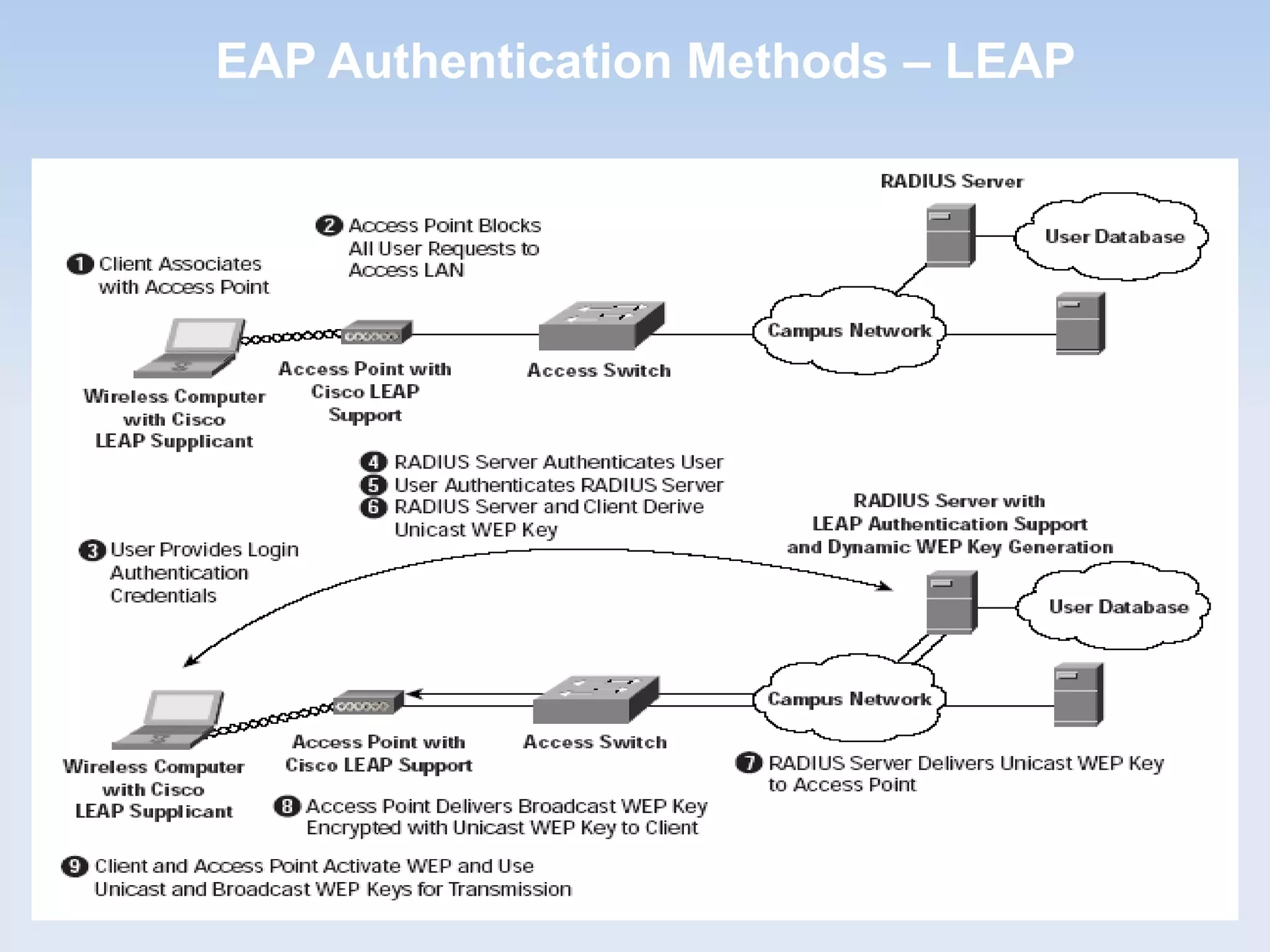
EAP Authentication Methods – LEAP
Drake Patrick MirembeDrake Patrick Mirembe
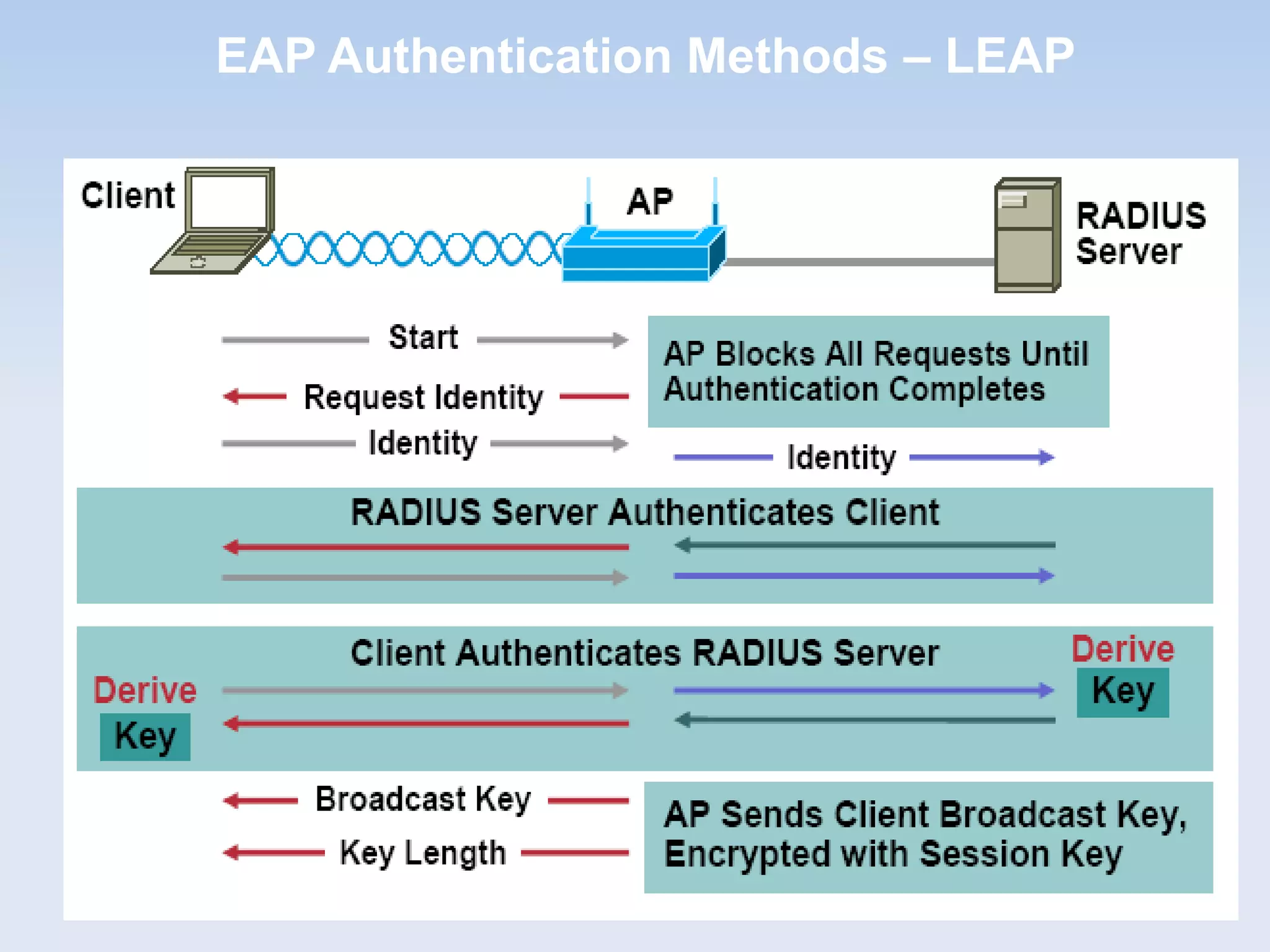
EAP Authentication Methods – LEAP
Drake Patrick MirembeDrake Patrick Mirembe
EAP Authentication Methods – PEAP

Protected EAP (PEAP): A version of EAP
developed by Microsoft, Cisco, and RSA Security
that offers two implementation options.

The first uses the Microsoft Challenge-Handshake
Authentication Protocol Version 2 (MS-CHAPv2) for
mutual authentication and does not require client
digital certificates.

The second implementation uses TLS for mutual
authentication and requires digital certificates on all
the clients (very similar to EAP-TLS).
Drake Patrick MirembeDrake Patrick Mirembe
EAP Authentication Methods – PEAP
Drake Patrick MirembeDrake Patrick Mirembe
PEAP w MS-CHAPv2
• The PEAP authentication process occurs in two
parts.
• The first part is the use of EAP and the PEAP EAP
type to create an encrypted TLS channel.
• The second part is the use of EAP and a different
EAP type to authenticate network access.
• The following examines PEAP with MS-CHAP v2
operation, using as an example, a wireless client
that attempts to authenticate to a wireless access
point (AP) that uses a RADIUS server for
authentication and authorization.
Drake Patrick MirembeDrake Patrick Mirembe
PEAP w MS-CHAPv2
• PEAP Part 1-Creating the TLS Channel
– The following steps are used to create the PEAP TLS channel:
• After creating the logical link, the wireless AP sends an EAP-
Request/Identity message to the wireless client.
• The wireless client responds with an EAP-Response/Identity message
that contains the identity (user or computer name) of the wireless
client.
• The EAP-Response/Identity message is sent by the wireless AP to
the RADIUS server. From this point on, the logical communication
occurs between the RADIUS server and the wireless client, using the
wireless AP as a pass-through device.
• The RADIUS server sends an EAP-Request/Start PEAP message to
the wireless client.
• The wireless client and the RADIUS server exchange a series of TLS
messages through which the cipher suite for the TLS channel is
negotiated and the RADIUS server sends a certificate chain to the
wireless client for authentication.
– At the end of the PEAP negotiation, the RADIUS server has authenticated
itself to the wireless client. Both nodes have determined mutual
encryption and signing keys (using public key cryptography, not
Drake Patrick MirembeDrake Patrick Mirembe
EAP Authentication Methods – PEAP
EAP-Request / Identity
EAP- Response / Identity [My Domain[
EAP-Request (Type = PEAP, start(
TLS Handshake
Client PEAP
Server
EAP- Response (empty(
Drake Patrick MirembeDrake Patrick Mirembe
PEAP w MS-CHAPv2
• PEAP Part 2-Authenticating With MS-CHAP v2
– After the PEAP TLS channel is created, the following steps are used to
authenticate the wireless client credentials with MS-CHAP v2:
• The RADIUS server sends an EAP-Request/Identity message.
• The wireless client responds with an EAP-Response/Identity message
that contains the identity (user or computer name) of the wireless
client.
• The RADIUS server sends an EAP-Request/EAP-MS-CHAP-V2
Challenge message that contains a challenge string.
• The wireless client responds with an EAP-Response/EAP-MS-CHAP-
V2 Response message that contains both the response to the
RADIUS server challenge string and a challenge string for the
RADIUS server.
• The RADIUS server sends an EAP-Request/EAP-MS-CHAP-V2
Success message, which indicates that the wireless client response
was correct and contains the response to the wireless client challenge
string.
• The wireless client responds with an EAP-Response/EAP-MS-CHAP-
V2 Ack message, indicating that the RADIUS server response was
correct.
• The RADIUS server sends an EAP-Success message.
– At the end of this mutual authentication exchange, the wireless client has provided
proof of knowledge of the correct password (the response to the RADIUS server
Drake Patrick MirembeDrake Patrick Mirembe
EAP Authentication Methods – PEAP
PEAP
ServerClient
EAP-Request / Identity
EAP-Response / Identity [My ID[
EAP-Request / Type = X (MD5, OTP, etc(
Establish EAP method and
Perform authentication
EAP-Success / EAP-Failure
Transfer of the generated key from the PEAP server
to the NAS if on different machines
Drake Patrick MirembeDrake Patrick Mirembe
EAP Authentication Methods – PEAP
Drake Patrick MirembeDrake Patrick Mirembe
EAP Authentication Methods – PEAP
Drake Patrick MirembeDrake Patrick Mirembe
EAP Authentication Methods – MS-CHAPv2

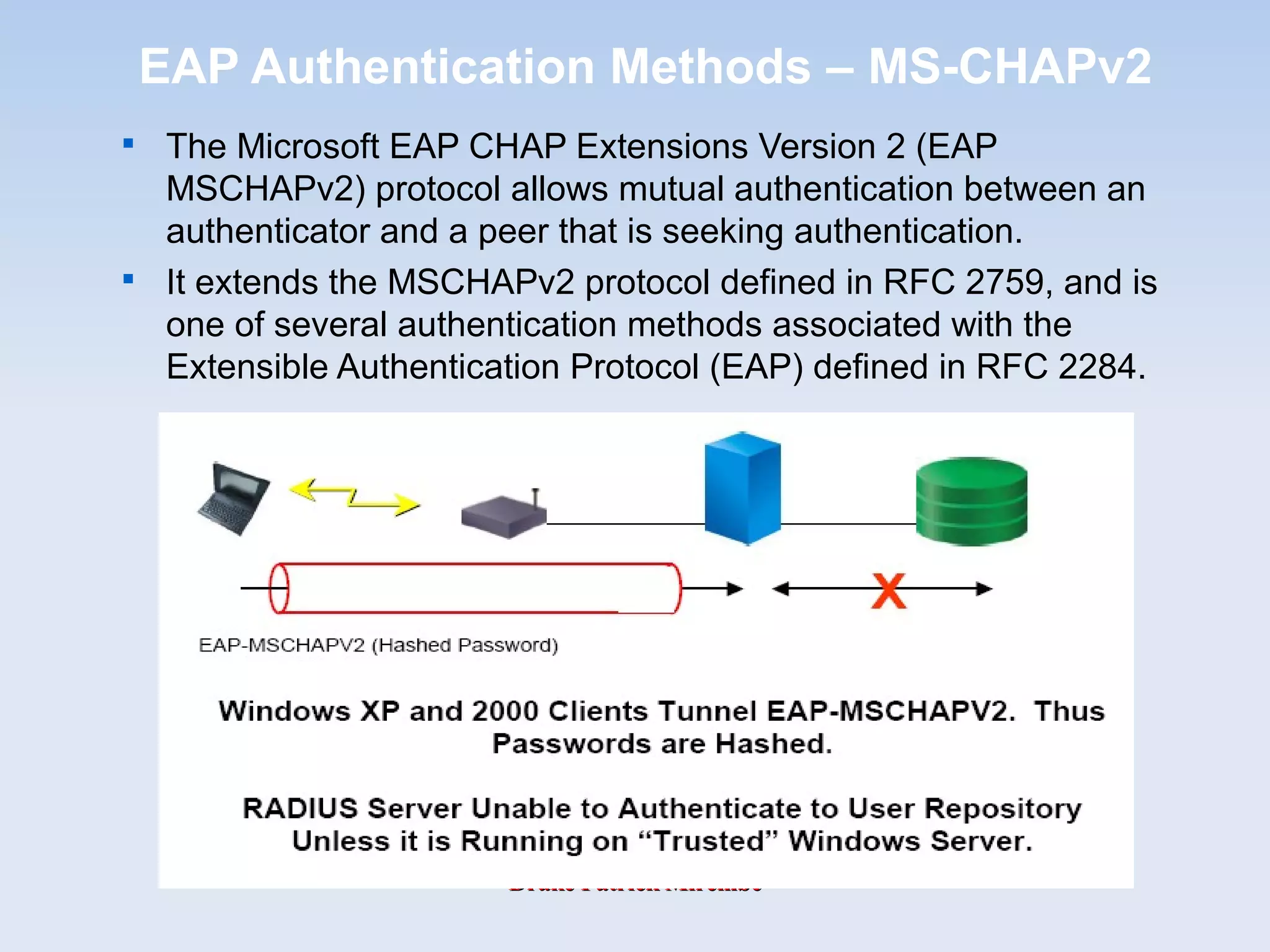
The Microsoft EAP CHAP Extensions Version 2 (EAP
MSCHAPv2) protocol allows mutual authentication between an
authenticator and a peer that is seeking authentication.

It extends the MSCHAPv2 protocol defined in RFC 2759, and is
one of several authentication methods associated with the
Extensible Authentication Protocol (EAP) defined in RFC 2284.
Drake Patrick MirembeDrake Patrick Mirembe
MS-CHAPv2, What is?

Peer authentication using MS-CHAPv2. Following stages
take place after a PPTP tunnel is established and the
setup for the PPP connection has started.

The client requests an authenticator challenge from the server.

The server sends back a 16-bytes random authenticator
challenge.

The client generates the response:

The client generates 16-bytes random peer challenge.

The client generates the challenge by hashing the authenticator
challenge, the peer challenge, and the user's login using SHA.

The client generates the NT password hash from the user's
password.

The 16-byte NT password hash from step (c) is padded with 5 bytes
of zero. From these 21 bytes three 7-byte DES keys are derived.

The first 8 bytes of the hash generated in step (b) (these 8 bytes are
later referred to as the challenge) are encrypted using DES with
each of the three keys generated in step (d).

The 24 bytes resulting from step (e), the 16-byte random peer
challenge, and the user's login are sent back to the server as
response.
Drake Patrick MirembeDrake Patrick Mirembe
 
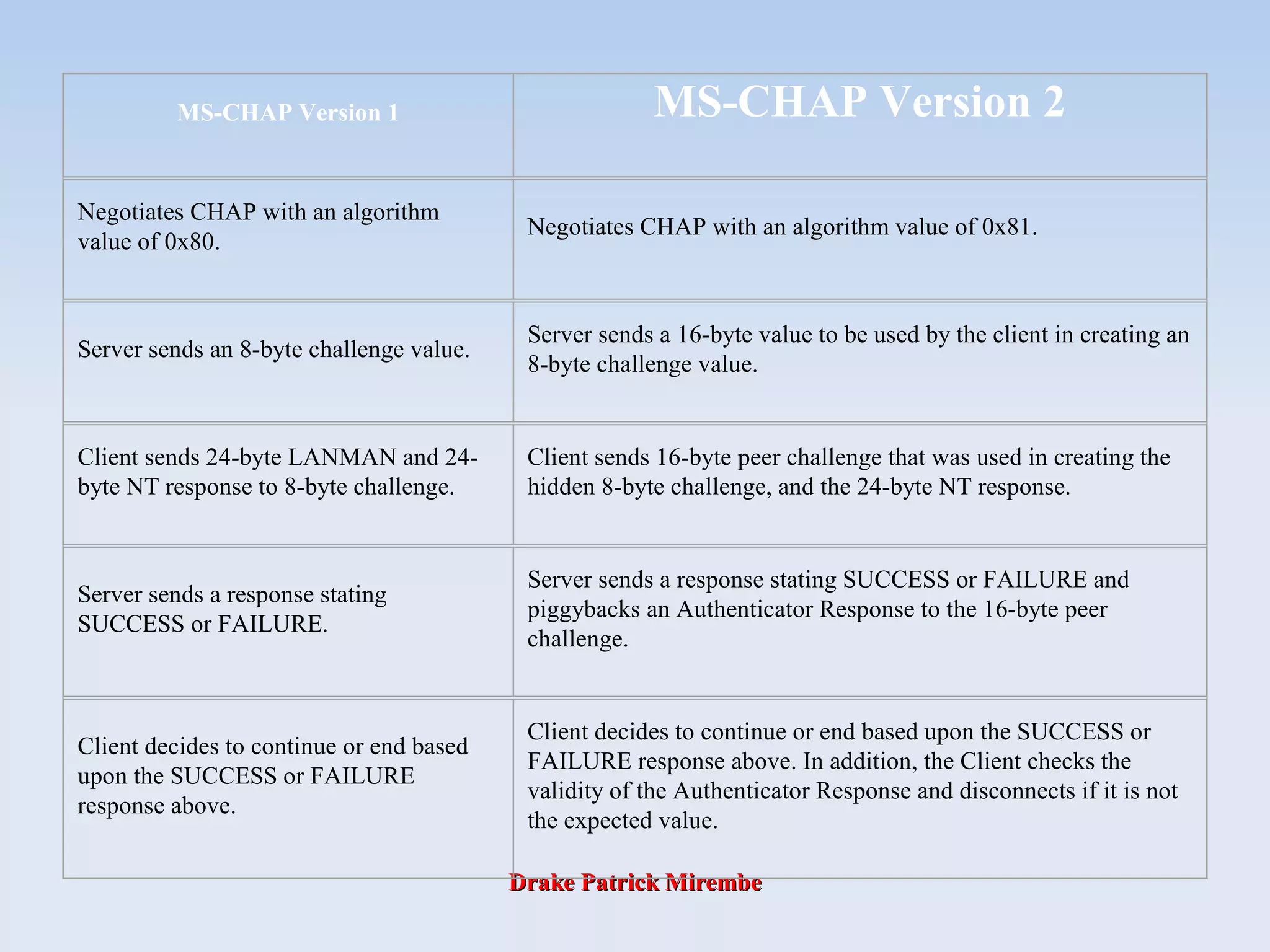
MS-CHAP Version 1 MS-CHAP Version 2
Negotiates CHAP with an algorithm
value of 0x80.
Negotiates CHAP with an algorithm value of 0x81.
Server sends an 8-byte challenge value.
Server sends a 16-byte value to be used by the client in creating an
8-byte challenge value.
Client sends 24-byte LANMAN and 24-
byte NT response to 8-byte challenge.
Client sends 16-byte peer challenge that was used in creating the
hidden 8-byte challenge, and the 24-byte NT response.
Server sends a response stating
SUCCESS or FAILURE.
Server sends a response stating SUCCESS or FAILURE and
piggybacks an Authenticator Response to the 16-byte peer
challenge.
Client decides to continue or end based
upon the SUCCESS or FAILURE
response above.
Client decides to continue or end based upon the SUCCESS or
FAILURE response above. In addition, the Client checks the
validity of the Authenticator Response and disconnects if it is not
the expected value.
Drake Patrick MirembeDrake Patrick Mirembe
EAP Authentication Methods – MS-CHAPv2
– The server decrypts the response with the hashed password of
the client that is stored in a database.
– If the decrypted response matches the challenge, the server
sends a positive authenticator response:
– The server hashes the NT password hash using MD4 to
generate a password-hash-hash.
– The server generates a hash using SHA from the clients
response, the password-hash-hash, and the literal constant
``Magic server to client signing constant''.
– The server generates another hash using SHA from the 20-byte
output of step (c), the 8-byte challenge (see step 3 (b)), and the
literal constant ``Pad to make it do more than one iteration''.
– The resulting 20 bytes are send back to the client in the form
``S= upper-case ASCII representation of the byte values ''.
– The client uses the same procedure to generate the 20 bytes
and compares them to the servers authenticator response. If
they match, both the client and the server are authenticated.
Drake Patrick MirembeDrake Patrick Mirembe
EAP Authentication Methods – GTC

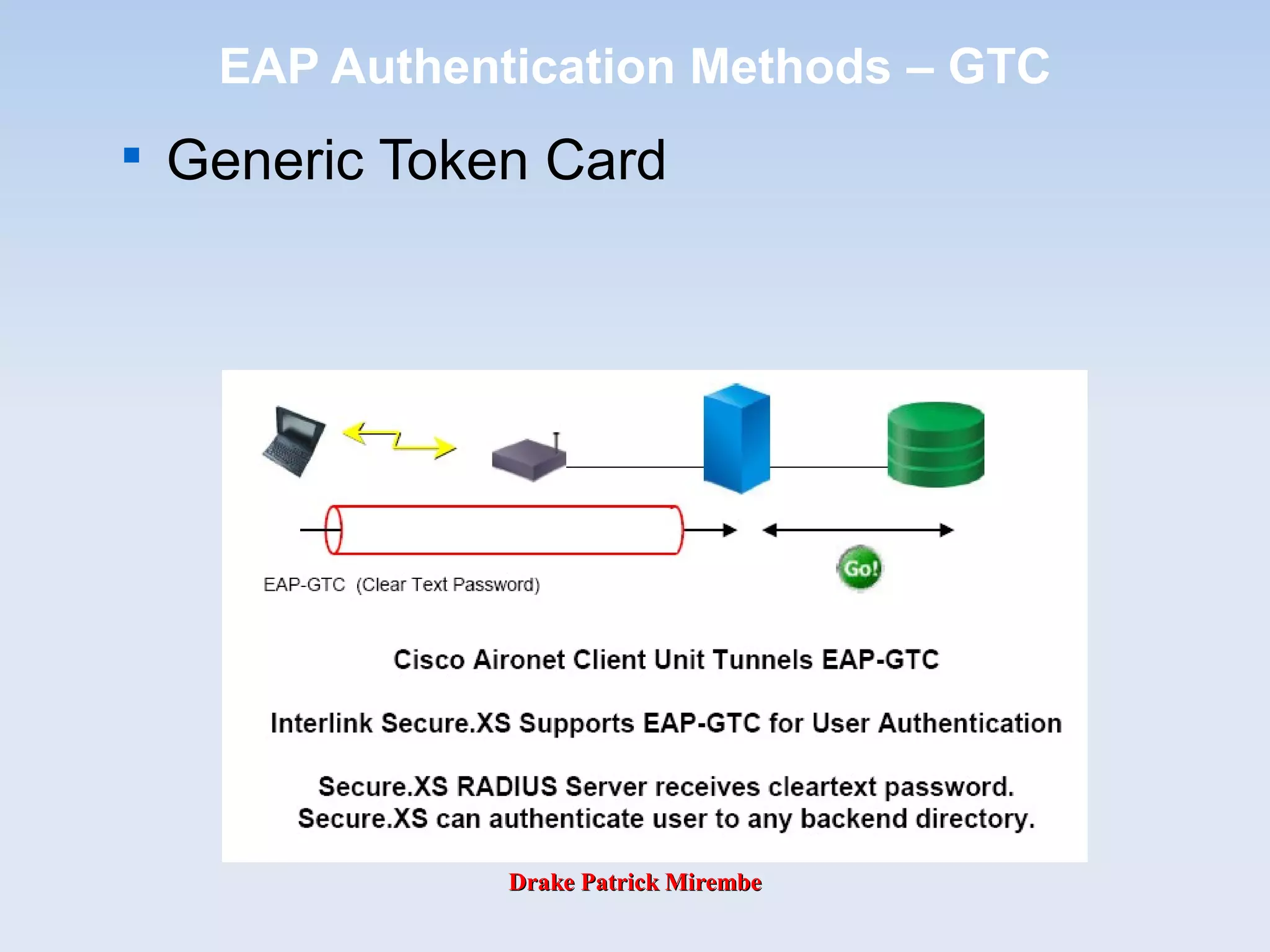
Generic Token Card
Drake Patrick MirembeDrake Patrick Mirembe
Difference between MsCHAPv2 and GTC

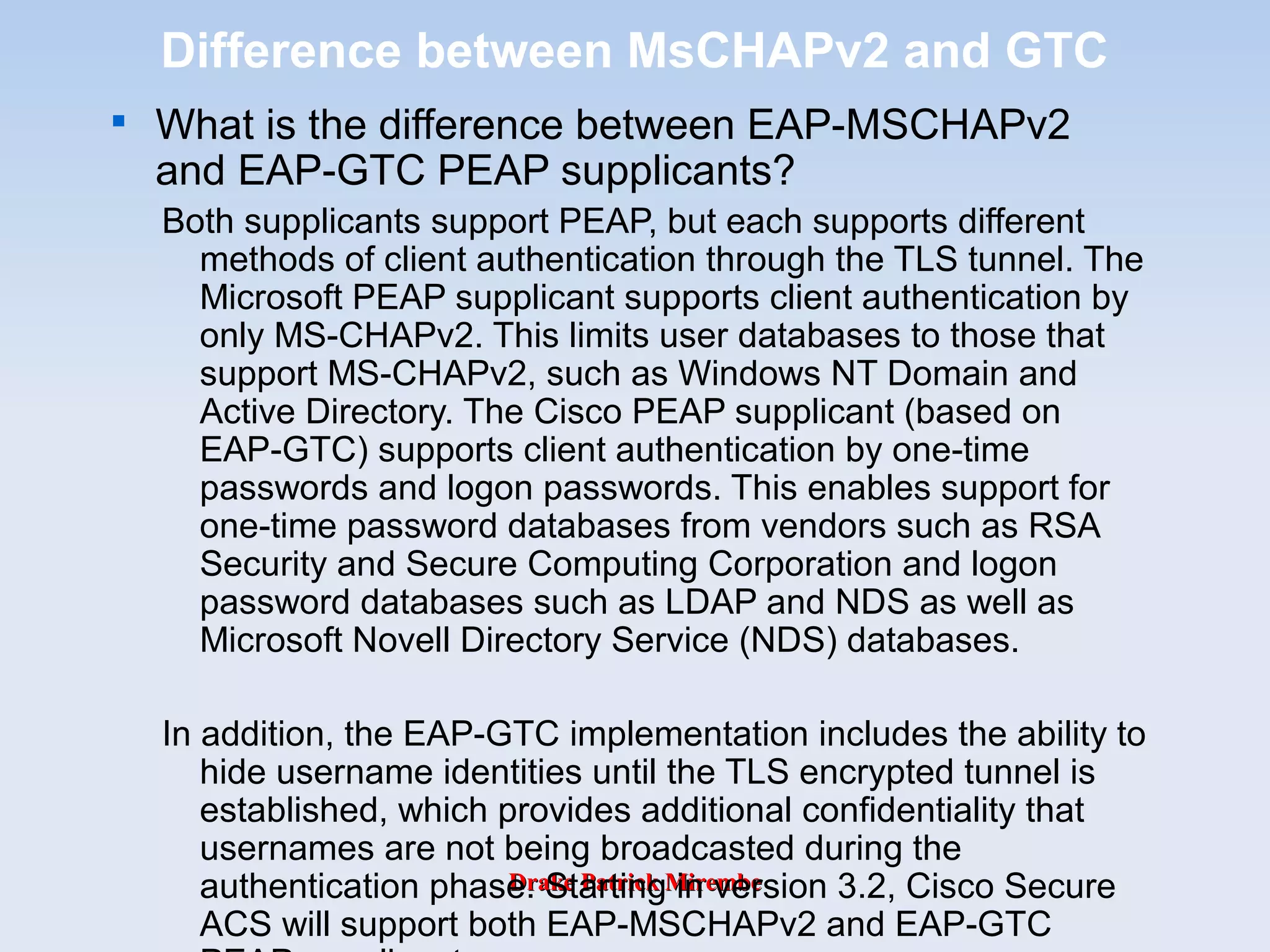
What is the difference between EAP-MSCHAPv2
and EAP-GTC PEAP supplicants?
Both supplicants support PEAP, but each supports different
methods of client authentication through the TLS tunnel. The
Microsoft PEAP supplicant supports client authentication by
only MS-CHAPv2. This limits user databases to those that
support MS-CHAPv2, such as Windows NT Domain and
Active Directory. The Cisco PEAP supplicant (based on
EAP-GTC) supports client authentication by one-time
passwords and logon passwords. This enables support for
one-time password databases from vendors such as RSA
Security and Secure Computing Corporation and logon
password databases such as LDAP and NDS as well as
Microsoft Novell Directory Service (NDS) databases.
In addition, the EAP-GTC implementation includes the ability to
hide username identities until the TLS encrypted tunnel is
established, which provides additional confidentiality that
usernames are not being broadcasted during the
authentication phase. Starting in version 3.2, Cisco Secure
ACS will support both EAP-MSCHAPv2 and EAP-GTC
Drake Patrick MirembeDrake Patrick Mirembe
EAP methods based on GSM credentials

Support for SIM and USIM (AKA) credentials

Uses standard SIM (Subscriber Identity Module) and
USIM(UMTS Subscriber Identity Module) cards

Wireless phone SIM cards as a way of obtaining
authentication

using SIM Extensible Authentication Protocol for GSM (EAP-
SIM)

Using USIM Extensible Authentication and Key Agreement
Protocol (EAP-AKA) for UMTS.

Generates 128 bit keys, has optional fast reconnect
and identity privacy support
Drake Patrick MirembeDrake Patrick Mirembe
EAP Authentication Methods – SIM
• EAP SIM (Subscriber Identity Module) Authentication for GSM
• EAP SIM authentication is based on Nokia’s EAP Server Technology.
• This provides an interface between the GSM Authentication Center and one
or more wireless LANs and uses the Extensible Authentication Protocol (EAP)
in order to allow it to pass traffic securely over any Wide Area Network – e.g.
a Telco’s internal data network or the Internet.
• It permits authentication to be performed by WLAN clients that have an
802.11 interface and access to a GSM SIM card, with or without GSM air
interface capabilities.

This authentication procedure is designed to provide mutual authentication
between a wireless LAN client and an AAA server.

Typically the EAP server is implemented on the AAA server (e.g. RADIUS)
and has an interface to the GSM network, so it operates as a gateway
between the Internet AAA network and the GSM authentication infrastructure.
• The system allows GSM mobile operators to reuse their existing
authentication infrastructure for providing access to wireless networks.
• EAP SIM combines the data from several GSM “triplets” (RAND, SRES, Kc),
obtained from an Authentication Centre (AuC), to generate a more secure
session encryption key. EAP SIM also enhances the basic GSM
authentication mechanism by providing for mutual authentication between the
client and the RADIUS server.
Drake Patrick MirembeDrake Patrick Mirembe
EAP Authentication Methods – SIM
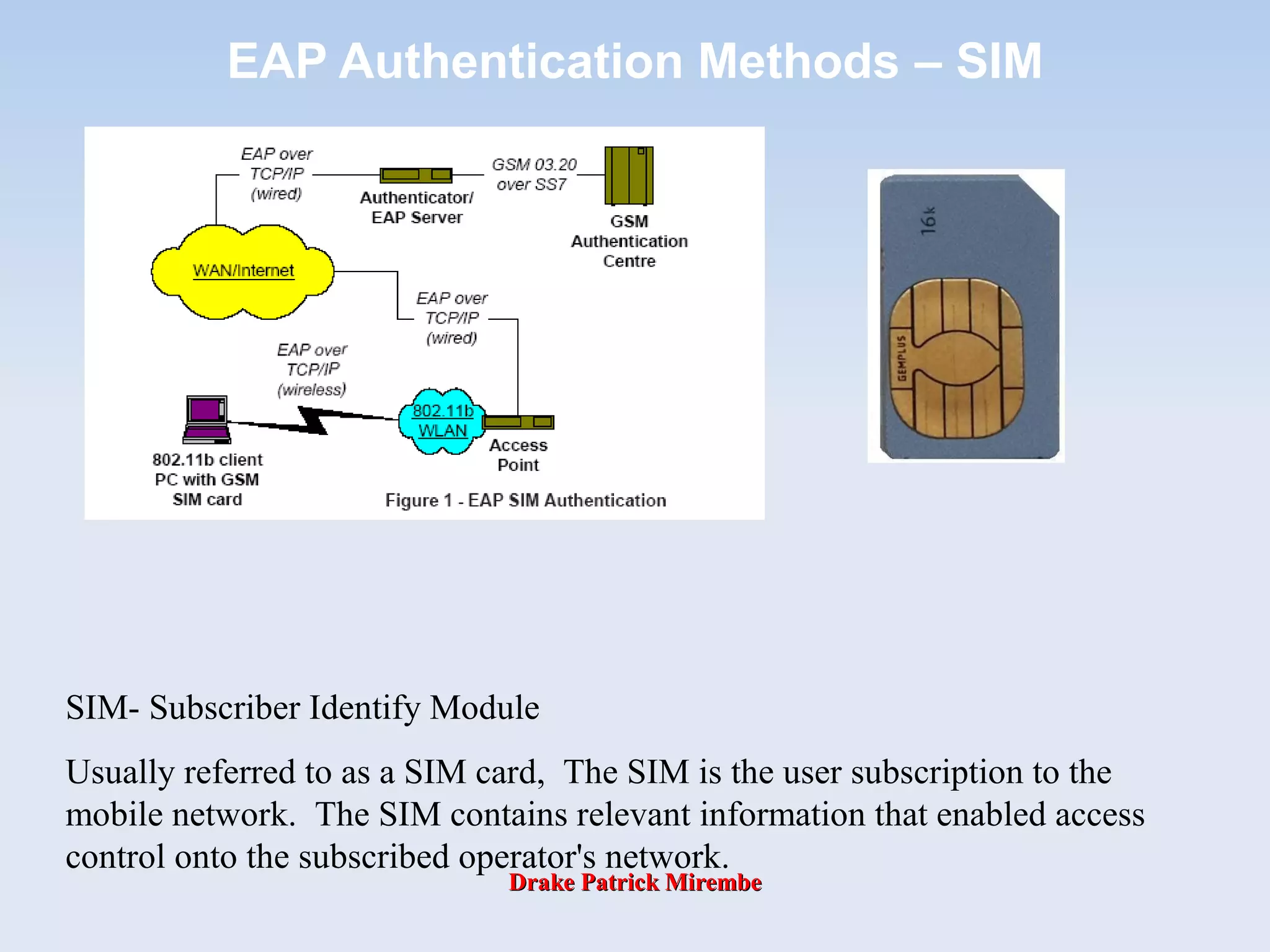
SIM- Subscriber Identify Module
Usually referred to as a SIM card, The SIM is the user subscription to the
mobile network. The SIM contains relevant information that enabled access
control onto the subscribed operator's network.
Drake Patrick MirembeDrake Patrick Mirembe
EAP Authentication Methods – SIM

The EAP SIM authentication proceeds as follows:

The client receives an EAP Identity Request from the access point (AP).

The client responds to the AP’s request with an EAP Identity Response message
containing the user’s network identity which is stored on the SIM (either the user's
International Mobile Subscriber Identity (IMSI) or a temporary identity
(pseudonym)).

The AP transmits this message to the RADIUS server, which in turn forwards it to
the Authentication Center of the GSM network.

From the AuC the RADIUS server obtains GSM triplets and passes the RAND to
the client. The SIM calculates the signed response (SRES) which is returned to
the RADIUS server. The SIM also calculates cryptographic keying material, using
a secure hash function on the user identity and the GSM encryption keys, for the
derivation of session encryption keys.

When the AAA server receives the client’s Authentication response, it calculates
its own XRES and compares it to the one received from the client. If both match,
the client is authenticated and the AAA server calculates the session encryption
keys.

It then sends a RADIUS ACCEPT message to the AP, which contains an
encapsulated EAP Success message and the (encrypted) client session key.

The AP installs the session key for the encryption and forwards the EAP Success
message to the client which is now able to access the network.
Drake Patrick MirembeDrake Patrick Mirembe
EAP Authentication Methods – SIM
Drake Patrick MirembeDrake Patrick Mirembe
EAP Authentication Methods – SIM
Drake Patrick MirembeDrake Patrick Mirembe
EAP Authentication Methods – AKA

EAP AKA (authentication and key agreement) is for UMTS

For a W-LAN-3G-inter-working the EAP AKA protocols have been
developed.

The basic difference in the security of the EAP SIM and EAP AKA
protocols is that, while both provide mutual authentication, the
network-to-user authentication of EAP SIM is implicitly based on
the derived key Kc , whereas the network-to-user authentication is
integral part of EAP/AKA procedure.

EAP/AKA is an EAP type for the UMTS Authentication and Key
Agreement (AKA)

EAP/AKA supports all the UMTS AKA scenarios

basic authentication, sequence number synchronization etc.

Similar IMSI privacy support as in EAP/SIM

EAP/AKA includes GSM compatible mode

basic GSM authentication without the enhancements of
EAP/SIM

The home server knows if this particular user has been given
an old GSM SIM or a newer UMTS USIM

Client can refuse GSM-only authentication
Drake Patrick MirembeDrake Patrick Mirembe
EAP Authentication Methods – AKA
• AKA is based on challenge-response mechanisms and
symmetric cryptography.
• AKA typically runs in a UMTS Subscriber Identity Module
(USIM), a smart card like device. However, the
applicability of AKA is not limited to client devices with
smart cards, but the AKA mechanisms could also be
implemented in host software.
• Compared to the GSM mechanism, AKA provides
substantially longer key lengths and the authentication of
the server side as well as the client side.
Drake Patrick MirembeDrake Patrick Mirembe
EAP Authentication Methods – AKA
Client Authenticator
| |
| EAP-Request/Identity |
|<------------------------------------------------------|
| |
| EAP-Response/Identity |
| (Includes user's NAI) |
|------------------------------------------------------>|
| |
| +------------------------------+
| | Server runs UMTS algorithms, |
| | generates RAND and AUTN. |
| +------------------------------+
| |
| EAP-Request/AKA-Challenge |
| (RAND, AUTN) |
|<------------------------------------------------------|
| |
+-------------------------------------+ |
| Client runs UMTS algorithms on USIM,| |
| verifies AUTN, derives RES | |
| and session key | |
+-------------------------------------+ |
| |
| EAP-Response/AKA-Challenge |
| (RES) |
|------------------------------------------------------>|
| |
| +------------------------------+
| | Server checks the given RES, |
| | and finds it correct. |
| +------------------------------+
| |
| EAP-Success |
|<------------------------------------------------------|

Bse 3106 wifi

  • 1.
    Drake Patrick MirembeDrakePatrick Mirembe Wi-Fi Technologies Drake Patrick Mirembe Date: September 2014
  • 2.
    Drake Patrick MirembeDrakePatrick Mirembe Recap: Mobile computing systems deal with three basic Components Wireless communications and Mobile Networks Mobile Computing Platform Mobile Services & Applications Wireless LAN, GSM/GPRS, BlueTooth, Ad Hoc Mobile networks Wireless ATM, …, and Wi-Fi SMS, WAP,I- mode, J2ME&J2EE Mobile phone, Internet, and other new, …, so many Network management “Mobility” We handle this
  • 3.
    Drake Patrick MirembeDrakePatrick Mirembe Lecture Summary  Wireless Channels  Wi-Fi Technology  EAP and 802.1x
  • 4.
    4 Frequencies for Communications VLF= Very Low Frequency UHF = Ultra High Frequency LF = Low Frequency SHF = Super High Frequency MF = Medium Frequency EHF = Extra High Frequency HF = High Frequency UV = Ultraviolet Light VHF = Very High Frequency Frequency and wave length: λ = c/f wave length λ, speed of light c ≅ 3x10⁸ m/s, frequency f 1 Mm 300 Hz 10 km 30 kHz 100 m 3 MHz 1 m 300 MHz 10 mm 30 GHz 100 µm 3 THz 1 µm 300 THz visible lightVLF LF MF HF VHF UHF SHF EHF infrared UV optical transmissioncoax cabletwisted pair
  • 5.
    5 ITU-R holds auctionsfor new frequencies, manages frequency bands worldwide (WRC, World Radio Conferences) Frequencies and Regulations Europe USA Japan Cellular Phones GSM 450- 457, 479 - 486/460 - 467,489 - 496, 890 - 915/935 - 960, 1710 - 1785/1805 - 1880 UMTS (FDD) 1920 - 1980, 2110 -2190 UMTS (TDD) 1900 - 1920, 2020 -2025 AMPS , TDMA , CDMA 824- 849, 869-894 TDMA , CDMA , GSM 1850 - 1910, 1930 -1990 PDC 810- 826, 940-956, 1429 - 1465, 1477 - 1513 Cordless Phones CT1+ 885- 887, 930 - 932 CT2 864-868 DECT 1880 -1900 PACS 1850 - 1910, 1930 - 1990 PACS -UB 1910 -1930 PHS 1895 - 1918 JCT 254-380 Wireless LANs IEEE 802.11 2400 -2483 HIPERLAN 2 5150 - 5350, 5470 - 5725 902-928 I EEE 802.11 2400 -2483 5150 - 5350, 5725 - 5825 IEEE 802.11 2471 - 2497 5150 - 5250 Others RF- Control 27, 128, 418, 433, 868 RF- Control 315, 915 RF- Control 426, 868
  • 6.
    6 Spectrum and Bandwidth:Shannon Channel Capacity The maximum number of bits that can be transmitted per second by a physical channel is: where W is the frequency range of the channel, and S/N is the signal noise ratio, assuming Gaussian noise W log2(1+ S N )
  • 7.
    Section 2: Antennas For wireless communications, signals are transmitted through space without guidance. We have to couple the electromagnetic energy from transmitter to the outside world and, in reverse, from the outside world to the receiver. This is exactly what antennas do.  A theoretical reference antenna  Simple antennas  Sectorized antennas  Smart antennas
  • 8.
    Theoretical & SimpleAntenna  Its also called isotropic radiator. A point in space radiating with equal power in all directions, i.e., all points with equal power are located on a sphere with antenna as its center.  However, such as antenna does not exist in reality due to directive effects.  The simplest real antenna is a thin, center fed dipole, also called Hertzian dipole. The length of the dipole is not arbitrary, but for example, half the wavelength λ of the signal to transmit results in a very efficient radiation of the energy. If mounted on the roof of a car, the length of λ/4 is efficient.
  • 9.
    Ideal isotropic radiator Simpledipole Antennas λ/4 λ/2 λ= c/f λ, wavelength f, the signal frequency and c, the light speed.
  • 10.
    If an antennais positioned, e.g., in a valley or between buildings, an omnidirectional radiation pattern is not very useful. So, Directional Antenna, with certain fixed preferential transmission and reception directions can be used. y (or z) x Also, a special example of directional antennas is constructed by satellite dishes. y z The radiation pattern of a directional antenna with the main lobe in direction of the x-axis.
  • 11.
    Two or moreantennas can also be combined to improve reception by counteracting the negative effects of multipath propagation. So, Multi-Element Antenna Arrays, allow different diversity scheme. One such scheme is Switched or Selection Diversity, where the receiver always uses the antenna element with large output. λ/2 λ/2 λ/4 •Flexibility •Coverage
  • 12.
    A more advancedsolution is provided by Smart Antennas which combine multiple antenna elements with signal processing to optimize the radiation/reception pattern in response to the signal environment. These antennas can adapt to changes in reception power, transmission conditions and many signal propagation effects as discussed in the following slides.
  • 13.
    Signal Propagation Sender Transmission range Detection Interference Distance Errorrate High This leads to the notion “cells” (transmission range) around a transmitter.
  • 14.
    Path Loss ofRadio Signals In free space, a radio signal propagates as light, follows a straight line (line-of-sight, LOS) Inverse Square law: the received power Pr = 1/d2 . It’s called “Path loss or attenuation” due to inverse square law; Weather conditions such as heavy rain, much of the radiated energy of the antenna is absorbed; Depending on the frequency, radio waves can also penetrate objects. Generally, the lower the frequency is, the better the penetration will be. Additional signal propagation effects: blocking, reflection and diffraction.
  • 15.
    Drake Patrick MirembeDrakePatrick Mirembe  Wireless devices deliver different qualities of voice and data over the air. These qualities are based on the physics of radio waves and the science of the spectrum.  In this section, we introduce the basis for building wireless technology and understanding spectrum, bandwidth, and qualities. Wireless Channels & Characteristics Wireless Spectrum The electromagnetic spectrum, or simply spectrum, is the entire range of energy waves over which communicating devices transmit.
  • 16.
  • 17.
    Drake Patrick MirembeDrakePatrick Mirembe  Higher frequencies travel short distances. They take more power to transmit; with enough power, they can be life threatening.  Higher frequencies can be modulated to carry more bits per second than longer waves, but they are subject to atmosphere interference.  Broadcasters generally prefer owning a lower frequency because it costs less to transmit a signal, it carries farther, and it is generally “safe”.  The ITU make frequency agreements so devices will operate clearly. Regulating radio interference is necessary so that wireless devices do not interfere with one another. For example, “FCC Spectrum Allocation”;  The owner of popular mobile cellular bands must obtain a license from the authority. Some interesting properties of the spectrum
  • 18.
    Drake Patrick MirembeDrakePatrick Mirembe  Spectrum in Hertz, for examples 1.9 GHz, this is where CDMA PCS operates on the spectrum 2.4 GHz, it’s used by wireless Ethernet (or LAN), Bluetooth, HomeRF, and other protocols  Bandwidth and Date Rate (we have learnt in NC1) Although bandwidth traditionally describes the width of a spectrum channel for wireless Internet engineers, bandwidth also measures data capacity, so the bandwidth indicates how many bits can be transferred per second  Converting voice to data: Hertz to Megabits Cellular networks carry both voice and data. The human voice can convey understandable speech in 300Hz –to 3300 Hz. Telephone companies use 4KHz as the allocated bandwidth for speech: 4KHz talk = 64 kbps (based on PCM learnt in NC1).
  • 19.
    Drake Patrick MirembeDrakePatrick Mirembe Common Wireless Data rates and Devices PDAs using a wireless LAN11 Mbps PADs using Ricochet128 kbps Pagers19.2 kbps Pagers, Web phones14.4 kbps Web phones9.6 kbps Wireless DevicesWireless data rate
  • 20.
    Drake Patrick MirembeDrakePatrick Mirembe  Wireless broadband is 200 kbps or better in both directions. The term broadband is often used for data bandwidth wider than a voice call. Although it has a number of meanings, when wireless engineers speak of broadband, they mean wireless broadband rather than 45 Mbps or greater wired broadband multichannel service. In conversations about wireless band, engineers rarely use wideband. Today’s cell phone wireless bandwidth is implemented as sub-narrowband network and also called wireless narrowband, referring to data overlays of circuit-switched cellular phone data at 14.4 kbps or slower.  Refer to the last slide, you may classify common wireless data rates as wireless broadband or not. Wireless Bands
  • 21.
    Drake Patrick MirembeDrakePatrick Mirembe  To make wireless broadband terminology more “interesting”, former fixed wireless services are experimenting with mobile terminals. These services currently require dishes or line-of-sight (LoS) antennas.  They are useful as fixed wireless Internet “on ramps” and provide service. For the technically minded, all these fixed wireless access services are grouped under the IEEE 802.16 standard.  The most prominent broadband wireless access (BWA) technologies are described in the next slide.
  • 22.
    Drake Patrick MirembeDrakePatrick Mirembe  Local Multipoint Distribution Service (LMDS) It is a low-power broadband, point-multipoint technology. This fixed wireless service can deliver up to 155 Mbps data at radius of 2 km to 8 km and operate from 29 GHz to 31 GHz.  Multichannel Multipoint Distribution Service (MMDS) Popular with Sprint and WorldCom (MCI), deliver data at 75 kbps to 11 Mbps with a range of 35 miles supporting 100, subscribers. Other vendors get a 100 Mbps data rate over short range. MMDS operates between 2 GHz and 4GHz making available 186 MHz of spectrum.
  • 23.
    Drake Patrick MirembeDrakePatrick Mirembe LMDS MMDS
  • 24.
    Drake Patrick MirembeDrakePatrick Mirembe Channels are subdivisions of spectrum used by an operator to connect subscribers. An operator with a wireless license divides that spectrum to obtain as many subscribers as possible; Channels subdivides bands. There are many schemes to share channels and they go by names like FDMA, TDMA, and CDMA. You will study them in the workshop from the Internet services. The important point to know is that callers share a limited number of channels on an assigned spectrum bandwidth. When you communicate wireless data, the more bits, the better, right? But, the more bit you take, the less bandwidth there is for other wireless callers in your area. In high- traffic areas, you will sometimes get good performance, but often experience long unpredictable waits. This is network latency. It should never exceed 400ms.
  • 25.
    Drake Patrick MirembeDrakePatrick Mirembe Wireless LAN Overview Wi-Fi Technology  Wireless Fidelity (Wi-Fi)  Channels  Basic Security&Practices  Vulnerabilities  WEP  WPA  802.11a/b/g
  • 26.
    Drake Patrick MirembeDrakePatrick Mirembe PANs, LANs & WANs PAN: Personal Area Network LAN WAN 10 m 100 m 2,500 m
  • 27.
    Drake Patrick MirembeDrakePatrick Mirembe Wi-Fi Technology
  • 28.
    Drake Patrick MirembeDrakePatrick Mirembe Wi-Fi • Wi-Fi (short for “Wireless Fidelity") is the popular term for a high-frequency wireless local area network (WLAN) – Promoted by the Wi-Fi Alliance (Formerly WECA - Wireless Ethernet Carriers Association) • Used generically when referring to any type of 802.11 network, whether 802.11a, 802.11b, 802.11g, dual-band, etc. The term is promulgated by the Wi-Fi Alliance
  • 29.
    Drake Patrick MirembeDrakePatrick Mirembe Wi-Fi • Wi-Fi standards use the Ethernet protocol and CSMA/CA (carrier sense multiple access with collision avoidance) for path sharing • The 802.11b (Wi-Fi) technology operates in the 2.4 GHz range offering data speeds up to 11 megabits per second. The modulation used in 802.11 has historically been phase-shift keying (PSK). – Note, unless adequately protected, a Wi-Fi wireless LAN is easily accessible by unauthorized users
  • 30.
    Drake Patrick MirembeDrakePatrick Mirembe Wireless LAN Topology • Wireless LAN is typically deployed as an extension of an existing wired network as shown below.
  • 31.
    Drake Patrick MirembeDrakePatrick Mirembe Wireless LAN Topology  Here is an example of small business usage of Wi-Fi Network. DSL Connection Etc. DSL Router The DSL router and Wi-Fi AP are often combined into a single unit
  • 32.
    Drake Patrick MirembeDrakePatrick Mirembe What is 802.11? • 802.11 refers to a family of specifications developed by the IEEE for wireless LAN technology. 802.11 specifies an over-the-air interface between a wireless client and a base station or between two wireless clients. • The IEEE accepted the specification in 1997.
  • 33.
    Drake Patrick MirembeDrakePatrick Mirembe 802.11 Family Members  There are several specifications in the 802.11 family:  802.11  Applies to wireless LANs and provides 1 or 2 Mbps transmission in the 2.4 GHz band using either frequency hopping spread spectrum (FHSS) or direct sequence spread spectrum (DSSS).  802.11a  An extension to 802.11 that applies to wireless LANs and provides up to 54 Mbps in the 5GHz band. 802.11a uses an orthogonal frequency division multiplexing encoding scheme rather than FHSS or DSSS.  802.11b  (also referred to as 802.11 High Rate or Wi-Fi) is an extension to 802.11 that applies to wireless LANs and provides 11 Mbps transmission (with a fallback to 5.5, 2 and 1 Mbps) in the 2.4 GHz band. 802.11b uses only DSSS. 802.11b was a 1999 ratification to the original 802.11 standard, allowing wireless functionality comparable to Ethernet.  802.11g  Applies to wireless LANs and provides 20+ Mbps in the 2.4 GHz band.
  • 34.
  • 35.
  • 36.
  • 37.
    Drake Patrick MirembeDrakePatrick Mirembe 802.11 Standards 802.11 The original WLAN Standard. Supports 1 Mbps to 2 Mbps. 802.11a High speed WLAN standard for 5 Ghz band. Supports 54 Mbps. 802.11b WLAN standard for 2.4 Ghz band. Supports 11 Mbps. 802.11e Address quality of service requirements for all IEEE WLAN radio interfaces. 802.11f Defines inter-access point communications to facilitate multiple vendor-distributed WLAN networks. 802.11g Establishes an additional modulation technique for 2.4 Ghz band. Intended to provide speeds up to 54 Mbps. Includes much greater security. 802.11h Defines the spectrum management of the 5 Ghz band for use in Europe and in Asia Pacific. 802.11i Address the current security weaknesses for both authentication and encryption protocols. The standard encompasses 802.1X, TKIP, and AES protocols.
  • 38.
    Drake Patrick MirembeDrakePatrick Mirembe 802.11Range Comparisons
  • 39.
    Drake Patrick MirembeDrakePatrick Mirembe 802.11 Authentication • The 802.11 standard defines several services that govern how two 802.11 devices communicate. The following events must occur before an 802.11 station can communicate with an Ethernet network through a wireless access point provides: – Turn on the wireless Client – Client listens for messages from any access points (AP) that are in range – Client finds a message from an AP that has a matching SSID – Client sends an authentication request to the AP – AP authenticates the station – Client sends an association request to the AP – AP associates with the station – Client can now communicate with the Ethernet network thru the
  • 40.
    Drake Patrick MirembeDrakePatrick Mirembe What Exactly Is 802.1x? • Standard set by the IEEE 802.1 working group. • Describes a standard link layer protocol used for transporting higher-level authentication protocols. • Works between the Supplicant (Client Software) and the Authenticator (Network Device). • Maintains backend communication to an Authentication (Typically RADIUS) Server.
  • 41.
    Drake Patrick MirembeDrakePatrick Mirembe What Does it Do? • Transport authentication information in the form of Extensible Authentication Protocol (EAP) payloads. • The authenticator (switch) becomes the middleman for relaying EAP received in 802.1x packets to an authentication server by using RADIUS to carry the EAP information. • Several EAP types are specified in the standard. • Three common forms of EAP are –EAP-MD5 – MD5 Hashed Username/Password –EAP-OTP – One-Time Passwords –EAP-TLS – Strong PKI Authenticated Transport Layer Security (SSL) 802.1x Header EAP Payload
  • 42.
    Drake Patrick MirembeDrakePatrick Mirembe What is RADIUS? • RADIUS – The Remote Authentication Dial In User Service • A protocol used to communicate between a network device and an authentication server or database. • Allows the communication of login and authentication information. i.e. Username/Password, OTP, etc. using Attribute/Value pairs (Attribute = Value) • Allows the communication of extended attribute value pairs using “Vendor Specific Attributes” (VSAs). • Can also act as a transport for EAP messages. • RFC2865, RFC2866 and others RADIUS Header EAP PayloadUDP Header
  • 43.
    Drake Patrick MirembeDrakePatrick Mirembe 802.11 Authentication Flow802.11 Authentication Flow
  • 44.
    Drake Patrick MirembeDrakePatrick Mirembe Wi-Fi Channels  Wireless LAN communications are based on the use of radio signals to exchange information through an association between a wireless LAN card and a nearby access point.  Each access point in an 802.11b/g network is configured to use one radio frequency (RF) channel.  Although the 802.11b/g specifications indicate that there are fourteen (14) channels that can be utilized for wireless communications, in the U.S., there are only eleven channels allowed for AP use. In addition, since there is frequency overlap among many of the channels, there must be 22 MHz separation between any two channels in use.
  • 45.
    Drake Patrick MirembeDrakePatrick Mirembe Wi-Fi Channels  In a multi-access point installation, where overlapping channels can cause interference, dead- spots and other problems, Channels 1, 6 and 11 are generally regarded as the only safe channels to use. Since there are 5 5MHz channels between 1 and 6, and between 6 and 11, or 25MHz of total bandwidth, that leaves three MHz of buffer zone between channels.  In practice, this constraint limits the number of useable channels to three (channels 1, 6, and 11). 802.11a wireless networks have eight non- overlapping channels which provide more flexibility in terms of channel assignment.
  • 46.
    Drake Patrick MirembeDrakePatrick Mirembe Wi-Fi Channels  For example, 802.11a - An extension to the IEEE 802.11 standard that applies to wireless LANs and provides up to 54 Mbps in the 5GHz band.  For the North American users, equipment available today operates between 5.15 and 5.35GHz.  This bandwidth supports eight separate, non- overlapping 200 MHz channels.  These channels allow users to install up to eight access points set to different channels without interference, making access point channel assignment much easier and significantly increasing the level of throughput the wireless LAN can deliver within a given area.
  • 47.
    Drake Patrick MirembeDrakePatrick Mirembe Wi-Fi Channels  If two access points that use the same RF channel are too close, the overlap in their signals will cause interference, possibly confusing wireless cards in the overlapping area.  To avoid this potential scenario, it is important that wireless deployments be carefully designed and coordinated.  It is also critical to make sure that deployment does not cause conflicts with other pre-existing wireless implementations. Three channels on a single floor
  • 48.
    Drake Patrick MirembeDrakePatrick Mirembe Basic 802.11 Security • SSID (Service Set Identifier) or ESSID (Extended Service Set Identifier)  Each AP has an SSID that it uses to identify itself. Network configuration requires each wireless client to know the SSID of the AP to which it wants to connect.  SSID provides a very modest amount of control. It keeps a client from accidentally connecting to a neighboring AP only. It does not keep an attacker out.
  • 49.
    Drake Patrick MirembeDrakePatrick Mirembe SSID • SSID (Service Set Identifier) or ESSID (Extended Service Set Identifier) – The SSID is a token that identifies an 802.11 network. The SSID is a secret key that is set by the network administrator. Clients must know the SSID to join an 802.11 network; however, network sniffing can discover the SSID. – The fact that the SSID is a secret key instead of a public key creates a management problem for the network administrator. • Every user of the network must configure the SSID into their system. If the network administrator seeks to lock a user out of the network, the administrator must change the SSID of the network, which requires reconfiguration of every network node. Some 802.11 NICs allow you to configure several SSIDs at one time.
  • 50.
    Drake Patrick MirembeDrakePatrick Mirembe Basic 802.11 Security  MAC filters  Some APs provide the capability for checking the MAC address of the client before allowing it to connect to the network.  Using MAC filters is considered to be very weak security because with many Wi-Fi client implementations it is possible to change the MAC address by reconfiguring the card.  An attacker could sniff a valid MAC address from the wireless network traffic .
  • 51.
    Drake Patrick MirembeDrakePatrick Mirembe Basic 802.11 Security  Static WEP keys  Wired Equivalent Privacy (WEP) is part of the 802.11 specification.  Static WEP key operation requires keys on the client and AP that are used to encrypt data sent between them. With WEP encryption, sniffing is eliminated and session hijacking is difficult (or impossible).  Client and AP are configured with a set of 4 keys, and when decrypting each are used in turn until decryption is successful. This allows keys to be changed dynamically.  Keys are the same in all clients and AP. This means that there is a “community” key shared by everyone using the same AP. The danger is that if any one in the community is compromised, the community key, and hence the network and everyone else using it, is at risk.
  • 52.
    Drake Patrick MirembeDrakePatrick Mirembe Authentication Type • An access point must authenticate a station before the station can associate with the access point or communicate with the network. The IEEE 802.11 standard defines two types of authentication: – Open System Authentication – Shared Key Authentication
  • 53.
    Drake Patrick MirembeDrakePatrick Mirembe Authentication Type: Open System Authentication • The following steps occur when two devices use Open System Authentication: – The station sends an authentication request to the access point. – The access point authenticates the station. – The station associates with the access point and joins the network. – The process is illustrated below.
  • 54.
    Drake Patrick MirembeDrakePatrick Mirembe Authentication Type: Shared Key Authentication • The following steps occur when two devices use Shared Key Authentication: 1. The station sends an authentication request to the access point. 2. The access point sends challenge text to the station. 3. The station uses its configured 64-bit or 128-bit default key to encrypt the challenge text, and sends the encrypted text to the access point. 4. The access point decrypts the encrypted text using its configured WEP Key that corresponds to the station’s default key. 5. The access point compares the decrypted text with the original challenge text. If the decrypted text matches the original challenge text, then the access point and the station share the same WEP Key and the access point authenticates the station. 6. The station connects to the network.
  • 55.
    Drake Patrick MirembeDrakePatrick Mirembe Authentication Type: Shared Key Authentication • If the decrypted text does not match the original challenge text (i.e., the access point and station do not share the same WEP Key), then the access point will refuse to authenticate the station and the station will be unable to communicate with either the 802.11 network or Ethernet network. • The process is illustrated in below.
  • 56.
    Drake Patrick MirembeDrakePatrick Mirembe Overview of WEP Parameters • Before enabling WEP on an 802.11 network, you must first consider what type of encryption you require and the key size you want to use. Typically, there are three WEP Encryption options available for 802.11 products: – Do Not Use WEP: The 802.11 network does not encrypt data. For authentication purposes, the network uses Open System Authentication. – Use WEP for Encryption: A transmitting 802.11 device encrypts the data portion of every packet it sends using a configured WEP Key. The receiving device decrypts the data using the same WEP Key. For authentication purposes, the wireless network uses Open System Authentication. – Use WEP for Authentication and Encryption: A transmitting 802.11 device encrypts the data portion of every packet it sends using a configured WEP Key. The receiving 802.11 device decrypts the data using the same WEP Key. For authentication purposes, the 802.11 network uses Shared Key Authentication. • Note: Some 802.11 access points also support Use WEP for Authentication Only (Shared Key Authentication without data encryption).
  • 57.
    Drake Patrick MirembeDrakePatrick Mirembe Recommended 802.11 Security Practices • Change the default password for the Admin account • SSID • Change the default • Disable Broadcast • Make it unique • If possible, Change it often • Enable MAC Address Filtering • Enable WEP 128-bit Data Encryption. Please note that this will reduce your network performance • Use the highest level of encryption possible • Use a “Shared” Key • Use multiple WEP keys • Change it regularly • Turn off DHCP • Refrain from using the default IP subnet
  • 58.
    Drake Patrick MirembeDrakePatrick Mirembe Vulnerabilities
  • 59.
    Drake Patrick MirembeDrakePatrick Mirembe Vulnerabilities • There are several known types of wireless attacks that must be protected against: – SSID (network name) sniffing – WEP encryption key recovery attacks – ARP poisoning (“man in the middle attacks”) – MAC address spoofing – Access Point management password and SNMP attacks – Wireless end user (station) attacks – Rogue AP attacks (AP impersonation) – DOS (denial of service) wireless attacks
  • 60.
    Drake Patrick MirembeDrakePatrick Mirembe Diversity Antenna Attacks • If diversity antennas A and B are attached to an AP, they are setup to cover both sides of tan area independently. Alice is on the left side of the area, so the AP will choose antenna A for the sending and receiving frames. Bob is on the opposite side of the area from Alice and will therefore send and receive frames with antenna B. • Bob can take Alice off the network by changing his MAC address to be the same as Alice's. Bob can also guarantee that his signal is stronger on antenna B than Alice's signal on antenna A by using an amplifier or other enhancement mechanism. • Once Bob's signal has been detected as the stronger signal on antenna B, the AP will send and receive frames for the MAC address on antenna B. As long as Bob continues to send traffic to the AP, Alice's frames will be ignored.
  • 61.
    Drake Patrick MirembeDrakePatrick Mirembe Malicious AP overpowering valid AP • If a client is not using WEP authentication (or an attacker has knowledge of the WEP key), then the client is vulnerable to DoS attacks from spoofed APs. • Clients can generally be configured to associate with any access point or to associate to an access point in a particular ESSID. – If a client is configured to associate to any available AP, it will select the AP with the strongest signal regardless of the ESSID. – If the client is configured to associate to a particular ESSID, it will select the AP in the ESSID with the strongest signal strength. • Either way, a malicious AP can effectively black-hole traffic from a victim by spoofing the desired AP.
  • 62.
    Drake Patrick MirembeDrakePatrick Mirembe Man-in-the-Middle Attacks • Man-in-the-middle (MITM) attacks have two major forms: eavesdropping and manipulation. – Eavesdropping occurs when an attacker receives a data communication stream. This is not so much a direct attack as much as it is a leaking of information. An eavesdropper can record and analyze the data that he is listening to. – A manipulation attack requires the attacker to not only have the ability to receive the victim's data but then be able to retransmit the data after changing it.
  • 63.
    Drake Patrick MirembeDrakePatrick Mirembe WEP – What? • WEP (Wired Equivalent Privacy) referring to the intent to provide a privacy service to wireless LAN users similar to that provided by the physical security inherent in a wired LAN. • WEP is the privacy protocol specified in IEEE 802.11 to provide wireless LAN users protection against casual eavesdropping.
  • 64.
    Drake Patrick MirembeDrakePatrick Mirembe IV Key Hashing/Temporal Key WEP Encryption Today IV BASE KEY STREAM CIPHER PLAINTEXT DATA CIPHERTEXT DATAXORRC4
  • 65.
    Drake Patrick MirembeDrakePatrick Mirembe WEP – How? • When WEP is active in a wireless LAN, each 802.11 packet is encrypted separately with a RC4 cipher stream generated by a 64 bit RC4 key. This key is composed of a 24 bit initialization vector (IV) and a 40 bit WEP key. • The encrypted packet is generated with a bit-wise exclusive OR (XOR) of the original packet and the RC4 stream. • The IV is chosen by the sender and should be changed so that every packet won't be encrypted with the same cipher stream. • The IV is sent in the clear with each packet. • An additional 4 byte Integrity Check Value (ICV) is computed on the original packet using the CRC-32 checksum algorithm and appended to the end. • The ICV (be careful not to confuse this with the IV) is also encrypted with the RC4 cipher stream.
  • 66.
    Drake Patrick MirembeDrakePatrick Mirembe WEP - Weaknesses  Key Management and Key Size  Key management is not specified in the WEP standard, and therefore is one of its weaknesses, because without interoperable key management, keys will tend to be long- lived and of poor quality.  The Initialization Vector (IV) is Too Small  WEP’s IV size of 24 bits provides for 16,777,216 different RC4 cipher streams for a given WEP key, for any key size. Remember that the RC4 cipher stream is XOR-ed with the original packet to give the encrypted packet which is transmitted, and the IV is sent in the clear with each packet.  The Integrity Check Value (ICV) algorithm is not appropriate  The WEP ICV is based on CRC-32, an algorithm for detecting noise and common errors in transmission. CRC- 32 is an excellent checksum for detecting errors, but an awful choice for a cryptographic hash.
  • 67.
    Drake Patrick MirembeDrakePatrick Mirembe WEP - Weaknesses  WEP’s use of RC4 is weak  RC4 in its implementation in WEP has been found to have weak keys. Having a weak key means that there is more correlation between the key and the output than there should be for good security. Determining which packets were encrypted with weak keys is easy because the first three bytes of the key are taken from the IV that is sent unencrypted in each packet.  This weakness can be exploited by a passive attack. All the attacker needs to do is be within a hundred feet or so of the AP.  Authentication Messages can be easily forged  802.11 defines two forms of authentication:  Open System (no authentication) and  Shared Key authentication.  These are used to authenticate the client to the access point.  The idea was that authentication would be better than no authentication because the user has to prove knowledge of
  • 68.
    Drake Patrick MirembeDrakePatrick Mirembe WPA • Wi-Fi Protected Access (WPA) is a new security guideline issued by the Wi-Fi Alliance.  The goal is to strengthen security over the current WEP standards by including mechanisms from the emerging 802.11i standard for both data encryption and network access control.  Path: WEP -> WPA -> 802.11i  WPA = TKIP(Temporal Key Integrity Protocol) + IEEE 802.1x  For encryption, WPA has TKIP, which uses the same encryption algorithm as WEP, but constructs keys in a different way.  For access control, WPA will use the IEEE 802.1x protocol.
  • 69.
    Drake Patrick MirembeDrakePatrick Mirembe 802.11i – Future Wireless Security Standard • Task group "i" within the IEEE 802.11 is responsible for developing a new standard for WLAN security to replace the weak WEP (Wired Equivalent Privacy). • The IEEE 802.11i standard utilizes the authentication schemes of 802.1x and EAP(Extensible Authentication Protocol) in addition to a new encryption scheme – AES (Advanced Encryption Standard) and dynamic key distribution scheme - TKIP(Temporal Key Integrity Protocol).  802.11i = TKIP + IEEE 802.1x + AES
  • 70.
    Drake Patrick MirembeDrakePatrick Mirembe 802.11i – Future Wireless Security Standard  Temporal Key Integrity Protocol (TKIP) – The Temporal Key Integrity Protocol is part of the IEEE 802.11i encryption standard for wireless LANs. TKIP is the next generation of WEP, the Wired Equivalency Protocol, which is used to secure 802.11 wireless LANs. TKIP provides per-packet key mixing, a message integrity check and a re- keying mechanism, thus fixing the flaws of WEP.
  • 71.
    Drake Patrick MirembeDrakePatrick Mirembe 802.11i – Future Wireless Security Standard  Advanced Encryption Standard (AES) – AES is the U.S. government's next-generation cryptography algorithm, which will replace DES and 3DES. AES vs. Triple-DES AES Triple-DES Type of algorithm Symmetric, block cipher Symmetric, feistel cipher 128, 192, 256 112 or 168 Speed High Low 149 trillion years 4.6 billion years Resource consumption Low Medium Key size (in bits) Time to crack (assume a machine could try 255 keys per second - NIST)
  • 72.
    Drake Patrick MirembeDrakePatrick Mirembe EAP and 802.1x (Self Study Material)
  • 73.
    Drake Patrick MirembeDrakePatrick Mirembe 802.1x  IEEE802.1x is the denotation of a standard that is titled “Port Based Network Access Control”, which indicates that the emphasis of the standard is to provide a control mechanism to connect physically to a LAN.  The standard does not define the authentication methods, but it does provide a framework that allows the application of this standard in combination with any chosen authentication method.  It adds to the flexibility as current and future authentication methods can be used without having to adapt the standard.
  • 74.
    Drake Patrick MirembeDrakePatrick Mirembe 802.1x Components  The 802.1x standard recognizes the following concepts:  Port Access Entity (PAE)  which refers to the mechanism (algorithms and protocols) associated with a LAN port (residing in either a Bridge or a Station)  Supplicant PAE  which refers to the entity that requires authentication before getting access to the LAN (typically in the client station)  Authenticator PAE  which refers to the entity facilitating authentication of a supplicant (typically in bridge or AP)  Authentication server  which refers to the entity that provides authentication service to the Authenticators in the LAN (could be a RADIUS server)
  • 75.
    Drake Patrick MirembeDrakePatrick Mirembe 802.1x Components
  • 76.
    Drake Patrick MirembeDrakePatrick Mirembe 802.1x Call Flow
  • 77.
    Drake Patrick MirembeDrakePatrick Mirembe 802.1x Call Flow
  • 78.
    Drake Patrick MirembeDrakePatrick Mirembe 802.1x Traffic • As the picture indicates, EAP information, when transmitted from Supplicant to Authentication Server, is first encapsulated within a (wireless) LAN frame (referred to as EAP over LAN or EAPoL). Once received by the Authenticator it is extracted from the LAN frame and placed in a packet that conforms to the RADIUS protocol. • This RADIUS packet is then transmitted to the Authentication using the RADIUS (UDP) protocol. • Traffic coming from the Authentication Server to the Supplicant follows the reverse process.
  • 79.
    Drake Patrick MirembeDrakePatrick Mirembe EAP • EAP was originally designed as part of the PPP (Point-to- Point Protocol) – The PPP Extensible Authentication Protocol (EAP) is a general protocol for PPP authentication which supports multiple authentication mechanisms. It was developed in response to an increasing demand for remote access user authentication that uses other security devices.  By using EAP, support for a number of authentication schemes may be added by defining EAP-Types. Support might include token cards, one-time passwords, public key authentication using smart card, certificates, and others. • EAP hides the details of the authentication scheme from those network elements that need not know – For example in PPP, the client and the AAA server only need to know the EAP type, and the Network Access Server does not
  • 80.
    Drake Patrick MirembeDrakePatrick Mirembe EAP • RFC 2284 defines PPP Extensible Authentication Protocol. • EAP does not select a specific authentication mechanism at Link Control Phase, but rather postpones this until the Authentication Phase. – This allows the authenticator to request more information before determining the specific authentication mechanism. – This also permits the use of a "back-end" server which actually implements the various mechanisms while the PPP authenticator merely passes through the authentication exchange.
  • 81.
    Drake Patrick MirembeDrakePatrick Mirembe EAP Architecture Other EAP Types
  • 82.
    Drake Patrick MirembeDrakePatrick Mirembe EAP Architecture
  • 83.
    Drake Patrick MirembeDrakePatrick Mirembe EAP Comparison
  • 84.
    Drake Patrick MirembeDrakePatrick Mirembe EAP Comparison
  • 85.
  • 86.
  • 87.
    Drake Patrick MirembeDrakePatrick Mirembe EAP Elements  EAP basically consists of four different protocol elements:  Request packets (from Authenticator [AP] to client [Supplicant])  Response packets (from Client to Authenticator)  Success packet  Failure packet May originate from an AAA server {
  • 88.
    Drake Patrick MirembeDrakePatrick Mirembe EAP Elements
  • 89.
    Drake Patrick MirembeDrakePatrick Mirembe EAP Message  All EAP messages have a common format: Code Identifier Length 0 1 2 3 4 5 6 7 8 9 0 1 2 3 4 5 6 7 8 9 0 1 2 3 4 5 6 7 8 9 0 1 0 1 2 3 Data... Code: 1 byte, representing the type of EAP message Data: any size, The message’s data ID: 1 byte, Used for matching requests and responses Length: 2 byte, The total message length
  • 90.
    Drake Patrick MirembeDrakePatrick Mirembe EAP Message 2 • EAP request and response messages have the same format , with code=1 for requests and code=2 for responses Code Identifier Length 0 1 2 3 4 5 6 7 8 9 0 1 2 3 4 5 6 7 8 9 0 1 2 3 4 5 6 7 8 9 0 1 0 1 2 3 Type Data.Type Type: 1 byte, The type of authentication protocol used Data: any size, Data used for the authentication process
  • 91.
    Drake Patrick MirembeDrakePatrick Mirembe EAP Message 3 • EAP Success messages are EAP messages with code 3 and no data. – A success message means that the authentication concluded successfully. • EAP failure messages are EAP messages with code 4 and no data. – A Failure message means that the authentication has failed.
  • 92.
    Drake Patrick MirembeDrakePatrick Mirembe General Description of IEEE 802.1x Terminology Supplicant Authentication ServerAuthenticator Operates on client Processes EAP requestsOperates on devices at network edge, like APs and switches wireless networkwireless network enterprise networkenterprise networkenterprise edgeenterprise edge EAP over wirelessEAP over wireless EAP over RADIUSEAP over RADIUS RADIUS server
  • 93.
    Drake Patrick MirembeDrakePatrick Mirembe Before EAP Start normal data authentication traffic 802.1X traffic RADIUS traffic (IP/UDP over Layer 2 protocol (Eg. Ethernet) • 802.11 association between client and authenticator • IP connection blocked by AP AP transfers data from 802.1x EAP messages into RADIUS messages, and visa versa AP blocks IP connection until RADIUS access-accept is received EAP over wirelessEAP over wireless EAP over RADIUSEAP over RADIUS RADIUS server
  • 94.
    Drake Patrick MirembeDrakePatrick Mirembe 802.1x Call Flow
  • 95.
    Drake Patrick MirembeDrakePatrick Mirembe EAP Flow • After the Link Establishment phase is complete, the authenticator sends one or more Requests to authenticate the peer. • The Request has a type field to indicate what is being requested. Examples of Request types include Identity, MD5-challenge, One-Time Passwords, Generic Token Card, etc. – The MD5-challenge type corresponds closely to the CHAP authentication protocol. • Typically, the authenticator will send an initial Identity Request followed by one or more Requests for authentication information. However, an initial Identity Request is not required, and MAY be bypassed in cases where the identity is presumed (leased lines, dedicated dial-ups, etc.).
  • 96.
    Drake Patrick MirembeDrakePatrick Mirembe EAP Flow • The peer sends a Response packet in reply to each Request. As with the Request packet, the Response packet contains a type field which corresponds to the type field of the Request. • The authenticator ends the authentication phase with a Success or Failure packet.
  • 97.
    Drake Patrick MirembeDrakePatrick Mirembe Generic EAP Authentication Flow AuthenticatorPeer Repeated as many times as needed EAP Request EAP Response with the same type or a Nak EAP Success or EAP Failure message EAP Request EAP Response with the same type or a Nak EAP Success or failure message Repeated as needed If mutual Auth Is required Identity Request Identity Response Identity Request Identity Response
  • 98.
    Drake Patrick MirembeDrakePatrick Mirembe EAP Authentication  Physical connection between the client station and the network is established first, which for wireless operation means that 802.11 Association has to be completed (this is the equivalent of plugging in a wired station in an Ethernet wall socket).
  • 99.
    Drake Patrick MirembeDrakePatrick Mirembe EAP Authentication  After Association the 802.1x authentication commences, initiated by the Authenticator (i.e. the AP or NAS), which sends an EAP Request to the Supplicant (i.e. the client station) asking for its credentials. These credentials could be machine name or user name, depending on the authentication method that is used.
  • 100.
    Drake Patrick MirembeDrakePatrick Mirembe EAP Authentication  The Supplicant transmits its identity information as part of an EAP response to the Authenticator, which takes the packet from the LAN frame and encapsulates it in a RADIUS protocol message for transmission to the Authentication Server.
  • 101.
    Drake Patrick MirembeDrakePatrick Mirembe EAP Authentication  At this point a sequence of exchanges will take place between the Authentication Server and the Supplicant (via the Authenticator), of which the exact details depend on the Authentication method used. The ultimate result of the complete sequence is either a positive result, where the supplicant is successfully authenticated, or a negative one where the authentication has failed. In the first case the “door” to network is opened and all network resources are now available for the client device, while in the second case the network access remains blocked.
  • 102.
    Drake Patrick MirembeDrakePatrick Mirembe EAP Authentication Methods – MD5 • EAP-Message Digest 5 uses the same challenge handshake protocol as PPP-based CHAP, but the challenges and responses are sent as EAP messages. – MD5 can be considered as the “lowest common denominator” EAP type. – EAP-MD5 does not support the use of per session WEP keys, or mutual authentication of Access Point and client. – It also does not support encrypted links for user data, so cannot be used in an 802.11i environment.  The EAP-MD5 authentication algorithm provides one- way password based network authentication of the client.
  • 103.
    Drake Patrick MirembeDrakePatrick Mirembe EAP Authentication Methods – MD5  This algorithm can also be used for wireless applications with less stringent wireless LAN security requirements.  Advantage of using EAP-MD5 is that it is simple to administer for an operator, re-using the database of usernames and passwords which may exist currently.  Disadvantage of using EAP-MD5 in wireless LAN applications is that no encryption keys are generated. Also, while the protocol can be used by the client to authenticate the network, it is typically used only for the network to authenticate the client.
  • 104.
    Drake Patrick MirembeDrakePatrick Mirembe EAP Authentication Methods – MD5 • A wireless station associates to its AP. • The AP will issue an EAP Request Identity frame to the client station. • The client station responds with its identity (machine name or user name). • The AP relays the EAP message (I.e. client station’s identity) to the RADIUS server, to initiate the authentication services. • The MD5 protocol replies on a challenge text issued by the server to the client. • Client is to encrypt this challenge using its user password and return the result.
  • 105.
    Drake Patrick MirembeDrakePatrick Mirembe EAP Authentication Methods – MD5  The server will decrypt the result using the password that is recorded for the user.  When results match the original, the client is validated as genuine.  No encryption keys are generated.
  • 106.
    Drake Patrick MirembeDrakePatrick Mirembe EAP – MD5
  • 107.
    Drake Patrick MirembeDrakePatrick Mirembe EAP Authentication Methods – TLS • Transport Layer Security (TLS) is a certificate based authentication protocol. RFC 2716 provides mutual authentication and supports per-session WEP keys . • Certificate based authentication provides a highly secure digital equivalent of ID cards used by both the client and network so they can authenticate each other. Public Key Infrastructure (PKI) digital signature techniques are used to prove each party’s authenticity.
  • 108.
    Drake Patrick MirembeDrakePatrick Mirembe EAP Authentication Methods – TLS  A digital certificate is comprised of the following fields:  a version  certificate serial number  signature algorithm identifier  name of the issuer  validity period  name  public key  optional unique identifiers  a signature value.
  • 109.
    Drake Patrick MirembeDrakePatrick Mirembe Certificate Authority
  • 110.
    Drake Patrick MirembeDrakePatrick Mirembe EAP Authentication Methods – TLS  A wireless station associates to its AP.  The AP will issue an EAP Request Identity frame to the client station.
  • 111.
    Drake Patrick MirembeDrakePatrick Mirembe EAP Authentication Methods – TLS  The client station responds with its identity (machine name or user name).  The AP relays the EAP message (I.e. client station’s identity) to the RADIUS server, to initiate the authentication services.
  • 112.
    Drake Patrick MirembeDrakePatrick Mirembe EAP Authentication Methods – TLS  The RADIUS server requests credentials from the client station to confirm the identity, by sending the EAP request via the AP.  The client replies sending its credentials relayed by the AP.
  • 113.
    Drake Patrick MirembeDrakePatrick Mirembe EAP Authentication Methods – TLS • The “TLS_Hello” messages are the start of the TLS handshake protocol:  Server initiates by sending its Server_hello (including, the Certificate, the so-called Cyphersuite, indicating what crypto algorithm it can handle).  Client replies with Client_Hello, stating among others its certificate, what crypto-algorithm was selected, and requesting the server to send its certificate.  The client and Server engage in the “Key-Exchange”
  • 114.
    Drake Patrick MirembeDrakePatrick Mirembe EAP Authentication Methods – TLS  On completion of the DH Key exchange between server and client, the server transmits its keys to the AP.  To encrypt subsequent IEEE 802.11 frames exchanged between the AP and the client, a WEP key pair is used, that is generated by the AP, and is the same for all clients associated to this particular AP.  The AP will transmit this key pair to the client and uses the key received from the server to encrypt this message.  Once the client received the WEP keys it will pass them to the PC card via the NDIS interface and the driver.  Station and AP will use these WEP keys until station logs off or until re-authentication timer has expired (for period re- authentication).  When station roams to another AP a re-authentication is required and new WEP keys are established.
  • 115.
    Drake Patrick MirembeDrakePatrick Mirembe EAP Authentication Methods – TLS
  • 116.
  • 117.
  • 118.
    Drake Patrick MirembeDrakePatrick Mirembe EAP Authentication Methods – TTLS • Tunneled Transport Layer Security (TTLS) and Protected Extensible Authentication Protocol (PEAP) are similar in operation and support both secure username/password and mutual authentication.  EAP-TTLS a combination of both EAP-TLS, and traditional password- based methods such as Challenge Handshake Authentication Protocol (CHAP), and One Time Password (OTP). On the client side merely passwords are required instead of digital certificates, which relieves the administrator of the systems to manage and distribute certificates. On the authentication server side a certificate is required. • Certificates do not have to be installed in each client device. This is because PKI techniques are used to first allow the client to authenticate the server (via a certificate installed on the server) and form a secured connection between client and server. Then the server authenticates the client over the secured connection with the user providing a username and password pair. • This principle is much like the way in which browser based commerce takes place today over web browsers. Secure connections are established before the user’s authentication information is exchanged. Users see this typically as a padlock symbol in their browsers.
  • 119.
    Drake Patrick MirembeDrakePatrick Mirembe EAP Authentication Methods – TTLS  In EAP-TTLS a secure TLS tunnel is first established between the supplicant and the authentication server.  The client authenticates the network to which it is connecting by authenticating the digital certificate provided by the TTLS server. This is exactly analogous to the techniques used to connect to a secure web server. Once an authenticated “tunnel” is established, the authentication of the end user occurs.  EAP-TTLS has the added benefit of protecting the identity of the end user from view over the wireless medium. In this way anonymity of the end user, a desirable attribute is provided.  EAP-TTLS also enables existing end-user authentication systems to be reused. Two key advantages of EAP-TTLS are that anonymity of the end user is provided, and that any existing RADIUS server and its associated database can be re- used.  EAP-TTLS is the only EAP type to date which provides end user anonymity.
  • 120.
    Drake Patrick MirembeDrakePatrick Mirembe EAP Authentication Methods – TTLS  A wireless station associates to its AP.  The AP will issue an EAP Request Identity frame to the client station.  The client station responds with its identity (machine name or user name).  The AP relays the EAP message (I.e. client station’s identity) to the RADIUS server, to initiate the authentication services.  The authentication protocol between the RADIUS server and the client station is still TLS and used to allow the client to authenticate the server.
  • 121.
    Drake Patrick MirembeDrakePatrick Mirembe EAP Authentication Methods – TTLS • The “TLS_Hello” messages are the start of the TLS handshake protocol:  Server initiates by sending its Server_hello (including its certificate and Cyphersuite, indicating what crypto algorithm it can handle).  Client responds by sending its acknowledgement for the crypto protocol to use (no certificates).  The client and Server engage in the “Key-Exchange” sequence (Diffie-Hellman).  Now the tunnel is established and secure, the additional user credentials are exchanged (using OTP or CHAP).
  • 122.
    Drake Patrick MirembeDrakePatrick Mirembe EAP Authentication Methods – TTLS  On completion of the exchange between server and client, the server transmits its keys to the AP.  To encrypt subsequent IEEE 802.11 frames exchanged between the AP and the client, a WEP key pair is used, that is generated by the AP, and is the same for all clients associated to this particular AP.  The AP will transmit this key pair to the client and uses the key received from the server to encrypt this message.  Once the client received the WEP keys it will pass them to the PC card via the NDIS interface and the driver. Station and AP will use these WEP keys until station logs off or until re- authentication timer has expired (for period re-authentication).
  • 123.
    Drake Patrick MirembeDrakePatrick Mirembe EAP Authentication Methods – TTLS
  • 124.
    Drake Patrick MirembeDrakePatrick Mirembe EAP Authentication Methods – SRP  SRP (Secure Remote Password) is a secure password- based authentication and key-exchange protocol.  It solves the problem of authenticating clients to servers securely, in cases where the user of the client software must memorize a small secret (like a password) and carries no other secret information.  The server stores a verifier for each user, which allows it to authenticate the client but which, if compromised, would not allow the attacker to impersonate the client. SRP also exchanges a cryptographically-strong secret as a byproduct of successful authentication, which enables the two parties to communicate securely.  A key advantage of SRP is that the user’s password need not be stored in the RADIUS database. SRP is also a completely password based authentication system. No certificates are required.
  • 125.
    Drake Patrick MirembeDrakePatrick Mirembe EAP Authentication Methods – SRP  A wireless station associates to its AP.  The AP will issue an EAP Request Identity frame to the client station.  The client station responds with its identity (machine name or user name).  The AP relays the EAP message (I.e. client station’s identity) to the RADIUS server, to initiate the authentication services.  The server initiates a key exchange by transmitting a Generator Value, a Modulus number and a salt value (to prevent re-occurring keys).
  • 126.
    Drake Patrick MirembeDrakePatrick Mirembe EAP Authentication Methods – SRP  The client calculates its Public Key as:  K(client) = ga (mod N), where “a” is randomly chosen (client’s private key).  The Server executes a similar procedure and calculates its Public Key as:  K(Server) = (v+gb) (mod N), where “b” is randomly chosen (Server’s private key), and is a stored verifier from the database .  With key’s in place, the client and server mutually validate each other.
  • 127.
    Drake Patrick MirembeDrakePatrick Mirembe EAP Authentication Methods – SRP  On completion of the exchange between server and client, the server transmits its keys to the AP.  To encrypt subsequent IEEE 802.11 frames exchanged between the AP and the client, a WEP key pair is used, that is generated by the AP, and is the same for all clients associated to this particular AP.  The AP will transmit this key pair to the client and uses the key received from the server to encrypt this message.  Once the client received the WEP keys it will pass them to the PC card via the NDIS interface and the driver.  Station and AP will use these WEP keys until station logs off or until re- authentication timer has expired (for period re-authentication).  When station roams to another AP new WEPs are established.
  • 128.
    Drake Patrick MirembeDrakePatrick Mirembe EAP Authentication Methods – LEAP • Cisco delivers a special version of EAP (Extensible Authentication Protocol), known as LEAP (where the “L” stands for lightweight). • Though the Cisco systems can be configured to operate with other EAP protocols (and as such are capable of communicating with off the shelf Radius implementations that support IEEE 802.1x), this proprietary version is promoted by Cisco in order to offer a complete Cisco solution. • LEAP also is known to have significant flaws: – The key used for encryption between client and Access Point is derived from the username and password stored at the Authentication server and used by the client station during log-in. The method used in this case is MSCHAP v1, and known in the industry to be vulnerable and hack-able by existing hack tools. – The EAP exchange between client and authentication server is not encrypted, as the key is not yet determined. The username is transmitted in the clear and the only the password is protected by an MSCHAP v1 hash, which is relatively easy to hack.
  • 129.
    Drake Patrick MirembeDrakePatrick Mirembe EAP Authentication Methods – LEAP
  • 130.
    Drake Patrick MirembeDrakePatrick Mirembe EAP Authentication Methods – LEAP
  • 131.
    Drake Patrick MirembeDrakePatrick Mirembe EAP Authentication Methods – PEAP  Protected EAP (PEAP): A version of EAP developed by Microsoft, Cisco, and RSA Security that offers two implementation options.  The first uses the Microsoft Challenge-Handshake Authentication Protocol Version 2 (MS-CHAPv2) for mutual authentication and does not require client digital certificates.  The second implementation uses TLS for mutual authentication and requires digital certificates on all the clients (very similar to EAP-TLS).
  • 132.
    Drake Patrick MirembeDrakePatrick Mirembe EAP Authentication Methods – PEAP
  • 133.
    Drake Patrick MirembeDrakePatrick Mirembe PEAP w MS-CHAPv2 • The PEAP authentication process occurs in two parts. • The first part is the use of EAP and the PEAP EAP type to create an encrypted TLS channel. • The second part is the use of EAP and a different EAP type to authenticate network access. • The following examines PEAP with MS-CHAP v2 operation, using as an example, a wireless client that attempts to authenticate to a wireless access point (AP) that uses a RADIUS server for authentication and authorization.
  • 134.
    Drake Patrick MirembeDrakePatrick Mirembe PEAP w MS-CHAPv2 • PEAP Part 1-Creating the TLS Channel – The following steps are used to create the PEAP TLS channel: • After creating the logical link, the wireless AP sends an EAP- Request/Identity message to the wireless client. • The wireless client responds with an EAP-Response/Identity message that contains the identity (user or computer name) of the wireless client. • The EAP-Response/Identity message is sent by the wireless AP to the RADIUS server. From this point on, the logical communication occurs between the RADIUS server and the wireless client, using the wireless AP as a pass-through device. • The RADIUS server sends an EAP-Request/Start PEAP message to the wireless client. • The wireless client and the RADIUS server exchange a series of TLS messages through which the cipher suite for the TLS channel is negotiated and the RADIUS server sends a certificate chain to the wireless client for authentication. – At the end of the PEAP negotiation, the RADIUS server has authenticated itself to the wireless client. Both nodes have determined mutual encryption and signing keys (using public key cryptography, not
  • 135.
    Drake Patrick MirembeDrakePatrick Mirembe EAP Authentication Methods – PEAP EAP-Request / Identity EAP- Response / Identity [My Domain[ EAP-Request (Type = PEAP, start( TLS Handshake Client PEAP Server EAP- Response (empty(
  • 136.
    Drake Patrick MirembeDrakePatrick Mirembe PEAP w MS-CHAPv2 • PEAP Part 2-Authenticating With MS-CHAP v2 – After the PEAP TLS channel is created, the following steps are used to authenticate the wireless client credentials with MS-CHAP v2: • The RADIUS server sends an EAP-Request/Identity message. • The wireless client responds with an EAP-Response/Identity message that contains the identity (user or computer name) of the wireless client. • The RADIUS server sends an EAP-Request/EAP-MS-CHAP-V2 Challenge message that contains a challenge string. • The wireless client responds with an EAP-Response/EAP-MS-CHAP- V2 Response message that contains both the response to the RADIUS server challenge string and a challenge string for the RADIUS server. • The RADIUS server sends an EAP-Request/EAP-MS-CHAP-V2 Success message, which indicates that the wireless client response was correct and contains the response to the wireless client challenge string. • The wireless client responds with an EAP-Response/EAP-MS-CHAP- V2 Ack message, indicating that the RADIUS server response was correct. • The RADIUS server sends an EAP-Success message. – At the end of this mutual authentication exchange, the wireless client has provided proof of knowledge of the correct password (the response to the RADIUS server
  • 137.
    Drake Patrick MirembeDrakePatrick Mirembe EAP Authentication Methods – PEAP PEAP ServerClient EAP-Request / Identity EAP-Response / Identity [My ID[ EAP-Request / Type = X (MD5, OTP, etc( Establish EAP method and Perform authentication EAP-Success / EAP-Failure Transfer of the generated key from the PEAP server to the NAS if on different machines
  • 138.
    Drake Patrick MirembeDrakePatrick Mirembe EAP Authentication Methods – PEAP
  • 139.
    Drake Patrick MirembeDrakePatrick Mirembe EAP Authentication Methods – PEAP
  • 140.
    Drake Patrick MirembeDrakePatrick Mirembe EAP Authentication Methods – MS-CHAPv2  The Microsoft EAP CHAP Extensions Version 2 (EAP MSCHAPv2) protocol allows mutual authentication between an authenticator and a peer that is seeking authentication.  It extends the MSCHAPv2 protocol defined in RFC 2759, and is one of several authentication methods associated with the Extensible Authentication Protocol (EAP) defined in RFC 2284.
  • 141.
    Drake Patrick MirembeDrakePatrick Mirembe MS-CHAPv2, What is?  Peer authentication using MS-CHAPv2. Following stages take place after a PPTP tunnel is established and the setup for the PPP connection has started.  The client requests an authenticator challenge from the server.  The server sends back a 16-bytes random authenticator challenge.  The client generates the response:  The client generates 16-bytes random peer challenge.  The client generates the challenge by hashing the authenticator challenge, the peer challenge, and the user's login using SHA.  The client generates the NT password hash from the user's password.  The 16-byte NT password hash from step (c) is padded with 5 bytes of zero. From these 21 bytes three 7-byte DES keys are derived.  The first 8 bytes of the hash generated in step (b) (these 8 bytes are later referred to as the challenge) are encrypted using DES with each of the three keys generated in step (d).  The 24 bytes resulting from step (e), the 16-byte random peer challenge, and the user's login are sent back to the server as response.
  • 142.
    Drake Patrick MirembeDrakePatrick Mirembe   MS-CHAP Version 1 MS-CHAP Version 2 Negotiates CHAP with an algorithm value of 0x80. Negotiates CHAP with an algorithm value of 0x81. Server sends an 8-byte challenge value. Server sends a 16-byte value to be used by the client in creating an 8-byte challenge value. Client sends 24-byte LANMAN and 24- byte NT response to 8-byte challenge. Client sends 16-byte peer challenge that was used in creating the hidden 8-byte challenge, and the 24-byte NT response. Server sends a response stating SUCCESS or FAILURE. Server sends a response stating SUCCESS or FAILURE and piggybacks an Authenticator Response to the 16-byte peer challenge. Client decides to continue or end based upon the SUCCESS or FAILURE response above. Client decides to continue or end based upon the SUCCESS or FAILURE response above. In addition, the Client checks the validity of the Authenticator Response and disconnects if it is not the expected value.
  • 143.
    Drake Patrick MirembeDrakePatrick Mirembe EAP Authentication Methods – MS-CHAPv2 – The server decrypts the response with the hashed password of the client that is stored in a database. – If the decrypted response matches the challenge, the server sends a positive authenticator response: – The server hashes the NT password hash using MD4 to generate a password-hash-hash. – The server generates a hash using SHA from the clients response, the password-hash-hash, and the literal constant ``Magic server to client signing constant''. – The server generates another hash using SHA from the 20-byte output of step (c), the 8-byte challenge (see step 3 (b)), and the literal constant ``Pad to make it do more than one iteration''. – The resulting 20 bytes are send back to the client in the form ``S= upper-case ASCII representation of the byte values ''. – The client uses the same procedure to generate the 20 bytes and compares them to the servers authenticator response. If they match, both the client and the server are authenticated.
  • 144.
    Drake Patrick MirembeDrakePatrick Mirembe EAP Authentication Methods – GTC  Generic Token Card
  • 145.
    Drake Patrick MirembeDrakePatrick Mirembe Difference between MsCHAPv2 and GTC  What is the difference between EAP-MSCHAPv2 and EAP-GTC PEAP supplicants? Both supplicants support PEAP, but each supports different methods of client authentication through the TLS tunnel. The Microsoft PEAP supplicant supports client authentication by only MS-CHAPv2. This limits user databases to those that support MS-CHAPv2, such as Windows NT Domain and Active Directory. The Cisco PEAP supplicant (based on EAP-GTC) supports client authentication by one-time passwords and logon passwords. This enables support for one-time password databases from vendors such as RSA Security and Secure Computing Corporation and logon password databases such as LDAP and NDS as well as Microsoft Novell Directory Service (NDS) databases. In addition, the EAP-GTC implementation includes the ability to hide username identities until the TLS encrypted tunnel is established, which provides additional confidentiality that usernames are not being broadcasted during the authentication phase. Starting in version 3.2, Cisco Secure ACS will support both EAP-MSCHAPv2 and EAP-GTC
  • 146.
    Drake Patrick MirembeDrakePatrick Mirembe EAP methods based on GSM credentials  Support for SIM and USIM (AKA) credentials  Uses standard SIM (Subscriber Identity Module) and USIM(UMTS Subscriber Identity Module) cards  Wireless phone SIM cards as a way of obtaining authentication  using SIM Extensible Authentication Protocol for GSM (EAP- SIM)  Using USIM Extensible Authentication and Key Agreement Protocol (EAP-AKA) for UMTS.  Generates 128 bit keys, has optional fast reconnect and identity privacy support
  • 147.
    Drake Patrick MirembeDrakePatrick Mirembe EAP Authentication Methods – SIM • EAP SIM (Subscriber Identity Module) Authentication for GSM • EAP SIM authentication is based on Nokia’s EAP Server Technology. • This provides an interface between the GSM Authentication Center and one or more wireless LANs and uses the Extensible Authentication Protocol (EAP) in order to allow it to pass traffic securely over any Wide Area Network – e.g. a Telco’s internal data network or the Internet. • It permits authentication to be performed by WLAN clients that have an 802.11 interface and access to a GSM SIM card, with or without GSM air interface capabilities.  This authentication procedure is designed to provide mutual authentication between a wireless LAN client and an AAA server.  Typically the EAP server is implemented on the AAA server (e.g. RADIUS) and has an interface to the GSM network, so it operates as a gateway between the Internet AAA network and the GSM authentication infrastructure. • The system allows GSM mobile operators to reuse their existing authentication infrastructure for providing access to wireless networks. • EAP SIM combines the data from several GSM “triplets” (RAND, SRES, Kc), obtained from an Authentication Centre (AuC), to generate a more secure session encryption key. EAP SIM also enhances the basic GSM authentication mechanism by providing for mutual authentication between the client and the RADIUS server.
  • 148.
    Drake Patrick MirembeDrakePatrick Mirembe EAP Authentication Methods – SIM SIM- Subscriber Identify Module Usually referred to as a SIM card, The SIM is the user subscription to the mobile network. The SIM contains relevant information that enabled access control onto the subscribed operator's network.
  • 149.
  • 150.
    Drake Patrick MirembeDrakePatrick Mirembe EAP Authentication Methods – SIM  The EAP SIM authentication proceeds as follows:  The client receives an EAP Identity Request from the access point (AP).  The client responds to the AP’s request with an EAP Identity Response message containing the user’s network identity which is stored on the SIM (either the user's International Mobile Subscriber Identity (IMSI) or a temporary identity (pseudonym)).  The AP transmits this message to the RADIUS server, which in turn forwards it to the Authentication Center of the GSM network.  From the AuC the RADIUS server obtains GSM triplets and passes the RAND to the client. The SIM calculates the signed response (SRES) which is returned to the RADIUS server. The SIM also calculates cryptographic keying material, using a secure hash function on the user identity and the GSM encryption keys, for the derivation of session encryption keys.  When the AAA server receives the client’s Authentication response, it calculates its own XRES and compares it to the one received from the client. If both match, the client is authenticated and the AAA server calculates the session encryption keys.  It then sends a RADIUS ACCEPT message to the AP, which contains an encapsulated EAP Success message and the (encrypted) client session key.  The AP installs the session key for the encryption and forwards the EAP Success message to the client which is now able to access the network.
  • 151.
    Drake Patrick MirembeDrakePatrick Mirembe EAP Authentication Methods – SIM
  • 152.
    Drake Patrick MirembeDrakePatrick Mirembe EAP Authentication Methods – SIM
  • 153.
    Drake Patrick MirembeDrakePatrick Mirembe EAP Authentication Methods – AKA  EAP AKA (authentication and key agreement) is for UMTS  For a W-LAN-3G-inter-working the EAP AKA protocols have been developed.  The basic difference in the security of the EAP SIM and EAP AKA protocols is that, while both provide mutual authentication, the network-to-user authentication of EAP SIM is implicitly based on the derived key Kc , whereas the network-to-user authentication is integral part of EAP/AKA procedure.  EAP/AKA is an EAP type for the UMTS Authentication and Key Agreement (AKA)  EAP/AKA supports all the UMTS AKA scenarios  basic authentication, sequence number synchronization etc.  Similar IMSI privacy support as in EAP/SIM  EAP/AKA includes GSM compatible mode  basic GSM authentication without the enhancements of EAP/SIM  The home server knows if this particular user has been given an old GSM SIM or a newer UMTS USIM  Client can refuse GSM-only authentication
  • 154.
    Drake Patrick MirembeDrakePatrick Mirembe EAP Authentication Methods – AKA • AKA is based on challenge-response mechanisms and symmetric cryptography. • AKA typically runs in a UMTS Subscriber Identity Module (USIM), a smart card like device. However, the applicability of AKA is not limited to client devices with smart cards, but the AKA mechanisms could also be implemented in host software. • Compared to the GSM mechanism, AKA provides substantially longer key lengths and the authentication of the server side as well as the client side.
  • 155.
    Drake Patrick MirembeDrakePatrick Mirembe EAP Authentication Methods – AKA Client Authenticator | | | EAP-Request/Identity | |<------------------------------------------------------| | | | EAP-Response/Identity | | (Includes user's NAI) | |------------------------------------------------------>| | | | +------------------------------+ | | Server runs UMTS algorithms, | | | generates RAND and AUTN. | | +------------------------------+ | | | EAP-Request/AKA-Challenge | | (RAND, AUTN) | |<------------------------------------------------------| | | +-------------------------------------+ | | Client runs UMTS algorithms on USIM,| | | verifies AUTN, derives RES | | | and session key | | +-------------------------------------+ | | | | EAP-Response/AKA-Challenge | | (RES) | |------------------------------------------------------>| | | | +------------------------------+ | | Server checks the given RES, | | | and finds it correct. | | +------------------------------+ | | | EAP-Success | |<------------------------------------------------------|