




Microsoft Teams – More
Than Chat
Nedra Allmond
Sr. Project Manager,
ExecuComp Services LLC
Agenda
• Introduction
• Teams & Channels
• Track Activity
• Chat
• Meetings & Calls
• Files
Agenda (cont.)
• Apps & services
• Security
• How we are successful with Teams
• A real user story
• Questions & Answers
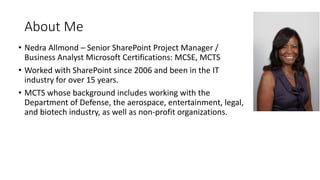
About Me
• Nedra Allmond – Senior SharePoint Project Manager /
Business Analyst Microsoft Certifications: MCSE, MCTS
• Worked with SharePoint since 2006 and been in the IT
industry for over 15 years.
• MCTS whose background includes working with the
Department of Defense, the aerospace, entertainment, legal,
and biotech industry, as well as non-profit organizations.
More about me
• User Advocate.
• Co-chair for SharePoint Saturday Los Angeles and has been a speaker for
numerous SPS Events
• Co-founder of the San Fernando Valley SharePoint Users Group.
• Served Women in SharePoint – National Board, West Regional President /
Board Member, and Los Angeles Chapter President / Board Member.
• Microsoft Teams my current favorite
Requirements for MS Teams
• Any license of Office 365
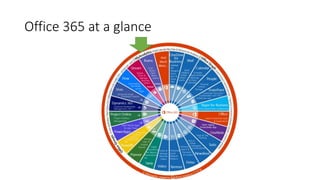
Office 365 at a glance
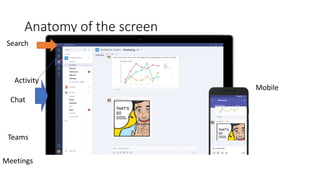
Anatomy of the screen
Search
Activity
Chat
Mobile
Teams
Meetings
Teams & Channels
• Apply a solid goverance plan around MS Teams to prevent wildfire
growth.
Teams & Channels (cont.)
• Recognize and apply best practices for straightforward taxonomy and
organization when using Teams.
Track Activity
• Best practices
• @notifications
• Check your activity feed first
• Distinguish between your activity and Team activity
• Mobile user?
Demo
• This is a demonstration of how to set up teams and channels
• Working in Teams
• Adding guest to teams
• Working in channels
• Team activity
CHAT
• Great to adhoc connect
• Quick questions
• Update status
• GIFs, emojis and stickers – may need to control
• KEEP HISTORY OR CONVERSATION
• Searchable
CHAT (cont.)
• You have options
• Private messages
• Post on channel
• Favorite a chat
• Team chat vs private chat
• Presence visible
Chat (cont.)
• Copy paste inline
• Link in chat
• Editing
• Chat threads
• SEARCH
Skype for Business
• Chat with someone who has Skype for Business
• Invite to join MS Teams
• Teams will soon replace Skype for Business
Demonstration for Chat
• Chat with Catherine
Meetings & Calls
• Audio quality has greatly improved
• Does depend on microphone quality
• Video anyone?
• Mobile – Teams call will ring on your mobile device
• Group calls
Meetings & Calls (cont.)
• Share your desktop
• Work together on work projects
• Invite team members on the fly
Files
• What type of files are allowed – anything allowed in Office 365
• You can edit a file
• Share with the team and others
• Cloud storage
• Move or copy files
Demo
• Meetings & Calls – (chat and call with Team member)
• Files
Apps & Services
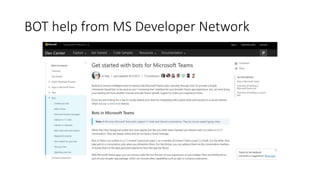
• What are bots
• Get started with bots for Microsoft Teams
• https://msdn.microsoft.com/en-us/microsoft-
teams/bots?f=255&MSPPError=-2147217396
BOT help from MS Developer Network
Apps & Services (cont.)
• How to use tabs effectively
• Using connectors – yes, there is a Visual Studio connector
• Click on ellipsis next to the channel
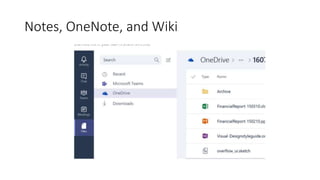
• OneNote, Notes, and Wiki
• Outlook and SharePoint
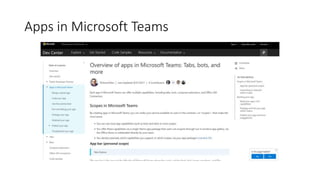
Apps
• What is available in the Teams app gallery
• Click on “plus sign”
• https://msdn.microsoft.com/en-us/microsoft-teams/teamsapps
Apps in Microsoft Teams
Customizable for each team
Demo of apps, bots
• T-bot
• SharePoint
• PowerBI
• Connectors, click elipses next to channel
Tabs
• Quickly add tabs to favorites, edit and share
• Duplicate tabs on channels
• Consider security
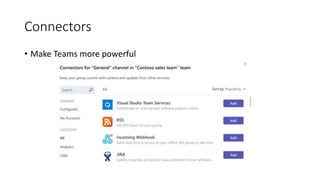
Connectors
• Make Teams more powerful
Notes, OneNote, and Wiki
Outlook and SharePoint
• Create a Team, get an Office 365 group
• Mailbox
• no messages
• SharePoint site
• Limited functionality
• Wiki
• Smart text editor
Full Adoption in less than 3 days – a real story
•How our technical team and sales team learned to
collaborate on the MS Teams powerful platform.
Working with a non-technical sales team we were
up and running with full adoption in less than 3
days.
MS Ignite Announcements – September 25,
2017
• Microsoft Teams is being positioned as the "central hub" to
simplify the user experience and provide access to the entire
O365 suite of apps.
• Drive adoption across the entire Office 365 stack and Teams
may be the missing element to simplify access and drive
greater adoption.
• More Connectors and integration for live collaboration.
MS Ignite Announcements
• Microsoft Teams is NOT replacing Skype for Business Server.
• Skype for Business Server is the on-premise (or dedicated
cloud) deployment model deployed by enterprise clients
with complex voice and collaboration requirements.
• Microsoft confirmed their commitment to the next release of
Skype Server. Do you reply on Skype? This is good news!
MS Ignite Announcements
• Microsoft Teams will provide a robust collaboration,
messaging and meetings tool set.
• The cloud voice capabilities in Teams appear to mirror those
of Skype Cloud PBX (with some potential new capabilities as
well).
• Evaluate their overall voice and collaboration requirements
as they build their cloud voice transformation strategy prior
to making a decision on Teams, Skype for Business or a
hybrid of both.
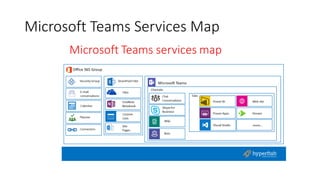
Microsoft Teams Services Map
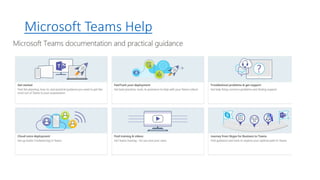
How to get help
• Microsoft Teams Help
• https://support.office.com/en-us/teams
• Microsoft Teams tech community
• https://techcommunity.microsoft.com/t5/Microsoft-
Teams/ct-p/MicrosoftTeams
• Microsoft Team developer platform
• https://dev.office.com/microsoft-teams
Microsoft Teams Help
Providing feedback to the Microsoft Teams
Team
• https://microsoftteams.uservoice.com/forums/555103-public-
preview
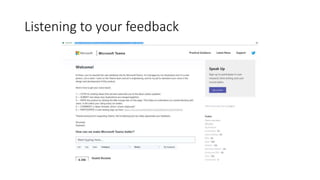
Listening to your feedback
Questions?
Thank you!
• My contact information
• http://linkedin.com/nedraallmond
• Twitter: @NedraAllmond
Thank You to Our Sponsors
PLATINUM
GOLD
SILVER BRONZE
Join us right after at The Urge
Socialize and unwind after our day of learning.
Urge Gastropub & Common House
(practically across the street)
255 Redel Road, San Marcos, CA 92078
https://sm.urgegastropub.com/
Thank you for joining us today!
Don’t Forget SharePint

Microsoft Teams More Than Just Chat

  • 2.
    Microsoft Teams –More Than Chat Nedra Allmond Sr. Project Manager, ExecuComp Services LLC
  • 3.
    Agenda • Introduction • Teams& Channels • Track Activity • Chat • Meetings & Calls • Files
  • 4.
    Agenda (cont.) • Apps& services • Security • How we are successful with Teams • A real user story • Questions & Answers
  • 5.
    About Me • NedraAllmond – Senior SharePoint Project Manager / Business Analyst Microsoft Certifications: MCSE, MCTS • Worked with SharePoint since 2006 and been in the IT industry for over 15 years. • MCTS whose background includes working with the Department of Defense, the aerospace, entertainment, legal, and biotech industry, as well as non-profit organizations.
  • 6.
    More about me •User Advocate. • Co-chair for SharePoint Saturday Los Angeles and has been a speaker for numerous SPS Events • Co-founder of the San Fernando Valley SharePoint Users Group. • Served Women in SharePoint – National Board, West Regional President / Board Member, and Los Angeles Chapter President / Board Member. • Microsoft Teams my current favorite
  • 7.
    Requirements for MSTeams • Any license of Office 365
  • 8.
    Office 365 ata glance
  • 9.
    Anatomy of thescreen Search Activity Chat Mobile Teams Meetings
  • 10.
    Teams & Channels •Apply a solid goverance plan around MS Teams to prevent wildfire growth.
  • 11.
    Teams & Channels(cont.) • Recognize and apply best practices for straightforward taxonomy and organization when using Teams.
  • 12.
    Track Activity • Bestpractices • @notifications • Check your activity feed first • Distinguish between your activity and Team activity • Mobile user?
  • 13.
    Demo • This isa demonstration of how to set up teams and channels • Working in Teams • Adding guest to teams • Working in channels • Team activity
  • 14.
    CHAT • Great toadhoc connect • Quick questions • Update status • GIFs, emojis and stickers – may need to control • KEEP HISTORY OR CONVERSATION • Searchable
  • 15.
    CHAT (cont.) • Youhave options • Private messages • Post on channel • Favorite a chat • Team chat vs private chat • Presence visible
  • 16.
    Chat (cont.) • Copypaste inline • Link in chat • Editing • Chat threads • SEARCH
  • 17.
    Skype for Business •Chat with someone who has Skype for Business • Invite to join MS Teams • Teams will soon replace Skype for Business
  • 18.
    Demonstration for Chat •Chat with Catherine
  • 19.
    Meetings & Calls •Audio quality has greatly improved • Does depend on microphone quality • Video anyone? • Mobile – Teams call will ring on your mobile device • Group calls
  • 20.
    Meetings & Calls(cont.) • Share your desktop • Work together on work projects • Invite team members on the fly
  • 21.
    Files • What typeof files are allowed – anything allowed in Office 365 • You can edit a file • Share with the team and others • Cloud storage • Move or copy files
  • 22.
    Demo • Meetings &Calls – (chat and call with Team member) • Files
  • 23.
    Apps & Services •What are bots • Get started with bots for Microsoft Teams • https://msdn.microsoft.com/en-us/microsoft- teams/bots?f=255&MSPPError=-2147217396
  • 24.
    BOT help fromMS Developer Network
  • 25.
    Apps & Services(cont.) • How to use tabs effectively • Using connectors – yes, there is a Visual Studio connector • Click on ellipsis next to the channel • OneNote, Notes, and Wiki • Outlook and SharePoint
  • 26.
    Apps • What isavailable in the Teams app gallery • Click on “plus sign” • https://msdn.microsoft.com/en-us/microsoft-teams/teamsapps
  • 27.
  • 28.
  • 29.
    Demo of apps,bots • T-bot • SharePoint • PowerBI • Connectors, click elipses next to channel
  • 30.
    Tabs • Quickly addtabs to favorites, edit and share • Duplicate tabs on channels • Consider security
  • 31.
  • 32.
  • 33.
    Outlook and SharePoint •Create a Team, get an Office 365 group • Mailbox • no messages • SharePoint site • Limited functionality • Wiki • Smart text editor
  • 34.
    Full Adoption inless than 3 days – a real story •How our technical team and sales team learned to collaborate on the MS Teams powerful platform. Working with a non-technical sales team we were up and running with full adoption in less than 3 days.
  • 35.
    MS Ignite Announcements– September 25, 2017 • Microsoft Teams is being positioned as the "central hub" to simplify the user experience and provide access to the entire O365 suite of apps. • Drive adoption across the entire Office 365 stack and Teams may be the missing element to simplify access and drive greater adoption. • More Connectors and integration for live collaboration.
  • 36.
    MS Ignite Announcements •Microsoft Teams is NOT replacing Skype for Business Server. • Skype for Business Server is the on-premise (or dedicated cloud) deployment model deployed by enterprise clients with complex voice and collaboration requirements. • Microsoft confirmed their commitment to the next release of Skype Server. Do you reply on Skype? This is good news!
  • 37.
    MS Ignite Announcements •Microsoft Teams will provide a robust collaboration, messaging and meetings tool set. • The cloud voice capabilities in Teams appear to mirror those of Skype Cloud PBX (with some potential new capabilities as well). • Evaluate their overall voice and collaboration requirements as they build their cloud voice transformation strategy prior to making a decision on Teams, Skype for Business or a hybrid of both.
  • 38.
  • 39.
    How to gethelp • Microsoft Teams Help • https://support.office.com/en-us/teams • Microsoft Teams tech community • https://techcommunity.microsoft.com/t5/Microsoft- Teams/ct-p/MicrosoftTeams • Microsoft Team developer platform • https://dev.office.com/microsoft-teams
  • 40.
  • 41.
    Providing feedback tothe Microsoft Teams Team • https://microsoftteams.uservoice.com/forums/555103-public- preview
  • 42.
  • 43.
  • 44.
    Thank you! • Mycontact information • http://linkedin.com/nedraallmond • Twitter: @NedraAllmond
  • 45.
    Thank You toOur Sponsors PLATINUM GOLD SILVER BRONZE
  • 46.
    Join us rightafter at The Urge Socialize and unwind after our day of learning. Urge Gastropub & Common House (practically across the street) 255 Redel Road, San Marcos, CA 92078 https://sm.urgegastropub.com/ Thank you for joining us today! Don’t Forget SharePint

Editor's Notes

  • #8 All you need is Office 365 to user teams. It is available with other Office 365 apps.
  • #9 Office 365 has many components. Teams is just one of them
  • #11 Channels help keep conversations organized. Think top level topic that will contain all artifacts for a “project” Consider what is “temporary” and what might be longer term. Suggest a naming convention to avoid duplicates and someone might consider maintaining the structure.
  • #29 Tailor your Microsoft Teams workspace to quickly access key documents and tools, explore data and get updates from the apps your teams uses every day. Create different chat channels for the team based on work streams or topics. Customize notifications so you don’t miss important activity and information.
  • #36 Because Teams is a hub for teamwork, we needed one central place that was easy to get to share documents and ideas with little to no training.
  • #48 SharePint