`UNIT I: MESSAGE FORMAT
MESSAGE FORMAT:
Earlier:
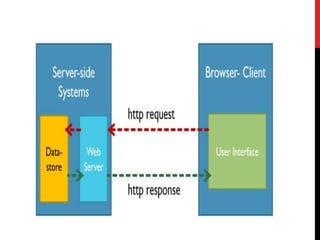
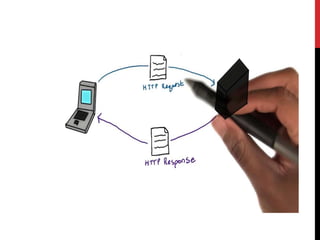
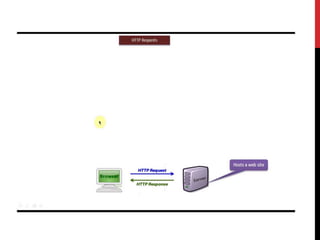
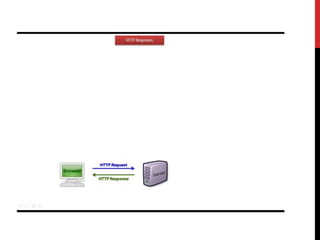
• HTTP is a request-response protocol.
It specifies a set of rules that clients and servers use to
communicate:
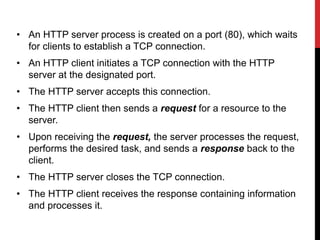
• An HTTP server process is created on a port (80), which waits
for clients to establish a TCP connection.
• An HTTP client initiates a TCP connection with the HTTP
server at the designated port.
• The HTTP server accepts this connection.
• The HTTP client then sends a request for a resource to the
server.
• Upon receiving the request, the server processes the request,
performs the desired task, and sends a response back to the
client.
• The HTTP server closes the TCP connection.
• The HTTP client receives the response containing information
and processes it.
HTTP STATELESS:
• HTTP client wants to get resource from the server, it has
to follow these steps.
• Web server treats every request as a new request.
• There is no way to specify that some requests are
related.
ADVANTAGE:
• Client/Server need not retain information between
successive requests.
• It is successive related requests is sometimes necessary.
• As HTTP protocol is inherently stateless, designer of the
web pages must use alternative methods such as
Cookies, URL rewriting, etc.
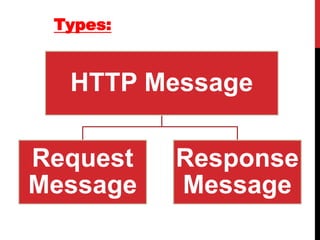
HTTP Message
Request
Message
Response
Message
Types:
REQUEST MESSAGE:
A request message is sent by a web client to the web server.
• Request Line
• Header
• Empty Line
• Optional Body
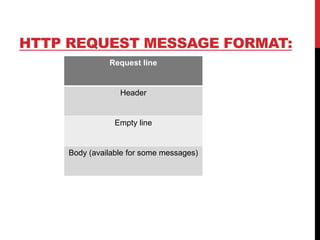
HTTP REQUEST MESSAGE FORMAT:
Request line
Header
Empty line
Body (available for some messages)
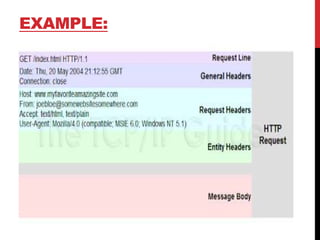
EXAMPLE:
REQUEST LINE:
• Request Type
• URL
• HTTP Version
Two consecutive parts are separated by a space.
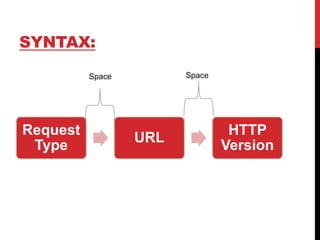
SYNTAX:
Request
Type
URL
HTTP
Version
Space
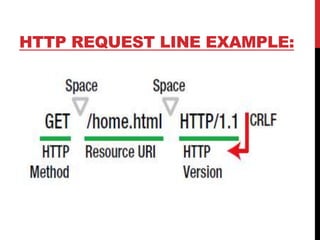
HTTP REQUEST LINE EXAMPLE:
REQUEST TYPE (METHOD):
• It indicates the type of the request, a client wants to send.
• A method makes a message either a request or a command
to the server.
• Request messages are used to retrieve data from the server.
• A command tells the server to do a specific task.
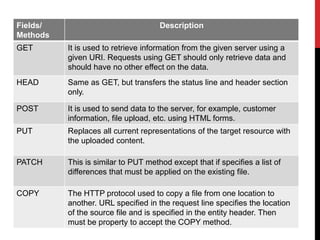
Fields/
Methods
Description
GET It is used to retrieve information from the given server using a
given URI. Requests using GET should only retrieve data and
should have no other effect on the data.
HEAD Same as GET, but transfers the status line and header section
only.
POST It is used to send data to the server, for example, customer
information, file upload, etc. using HTML forms.
PUT Replaces all current representations of the target resource with
the uploaded content.
PATCH This is similar to PUT method except that if specifies a list of
differences that must be applied on the existing file.
COPY The HTTP protocol used to copy a file from one location to
another. URL specified in the request line specifies the location
of the source file and is specified in the entity header. Then
must be property to accept the COPY method.
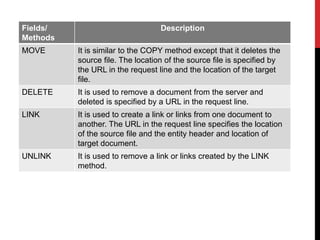
Fields/
Methods
Description
MOVE It is similar to the COPY method except that it deletes the
source file. The location of the source file is specified by
the URL in the request line and the location of the target
file.
DELETE It is used to remove a document from the server and
deleted is specified by a URL in the request line.
LINK It is used to create a link or links from one document to
another. The URL in the request line specifies the location
of the source file and the entity header and location of
target document.
UNLINK It is used to remove a link or links created by the LINK
method.
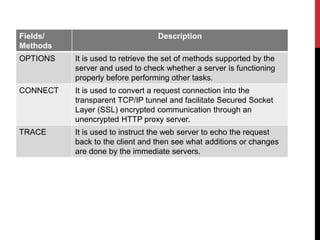
Fields/
Methods
Description
OPTIONS It is used to retrieve the set of methods supported by the
server and used to check whether a server is functioning
properly before performing other tasks.
CONNECT It is used to convert a request connection into the
transparent TCP/IP tunnel and facilitate Secured Socket
Layer (SSL) encrypted communication through an
unencrypted HTTP proxy server.
TRACE It is used to instruct the web server to echo the request
back to the client and then see what additions or changes
are done by the immediate servers.
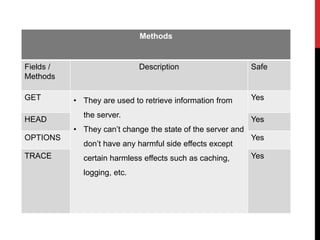
Methods
Fields /
Methods
Description Safe
GET • They are used to retrieve information from
the server.
• They can’t change the state of the server and
don’t have any harmful side effects except
certain harmless effects such as caching,
logging, etc.
Yes
HEAD Yes
OPTIONS Yes
TRACE Yes
Methods
Fields /
Methods
Description Unsafe
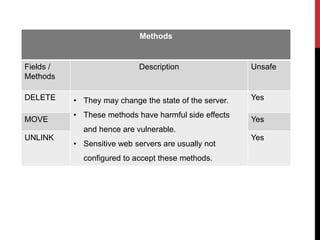
DELETE • They may change the state of the server.
• These methods have harmful side effects
and hence are vulnerable.
• Sensitive web servers are usually not
configured to accept these methods.
Yes
MOVE Yes
UNLINK Yes
URL:
Studied in previous section.
HTTP VERSION:
• HTTP/1.0
• HTTP/1.1 – it is current version.
RESPONSE METHOD:
In response to the request message, a response message is sent
by a server to the client.
• A status line
• A header
• An empty line
• An optional body
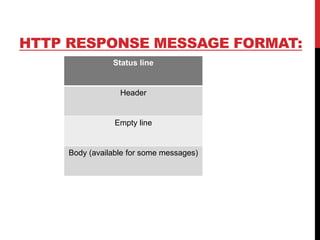
HTTP RESPONSE MESSAGE FORMAT:
Status line
Header
Empty line
Body (available for some messages)
STATUS LINE:
• HTTP version
• Status code
• Status phrase
Two consecutive parts are separated by a space.
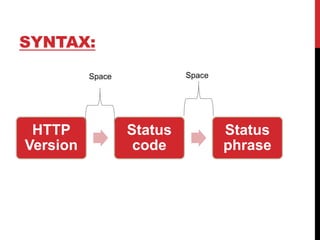
SYNTAX:
HTTP
Version
Status
code
Status
phrase
Space
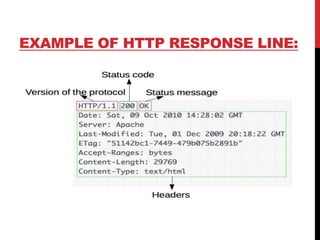
EXAMPLE OF HTTP RESPONSE LINE:
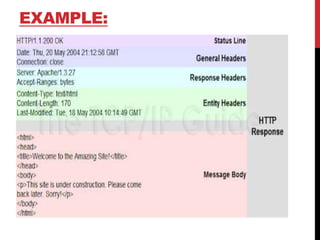
EXAMPLE:
HTTP VERSION:
This field specifies the version of the HTTP protocol being
used by the server.
Current Version: HTTP/1.1
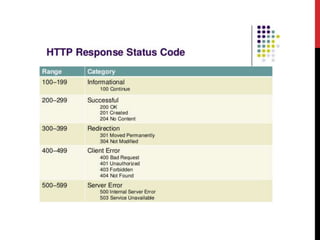
STATUS CODE:
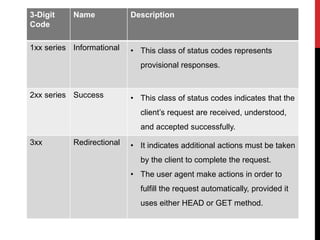
• It is a three-digit code that indicates the status of the
response.
• They are classified with respect to their functionality into
five groups:
3-Digit
Code
Name Description
1xx series Informational • This class of status codes represents
provisional responses.
2xx series Success • This class of status codes indicates that the
client’s request are received, understood,
and accepted successfully.
3xx Redirectional • It indicates additional actions must be taken
by the client to complete the request.
• The user agent make actions in order to
fulfill the request automatically, provided it
uses either HEAD or GET method.
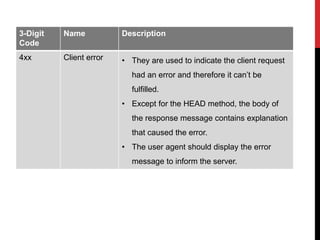
3-Digit
Code
Name Description
4xx Client error • They are used to indicate the client request
had an error and therefore it can’t be
fulfilled.
• Except for the HEAD method, the body of
the response message contains explanation
that caused the error.
• The user agent should display the error
message to inform the server.
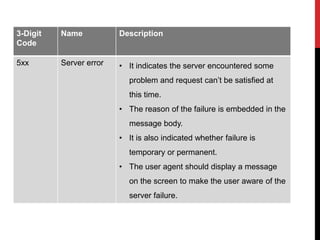
3-Digit
Code
Name Description
5xx Server error • It indicates the server encountered some
problem and request can’t be satisfied at
this time.
• The reason of the failure is embedded in the
message body.
• It is also indicated whether failure is
temporary or permanent.
• The user agent should display a message
on the screen to make the user aware of the
server failure.
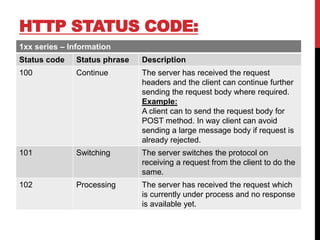
HTTP STATUS CODE:
1xx series – Information
Status code Status phrase Description
100 Continue The server has received the request
headers and the client can continue further
sending the request body where required.
Example:
A client can to send the request body for
POST method. In way client can avoid
sending a large message body if request is
already rejected.
101 Switching The server switches the protocol on
receiving a request from the client to do the
same.
102 Processing The server has received the request which
is currently under process and no response
is available yet.
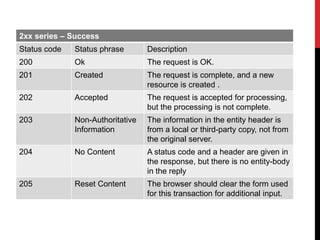
2xx series – Success
Status code Status phrase Description
200 Ok The request is OK.
201 Created The request is complete, and a new
resource is created .
202 Accepted The request is accepted for processing,
but the processing is not complete.
203 Non-Authoritative
Information
The information in the entity header is
from a local or third-party copy, not from
the original server.
204 No Content A status code and a header are given in
the response, but there is no entity-body
in the reply
205 Reset Content The browser should clear the form used
for this transaction for additional input.
Status code Status phrase Description
206 Partial Content The server is returning partial data of
the size requested. Used in response to
a request specifying a Range header.
The server must specify the range
included in the response with
the Content-Range head
207 Multi-Status The body of the message is an XML file
that contains a number of response
codes. The number of response codes
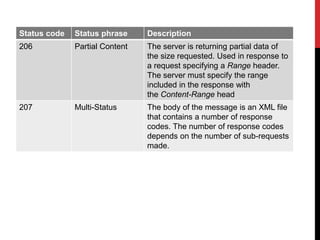
depends on the number of sub-requests
made.
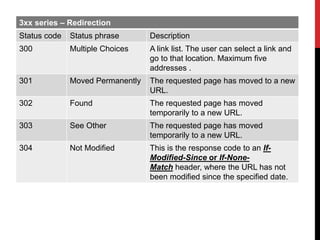
3xx series – Redirection
Status code Status phrase Description
300 Multiple Choices A link list. The user can select a link and
go to that location. Maximum five
addresses .
301 Moved Permanently The requested page has moved to a new
URL.
302 Found The requested page has moved
temporarily to a new URL.
303 See Other The requested page has moved
temporarily to a new URL.
304 Not Modified This is the response code to an If-
Modified-Since or If-None-
Match header, where the URL has not
been modified since the specified date.
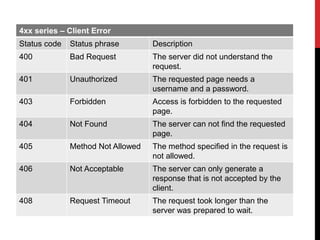
4xx series – Client Error
Status code Status phrase Description
400 Bad Request The server did not understand the
request.
401 Unauthorized The requested page needs a
username and a password.
403 Forbidden Access is forbidden to the requested
page.
404 Not Found The server can not find the requested
page.
405 Method Not Allowed The method specified in the request is
not allowed.
406 Not Acceptable The server can only generate a
response that is not accepted by the
client.
408 Request Timeout The request took longer than the
server was prepared to wait.
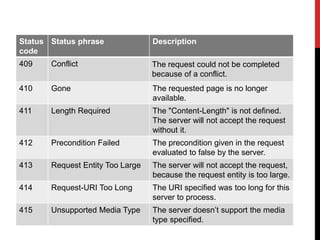
Status
code
Status phrase Description
409 Conflict The request could not be completed
because of a conflict.
410 Gone The requested page is no longer
available.
411 Length Required The "Content-Length" is not defined.
The server will not accept the request
without it.
412 Precondition Failed The precondition given in the request
evaluated to false by the server.
413 Request Entity Too Large The server will not accept the request,
because the request entity is too large.
414 Request-URI Too Long The URI specified was too long for this
server to process.
415 Unsupported Media Type The server doesn’t support the media
type specified.
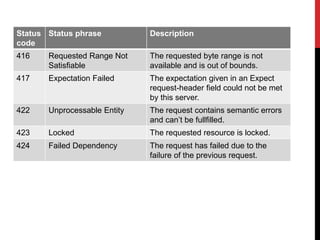
Status
code
Status phrase Description
416 Requested Range Not
Satisfiable
The requested byte range is not
available and is out of bounds.
417 Expectation Failed The expectation given in an Expect
request-header field could not be met
by this server.
422 Unprocessable Entity The request contains semantic errors
and can’t be fullfilled.
423 Locked The requested resource is locked.
424 Failed Dependency The request has failed due to the
failure of the previous request.
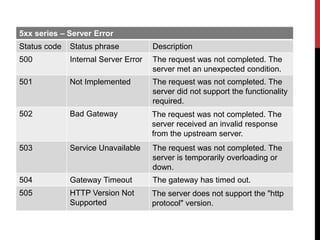
5xx series – Server Error
Status code Status phrase Description
500 Internal Server Error The request was not completed. The
server met an unexpected condition.
501 Not Implemented The request was not completed. The
server did not support the functionality
required.
502 Bad Gateway The request was not completed. The
server received an invalid response
from the upstream server.
503 Service Unavailable The request was not completed. The
server is temporarily overloading or
down.
504 Gateway Timeout The gateway has timed out.
505 HTTP Version Not
Supported
The server does not support the "http
protocol" version.
HEADERS:
• They are important part of both request message and response
message.
• The characteristics of the resource requested and the data that are
provided.
Example:
• A client may want to accept image files only in some specified format.
• Similarly, the server may provide additional information about the
resource being sent such as the length of message content or last
modification date of the resource, etc.
• The headers are separated by an empty line from the request and
response body.
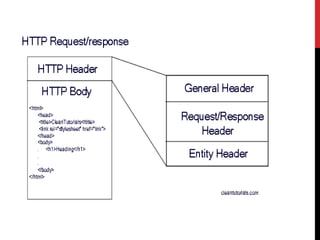
HTTP REQUEST HEADER FORMAT:
Request Header contains of three parts:
General Header
Request Header
Entity Header
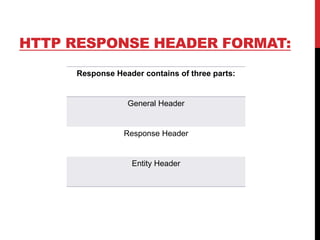
HTTP RESPONSE HEADER FORMAT:
Response Header contains of three parts:
General Header
Response Header
Entity Header
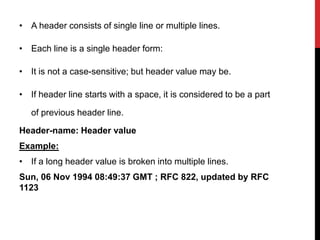
• A header consists of single line or multiple lines.
• Each line is a single header form:
• It is not a case-sensitive; but header value may be.
• If header line starts with a space, it is considered to be a part
of previous header line.
Header-name: Header value
Example:
• If a long header value is broken into multiple lines.
Sun, 06 Nov 1994 08:49:37 GMT ; RFC 822, updated by RFC
1123
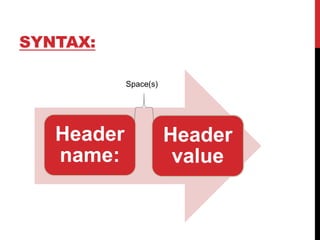
SYNTAX:
Header
name:
Header
value
Space(s)
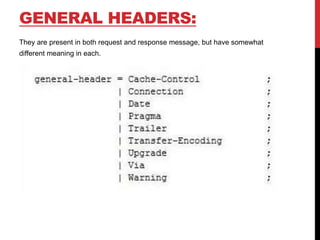
GENERAL HEADERS:
They are present in both request and response message, but have somewhat
different meaning in each.
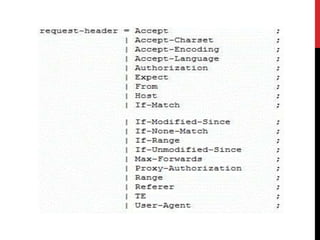
REQUEST HEADER:
It contains information about client sending the request as well as the
data format that the client expects.
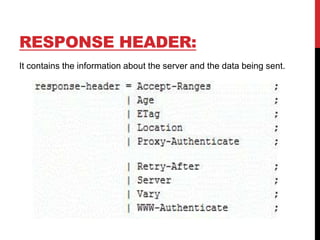
RESPONSE HEADER:
It contains the information about the server and the data being sent.
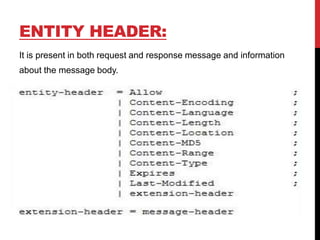
ENTITY HEADER:
It is present in both request and response message and information
about the message body.
REFERENCE:
https://www.slideshare.net/origamiaddict/http-40249449
https://www.httpdebugger.com/http/http_header.html

Web technology Unit-I Part D - message format

  • 1.
  • 2.
    MESSAGE FORMAT: Earlier: • HTTPis a request-response protocol. It specifies a set of rules that clients and servers use to communicate:
  • 3.
    • An HTTPserver process is created on a port (80), which waits for clients to establish a TCP connection. • An HTTP client initiates a TCP connection with the HTTP server at the designated port. • The HTTP server accepts this connection. • The HTTP client then sends a request for a resource to the server. • Upon receiving the request, the server processes the request, performs the desired task, and sends a response back to the client. • The HTTP server closes the TCP connection. • The HTTP client receives the response containing information and processes it.
  • 4.
    HTTP STATELESS: • HTTPclient wants to get resource from the server, it has to follow these steps. • Web server treats every request as a new request. • There is no way to specify that some requests are related.
  • 5.
    ADVANTAGE: • Client/Server neednot retain information between successive requests. • It is successive related requests is sometimes necessary. • As HTTP protocol is inherently stateless, designer of the web pages must use alternative methods such as Cookies, URL rewriting, etc.
  • 7.
  • 9.
    REQUEST MESSAGE: A requestmessage is sent by a web client to the web server. • Request Line • Header • Empty Line • Optional Body
  • 10.
    HTTP REQUEST MESSAGEFORMAT: Request line Header Empty line Body (available for some messages)
  • 11.
  • 12.
    REQUEST LINE: • RequestType • URL • HTTP Version Two consecutive parts are separated by a space.
  • 13.
  • 14.
  • 15.
    REQUEST TYPE (METHOD): •It indicates the type of the request, a client wants to send. • A method makes a message either a request or a command to the server. • Request messages are used to retrieve data from the server. • A command tells the server to do a specific task.
  • 16.
    Fields/ Methods Description GET It isused to retrieve information from the given server using a given URI. Requests using GET should only retrieve data and should have no other effect on the data. HEAD Same as GET, but transfers the status line and header section only. POST It is used to send data to the server, for example, customer information, file upload, etc. using HTML forms. PUT Replaces all current representations of the target resource with the uploaded content. PATCH This is similar to PUT method except that if specifies a list of differences that must be applied on the existing file. COPY The HTTP protocol used to copy a file from one location to another. URL specified in the request line specifies the location of the source file and is specified in the entity header. Then must be property to accept the COPY method.
  • 17.
    Fields/ Methods Description MOVE It issimilar to the COPY method except that it deletes the source file. The location of the source file is specified by the URL in the request line and the location of the target file. DELETE It is used to remove a document from the server and deleted is specified by a URL in the request line. LINK It is used to create a link or links from one document to another. The URL in the request line specifies the location of the source file and the entity header and location of target document. UNLINK It is used to remove a link or links created by the LINK method.
  • 18.
    Fields/ Methods Description OPTIONS It isused to retrieve the set of methods supported by the server and used to check whether a server is functioning properly before performing other tasks. CONNECT It is used to convert a request connection into the transparent TCP/IP tunnel and facilitate Secured Socket Layer (SSL) encrypted communication through an unencrypted HTTP proxy server. TRACE It is used to instruct the web server to echo the request back to the client and then see what additions or changes are done by the immediate servers.
  • 19.
    Methods Fields / Methods Description Safe GET• They are used to retrieve information from the server. • They can’t change the state of the server and don’t have any harmful side effects except certain harmless effects such as caching, logging, etc. Yes HEAD Yes OPTIONS Yes TRACE Yes
  • 20.
    Methods Fields / Methods Description Unsafe DELETE• They may change the state of the server. • These methods have harmful side effects and hence are vulnerable. • Sensitive web servers are usually not configured to accept these methods. Yes MOVE Yes UNLINK Yes
  • 21.
  • 22.
    HTTP VERSION: • HTTP/1.0 •HTTP/1.1 – it is current version.
  • 24.
    RESPONSE METHOD: In responseto the request message, a response message is sent by a server to the client. • A status line • A header • An empty line • An optional body
  • 25.
    HTTP RESPONSE MESSAGEFORMAT: Status line Header Empty line Body (available for some messages)
  • 26.
    STATUS LINE: • HTTPversion • Status code • Status phrase Two consecutive parts are separated by a space.
  • 27.
  • 28.
    EXAMPLE OF HTTPRESPONSE LINE:
  • 29.
  • 30.
    HTTP VERSION: This fieldspecifies the version of the HTTP protocol being used by the server. Current Version: HTTP/1.1
  • 31.
    STATUS CODE: • Itis a three-digit code that indicates the status of the response. • They are classified with respect to their functionality into five groups:
  • 32.
    3-Digit Code Name Description 1xx seriesInformational • This class of status codes represents provisional responses. 2xx series Success • This class of status codes indicates that the client’s request are received, understood, and accepted successfully. 3xx Redirectional • It indicates additional actions must be taken by the client to complete the request. • The user agent make actions in order to fulfill the request automatically, provided it uses either HEAD or GET method.
  • 33.
    3-Digit Code Name Description 4xx Clienterror • They are used to indicate the client request had an error and therefore it can’t be fulfilled. • Except for the HEAD method, the body of the response message contains explanation that caused the error. • The user agent should display the error message to inform the server.
  • 34.
    3-Digit Code Name Description 5xx Servererror • It indicates the server encountered some problem and request can’t be satisfied at this time. • The reason of the failure is embedded in the message body. • It is also indicated whether failure is temporary or permanent. • The user agent should display a message on the screen to make the user aware of the server failure.
  • 35.
    HTTP STATUS CODE: 1xxseries – Information Status code Status phrase Description 100 Continue The server has received the request headers and the client can continue further sending the request body where required. Example: A client can to send the request body for POST method. In way client can avoid sending a large message body if request is already rejected. 101 Switching The server switches the protocol on receiving a request from the client to do the same. 102 Processing The server has received the request which is currently under process and no response is available yet.
  • 36.
    2xx series –Success Status code Status phrase Description 200 Ok The request is OK. 201 Created The request is complete, and a new resource is created . 202 Accepted The request is accepted for processing, but the processing is not complete. 203 Non-Authoritative Information The information in the entity header is from a local or third-party copy, not from the original server. 204 No Content A status code and a header are given in the response, but there is no entity-body in the reply 205 Reset Content The browser should clear the form used for this transaction for additional input.
  • 37.
    Status code Statusphrase Description 206 Partial Content The server is returning partial data of the size requested. Used in response to a request specifying a Range header. The server must specify the range included in the response with the Content-Range head 207 Multi-Status The body of the message is an XML file that contains a number of response codes. The number of response codes depends on the number of sub-requests made.
  • 38.
    3xx series –Redirection Status code Status phrase Description 300 Multiple Choices A link list. The user can select a link and go to that location. Maximum five addresses . 301 Moved Permanently The requested page has moved to a new URL. 302 Found The requested page has moved temporarily to a new URL. 303 See Other The requested page has moved temporarily to a new URL. 304 Not Modified This is the response code to an If- Modified-Since or If-None- Match header, where the URL has not been modified since the specified date.
  • 39.
    4xx series –Client Error Status code Status phrase Description 400 Bad Request The server did not understand the request. 401 Unauthorized The requested page needs a username and a password. 403 Forbidden Access is forbidden to the requested page. 404 Not Found The server can not find the requested page. 405 Method Not Allowed The method specified in the request is not allowed. 406 Not Acceptable The server can only generate a response that is not accepted by the client. 408 Request Timeout The request took longer than the server was prepared to wait.
  • 40.
    Status code Status phrase Description 409Conflict The request could not be completed because of a conflict. 410 Gone The requested page is no longer available. 411 Length Required The "Content-Length" is not defined. The server will not accept the request without it. 412 Precondition Failed The precondition given in the request evaluated to false by the server. 413 Request Entity Too Large The server will not accept the request, because the request entity is too large. 414 Request-URI Too Long The URI specified was too long for this server to process. 415 Unsupported Media Type The server doesn’t support the media type specified.
  • 41.
    Status code Status phrase Description 416Requested Range Not Satisfiable The requested byte range is not available and is out of bounds. 417 Expectation Failed The expectation given in an Expect request-header field could not be met by this server. 422 Unprocessable Entity The request contains semantic errors and can’t be fullfilled. 423 Locked The requested resource is locked. 424 Failed Dependency The request has failed due to the failure of the previous request.
  • 42.
    5xx series –Server Error Status code Status phrase Description 500 Internal Server Error The request was not completed. The server met an unexpected condition. 501 Not Implemented The request was not completed. The server did not support the functionality required. 502 Bad Gateway The request was not completed. The server received an invalid response from the upstream server. 503 Service Unavailable The request was not completed. The server is temporarily overloading or down. 504 Gateway Timeout The gateway has timed out. 505 HTTP Version Not Supported The server does not support the "http protocol" version.
  • 45.
    HEADERS: • They areimportant part of both request message and response message. • The characteristics of the resource requested and the data that are provided. Example: • A client may want to accept image files only in some specified format. • Similarly, the server may provide additional information about the resource being sent such as the length of message content or last modification date of the resource, etc. • The headers are separated by an empty line from the request and response body.
  • 46.
    HTTP REQUEST HEADERFORMAT: Request Header contains of three parts: General Header Request Header Entity Header
  • 47.
    HTTP RESPONSE HEADERFORMAT: Response Header contains of three parts: General Header Response Header Entity Header
  • 48.
    • A headerconsists of single line or multiple lines. • Each line is a single header form: • It is not a case-sensitive; but header value may be. • If header line starts with a space, it is considered to be a part of previous header line. Header-name: Header value Example: • If a long header value is broken into multiple lines. Sun, 06 Nov 1994 08:49:37 GMT ; RFC 822, updated by RFC 1123
  • 49.
  • 51.
    GENERAL HEADERS: They arepresent in both request and response message, but have somewhat different meaning in each.
  • 52.
    REQUEST HEADER: It containsinformation about client sending the request as well as the data format that the client expects.
  • 54.
    RESPONSE HEADER: It containsthe information about the server and the data being sent.
  • 55.
    ENTITY HEADER: It ispresent in both request and response message and information about the message body.
  • 57.