CHAPTER ONE
HTTP
Hyper Text Transfer Protocol
Compiled By: Seble N.
 History
 The World Wide Web (WWW)
 The Client/Server Architecture of the WWW
 URL, URI & URN
 The Domain Name System (DNS)
 HTTP Headers
 HTTP Request/Response, the Stateless nature of HTTP
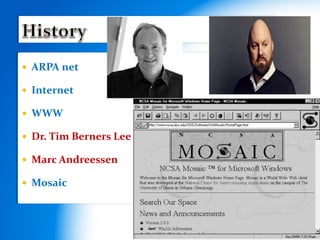
 ARPA net
 Internet
 WWW
 Dr. Tim Berners Lee
 Marc Andreessen
 Mosaic
 www (world wide web)
 A collection of websites
 A website
 A collection of resources:
 Web pages (static / dynamic)
 Media files (images, animations, sound, …)
 Style files (CSS)
 Documents (pdf, doc, txt, rtf, …)
 …
 Stored on machines called web server
 Software involved:
 At the server:
 Web server software : listens for incoming requests for
resources from clients and serves the requests
 Apache - open source, IIS – Microsoft
 At the client:
 Web browser : sends/receives requests/responses
to/from web servers on behalf of the client and renders
content as necessary
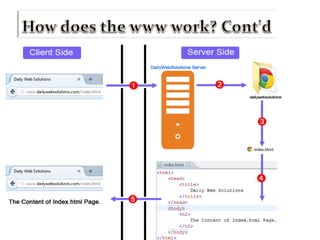
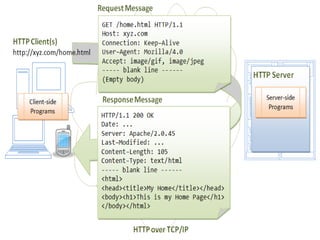
 WWW use client / server architecture
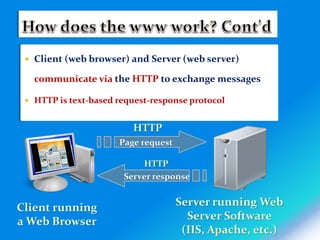
 Client (web browser) and Server (web server)
communicate via the HTTP to exchange messages
 HTTP is text-based request-response protocol
Page request
Client running
a Web Browser
Server running Web
Server Software
(IIS, Apache, etc.)
Server response
HTTP
HTTP
 What is URL?
 The exact address of a resource on the web
 Format:
 <protocol>://<host>[:<port>][<path>][?<query>]
 E.g. http://www.somedomain.com/search.php?q=dns&lang=en
 Protocol – identifies the type of protocol to be used for communication
 http, ftp ….
 Host – identifies the machine on which the requested resource is stored
 Domain names (eg. www.google.com)
 IP address
 Port – identifies the port number of the web server software on the web server
machine
 Default port for http: 80
 Path – identifies the name and path of the resource on the server
 Query – specifies parameters, if any, that should be sent to the server along with
the request
 has the form: ?var_name1=value1&var_name2=value2&…
 DNS is a hierarchical naming system for domain name
services, or any resource connected to with internet
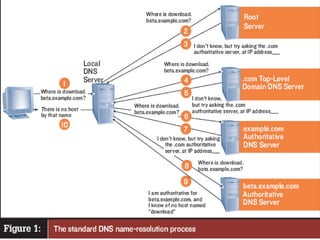
 DNS servers translate domain names to IP addresses
 For this purpose, DNS servers store a table containing name-
IP pairs and do a look-up when requested
 Resolves a human friendly name (eg www.google.com) to a machine
friendly IP address (eg 64.233.187.99)
 “Phone book” of the Internet
 A DNS server may communicate with other server to resolve
a given name
 There are about 13 root DNS servers (http://www.root-
servers.org/)
 Hierarchical in nature (eg. www.aau.edu.et)
 Labels are separated by . (dot)
 Labels must start with a letter and can only consist of letters,
digits and hypens
 Labels can be up to 63 characters long and are case insensitive
 A maximum of 255 characters is allowed in total
 The last (highest) label of a DNS name can be:
 Three letter code top level domains (TLDs): indicating the type of
organization
 com, edu, gov, net, org, biz, …
 Two letter country codes (CCTLDs): indicating the country
 et, us, za, uk, tv, …
 A protocol that enables communication b/n browser and web
server
 A stateless protocol
 When a resource has been sent, the server keeps no record of the
exchange, so that if a second request is made by the same client, it is as
if this was first contact with that client
 Each request a browser sends to a web server is independent of any
other request
 HTTP conversation involves the exchange of HTTP messages
 Is either a request from client to server OR a
response from server to client
 Messages are composed of:
 A start line (request/response line)
 One or more header fields
 An empty line – indicating the end of the header fields
 A message body (optional)
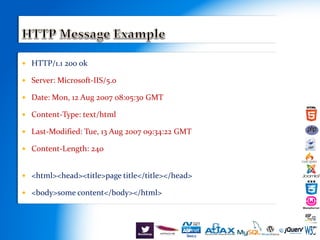
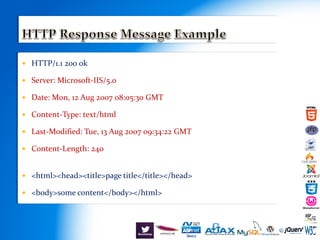
 HTTP/1.1 200 ok
 Server: Microsoft-IIS/5.0
 Date: Mon, 12 Aug 2007 08:05:30 GMT
 Content-Type: text/html
 Last-Modified: Tue, 13 Aug 2007 09:34:22 GMT
 Content-Length: 240
 <html><head><title>page title</title></head>
 <body>some content</body></html>
 The request line contains three parts:
 Request method, Request URI and HTTP Version
 Request methods
 GET (or retrieve) information from the server
 POST (information) back to the server
 HEAD – like GET but only returns meta-information
 PUT (information) at the server
 DELETE (information) from the server
 Request URI
 The URI of the resource requested
 HTTP Version
 Used by the sender to notify the receiver of its abilities
 Format: HTTP/<major>.<minor>
 E.x. HTTP/1.1
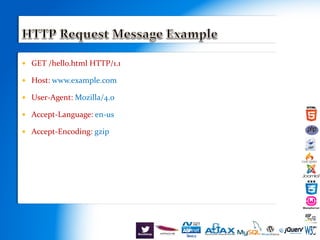
 GET /hello.html HTTP/1.1
 Host: www.example.com
 User-Agent: Mozilla/4.0
 Accept-Language: en-us
 Accept-Encoding: gzip
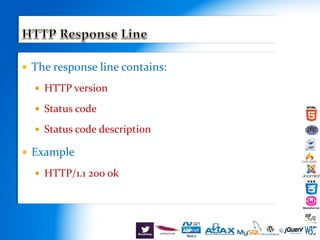
 The response line contains:
 HTTP version
 Status code
 Status code description
 Example
 HTTP/1.1 200 ok
 HTTP/1.1 200 ok
 Server: Microsoft-IIS/5.0
 Date: Mon, 12 Aug 2007 08:05:30 GMT
 Content-Type: text/html
 Last-Modified: Tue, 13 Aug 2007 09:34:22 GMT
 Content-Length: 240
 <html><head><title>page title</title></head>
 <body>some content</body></html>
 Status code - has 5 categories
 1xx – request received, processing continues
 100 Continue – tells client to continue with a request
 2xx – success, action was successfully received,
understood and accepted
 200 Ok – request has succeeded
 202 Accepted – request accepted but not processed
 3xx – further action must be taken to complete
the request
 302 Found – resource found but temporarily moved
 4xx – client error or invalid request
 E.x.
 401 Unauthorized – request requires authorization
 403 Forbidden – client may not have access to the resource
 404 Not Found– page not found
 5xx – server error occurred
 E.x.
 500 Internal Server Error – server encountered an
unexpected error (error/bug with a server side script)
 505 HTTP Version Not Supported – server doesn’t support
the HTTP version
 Contains header fields
 The header fields can be:
 General headers
 Request headers
 Response headers
 Entity headers
 All header fields follow the same generic format
 Each header field consists of a name followed by a colon (:) and a value:
 Header-name:value
 The order of the header field is insignificant
 Have general applicability for both request and response messages
 Apply only to the message being transferred
 Examples:
 Connection: close – client wants to close the connection when the first response
is complete
 Cache-control: no-cache - client can specify additional properties if the
requested resource is cached
 Date
 Give meta-information about the entity body (message body)
being transferred
 Apply only if a message body exists
 Examples:
 Content-Language – language of the intended audience
 Content-Length – size of the entity body (message body)
 Last-Modified: Tue,15 Nov 1994
 …
 Adds additional information about the request
 May include information about the client/sender, including client
capability
 Examples:
 Accept - acceptable media types for response
 Accept-Charset – acceptable character set
 User-Agent – client browser
 Host: - domain name+port
 …
 More information, in addition to the status line
 May contain information about the server or resource
 Examples:
 Server – information about the web server software
 Location – used to redirect to a different location (URI)
 Proxy-Authenticate – proxy authentication challenge
 Age – estimate of time since response was generated
 …
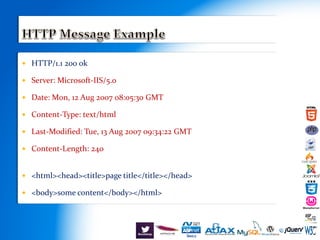
 HTTP/1.1 200 ok
 Server: Microsoft-IIS/5.0
 Date: Mon, 12 Aug 2007 08:05:30 GMT
 Content-Type: text/html
 Last-Modified: Tue, 13 Aug 2007 09:34:22 GMT
 Content-Length: 240
 <html><head><title>page title</title></head>
 <body>some content</body></html>

Introduction to HTTP

  • 1.
    CHAPTER ONE HTTP Hyper TextTransfer Protocol Compiled By: Seble N.
  • 2.
     History  TheWorld Wide Web (WWW)  The Client/Server Architecture of the WWW  URL, URI & URN  The Domain Name System (DNS)  HTTP Headers  HTTP Request/Response, the Stateless nature of HTTP
  • 3.
     ARPA net Internet  WWW  Dr. Tim Berners Lee  Marc Andreessen  Mosaic
  • 4.
     www (worldwide web)  A collection of websites  A website  A collection of resources:  Web pages (static / dynamic)  Media files (images, animations, sound, …)  Style files (CSS)  Documents (pdf, doc, txt, rtf, …)  …  Stored on machines called web server
  • 5.
     Software involved: At the server:  Web server software : listens for incoming requests for resources from clients and serves the requests  Apache - open source, IIS – Microsoft  At the client:  Web browser : sends/receives requests/responses to/from web servers on behalf of the client and renders content as necessary  WWW use client / server architecture
  • 6.
     Client (webbrowser) and Server (web server) communicate via the HTTP to exchange messages  HTTP is text-based request-response protocol Page request Client running a Web Browser Server running Web Server Software (IIS, Apache, etc.) Server response HTTP HTTP
  • 7.
     What isURL?  The exact address of a resource on the web  Format:  <protocol>://<host>[:<port>][<path>][?<query>]  E.g. http://www.somedomain.com/search.php?q=dns&lang=en  Protocol – identifies the type of protocol to be used for communication  http, ftp ….  Host – identifies the machine on which the requested resource is stored  Domain names (eg. www.google.com)  IP address  Port – identifies the port number of the web server software on the web server machine  Default port for http: 80  Path – identifies the name and path of the resource on the server  Query – specifies parameters, if any, that should be sent to the server along with the request  has the form: ?var_name1=value1&var_name2=value2&…
  • 9.
     DNS isa hierarchical naming system for domain name services, or any resource connected to with internet  DNS servers translate domain names to IP addresses  For this purpose, DNS servers store a table containing name- IP pairs and do a look-up when requested  Resolves a human friendly name (eg www.google.com) to a machine friendly IP address (eg 64.233.187.99)  “Phone book” of the Internet  A DNS server may communicate with other server to resolve a given name  There are about 13 root DNS servers (http://www.root- servers.org/)
  • 10.
     Hierarchical innature (eg. www.aau.edu.et)  Labels are separated by . (dot)  Labels must start with a letter and can only consist of letters, digits and hypens  Labels can be up to 63 characters long and are case insensitive  A maximum of 255 characters is allowed in total  The last (highest) label of a DNS name can be:  Three letter code top level domains (TLDs): indicating the type of organization  com, edu, gov, net, org, biz, …  Two letter country codes (CCTLDs): indicating the country  et, us, za, uk, tv, …
  • 12.
     A protocolthat enables communication b/n browser and web server  A stateless protocol  When a resource has been sent, the server keeps no record of the exchange, so that if a second request is made by the same client, it is as if this was first contact with that client  Each request a browser sends to a web server is independent of any other request  HTTP conversation involves the exchange of HTTP messages
  • 13.
     Is eithera request from client to server OR a response from server to client  Messages are composed of:  A start line (request/response line)  One or more header fields  An empty line – indicating the end of the header fields  A message body (optional)
  • 14.
     HTTP/1.1 200ok  Server: Microsoft-IIS/5.0  Date: Mon, 12 Aug 2007 08:05:30 GMT  Content-Type: text/html  Last-Modified: Tue, 13 Aug 2007 09:34:22 GMT  Content-Length: 240  <html><head><title>page title</title></head>  <body>some content</body></html>
  • 15.
     The requestline contains three parts:  Request method, Request URI and HTTP Version  Request methods  GET (or retrieve) information from the server  POST (information) back to the server  HEAD – like GET but only returns meta-information  PUT (information) at the server  DELETE (information) from the server  Request URI  The URI of the resource requested  HTTP Version  Used by the sender to notify the receiver of its abilities  Format: HTTP/<major>.<minor>  E.x. HTTP/1.1
  • 16.
     GET /hello.htmlHTTP/1.1  Host: www.example.com  User-Agent: Mozilla/4.0  Accept-Language: en-us  Accept-Encoding: gzip
  • 17.
     The responseline contains:  HTTP version  Status code  Status code description  Example  HTTP/1.1 200 ok
  • 18.
     HTTP/1.1 200ok  Server: Microsoft-IIS/5.0  Date: Mon, 12 Aug 2007 08:05:30 GMT  Content-Type: text/html  Last-Modified: Tue, 13 Aug 2007 09:34:22 GMT  Content-Length: 240  <html><head><title>page title</title></head>  <body>some content</body></html>
  • 20.
     Status code- has 5 categories  1xx – request received, processing continues  100 Continue – tells client to continue with a request  2xx – success, action was successfully received, understood and accepted  200 Ok – request has succeeded  202 Accepted – request accepted but not processed  3xx – further action must be taken to complete the request  302 Found – resource found but temporarily moved
  • 21.
     4xx –client error or invalid request  E.x.  401 Unauthorized – request requires authorization  403 Forbidden – client may not have access to the resource  404 Not Found– page not found  5xx – server error occurred  E.x.  500 Internal Server Error – server encountered an unexpected error (error/bug with a server side script)  505 HTTP Version Not Supported – server doesn’t support the HTTP version
  • 22.
     Contains headerfields  The header fields can be:  General headers  Request headers  Response headers  Entity headers  All header fields follow the same generic format  Each header field consists of a name followed by a colon (:) and a value:  Header-name:value  The order of the header field is insignificant
  • 23.
     Have generalapplicability for both request and response messages  Apply only to the message being transferred  Examples:  Connection: close – client wants to close the connection when the first response is complete  Cache-control: no-cache - client can specify additional properties if the requested resource is cached  Date
  • 24.
     Give meta-informationabout the entity body (message body) being transferred  Apply only if a message body exists  Examples:  Content-Language – language of the intended audience  Content-Length – size of the entity body (message body)  Last-Modified: Tue,15 Nov 1994  …
  • 25.
     Adds additionalinformation about the request  May include information about the client/sender, including client capability  Examples:  Accept - acceptable media types for response  Accept-Charset – acceptable character set  User-Agent – client browser  Host: - domain name+port  …
  • 26.
     More information,in addition to the status line  May contain information about the server or resource  Examples:  Server – information about the web server software  Location – used to redirect to a different location (URI)  Proxy-Authenticate – proxy authentication challenge  Age – estimate of time since response was generated  …
  • 27.
     HTTP/1.1 200ok  Server: Microsoft-IIS/5.0  Date: Mon, 12 Aug 2007 08:05:30 GMT  Content-Type: text/html  Last-Modified: Tue, 13 Aug 2007 09:34:22 GMT  Content-Length: 240  <html><head><title>page title</title></head>  <body>some content</body></html>