HTTP(Hyper Text Transfer Protocol)
Dr R Jegadeesan Prof-CSE
Jyothishmathi Institute of Technology
and Science, Karimnagar
• The Hypertext Transfer Protocol (HTTP) is a
protocol used mainly to access data on the
World Wide Web.
• HTTP functions as a combination of FTP
and SMTP.
• It is similar to FTP because it transfers files
and uses the services of TCP.
• It is much simpler than FTP because it uses
only one TCP connection.
• There is no separate control connection;
only data are transferred between the client
and the server.
• HTTP is like SMTP because the data transferred
between the client and the server look like SMTP
messages.
• The format of the data is controlled by MIME-like
headers.
• Unlike SMTP, the HTTP messages are not destined to
be read by humans; they are read and interpreted by the
HTTP server and HTTP client (browser)
• SMTP messages are stored and forwarded, but HTTP
messages are delivered immediately
• The commands from the client to the server are
embedded in a request message.
• The contents of the requested file or other
information are embedded in a response
message.
• AS SMTP uses the services of TCP on well-
known port 25, POP3 uses 110, IMAP4 uses 143
port number
• HTTP uses the services of TCP on well-known
port 80.
HTTP Transaction
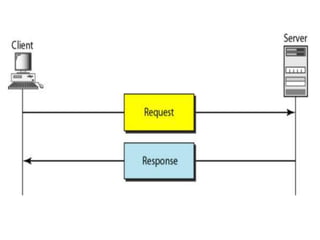
• Figure illustrates the HTTP transaction
between the client and server.
• The client initializes the transaction by
sending a request message.
• The server replies by sending a response
message
Messages
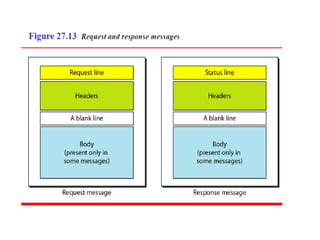
• The formats of the request and response
messages are similar; both are shown in
figure
• A request message consists of a request line,
a header, and sometimes a body.
• A response message consists of a status line, a
header, and sometimes a body.
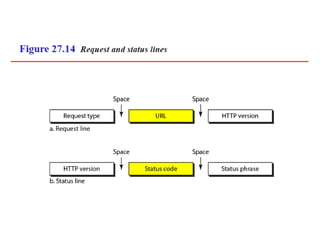
Request and Status Line
• The first line in a request message is called a
request line;
• The first line in the response message is

called the status line.
• There is one common field, as shown in
Figure
Request type.
• This field is used in the request message.
• In version 1.1 of HTTP, several request types are defined.
they are
➢ GET
➢ HEAD
➢ POST
➢ PUT
➢ CONNECT
• GET
Requests a document from the server
• HEAD
Requests information about a document but
not the document itself.
• POST
Client submits data to be processed to a
specified server
• PUT
Sends a document from the server to client
• CONNECT
Reserved(connection established between
client and server)
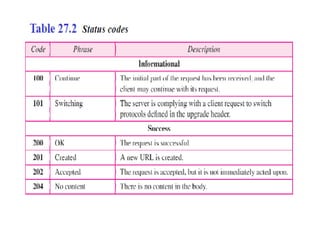
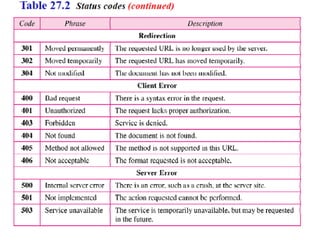
• Status code
➢The status code field is similar to those in the
FTP and the SMTP protocols.
➢It consists of three digits code.
➢Whereas the codes in the 100 range are only
informational
➢ the codes in the 200 range indicate a successful
request.
➢The codes in the 300 range redirect the client to
another URL
➢the codes in the 400 range indicate an error at
the client site.
➢Finally, the codes in the 500 range indicate an
error at the server site.
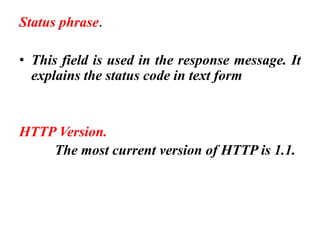
Status phrase.
• This field is used in the response message. It
explains the status code in text form
HTTP Version.
The most current version of HTTP is 1.1.
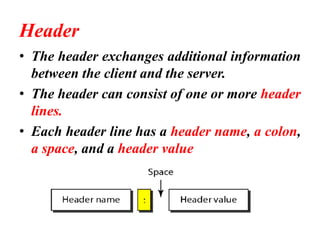
Header
• The header exchanges additional information
between the client and the server.
• The header can consist of one or more header
lines.
• Each header line has a header name, a colon,
a space, and a header value
• A header line belongs to one of four categories:
• General Header
• Request Header
• Response Header
• Entity Header
• A request message can contain only general,
request, and entity headers.
• A response message can contain only general,
response, and entity headers
General header
➢The general header gives general information
about the message and can be present in both a
request and a response.
➢Cache-control Specifies information about
caching
➢Connection Shows whether the connection
should be closed or not between client and server
➢Date Shows the current date
➢MIME-version Shows the MIME version used
Request Header
• The request header can be present only in a
request message.
• It specifies the client's configuration and the
client's preferred document format
• List of some request headers and their
descriptions.
• Accept
Shows the format the client can accept
• Accept- charset
Shows the character set the client can handle
• Accept-encoding
Shows the encoding scheme the client can
handle
• Accept-language
Shows the language the client can accept
• From
Shows the e-mail address of the user
• Host
Shows the host and port number of the server
• If-modified-since
Sends the document if newer than specified
date
• If-match
Sends the document only if it matches given
request
• If-range
Sends only the portion of the document
• Referrer
Specifies the URL of the linked document
• User-agent
Identifies the client program
Response header
• The response header can be present only in a
response message.
• It specifies the server's configuration and
special information about the request
• List of some response headers with their
descriptions
• Accept-range
Shows if server accepts the range of
document requested by client
• Public
Shows the supported list of methods
• Retry-after
Specifies the date after which the server is
available
• Server
Shows the server name and version number
Entity header
• The entity header gives information about the body
of the document.
• Given below List of some entity headers and their
descriptions.
➢Content-encoding Specifies the encoding scheme
➢Content-language Specifies the language
➢Content-length Shows the length of the document
➢Content-range Specifies the range of the document
➢Content-type Specifies the data type
Body
• The body can be present in a request or
response message.
• Usually, it contains the document to be sent
or received.
Network security
• Network security is protection of the
access to files and directories in
computer network against hacking,
misuse and unauthorized changes to
the file.
SECURITY SERVICES
• Network security can provide one of the five
services.
➢Message Confidentiality,
➢Message Integrity
➢ Authentication
➢Non repudiation
➢Entity Authentication Or Identification
Message Confidentiality
• Message confidentiality or privacy means that the
sender and the receiver expect confidentiality.
• The transmitted message must make sense to
only the intended receiver.
• To all others, the message must be garbage.
• For example When a customer communicates
with her bank, she expects that the
communication is totally confidential.
Message Integrity
• Message integrity means that the data must
arrive at the receiver exactly as they were sent.
• There must be no changes during the
transmission, neither accidentally nor
maliciously.
• As more and more money exchanges occur over
the Internet, integrity is crucial.
• For example, it would be disastrous if a request
for transferring Rs1000 changed to a request for
Rs10,000 or Rs1,00,000.
Authentication
• It refers to the process of verifying the
identity of an entity involved in the
communication process i.e. determining the
identity of an entity before revealing the
sensitive information.
• The process of identifying an individual,
usually based on a username and password.
Non repudiation
• Message non repudiation means that a sender
must not be able to deny sending a message that
he or she, in fact, did send.
• Non repudiation is a way to guarantee that the
sender of a message cannot later deny having
sent the message and that the recipient cannot
later deny having received the message.
• Non repudiation can be obtained through the
use of digital signatures.
Entity authentication
• Entity authentication is a technique designed
to let one party prove the identity of another
party.
• An entity can be a person, a process, a client,
or a server.
• The entity whose identity needs to be proved
is called the claimant
• The entity that tries to prove the identity of
the claimant is called the verifier.
Thank you

HTTP(Hyper Text Transfer Protocol)

  • 1.
    HTTP(Hyper Text TransferProtocol) Dr R Jegadeesan Prof-CSE Jyothishmathi Institute of Technology and Science, Karimnagar
  • 2.
    • The HypertextTransfer Protocol (HTTP) is a protocol used mainly to access data on the World Wide Web. • HTTP functions as a combination of FTP and SMTP. • It is similar to FTP because it transfers files and uses the services of TCP. • It is much simpler than FTP because it uses only one TCP connection. • There is no separate control connection; only data are transferred between the client and the server.
  • 3.
    • HTTP islike SMTP because the data transferred between the client and the server look like SMTP messages. • The format of the data is controlled by MIME-like headers. • Unlike SMTP, the HTTP messages are not destined to be read by humans; they are read and interpreted by the HTTP server and HTTP client (browser) • SMTP messages are stored and forwarded, but HTTP messages are delivered immediately
  • 4.
    • The commandsfrom the client to the server are embedded in a request message. • The contents of the requested file or other information are embedded in a response message. • AS SMTP uses the services of TCP on well- known port 25, POP3 uses 110, IMAP4 uses 143 port number • HTTP uses the services of TCP on well-known port 80.
  • 5.
    HTTP Transaction • Figureillustrates the HTTP transaction between the client and server. • The client initializes the transaction by sending a request message. • The server replies by sending a response message
  • 7.
    Messages • The formatsof the request and response messages are similar; both are shown in figure • A request message consists of a request line, a header, and sometimes a body. • A response message consists of a status line, a header, and sometimes a body.
  • 9.
    Request and StatusLine • The first line in a request message is called a request line; • The first line in the response message is called the status line. • There is one common field, as shown in Figure
  • 11.
    Request type. • Thisfield is used in the request message. • In version 1.1 of HTTP, several request types are defined. they are ➢ GET ➢ HEAD ➢ POST ➢ PUT ➢ CONNECT
  • 12.
    • GET Requests adocument from the server • HEAD Requests information about a document but not the document itself. • POST Client submits data to be processed to a specified server
  • 13.
    • PUT Sends adocument from the server to client • CONNECT Reserved(connection established between client and server)
  • 14.
    • Status code ➢Thestatus code field is similar to those in the FTP and the SMTP protocols. ➢It consists of three digits code. ➢Whereas the codes in the 100 range are only informational ➢ the codes in the 200 range indicate a successful request. ➢The codes in the 300 range redirect the client to another URL ➢the codes in the 400 range indicate an error at the client site. ➢Finally, the codes in the 500 range indicate an error at the server site.
  • 17.
    Status phrase. • Thisfield is used in the response message. It explains the status code in text form HTTP Version. The most current version of HTTP is 1.1.
  • 18.
    Header • The headerexchanges additional information between the client and the server. • The header can consist of one or more header lines. • Each header line has a header name, a colon, a space, and a header value
  • 19.
    • A headerline belongs to one of four categories: • General Header • Request Header • Response Header • Entity Header • A request message can contain only general, request, and entity headers. • A response message can contain only general, response, and entity headers
  • 20.
    General header ➢The generalheader gives general information about the message and can be present in both a request and a response. ➢Cache-control Specifies information about caching ➢Connection Shows whether the connection should be closed or not between client and server ➢Date Shows the current date ➢MIME-version Shows the MIME version used
  • 21.
    Request Header • Therequest header can be present only in a request message. • It specifies the client's configuration and the client's preferred document format • List of some request headers and their descriptions.
  • 22.
    • Accept Shows theformat the client can accept • Accept- charset Shows the character set the client can handle • Accept-encoding Shows the encoding scheme the client can handle • Accept-language Shows the language the client can accept • From Shows the e-mail address of the user • Host Shows the host and port number of the server
  • 23.
    • If-modified-since Sends thedocument if newer than specified date • If-match Sends the document only if it matches given request • If-range Sends only the portion of the document • Referrer Specifies the URL of the linked document • User-agent Identifies the client program
  • 24.
    Response header • Theresponse header can be present only in a response message. • It specifies the server's configuration and special information about the request • List of some response headers with their descriptions
  • 25.
    • Accept-range Shows ifserver accepts the range of document requested by client • Public Shows the supported list of methods • Retry-after Specifies the date after which the server is available • Server Shows the server name and version number
  • 26.
    Entity header • Theentity header gives information about the body of the document. • Given below List of some entity headers and their descriptions. ➢Content-encoding Specifies the encoding scheme ➢Content-language Specifies the language ➢Content-length Shows the length of the document ➢Content-range Specifies the range of the document ➢Content-type Specifies the data type
  • 27.
    Body • The bodycan be present in a request or response message. • Usually, it contains the document to be sent or received.
  • 28.
  • 29.
    • Network securityis protection of the access to files and directories in computer network against hacking, misuse and unauthorized changes to the file.
  • 30.
    SECURITY SERVICES • Networksecurity can provide one of the five services. ➢Message Confidentiality, ➢Message Integrity ➢ Authentication ➢Non repudiation ➢Entity Authentication Or Identification
  • 31.
    Message Confidentiality • Messageconfidentiality or privacy means that the sender and the receiver expect confidentiality. • The transmitted message must make sense to only the intended receiver. • To all others, the message must be garbage. • For example When a customer communicates with her bank, she expects that the communication is totally confidential.
  • 32.
    Message Integrity • Messageintegrity means that the data must arrive at the receiver exactly as they were sent. • There must be no changes during the transmission, neither accidentally nor maliciously. • As more and more money exchanges occur over the Internet, integrity is crucial. • For example, it would be disastrous if a request for transferring Rs1000 changed to a request for Rs10,000 or Rs1,00,000.
  • 33.
    Authentication • It refersto the process of verifying the identity of an entity involved in the communication process i.e. determining the identity of an entity before revealing the sensitive information. • The process of identifying an individual, usually based on a username and password.
  • 34.
    Non repudiation • Messagenon repudiation means that a sender must not be able to deny sending a message that he or she, in fact, did send. • Non repudiation is a way to guarantee that the sender of a message cannot later deny having sent the message and that the recipient cannot later deny having received the message. • Non repudiation can be obtained through the use of digital signatures.
  • 35.
    Entity authentication • Entityauthentication is a technique designed to let one party prove the identity of another party. • An entity can be a person, a process, a client, or a server. • The entity whose identity needs to be proved is called the claimant • The entity that tries to prove the identity of the claimant is called the verifier.
  • 36.