HTTP
 HTTP stands for Hypertext Transfer Protocol.
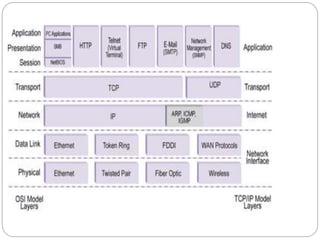
 It is an TCP/IP based communication protocol which is used to
deliver virtually all files and other data, collectively called
resources, on the World Wide Web. These resources could be
HTML files, image files, query results, or anything else.
 It is a Client-Server based protocol.
 Here the browser works as an HTTP client because it sends
requests to an HTTP server which is called Web server. The
Web Server then sends responses back to the client.
 The standard and default port for HTTP servers to listen on is
80.
WHY HTTP?
 HTTP is like SMTP because the data transferred
between the client and server are similar in
appearance to SMTP messages. Also, the format of
the messages is controlled by MIME-like headers
.BUT unlike SMTP HTTP doesn’t store the
intermediate messages it just transmits them
dynamically.
 HTTP is like FTP because they both transfer files and
use the services of TCP . BUT unlike FTP HTTP is
non-persistent type whereas the former one is
persistent type.
 Thus HTTP incorporates the features of both FTP &
SMTP and can be considered to be a advanced and
augmented version of both.
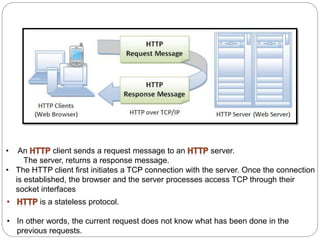
• An client sends a request message to an server.
The server, returns a response message.
• The HTTP client first initiates a TCP connection with the server. Once the connection
is established, the browser and the server processes access TCP through their
socket interfaces
is a stateless protocol.
• In other words, the current request does not know what has been done in the
previous requests.
There are three important things about
HTTP of which you should be aware:
 HTTP is connectionless: After a request is made, the client disconnects
from the server and waits for a response. The server must re-establish the
connection after it process the request.
 HTTP is media independent: Any type of data can be sent by HTTP as
long as both the client and server know how to handle the data content.
 HTTP is stateless: This is a direct result of HTTP's being connectionless.
The server and client are aware of each other only during a request.
Afterwards, each forgets the other. For this reason neither the client nor the
browser can retain information between different request across the web
pages.
Terminology
 IP Address: An Internet Protocol address (IP address)
is a numerical label assigned to each device (e.g.,
computer, printer) participating in a computer
network that uses the Internet Protocol for
communication.
 TCP :Transmission Control Protocol (TCP) is one of the
two original core protocols of the Internet Protocol
Suite (IP), and is so common that the entire suite is
often called TCP/IP. TCP provides reliable, ordered,
error-checked delivery of a stream of octets between
programs running on computers connected to
an intranet or the public Internet.
 Port Number : A port number is a 16 bit number which
when associated with IP address , completes the
destination address for a communications session.
 Socket : A socket is nothing but a combination of IP
address and port number. It is simply an end while
communication.
6
HTTP - URLs
• URL -- Uniform Resource Locator
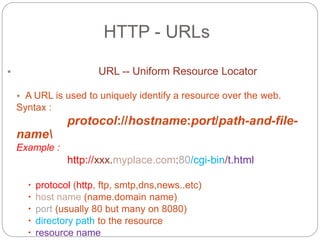
• A URL is used to uniquely identify a resource over the web.
Syntax :
protocol://hostname:port/path-and-file-
name
Example :
http://xxx.myplace.com:80/cgi-bin/t.html
 protocol (http, ftp, smtp,dns,news..etc)
 host name (name.domain name)
 port (usually 80 but many on 8080)
 directory path to the resource
 resource name
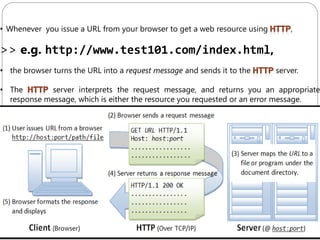
• Whenever you issue a URL from your browser to get a web resource using ,
>> e.g. http://www.test101.com/index.html,
• the browser turns the URL into a request message and sends it to the server.
• The server interprets the request message, and returns you an appropriate
response message, which is either the resource you requested or an error message.
HTTP MESSAGES
9
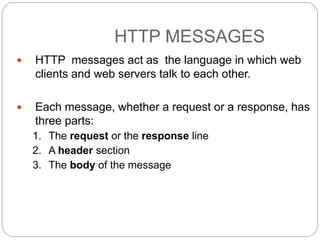
 HTTP messages act as the language in which web
clients and web servers talk to each other.
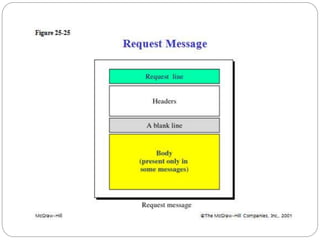
 Each message, whether a request or a response, has
three parts:
1. The request or the response line
2. A header section
3. The body of the message
10
What the client does??
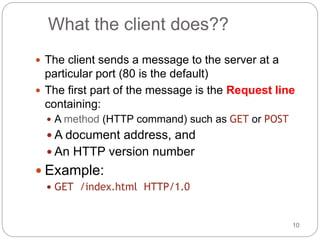
 The client sends a message to the server at a
particular port (80 is the default)
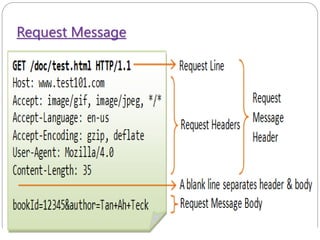
 The first part of the message is the Request line
containing:
 A method (HTTP command) such as GET or POST
 A document address, and
 An HTTP version number
 Example:
 GET /index.html HTTP/1.0
HTTP Request Message
12
 The method field can take on several different
values, including GET, POST, HEAD, PUT, and
DELETE etc.
 The great majority of HTTP request messages
use the GET method.
 The GET method is used when the browser
requests an object, with the requested object
identified in the URL field.
13
Other methods beside GET and POST are:
 HEAD: Like GET, but ask that only a header be returned
 PUT: Request to store the entity-body at the URI
 DELETE: Request removal of data at the URI
 LINK: Request header information be associated with a
document on the server
 UNLINK: Request to undo a LINK request
 OPTIONS: Request information about communications
options on the server
 TRACE: Request that the entity-body be returned as
received (used for debugging)
14
What the client does, part II
 The second part of a request is optional
Header information, such as:
 What the client software is
 What formats it can accept
 All information is in the form Name: Value
 Example:
User-Agent: Mozilla/2.02Gold (WinNT; I)
Accept: image/gif, image/jpeg, */*
 A blank line ends the header
15
Client request headers
 Accept: type/subtype, type/subtype, ...
 Specifies media types that the client prefers to accept
 Accept-Language: en, fr, de
 Preferred language (For example: English, French, German)
 User-Agent: string
 The browser or other client program sending the request
 From: dave@acm.org
 Email address of user of client program
 Cookie: name=value
 Information about a cookie for that URL
 Multiple cookies can be separated by commas
Request Message
What the server does, part I
17
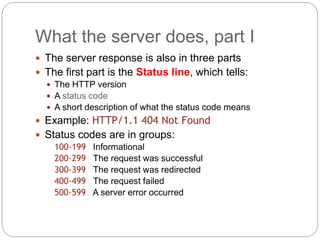
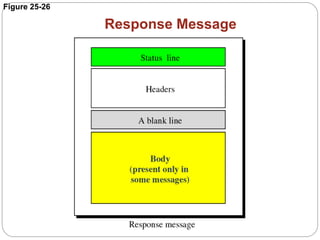
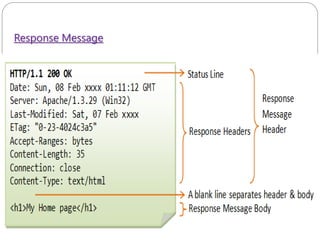
 The server response is also in three parts
 The first part is the Status line, which tells:
 The HTTP version
 A status code
 A short description of what the status code means
 Example: HTTP/1.1 404 Not Found
 Status codes are in groups:
100-199 Informational
200-299 The request was successful
300-399 The request was redirected
400-499 The request failed
500-599 A server error occurred
Common status codes
18
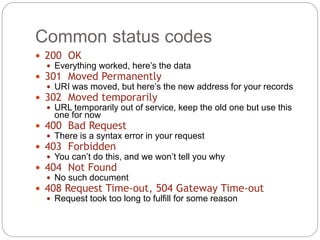
 200 OK
 Everything worked, here’s the data
 301 Moved Permanently
 URI was moved, but here’s the new address for your records
 302 Moved temporarily
 URL temporarily out of service, keep the old one but use this
one for now
 400 Bad Request
 There is a syntax error in your request
 403 Forbidden
 You can’t do this, and we won’t tell you why
 404 Not Found
 No such document
 408 Request Time-out, 504 Gateway Time-out
 Request took too long to fulfill for some reason
Figure 25-26
Response Message
20
Server response headers
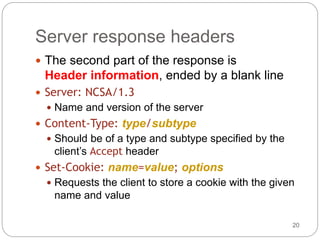
 The second part of the response is
Header information, ended by a blank line
 Server: NCSA/1.3
 Name and version of the server
 Content-Type: type/subtype
 Should be of a type and subtype specified by the
client’s Accept header
 Set-Cookie: name=value; options
 Requests the client to store a cookie with the given
name and value
21
What the server does, part III
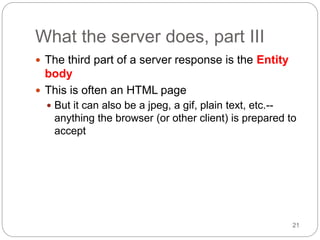
 The third part of a server response is the Entity
body
 This is often an HTML page
 But it can also be a jpeg, a gif, plain text, etc.--
anything the browser (or other client) is prepared to
accept
Response Message
The Message Body
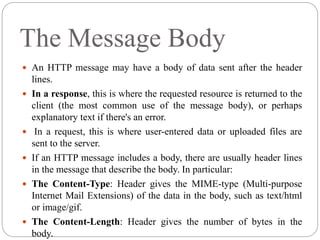
 An HTTP message may have a body of data sent after the header
lines.
 In a response, this is where the requested resource is returned to the
client (the most common use of the message body), or perhaps
explanatory text if there's an error.
 In a request, this is where user-entered data or uploaded files are
sent to the server.
 If an HTTP message includes a body, there are usually header lines
in the message that describe the body. In particular:
 The Content-Type: Header gives the MIME-type (Multi-purpose
Internet Mail Extensions) of the data in the body, such as text/html
or image/gif.
 The Content-Length: Header gives the number of bytes in the
body.
Advantages of HTTP
 Platform independent- Allows Straight cross
platform porting.
 No Runtime support required to run properly.
 Usable over Firewalls! Global applications
possible.
 Not Connection Oriented- No network overhead
HTTP Limitations
Security Concerns
Privacy
 Anyone can see content
Integrity
 Someone might alter content. HTTP is insecure since no
encryption methods are used. Hence is subject to man in the
middle and eavesdropping of sensitive information.
 Authentication
 Not clear who you are talking with. Authentication is sent in the
clear — Anyone who intercepts the request can determine the
username and password being used.
.
SUMMARY
26
 HTTP is a fairly straightforward protocol with a lot of
possible kinds of predefined header information
 More kinds can be added, so long as client and server agree
 A request from the client consists of three parts:
1. A header line
2. A block of header information, ending with a blank line
3. The (optional) entity body, containing data
 A response from the server consists of the same three
parts
 HTTP headers are “under the hood” information, not
normally displayed to the user

Http

  • 1.
    HTTP  HTTP standsfor Hypertext Transfer Protocol.  It is an TCP/IP based communication protocol which is used to deliver virtually all files and other data, collectively called resources, on the World Wide Web. These resources could be HTML files, image files, query results, or anything else.  It is a Client-Server based protocol.  Here the browser works as an HTTP client because it sends requests to an HTTP server which is called Web server. The Web Server then sends responses back to the client.  The standard and default port for HTTP servers to listen on is 80.
  • 3.
    WHY HTTP?  HTTPis like SMTP because the data transferred between the client and server are similar in appearance to SMTP messages. Also, the format of the messages is controlled by MIME-like headers .BUT unlike SMTP HTTP doesn’t store the intermediate messages it just transmits them dynamically.  HTTP is like FTP because they both transfer files and use the services of TCP . BUT unlike FTP HTTP is non-persistent type whereas the former one is persistent type.  Thus HTTP incorporates the features of both FTP & SMTP and can be considered to be a advanced and augmented version of both.
  • 4.
    • An clientsends a request message to an server. The server, returns a response message. • The HTTP client first initiates a TCP connection with the server. Once the connection is established, the browser and the server processes access TCP through their socket interfaces is a stateless protocol. • In other words, the current request does not know what has been done in the previous requests.
  • 5.
    There are threeimportant things about HTTP of which you should be aware:  HTTP is connectionless: After a request is made, the client disconnects from the server and waits for a response. The server must re-establish the connection after it process the request.  HTTP is media independent: Any type of data can be sent by HTTP as long as both the client and server know how to handle the data content.  HTTP is stateless: This is a direct result of HTTP's being connectionless. The server and client are aware of each other only during a request. Afterwards, each forgets the other. For this reason neither the client nor the browser can retain information between different request across the web pages.
  • 6.
    Terminology  IP Address:An Internet Protocol address (IP address) is a numerical label assigned to each device (e.g., computer, printer) participating in a computer network that uses the Internet Protocol for communication.  TCP :Transmission Control Protocol (TCP) is one of the two original core protocols of the Internet Protocol Suite (IP), and is so common that the entire suite is often called TCP/IP. TCP provides reliable, ordered, error-checked delivery of a stream of octets between programs running on computers connected to an intranet or the public Internet.  Port Number : A port number is a 16 bit number which when associated with IP address , completes the destination address for a communications session.  Socket : A socket is nothing but a combination of IP address and port number. It is simply an end while communication. 6
  • 7.
    HTTP - URLs •URL -- Uniform Resource Locator • A URL is used to uniquely identify a resource over the web. Syntax : protocol://hostname:port/path-and-file- name Example : http://xxx.myplace.com:80/cgi-bin/t.html  protocol (http, ftp, smtp,dns,news..etc)  host name (name.domain name)  port (usually 80 but many on 8080)  directory path to the resource  resource name
  • 8.
    • Whenever youissue a URL from your browser to get a web resource using , >> e.g. http://www.test101.com/index.html, • the browser turns the URL into a request message and sends it to the server. • The server interprets the request message, and returns you an appropriate response message, which is either the resource you requested or an error message.
  • 9.
    HTTP MESSAGES 9  HTTPmessages act as the language in which web clients and web servers talk to each other.  Each message, whether a request or a response, has three parts: 1. The request or the response line 2. A header section 3. The body of the message
  • 10.
    10 What the clientdoes??  The client sends a message to the server at a particular port (80 is the default)  The first part of the message is the Request line containing:  A method (HTTP command) such as GET or POST  A document address, and  An HTTP version number  Example:  GET /index.html HTTP/1.0
  • 12.
    HTTP Request Message 12 The method field can take on several different values, including GET, POST, HEAD, PUT, and DELETE etc.  The great majority of HTTP request messages use the GET method.  The GET method is used when the browser requests an object, with the requested object identified in the URL field.
  • 13.
    13 Other methods besideGET and POST are:  HEAD: Like GET, but ask that only a header be returned  PUT: Request to store the entity-body at the URI  DELETE: Request removal of data at the URI  LINK: Request header information be associated with a document on the server  UNLINK: Request to undo a LINK request  OPTIONS: Request information about communications options on the server  TRACE: Request that the entity-body be returned as received (used for debugging)
  • 14.
    14 What the clientdoes, part II  The second part of a request is optional Header information, such as:  What the client software is  What formats it can accept  All information is in the form Name: Value  Example: User-Agent: Mozilla/2.02Gold (WinNT; I) Accept: image/gif, image/jpeg, */*  A blank line ends the header
  • 15.
    15 Client request headers Accept: type/subtype, type/subtype, ...  Specifies media types that the client prefers to accept  Accept-Language: en, fr, de  Preferred language (For example: English, French, German)  User-Agent: string  The browser or other client program sending the request  From: dave@acm.org  Email address of user of client program  Cookie: name=value  Information about a cookie for that URL  Multiple cookies can be separated by commas
  • 16.
  • 17.
    What the serverdoes, part I 17  The server response is also in three parts  The first part is the Status line, which tells:  The HTTP version  A status code  A short description of what the status code means  Example: HTTP/1.1 404 Not Found  Status codes are in groups: 100-199 Informational 200-299 The request was successful 300-399 The request was redirected 400-499 The request failed 500-599 A server error occurred
  • 18.
    Common status codes 18 200 OK  Everything worked, here’s the data  301 Moved Permanently  URI was moved, but here’s the new address for your records  302 Moved temporarily  URL temporarily out of service, keep the old one but use this one for now  400 Bad Request  There is a syntax error in your request  403 Forbidden  You can’t do this, and we won’t tell you why  404 Not Found  No such document  408 Request Time-out, 504 Gateway Time-out  Request took too long to fulfill for some reason
  • 19.
  • 20.
    20 Server response headers The second part of the response is Header information, ended by a blank line  Server: NCSA/1.3  Name and version of the server  Content-Type: type/subtype  Should be of a type and subtype specified by the client’s Accept header  Set-Cookie: name=value; options  Requests the client to store a cookie with the given name and value
  • 21.
    21 What the serverdoes, part III  The third part of a server response is the Entity body  This is often an HTML page  But it can also be a jpeg, a gif, plain text, etc.-- anything the browser (or other client) is prepared to accept
  • 22.
  • 23.
    The Message Body An HTTP message may have a body of data sent after the header lines.  In a response, this is where the requested resource is returned to the client (the most common use of the message body), or perhaps explanatory text if there's an error.  In a request, this is where user-entered data or uploaded files are sent to the server.  If an HTTP message includes a body, there are usually header lines in the message that describe the body. In particular:  The Content-Type: Header gives the MIME-type (Multi-purpose Internet Mail Extensions) of the data in the body, such as text/html or image/gif.  The Content-Length: Header gives the number of bytes in the body.
  • 24.
    Advantages of HTTP Platform independent- Allows Straight cross platform porting.  No Runtime support required to run properly.  Usable over Firewalls! Global applications possible.  Not Connection Oriented- No network overhead
  • 25.
    HTTP Limitations Security Concerns Privacy Anyone can see content Integrity  Someone might alter content. HTTP is insecure since no encryption methods are used. Hence is subject to man in the middle and eavesdropping of sensitive information.  Authentication  Not clear who you are talking with. Authentication is sent in the clear — Anyone who intercepts the request can determine the username and password being used. .
  • 26.
    SUMMARY 26  HTTP isa fairly straightforward protocol with a lot of possible kinds of predefined header information  More kinds can be added, so long as client and server agree  A request from the client consists of three parts: 1. A header line 2. A block of header information, ending with a blank line 3. The (optional) entity body, containing data  A response from the server consists of the same three parts  HTTP headers are “under the hood” information, not normally displayed to the user