Chapter 2
Application Layer
Computer Networking: A
Top Down Approach,
4th edition.
Jim Kurose, Keith Ross
Addison-Wesley, July
2007.
HTTP Request Message
Two types of HTTP messages:
Request, Response
HTTP request message:
Human-readable format
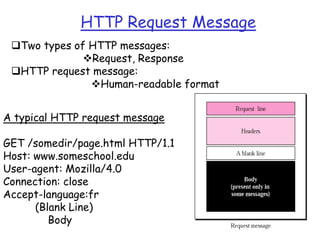
A typical HTTP request message
GET /somedir/page.html HTTP/1.1
Host: www.someschool.edu
User-agent: Mozilla/4.0
Connection: close
Accept-language:fr
(Blank Line)
Body
HTTP Request Message
• Request Line
 First Line of HTTP request message
 The request line has three fields
 Method field can take on several values
GET,POST, PUT, DELETE etc
Majority of HTTP request messages use GET
 URL field
 HTTP version field
• Header Lines
– Host: Host on which the object resides
– User-agent: Identifies the client program e.g. Mozilla/4.0
– Connection: Shows whether the connection should be closed
or not
– Accept-language: Shows the language the client prefers
HTTP Request Message
• Body is empty with GET
method
• Used with the POST
method
– Web page often
includes form input
– Input is sent to
server in body

PUT method:
• To upload objects to
web server
DELETE method
• Allows a user or an
application to delete
an object on web
server

Find out about OPTIONS, TRACE, HEAD?
HTTP Response Message
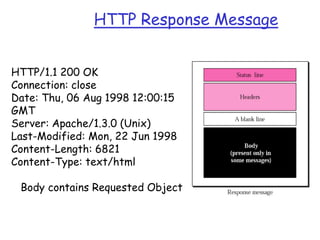
HTTP/1.1 200 OK
Connection: close
Date: Thu, 06 Aug 1998 12:00:15
GMT
Server: Apache/1.3.0 (Unix)
Last-Modified: Mon, 22 Jun 1998
Content-Length: 6821
Content-Type: text/html

Body contains Requested Object
HTTP Response Message
• Status Line
– Protocol Version
– Status Code and Status Message
 The status code and associated phrase indicate the result of the request

• Header Line
 Connection: Shows whether the connection should be
closed or not
 Date and time: When the HTTP response was created
 Server: Analogous to user-agent in request message
 Last-modified: When the Object was last created or
modified
 Content-length: Number of bytes in object being sent
 Content-Type: Indicates the object type (HTML text etc.)
HTTP Response Status Codes
The status code and associated phrase indicate the
result of the request
200 OK
– Request succeeded and information is returned
in response
301 Moved Permanently
– Requested object moved, new location specified
later in this message (Location:)
404 Not Found
– Requested document not found on this server
505 Version not supported
– HTTP version is not supported by the server

Week3 lec 1

  • 1.
    Chapter 2 Application Layer ComputerNetworking: A Top Down Approach, 4th edition. Jim Kurose, Keith Ross Addison-Wesley, July 2007.
  • 2.
    HTTP Request Message Twotypes of HTTP messages: Request, Response HTTP request message: Human-readable format A typical HTTP request message GET /somedir/page.html HTTP/1.1 Host: www.someschool.edu User-agent: Mozilla/4.0 Connection: close Accept-language:fr (Blank Line) Body
  • 3.
    HTTP Request Message •Request Line  First Line of HTTP request message  The request line has three fields  Method field can take on several values GET,POST, PUT, DELETE etc Majority of HTTP request messages use GET  URL field  HTTP version field • Header Lines – Host: Host on which the object resides – User-agent: Identifies the client program e.g. Mozilla/4.0 – Connection: Shows whether the connection should be closed or not – Accept-language: Shows the language the client prefers
  • 4.
    HTTP Request Message •Body is empty with GET method • Used with the POST method – Web page often includes form input – Input is sent to server in body PUT method: • To upload objects to web server DELETE method • Allows a user or an application to delete an object on web server Find out about OPTIONS, TRACE, HEAD?
  • 5.
    HTTP Response Message HTTP/1.1200 OK Connection: close Date: Thu, 06 Aug 1998 12:00:15 GMT Server: Apache/1.3.0 (Unix) Last-Modified: Mon, 22 Jun 1998 Content-Length: 6821 Content-Type: text/html Body contains Requested Object
  • 6.
    HTTP Response Message •Status Line – Protocol Version – Status Code and Status Message  The status code and associated phrase indicate the result of the request • Header Line  Connection: Shows whether the connection should be closed or not  Date and time: When the HTTP response was created  Server: Analogous to user-agent in request message  Last-modified: When the Object was last created or modified  Content-length: Number of bytes in object being sent  Content-Type: Indicates the object type (HTML text etc.)
  • 7.
    HTTP Response StatusCodes The status code and associated phrase indicate the result of the request 200 OK – Request succeeded and information is returned in response 301 Moved Permanently – Requested object moved, new location specified later in this message (Location:) 404 Not Found – Requested document not found on this server 505 Version not supported – HTTP version is not supported by the server