5
Web Development
HTML , CSS, JAVASCRIPT, BOOTSTRAP
Prepared by: Ghayour Abbas
Outline:
• Forms
Forms
An HTML form is used to collect user input. The user input is most often sent
to a server for processing.
The <form> Element
The HTML <form> element is used to create an HTML form for user input:
<form>
.
form elements
.
</form>
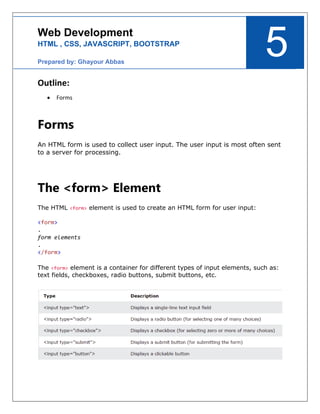
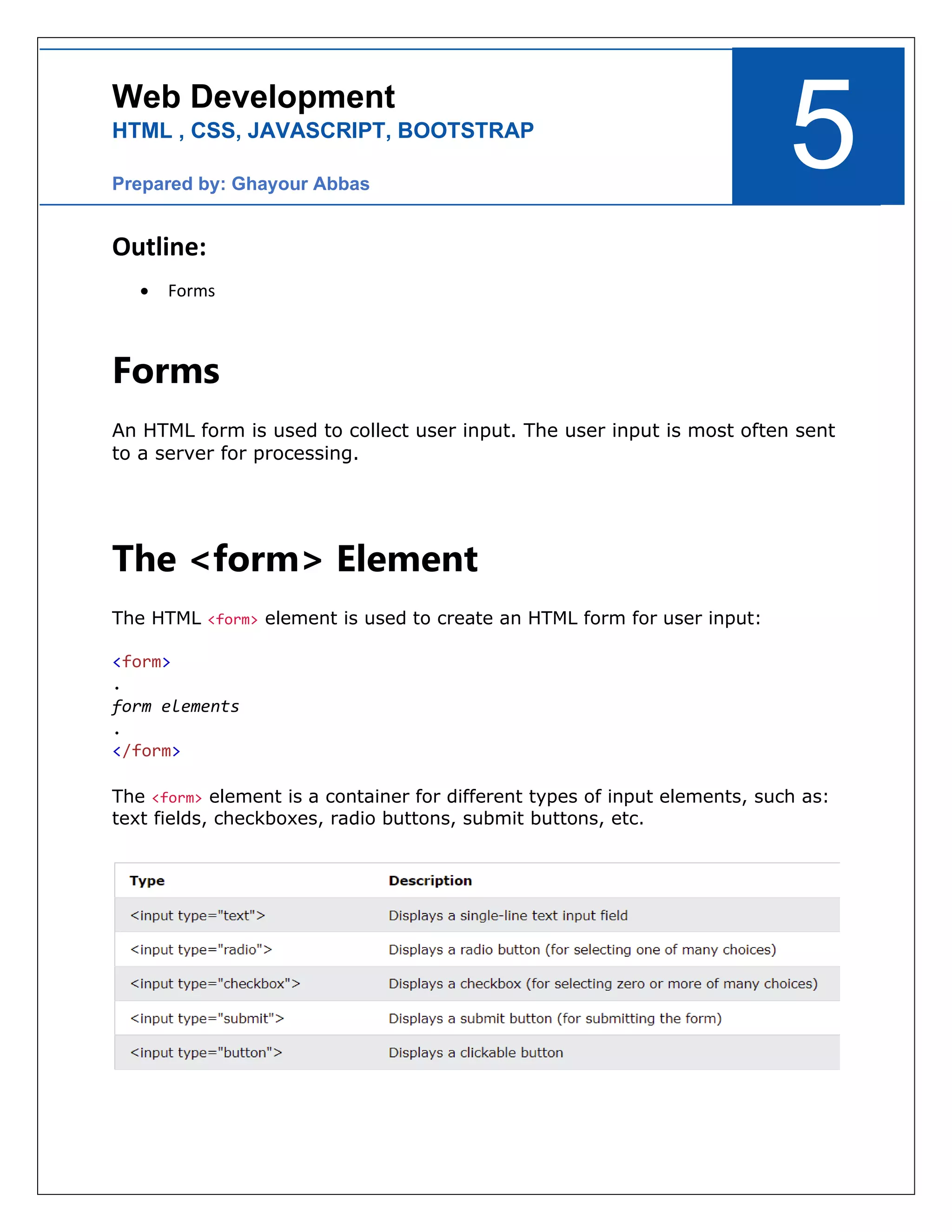
The <form> element is a container for different types of input elements, such as:
text fields, checkboxes, radio buttons, submit buttons, etc.
The <label> Element
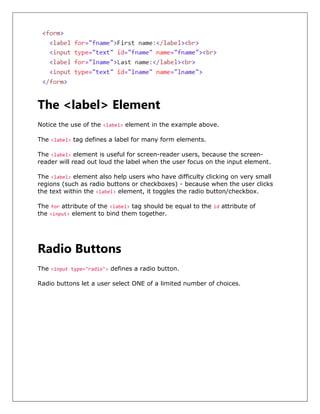
Notice the use of the <label> element in the example above.
The <label> tag defines a label for many form elements.
The <label> element is useful for screen-reader users, because the screen-
reader will read out loud the label when the user focus on the input element.
The <label> element also help users who have difficulty clicking on very small
regions (such as radio buttons or checkboxes) - because when the user clicks
the text within the <label> element, it toggles the radio button/checkbox.
The for attribute of the <label> tag should be equal to the id attribute of
the <input> element to bind them together.
Radio Buttons
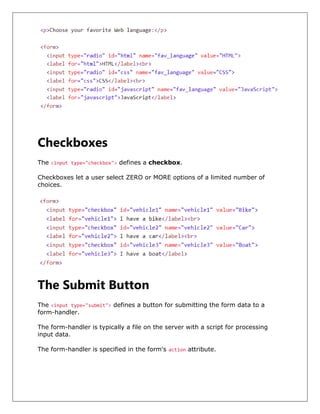
The <input type="radio"> defines a radio button.
Radio buttons let a user select ONE of a limited number of choices.
Checkboxes
The <input type="checkbox"> defines a checkbox.
Checkboxes let a user select ZERO or MORE options of a limited number of
choices.
The Submit Button
The <input type="submit"> defines a button for submitting the form data to a
form-handler.
The form-handler is typically a file on the server with a script for processing
input data.
The form-handler is specified in the form's action attribute.
The Name Attribute for <input>
Notice that each input field must have a name attribute to be submitted.
If the name attribute is omitted, the value of the input field will not be sent at all.
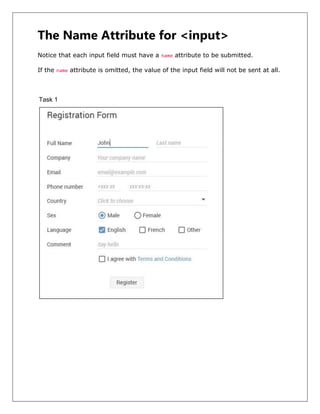
Task 1
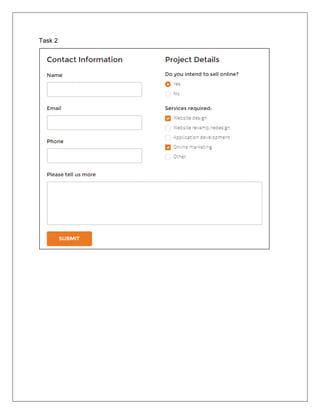
Task 2

Web Development 5

  • 1.
    5 Web Development HTML ,CSS, JAVASCRIPT, BOOTSTRAP Prepared by: Ghayour Abbas Outline: • Forms Forms An HTML form is used to collect user input. The user input is most often sent to a server for processing. The <form> Element The HTML <form> element is used to create an HTML form for user input: <form> . form elements . </form> The <form> element is a container for different types of input elements, such as: text fields, checkboxes, radio buttons, submit buttons, etc.
  • 2.
    The <label> Element Noticethe use of the <label> element in the example above. The <label> tag defines a label for many form elements. The <label> element is useful for screen-reader users, because the screen- reader will read out loud the label when the user focus on the input element. The <label> element also help users who have difficulty clicking on very small regions (such as radio buttons or checkboxes) - because when the user clicks the text within the <label> element, it toggles the radio button/checkbox. The for attribute of the <label> tag should be equal to the id attribute of the <input> element to bind them together. Radio Buttons The <input type="radio"> defines a radio button. Radio buttons let a user select ONE of a limited number of choices.
  • 3.
    Checkboxes The <input type="checkbox">defines a checkbox. Checkboxes let a user select ZERO or MORE options of a limited number of choices. The Submit Button The <input type="submit"> defines a button for submitting the form data to a form-handler. The form-handler is typically a file on the server with a script for processing input data. The form-handler is specified in the form's action attribute.
  • 4.
    The Name Attributefor <input> Notice that each input field must have a name attribute to be submitted. If the name attribute is omitted, the value of the input field will not be sent at all. Task 1
  • 5.