Introduction to 
Visual Basic 6.0 
BY :- Manav khandelwal 
To :- Rakesh Sir
Content 
• Front page Form Window 
• Content Toolbox 
• History Project Explorer Window 
• Introduction Properties Window 
• IDE playground Form Layout Window 
• Title Bar Tool in Toolbox 
• Menu bar Visual Basic Project 
• Tool bar OOPS 
• Thank you
History 
• VB 1.0 was introduced in 1991. 
The drag and drop design for 
creating the user interface is 
derived from a prototype form 
generator developed by Alan 
Cooper and his company 
called Tripod.
Introduction 
• Visual Basic is a programing language. 
• It’s a high-level programing language that 
provides Graphical User Interface (GUI) for 
designing and developing application as per 
user requirement.
IDE Playground 
• An integrated development environment 
refers to the programming environment that 
has been stacked consisting of code editor, 
compiler, debugger and also GUI builder. 
• The integrated development environment 
works as interface in Visual Basic 6.0. 
• Some components make an IDE Playground. 
The components are as follows:-
Title bar 
• The Title Bar appears at the top end of Visual 
Basic Application Window. 
• It displays the name of the Project. 
• The by default First project is named as 
Project1.
Menu Bar 
• The menu bar provides you 
menus and submenus populated 
with standard commands which 
are useful in working with Visual 
basic project.
Toolbar 
• The toolbar is Visual basic refers 
to the buttons which are used to 
perform frequently, used task, 
such as Save Projects, Open 
projects, etc.
Form Window 
• The form window is known as 
the prime components of 
Visual Basic application and 
hence it is known as the “basic 
building block” 
for creating the applications.
Toolbox 
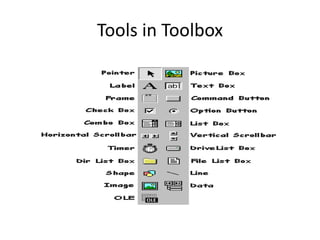
• The toolbox contains icons of 
different controls such as Labels, 
command Buttons, etc. 
• These tools are used to create an 
interface while working with 
Forms.
Project Explorer Window 
• The Project Explorer Windows 
contains various elements, such 
ass Form, class and modules. 
• The windows displays all the 
components created in the 
current project.
Properties Windows 
• The Properties Windows displays 
the various properties for various 
components. 
• This windows is only available in 
the design mode.
Form Layout Windows 
• The Form Layout Window is 
used to locate the position of a 
Form with respect to the 
display area of the screen 
during runtime.
Tools in Toolbox
Visual Basic Project 
• The Visual Basic Project refers to the 
repository where code modules and 
Form are saved collectively. 
• The project file extension (.vbp) 
describes the Project as a whole, 
naming the individual files that are a 
part of the project
OOPS 
• Full form of OOPS is Object Oriented 
programming System. 
• OOPS refers to the concept of 
programming in a graphical 
environment where 
• the modules are classified as an 
object
Thank 
you

Introduction to visual basic

  • 1.
    Introduction to VisualBasic 6.0 BY :- Manav khandelwal To :- Rakesh Sir
  • 2.
    Content • Frontpage Form Window • Content Toolbox • History Project Explorer Window • Introduction Properties Window • IDE playground Form Layout Window • Title Bar Tool in Toolbox • Menu bar Visual Basic Project • Tool bar OOPS • Thank you
  • 3.
    History • VB1.0 was introduced in 1991. The drag and drop design for creating the user interface is derived from a prototype form generator developed by Alan Cooper and his company called Tripod.
  • 4.
    Introduction • VisualBasic is a programing language. • It’s a high-level programing language that provides Graphical User Interface (GUI) for designing and developing application as per user requirement.
  • 5.
    IDE Playground •An integrated development environment refers to the programming environment that has been stacked consisting of code editor, compiler, debugger and also GUI builder. • The integrated development environment works as interface in Visual Basic 6.0. • Some components make an IDE Playground. The components are as follows:-
  • 6.
    Title bar •The Title Bar appears at the top end of Visual Basic Application Window. • It displays the name of the Project. • The by default First project is named as Project1.
  • 7.
    Menu Bar •The menu bar provides you menus and submenus populated with standard commands which are useful in working with Visual basic project.
  • 8.
    Toolbar • Thetoolbar is Visual basic refers to the buttons which are used to perform frequently, used task, such as Save Projects, Open projects, etc.
  • 9.
    Form Window •The form window is known as the prime components of Visual Basic application and hence it is known as the “basic building block” for creating the applications.
  • 10.
    Toolbox • Thetoolbox contains icons of different controls such as Labels, command Buttons, etc. • These tools are used to create an interface while working with Forms.
  • 11.
    Project Explorer Window • The Project Explorer Windows contains various elements, such ass Form, class and modules. • The windows displays all the components created in the current project.
  • 12.
    Properties Windows •The Properties Windows displays the various properties for various components. • This windows is only available in the design mode.
  • 13.
    Form Layout Windows • The Form Layout Window is used to locate the position of a Form with respect to the display area of the screen during runtime.
  • 14.
  • 15.
    Visual Basic Project • The Visual Basic Project refers to the repository where code modules and Form are saved collectively. • The project file extension (.vbp) describes the Project as a whole, naming the individual files that are a part of the project
  • 16.
    OOPS • Fullform of OOPS is Object Oriented programming System. • OOPS refers to the concept of programming in a graphical environment where • the modules are classified as an object
  • 17.