An Introduction to
PROFINET Frame
Analysis using
Peter Thomas
Control Specialists Ltd
www.controlspecialists.co.uk
An Introduction to Profinet Frame Analysis using Wireshark – V1.0 (07/05/2013)
2
Objectives
• To gain an understanding of the way in
which PROFINET devices communicate
with one another over Ethernet.
• To learn how to capture the PROFINET
Frames using Wireshark®.
• To analyse the captured frames to gain an
understanding and purpose of the various
protocols.
• This is a topic covered in more detail in
the Certified Profinet Engineers Course
An Introduction to Profinet Frame Analysis using Wireshark – V1.0 www.controlspecialists.co.uk
3
What is Wireshark?
• Wireshark® is a network protocol
analyser. It lets you capture and
interactively browse the traffic running on
a computer network.
• It is not dedicated to Proifinet and as such
cannot be compared to ProfiTrace.
• It is free to download and available from
www.wireshark.org
An Introduction to Profinet Frame Analysis using Wireshark – V1.0 www.controlspecialists.co.uk
4
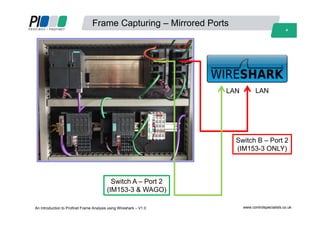
Frame Capturing – Mirrored Ports
Switch A – Port 2
(IM153-3 & WAGO)
Switch B – Port 2
(IM153-3 ONLY)
LAN LAN
An Introduction to Profinet Frame Analysis using Wireshark – V1.0 www.controlspecialists.co.uk
5
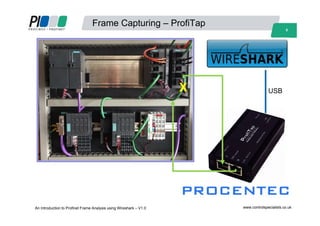
Frame Capturing – ProfiTap
USBX
An Introduction to Profinet Frame Analysis using Wireshark – V1.0 www.controlspecialists.co.uk
6
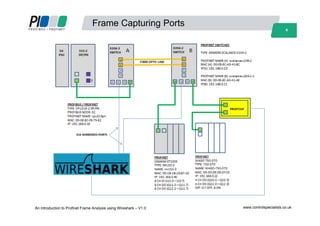
Frame Capturing Ports
An Introduction to Profinet Frame Analysis using Wireshark – V1.0 www.controlspecialists.co.uk
7
Scope of this workshop
• Wireshark® will be used to capture and analyse
Profinet traffic during the following events:-
– Start-Up
– Data Exchange
– Loss of Module
– Loss of Communications
– Duplicate Device Name
An Introduction to Profinet Frame Analysis using Wireshark – V1.0 www.controlspecialists.co.uk
8
Equipment used in this workshop
• Siemens S7 PLC Hardware & Switches.
• Wago IO
• ProfiTap & Netilities from Procentec
• Wireshark® Network Protocol Analyser.
An Introduction to Profinet Frame Analysis using Wireshark – V1.0 www.controlspecialists.co.uk
9
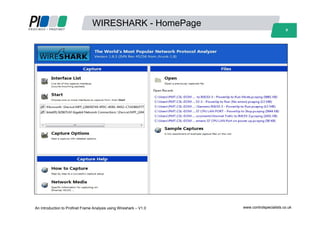
WIRESHARK - HomePage
An Introduction to Profinet Frame Analysis using Wireshark – V1.0 www.controlspecialists.co.uk
10
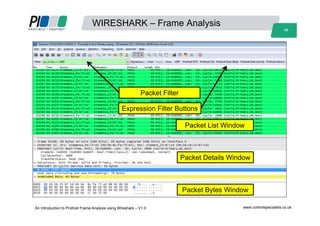
WIRESHARK – Frame Analysis
An Introduction to Profinet Frame Analysis using Wireshark – V1.0 www.controlspecialists.co.uk
Packet Filter
Expression Filter Buttons
Packet Details Window
Packet Bytes Window
Packet List Window
11
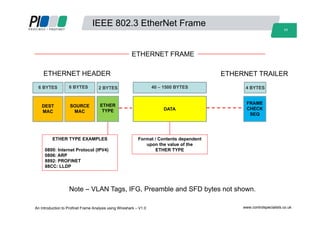
IEEE 802.3 EtherNet Frame
40 – 1500 BYTES
DATA
SOURCE
MAC
6 BYTES
DEST
MAC
ETHER
TYPE
FRAME
CHECK
SEQ
ETHER TYPE EXAMPLES
0800: Internet Protocol (IPV4)
0806: ARP
8892: PROFINET
88CC: LLDP
Format / Contents dependent
upon the value of the
ETHER TYPE
ETHERNET HEADER ETHERNET TRAILER
Note – VLAN Tags, IFG, Preamble and SFD bytes not shown.
ETHERNET FRAME
6 BYTES 2 BYTES 4 BYTES
An Introduction to Profinet Frame Analysis using Wireshark – V1.0 www.controlspecialists.co.uk
12
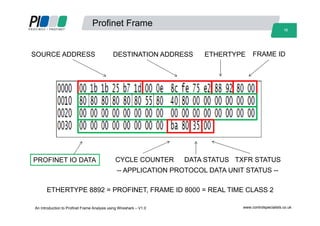
Profinet Frame
SOURCE ADDRESS DESTINATION ADDRESS ETHERTYPE
PROFINET IO DATA CYCLE COUNTER DATA STATUS
FRAME ID
TXFR STATUS
ETHERTYPE 8892 = PROFINET, FRAME ID 8000 = REAL TIME CLASS 2
-- APPLICATION PROTOCOL DATA UNIT STATUS --
An Introduction to Profinet Frame Analysis using Wireshark – V1.0 www.controlspecialists.co.uk
13
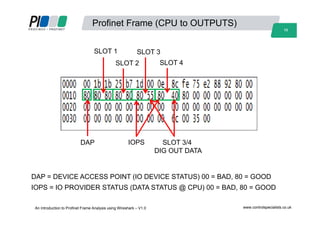
Profinet Frame (CPU to OUTPUTS)
SLOT 1
SLOT 2
SLOT 3
SLOT 4
IOPS SLOT 3/4
DIG OUT DATA
DAP
DAP = DEVICE ACCESS POINT (IO DEVICE STATUS) 00 = BAD, 80 = GOOD
IOPS = IO PROVIDER STATUS (DATA STATUS @ CPU) 00 = BAD, 80 = GOOD
An Introduction to Profinet Frame Analysis using Wireshark – V1.0 www.controlspecialists.co.uk
14
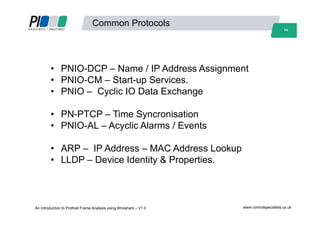
Common Protocols
• PNIO-DCP – Name / IP Address Assignment
• PNIO-CM – Start-up Services.
• PNIO – Cyclic IO Data Exchange
• PN-PTCP – Time Syncronisation
• PNIO-AL – Acyclic Alarms / Events
• ARP – IP Address – MAC Address Lookup
• LLDP – Device Identity & Properties.
An Introduction to Profinet Frame Analysis using Wireshark – V1.0 www.controlspecialists.co.uk
15
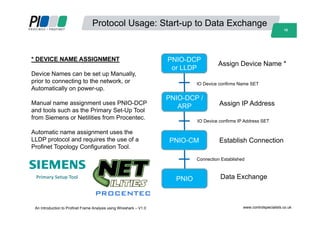
Protocol Usage: Start-up to Data Exchange
Assign Device Name *
PNIO-DCP /
ARP Assign IP Address
Establish Connection
PNIO-DCP
or LLDP
PNIO-CM
PNIO Data Exchange
IO Device confirms Name SET
IO Device confirms IP Address SET
Connection Established
* DEVICE NAME ASSIGNMENT
Device Names can be set up Manually,
prior to connecting to the network, or
Automatically on power-up.
Manual name assignment uses PNIO-DCP
and tools such as the Primary Set-Up Tool
from Siemens or Netilities from Procentec.
Automatic name assignment uses the
LLDP protocol and requires the use of a
Profinet Topology Configuration Tool.
Primary Setup Tool
An Introduction to Profinet Frame Analysis using Wireshark – V1.0 www.controlspecialists.co.uk
16
An Introduction to Profinet Frame Analysis using Wireshark – V1.0
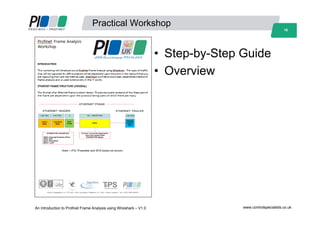
Practical Workshop
• Step-by-Step Guide
• Overview
www.controlspecialists.co.uk

W4 profinet frame analysis, peter thomas

  • 1.
    An Introduction to PROFINETFrame Analysis using Peter Thomas Control Specialists Ltd www.controlspecialists.co.uk An Introduction to Profinet Frame Analysis using Wireshark – V1.0 (07/05/2013)
  • 2.
    2 Objectives • To gainan understanding of the way in which PROFINET devices communicate with one another over Ethernet. • To learn how to capture the PROFINET Frames using Wireshark®. • To analyse the captured frames to gain an understanding and purpose of the various protocols. • This is a topic covered in more detail in the Certified Profinet Engineers Course An Introduction to Profinet Frame Analysis using Wireshark – V1.0 www.controlspecialists.co.uk
  • 3.
    3 What is Wireshark? •Wireshark® is a network protocol analyser. It lets you capture and interactively browse the traffic running on a computer network. • It is not dedicated to Proifinet and as such cannot be compared to ProfiTrace. • It is free to download and available from www.wireshark.org An Introduction to Profinet Frame Analysis using Wireshark – V1.0 www.controlspecialists.co.uk
  • 4.
    4 Frame Capturing –Mirrored Ports Switch A – Port 2 (IM153-3 & WAGO) Switch B – Port 2 (IM153-3 ONLY) LAN LAN An Introduction to Profinet Frame Analysis using Wireshark – V1.0 www.controlspecialists.co.uk
  • 5.
    5 Frame Capturing –ProfiTap USBX An Introduction to Profinet Frame Analysis using Wireshark – V1.0 www.controlspecialists.co.uk
  • 6.
    6 Frame Capturing Ports AnIntroduction to Profinet Frame Analysis using Wireshark – V1.0 www.controlspecialists.co.uk
  • 7.
    7 Scope of thisworkshop • Wireshark® will be used to capture and analyse Profinet traffic during the following events:- – Start-Up – Data Exchange – Loss of Module – Loss of Communications – Duplicate Device Name An Introduction to Profinet Frame Analysis using Wireshark – V1.0 www.controlspecialists.co.uk
  • 8.
    8 Equipment used inthis workshop • Siemens S7 PLC Hardware & Switches. • Wago IO • ProfiTap & Netilities from Procentec • Wireshark® Network Protocol Analyser. An Introduction to Profinet Frame Analysis using Wireshark – V1.0 www.controlspecialists.co.uk
  • 9.
    9 WIRESHARK - HomePage AnIntroduction to Profinet Frame Analysis using Wireshark – V1.0 www.controlspecialists.co.uk
  • 10.
    10 WIRESHARK – FrameAnalysis An Introduction to Profinet Frame Analysis using Wireshark – V1.0 www.controlspecialists.co.uk Packet Filter Expression Filter Buttons Packet Details Window Packet Bytes Window Packet List Window
  • 11.
    11 IEEE 802.3 EtherNetFrame 40 – 1500 BYTES DATA SOURCE MAC 6 BYTES DEST MAC ETHER TYPE FRAME CHECK SEQ ETHER TYPE EXAMPLES 0800: Internet Protocol (IPV4) 0806: ARP 8892: PROFINET 88CC: LLDP Format / Contents dependent upon the value of the ETHER TYPE ETHERNET HEADER ETHERNET TRAILER Note – VLAN Tags, IFG, Preamble and SFD bytes not shown. ETHERNET FRAME 6 BYTES 2 BYTES 4 BYTES An Introduction to Profinet Frame Analysis using Wireshark – V1.0 www.controlspecialists.co.uk
  • 12.
    12 Profinet Frame SOURCE ADDRESSDESTINATION ADDRESS ETHERTYPE PROFINET IO DATA CYCLE COUNTER DATA STATUS FRAME ID TXFR STATUS ETHERTYPE 8892 = PROFINET, FRAME ID 8000 = REAL TIME CLASS 2 -- APPLICATION PROTOCOL DATA UNIT STATUS -- An Introduction to Profinet Frame Analysis using Wireshark – V1.0 www.controlspecialists.co.uk
  • 13.
    13 Profinet Frame (CPUto OUTPUTS) SLOT 1 SLOT 2 SLOT 3 SLOT 4 IOPS SLOT 3/4 DIG OUT DATA DAP DAP = DEVICE ACCESS POINT (IO DEVICE STATUS) 00 = BAD, 80 = GOOD IOPS = IO PROVIDER STATUS (DATA STATUS @ CPU) 00 = BAD, 80 = GOOD An Introduction to Profinet Frame Analysis using Wireshark – V1.0 www.controlspecialists.co.uk
  • 14.
    14 Common Protocols • PNIO-DCP– Name / IP Address Assignment • PNIO-CM – Start-up Services. • PNIO – Cyclic IO Data Exchange • PN-PTCP – Time Syncronisation • PNIO-AL – Acyclic Alarms / Events • ARP – IP Address – MAC Address Lookup • LLDP – Device Identity & Properties. An Introduction to Profinet Frame Analysis using Wireshark – V1.0 www.controlspecialists.co.uk
  • 15.
    15 Protocol Usage: Start-upto Data Exchange Assign Device Name * PNIO-DCP / ARP Assign IP Address Establish Connection PNIO-DCP or LLDP PNIO-CM PNIO Data Exchange IO Device confirms Name SET IO Device confirms IP Address SET Connection Established * DEVICE NAME ASSIGNMENT Device Names can be set up Manually, prior to connecting to the network, or Automatically on power-up. Manual name assignment uses PNIO-DCP and tools such as the Primary Set-Up Tool from Siemens or Netilities from Procentec. Automatic name assignment uses the LLDP protocol and requires the use of a Profinet Topology Configuration Tool. Primary Setup Tool An Introduction to Profinet Frame Analysis using Wireshark – V1.0 www.controlspecialists.co.uk
  • 16.
    16 An Introduction toProfinet Frame Analysis using Wireshark – V1.0 Practical Workshop • Step-by-Step Guide • Overview www.controlspecialists.co.uk