FORENSIC INSIGHT;
DIGITAL FORENSICS COMMUNITY IN KOREA
Network Forensics and its Scope & Role
kevinkoo001@gmail.com
May 2013
forensicinsight.org Page 2
Overview
1. Introduction
2. Considerations
3. Scope & Role for Network Forensic (Discussion)
4. Packet Analysis for Network Forensics
forensicinsight.org Page 3
Introduction
 Network?
• Protocols
• Devices
• Packets never lie!
forensicinsight.org Page 4
Introduction
 Methodology (OSCAR)
• Obtain information
• Strategize
• Collect Evidence
• Analyze
• Report
forensicinsight.org Page 5
Considerations
 What to know when an incident occurs over network
• Description
• Date, time, and method of incident discovery
• Persons involved
• Systems and data involved
• Actions taken since discovery
• Summary of internal discussions
• Incident manager and process
• Legal issues
• Time frame for investigation/recovery/resolution
• Goals
forensicinsight.org Page 6
Considerations
 The properties (thus challenges) of Network-based digital evidence
• Communication: Between the two or among multiple participants at a certain point
• Volatile: The matter of when, hard to find artifacts even in memory
• Scattered: No choice but to get involved multiple sources of evidence
• Storage: Possibly stores all packets on the fly??
• Privacy: Problematic if storage is available depending on jurisdiction
• Seizure: Seizing a network device with a warrant?
• Admissibility: No file system and no standard format  admissible in court?
• Encryption: Hard to identify network traffic even though it’s detected.
forensicinsight.org Page 7
Scope & Role for Network Forensic
 Things taken into account
• Acquirements  Standard? Format? C.I.A?
• Storage  Chain of Custody
Who is eligible to get access to potential evidence?
How can collected network evidence be handled in a forensically sound manner?
• How to prove the originals and the copies
• Analysis  Correlation from multiple sources of evidence
Are all timestamp trustworthy?
Is skewed timeline allowable to court?
Extracted files over network!
• Repeatable?
forensicinsight.org Page 8
Scope & Role for Network Forensic
 DISCUSSION: Then how much does network forensics cover?
• Network packet acquirement  mandatory?
• If so, are all network range included? Both on the wire and in the air?? Cost???
• Are the followings part of network forensics?
Log analysis for correlation
Executable found in the packets
Encrypted payloads in the packets (SSL/TLS/other home-brewed techniques, …)
• If so, is the investigation from network-oriented security devices itself as well as
all logs (eg. IDS, IPS, WAF, …)?
• In real time or Post-investigation? Cost? Mandatory?
• Putting all together, what should be defined as forensic readiness?
forensicinsight.org Page 9
Packet Analysis for Network Forensics
forensicinsight.org Page 10
Things to help you analyze network traffic with Wireshark
 Tips to use Wireshark wisely (1/7)
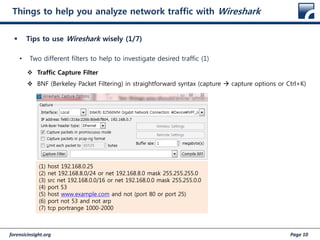
• Two different filters to help to investigate desired traffic (1)
 Traffic Capture Filter
 BNF (Berkeley Packet Filtering) in straightforward syntax (capture  capture options or Ctrl+K)
(1) host 192.168.0.25
(2) net 192.168.8.0/24 or net 192.168.8.0 mask 255.255.255.0
(3) src net 192.168.0.0/16 or net 192.168.0.0 mask 255.255.0.0
(4) port 53
(5) host www.example.com and not (port 80 or port 25)
(6) port not 53 and not arp
(7) tcp portrange 1000-2000
forensicinsight.org Page 11
Things to help you analyze network traffic with Wireshark
 Tips to use Wireshark wisely (2/7)
• Two different filters to help to investigate desired traffic (2)
 Display Filter (http://www.wireshark.org/docs/dfref/)
 Wireshark’s own syntax
(1) tcp.port eq 25 or icmp
(2) ip.src == 192.168.8.0/24 and ip.dst == 192.168.0.0/16
(3) http || ssl
(4) eth.addr [0:3] == 00:06:5B
(5) udp contains 81:60:03
(6) http.request.uri
(7) ip.addr == 10.1.2.3
(8) ip.addr != 10.2.3.4 or ip.dst != 10.6.7.9
(9) !(ip.src == 10.11.12.13)
forensicinsight.org Page 12
Things to help you analyze network traffic with Wireshark
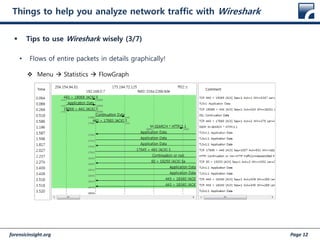
 Tips to use Wireshark wisely (3/7)
• Flows of entire packets in details graphically!
 Menu  Statistics  FlowGraph
forensicinsight.org Page 13
Things to help you analyze network traffic with Wireshark
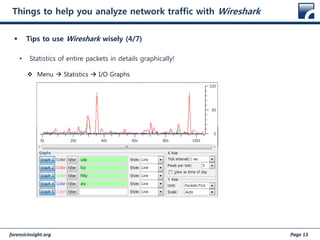
 Tips to use Wireshark wisely (4/7)
• Statistics of entire packets in details graphically!
 Menu  Statistics  I/O Graphs
forensicinsight.org Page 14
Things to help you analyze network traffic with Wireshark
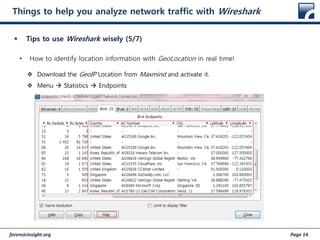
 Tips to use Wireshark wisely (5/7)
• How to identify location information with GeoLocation in real time!
 Download the GeoIP Location from Maxmind and activate it.
 Menu  Statistics  Endpoints
forensicinsight.org Page 15
Things to help you analyze network traffic with Wireshark
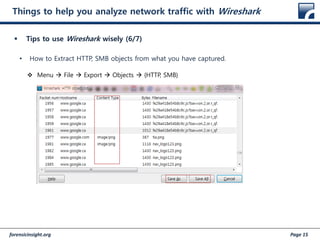
 Tips to use Wireshark wisely (6/7)
• How to Extract HTTP, SMB objects from what you have captured.
 Menu  File  Export  Objects  {HTTP, SMB}
forensicinsight.org Page 16
Things to help you analyze network traffic with Wireshark
 How to get abnormal packets quickly
• Expert Infos
forensicinsight.org Page 17
Things to help you analyze network traffic with Wireshark
 Tips to use Wireshark wisely (7/7)
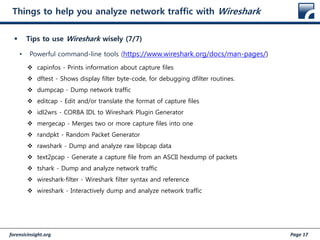
• Powerful command-line tools (https://www.wireshark.org/docs/man-pages/)
 capinfos - Prints information about capture files
 dftest - Shows display filter byte-code, for debugging dfilter routines.
 dumpcap - Dump network traffic
 editcap - Edit and/or translate the format of capture files
 idl2wrs - CORBA IDL to Wireshark Plugin Generator
 mergecap - Merges two or more capture files into one
 randpkt - Random Packet Generator
 rawshark - Dump and analyze raw libpcap data
 text2pcap - Generate a capture file from an ASCII hexdump of packets
 tshark - Dump and analyze network traffic
 wireshark-filter - Wireshark filter syntax and reference
 wireshark - Interactively dump and analyze network traffic
forensicinsight.org Page 18
Getting used to abnormal network traffic with Samples
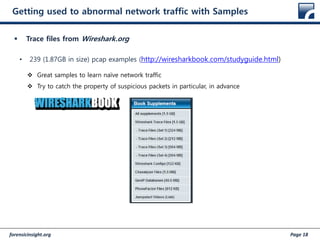
 Trace files from Wireshark.org
• 239 (1.87GB in size) pcap examples (http://wiresharkbook.com/studyguide.html)
 Great samples to learn naïve network traffic
 Try to catch the property of suspicious packets in particular, in advance
forensicinsight.org Page 19
Getting used to abnormal network traffic with Samples
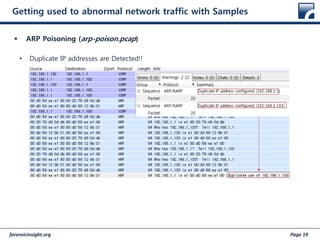
 ARP Poisoning (arp-poison.pcap)
• Duplicate IP addresses are Detected!!
forensicinsight.org Page 20
Getting used to abnormal network traffic with Samples
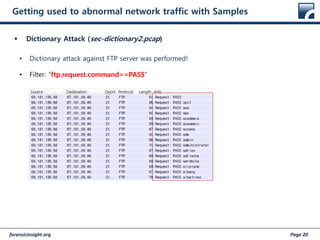
 Dictionary Attack (sec-dictionary2.pcap)
• Dictionary attack against FTP server was performed!
• Filter: “ftp.request.command==PASS”
forensicinsight.org Page 21
Getting used to abnormal network traffic with Samples
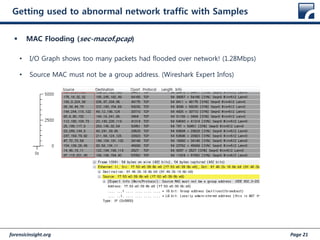
 MAC Flooding (sec-macof.pcap)
• I/O Graph shows too many packets had flooded over network! (1.28Mbps)
• Source MAC must not be a group address. (Wireshark Expert Infos)
forensicinsight.org Page 22
Getting used to abnormal network traffic with Samples
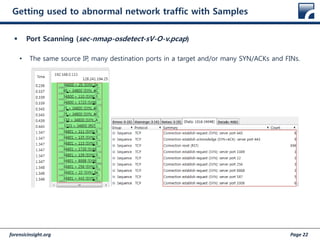
 Port Scanning (sec-nmap-osdetect-sV-O-v.pcap)
• The same source IP, many destination ports in a target and/or many SYN/ACKs and FINs.
forensicinsight.org Page 23
References
forensicinsight.org Page 24
Question and Answer

(130511) #fitalk network forensics and its role and scope

  • 1.
    FORENSIC INSIGHT; DIGITAL FORENSICSCOMMUNITY IN KOREA Network Forensics and its Scope & Role kevinkoo001@gmail.com May 2013
  • 2.
    forensicinsight.org Page 2 Overview 1.Introduction 2. Considerations 3. Scope & Role for Network Forensic (Discussion) 4. Packet Analysis for Network Forensics
  • 3.
    forensicinsight.org Page 3 Introduction Network? • Protocols • Devices • Packets never lie!
  • 4.
    forensicinsight.org Page 4 Introduction Methodology (OSCAR) • Obtain information • Strategize • Collect Evidence • Analyze • Report
  • 5.
    forensicinsight.org Page 5 Considerations What to know when an incident occurs over network • Description • Date, time, and method of incident discovery • Persons involved • Systems and data involved • Actions taken since discovery • Summary of internal discussions • Incident manager and process • Legal issues • Time frame for investigation/recovery/resolution • Goals
  • 6.
    forensicinsight.org Page 6 Considerations The properties (thus challenges) of Network-based digital evidence • Communication: Between the two or among multiple participants at a certain point • Volatile: The matter of when, hard to find artifacts even in memory • Scattered: No choice but to get involved multiple sources of evidence • Storage: Possibly stores all packets on the fly?? • Privacy: Problematic if storage is available depending on jurisdiction • Seizure: Seizing a network device with a warrant? • Admissibility: No file system and no standard format  admissible in court? • Encryption: Hard to identify network traffic even though it’s detected.
  • 7.
    forensicinsight.org Page 7 Scope& Role for Network Forensic  Things taken into account • Acquirements  Standard? Format? C.I.A? • Storage  Chain of Custody Who is eligible to get access to potential evidence? How can collected network evidence be handled in a forensically sound manner? • How to prove the originals and the copies • Analysis  Correlation from multiple sources of evidence Are all timestamp trustworthy? Is skewed timeline allowable to court? Extracted files over network! • Repeatable?
  • 8.
    forensicinsight.org Page 8 Scope& Role for Network Forensic  DISCUSSION: Then how much does network forensics cover? • Network packet acquirement  mandatory? • If so, are all network range included? Both on the wire and in the air?? Cost??? • Are the followings part of network forensics? Log analysis for correlation Executable found in the packets Encrypted payloads in the packets (SSL/TLS/other home-brewed techniques, …) • If so, is the investigation from network-oriented security devices itself as well as all logs (eg. IDS, IPS, WAF, …)? • In real time or Post-investigation? Cost? Mandatory? • Putting all together, what should be defined as forensic readiness?
  • 9.
    forensicinsight.org Page 9 PacketAnalysis for Network Forensics
  • 10.
    forensicinsight.org Page 10 Thingsto help you analyze network traffic with Wireshark  Tips to use Wireshark wisely (1/7) • Two different filters to help to investigate desired traffic (1)  Traffic Capture Filter  BNF (Berkeley Packet Filtering) in straightforward syntax (capture  capture options or Ctrl+K) (1) host 192.168.0.25 (2) net 192.168.8.0/24 or net 192.168.8.0 mask 255.255.255.0 (3) src net 192.168.0.0/16 or net 192.168.0.0 mask 255.255.0.0 (4) port 53 (5) host www.example.com and not (port 80 or port 25) (6) port not 53 and not arp (7) tcp portrange 1000-2000
  • 11.
    forensicinsight.org Page 11 Thingsto help you analyze network traffic with Wireshark  Tips to use Wireshark wisely (2/7) • Two different filters to help to investigate desired traffic (2)  Display Filter (http://www.wireshark.org/docs/dfref/)  Wireshark’s own syntax (1) tcp.port eq 25 or icmp (2) ip.src == 192.168.8.0/24 and ip.dst == 192.168.0.0/16 (3) http || ssl (4) eth.addr [0:3] == 00:06:5B (5) udp contains 81:60:03 (6) http.request.uri (7) ip.addr == 10.1.2.3 (8) ip.addr != 10.2.3.4 or ip.dst != 10.6.7.9 (9) !(ip.src == 10.11.12.13)
  • 12.
    forensicinsight.org Page 12 Thingsto help you analyze network traffic with Wireshark  Tips to use Wireshark wisely (3/7) • Flows of entire packets in details graphically!  Menu  Statistics  FlowGraph
  • 13.
    forensicinsight.org Page 13 Thingsto help you analyze network traffic with Wireshark  Tips to use Wireshark wisely (4/7) • Statistics of entire packets in details graphically!  Menu  Statistics  I/O Graphs
  • 14.
    forensicinsight.org Page 14 Thingsto help you analyze network traffic with Wireshark  Tips to use Wireshark wisely (5/7) • How to identify location information with GeoLocation in real time!  Download the GeoIP Location from Maxmind and activate it.  Menu  Statistics  Endpoints
  • 15.
    forensicinsight.org Page 15 Thingsto help you analyze network traffic with Wireshark  Tips to use Wireshark wisely (6/7) • How to Extract HTTP, SMB objects from what you have captured.  Menu  File  Export  Objects  {HTTP, SMB}
  • 16.
    forensicinsight.org Page 16 Thingsto help you analyze network traffic with Wireshark  How to get abnormal packets quickly • Expert Infos
  • 17.
    forensicinsight.org Page 17 Thingsto help you analyze network traffic with Wireshark  Tips to use Wireshark wisely (7/7) • Powerful command-line tools (https://www.wireshark.org/docs/man-pages/)  capinfos - Prints information about capture files  dftest - Shows display filter byte-code, for debugging dfilter routines.  dumpcap - Dump network traffic  editcap - Edit and/or translate the format of capture files  idl2wrs - CORBA IDL to Wireshark Plugin Generator  mergecap - Merges two or more capture files into one  randpkt - Random Packet Generator  rawshark - Dump and analyze raw libpcap data  text2pcap - Generate a capture file from an ASCII hexdump of packets  tshark - Dump and analyze network traffic  wireshark-filter - Wireshark filter syntax and reference  wireshark - Interactively dump and analyze network traffic
  • 18.
    forensicinsight.org Page 18 Gettingused to abnormal network traffic with Samples  Trace files from Wireshark.org • 239 (1.87GB in size) pcap examples (http://wiresharkbook.com/studyguide.html)  Great samples to learn naïve network traffic  Try to catch the property of suspicious packets in particular, in advance
  • 19.
    forensicinsight.org Page 19 Gettingused to abnormal network traffic with Samples  ARP Poisoning (arp-poison.pcap) • Duplicate IP addresses are Detected!!
  • 20.
    forensicinsight.org Page 20 Gettingused to abnormal network traffic with Samples  Dictionary Attack (sec-dictionary2.pcap) • Dictionary attack against FTP server was performed! • Filter: “ftp.request.command==PASS”
  • 21.
    forensicinsight.org Page 21 Gettingused to abnormal network traffic with Samples  MAC Flooding (sec-macof.pcap) • I/O Graph shows too many packets had flooded over network! (1.28Mbps) • Source MAC must not be a group address. (Wireshark Expert Infos)
  • 22.
    forensicinsight.org Page 22 Gettingused to abnormal network traffic with Samples  Port Scanning (sec-nmap-osdetect-sV-O-v.pcap) • The same source IP, many destination ports in a target and/or many SYN/ACKs and FINs.
  • 23.
  • 24.