PRESENTATION
VPN & ItsTypes & Configuration
Learning Points
■ DefineVPN
■ Types OfVPN
■ Types OfVPN Protocols
■ Configuration
■ Benefits
VPN (Virtual Private Network)
■ VPN is a Virtual Private Network that allows a user to connect to a
private network over the Internet securely and privately.
■ VPN creates an encrypted connection, known as VPN tunnel, and
all Internet traffic and communication is passed through this secure
tunnel. Thus, keeping the user data secure and private.
Types OfVPN
There are two basic VPN types which are explained below.
1. Remote Access VPN
1. Site – to – Site VPN
Remote Access VPN
■ Remote access VPN allows a user to connect to a private network
and access its services and resources remotely. The connection
between the user and the private network happens through the
Internet and the connection is secure and private.
■ Remote Access VPN is useful for business users as well as home
users.
■ A corporate employee, while traveling, uses a VPN to connect to
his/her company’s private network and remotely access files and
resources on the private network.
Home users, or private users of VPN, primarily use VPN services to
bypass regional restrictions on the Internet and access blocked
websites. Users conscious of Internet security also use VPN services
to enhance their Internet security and privacy.
Site – to – Site VPN
■ A Site-to-Site VPN is also called as Router-to-Router VPN and is
mostly used in the corporates.
■ Companies, with offices in different geographical locations, use
Site-to-site VPN to connect the network of one office location to
the network at another office location.
■ When multiple offices of the same company are connected using
Site-to-Site VPN type, it is called as Intranet based VPN.
■ When companies use Site-to-site VPN type to connect to the office
of another company, it is called as Extranet based VPN.
■ Basically, Site-to-site VPN create a virtual bridge between the
networks at geographically distant offices and connect them
through the Internet and maintain a secure and private
communication between the networks.
Types ofVPN protocols
1. Internet Protocol Security or IPsec
2. Layer 2 Tunneling Protocol (L2TP)
3. Point – to – Point Tunneling Protocol (PPTP)
4. Secure Sockets Layer (SSL) and Transport Layer Security (TLS)
5. Open VPN
6. Secure Shell (SSH)
Internet Protocol Security or IPsec
Internet Protocol Security or IPsec is used to secure Internet
communication across an IP network.
IPsec secures Internet Protocol communication by authenticating the
session and encrypts each data packet during the connection.
IPsec operates in two modes, Transport mode and Tunneling mode,
to protect data transfer between two different networks. The transport
mode encrypts the message in the data packet and the tunneling
mode encrypts the entire data packet. IPsec can also be used with
other security protocols to enhance the security system.
Layer 2 Tunneling Protocol (L2TP)
■ Layer 2 Tunneling Protocol is a tunneling protocol that is usually
combined with another VPN security protocol like IPsec to create a
highly secure VPN connection.
■ L2TP creates a tunnel between two L2TP connection points and
IPsec protocol encrypts the data and handles secure
communication between the tunnel
Point – to – Point Tunneling Protocol
(PPTP)
■ PPTP or Point-to-Point Tunneling Protocol creates a tunnel and
encapsulates the data packet. It uses a Point-to-Point Protocol
(PPP) to encrypt the data between the connection. PPTP is one of
the most widely used VPN protocol and has been in use since the
time of Windows 95. Apart from Windows, PPTP is also supported
on Mac and Linux.
Open VPN
■ Open VPN is an open source VPN that is useful for creating Point-
to-Point and Site-to-Site connections. It uses a custom security
protocol based on SSL and TLS protocol.
Secure Sockets Layer (SSL) and
Transport Layer Security (TLS)
■ SSL (Secure Sockets Layer) and TLS (Transport Layer Security)
create a VPN connection where the web browser acts as the client
and user access is restricted to specific applications instead of
entire network.
■ SSL and TLS protocol is most commonly used by online shopping
websites and service providers. Web browsers switch to SSL with
ease and with almost no action required from the user, since web
browsers come integrated with SSL and TLS. SSL connections
have https in the beginning of the URL instead of http.
Secure Shell (SSH)
■ Secure Shell or SSH creates the VPN tunnel through which the
data transfer happens and also ensures that the tunnel is
encrypted.
■ SSH connections are created by a SSH client and data is
transferred from a local port on to the remote server through the
encrypted tunnel.
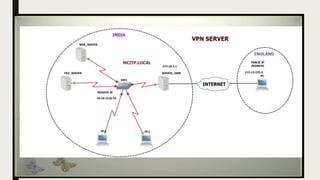
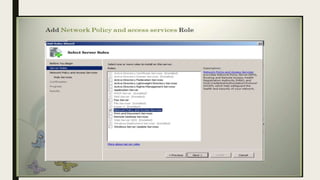
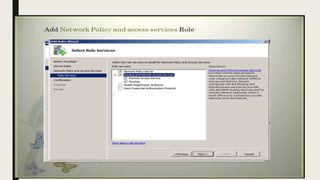
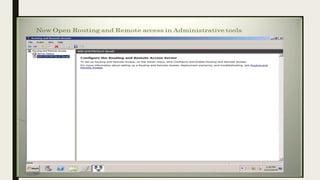
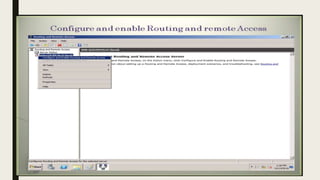
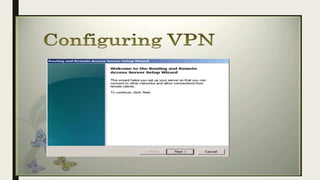
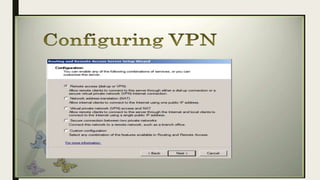
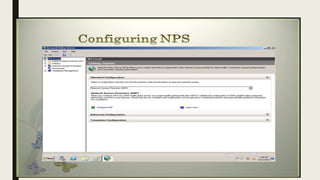
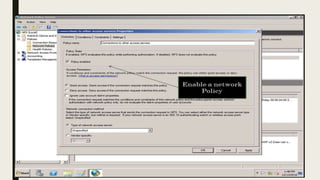
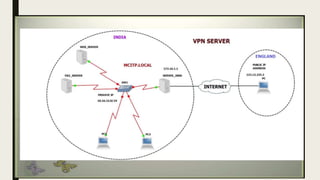
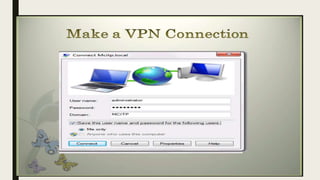
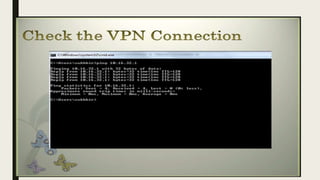
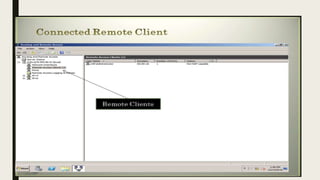
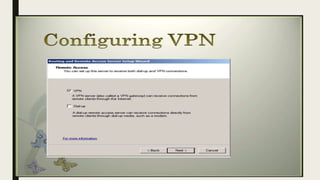
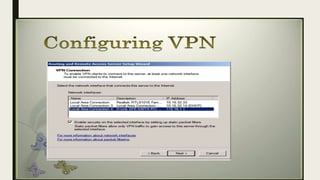
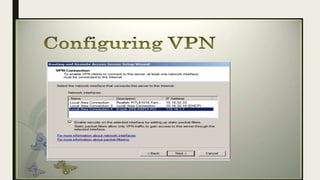
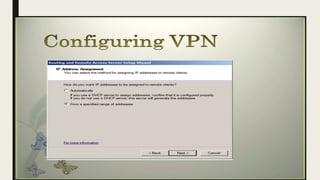
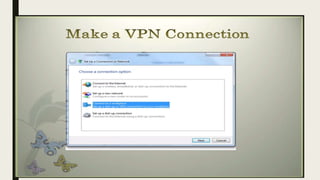
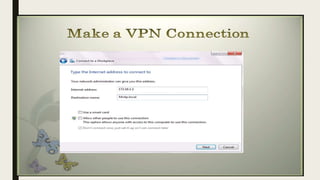
CONFIGURATION OFVPN
BENEFITS OFVPN
1. Access Blocked Websites & Avoid Geographical Restrictions.
2. Online Security & Privacy:
3. PublicWi-Fi Security:
4. Secure Connection to Remote Networks
5. Anonymous Browsing
Access Blocked Websites & Avoid
Geographical Restrictions.
■ VPN allows a user to access blocked websites and circumvent geographical
restrictions.
■ Some countries keep restrictions on certain websites and block these websites from
being accessed by people living in that country.This is called as Geo-blocking of the
websites.VPNs have a work around for this too and is more popular for enabling users
to access websites which are otherwise blocked in their region or country
Online Security & Privacy:
■ OurVPN uses high strength 256-bit encryption to protect your data from prying eyes.
Browse freely fromWi-Fi hotspots with the comfort that you can’t be tracked or
monitored.
■ It protects you from the prying eyes of hackers and snoopers who want to capture
your passwords and personal information
Anonymous Browsing
■ VPN service enables a user to browse through the Internet completely anonymously.
■ A lot of people who are concerned about their security and privacy prefer to browse
the Internet anonymously.AVPN connection would create a secure encrypted tunnel
between a user’s computer or mobile device to theVPN Server, enabling the user to
carry out online activities anonymously.
Public Wi-Fi Security:
■ AVPN increases the security when connected to a publicWi-Fi network.
■ PublicWi-Fi networks like the ones you would find in a coffee shop or in a hotel room
are not as safe and secure as one might believe they would be. Most publicWi-Fi
networks are insecure and open since they lack public Wi-Fi security encryption.
■ It is easiest to hack or snoop into your connection when you are connected through a
publicWi-Fi network. If a user is connected on a public Wi-Fi or an untrusted network
(such as in a hotel, coffee shop, other public places, etc.), the browsing activity of the
user on non-https websites could easily be snooped upon.
Secure Connection to Remote
Networks
■ VPNs also allow users to connect to remote network securely.
■ Most business useVirtual Private Network to allow their employees to access their
company’s private network securely while being physically away from the company
premises.The employees could be traveling around the world and still connect to the
secure private network of their company to access files, applications, and other
resources on the office network.

VPN, Its Types,VPN Protocols,Configuration and Benefits

  • 1.
  • 3.
    Learning Points ■ DefineVPN ■Types OfVPN ■ Types OfVPN Protocols ■ Configuration ■ Benefits
  • 4.
    VPN (Virtual PrivateNetwork) ■ VPN is a Virtual Private Network that allows a user to connect to a private network over the Internet securely and privately. ■ VPN creates an encrypted connection, known as VPN tunnel, and all Internet traffic and communication is passed through this secure tunnel. Thus, keeping the user data secure and private.
  • 5.
    Types OfVPN There aretwo basic VPN types which are explained below. 1. Remote Access VPN 1. Site – to – Site VPN
  • 6.
    Remote Access VPN ■Remote access VPN allows a user to connect to a private network and access its services and resources remotely. The connection between the user and the private network happens through the Internet and the connection is secure and private. ■ Remote Access VPN is useful for business users as well as home users. ■ A corporate employee, while traveling, uses a VPN to connect to his/her company’s private network and remotely access files and resources on the private network.
  • 7.
    Home users, orprivate users of VPN, primarily use VPN services to bypass regional restrictions on the Internet and access blocked websites. Users conscious of Internet security also use VPN services to enhance their Internet security and privacy.
  • 8.
    Site – to– Site VPN ■ A Site-to-Site VPN is also called as Router-to-Router VPN and is mostly used in the corporates. ■ Companies, with offices in different geographical locations, use Site-to-site VPN to connect the network of one office location to the network at another office location. ■ When multiple offices of the same company are connected using Site-to-Site VPN type, it is called as Intranet based VPN.
  • 9.
    ■ When companiesuse Site-to-site VPN type to connect to the office of another company, it is called as Extranet based VPN. ■ Basically, Site-to-site VPN create a virtual bridge between the networks at geographically distant offices and connect them through the Internet and maintain a secure and private communication between the networks.
  • 10.
    Types ofVPN protocols 1.Internet Protocol Security or IPsec 2. Layer 2 Tunneling Protocol (L2TP) 3. Point – to – Point Tunneling Protocol (PPTP) 4. Secure Sockets Layer (SSL) and Transport Layer Security (TLS) 5. Open VPN 6. Secure Shell (SSH)
  • 12.
    Internet Protocol Securityor IPsec Internet Protocol Security or IPsec is used to secure Internet communication across an IP network. IPsec secures Internet Protocol communication by authenticating the session and encrypts each data packet during the connection. IPsec operates in two modes, Transport mode and Tunneling mode, to protect data transfer between two different networks. The transport mode encrypts the message in the data packet and the tunneling mode encrypts the entire data packet. IPsec can also be used with other security protocols to enhance the security system.
  • 13.
    Layer 2 TunnelingProtocol (L2TP) ■ Layer 2 Tunneling Protocol is a tunneling protocol that is usually combined with another VPN security protocol like IPsec to create a highly secure VPN connection. ■ L2TP creates a tunnel between two L2TP connection points and IPsec protocol encrypts the data and handles secure communication between the tunnel
  • 14.
    Point – to– Point Tunneling Protocol (PPTP) ■ PPTP or Point-to-Point Tunneling Protocol creates a tunnel and encapsulates the data packet. It uses a Point-to-Point Protocol (PPP) to encrypt the data between the connection. PPTP is one of the most widely used VPN protocol and has been in use since the time of Windows 95. Apart from Windows, PPTP is also supported on Mac and Linux.
  • 15.
    Open VPN ■ OpenVPN is an open source VPN that is useful for creating Point- to-Point and Site-to-Site connections. It uses a custom security protocol based on SSL and TLS protocol.
  • 16.
    Secure Sockets Layer(SSL) and Transport Layer Security (TLS) ■ SSL (Secure Sockets Layer) and TLS (Transport Layer Security) create a VPN connection where the web browser acts as the client and user access is restricted to specific applications instead of entire network. ■ SSL and TLS protocol is most commonly used by online shopping websites and service providers. Web browsers switch to SSL with ease and with almost no action required from the user, since web browsers come integrated with SSL and TLS. SSL connections have https in the beginning of the URL instead of http.
  • 17.
    Secure Shell (SSH) ■Secure Shell or SSH creates the VPN tunnel through which the data transfer happens and also ensures that the tunnel is encrypted. ■ SSH connections are created by a SSH client and data is transferred from a local port on to the remote server through the encrypted tunnel.
  • 19.
  • 44.
    BENEFITS OFVPN 1. AccessBlocked Websites & Avoid Geographical Restrictions. 2. Online Security & Privacy: 3. PublicWi-Fi Security: 4. Secure Connection to Remote Networks 5. Anonymous Browsing
  • 45.
    Access Blocked Websites& Avoid Geographical Restrictions. ■ VPN allows a user to access blocked websites and circumvent geographical restrictions. ■ Some countries keep restrictions on certain websites and block these websites from being accessed by people living in that country.This is called as Geo-blocking of the websites.VPNs have a work around for this too and is more popular for enabling users to access websites which are otherwise blocked in their region or country
  • 46.
    Online Security &Privacy: ■ OurVPN uses high strength 256-bit encryption to protect your data from prying eyes. Browse freely fromWi-Fi hotspots with the comfort that you can’t be tracked or monitored. ■ It protects you from the prying eyes of hackers and snoopers who want to capture your passwords and personal information
  • 47.
    Anonymous Browsing ■ VPNservice enables a user to browse through the Internet completely anonymously. ■ A lot of people who are concerned about their security and privacy prefer to browse the Internet anonymously.AVPN connection would create a secure encrypted tunnel between a user’s computer or mobile device to theVPN Server, enabling the user to carry out online activities anonymously.
  • 48.
    Public Wi-Fi Security: ■AVPN increases the security when connected to a publicWi-Fi network. ■ PublicWi-Fi networks like the ones you would find in a coffee shop or in a hotel room are not as safe and secure as one might believe they would be. Most publicWi-Fi networks are insecure and open since they lack public Wi-Fi security encryption. ■ It is easiest to hack or snoop into your connection when you are connected through a publicWi-Fi network. If a user is connected on a public Wi-Fi or an untrusted network (such as in a hotel, coffee shop, other public places, etc.), the browsing activity of the user on non-https websites could easily be snooped upon.
  • 49.
    Secure Connection toRemote Networks ■ VPNs also allow users to connect to remote network securely. ■ Most business useVirtual Private Network to allow their employees to access their company’s private network securely while being physically away from the company premises.The employees could be traveling around the world and still connect to the secure private network of their company to access files, applications, and other resources on the office network.