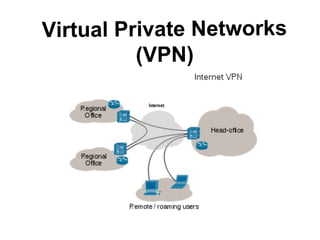
Virtual Private Networks
(VPN)
Introduction
1. A VPN is a combination of software and hardware that
allows mobile employees, telecommuters, business
partners, and remote sites to use a public or "unsecured"
medium such as the Internet to establish a secure,
private connection with a host network
2. It uses "virtual" connections routed through the internet
from the business's private network to the remote site
3. VPN extends a private network and the resources
contained in the network across public networks like the
Internet
History
1. Leased lines were expensive, no security, no back up
for the data, easy to hack
2. Increased security concerns - customers began using
different protocols to encrypt their data so that even if
the traffic can be observed, it cannot be read
3. Using the IP Protocol Security and other relative
protocols, adequate security and encryption ensured
that a session is secure and properly encrypted-the
market for VPN grew
4. Early VPN products required as many still do, their
own client, which is usually installed on the remote
workstation that needs access to the local network
How it works
A simple analogy to understand the working of VPNs:
1. you live on an island; there are thousands of other islands around you; the
common means of travel is via ferry; you have almost no privacy: Other people
can see everything you do.
2. Island = private local area network; ocean=internet; traveling by ferry
=connecting to a web server/other device through Internet; no control over the
other people on the ferry = no control over the wires and routers that make up the
Internet.
3. Now, let's assume each inhabitant has a submarine with these properties:
It's fast; It's portable; It's able to completely hide you from any other
boats/submarines; easy to add additional submarines to your fleet

4. So with the submarine, although you are traveling in the ocean along with other
traffic, you can travel between islands whenever you want to - privacy and
security. That's essentially how a VPN works
Types of VPN
1. Remote Access VPN: allows individual users to establish
secure connections with a remote computer network; users
can access the secure resources on that network as if they
were directly plugged in to the network's servers
2. Site to Site VPN: allows for offices in multiple fixed
locations to establish secure connections with each other
over a public network. Two types:
Intranet Based - A company can connect two or more of its
office locations using single private network
Extranet based - 2 companies have a close business relation
or understanding with each other and may wish to share the
same private network
Data Transmission in VPN
1. VPNs make use of tunneling to securely transmit packets think of tunneling as a package delivered to you by an
overnight-delivery service. The sender places the package
(passenger protocol) in an envelope (encapsulating protocol),
which is then put on a delivery truck (carrier protocol) at the
sender's office (entry tunnel interface). The truck (carrier
protocol) travels over the roads (Internet) to your home (exit
tunnel interface) and delivers the package. You open the
package (encapsulating protocol) and remove the contents
(passenger protocol).
2. Also referred to as encapsulation; computers at both ends
of the tunnel, are capable of encapsulating outbound packets
and also of stripping the extra layer from the incoming
packets
Some VPN protocols
1. Protocols and technologies used to enable siteto-site VPNs: IPsec, Draft Martini, L2TPv3, IEEE
802.1Q tunneling, MPLS LSPs
2. Protocols used to enable remote access VPNs:
Layer Two Forwarding (L2F) Protocol, Point-toPoint Tunneling Protocol (PPTP), Layer 2
Tunneling Protocol versions 2 and 3
(L2TPv2/L2TPv3), IPsec, Secure Sockets Layer
(SSL)
VPN-Pros and Cons
1. Merits: cost effective in an organization, best
suited for modern IP services, data is kept
secured and encrypted-enhanced security, easy
sharing of files, online anonymity, great for
accessing blocked websites or for bypassing
Internet filters, simplified network topology,
scalability
2. Demerits: VPN clients usually support
specific OS, access to corporate VPN requires
custom ports to be open through the firewall,
require detailed understanding of network
security issues
THANK YOU!!

Vpn ppt

  • 1.
  • 2.
    Introduction 1. A VPNis a combination of software and hardware that allows mobile employees, telecommuters, business partners, and remote sites to use a public or "unsecured" medium such as the Internet to establish a secure, private connection with a host network 2. It uses "virtual" connections routed through the internet from the business's private network to the remote site 3. VPN extends a private network and the resources contained in the network across public networks like the Internet
  • 3.
    History 1. Leased lineswere expensive, no security, no back up for the data, easy to hack 2. Increased security concerns - customers began using different protocols to encrypt their data so that even if the traffic can be observed, it cannot be read 3. Using the IP Protocol Security and other relative protocols, adequate security and encryption ensured that a session is secure and properly encrypted-the market for VPN grew 4. Early VPN products required as many still do, their own client, which is usually installed on the remote workstation that needs access to the local network
  • 4.
    How it works Asimple analogy to understand the working of VPNs: 1. you live on an island; there are thousands of other islands around you; the common means of travel is via ferry; you have almost no privacy: Other people can see everything you do. 2. Island = private local area network; ocean=internet; traveling by ferry =connecting to a web server/other device through Internet; no control over the other people on the ferry = no control over the wires and routers that make up the Internet. 3. Now, let's assume each inhabitant has a submarine with these properties: It's fast; It's portable; It's able to completely hide you from any other boats/submarines; easy to add additional submarines to your fleet 4. So with the submarine, although you are traveling in the ocean along with other traffic, you can travel between islands whenever you want to - privacy and security. That's essentially how a VPN works
  • 5.
    Types of VPN 1.Remote Access VPN: allows individual users to establish secure connections with a remote computer network; users can access the secure resources on that network as if they were directly plugged in to the network's servers 2. Site to Site VPN: allows for offices in multiple fixed locations to establish secure connections with each other over a public network. Two types: Intranet Based - A company can connect two or more of its office locations using single private network Extranet based - 2 companies have a close business relation or understanding with each other and may wish to share the same private network
  • 6.
    Data Transmission inVPN 1. VPNs make use of tunneling to securely transmit packets think of tunneling as a package delivered to you by an overnight-delivery service. The sender places the package (passenger protocol) in an envelope (encapsulating protocol), which is then put on a delivery truck (carrier protocol) at the sender's office (entry tunnel interface). The truck (carrier protocol) travels over the roads (Internet) to your home (exit tunnel interface) and delivers the package. You open the package (encapsulating protocol) and remove the contents (passenger protocol). 2. Also referred to as encapsulation; computers at both ends of the tunnel, are capable of encapsulating outbound packets and also of stripping the extra layer from the incoming packets
  • 7.
    Some VPN protocols 1.Protocols and technologies used to enable siteto-site VPNs: IPsec, Draft Martini, L2TPv3, IEEE 802.1Q tunneling, MPLS LSPs 2. Protocols used to enable remote access VPNs: Layer Two Forwarding (L2F) Protocol, Point-toPoint Tunneling Protocol (PPTP), Layer 2 Tunneling Protocol versions 2 and 3 (L2TPv2/L2TPv3), IPsec, Secure Sockets Layer (SSL)
  • 8.
    VPN-Pros and Cons 1.Merits: cost effective in an organization, best suited for modern IP services, data is kept secured and encrypted-enhanced security, easy sharing of files, online anonymity, great for accessing blocked websites or for bypassing Internet filters, simplified network topology, scalability 2. Demerits: VPN clients usually support specific OS, access to corporate VPN requires custom ports to be open through the firewall, require detailed understanding of network security issues
  • 9.