Name: Riaz Hussain
Roll No:2K15/ITE/114
Name: Dilsher Ahmed
Roll No:2K15/ITE/46
Name: Mazhar Ali
Roll No:2K15/ITE/76
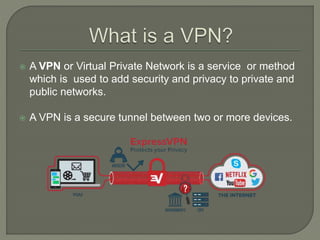
 A VPN or Virtual Private Network is a service or method
which is used to add security and privacy to private and
public networks.
 A VPN is a secure tunnel between two or more devices.
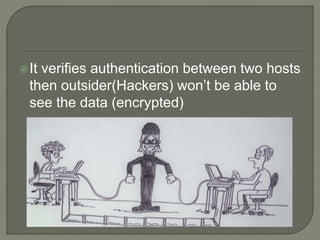
It verifies authentication between two hosts
then outsider(Hackers) won’t be able to
see the data (encrypted)
 when you connect to the internet you first connect to
your ISP.
 All your internet traffic passes through your ISP’s .
 When using VPN you connect to a server run by
your VPN provider via an encrypted connection.
 All your data traveling between your computer and
the VPN server is encrypted.
 It gives another IP address instead of your IP
address (during surfing)
Remote Access VPN:
 Remote access VPN allows a user to connect to a
private network and access its services and resources
remotely.
 Remote Access VPN is useful for business users as
well as home users.
Site – to – Site VPN:
 A Site-to-Site VPN is also called a Router-to-Router
VPN and is mostly used in Companies and
organizations.
 Many companies have offices located both nationally
and internationally, a Site-to-Site VPN is used to
connect the network of the main office location to
multiple offices.
A VPN can be used as remotely way.
A VPN allows you to connect private
networks securely.
It allows you to bypass internet censorship.
Hides your location.
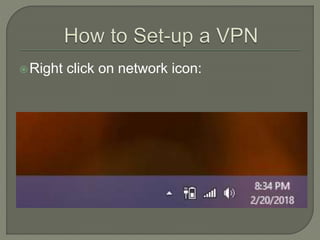
Right click on network icon:
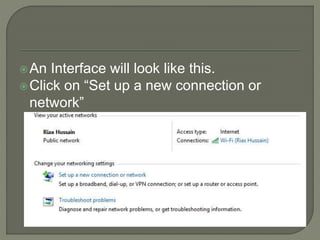
An Interface will look like this.
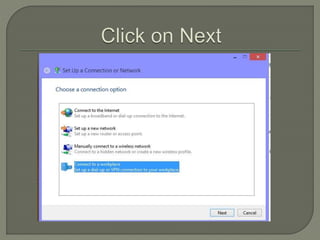
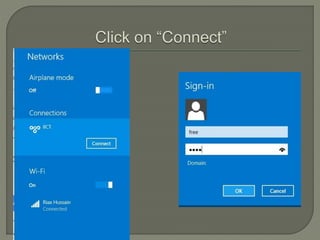
Click on “Set up a new connection or
network”
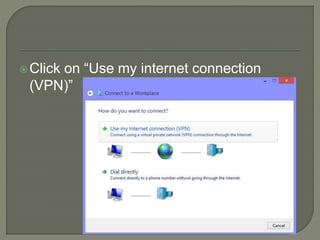
Click on “Use my internet connection
(VPN)”
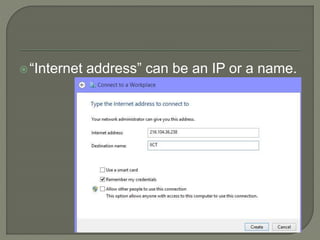
“Internet address” can be an IP or a name.
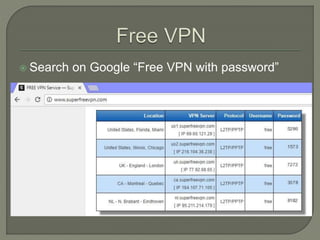
 Search on Google “Free VPN with password”
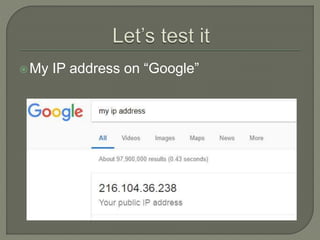
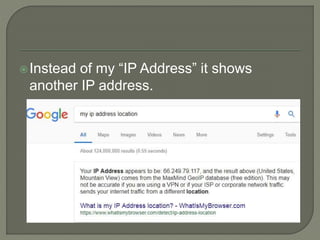
My IP address on “Google”
Instead of my “IP Address” it shows
another IP address.
“Does anyone have any thoughts
regarding to presentation”
No hesitation, feel free to ask.
 Point to Point Tunneling Protocol
(PPTP) developed by Microsoft in 1995.
 It is one of the most popular VPN protocol
available today that people use.
 PPTP, operating on TCP port 1723.
 PPTP encapsulates Point-to-Point Protocol
(PPP) frames into IP datagram for transmission
over an IP-based network, such as the Internet.
PPTP uses a TCP connection, known as
the PPTP control connection, to create,
maintain, and terminate the tunnel.
PPTP is based on authentication,
encryption and PPP negotiation.
This protocol encrypts data and puts it into
packets by creating a tunnel that provides
secured communication over internet.
Advantage:
PPTP supports a wide range of desktop
and mobile operating systems which is its
biggest advantage.
PPTP is easy to configure
Disadvantage:
PPTP is a old VPN protocol and it is not as
secured as other protocols available today
like L2TP.
 L2TP stands for Layer to Tunneling Protocol
that was developed by Microsoft and Cisco.
 L2TP is a VPN that typically combined with
another VPN security protocol to establish a
more secure VPN connection
 L2TP VPN forms a tunnel between two L2TP
connection points and another VPN such as
IP sec protocol encrypts the data and focuses
on securing communication between the
tunnels.
A L2TP is also similar to PPTP.
 The similarities exist in terms of their lack
of encryption and that both rely on PPP
protocol to do this.
They begin to differ with regards to their
data confidentially and data integrity.
 L2TP VPNs provide both whereas PPTP
VPNs do not.
Thank you 

VPN presentation

  • 1.
    Name: Riaz Hussain RollNo:2K15/ITE/114 Name: Dilsher Ahmed Roll No:2K15/ITE/46 Name: Mazhar Ali Roll No:2K15/ITE/76
  • 3.
     A VPNor Virtual Private Network is a service or method which is used to add security and privacy to private and public networks.  A VPN is a secure tunnel between two or more devices.
  • 4.
    It verifies authenticationbetween two hosts then outsider(Hackers) won’t be able to see the data (encrypted)
  • 5.
     when youconnect to the internet you first connect to your ISP.  All your internet traffic passes through your ISP’s .  When using VPN you connect to a server run by your VPN provider via an encrypted connection.  All your data traveling between your computer and the VPN server is encrypted.  It gives another IP address instead of your IP address (during surfing)
  • 6.
    Remote Access VPN: Remote access VPN allows a user to connect to a private network and access its services and resources remotely.  Remote Access VPN is useful for business users as well as home users.
  • 7.
    Site – to– Site VPN:  A Site-to-Site VPN is also called a Router-to-Router VPN and is mostly used in Companies and organizations.  Many companies have offices located both nationally and internationally, a Site-to-Site VPN is used to connect the network of the main office location to multiple offices.
  • 8.
    A VPN canbe used as remotely way. A VPN allows you to connect private networks securely. It allows you to bypass internet censorship. Hides your location.
  • 9.
    Right click onnetwork icon:
  • 10.
    An Interface willlook like this. Click on “Set up a new connection or network”
  • 12.
    Click on “Usemy internet connection (VPN)”
  • 13.
    “Internet address” canbe an IP or a name.
  • 14.
     Search onGoogle “Free VPN with password”
  • 16.
    My IP addresson “Google”
  • 17.
    Instead of my“IP Address” it shows another IP address.
  • 18.
    “Does anyone haveany thoughts regarding to presentation” No hesitation, feel free to ask.
  • 20.
     Point toPoint Tunneling Protocol (PPTP) developed by Microsoft in 1995.  It is one of the most popular VPN protocol available today that people use.  PPTP, operating on TCP port 1723.  PPTP encapsulates Point-to-Point Protocol (PPP) frames into IP datagram for transmission over an IP-based network, such as the Internet.
  • 21.
    PPTP uses aTCP connection, known as the PPTP control connection, to create, maintain, and terminate the tunnel.
  • 22.
    PPTP is basedon authentication, encryption and PPP negotiation. This protocol encrypts data and puts it into packets by creating a tunnel that provides secured communication over internet.
  • 23.
    Advantage: PPTP supports awide range of desktop and mobile operating systems which is its biggest advantage. PPTP is easy to configure Disadvantage: PPTP is a old VPN protocol and it is not as secured as other protocols available today like L2TP.
  • 25.
     L2TP standsfor Layer to Tunneling Protocol that was developed by Microsoft and Cisco.  L2TP is a VPN that typically combined with another VPN security protocol to establish a more secure VPN connection  L2TP VPN forms a tunnel between two L2TP connection points and another VPN such as IP sec protocol encrypts the data and focuses on securing communication between the tunnels.
  • 26.
    A L2TP isalso similar to PPTP.  The similarities exist in terms of their lack of encryption and that both rely on PPP protocol to do this. They begin to differ with regards to their data confidentially and data integrity.  L2TP VPNs provide both whereas PPTP VPNs do not.
  • 27.