VPN
VIRTUAL PRIVATE NETWORK
VIRTUAL PRIVATE
NETWORK
It basically encrypts the connection and makes
the user’s IP address hidden by using various tunneling
protocols.
It is used to bypass geo-blocks and for security
purposes. It is secure and private means for file sharing,
communication and remotely accessing data without
any risk of a hack.
VPN tunneling ensures encryption
at the user’s end and decryption at
the receiver’s end, for this to
happen the device should be
connected to a VPN client software
application.VPN acts as an
intermediator between user and
connection to the internet. It hides
user IP address and makes a
connection from VPN’s private
network rather than the user’s ISP
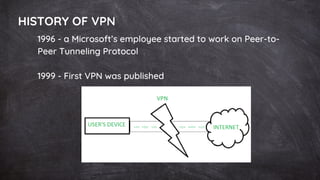
HISTORY OF VPN
1996 - a Microsoft’s employee started to work on Peer-to-
Peer Tunneling Protocol
1999 - First VPN was published
FEATURES
VPN PROVIDES PLENTIFUL SERVER
LOCATION.
IT ALSO PROVIDES ANONYMOUS DNS
SERVERS.
VPNS ARE GENERALLY COST-EFFECTIVE.
VPN SUPPORTS ROUTER.
THE VPN IS HIGHLY ENCRYPTED AND
SECURE.
ALONG WITH VPN, WE GET SECURE VPN
PROTOCOLS.
IT PROVIDES SAFETY AGAINST DNS LEAK.
THE VPN PROVIDERS ALSO OFFER CROSS-
PLATFORM COMPATIBLE APPS.
It maintains confidentiality of user’s data.
It maintains the integrity of the user’s
data that is the data cannot be changed
in between the transmission.
It ensures non-repudiation that is a
sender cannot deny that he/she had not
sent the data.
Data authentication is also ensured by
VPN, it verifies the source and
destination’s authenticity.
Characteristics of VPN
APPLICATION
OF VPN
VPN can easily bypass geographic restrictions on
websites or streaming audio and video.
Using a VPN, we can protect ourselves from
snooping from untrustworthy Wi-Fi hotspots.
One can gain privacy online by hiding one’s true
location.
One can protect themselves from being logged
while torrenting.
VPN Protocol
IP Security (IPsec)
Point-to-Point Tunneling Protocol (PPTP)
Secure Sockets Layer (SSL) and Transport Layer
Security (TLS)
Layer 2 Tunnel Protocol (L2TP)
OpenVPN
It ensure an appropriate level of security with connected
systems when the underlying network infrastructure can
not provide it alone. To secure and encrypt, several
different protocols can be used:
WORKING PRINCIPLE OF VPN
The working principle of a VPN involves creating
a secure and encrypted connection between the
user’s device and a VPN server. This connection
is created using a combination of encryption
protocols and network protocols.
When a user connects to a VPN, their device
sends a request to the VPN server to establish a
secure connection. The VPN server responds by
sending the user’s device a set of encryption
keys, which are used to encrypt all data that is
transmitted between the device and the VPN
server.
WORKING PRINCIPLE OF VPN
Once the connection has been established, all
data that is transmitted between the user’s
device and the VPN server is encrypted using the
encryption keys. This means that even if a
hacker intercepts the data, they will not be able
to read it.
VPN also uses network protocols to ensure that
the data is transmitted securely. The most
common network protocol used by VPNs is the
Internet Protocol Security (IPsec) protocol. IPsec
provides a set of security protocols that ensure
the integrity, confidentiality, and authenticity of
the data that is transmitted over the internet.
Advantages of VPN
Improved Security: A VPN encrypts all data that is
transmitted between the user’s device and the
VPN server. This means that even if a hacker
intercepts the data, they will not be able to read
it.
Privacy: A VPN masks the user’s IP address,
making it difficult for websites and online services
to track their online activity.
Access to Restricted Content: Some websites and
online services are restricted in certain countries.
By using a VPN, users can connect to a server in
another country and access the content that is
restricted in their own country.
Anonymity: By masking the user’s IP address and
encrypting their data, a VPN provides a high level
of anonymity online.
Disadvantages of VPN
The time taken to fetch the data sometimes
increases when fetched through VPN, so there
might be a performance issue with respect to
time.
VPN allows you to hide your identity but
sometimes your VPN provider company itself
steals your data, which can cause security issues.
Whenever VPN disconnection occurs
there is a possibility of IP address get
revealed to the network from which
connection was made.
It is always not possible to bypass
restrictions applied by a website by using
a VPN.
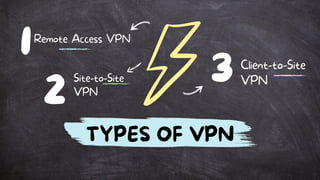
1
3
Site-to-Site
VPN
2
Remote Access VPN
Client-to-Site
VPN
TYPES OF VPN
VPN
PRIVACY
YOUR BROWSING HISTORY
YOUR LOCATION FOR
STREAMING
YOUR IP ADDRESS AND
LOCATION
YOUR DEVICES
YOUR WEB ACTIVITY — TO
MAINTAIN INTERNET FREEDOM
1.
2.
3.
4.
5.
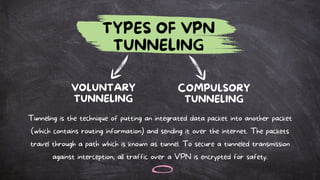
TYPES OF VPN
TUNNELING
VOLUNTARY
TUNNELING
COMPULSORY
TUNNELING
Tunneling is the technique of putting an integrated data packet into another packet
(which contains routing information) and sending it over the internet. The packets
travel through a path which is known as tunnel. To secure a tunneled transmission
against interception, all traffic over a VPN is encrypted for safety.
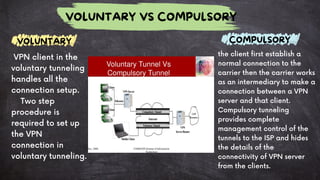
VOLUNTARY COMPULSORY
VOLUNTARY VS COMPULSORY
VPN client in the
voluntary tunneling
handles all the
connection setup.
Two step
procedure is
required to set up
the VPN
connection in
voluntary tunneling.
the client first establish a
normal connection to the
carrier then the carrier works
as an intermediary to make a
connection between a VPN
server and that client.
Compulsory tunneling
provides complete
management control of the
tunnels to the ISP and hides
the details of the
connectivity of VPN server
from the clients.
VPN FRONT END PROCESSOR (FEP)
NETWORK ACCESS SERVER (NAS)
POINT OF PRESENCE SERVER (POS)
BROKER DEVICES ARE USED IN COMPULSORY
TUNNELING FOR THE VERIFICATION OF CLIENTS. THE
LOGIC BUILD IN THE BROKER DEVICE ARE USED TO
ASSOCIATES THE CLIENT WITH THE DIFFERENT VPN
SERVERS.
THIS NETWORK DEVICE IS ALSO CALLED AS THE
FOLLOWING:
ACTIVITY
We will try to setup a VPN connection using
Hamachi VPN

Introduction to Virtual Private Network and Components

  • 1.
  • 2.
    VIRTUAL PRIVATE NETWORK It basicallyencrypts the connection and makes the user’s IP address hidden by using various tunneling protocols. It is used to bypass geo-blocks and for security purposes. It is secure and private means for file sharing, communication and remotely accessing data without any risk of a hack.
  • 3.
    VPN tunneling ensuresencryption at the user’s end and decryption at the receiver’s end, for this to happen the device should be connected to a VPN client software application.VPN acts as an intermediator between user and connection to the internet. It hides user IP address and makes a connection from VPN’s private network rather than the user’s ISP
  • 4.
    HISTORY OF VPN 1996- a Microsoft’s employee started to work on Peer-to- Peer Tunneling Protocol 1999 - First VPN was published
  • 5.
    FEATURES VPN PROVIDES PLENTIFULSERVER LOCATION. IT ALSO PROVIDES ANONYMOUS DNS SERVERS. VPNS ARE GENERALLY COST-EFFECTIVE. VPN SUPPORTS ROUTER. THE VPN IS HIGHLY ENCRYPTED AND SECURE. ALONG WITH VPN, WE GET SECURE VPN PROTOCOLS. IT PROVIDES SAFETY AGAINST DNS LEAK. THE VPN PROVIDERS ALSO OFFER CROSS- PLATFORM COMPATIBLE APPS.
  • 6.
    It maintains confidentialityof user’s data. It maintains the integrity of the user’s data that is the data cannot be changed in between the transmission. It ensures non-repudiation that is a sender cannot deny that he/she had not sent the data. Data authentication is also ensured by VPN, it verifies the source and destination’s authenticity. Characteristics of VPN
  • 7.
    APPLICATION OF VPN VPN caneasily bypass geographic restrictions on websites or streaming audio and video. Using a VPN, we can protect ourselves from snooping from untrustworthy Wi-Fi hotspots. One can gain privacy online by hiding one’s true location. One can protect themselves from being logged while torrenting.
  • 8.
    VPN Protocol IP Security(IPsec) Point-to-Point Tunneling Protocol (PPTP) Secure Sockets Layer (SSL) and Transport Layer Security (TLS) Layer 2 Tunnel Protocol (L2TP) OpenVPN It ensure an appropriate level of security with connected systems when the underlying network infrastructure can not provide it alone. To secure and encrypt, several different protocols can be used:
  • 9.
    WORKING PRINCIPLE OFVPN The working principle of a VPN involves creating a secure and encrypted connection between the user’s device and a VPN server. This connection is created using a combination of encryption protocols and network protocols. When a user connects to a VPN, their device sends a request to the VPN server to establish a secure connection. The VPN server responds by sending the user’s device a set of encryption keys, which are used to encrypt all data that is transmitted between the device and the VPN server.
  • 10.
    WORKING PRINCIPLE OFVPN Once the connection has been established, all data that is transmitted between the user’s device and the VPN server is encrypted using the encryption keys. This means that even if a hacker intercepts the data, they will not be able to read it. VPN also uses network protocols to ensure that the data is transmitted securely. The most common network protocol used by VPNs is the Internet Protocol Security (IPsec) protocol. IPsec provides a set of security protocols that ensure the integrity, confidentiality, and authenticity of the data that is transmitted over the internet.
  • 11.
    Advantages of VPN ImprovedSecurity: A VPN encrypts all data that is transmitted between the user’s device and the VPN server. This means that even if a hacker intercepts the data, they will not be able to read it. Privacy: A VPN masks the user’s IP address, making it difficult for websites and online services to track their online activity.
  • 12.
    Access to RestrictedContent: Some websites and online services are restricted in certain countries. By using a VPN, users can connect to a server in another country and access the content that is restricted in their own country. Anonymity: By masking the user’s IP address and encrypting their data, a VPN provides a high level of anonymity online.
  • 13.
    Disadvantages of VPN Thetime taken to fetch the data sometimes increases when fetched through VPN, so there might be a performance issue with respect to time. VPN allows you to hide your identity but sometimes your VPN provider company itself steals your data, which can cause security issues.
  • 14.
    Whenever VPN disconnectionoccurs there is a possibility of IP address get revealed to the network from which connection was made. It is always not possible to bypass restrictions applied by a website by using a VPN.
  • 15.
  • 16.
    VPN PRIVACY YOUR BROWSING HISTORY YOURLOCATION FOR STREAMING YOUR IP ADDRESS AND LOCATION YOUR DEVICES YOUR WEB ACTIVITY — TO MAINTAIN INTERNET FREEDOM 1. 2. 3. 4. 5.
  • 17.
    TYPES OF VPN TUNNELING VOLUNTARY TUNNELING COMPULSORY TUNNELING Tunnelingis the technique of putting an integrated data packet into another packet (which contains routing information) and sending it over the internet. The packets travel through a path which is known as tunnel. To secure a tunneled transmission against interception, all traffic over a VPN is encrypted for safety.
  • 18.
    VOLUNTARY COMPULSORY VOLUNTARY VSCOMPULSORY VPN client in the voluntary tunneling handles all the connection setup. Two step procedure is required to set up the VPN connection in voluntary tunneling. the client first establish a normal connection to the carrier then the carrier works as an intermediary to make a connection between a VPN server and that client. Compulsory tunneling provides complete management control of the tunnels to the ISP and hides the details of the connectivity of VPN server from the clients.
  • 19.
    VPN FRONT ENDPROCESSOR (FEP) NETWORK ACCESS SERVER (NAS) POINT OF PRESENCE SERVER (POS) BROKER DEVICES ARE USED IN COMPULSORY TUNNELING FOR THE VERIFICATION OF CLIENTS. THE LOGIC BUILD IN THE BROKER DEVICE ARE USED TO ASSOCIATES THE CLIENT WITH THE DIFFERENT VPN SERVERS. THIS NETWORK DEVICE IS ALSO CALLED AS THE FOLLOWING:
  • 20.
    ACTIVITY We will tryto setup a VPN connection using Hamachi VPN