1
Virtualization Management
Simplifying the Provisioning of Virtualized Applications
2
Dynamic Provisioning
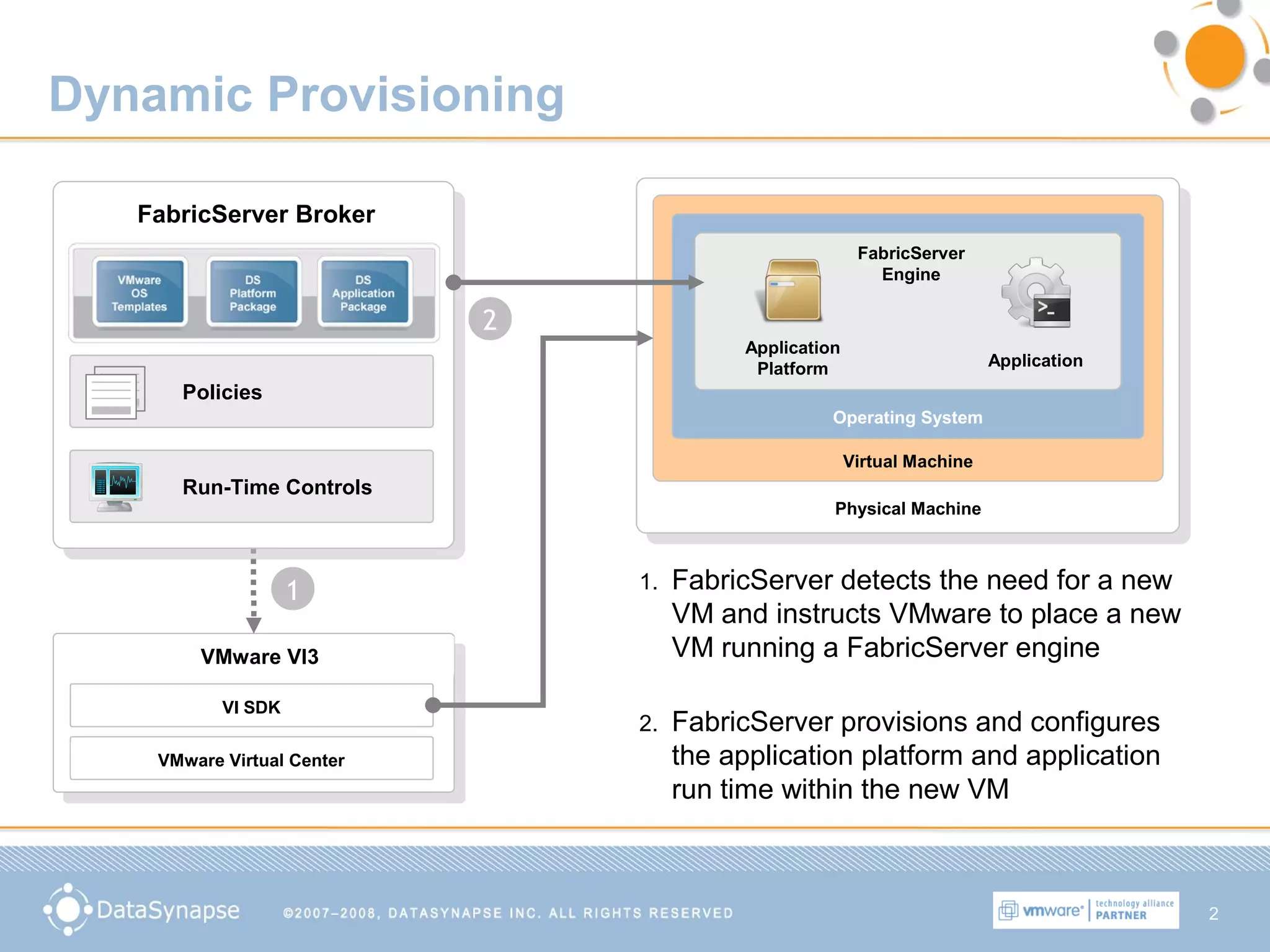
1. FabricServer detects the need for a new
VM and instructs VMware to place a new
VM running a FabricServer engine
Physical Machine
Virtual Machine
Operating System
FabricServer
Engine
Application
Platform Application
VMware VI3
VI SDK
VMware Virtual Center
FabricServer Broker
Policies
Run-Time Controls
1
2
2. FabricServer provisions and configures
the application platform and application
run time within the new VM
3
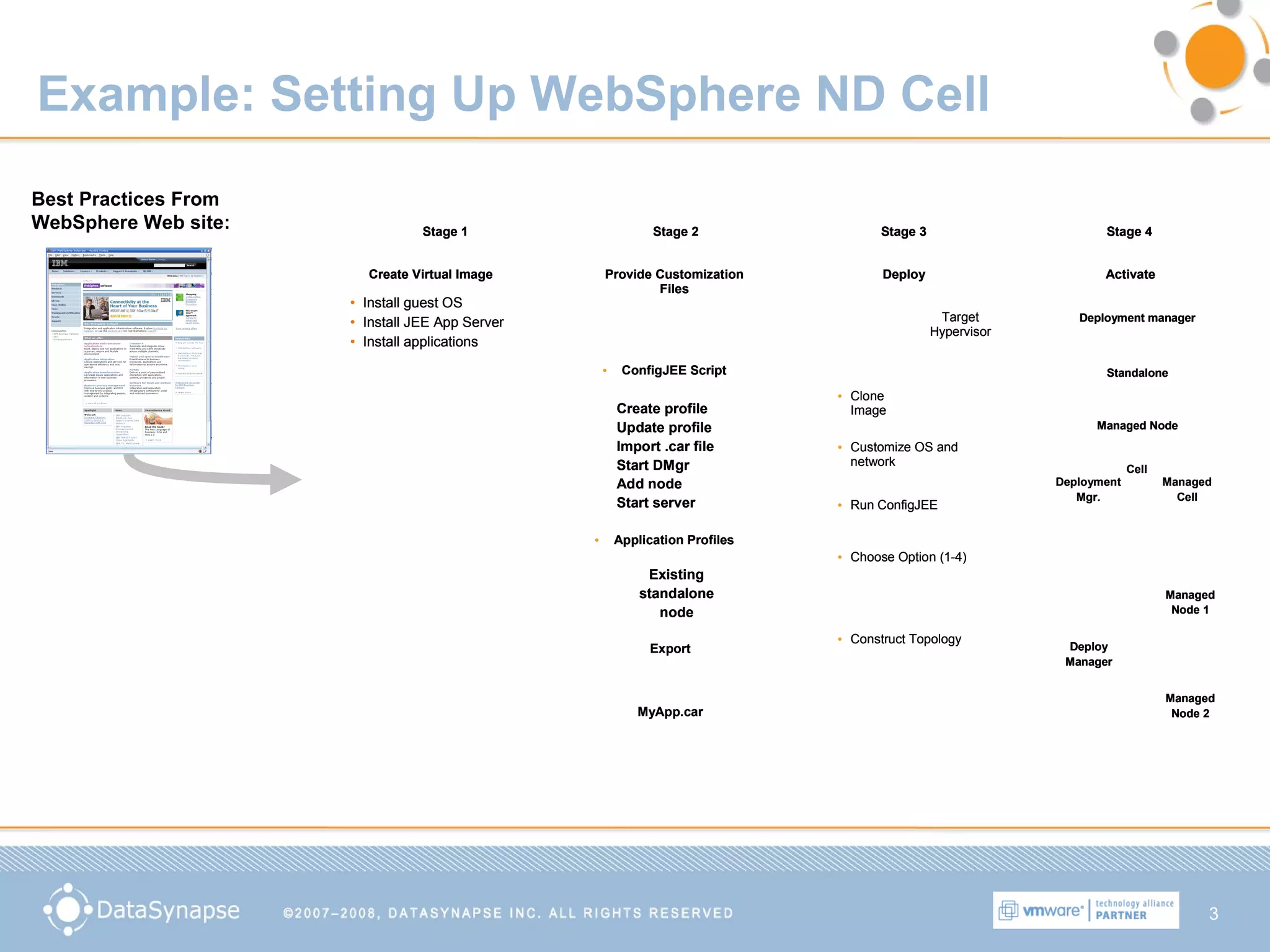
Example: Setting Up WebSphere ND Cell
Create Virtual Image Provide Customization
Files
Deploy Activate
Stage 3Stage 2Stage 1 Stage 4
Application Profiles
JEE
Application Server
Other common
components
monitoring agents,
security, etc..
Operating System
• Install guest OS
• Install JEE App Server
• Install applications
• ConfigJEE Script
Create profile
Update profile
Import .car file
Start DMgr
Add node
Start server
• Application Profiles
Export
Existing
standalone
node
MyApp.car
Target
Hypervisor
• Clone
Image
• Customize OS and
network
• Run ConfigJEE
• Choose Option (1-4)
• Construct Topology
Deployment manager
Standalone
Managed Node
Deployment
Mgr.
Managed
Cell
Cell
Deploy
Manager
Managed
Node 1
Managed
Node 2
Create Virtual Image Provide Customization
Files
Deploy Activate
Stage 3Stage 2Stage 1 Stage 4
Create Virtual Image Provide Customization
Files
Deploy Activate
Stage 3Stage 2Stage 1 Stage 4
Application Profiles
JEE
Application Server
Other common
components
monitoring agents,
security, etc..
Operating System
• Install guest OS
• Install JEE App Server
• Install applications
• ConfigJEE Script
Create profile
Update profile
Import .car file
Start DMgr
Add node
Start server
• Application Profiles
Export
Existing
standalone
node
MyApp.car
Target
Hypervisor
• Clone
Image
• Customize OS and
network
• Run ConfigJEE
• Choose Option (1-4)
• Construct Topology
Deployment manager
Standalone
Managed Node
Deployment manager
Standalone
Managed Node
Deployment
Mgr.
Managed
Cell
Cell
Deploy
Manager
Deploy
Manager
Managed
Node 1
Managed
Node 1
Managed
Node 2
Managed
Node 2
Best Practices From
WebSphere Web site:
4
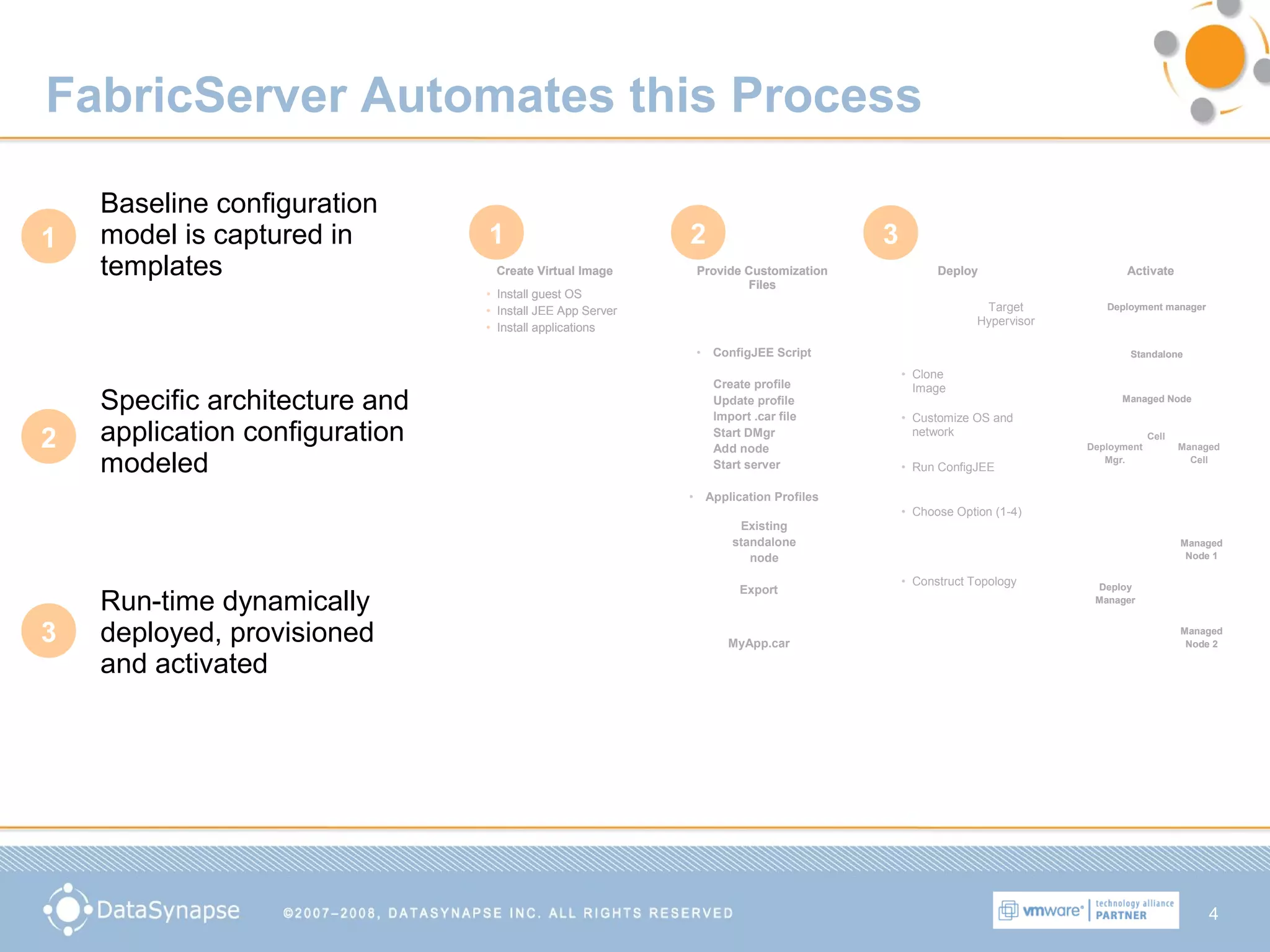
FabricServer Automates this Process
Create Virtual Image Provide Customization
Files
Deploy Activate
Stage 3Stage 2Stage 1 Stage 4
Create Virtual Image Provide Customization
Files
Deploy Activate
Stage 3Stage 2Stage 1 Stage 4
Application Profiles
JEE
Application Server
Other common
components
monitoring agents,
security, etc..
Operating System
• Install guest OS
• Install JEE App Server
• Install applications
Application Profiles
JEE
Application Server
Other common
components
monitoring agents,
security, etc..
Operating System
Application Profiles
JEE
Application Server
Other common
components
monitoring agents,
security, etc..
Operating System
• Install guest OS
• Install JEE App Server
• Install applications
• ConfigJEE Script
Create profile
Update profile
Import .car file
Start DMgr
Add node
Start server
• Application Profiles
Export
Existing
standalone
node
MyApp.car
Target
Hypervisor
• Clone
Image
• Customize OS and
network
• Run ConfigJEE
• Choose Option (1-4)
• Construct Topology
Deployment manager
Standalone
Managed Node
Deployment manager
Standalone
Managed Node
Deployment
Mgr.
Managed
Cell
Cell
Deploy
Manager
Deploy
Manager
Managed
Node 1
Managed
Node 1
Managed
Node 2
Managed
Node 2
Baseline configuration
model is captured in
templates
Specific architecture and
application configuration
modeled
Run-time dynamically
deployed, provisioned
and activated
1
2
3
1 2 3
5
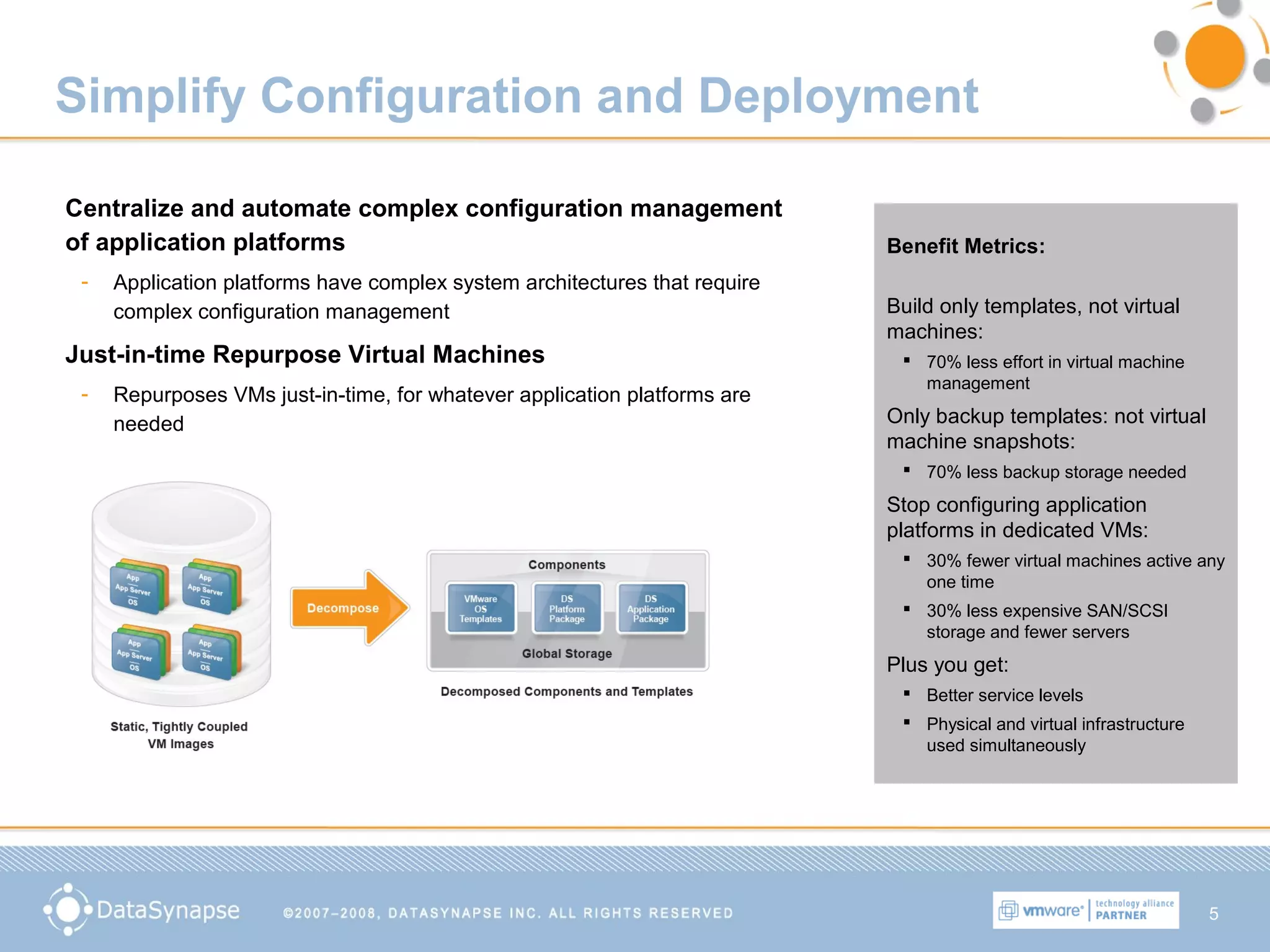
Simplify Configuration and Deployment
Centralize and automate complex configuration management
of application platforms
- Application platforms have complex system architectures that require
complex configuration management
Just-in-time Repurpose Virtual Machines
- Repurposes VMs just-in-time, for whatever application platforms are
needed
Benefit Metrics:
Build only templates, not virtual
machines:
 70% less effort in virtual machine
management
Only backup templates: not virtual
machine snapshots:
 70% less backup storage needed
Stop configuring application
platforms in dedicated VMs:
 30% fewer virtual machines active any
one time
 30% less expensive SAN/SCSI
storage and fewer servers
Plus you get:
 Better service levels
 Physical and virtual infrastructure
used simultaneously
6
Manage Application Service Levels Dynamically
• Platform dynamically allocates resources based on demand and manage
• Activate appropriate type and number of Virtual Machines
7
Value Proposition for VMware Customers
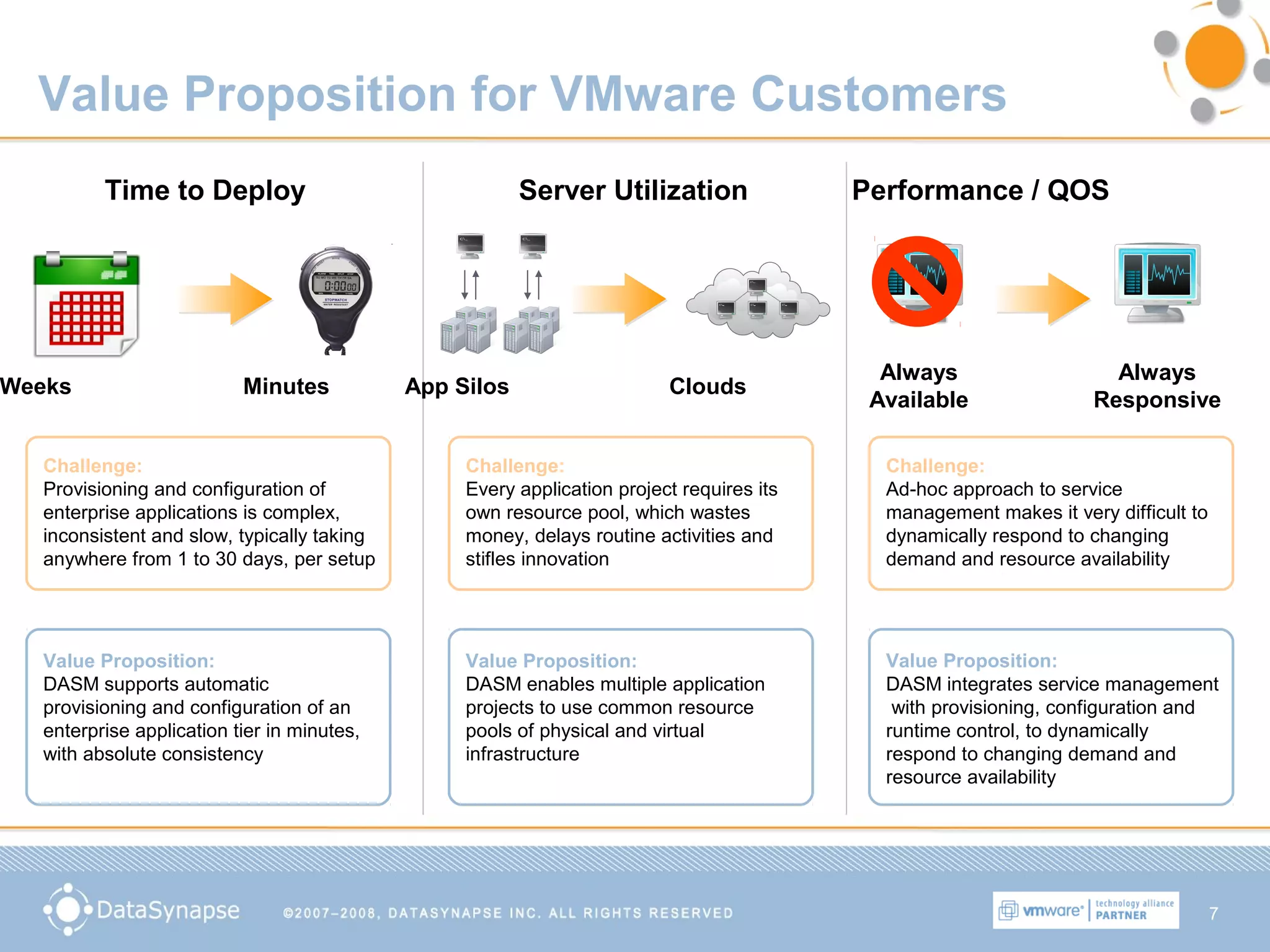
Time to Deploy
Challenge:
Provisioning and configuration of
enterprise applications is complex,
inconsistent and slow, typically taking
anywhere from 1 to 30 days, per setup
Weeks Minutes
Value Proposition:
DASM supports automatic
provisioning and configuration of an
enterprise application tier in minutes,
with absolute consistency
Server Utilization
App Silos Clouds
Challenge:
Every application project requires its
own resource pool, which wastes
money, delays routine activities and
stifles innovation
Value Proposition:
DASM enables multiple application
projects to use common resource
pools of physical and virtual
infrastructure
Performance / QOS
Challenge:
Ad-hoc approach to service
management makes it very difficult to
dynamically respond to changing
demand and resource availability
Value Proposition:
DASM integrates service management
with provisioning, configuration and
runtime control, to dynamically
respond to changing demand and
resource availability
Always
Responsive
Always
Available
8
Virtualization Management
Simplifying the Provisioning of Virtualized Applications

VMware and DataSynapse

  • 1.
    1 Virtualization Management Simplifying theProvisioning of Virtualized Applications
  • 2.
    2 Dynamic Provisioning 1. FabricServerdetects the need for a new VM and instructs VMware to place a new VM running a FabricServer engine Physical Machine Virtual Machine Operating System FabricServer Engine Application Platform Application VMware VI3 VI SDK VMware Virtual Center FabricServer Broker Policies Run-Time Controls 1 2 2. FabricServer provisions and configures the application platform and application run time within the new VM
  • 3.
    3 Example: Setting UpWebSphere ND Cell Create Virtual Image Provide Customization Files Deploy Activate Stage 3Stage 2Stage 1 Stage 4 Application Profiles JEE Application Server Other common components monitoring agents, security, etc.. Operating System • Install guest OS • Install JEE App Server • Install applications • ConfigJEE Script Create profile Update profile Import .car file Start DMgr Add node Start server • Application Profiles Export Existing standalone node MyApp.car Target Hypervisor • Clone Image • Customize OS and network • Run ConfigJEE • Choose Option (1-4) • Construct Topology Deployment manager Standalone Managed Node Deployment Mgr. Managed Cell Cell Deploy Manager Managed Node 1 Managed Node 2 Create Virtual Image Provide Customization Files Deploy Activate Stage 3Stage 2Stage 1 Stage 4 Create Virtual Image Provide Customization Files Deploy Activate Stage 3Stage 2Stage 1 Stage 4 Application Profiles JEE Application Server Other common components monitoring agents, security, etc.. Operating System • Install guest OS • Install JEE App Server • Install applications • ConfigJEE Script Create profile Update profile Import .car file Start DMgr Add node Start server • Application Profiles Export Existing standalone node MyApp.car Target Hypervisor • Clone Image • Customize OS and network • Run ConfigJEE • Choose Option (1-4) • Construct Topology Deployment manager Standalone Managed Node Deployment manager Standalone Managed Node Deployment Mgr. Managed Cell Cell Deploy Manager Deploy Manager Managed Node 1 Managed Node 1 Managed Node 2 Managed Node 2 Best Practices From WebSphere Web site:
  • 4.
    4 FabricServer Automates thisProcess Create Virtual Image Provide Customization Files Deploy Activate Stage 3Stage 2Stage 1 Stage 4 Create Virtual Image Provide Customization Files Deploy Activate Stage 3Stage 2Stage 1 Stage 4 Application Profiles JEE Application Server Other common components monitoring agents, security, etc.. Operating System • Install guest OS • Install JEE App Server • Install applications Application Profiles JEE Application Server Other common components monitoring agents, security, etc.. Operating System Application Profiles JEE Application Server Other common components monitoring agents, security, etc.. Operating System • Install guest OS • Install JEE App Server • Install applications • ConfigJEE Script Create profile Update profile Import .car file Start DMgr Add node Start server • Application Profiles Export Existing standalone node MyApp.car Target Hypervisor • Clone Image • Customize OS and network • Run ConfigJEE • Choose Option (1-4) • Construct Topology Deployment manager Standalone Managed Node Deployment manager Standalone Managed Node Deployment Mgr. Managed Cell Cell Deploy Manager Deploy Manager Managed Node 1 Managed Node 1 Managed Node 2 Managed Node 2 Baseline configuration model is captured in templates Specific architecture and application configuration modeled Run-time dynamically deployed, provisioned and activated 1 2 3 1 2 3
  • 5.
    5 Simplify Configuration andDeployment Centralize and automate complex configuration management of application platforms - Application platforms have complex system architectures that require complex configuration management Just-in-time Repurpose Virtual Machines - Repurposes VMs just-in-time, for whatever application platforms are needed Benefit Metrics: Build only templates, not virtual machines:  70% less effort in virtual machine management Only backup templates: not virtual machine snapshots:  70% less backup storage needed Stop configuring application platforms in dedicated VMs:  30% fewer virtual machines active any one time  30% less expensive SAN/SCSI storage and fewer servers Plus you get:  Better service levels  Physical and virtual infrastructure used simultaneously
  • 6.
    6 Manage Application ServiceLevels Dynamically • Platform dynamically allocates resources based on demand and manage • Activate appropriate type and number of Virtual Machines
  • 7.
    7 Value Proposition forVMware Customers Time to Deploy Challenge: Provisioning and configuration of enterprise applications is complex, inconsistent and slow, typically taking anywhere from 1 to 30 days, per setup Weeks Minutes Value Proposition: DASM supports automatic provisioning and configuration of an enterprise application tier in minutes, with absolute consistency Server Utilization App Silos Clouds Challenge: Every application project requires its own resource pool, which wastes money, delays routine activities and stifles innovation Value Proposition: DASM enables multiple application projects to use common resource pools of physical and virtual infrastructure Performance / QOS Challenge: Ad-hoc approach to service management makes it very difficult to dynamically respond to changing demand and resource availability Value Proposition: DASM integrates service management with provisioning, configuration and runtime control, to dynamically respond to changing demand and resource availability Always Responsive Always Available
  • 8.
    8 Virtualization Management Simplifying theProvisioning of Virtualized Applications