Deployment Appliance
Product Walk-Through
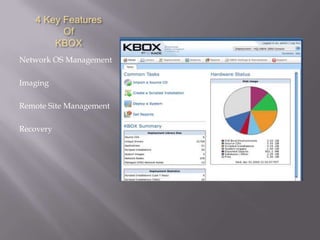
4 Key Features
         Of
       KBOX
Network OS Management

Imaging

Remote Site Management

Recovery
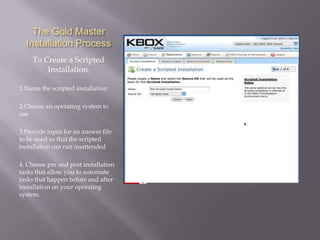
The Gold Master
  Installation Process
    To Create a Scripted
        Installation:

1.Name the scripted installation

2.Choose an operating system to
use

3.Provide input for an answer file
to be used so that the scripted
installation can run unattended

4. Choose pre and post installation
tasks that allow you to automate
tasks that happen before and after
installation on your operating
system.
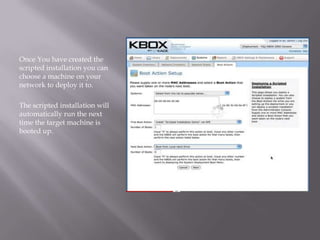
Once You have created the
scripted installation you can
choose a machine on your
network to deploy it to.

The scripted installation will
automatically run the next
time the target machine is
booted up.
Advantages
             of
          K-Image
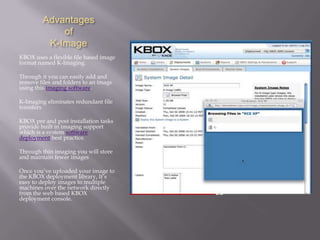
KBOX uses a flexible file based image
format named K-Imaging.

Through it you can easily add and
remove files and folders to an image
using this imaging software.

K-Imaging eliminates redundant file
transfers

KBOX pre and post installation tasks
provide built in imaging support
which is a system software
deployment best practice.

Through thin imaging you will store
and maintain fewer images

Once you’ve uploaded your image to
the KBOX deployment library, It’s
easy to deploy images to multiple
machines over the network directly
from the web based KBOX
deployment console.
KBOX Remote Site
    Management
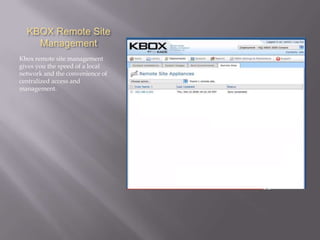
Kbox remote site management
gives you the speed of a local
network and the convenience of
centralized access and
management.
Remote Site
        Advantages
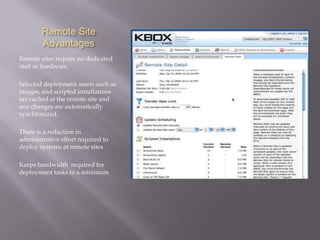
Remote sites require no dedicated
staff or hardware.

Selected deployment assets such as
images, and scripted installations
are cached at the remote site and
any changes are automatically
synchronized.

There is a reduction in
administrative effort required to
deploy systems at remote sites

Keeps bandwidth required for
deployment tasks to a minimum
KBOX Recovery
It’s important that administrators
be able to properly provision
machines in case they need repair.

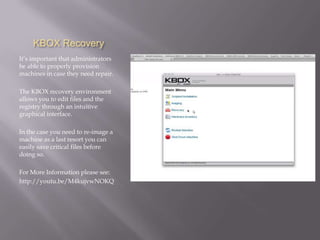
The KBOX recovery environment
allows you to edit files and the
registry through an intuitive
graphical interface.

In the case you need to re-image a
machine as a last resort you can
easily save critical files before
doing so.

For More Information please see:
http://youtu.be/M4kujvwNOKQ

Deployment appliance product walk through

  • 1.
  • 2.
    4 Key Features Of KBOX Network OS Management Imaging Remote Site Management Recovery
  • 4.
    The Gold Master Installation Process To Create a Scripted Installation: 1.Name the scripted installation 2.Choose an operating system to use 3.Provide input for an answer file to be used so that the scripted installation can run unattended 4. Choose pre and post installation tasks that allow you to automate tasks that happen before and after installation on your operating system.
  • 5.
    Once You havecreated the scripted installation you can choose a machine on your network to deploy it to. The scripted installation will automatically run the next time the target machine is booted up.
  • 7.
    Advantages of K-Image KBOX uses a flexible file based image format named K-Imaging. Through it you can easily add and remove files and folders to an image using this imaging software. K-Imaging eliminates redundant file transfers KBOX pre and post installation tasks provide built in imaging support which is a system software deployment best practice. Through thin imaging you will store and maintain fewer images Once you’ve uploaded your image to the KBOX deployment library, It’s easy to deploy images to multiple machines over the network directly from the web based KBOX deployment console.
  • 9.
    KBOX Remote Site Management Kbox remote site management gives you the speed of a local network and the convenience of centralized access and management.
  • 10.
    Remote Site Advantages Remote sites require no dedicated staff or hardware. Selected deployment assets such as images, and scripted installations are cached at the remote site and any changes are automatically synchronized. There is a reduction in administrative effort required to deploy systems at remote sites Keeps bandwidth required for deployment tasks to a minimum
  • 12.
    KBOX Recovery It’s importantthat administrators be able to properly provision machines in case they need repair. The KBOX recovery environment allows you to edit files and the registry through an intuitive graphical interface. In the case you need to re-image a machine as a last resort you can easily save critical files before doing so. For More Information please see: http://youtu.be/M4kujvwNOKQ