DYNAMIC VIRTUAL PRIVATE NETWORK
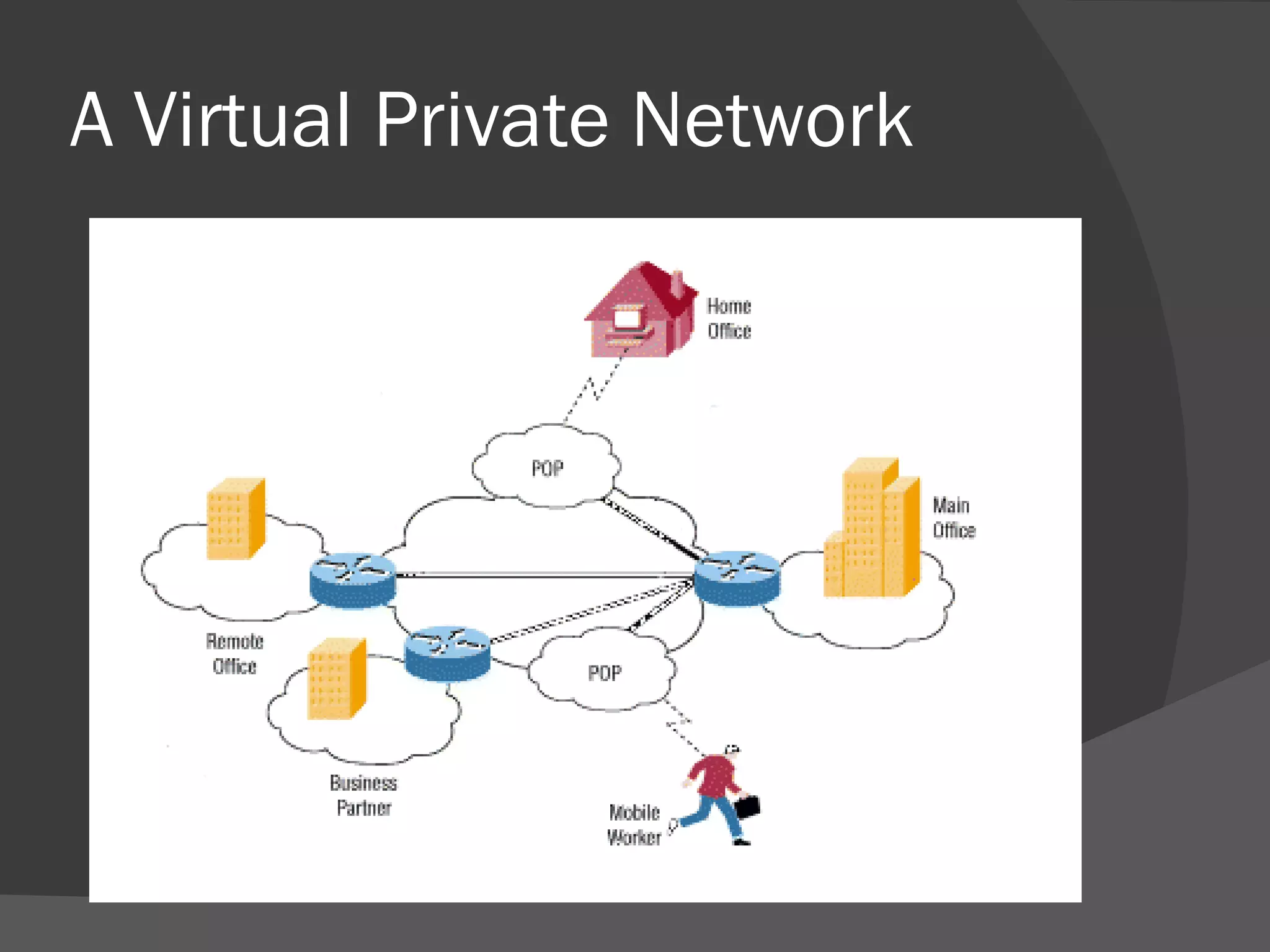
What Is A VPN? It is a private network that uses a public network to connect remote sites or users together. Instead of dedicated leased lines it uses virtual connections .
A Virtual Private Network
What makes a VPN? There  are 2 common VPN types: Remote Access Site-to-Site
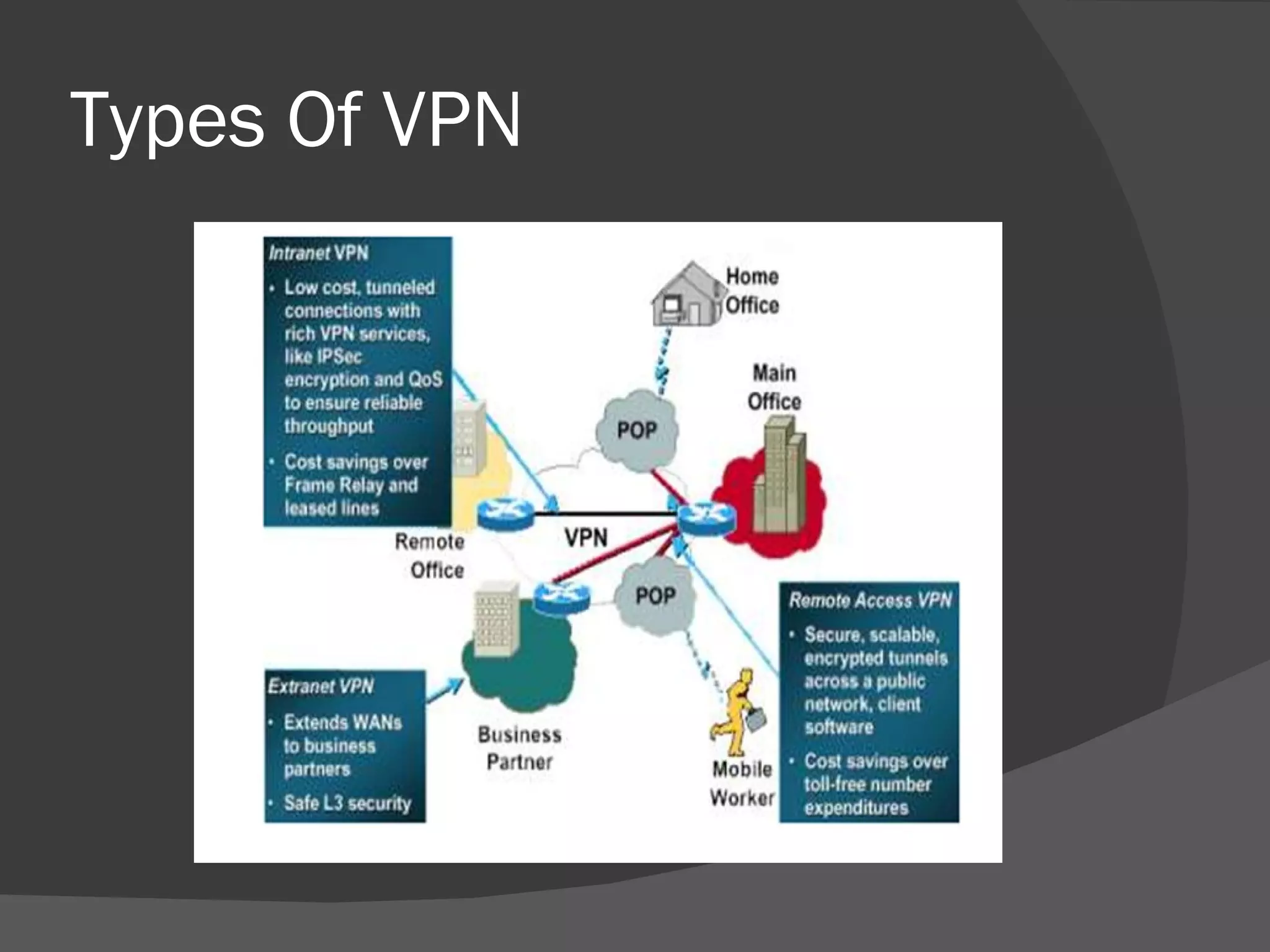
Remote Access VPN Also called a VPDN i.e. Virtual Private Dial-up network. It is a user to LAN connection. It permits secure & encrypted connections between a company’s private network and remote users.
Site-to-Site VPN This may be one of the following- Intranet based  – Low cost , tunneled connections with services like IPSec. Extranet based  – Provides enhanced security features. It extends WANs to business partners.
Types Of VPN
What is Tunneling? It is the process of placing an entire packet within another packet and sending it over a network. It allows the users to encapsulate their data in IP packets to securely transfer the contents that lies within.
… continued Tunneling requires  3 protocols: Carrier Protocol  – used by the network Encapsulating protocol – the protocol that is wrapped around the data. Passenger protocol – the original data.
VPN Protocols 4 different protocols are there for creating VPN over Internet PPTP - Point-to-Point Tunneling protocol L2F – Layer 2 Forwarding L2TP – Layer 2 Tunneling Protocol IPSec – IP Security Protocol
Drawbacks of VPN Security – prone to be hacked Authentication – No proof of the sender Encryption – problem related with the Keys.
Traditional VPN Solutions VANs  – Value Added Networks based on private , closed , leased line  or dial-up access Advantages: Fast and High Volume transfer of data. Limitations: Expensive and Restricted Companies need to be belonged to same VAN to execute transactions.
…… continued Routers , Firewalls and Encrypted Routers provides a fair degree of security but the security can be compromised by someone using a stolen key. also the router system is too brittle to accommodate multiple users.
The Solution : DVPN DVPN i.e. Dynamic Virtual Private Network Dynamic stands for its ability to accommodate open , changing business requirements . This ability is based on its unique architecture and set of other features.
Working Of DVPN Before actually using it, a user or service must first join the VPN by registering with the CA. A Local Registration Agent approves all the registration requests.
… .continued The following steps illustrate user requesting information from a server : A user request information using a desktop application such as Internet Browser. The application secures and sends a message.
… continued The Message is transmitted over the network. The received message must pass security. For requests , the user’s access rights are verified. The requested information is secured and returned over the internet
Capabilities and Features Of DVPN Provides enhanced security Accommodates dynamically changes communities of users Provides ability to exchange information in various forms(web pages,files etc.) Maintains integrity over time regardless of any changes in technology.
Features Of DVPN Distributes access control mechanism Application independence Access control based on strongly anthenticated user identities Support for user groups.
CONCLUSION No matter how secure a company’s network is , hackers will still look for compromising the security , especially when it comes to VPN connections. So in order for businesses to receive full benefits of intranets and Internet technology , a DVPN needs to be implemented to establish trust in open environments & to make it flexible & finely controlled.
THANK YOU….

Virtual Private Network

  • 1.
  • 2.
    What Is AVPN? It is a private network that uses a public network to connect remote sites or users together. Instead of dedicated leased lines it uses virtual connections .
  • 3.
  • 4.
    What makes aVPN? There are 2 common VPN types: Remote Access Site-to-Site
  • 5.
    Remote Access VPNAlso called a VPDN i.e. Virtual Private Dial-up network. It is a user to LAN connection. It permits secure & encrypted connections between a company’s private network and remote users.
  • 6.
    Site-to-Site VPN Thismay be one of the following- Intranet based – Low cost , tunneled connections with services like IPSec. Extranet based – Provides enhanced security features. It extends WANs to business partners.
  • 7.
  • 8.
    What is Tunneling?It is the process of placing an entire packet within another packet and sending it over a network. It allows the users to encapsulate their data in IP packets to securely transfer the contents that lies within.
  • 9.
    … continued Tunnelingrequires 3 protocols: Carrier Protocol – used by the network Encapsulating protocol – the protocol that is wrapped around the data. Passenger protocol – the original data.
  • 10.
    VPN Protocols 4different protocols are there for creating VPN over Internet PPTP - Point-to-Point Tunneling protocol L2F – Layer 2 Forwarding L2TP – Layer 2 Tunneling Protocol IPSec – IP Security Protocol
  • 11.
    Drawbacks of VPNSecurity – prone to be hacked Authentication – No proof of the sender Encryption – problem related with the Keys.
  • 12.
    Traditional VPN SolutionsVANs – Value Added Networks based on private , closed , leased line or dial-up access Advantages: Fast and High Volume transfer of data. Limitations: Expensive and Restricted Companies need to be belonged to same VAN to execute transactions.
  • 13.
    …… continued Routers, Firewalls and Encrypted Routers provides a fair degree of security but the security can be compromised by someone using a stolen key. also the router system is too brittle to accommodate multiple users.
  • 14.
    The Solution :DVPN DVPN i.e. Dynamic Virtual Private Network Dynamic stands for its ability to accommodate open , changing business requirements . This ability is based on its unique architecture and set of other features.
  • 15.
    Working Of DVPNBefore actually using it, a user or service must first join the VPN by registering with the CA. A Local Registration Agent approves all the registration requests.
  • 16.
    … .continued Thefollowing steps illustrate user requesting information from a server : A user request information using a desktop application such as Internet Browser. The application secures and sends a message.
  • 17.
    … continued TheMessage is transmitted over the network. The received message must pass security. For requests , the user’s access rights are verified. The requested information is secured and returned over the internet
  • 18.
    Capabilities and FeaturesOf DVPN Provides enhanced security Accommodates dynamically changes communities of users Provides ability to exchange information in various forms(web pages,files etc.) Maintains integrity over time regardless of any changes in technology.
  • 19.
    Features Of DVPNDistributes access control mechanism Application independence Access control based on strongly anthenticated user identities Support for user groups.
  • 20.
    CONCLUSION No matterhow secure a company’s network is , hackers will still look for compromising the security , especially when it comes to VPN connections. So in order for businesses to receive full benefits of intranets and Internet technology , a DVPN needs to be implemented to establish trust in open environments & to make it flexible & finely controlled.
  • 21.