VIRTUAL PRIVATE NETWORKS
(VPN)
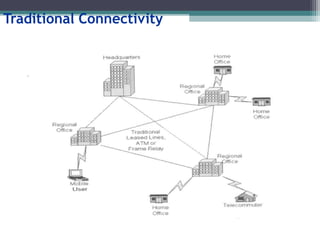
Traditional Connectivity
What is VPN?
Virtual Private Network is a type of private
network that uses public telecommunication,
such as the Internet, instead of leased lines to
communicate.
Became popular as more employees worked in
remote locations.
Terminologies to understand how VPNs work.
Private Networks
vs.
Virtual Private Networks
Employees can access the network (Intranet) from
remote locations.
Secured networks.
The Internet is used as the backbone for VPNs
Saves cost tremendously from reduction of
equipment and maintenance costs.
Scalability
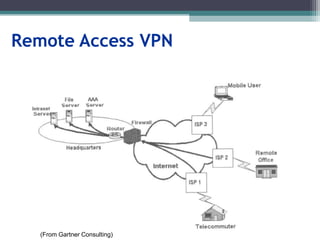
Remote Access VPN
(From Gartner Consulting)
Brief Overview of How it Works
Two connections – one is made to the Internet
and the second is made to the VPN.
Datagrams – contains data, destination and
source information.
Firewalls – VPNs allow authorized users to pass
through the firewalls.
Protocols – protocols create the VPN tunnels.
Four Critical Functions
Authentication – validates that the data was sent
from the sender.
Access control – limiting unauthorized users from
accessing the network.
Confidentiality – preventing the data to be read or
copied as the data is being transported.
Data Integrity – ensuring that the data has not been
altered
Encryption
Encryption -- is a method of “scrambling” data
before transmitting it onto the Internet.
Public Key Encryption Technique
Digital signature – for authentication
Tunneling
A virtual point-to-point connection
made through a public network. It transports
encapsulated datagrams.
Encrypted Inner Datagram
Datagram Header Outer Datagram Data Area
Original Datagram
Data Encapsulation [From Comer]
Two types of end points:
 Remote Access
 Site-to-Site
Four Protocols used in VPN
PPTP -- Point-to-Point Tunneling Protocol
L2TP -- Layer 2 Tunneling Protocol
IPsec -- Internet Protocol Security
SOCKS – is not used as much as the ones above
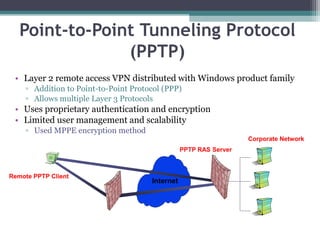
Point-to-Point Tunneling Protocol
(PPTP)
• Layer 2 remote access VPN distributed with Windows product family
▫ Addition to Point-to-Point Protocol (PPP)
▫ Allows multiple Layer 3 Protocols
• Uses proprietary authentication and encryption
• Limited user management and scalability
▫ Used MPPE encryption method
Internet
Remote PPTP Client
ISP Remote Access
Switch
PPTP RAS Server
Corporate Network
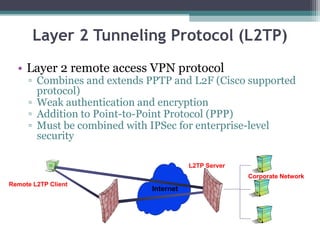
Layer 2 Tunneling Protocol (L2TP)
• Layer 2 remote access VPN protocol
▫ Combines and extends PPTP and L2F (Cisco supported
protocol)
▫ Weak authentication and encryption
▫ Addition to Point-to-Point Protocol (PPP)
▫ Must be combined with IPSec for enterprise-level
security
Internet
Remote L2TP Client
ISP L2TP Concentrator
L2TP Server
Corporate Network
Internet Protocol Security (IPSec)
• Layer 3 protocol for remote access, intranet, and
extranet VPNs
▫ Internet standard for VPNs
▫ Provides flexible encryption and message
authentication/integrity
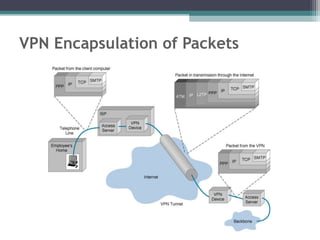
VPN Encapsulation of Packets
Types of Implementations
What does “implementation” mean in VPNs?
3 types
Intranet – Within an organization
Extranet – Outside an organization
Remote Access – Employee to Business
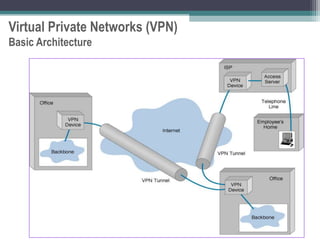
Virtual Private Networks (VPN)
Basic Architecture
Device Types
• What it means
• 3 types
▫ Hardware
▫ Firewall
▫ Software
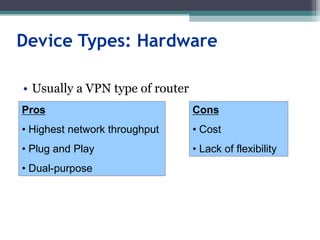
Device Types: Hardware
• Usually a VPN type of router
Pros
• Highest network throughput
• Plug and Play
• Dual-purpose
Cons
• Cost
• Lack of flexibility
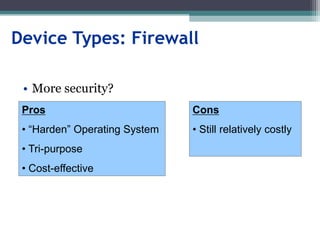
Device Types: Firewall
• More security?
Pros
• “Harden” Operating System
• Tri-purpose
• Cost-effective
Cons
• Still relatively costly
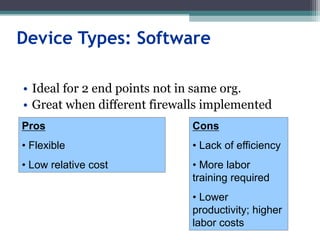
Device Types: Software
• Ideal for 2 end points not in same org.
• Great when different firewalls implemented
Pros
• Flexible
• Low relative cost
Cons
• Lack of efficiency
• More labor
training required
• Lower
productivity; higher
labor costs
Advantages
VS.
Disadvantages
Advantages: Cost Savings
• Eliminating the need for expensive long-distance
leased lines
• Reducing the long-distance telephone charges
for remote access.
• Transferring the support burden to the service
providers
• Operational costs
• Cisco VPN Savings Calculator
Advantages: Scalability
Flexibility of growth
Efficiency with broadband technology
Disadvantages
VPNs require an in-depth understanding of
public network security issues and proper
deployment of precautions
Availability and performance depends on factors
largely outside of their control
Immature standards
VPNs need to accommodate protocols other
than IP and existing internal network technology
Applications: Site-to-Site VPNs
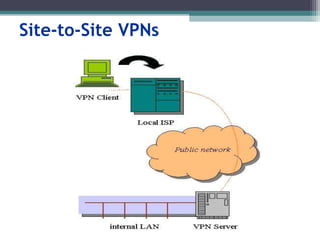
Large-scale encryption between multiple fixed
sites such as remote offices and central offices
Network traffic is sent over the branch office
Internet connection
This saves the company hardware and
management expenses
Site-to-Site VPNs
Applications: Remote Access
Encrypted connections between mobile or
remote users and their corporate networks
Remote user can make a local call to an ISP, as
opposed to a long distance call to the corporate
remote access server.
Ideal for a telecommuter or mobile sales people.
VPN allows mobile workers & telecommuters to
take advantage of broadband connectivity.
i.e. DSL, Cable
Industries That May Use a VPN
Healthcare: enables the transferring of confidential patient
information within the medical facilities & health care provider
Manufacturing: allow suppliers to view inventory & allow
clients to purchase online safely
Retail: able to securely transfer sales data or customer info
between stores & the headquarters
Banking/Financial: enables account information to be
transferred safely within departments & branches
General Business: communication between remote
employees can be securely exchanged
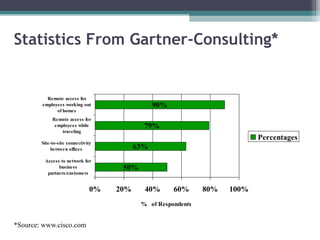
Statistics From Gartner-Consulting*
50%
63%
79%
90%
0% 20% 40% 60% 80% 100%
Access to network for
business
partners/customers
Site-to-site connectivity
between offices
Remote access for
employees while
traveling
Remote access for
employees working out
of homes
% of Respondents
Percentages
*Source: www.cisco.com
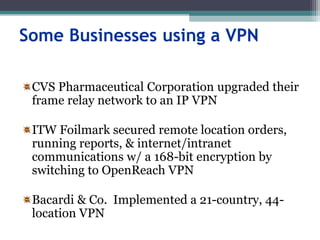
Some Businesses using a VPN
CVS Pharmaceutical Corporation upgraded their
frame relay network to an IP VPN
ITW Foilmark secured remote location orders,
running reports, & internet/intranet
communications w/ a 168-bit encryption by
switching to OpenReach VPN
Bacardi & Co. Implemented a 21-country, 44-
location VPN
Where Do We See VPNs Going in the
Future?
VPNs are continually being enhanced.
Example: Equant NV
As the VPN market becomes larger, more
applications will be created along with more
VPN providers and new VPN types.
Networks are expected to converge to create an
integrated VPN
Improved protocols are expected, which will also
improve VPNs.

VPN_ppt.ppt

  • 1.
  • 2.
  • 3.
    What is VPN? VirtualPrivate Network is a type of private network that uses public telecommunication, such as the Internet, instead of leased lines to communicate. Became popular as more employees worked in remote locations. Terminologies to understand how VPNs work.
  • 4.
    Private Networks vs. Virtual PrivateNetworks Employees can access the network (Intranet) from remote locations. Secured networks. The Internet is used as the backbone for VPNs Saves cost tremendously from reduction of equipment and maintenance costs. Scalability
  • 5.
    Remote Access VPN (FromGartner Consulting)
  • 6.
    Brief Overview ofHow it Works Two connections – one is made to the Internet and the second is made to the VPN. Datagrams – contains data, destination and source information. Firewalls – VPNs allow authorized users to pass through the firewalls. Protocols – protocols create the VPN tunnels.
  • 7.
    Four Critical Functions Authentication– validates that the data was sent from the sender. Access control – limiting unauthorized users from accessing the network. Confidentiality – preventing the data to be read or copied as the data is being transported. Data Integrity – ensuring that the data has not been altered
  • 8.
    Encryption Encryption -- isa method of “scrambling” data before transmitting it onto the Internet. Public Key Encryption Technique Digital signature – for authentication
  • 9.
    Tunneling A virtual point-to-pointconnection made through a public network. It transports encapsulated datagrams. Encrypted Inner Datagram Datagram Header Outer Datagram Data Area Original Datagram Data Encapsulation [From Comer] Two types of end points:  Remote Access  Site-to-Site
  • 10.
    Four Protocols usedin VPN PPTP -- Point-to-Point Tunneling Protocol L2TP -- Layer 2 Tunneling Protocol IPsec -- Internet Protocol Security SOCKS – is not used as much as the ones above
  • 11.
    Point-to-Point Tunneling Protocol (PPTP) •Layer 2 remote access VPN distributed with Windows product family ▫ Addition to Point-to-Point Protocol (PPP) ▫ Allows multiple Layer 3 Protocols • Uses proprietary authentication and encryption • Limited user management and scalability ▫ Used MPPE encryption method Internet Remote PPTP Client ISP Remote Access Switch PPTP RAS Server Corporate Network
  • 12.
    Layer 2 TunnelingProtocol (L2TP) • Layer 2 remote access VPN protocol ▫ Combines and extends PPTP and L2F (Cisco supported protocol) ▫ Weak authentication and encryption ▫ Addition to Point-to-Point Protocol (PPP) ▫ Must be combined with IPSec for enterprise-level security Internet Remote L2TP Client ISP L2TP Concentrator L2TP Server Corporate Network
  • 13.
    Internet Protocol Security(IPSec) • Layer 3 protocol for remote access, intranet, and extranet VPNs ▫ Internet standard for VPNs ▫ Provides flexible encryption and message authentication/integrity
  • 14.
  • 15.
    Types of Implementations Whatdoes “implementation” mean in VPNs? 3 types Intranet – Within an organization Extranet – Outside an organization Remote Access – Employee to Business
  • 16.
    Virtual Private Networks(VPN) Basic Architecture
  • 17.
    Device Types • Whatit means • 3 types ▫ Hardware ▫ Firewall ▫ Software
  • 18.
    Device Types: Hardware •Usually a VPN type of router Pros • Highest network throughput • Plug and Play • Dual-purpose Cons • Cost • Lack of flexibility
  • 19.
    Device Types: Firewall •More security? Pros • “Harden” Operating System • Tri-purpose • Cost-effective Cons • Still relatively costly
  • 20.
    Device Types: Software •Ideal for 2 end points not in same org. • Great when different firewalls implemented Pros • Flexible • Low relative cost Cons • Lack of efficiency • More labor training required • Lower productivity; higher labor costs
  • 21.
  • 22.
    Advantages: Cost Savings •Eliminating the need for expensive long-distance leased lines • Reducing the long-distance telephone charges for remote access. • Transferring the support burden to the service providers • Operational costs • Cisco VPN Savings Calculator
  • 23.
    Advantages: Scalability Flexibility ofgrowth Efficiency with broadband technology
  • 24.
    Disadvantages VPNs require anin-depth understanding of public network security issues and proper deployment of precautions Availability and performance depends on factors largely outside of their control Immature standards VPNs need to accommodate protocols other than IP and existing internal network technology
  • 25.
    Applications: Site-to-Site VPNs Large-scaleencryption between multiple fixed sites such as remote offices and central offices Network traffic is sent over the branch office Internet connection This saves the company hardware and management expenses
  • 26.
  • 27.
    Applications: Remote Access Encryptedconnections between mobile or remote users and their corporate networks Remote user can make a local call to an ISP, as opposed to a long distance call to the corporate remote access server. Ideal for a telecommuter or mobile sales people. VPN allows mobile workers & telecommuters to take advantage of broadband connectivity. i.e. DSL, Cable
  • 28.
    Industries That MayUse a VPN Healthcare: enables the transferring of confidential patient information within the medical facilities & health care provider Manufacturing: allow suppliers to view inventory & allow clients to purchase online safely Retail: able to securely transfer sales data or customer info between stores & the headquarters Banking/Financial: enables account information to be transferred safely within departments & branches General Business: communication between remote employees can be securely exchanged
  • 29.
    Statistics From Gartner-Consulting* 50% 63% 79% 90% 0%20% 40% 60% 80% 100% Access to network for business partners/customers Site-to-site connectivity between offices Remote access for employees while traveling Remote access for employees working out of homes % of Respondents Percentages *Source: www.cisco.com
  • 30.
    Some Businesses usinga VPN CVS Pharmaceutical Corporation upgraded their frame relay network to an IP VPN ITW Foilmark secured remote location orders, running reports, & internet/intranet communications w/ a 168-bit encryption by switching to OpenReach VPN Bacardi & Co. Implemented a 21-country, 44- location VPN
  • 31.
    Where Do WeSee VPNs Going in the Future? VPNs are continually being enhanced. Example: Equant NV As the VPN market becomes larger, more applications will be created along with more VPN providers and new VPN types. Networks are expected to converge to create an integrated VPN Improved protocols are expected, which will also improve VPNs.