PREPARED BY:-
MADHUKAR KUMAR
PRIYA KIRAN
SANDEEP KUMAR
VIVEK KUMAR
VISHWAJEET
VIRTUAL CLASS FOR CUCEK
 INTRODUCTION
 AIMS & OBJECTIVES
 TOOLS
 MODULES
 KEY COMPONENTS
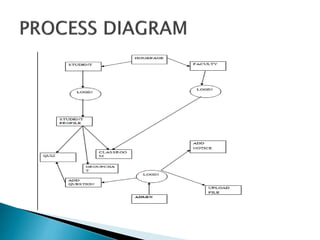
 PROCESS DIAGRAM
 FUTURE SCOPE
 CONCLUSION
 With increasing popularity of the internet traditional
classroom has shifted to e-learning.
 The growing popularity of E-learning has introduced new
terms to education as VIRTUAL CLASSROOM.
 In virtual classroom lectures or sessions conducted using
internet.
 It is a scheduled, online, teacher-led training session where
teachers are not present with learners physically but interact
via internet.
 To develop a virtual classroom tool for synchronous
distance learning with multimedia facilities.
 Aims to bring learners from around the world together
online in highly interactive manner by greatly reducing
travel, time and expenses of onsite training.
 To provide similar facilities to learners as in traditional
classroom by implementing components such as chat,
whiteboard, web cam etc.
 Operating System: Windows 7
 JAVA 1.6.0
 MYSQL 5.0
 Eclipse- JUNO as IDE
 APACHE TOMCAT 7.0.12
 JMF 2.1.1(e)
These modules are there
 Administrator module
 File upload/download module
 Class room module
 Group chat module
 Auto attendance module
 Quiz module
 Teacher module
 Register new users :-administrator has to register new users
that will be attending the session.
 Cancel a user registration:- If any registered user does not
want to attend the session, cancels his registration.
 Share Resources :Presenter can add various resources to the
session. It may be a file or just a simple web page link that
participant can download.
 Conduct Poll : He can create a poll for participants. Also he
can chat with participants.
 Upload file :- upload files and materials availabe for
student to download.
 Download file:-download file uploaded by the
administrator.
 live class room sessions will be displayed on the client
side.
 Audio and other resources :The resources that are been
shared by the presenter can be viewed by the participants at
their machine
 Participants can login using their nick name
and can chat with other users.
 They can share their view about lectures with
other participants.
 They can create their own chat room as per
their interest.
 Attendance will be provided automatically
just after login to the system.
 Attendance will be stored in the database and
automatically increased.
 Quiz will be conducted by the administrator.
 Result will be provided at the end of the quiz.
 Administrator can add the questions and
update the quiz module regularly.
 Conduct Online presentation :-As a presenter, he conducts
the session for participants.
 During presentation one can load the presentation slide.
 Share Resource:- He can add various resources to the
session. It may be a file or just a simple web page link that
participant can download at their end.
 Explain concepts using Screen capture:-He can use screen
share to explain topics
Functioning components of the virtual classroom
Chat
Quiz
Screen capturing
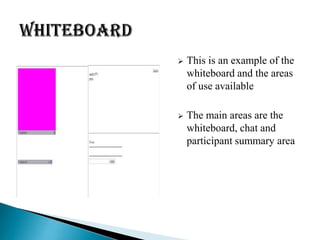
 This is an example of the
whiteboard and the areas
of use available
 The main areas are the
whiteboard, chat and
participant summary area
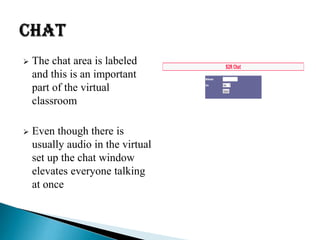
 The chat area is labeled
and this is an important
part of the virtual
classroom
 Even though there is
usually audio in the virtual
set up the chat window
elevates everyone talking
at once
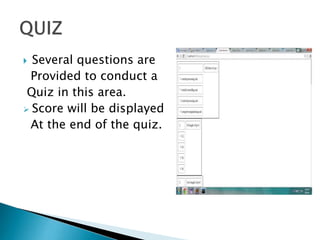
 Several questions are
Provided to conduct a
Quiz in this area.
 Score will be displayed
At the end of the quiz.
 Flexibility and Convenience
 Cost Saving
 Interaction and retention
 Teamwork
 Post-Course Reinforcement
 On-line Reference Materials
 Teachers and students need to become
familiar with the tools
 Time dependency for Live Sessions
 Infrastructure for the participants PC needs to
be
 Technical Limitations
 It is easy to use, since it uses the GUI provided in the user dialog.
 User friendly screens are provided.
 The usage of software increases the efficiency, decreases the effort.
 It can be efficiently employed as a Web Based Academic Organizer.
 It has been thoroughly tested and implemented.
 Any endeavor is incomplete without the spirit of teamwork. We
could not only muster up support for fostering this project but
also gather up the enthusiastic team
virtual classroom for college major project for computer science.

virtual classroom for college major project for computer science.

  • 1.
    PREPARED BY:- MADHUKAR KUMAR PRIYAKIRAN SANDEEP KUMAR VIVEK KUMAR VISHWAJEET VIRTUAL CLASS FOR CUCEK
  • 2.
     INTRODUCTION  AIMS& OBJECTIVES  TOOLS  MODULES  KEY COMPONENTS  PROCESS DIAGRAM  FUTURE SCOPE  CONCLUSION
  • 3.
     With increasingpopularity of the internet traditional classroom has shifted to e-learning.  The growing popularity of E-learning has introduced new terms to education as VIRTUAL CLASSROOM.  In virtual classroom lectures or sessions conducted using internet.  It is a scheduled, online, teacher-led training session where teachers are not present with learners physically but interact via internet.
  • 4.
     To developa virtual classroom tool for synchronous distance learning with multimedia facilities.  Aims to bring learners from around the world together online in highly interactive manner by greatly reducing travel, time and expenses of onsite training.  To provide similar facilities to learners as in traditional classroom by implementing components such as chat, whiteboard, web cam etc.
  • 5.
     Operating System:Windows 7  JAVA 1.6.0  MYSQL 5.0  Eclipse- JUNO as IDE  APACHE TOMCAT 7.0.12  JMF 2.1.1(e)
  • 6.
    These modules arethere  Administrator module  File upload/download module  Class room module  Group chat module  Auto attendance module  Quiz module  Teacher module
  • 7.
     Register newusers :-administrator has to register new users that will be attending the session.  Cancel a user registration:- If any registered user does not want to attend the session, cancels his registration.  Share Resources :Presenter can add various resources to the session. It may be a file or just a simple web page link that participant can download.  Conduct Poll : He can create a poll for participants. Also he can chat with participants.
  • 8.
     Upload file:- upload files and materials availabe for student to download.  Download file:-download file uploaded by the administrator.
  • 9.
     live classroom sessions will be displayed on the client side.  Audio and other resources :The resources that are been shared by the presenter can be viewed by the participants at their machine
  • 10.
     Participants canlogin using their nick name and can chat with other users.  They can share their view about lectures with other participants.  They can create their own chat room as per their interest.
  • 11.
     Attendance willbe provided automatically just after login to the system.  Attendance will be stored in the database and automatically increased.
  • 12.
     Quiz willbe conducted by the administrator.  Result will be provided at the end of the quiz.  Administrator can add the questions and update the quiz module regularly.
  • 13.
     Conduct Onlinepresentation :-As a presenter, he conducts the session for participants.  During presentation one can load the presentation slide.  Share Resource:- He can add various resources to the session. It may be a file or just a simple web page link that participant can download at their end.  Explain concepts using Screen capture:-He can use screen share to explain topics
  • 14.
    Functioning components ofthe virtual classroom Chat Quiz Screen capturing
  • 16.
     This isan example of the whiteboard and the areas of use available  The main areas are the whiteboard, chat and participant summary area
  • 17.
     The chatarea is labeled and this is an important part of the virtual classroom  Even though there is usually audio in the virtual set up the chat window elevates everyone talking at once
  • 18.
     Several questionsare Provided to conduct a Quiz in this area.  Score will be displayed At the end of the quiz.
  • 19.
     Flexibility andConvenience  Cost Saving  Interaction and retention  Teamwork  Post-Course Reinforcement  On-line Reference Materials
  • 20.
     Teachers andstudents need to become familiar with the tools  Time dependency for Live Sessions  Infrastructure for the participants PC needs to be  Technical Limitations
  • 21.
     It iseasy to use, since it uses the GUI provided in the user dialog.  User friendly screens are provided.  The usage of software increases the efficiency, decreases the effort.  It can be efficiently employed as a Web Based Academic Organizer.  It has been thoroughly tested and implemented.  Any endeavor is incomplete without the spirit of teamwork. We could not only muster up support for fostering this project but also gather up the enthusiastic team