A Basic Guide to  Shooting Video  Society of Professional Journalists January 11, 2011
The Camera Flip Camera Point & Shoot Camera Handheld Camera Professional Camera
Why learn to shoot? Quality Video is Invaluable Neda’s Death (Iran election fallout) Zapruder Films (JFK Assasination) Virginia Tech Shootings Homeless Man with Golden Voice
Key Vocabulary B-roll : Supplemental or alternative  footage  intercut with the main shot in an interview, documentary, news package.  SOT : Literally means “sound on tape.” It is most often referred to as a “soundbite” and is essentially the broadcast version of a “quote.”
The Tripod Used to stabilize the camera. IMPORTANT: Use a tripod whenever possible. If you do not have a tripod handy, place the camera on a steady object or lean against your body.
The Steps: Setting up your Shot Secure the camera on the tripod. Place your subject in front of the subject.  When adjusting the height of the tripod, the camera should be eye level with your subject. Inferior Superior
The Steps: Setting up Your Shot Step to the side of the camera.  Make sure that you are eye level with the camera and subject. Ask your subject to look at and talk to you, not the camera. Why?
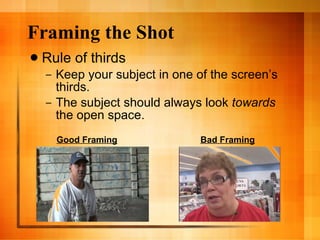
Framing the Shot Rule of thirds Keep your subject in one of the screen’s thirds. The subject should always look  towards  the open space.  Good Framing Bad Framing
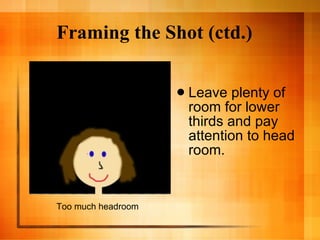
Framing the Shot (ctd.) Leave plenty of room for lower thirds and pay attention to head room.  Too much headroom
Zooming and Panning Do not zoom or pan.  When these techniques are used, they must be motivated -- there for a reason. Don’t use these buttons just because they’re there.  http://www.youtube.com/watch?v=cBtFTF2ii7U&feature=related
Holding the Shot Keep each and every shot steady for at least 10 seconds. If you do not hold your shots, you’ll kick yourself in the edit process. Remember not to talk while the camera is recording.
Cutaways, Sequences, and Transitions Shoot cutaways, sequences and transitions. They’re invaluable in the editing process. Cutaways : Prevent jump cuts and allow you to transition to new material. Examples Sequence : Close Up, Medium Shot, Wide Shot Instead of Zooming and Panning Movement of the human eye
Examples of Shots Extreme Wide Shot Very Wide Shot * Images from Mediacollege.com
Examples of Shots (ctd.) Wide Shot Medium Shot * Images from Mediacollege.com
Examples of Shots (ctd.) Close Up Extreme Close Up * Images from Mediacollege.com
Natural Sound Seek great natural (or ambient) sound. Examples: water, hammers, plastic, dogs panting, sewing machines, chalk on chalkboard, plastic bags, cheering fans. http://www.youtube.com/watch?v=LAcIFIASiI4&feature=related http://www.msnbc.msn.com/id/3032619/#34353385
Headphones If possible, wear headphones. Otherwise, you don’t know what sound you’re recording -- or if you’re recording any at all.
Opens and Closes Always look for a strong open and a memorable close. Tiger Woods Example Opens and Closes to Avoid: signs, still objects http://www.msnbc.msn.com/id/3032619/#34579602
The Soundbite Seek subjective sound bites. Get your subjects to open up and talk. Emotion, not facts.  “ What does this mean to you?” “ How does it make you feel?”
Other Useful Tips Too much b-roll is better than not enough. Do not rewind your tape in the field. How can you make a shot more interesting? Escalator Example.

A Basic Guide to Shooting Video

  • 1.
    A Basic Guideto Shooting Video Society of Professional Journalists January 11, 2011
  • 2.
    The Camera FlipCamera Point & Shoot Camera Handheld Camera Professional Camera
  • 3.
    Why learn toshoot? Quality Video is Invaluable Neda’s Death (Iran election fallout) Zapruder Films (JFK Assasination) Virginia Tech Shootings Homeless Man with Golden Voice
  • 4.
    Key Vocabulary B-roll: Supplemental or alternative footage intercut with the main shot in an interview, documentary, news package. SOT : Literally means “sound on tape.” It is most often referred to as a “soundbite” and is essentially the broadcast version of a “quote.”
  • 5.
    The Tripod Usedto stabilize the camera. IMPORTANT: Use a tripod whenever possible. If you do not have a tripod handy, place the camera on a steady object or lean against your body.
  • 6.
    The Steps: Settingup your Shot Secure the camera on the tripod. Place your subject in front of the subject. When adjusting the height of the tripod, the camera should be eye level with your subject. Inferior Superior
  • 7.
    The Steps: Settingup Your Shot Step to the side of the camera. Make sure that you are eye level with the camera and subject. Ask your subject to look at and talk to you, not the camera. Why?
  • 8.
    Framing the ShotRule of thirds Keep your subject in one of the screen’s thirds. The subject should always look towards the open space. Good Framing Bad Framing
  • 9.
    Framing the Shot(ctd.) Leave plenty of room for lower thirds and pay attention to head room. Too much headroom
  • 10.
    Zooming and PanningDo not zoom or pan. When these techniques are used, they must be motivated -- there for a reason. Don’t use these buttons just because they’re there. http://www.youtube.com/watch?v=cBtFTF2ii7U&feature=related
  • 11.
    Holding the ShotKeep each and every shot steady for at least 10 seconds. If you do not hold your shots, you’ll kick yourself in the edit process. Remember not to talk while the camera is recording.
  • 12.
    Cutaways, Sequences, andTransitions Shoot cutaways, sequences and transitions. They’re invaluable in the editing process. Cutaways : Prevent jump cuts and allow you to transition to new material. Examples Sequence : Close Up, Medium Shot, Wide Shot Instead of Zooming and Panning Movement of the human eye
  • 13.
    Examples of ShotsExtreme Wide Shot Very Wide Shot * Images from Mediacollege.com
  • 14.
    Examples of Shots(ctd.) Wide Shot Medium Shot * Images from Mediacollege.com
  • 15.
    Examples of Shots(ctd.) Close Up Extreme Close Up * Images from Mediacollege.com
  • 16.
    Natural Sound Seekgreat natural (or ambient) sound. Examples: water, hammers, plastic, dogs panting, sewing machines, chalk on chalkboard, plastic bags, cheering fans. http://www.youtube.com/watch?v=LAcIFIASiI4&feature=related http://www.msnbc.msn.com/id/3032619/#34353385
  • 17.
    Headphones If possible,wear headphones. Otherwise, you don’t know what sound you’re recording -- or if you’re recording any at all.
  • 18.
    Opens and ClosesAlways look for a strong open and a memorable close. Tiger Woods Example Opens and Closes to Avoid: signs, still objects http://www.msnbc.msn.com/id/3032619/#34579602
  • 19.
    The Soundbite Seeksubjective sound bites. Get your subjects to open up and talk. Emotion, not facts. “ What does this mean to you?” “ How does it make you feel?”
  • 20.
    Other Useful TipsToo much b-roll is better than not enough. Do not rewind your tape in the field. How can you make a shot more interesting? Escalator Example.

Editor's Notes

  • #3 - The manner in which you shoot video is generally the same, regardless of the equipment you have available.
  • #6 Discuss different kinds of tripods. Situations when you would not use a tripod: When you’re covering a “breaking news” story and using a tripod would prohibit you from getting the story/video. (9/11, Neda Video, Virgina Tech, etc.) If you do not use a tripod, your viewer will be more distracted by the shakiness of your video and will not pay as much attention to your story.
  • #7 Demonstrate Setting up an Interview Inferior: If the camera is higher than the subject, the subject must look up and appears to be inferior to the viewers. Superior: If the camera is lower than the subject, the person that you are interviewing must look down and is given unwarranted authority.
  • #8 - Viewer should feel like they’re listening into a conversation, rather than being lectured.
  • #10 * Also avoid shooting things straight up. For example, shoot a sign at an angel so it does not look so flat.
  • #11 It’s always better to get closer to an object than to zoom, because the more you zoom, the shakier your video becomes -- especially when you’re using a handheld or point & shoot camera.