What is an instructional video?

•   Telling a story with moving pictures and sound for
    instructional purposes
•   Serves an instructional or informational purpose directed
    towards a target audience for specific goal and objectives
•   Content is prepared and organized to optimize the target
    video presentation format (NTSC video, streaming
    video, etc.)
Instructional Video Examples


 How Cast Videos
    http://www.howcast.com/videos/457270-How-to-Play-Notes-
     on-a-Harmonica
    http://www.howcast.com/videos/494721-Coffee-Talk-How-to-
     Make-Espresso-Grinding-in-the-Doser

 http://www.youtube.com/watch?v=QtYgmDEddug

 http://www.youtube.com/watch?v=CN7ehPQwVSU

 Instructions on video classrooms – IDT student
Advantages to using video
•   Can show processes, procedures, events, social interactions, emotional impact

•   Manipulation of time and space for shifting duration and view

•   Can use audio, text, diagrams, animation, pictures, and motion to communicate
    (multiple learning styles - Gardner)

•   As humans, we respond attentively to motion and movement and process the
    information somewhat separately from sound

•   In our culture, we have become accustomed to video communication as a form of
    instruction and information transfer

•   Can convey emotions and social interaction

•   Can be used to model behavior

•   A form of human storytelling that became refined in the last century

•   Can quickly capture attention (ARCS – Keller)
Disadvantages to Video
•   Can be expensive to produce high quality video
•   Hard to find good actors (talent)
•   Requires investment in hardware and software for high
    quality video
•   Takes time to develop, shoot, edit, distribute
•   May not be appropriate for abstract concepts and text-
    intensive content
•   Not inherently two-way interactive
•   By itself, can be linear and preset (not branching multimedia)
•   Can be misinterpreted, especially humor
The video production timeline
•   Development
    •   Finance (internal or external)
    •   Treatment
    •   Script
    •   Storyboards
•   Preproduction
    •   Breakdown
    •   Schedule
    •   Budget
    •   Crewing
    •   Location
    •   Art Direction
    •   Rehearsals
The video production timeline
•   Production
    •   Setup of location
    •   Lighting
    •   Getting talent ready (make-up, wardrobe, blocking)
    •   Sound check
    •   Pick-up shots
•   Postproduction
    •   Log and capture material
    •   Organize clips
    •   Sync sound and video
    •   Edit fine cut
    •   Add titles, transitions, filters, motion, music
    •   Render to desired output format
    •   Compress
    •   Release and distribute copies
Getting to know your camera
 Read Manual

 Record different scenes to understand features

 Learn to control focus, aperture, shutter
   speed, zoom, mic, backlighting, etc.
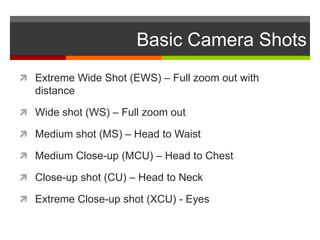
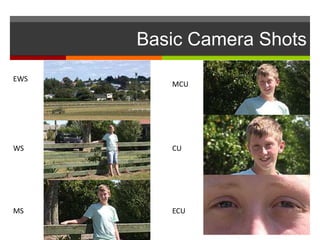
Basic Camera Shots
 Extreme Wide Shot (EWS) – Full zoom out with
   distance

 Wide shot (WS) – Full zoom out

 Medium shot (MS) – Head to Waist

 Medium Close-up (MCU) – Head to Chest

 Close-up shot (CU) – Head to Neck

 Extreme Close-up shot (XCU) - Eyes
Basic Camera Shots
EWS
         MCU


WS       CU


MS       ECU
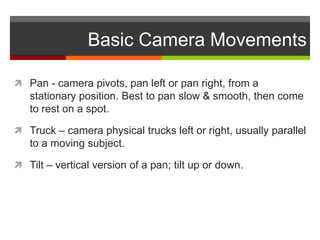
Basic Camera Movements

 Pan - camera pivots, pan left or pan right, from a
   stationary position. Best to pan slow & smooth, then come
   to rest on a spot.

 Truck – camera physical trucks left or right, usually parallel
   to a moving subject.

 Tilt – vertical version of a pan; tilt up or down.
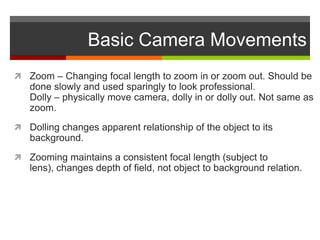
Basic Camera Movements
 Zoom – Changing focal length to zoom in or zoom out. Should be
   done slowly and used sparingly to look professional.
   Dolly – physically move camera, dolly in or dolly out. Not same as
   zoom.
 Dolling changes apparent relationship of the object to its
   background.
 Zooming maintains a consistent focal length (subject to
   lens), changes depth of field, not object to background relation.

Instructional video

  • 1.
    What is aninstructional video? • Telling a story with moving pictures and sound for instructional purposes • Serves an instructional or informational purpose directed towards a target audience for specific goal and objectives • Content is prepared and organized to optimize the target video presentation format (NTSC video, streaming video, etc.)
  • 2.
    Instructional Video Examples How Cast Videos  http://www.howcast.com/videos/457270-How-to-Play-Notes- on-a-Harmonica  http://www.howcast.com/videos/494721-Coffee-Talk-How-to- Make-Espresso-Grinding-in-the-Doser  http://www.youtube.com/watch?v=QtYgmDEddug  http://www.youtube.com/watch?v=CN7ehPQwVSU  Instructions on video classrooms – IDT student
  • 3.
    Advantages to usingvideo • Can show processes, procedures, events, social interactions, emotional impact • Manipulation of time and space for shifting duration and view • Can use audio, text, diagrams, animation, pictures, and motion to communicate (multiple learning styles - Gardner) • As humans, we respond attentively to motion and movement and process the information somewhat separately from sound • In our culture, we have become accustomed to video communication as a form of instruction and information transfer • Can convey emotions and social interaction • Can be used to model behavior • A form of human storytelling that became refined in the last century • Can quickly capture attention (ARCS – Keller)
  • 4.
    Disadvantages to Video • Can be expensive to produce high quality video • Hard to find good actors (talent) • Requires investment in hardware and software for high quality video • Takes time to develop, shoot, edit, distribute • May not be appropriate for abstract concepts and text- intensive content • Not inherently two-way interactive • By itself, can be linear and preset (not branching multimedia) • Can be misinterpreted, especially humor
  • 5.
    The video productiontimeline • Development • Finance (internal or external) • Treatment • Script • Storyboards • Preproduction • Breakdown • Schedule • Budget • Crewing • Location • Art Direction • Rehearsals
  • 6.
    The video productiontimeline • Production • Setup of location • Lighting • Getting talent ready (make-up, wardrobe, blocking) • Sound check • Pick-up shots • Postproduction • Log and capture material • Organize clips • Sync sound and video • Edit fine cut • Add titles, transitions, filters, motion, music • Render to desired output format • Compress • Release and distribute copies
  • 7.
    Getting to knowyour camera  Read Manual  Record different scenes to understand features  Learn to control focus, aperture, shutter speed, zoom, mic, backlighting, etc.
  • 8.
    Basic Camera Shots Extreme Wide Shot (EWS) – Full zoom out with distance  Wide shot (WS) – Full zoom out  Medium shot (MS) – Head to Waist  Medium Close-up (MCU) – Head to Chest  Close-up shot (CU) – Head to Neck  Extreme Close-up shot (XCU) - Eyes
  • 9.
    Basic Camera Shots EWS MCU WS CU MS ECU
  • 10.
    Basic Camera Movements Pan - camera pivots, pan left or pan right, from a stationary position. Best to pan slow & smooth, then come to rest on a spot.  Truck – camera physical trucks left or right, usually parallel to a moving subject.  Tilt – vertical version of a pan; tilt up or down.
  • 11.
    Basic Camera Movements Zoom – Changing focal length to zoom in or zoom out. Should be done slowly and used sparingly to look professional. Dolly – physically move camera, dolly in or dolly out. Not same as zoom.  Dolling changes apparent relationship of the object to its background.  Zooming maintains a consistent focal length (subject to lens), changes depth of field, not object to background relation.