UX
User eXperience
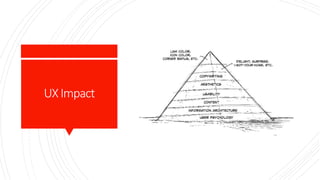
Ingredients
 Psychology
 Usability
 Design
 Copywriting
 Analysis
Psychology
 What is the user’s motivation to be here in the first
place?
 How does this make them feel?
 How much work does the user have to do to get what
they want?
 What habits are created if they do this over and over?
 What do they expect when they click this?
 Are you assuming they know something that they
haven’t learned yet?
 Is this something they want to do again? Why? How
often?
 Are you thinking of the user’s wants and needs, or your
own?
 How are you rewarding good behavior?
Usability
 Could you get the job done with less input from the user?
 Are there any user mistakes you could prevent? (Hint:
Yes, there are.)
 Are you being clear and direct, or is this a little too
clever?
 Is it easy to find (good), hard to miss (better), or
subconsciously expected (best)?
 Are you working with the user’s assumptions or against
them?
 Have you provided everything the user needs to know?
 Could you solve this just as well by doing something
more common?
 Are you basing your decisions on your own logic or
categories, or the user’s intuition? How do you know?
 If the user doesn’t read the fine print, does it still
work/make sense?
Design
 Do users think it looks good? Do they trust it
immediately?
 Does it communicate the purpose and function without
words?
 Does it represent the brand? Does it all feel like the same
site?
 Does the design lead the user’s eyes to the right places?
How do you know?
 Do the colors, shapes, and typography help people find
what they want and improve usability of the details?
 Do clickable things look different than nonclickable
things?
Copywriting
 Does it sound confident and tell the user what to do?
 Does it motivate the user to complete their goal? Is that
what we want?
 Is the biggest text the most important text? Why not?
 Does it inform the user or does it assume that they
already understand?
 Does it reduce anxiety?
 Is it clear, direct, simple, and functional?
Analysis
 Are you using data to prove that you are right, or to
learn the truth?
 Are you looking for subjective opinions or objective facts?
 Have you collected information that can give you those
types of answers?
 Do you know why users do that, or are you interpreting
their behavior?
 Are you looking at absolute numbers, or relative
improvements?
 How will you measure this? Are you measuring the right
things?
 Are you looking for bad results, too? Why not?
 How can you use this analysis to make improvements?
User
Perspective
 Whats of User Perspective
 What is this?
 What is the benefit for the user?
 What should they do next?
UXImpact
UXisa Process
 UX is not an event or a task
 Your process as a UX designer is for
 gather the information you need,
 research the users,
 design the solution make sure it is implemented properly
 and measure the results
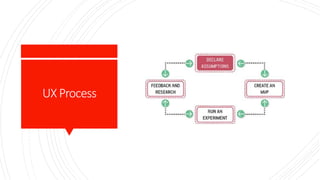
UXProcess
Problem
Statement
 Elements of Problem Statement:
 1. The current goals of the product or system
 2. The problem the business stakeholder wants
addressed (i.e., where the goals aren’t being met)
 3. An explicit request for improvement that doesn’t
dictate a specific solution
Problem
Statement
Template
 [Our service/product] was designed to achieve [these
goals]. We have observed that the product/service isn’t
meeting [these goals], which is causing [this adverse
effect] to our business. How might we improve
[service/product] so that our customers are more
successful based on [these measurable criteria]?
Prioritization
Matrix
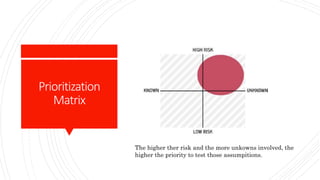
The higher ther risk and the more unkowns involved, the
higher the priority to test those assumpitions.
Hypotheses
 Testing your assumptions:
 Hypothesis statement:
 We believe [this statement is true].
 We will know we’re [right/wrong] when we see the
following feedback from the market: [qualitative
feedback] and/or [quantitative feedback] and/or [key
performance indicator change].
Subhypotheses
 Breaking the Hyphotesis down into smaller Parts
 Hypothesis statement:
 We believe [doing this/building this feature/creating this
experience].
 for [these people/personas]
 will achieve [this outcome].
 We will know this is true when we see [this market
feedback, quantitative measure, or qualitative insight].
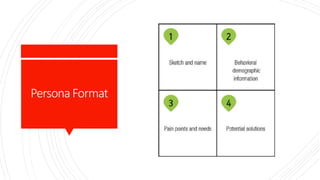
Personas
 Designers often create models called personas to
represent the users of their systems.
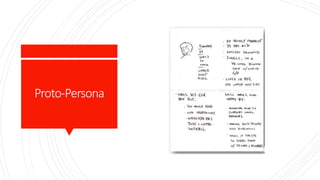
Proto-Persona
PersonaFormat
Hypothesis
CreationTable
We Will for In order to achieve
[Create this feature] [this persona] [this outcome]
Principles
 Cross-Functional Teams
 Small, dedicated, collated
 Progress=Outcomes, not Output
 Problem-Focused Teams
 Removing Waste
 Small Batch Size
 Continuos Discovery
 GOOB: The New User-Centricity
 Shared Understanding
 Anti-Pattern Rockstars, Gurus and Ninjas
 Externalizing Your Work
 Making over Analysis
 Learning over Growth
 Permission to Fail
 Getting Out of the Deliverables Business
Cross-
Functional
Teams
 Cross-functional teams are made up of the various
disciplines involved in creating your product. Software
engineering, product management, interaction design,
visual design, content strategy, marketing, and quality
assurance (QA) should all be included in a Lean UX
team. Lean UX demands a high level of collaboration
between these disciplines. Their involvement must be
continuous, from day one of the project until the end of
the engagement.
Small,
Dedicated,
Colocated
 Keep your teams small—no more than 10 total core
people. Dedicate them to one project and staff it all out
of the same location.
Progress=
Outcomes,Not
Output
 Features and services are outputs. The business goals
they are meant to achieve are outcomes. Lean UX
measures progress in terms of explicitly defined
business outcomes.
Problem-
FocusedTeams
 A problem-focused team is one that has been assigned
a business problem to solve, as opposed to a set of
features to implement. This is the logical extension of
the focus on outcomes.
Removing
Waste
 One of the core tenets in Lean manufacturing is the
removal of anything that doesn’t lead to the ultimate
goal. In Lean UX, the ultimate goal is improved
outcomes; hence, anything that doesn’t contribute to
that is considered waste and should be removed from
the team’s process.
SmallBatchSize
 Another fundamental from Lean manufacturing is the
use of small batch sizes. Lean manufacturing uses this
notion to keep inventory low and quality high.
Translated to Lean UX, this concept means creating
only the design that is necessary to move the team
forward and avoiding a big “inventory” of untested and
unimplemented design ideas.
Continuous
Discovery
 Continuous discovery is the ongoing process of
engaging the customer during the design and
development process. This engagement is done through
regularly scheduled activities, using both quantitative
and qualitative methods. The goal is to understand
what the users are doing with your products and why
they are doing it. Research is done on frequent and
regular schedules. Research involves the entire team.
GOOB:The
NewUser-
Centricity
 It may sound like a baby’s first word, but GOOB is
actually an acronym for what Stanford professor,
entrepreneur, and author Steve Blank calls “getting
out of the building.” It’s the realization that meeting-
room debates about user needs won’t be settled
conclusively within your office. Instead, the answers lie
out in the marketplace, outside of your building.
 After years of advocating for customer research, the
UX community has a champion from the business
world in Steve Blank. Blank’s prescription: give
potential customers a chance to provide feedback on
your ideas sooner than you would have in the past.
Much sooner. Test your ideas with a strong dose of
reality while they’re still young. Better to find out that
your ideas are missing the mark before you’ve spent
time and resources building a product that no one
wants.
Shared
Understanding
 Shared understanding is the collective knowledge of
the team that builds up over time as the team works
together. It’s a rich understanding of the space, the
product, and the customers.
Anti-Pattern:
Rockstars, Gurus,
andNinjas
 Lean UX advocates a team-based mentality. Rockstars,
gurus, ninjas, and other elite experts of their craft
break down team cohesion and eschew collaboration.
Externalizing
YourWork
 Externalizing means getting your work out of your
head and out of your computer and into public view.
Teams use whiteboards, foamcore boards, artifact
walls, printouts, and sticky notes to expose their work
in progress to their teammates, colleagues, and
customers.
Makingover
Analysis
 Lean UX values making over analysis. There is more
value in creating the first version of an idea than
spending half a day debating its merits in a conference
room.
Learningover
Growth
 It’s difficult to figure out the right thing to build and
scale a business around that thing at the same time.
They are contradictory activities. Lean UX favors a
focus on learning first and scaling second.
Permissionto
Fail
 In order to find the best solution to business problems,
UX teams need to experiment with ideas. Most of these
ideas will fail. The team must be safe to fail if they are
to be successful. Permission to fail means that the
team has a safe environment in which to experiment.
That philosophy applies to both the technical
environment (they can push out ideas in a safe way)
and the cultural environment (they won’t be penalized
for trying ideas that don’t succeed).
GettingOutof
theDeliverables
Business
 UX refocuses the design process away from the
documents the team is creating to the outcomes the
team is achieving. With increased cross-functional
collaboration, stakeholder conversation becomes less
about what artifact is being created and more about
which outcome is being achieved.
Exercise  Design Studio Workshop
DesignStudio
 Process
 Problem Definition and Constraints
 Individual Idea Generation (Diverge)
 Presentation and Criique
 Iterate and Refine (Emerge)
 Team Idea Generation (Converge)
DesignStudio
 Supplies
 Pencils
 Pens
 Permanent Markets (multiple colors/thicknesses)
 Highlighters (multiple colors)
 Sketching templates (1-up and 6-up templates)
 Self-stick easel pads
 Drafting dots
Problem
Definitionand
Constraints
(15-30minutes)
 Everyone knows the problem to solve
 Assumptions has been declared
 Hypothesis to prove
IndividualIdea
Generation
(10minutes)
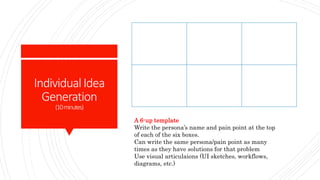
A 6-up template
Write the persona’s name and pain point at the top
of each of the six boxes.
Can write the same persona/pain point as many
times as they have solutions for that problem
Use visual articulaions (UI sketches, workflows,
diagrams, etc.)
Presentation
andCritique
(3minutesperperson)
 Going around the table, give each participant 3
minutes to hold up his or her sketches and present
them to the team.
 Explain for whom they were solving a problem
(persona), which pain point hey were addressing
(hypothesis), then explain the sketch.
 Each member of team should provide critique and
feedback to the presenter.
 Critiques should focus on clarifying the presenter’s
intentions.
 Every team member presents and receives critique.
Iterateand
Refine
(10-15minutes)
 Each participant take their original ideas and using
critique to refine it.
 Once time is up, ask the team to go through the
present and critique process again.
TeamIdeaGeneration
(45minutes)
 Now everyone has feedback
 The team must coverage on one idea.
 Team is trying to converge on the idea they feel has the
biggest change to success.
 This idea serve to create an MVP and running
experiments.
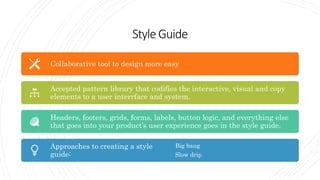
StyleGuide
Collaborative tool to design more easy
Accepted pattern library that codifies the interactive, visual and copy
elements to a user interrface and system.
Headers, footers, grids, forms, labels, button logic, and everything else
that goes into your product’s user experience goes in the style guide.
Approaches to creating a style
guide:
Big bang
Slow drip
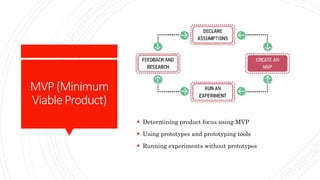
MVP(Minimum
ViableProduct)
 Determining product focus using MVP
 Using prototypes and prototyping tools
 Running experiments without prototypes
CreateandMVP
 1. Consider what you’re trying to learn. Response:
 Is there a need for the solution I’m designing?
 Is there value in the solution and features I’m offering?
 Is my solution usable?
MVPGuidelines
 To maximize your learning:
 Be clear and concise
 Prioritize ruthlessly
 Stay agile
 Measure behavior
 Use a call-to-action: i.e. “Sign up” or “Buy now”
 To deliver value to your customers:
 Be functional
 Integrate with existing analytics
 Be consistent with the rest of the application
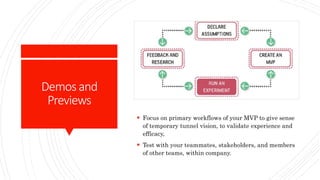
Demosand
Previews
 Focus on primary workflows of your MVP to give sense
of temporary tunnel vision, to validate experience and
efficacy,
 Test with your teammates, stakeholders, and members
of other teams, within company.
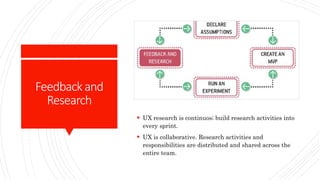
Feedbackand
Research
 UX research is continuos; build research activities into
every sprint.
 UX is collaborative. Research activities and
responsibilities are distributed and shared across the
entire team.
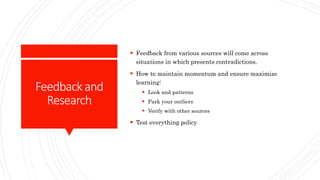
Feedbackand
Research
 Feedback from various sources will come across
situations in which presents contradictions.
 How to maintain momentum and ensure maximize
learning:
 Look and patterns
 Park your outliers
 Verify with other sources
 Test everything policy
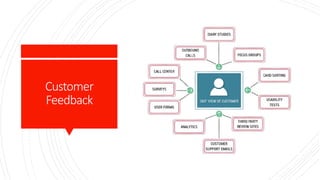
Customer
Feedback
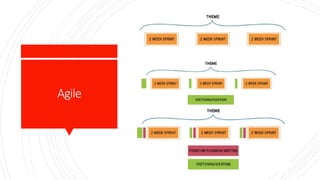
Agile
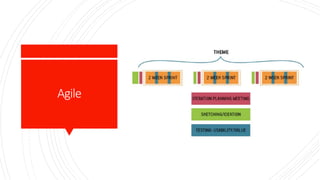
Agile
UX
User eXperience

Ux

  • 1.
  • 2.
    Ingredients  Psychology  Usability Design  Copywriting  Analysis
  • 3.
    Psychology  What isthe user’s motivation to be here in the first place?  How does this make them feel?  How much work does the user have to do to get what they want?  What habits are created if they do this over and over?  What do they expect when they click this?  Are you assuming they know something that they haven’t learned yet?  Is this something they want to do again? Why? How often?  Are you thinking of the user’s wants and needs, or your own?  How are you rewarding good behavior?
  • 4.
    Usability  Could youget the job done with less input from the user?  Are there any user mistakes you could prevent? (Hint: Yes, there are.)  Are you being clear and direct, or is this a little too clever?  Is it easy to find (good), hard to miss (better), or subconsciously expected (best)?  Are you working with the user’s assumptions or against them?  Have you provided everything the user needs to know?  Could you solve this just as well by doing something more common?  Are you basing your decisions on your own logic or categories, or the user’s intuition? How do you know?  If the user doesn’t read the fine print, does it still work/make sense?
  • 5.
    Design  Do usersthink it looks good? Do they trust it immediately?  Does it communicate the purpose and function without words?  Does it represent the brand? Does it all feel like the same site?  Does the design lead the user’s eyes to the right places? How do you know?  Do the colors, shapes, and typography help people find what they want and improve usability of the details?  Do clickable things look different than nonclickable things?
  • 6.
    Copywriting  Does itsound confident and tell the user what to do?  Does it motivate the user to complete their goal? Is that what we want?  Is the biggest text the most important text? Why not?  Does it inform the user or does it assume that they already understand?  Does it reduce anxiety?  Is it clear, direct, simple, and functional?
  • 7.
    Analysis  Are youusing data to prove that you are right, or to learn the truth?  Are you looking for subjective opinions or objective facts?  Have you collected information that can give you those types of answers?  Do you know why users do that, or are you interpreting their behavior?  Are you looking at absolute numbers, or relative improvements?  How will you measure this? Are you measuring the right things?  Are you looking for bad results, too? Why not?  How can you use this analysis to make improvements?
  • 8.
    User Perspective  Whats ofUser Perspective  What is this?  What is the benefit for the user?  What should they do next?
  • 9.
  • 10.
    UXisa Process  UXis not an event or a task  Your process as a UX designer is for  gather the information you need,  research the users,  design the solution make sure it is implemented properly  and measure the results
  • 11.
  • 12.
    Problem Statement  Elements ofProblem Statement:  1. The current goals of the product or system  2. The problem the business stakeholder wants addressed (i.e., where the goals aren’t being met)  3. An explicit request for improvement that doesn’t dictate a specific solution
  • 13.
    Problem Statement Template  [Our service/product]was designed to achieve [these goals]. We have observed that the product/service isn’t meeting [these goals], which is causing [this adverse effect] to our business. How might we improve [service/product] so that our customers are more successful based on [these measurable criteria]?
  • 14.
    Prioritization Matrix The higher therrisk and the more unkowns involved, the higher the priority to test those assumpitions.
  • 15.
    Hypotheses  Testing yourassumptions:  Hypothesis statement:  We believe [this statement is true].  We will know we’re [right/wrong] when we see the following feedback from the market: [qualitative feedback] and/or [quantitative feedback] and/or [key performance indicator change].
  • 16.
    Subhypotheses  Breaking theHyphotesis down into smaller Parts  Hypothesis statement:  We believe [doing this/building this feature/creating this experience].  for [these people/personas]  will achieve [this outcome].  We will know this is true when we see [this market feedback, quantitative measure, or qualitative insight].
  • 17.
    Personas  Designers oftencreate models called personas to represent the users of their systems.
  • 18.
  • 19.
  • 20.
    Hypothesis CreationTable We Will forIn order to achieve [Create this feature] [this persona] [this outcome]
  • 21.
    Principles  Cross-Functional Teams Small, dedicated, collated  Progress=Outcomes, not Output  Problem-Focused Teams  Removing Waste  Small Batch Size  Continuos Discovery  GOOB: The New User-Centricity  Shared Understanding  Anti-Pattern Rockstars, Gurus and Ninjas  Externalizing Your Work  Making over Analysis  Learning over Growth  Permission to Fail  Getting Out of the Deliverables Business
  • 22.
    Cross- Functional Teams  Cross-functional teamsare made up of the various disciplines involved in creating your product. Software engineering, product management, interaction design, visual design, content strategy, marketing, and quality assurance (QA) should all be included in a Lean UX team. Lean UX demands a high level of collaboration between these disciplines. Their involvement must be continuous, from day one of the project until the end of the engagement.
  • 23.
    Small, Dedicated, Colocated  Keep yourteams small—no more than 10 total core people. Dedicate them to one project and staff it all out of the same location.
  • 24.
    Progress= Outcomes,Not Output  Features andservices are outputs. The business goals they are meant to achieve are outcomes. Lean UX measures progress in terms of explicitly defined business outcomes.
  • 25.
    Problem- FocusedTeams  A problem-focusedteam is one that has been assigned a business problem to solve, as opposed to a set of features to implement. This is the logical extension of the focus on outcomes.
  • 26.
    Removing Waste  One ofthe core tenets in Lean manufacturing is the removal of anything that doesn’t lead to the ultimate goal. In Lean UX, the ultimate goal is improved outcomes; hence, anything that doesn’t contribute to that is considered waste and should be removed from the team’s process.
  • 27.
    SmallBatchSize  Another fundamentalfrom Lean manufacturing is the use of small batch sizes. Lean manufacturing uses this notion to keep inventory low and quality high. Translated to Lean UX, this concept means creating only the design that is necessary to move the team forward and avoiding a big “inventory” of untested and unimplemented design ideas.
  • 28.
    Continuous Discovery  Continuous discoveryis the ongoing process of engaging the customer during the design and development process. This engagement is done through regularly scheduled activities, using both quantitative and qualitative methods. The goal is to understand what the users are doing with your products and why they are doing it. Research is done on frequent and regular schedules. Research involves the entire team.
  • 29.
    GOOB:The NewUser- Centricity  It maysound like a baby’s first word, but GOOB is actually an acronym for what Stanford professor, entrepreneur, and author Steve Blank calls “getting out of the building.” It’s the realization that meeting- room debates about user needs won’t be settled conclusively within your office. Instead, the answers lie out in the marketplace, outside of your building.  After years of advocating for customer research, the UX community has a champion from the business world in Steve Blank. Blank’s prescription: give potential customers a chance to provide feedback on your ideas sooner than you would have in the past. Much sooner. Test your ideas with a strong dose of reality while they’re still young. Better to find out that your ideas are missing the mark before you’ve spent time and resources building a product that no one wants.
  • 30.
    Shared Understanding  Shared understandingis the collective knowledge of the team that builds up over time as the team works together. It’s a rich understanding of the space, the product, and the customers.
  • 31.
    Anti-Pattern: Rockstars, Gurus, andNinjas  LeanUX advocates a team-based mentality. Rockstars, gurus, ninjas, and other elite experts of their craft break down team cohesion and eschew collaboration.
  • 32.
    Externalizing YourWork  Externalizing meansgetting your work out of your head and out of your computer and into public view. Teams use whiteboards, foamcore boards, artifact walls, printouts, and sticky notes to expose their work in progress to their teammates, colleagues, and customers.
  • 33.
    Makingover Analysis  Lean UXvalues making over analysis. There is more value in creating the first version of an idea than spending half a day debating its merits in a conference room.
  • 34.
    Learningover Growth  It’s difficultto figure out the right thing to build and scale a business around that thing at the same time. They are contradictory activities. Lean UX favors a focus on learning first and scaling second.
  • 35.
    Permissionto Fail  In orderto find the best solution to business problems, UX teams need to experiment with ideas. Most of these ideas will fail. The team must be safe to fail if they are to be successful. Permission to fail means that the team has a safe environment in which to experiment. That philosophy applies to both the technical environment (they can push out ideas in a safe way) and the cultural environment (they won’t be penalized for trying ideas that don’t succeed).
  • 36.
    GettingOutof theDeliverables Business  UX refocusesthe design process away from the documents the team is creating to the outcomes the team is achieving. With increased cross-functional collaboration, stakeholder conversation becomes less about what artifact is being created and more about which outcome is being achieved.
  • 37.
    Exercise  DesignStudio Workshop
  • 38.
    DesignStudio  Process  ProblemDefinition and Constraints  Individual Idea Generation (Diverge)  Presentation and Criique  Iterate and Refine (Emerge)  Team Idea Generation (Converge)
  • 39.
    DesignStudio  Supplies  Pencils Pens  Permanent Markets (multiple colors/thicknesses)  Highlighters (multiple colors)  Sketching templates (1-up and 6-up templates)  Self-stick easel pads  Drafting dots
  • 40.
    Problem Definitionand Constraints (15-30minutes)  Everyone knowsthe problem to solve  Assumptions has been declared  Hypothesis to prove
  • 41.
    IndividualIdea Generation (10minutes) A 6-up template Writethe persona’s name and pain point at the top of each of the six boxes. Can write the same persona/pain point as many times as they have solutions for that problem Use visual articulaions (UI sketches, workflows, diagrams, etc.)
  • 42.
    Presentation andCritique (3minutesperperson)  Going aroundthe table, give each participant 3 minutes to hold up his or her sketches and present them to the team.  Explain for whom they were solving a problem (persona), which pain point hey were addressing (hypothesis), then explain the sketch.  Each member of team should provide critique and feedback to the presenter.  Critiques should focus on clarifying the presenter’s intentions.  Every team member presents and receives critique.
  • 43.
    Iterateand Refine (10-15minutes)  Each participanttake their original ideas and using critique to refine it.  Once time is up, ask the team to go through the present and critique process again.
  • 44.
    TeamIdeaGeneration (45minutes)  Now everyonehas feedback  The team must coverage on one idea.  Team is trying to converge on the idea they feel has the biggest change to success.  This idea serve to create an MVP and running experiments.
  • 45.
    StyleGuide Collaborative tool todesign more easy Accepted pattern library that codifies the interactive, visual and copy elements to a user interrface and system. Headers, footers, grids, forms, labels, button logic, and everything else that goes into your product’s user experience goes in the style guide. Approaches to creating a style guide: Big bang Slow drip
  • 46.
    MVP(Minimum ViableProduct)  Determining productfocus using MVP  Using prototypes and prototyping tools  Running experiments without prototypes
  • 47.
    CreateandMVP  1. Considerwhat you’re trying to learn. Response:  Is there a need for the solution I’m designing?  Is there value in the solution and features I’m offering?  Is my solution usable?
  • 48.
    MVPGuidelines  To maximizeyour learning:  Be clear and concise  Prioritize ruthlessly  Stay agile  Measure behavior  Use a call-to-action: i.e. “Sign up” or “Buy now”  To deliver value to your customers:  Be functional  Integrate with existing analytics  Be consistent with the rest of the application
  • 49.
    Demosand Previews  Focus onprimary workflows of your MVP to give sense of temporary tunnel vision, to validate experience and efficacy,  Test with your teammates, stakeholders, and members of other teams, within company.
  • 50.
    Feedbackand Research  UX researchis continuos; build research activities into every sprint.  UX is collaborative. Research activities and responsibilities are distributed and shared across the entire team.
  • 51.
    Feedbackand Research  Feedback fromvarious sources will come across situations in which presents contradictions.  How to maintain momentum and ensure maximize learning:  Look and patterns  Park your outliers  Verify with other sources  Test everything policy
  • 52.
  • 53.
  • 54.
  • 55.