UX - A Practical Guide
How is this going to work?
This is NOT a lecture…
‣ Interactive discussion
‣ There is no “questions” slide
Who Are You?
‣ Designers?
‣ Developers?
‣ Marketers?
‣ Business Dev?
‣ Entrepreneur?
‣ Student?
Who Am I?
‣ Adrian Bunge
‣ Alumni of VIP Cohort 1 - TutorX
‣ UX Designer & Developer @ Nona
‣ Google Dev Group - Co-organiser
What do you hope to achieve
by starting a company?
What do you hope to achieve?
‣ Build a great product
‣ How do we build a great product that users love?
‣ "You know, with Tesla, we're trying to make things that
people love. [...] How many things can you buy that
you really love, that really give you joy? So rare, so rare.
I wish there were more things. That's what we're trying
to do - make things that people love" - Elon Musk
What makes a great product?
A great overall experience…
The Realm of Experience
‣ Some UX Professionals split up experience into:
‣ User Exp., Customer Exp., Brand Exp.
‣ I don’t really like boxing in “experience”
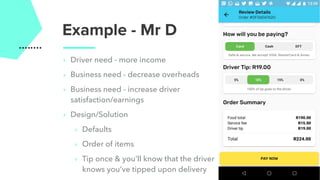
Example - Mr D
‣ Driver need - more income
‣ Business need - decrease overheads
‣ Business need - increase driver
satisfaction/earnings
‣ Design/Solution
‣ Defaults
‣ Order of items
‣ Tip once & you’ll know that the driver
knows you’ve tipped upon delivery
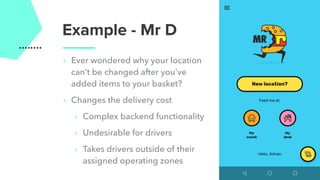
Example - Mr D
‣ Ever wondered why your location
can’t be changed after you’ve
added items to your basket?
‣ Changes the delivery cost
‣ Complex backend functionality
‣ Undesirable for drivers
‣ Takes drivers outside of their
assigned operating zones
Technically
‣ It is the process of enhancing user satisfaction with a
product by improving the usability, accessibility, and
pleasure provided in the interaction with the product.
‣ User experience design encompasses traditional
human–computer interaction (HCI) design, and extends
it by addressing all aspects of a product or service as
perceived by users.
Source: Wikipedia
Approaches To UX Design
1.You rely on your own empathy, proximity to the
problem or experience to ensure product-problem fit
‣ Sometimes okay but DANGEROUS
Approaches
Approaches
2. Look at your competitors
‣ Try fall in love with how they do something - think
about why they did something before criticising it
‣ Potential Negatives
‣ Inheriting bad/untested ideas
‣ Might not work in your use case
‣ Less differentiated product
Approaches
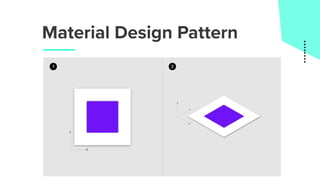
3. Design Patterns
‣ This helps with general usability
‣ Google Material Design material.io - devs will love
you
‣ Apple - Human Interface Guidelines
‣ Highly rated Wordpress templates
Approacheshttps://youtu.be/w2JUhDd0CAA
Material Design Pattern
Approaches
4. Reading/Theory/First Principles
‣ Proven (peer reviewed)
‣ Sometimes the theory isn’t practical
‣ Behavioural economics
‣ Predictably Irrational - Dan Ariely
Approaches
5. Get/collect user data (upfront & after)
‣ This is always the pudding (proof is in the…)
‣ More is always better
‣ It always surprises me by how many people opt of
this
‣ NB: Be careful of biases - e.g. recollection/response
bias
Excuses for not testing/getting data
1. The users don’t know what they want
2. The feature doesn’t have all of it’s functionality yet….
so their opinion would be meaningless
3. You watching users, use the app changes what their
feedback
4. Users will tell you, what you want to hear
5. Fear of rejection (not said but very common)
Side Note
‣ UX is very broad and touches just about everything
‣ So unless you know everything - impossible… it has to
be a very collaborative exercise
‣ What you actually want to do is build a product
improvement engine
My Process
1. Business case/requirements (e.g. increase revenue)
2. User needs/wants ==> Personas
Personas
‣ Know and constantly keep in mind who you’re design/
building this for
‣ What knowledge are they entering your experience
with?
‣ What motivates them?
My Process
1. Business case/requirements (e.g. increase revenue)
2. User needs/wants ==> Personas
3. Constraints (combination of business & users)
4. Design constraints (platform, device capabilities)
5. Think about it - really try to absorb all the information
6. Whiteboard/Paper
7. Low-fi ==> High-fi
Important things to bear in mind
‣ Hierarchy of information
‣ Decrease friction where ever possible (some
exceptions)
‣ How can what you design be tested? (Get to this later)
‣ Every choice must be justified/informed by the
data/constraints
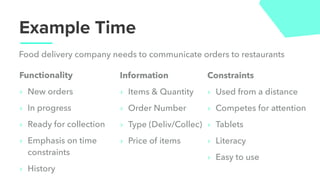
Example Time
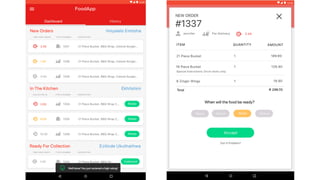
Food delivery company needs to communicate orders to restaurants
Functionality
‣ New orders
‣ In progress
‣ Ready for collection
‣ Emphasis on time
constraints
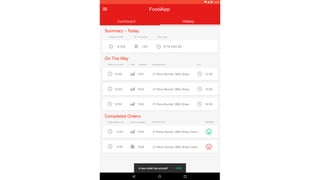
‣ History
Information
‣ Items & Quantity
‣ Order Number
‣ Type (Deliv/Collec)
‣ Price of items
Constraints
‣ Used from a distance
‣ Competes for attention
‣ Tablets
‣ Literacy
‣ Easy to use
‣ Button Clicks (Analytics) - In particular new orders
‣ Intercom heat maps
‣ Fabric screen recording
‣ Watching users
‣ Interviewing users
Testing
Other Useful Testing Tools
‣ A-B Testing
‣ Net Promoter Score - how likely are you to recommend
this to a friend/colleague
‣ Watch people use the app
Designing CRAP
‣ Contrast
‣ Repetition (Consistency)
‣ Alignment
‣ Proximity
Designing CRAP
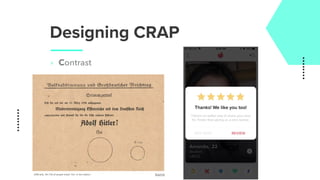
‣ Contrast
‣ Direct the viewer’s eyes to what’s important
and helps them focus on what to do next.
Designing CRAP
‣ Contrast
(Officially, 99.73% of people voted ‘Yes’ in this ballot.) Source
Designing CRAP
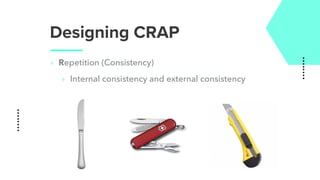
‣ Repetition (Consistency)
‣ Internal consistency and external consistency
Designing CRAP
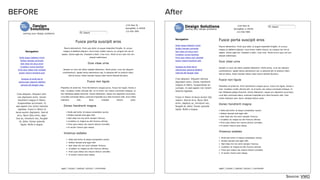
‣ Alignment
‣ All elements of the design line up horizontally and
vertically
BEFORE After
Source: VWO
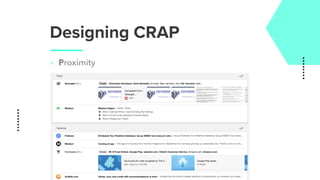
Designing CRAP
‣ Proximity
‣ Elements placed near each other, will make users
think that they are somehow related
Designing CRAP
‣ Proximity
Last Points
‣ Always give users a sense of direction, and visibility
of system status. They should get a feeling that they’re
in control of the situation.
‣ They say “Good design is telepathic”. The user must
understand what they are using your product for what
are their main tasks.
‣ Less friction, more action
‣ Don’t let perfect be the enemy of good enough
DONE
linkedin.com/in/adrianbunge/adrian.bunge@gmail.com
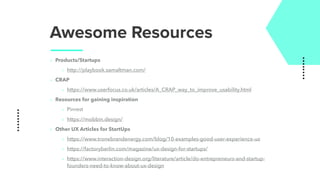
Awesome Resources
‣ Products/Startups
‣ http://playbook.samaltman.com/
‣ CRAP
‣ https://www.userfocus.co.uk/articles/A_CRAP_way_to_improve_usability.html
‣ Resources for gaining inspiration
‣ Pinrest
‣ https://mobbin.design/
‣ Other UX Articles for StartUps
‣ https://www.tronebrandenergy.com/blog/10-examples-good-user-experience-ux
‣ https://factoryberlin.com/magazine/ux-design-for-startups/
‣ https://www.interaction-design.org/literature/article/do-entrepreneurs-and-startup-
founders-need-to-know-about-ux-design
Approaches
https://youtu.be/rrT6v5sOwJg

User Experience 101 - A Practical Guide

  • 1.
    UX - APractical Guide
  • 2.
    How is thisgoing to work? This is NOT a lecture… ‣ Interactive discussion ‣ There is no “questions” slide
  • 4.
    Who Are You? ‣Designers? ‣ Developers? ‣ Marketers? ‣ Business Dev? ‣ Entrepreneur? ‣ Student?
  • 6.
    Who Am I? ‣Adrian Bunge ‣ Alumni of VIP Cohort 1 - TutorX ‣ UX Designer & Developer @ Nona ‣ Google Dev Group - Co-organiser
  • 7.
    What do youhope to achieve by starting a company?
  • 8.
    What do youhope to achieve? ‣ Build a great product ‣ How do we build a great product that users love? ‣ "You know, with Tesla, we're trying to make things that people love. [...] How many things can you buy that you really love, that really give you joy? So rare, so rare. I wish there were more things. That's what we're trying to do - make things that people love" - Elon Musk
  • 9.
    What makes agreat product?
  • 10.
    A great overallexperience…
  • 11.
    The Realm ofExperience ‣ Some UX Professionals split up experience into: ‣ User Exp., Customer Exp., Brand Exp. ‣ I don’t really like boxing in “experience”
  • 12.
    Example - MrD ‣ Driver need - more income ‣ Business need - decrease overheads ‣ Business need - increase driver satisfaction/earnings ‣ Design/Solution ‣ Defaults ‣ Order of items ‣ Tip once & you’ll know that the driver knows you’ve tipped upon delivery
  • 13.
    Example - MrD ‣ Ever wondered why your location can’t be changed after you’ve added items to your basket? ‣ Changes the delivery cost ‣ Complex backend functionality ‣ Undesirable for drivers ‣ Takes drivers outside of their assigned operating zones
  • 14.
    Technically ‣ It isthe process of enhancing user satisfaction with a product by improving the usability, accessibility, and pleasure provided in the interaction with the product. ‣ User experience design encompasses traditional human–computer interaction (HCI) design, and extends it by addressing all aspects of a product or service as perceived by users. Source: Wikipedia
  • 15.
    Approaches To UXDesign 1.You rely on your own empathy, proximity to the problem or experience to ensure product-problem fit ‣ Sometimes okay but DANGEROUS
  • 16.
  • 17.
    Approaches 2. Look atyour competitors ‣ Try fall in love with how they do something - think about why they did something before criticising it ‣ Potential Negatives ‣ Inheriting bad/untested ideas ‣ Might not work in your use case ‣ Less differentiated product
  • 18.
    Approaches 3. Design Patterns ‣This helps with general usability ‣ Google Material Design material.io - devs will love you ‣ Apple - Human Interface Guidelines ‣ Highly rated Wordpress templates
  • 19.
  • 20.
  • 21.
    Approaches 4. Reading/Theory/First Principles ‣Proven (peer reviewed) ‣ Sometimes the theory isn’t practical ‣ Behavioural economics ‣ Predictably Irrational - Dan Ariely
  • 22.
    Approaches 5. Get/collect userdata (upfront & after) ‣ This is always the pudding (proof is in the…) ‣ More is always better ‣ It always surprises me by how many people opt of this ‣ NB: Be careful of biases - e.g. recollection/response bias
  • 23.
    Excuses for nottesting/getting data 1. The users don’t know what they want 2. The feature doesn’t have all of it’s functionality yet…. so their opinion would be meaningless 3. You watching users, use the app changes what their feedback 4. Users will tell you, what you want to hear 5. Fear of rejection (not said but very common)
  • 24.
    Side Note ‣ UXis very broad and touches just about everything ‣ So unless you know everything - impossible… it has to be a very collaborative exercise ‣ What you actually want to do is build a product improvement engine
  • 25.
    My Process 1. Businesscase/requirements (e.g. increase revenue) 2. User needs/wants ==> Personas
  • 26.
    Personas ‣ Know andconstantly keep in mind who you’re design/ building this for ‣ What knowledge are they entering your experience with? ‣ What motivates them?
  • 27.
    My Process 1. Businesscase/requirements (e.g. increase revenue) 2. User needs/wants ==> Personas 3. Constraints (combination of business & users) 4. Design constraints (platform, device capabilities) 5. Think about it - really try to absorb all the information 6. Whiteboard/Paper 7. Low-fi ==> High-fi
  • 28.
    Important things tobear in mind ‣ Hierarchy of information ‣ Decrease friction where ever possible (some exceptions) ‣ How can what you design be tested? (Get to this later) ‣ Every choice must be justified/informed by the data/constraints
  • 29.
    Example Time Food deliverycompany needs to communicate orders to restaurants Functionality ‣ New orders ‣ In progress ‣ Ready for collection ‣ Emphasis on time constraints ‣ History Information ‣ Items & Quantity ‣ Order Number ‣ Type (Deliv/Collec) ‣ Price of items Constraints ‣ Used from a distance ‣ Competes for attention ‣ Tablets ‣ Literacy ‣ Easy to use
  • 33.
    ‣ Button Clicks(Analytics) - In particular new orders ‣ Intercom heat maps ‣ Fabric screen recording ‣ Watching users ‣ Interviewing users Testing
  • 34.
    Other Useful TestingTools ‣ A-B Testing ‣ Net Promoter Score - how likely are you to recommend this to a friend/colleague ‣ Watch people use the app
  • 35.
    Designing CRAP ‣ Contrast ‣Repetition (Consistency) ‣ Alignment ‣ Proximity
  • 36.
    Designing CRAP ‣ Contrast ‣Direct the viewer’s eyes to what’s important and helps them focus on what to do next.
  • 37.
    Designing CRAP ‣ Contrast (Officially,99.73% of people voted ‘Yes’ in this ballot.) Source
  • 38.
    Designing CRAP ‣ Repetition(Consistency) ‣ Internal consistency and external consistency
  • 39.
    Designing CRAP ‣ Alignment ‣All elements of the design line up horizontally and vertically
  • 40.
  • 41.
    Designing CRAP ‣ Proximity ‣Elements placed near each other, will make users think that they are somehow related
  • 42.
  • 43.
    Last Points ‣ Alwaysgive users a sense of direction, and visibility of system status. They should get a feeling that they’re in control of the situation. ‣ They say “Good design is telepathic”. The user must understand what they are using your product for what are their main tasks. ‣ Less friction, more action ‣ Don’t let perfect be the enemy of good enough
  • 44.
  • 45.
    Awesome Resources ‣ Products/Startups ‣http://playbook.samaltman.com/ ‣ CRAP ‣ https://www.userfocus.co.uk/articles/A_CRAP_way_to_improve_usability.html ‣ Resources for gaining inspiration ‣ Pinrest ‣ https://mobbin.design/ ‣ Other UX Articles for StartUps ‣ https://www.tronebrandenergy.com/blog/10-examples-good-user-experience-ux ‣ https://factoryberlin.com/magazine/ux-design-for-startups/ ‣ https://www.interaction-design.org/literature/article/do-entrepreneurs-and-startup- founders-need-to-know-about-ux-design
  • 46.