File
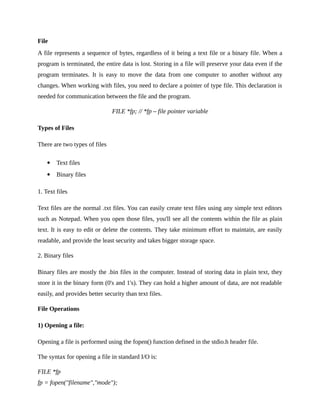
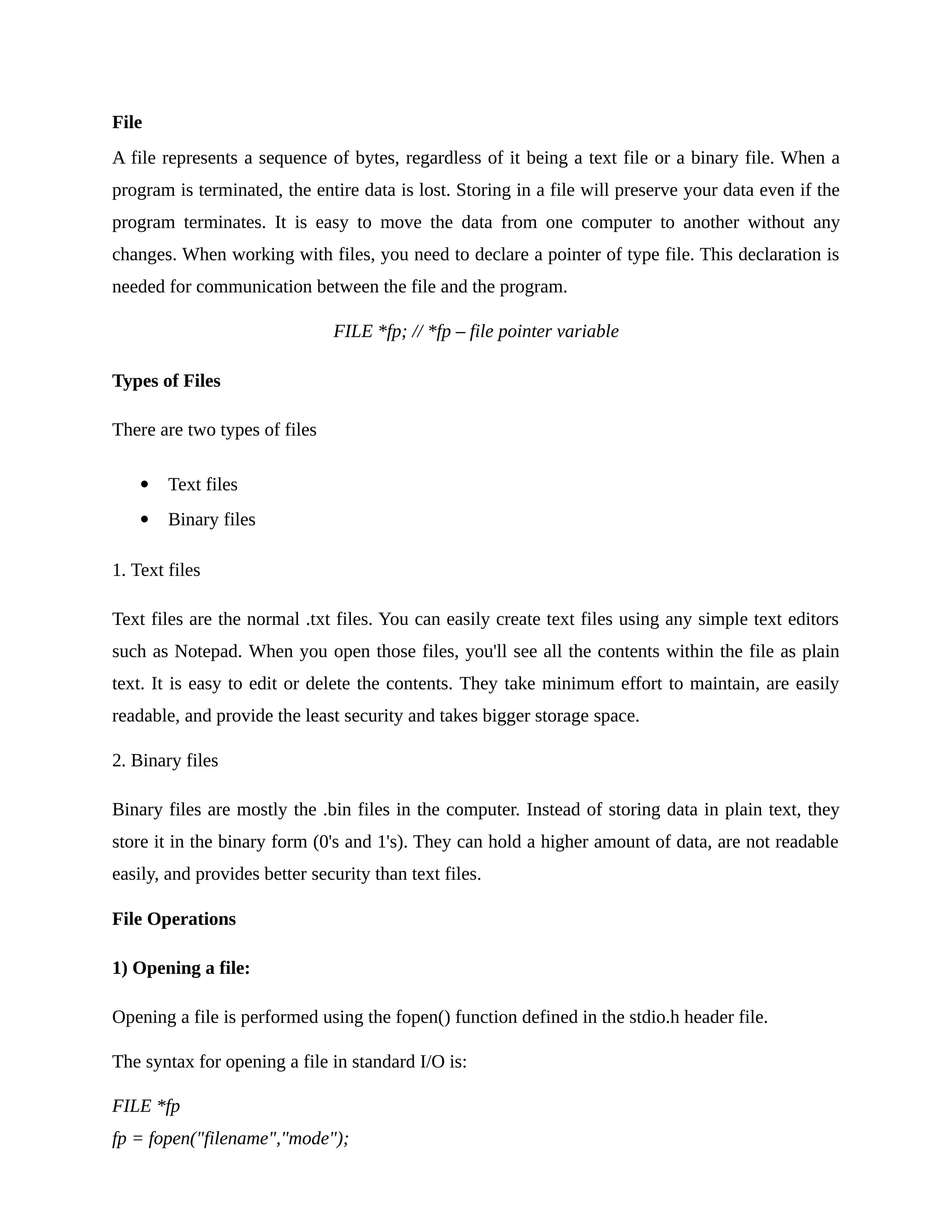
A file represents a sequence of bytes, regardless of it being a text file or a binary file. When a
program is terminated, the entire data is lost. Storing in a file will preserve your data even if the
program terminates. It is easy to move the data from one computer to another without any
changes. When working with files, you need to declare a pointer of type file. This declaration is
needed for communication between the file and the program.
FILE *fp; // *fp – file pointer variable
Types of Files
There are two types of files
 Text files
 Binary files
1. Text files
Text files are the normal .txt files. You can easily create text files using any simple text editors
such as Notepad. When you open those files, you'll see all the contents within the file as plain
text. It is easy to edit or delete the contents. They take minimum effort to maintain, are easily
readable, and provide the least security and takes bigger storage space.
2. Binary files
Binary files are mostly the .bin files in the computer. Instead of storing data in plain text, they
store it in the binary form (0's and 1's). They can hold a higher amount of data, are not readable
easily, and provides better security than text files.
File Operations
1) Opening a file:
Opening a file is performed using the fopen() function defined in the stdio.h header file.
The syntax for opening a file in standard I/O is:
FILE *fp
fp = fopen("filename","mode");
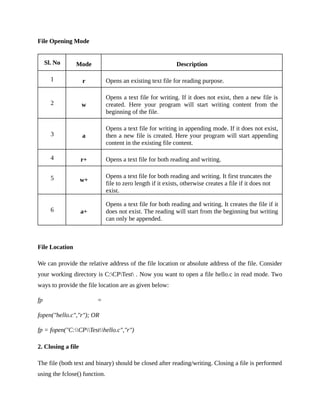
File Opening Mode
Sl. No Mode Description
1 r Opens an existing text file for reading purpose.
2 w
Opens a text file for writing. If it does not exist, then a new file is
created. Here your program will start writing content from the
beginning of the file.
3 a
Opens a text file for writing in appending mode. If it does not exist,
then a new file is created. Here your program will start appending
content in the existing file content.
4 r+ Opens a text file for both reading and writing.
5 w+
Opens a text file for both reading and writing. It first truncates the
file to zero length if it exists, otherwise creates a file if it does not
exist.
6 a+
Opens a text file for both reading and writing. It creates the file if it
does not exist. The reading will start from the beginning but writing
can only be appended.
File Location
We can provide the relative address of the file location or absolute address of the file. Consider
your working directory is C:CPTest . Now you want to open a file hello.c in read mode. Two
ways to provide the file location are as given below:
fp =
fopen("hello.c","r"); OR
fp = fopen("C:CPTesthello.c","r")
2. Closing a file
The file (both text and binary) should be closed after reading/writing. Closing a file is performed
using the fclose() function.
fclose(fp);
Here, fp is a file pointer associated with the file to be closed.
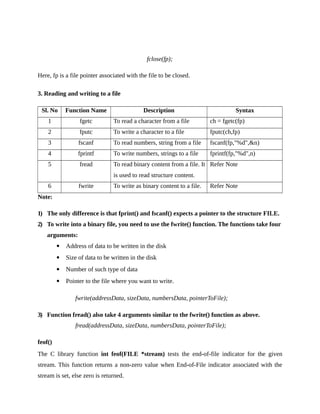
3. Reading and writing to a file
Sl. No Function Name Description Syntax
1 fgetc To read a character from a file ch = fgetc(fp)
2 fputc To write a character to a file fputc(ch,fp)
3 fscanf To read numbers, string from a file fscanf(fp,"%d",&n)
4 fprintf To write numbers, strings to a file fprintf(fp,"%d",n)
5 fread To read binary content from a file. It
is used to read structure content.
Refer Note
6 fwrite To write as binary content to a file. Refer Note
Note:
1) The only difference is that fprint() and fscanf() expects a pointer to the structure FILE.
2) To write into a binary file, you need to use the fwrite() function. The functions take four
arguments:
 Address of data to be written in the disk
 Size of data to be written in the disk
 Number of such type of data
 Pointer to the file where you want to write.
fwrite(addressData, sizeData, numbersData, pointerToFile);
3) Function fread() also take 4 arguments similar to the fwrite() function as above.
fread(addressData, sizeData, numbersData, pointerToFile);
feof()
The C library function int feof(FILE *stream) tests the end-of-file indicator for the given
stream. This function returns a non-zero value when End-of-File indicator associated with the
stream is set, else zero is returned.
Random Access to a file
1) fseek()
If you have many records inside a file and need to access a record at a specific position, you need
to loop through all the records before it to get the record. This will waste a lot of memory and
operation time. An easier way to get to the required data can be achieved using fseek().
fseek(FILE * stream, long int offset, int pos);
The first parameter stream is the pointer to the file. The second parameter is the position of the
record to be found, and the third parameter specifies the location where the offset starts.
Different positions in fseek()
Position Meaning
SEEK_SET Starts the offset from the beginning of the file.
SEEK_END Starts the offset from the end of the file.
SEEK_CUR Starts the offset from the current location of the cursor in the file.
2) ftell()
ftell() in C is used to find out the position of file pointer in the file with respect to starting of the
file.
Syntax of ftell() is:
ftell(FILE *pointer)
Examples Programs
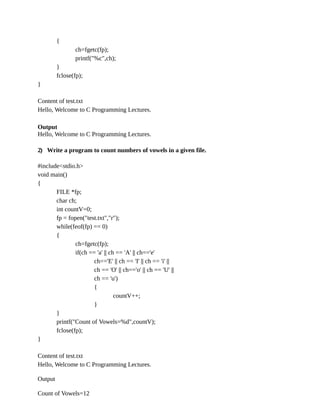
1) Write a program to display the content of a file.
#include<stdio.h>
void main()
{
FILE *fp;
char ch;
fp = fopen("test.txt","r");
while(feof(fp) == 0)
{
ch=fgetc(fp);
printf("%c",ch);
}
fclose(fp);
}
Content of test.txt
Hello, Welcome to C Programming Lectures.
Output
Hello, Welcome to C Programming Lectures.
2) Write a program to count numbers of vowels in a given file.
#include<stdio.h>
void main()
{
FILE *fp;
char ch;
int countV=0;
fp = fopen("test.txt","r");
while(feof(fp) == 0)
{
ch=fgetc(fp);
if(ch == 'a' || ch == 'A' || ch=='e'
ch=='E' || ch == 'I' || ch == 'i' ||
ch == 'O' || ch=='o' || ch == 'U' ||
ch == 'u')
{
countV++;
}
}
printf("Count of Vowels=%d",countV);
fclose(fp);
}
Content of test.txt
Hello, Welcome to C Programming Lectures.
Output
Count of Vowels=12
3) Write a program to copy the content of file to another.
#include<stdio.h>
void main()
{
FILE *f1,*f2;
char ch;
f1 = fopen("test.txt","r");
f2 = fopen("copy.txt","w");
while(feof(f1) == 0)
{
ch=fgetc(f1);
fputc(ch,f2);
}
printf("Successfully Copied");
fclose(f1);
fclose(f2);
}
Content of test.txt
Hello, Welcome to C Programming Lectures.
Output
Successfully Copied
Content of copy.txt
Hello, Welcome to C Programming Lectures.
4) Write a program to merge the content of two files.
#include<stdio.h>
void main()
{
FILE *f1,*f2,*f3;
char ch;
f1 = fopen("file1.txt","r");
f2 = fopen("file2.txt","r");
f3 = fopen("merge.txt","w");
while(feof(f1) == 0)
{
ch=fgetc(f1);
fputc(ch,f3);
}
while(feof(f2) == 0)
{
ch=fgetc(f2);
fputc(ch,f3);
}
printf("Successfully Merged");
}
Content of file1.txt
Hello, Welcome to C Programming Lectures.
Content of file2.txt
C is very easy to learn.
Output
Successfully Merged
Content of merge.txt
Hello, Welcome to C Programming Lectures. C is very easy to learn.
5) Write a program to read numbers from a file and display the largest number.
#include<stdio.h>
void main()
{
FILE *f1;
int large,num;
f1 = fopen("number.txt","r");
fscanf(f1,"%d",&large); // setting first element as largest element
while(feof(f1) == 0)
{
fscanf(f1,"%d",&num);
if(large<num)
{
large= num;
}
}
fclose(f1);
printf("Largest element = %d",large);
}
Content of number.txt
15 21 7 29 36 78 67 56 10
Output
Largest element = 78
6) Consider you are a content writer in Wikipedia. You are the person who write the known facts
about APJ Abdul Kalam. After his death, you need to change all is to was. Write a program to
replace all is’ to was’ to a new file.
#include<stdio.h>
#include<string.h>
void main()
{
FILE *f1,*f2;
char str[30];
f1 = fopen("apj.txt","r");
f2 = fopen("new.txt","w");
fscanf(f1,"%s",str);
while(feof(f1) == 0)
{
if(strcmp(str,"is")==0)
fprintf(f2,"was A");
else
fprintf(f2,"%s ",str);
fscanf(f1,"%s",str);
}
fclose(f1);
fclose(f2);
printf("Replaced String Sucessfullyn");
}
7) Write a program to reverse each content of file to another.
#include<stdio.h>
#include<string.h>
void main()
{
FILE *f1,*f2;
char str[30],rev[30];
int i,j;
f1 = fopen("test.txt","r");
f2 = fopen("new.txt","w");
while(feof(f1) == 0)
{
fscanf(f1,"%s",str);
j=0;
for(i=strlen(str)-1;i>=0;i--)
{
rev[j]=str[i];
j++;
}
rev[j]='0';
fprintf(f2,"%s ",rev);
}
fclose(f1);
fclose(f2);
}
Content of test.txt
Welcome to C programming
Content of new.txt after execution
emocleW ot C gnimmargorp
8) Write a program to copy the content of a file to another in reverse order.
#include<stdio.h>
void main()
{
FILE *f1,*f2;
int count,begin,end;
char ch,i;
f1 = fopen("test.txt","r");
f2 = fopen("new.txt","w");
// Code to find count of characters in a file.
begin = ftell(f1);
fseek(f1, -1, SEEK_END);
end = ftell(f1);
count = end - begin; // Count of characters.
printf("Count of characters=%d",count);
// Copy the content of file in reverse order
i=-1;
while (count != -1)
{
ch = fgetc(f1);
fputc(ch, f2);
i--;
fseek(f1, i, SEEK_END); // shifts the pointer to the previous character
count--;
}
fclose(f1);
fclose(f2);
}
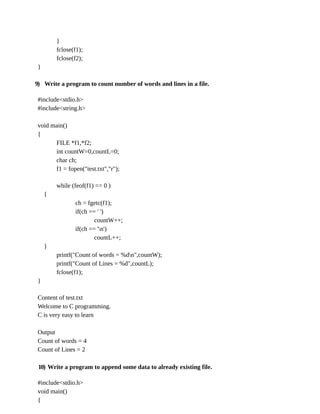
9) Write a program to count number of words and lines in a file.
#include<stdio.h>
#include<string.h>
void main()
{
FILE *f1,*f2;
int countW=0,countL=0;
char ch;
f1 = fopen("test.txt","r");
while (feof(f1) == 0 )
{
ch = fgetc(f1);
if(ch == ' ')
countW++;
if(ch == 'n')
countL++;
}
printf("Count of words = %dn",countW);
printf("Count of Lines = %d",countL);
fclose(f1);
}
Content of test.txt
Welcome to C programming.
C is very easy to learn
Output
Count of words = 4
Count of Lines = 2
10) Write a program to append some data to already existing file.
#include<stdio.h>
void main()
{
FILE *f1;
char str[30];
f1 = fopen("test.txt","a");
printf("Enter the string:");
gets(str);
fprintf(f1,"%s",str);
fclose(f1);
}

Module 5 file cp

  • 1.
    File A file representsa sequence of bytes, regardless of it being a text file or a binary file. When a program is terminated, the entire data is lost. Storing in a file will preserve your data even if the program terminates. It is easy to move the data from one computer to another without any changes. When working with files, you need to declare a pointer of type file. This declaration is needed for communication between the file and the program. FILE *fp; // *fp – file pointer variable Types of Files There are two types of files  Text files  Binary files 1. Text files Text files are the normal .txt files. You can easily create text files using any simple text editors such as Notepad. When you open those files, you'll see all the contents within the file as plain text. It is easy to edit or delete the contents. They take minimum effort to maintain, are easily readable, and provide the least security and takes bigger storage space. 2. Binary files Binary files are mostly the .bin files in the computer. Instead of storing data in plain text, they store it in the binary form (0's and 1's). They can hold a higher amount of data, are not readable easily, and provides better security than text files. File Operations 1) Opening a file: Opening a file is performed using the fopen() function defined in the stdio.h header file. The syntax for opening a file in standard I/O is: FILE *fp fp = fopen("filename","mode");
  • 2.
    File Opening Mode Sl.No Mode Description 1 r Opens an existing text file for reading purpose. 2 w Opens a text file for writing. If it does not exist, then a new file is created. Here your program will start writing content from the beginning of the file. 3 a Opens a text file for writing in appending mode. If it does not exist, then a new file is created. Here your program will start appending content in the existing file content. 4 r+ Opens a text file for both reading and writing. 5 w+ Opens a text file for both reading and writing. It first truncates the file to zero length if it exists, otherwise creates a file if it does not exist. 6 a+ Opens a text file for both reading and writing. It creates the file if it does not exist. The reading will start from the beginning but writing can only be appended. File Location We can provide the relative address of the file location or absolute address of the file. Consider your working directory is C:CPTest . Now you want to open a file hello.c in read mode. Two ways to provide the file location are as given below: fp = fopen("hello.c","r"); OR fp = fopen("C:CPTesthello.c","r") 2. Closing a file The file (both text and binary) should be closed after reading/writing. Closing a file is performed using the fclose() function.
  • 3.
    fclose(fp); Here, fp isa file pointer associated with the file to be closed. 3. Reading and writing to a file Sl. No Function Name Description Syntax 1 fgetc To read a character from a file ch = fgetc(fp) 2 fputc To write a character to a file fputc(ch,fp) 3 fscanf To read numbers, string from a file fscanf(fp,"%d",&n) 4 fprintf To write numbers, strings to a file fprintf(fp,"%d",n) 5 fread To read binary content from a file. It is used to read structure content. Refer Note 6 fwrite To write as binary content to a file. Refer Note Note: 1) The only difference is that fprint() and fscanf() expects a pointer to the structure FILE. 2) To write into a binary file, you need to use the fwrite() function. The functions take four arguments:  Address of data to be written in the disk  Size of data to be written in the disk  Number of such type of data  Pointer to the file where you want to write. fwrite(addressData, sizeData, numbersData, pointerToFile); 3) Function fread() also take 4 arguments similar to the fwrite() function as above. fread(addressData, sizeData, numbersData, pointerToFile); feof() The C library function int feof(FILE *stream) tests the end-of-file indicator for the given stream. This function returns a non-zero value when End-of-File indicator associated with the stream is set, else zero is returned.
  • 4.
    Random Access toa file 1) fseek() If you have many records inside a file and need to access a record at a specific position, you need to loop through all the records before it to get the record. This will waste a lot of memory and operation time. An easier way to get to the required data can be achieved using fseek(). fseek(FILE * stream, long int offset, int pos); The first parameter stream is the pointer to the file. The second parameter is the position of the record to be found, and the third parameter specifies the location where the offset starts. Different positions in fseek() Position Meaning SEEK_SET Starts the offset from the beginning of the file. SEEK_END Starts the offset from the end of the file. SEEK_CUR Starts the offset from the current location of the cursor in the file. 2) ftell() ftell() in C is used to find out the position of file pointer in the file with respect to starting of the file. Syntax of ftell() is: ftell(FILE *pointer) Examples Programs 1) Write a program to display the content of a file. #include<stdio.h> void main() { FILE *fp; char ch; fp = fopen("test.txt","r"); while(feof(fp) == 0)
  • 5.
    { ch=fgetc(fp); printf("%c",ch); } fclose(fp); } Content of test.txt Hello,Welcome to C Programming Lectures. Output Hello, Welcome to C Programming Lectures. 2) Write a program to count numbers of vowels in a given file. #include<stdio.h> void main() { FILE *fp; char ch; int countV=0; fp = fopen("test.txt","r"); while(feof(fp) == 0) { ch=fgetc(fp); if(ch == 'a' || ch == 'A' || ch=='e' ch=='E' || ch == 'I' || ch == 'i' || ch == 'O' || ch=='o' || ch == 'U' || ch == 'u') { countV++; } } printf("Count of Vowels=%d",countV); fclose(fp); } Content of test.txt Hello, Welcome to C Programming Lectures. Output Count of Vowels=12
  • 6.
    3) Write aprogram to copy the content of file to another.
  • 7.
    #include<stdio.h> void main() { FILE *f1,*f2; charch; f1 = fopen("test.txt","r"); f2 = fopen("copy.txt","w"); while(feof(f1) == 0) { ch=fgetc(f1); fputc(ch,f2); } printf("Successfully Copied"); fclose(f1); fclose(f2); } Content of test.txt Hello, Welcome to C Programming Lectures. Output Successfully Copied Content of copy.txt Hello, Welcome to C Programming Lectures. 4) Write a program to merge the content of two files. #include<stdio.h> void main() { FILE *f1,*f2,*f3; char ch; f1 = fopen("file1.txt","r"); f2 = fopen("file2.txt","r"); f3 = fopen("merge.txt","w"); while(feof(f1) == 0) { ch=fgetc(f1); fputc(ch,f3); } while(feof(f2) == 0) {
  • 8.
  • 9.
    printf("Successfully Merged"); } Content offile1.txt Hello, Welcome to C Programming Lectures. Content of file2.txt C is very easy to learn. Output Successfully Merged Content of merge.txt Hello, Welcome to C Programming Lectures. C is very easy to learn. 5) Write a program to read numbers from a file and display the largest number. #include<stdio.h> void main() { FILE *f1; int large,num; f1 = fopen("number.txt","r"); fscanf(f1,"%d",&large); // setting first element as largest element while(feof(f1) == 0) { fscanf(f1,"%d",&num); if(large<num) { large= num; } } fclose(f1); printf("Largest element = %d",large); } Content of number.txt 15 21 7 29 36 78 67 56 10 Output Largest element = 78
  • 10.
    6) Consider youare a content writer in Wikipedia. You are the person who write the known facts about APJ Abdul Kalam. After his death, you need to change all is to was. Write a program to replace all is’ to was’ to a new file. #include<stdio.h> #include<string.h> void main() { FILE *f1,*f2; char str[30]; f1 = fopen("apj.txt","r"); f2 = fopen("new.txt","w"); fscanf(f1,"%s",str); while(feof(f1) == 0) { if(strcmp(str,"is")==0) fprintf(f2,"was A"); else fprintf(f2,"%s ",str); fscanf(f1,"%s",str); } fclose(f1); fclose(f2); printf("Replaced String Sucessfullyn"); } 7) Write a program to reverse each content of file to another. #include<stdio.h> #include<string.h> void main() { FILE *f1,*f2; char str[30],rev[30]; int i,j; f1 = fopen("test.txt","r"); f2 = fopen("new.txt","w"); while(feof(f1) == 0)
  • 11.
  • 12.
    for(i=strlen(str)-1;i>=0;i--) { rev[j]=str[i]; j++; } rev[j]='0'; fprintf(f2,"%s ",rev); } fclose(f1); fclose(f2); } Content oftest.txt Welcome to C programming Content of new.txt after execution emocleW ot C gnimmargorp 8) Write a program to copy the content of a file to another in reverse order. #include<stdio.h> void main() { FILE *f1,*f2; int count,begin,end; char ch,i; f1 = fopen("test.txt","r"); f2 = fopen("new.txt","w"); // Code to find count of characters in a file. begin = ftell(f1); fseek(f1, -1, SEEK_END); end = ftell(f1); count = end - begin; // Count of characters. printf("Count of characters=%d",count); // Copy the content of file in reverse order i=-1; while (count != -1) { ch = fgetc(f1); fputc(ch, f2); i--;
  • 13.
    fseek(f1, i, SEEK_END);// shifts the pointer to the previous character count--;
  • 14.
    } fclose(f1); fclose(f2); } 9) Write aprogram to count number of words and lines in a file. #include<stdio.h> #include<string.h> void main() { FILE *f1,*f2; int countW=0,countL=0; char ch; f1 = fopen("test.txt","r"); while (feof(f1) == 0 ) { ch = fgetc(f1); if(ch == ' ') countW++; if(ch == 'n') countL++; } printf("Count of words = %dn",countW); printf("Count of Lines = %d",countL); fclose(f1); } Content of test.txt Welcome to C programming. C is very easy to learn Output Count of words = 4 Count of Lines = 2 10) Write a program to append some data to already existing file. #include<stdio.h> void main() {
  • 15.
    FILE *f1; char str[30]; f1= fopen("test.txt","a");
  • 16.