1
Topics
• File Handling in C
• Basic File I/O Functions
• Example
11/12/15
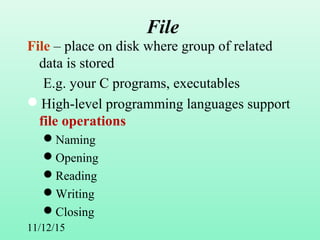
File
File – place on disk where group of related
data is stored
E.g. your C programs, executables
High-level programming languages support
file operations
Naming
Opening
Reading
Writing
Closing
3
File Handling in C
• Files need to be opened before use.
– Associate a "file handler" to each file
– Modes: read, write, or append
• File I/O functions use the file handler (not
the filename).
• Need to close the file after use.
• Basic file handling functions: fopen(),
fclose(), fscanf(), fprintf().
4
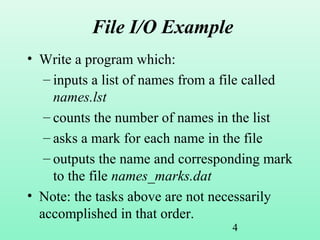
File I/O Example
• Write a program which:
– inputs a list of names from a file called
names.lst
– counts the number of names in the list
– asks a mark for each name in the file
– outputs the name and corresponding mark
to the file names_marks.dat
• Note: the tasks above are not necessarily
accomplished in that order.
5
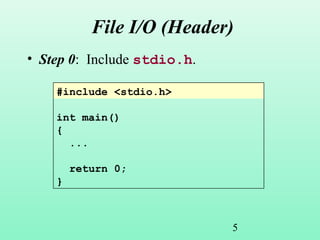
File I/O (Header)
• Step 0: Include stdio.h.
#include <stdio.h>
int main()
{
...
return 0;
}
6
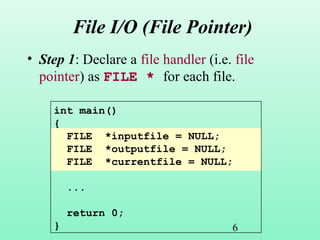
File I/O (File Pointer)
• Step 1: Declare a file handler (i.e. file
pointer) as FILE * for each file.
int main()
{
FILE *inputfile = NULL;
FILE *outputfile = NULL;
FILE *currentfile = NULL;
...
return 0;
}
7
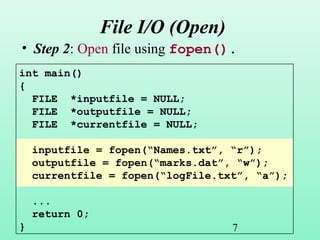
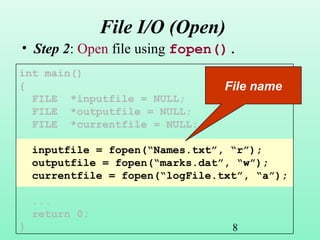
File I/O (Open)
• Step 2: Open file using fopen().
int main()
{
FILE *inputfile = NULL;
FILE *outputfile = NULL;
FILE *currentfile = NULL;
inputfile = fopen(“Names.txt”, “r”);
outputfile = fopen(“marks.dat”, “w”);
currentfile = fopen(“logFile.txt”, “a”);
...
return 0;
}
8
File I/O (Open)
• Step 2: Open file using fopen().
int main()
{
FILE *inputfile = NULL;
FILE *outputfile = NULL;
FILE *currentfile = NULL;
inputfile = fopen(“Names.txt”, “r”);
outputfile = fopen(“marks.dat”, “w”);
currentfile = fopen(“logFile.txt”, “a”);
...
return 0;
}
File name
9
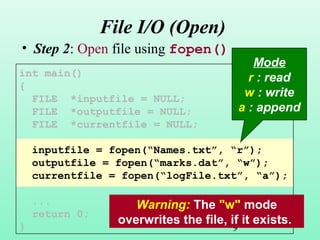
File I/O (Open)
• Step 2: Open file using fopen().
int main()
{
FILE *inputfile = NULL;
FILE *outputfile = NULL;
FILE *currentfile = NULL;
inputfile = fopen(“Names.txt”, “r”);
outputfile = fopen(“marks.dat”, “w”);
currentfile = fopen(“logFile.txt”, “a”);
...
return 0;
}
Mode
r : read
w : write
a : append
Warning: The "w" mode
overwrites the file, if it exists.
10
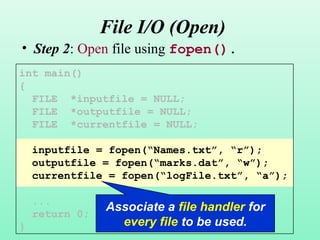
File I/O (Open)
• Step 2: Open file using fopen().
int main()
{
FILE *inputfile = NULL;
FILE *outputfile = NULL;
FILE *currentfile = NULL;
inputfile = fopen(“Names.txt”, “r”);
outputfile = fopen(“marks.dat”, “w”);
currentfile = fopen(“logFile.txt”, “a”);
...
return 0;
}
Associate a file handler for
every file to be used.
11
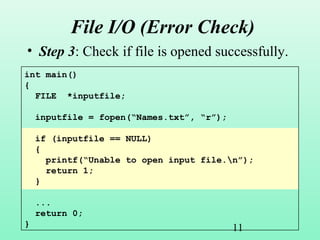
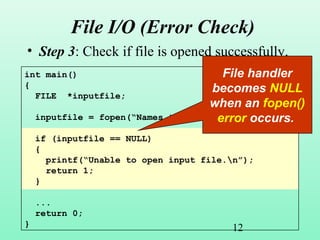
File I/O (Error Check)
• Step 3: Check if file is opened successfully.
int main()
{
FILE *inputfile;
inputfile = fopen(“Names.txt”, “r”);
if (inputfile == NULL)
{
printf(“Unable to open input file.n”);
return 1;
}
...
return 0;
}
12
File I/O (Error Check)
• Step 3: Check if file is opened successfully.
int main()
{
FILE *inputfile;
inputfile = fopen(“Names.txt”, “r”);
if (inputfile == NULL)
{
printf(“Unable to open input file.n”);
return 1;
}
...
return 0;
}
File handler
becomes NULL
when an fopen()
error occurs.
13
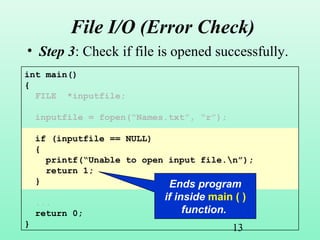
File I/O (Error Check)
• Step 3: Check if file is opened successfully.
int main()
{
FILE *inputfile;
inputfile = fopen(“Names.txt”, “r”);
if (inputfile == NULL)
{
printf(“Unable to open input file.n”);
return 1;
}
...
return 0;
}
Ends program
if inside main ( )
function.
14
File I/O (Input)
• Step 4a: Use fscanf() for input.
#include <stdio.h>
#define MAXLEN 100
int main()
{
FILE *inputfile = NULL;
char name[MAXLEN];
int count;
15
File I/O (Input)
• Step 4a: Use fscanf() for input.
#include <stdio.h>
#define MAXLEN 100
int main()
{
FILE *inputfile = NULL;
char name[MAXLEN];
int count;
Recall: Macro definition
16
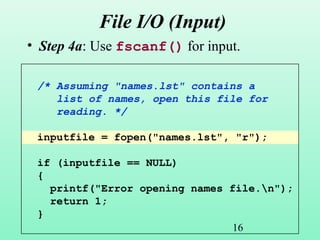
File I/O (Input)
• Step 4a: Use fscanf() for input.
/* Assuming "names.lst" contains a
list of names, open this file for
reading. */
inputfile = fopen("names.lst", "r");
if (inputfile == NULL)
{
printf("Error opening names file.n");
return 1;
}
17
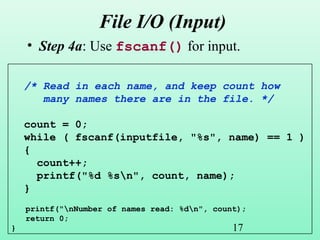
File I/O (Input)
• Step 4a: Use fscanf() for input.
/* Read in each name, and keep count how
many names there are in the file. */
count = 0;
while ( fscanf(inputfile, "%s", name) == 1 )
{
count++;
printf("%d %sn", count, name);
}
printf("nNumber of names read: %dn", count);
return 0;
}
18
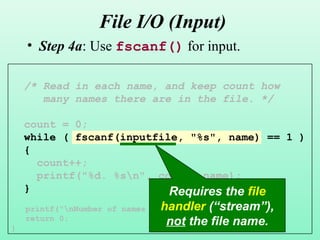
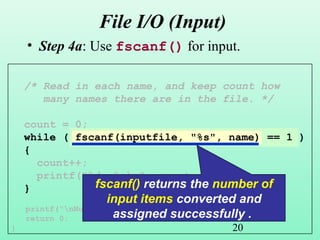
File I/O (Input)
• Step 4a: Use fscanf() for input.
/* Read in each name, and keep count how
many names there are in the file. */
count = 0;
while ( fscanf(inputfile, "%s", name) == 1 )
{
count++;
printf("%d. %sn", count, name);
}
printf("nNumber of names read: %dn", count);
return 0;
}
Requires the file
handler (“stream”),
not the file name.
19
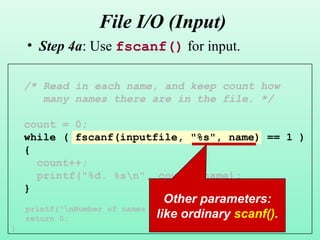
File I/O (Input)
• Step 4a: Use fscanf() for input.
/* Read in each name, and keep count how
many names there are in the file. */
count = 0;
while ( fscanf(inputfile, "%s", name) == 1 )
{
count++;
printf("%d. %sn", count, name);
}
printf("nNumber of names read: %dn", count);
return 0;
}
Other parameters:
like ordinary scanf().
20
File I/O (Input)
• Step 4a: Use fscanf() for input.
/* Read in each name, and keep count how
many names there are in the file. */
count = 0;
while ( fscanf(inputfile, "%s", name) == 1 )
{
count++;
printf("%d. %sn", count, name);
}
printf("nNumber of names read: %dn", count);
return 0;
}
fscanf() returns the number of
input items converted and
assigned successfully .
21
/* Read in each name, and keep count how
many names there are in the file. */
count = 0;
while ( fscanf(inputfile, "%s", name) == 1 )
{
count++;
printf("%d. %sn", count, name);
}
printf("nNumber of names read: %dn", count);
return 0;
}
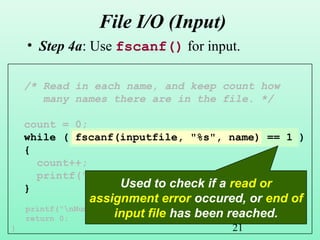
File I/O (Input)
• Step 4a: Use fscanf() for input.
Used to check if a read or
assignment error occured, or end of
input file has been reached.
22
File I/O (Output)
• Step 4b: Use fprintf() for output.
#include <stdio.h>
#define MAXLEN 100
int main()
{
FILE *inputfile = NULL;
FILE *outfile = NULL;
char name[MAXLEN];
int count;
float mark;
/* Assuming "names.lst" contains a list of names,
open this file for reading. */
inputfile = fopen("names.lst", "r");
if (inputfile == NULL)
{
printf("Error opening names file.n");
return 1;
}
23
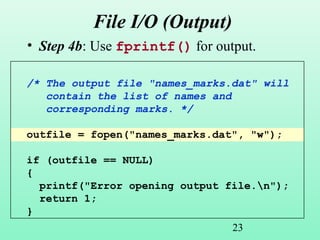
File I/O (Output)
• Step 4b: Use fprintf() for output.
/* The output file "names_marks.dat" will
contain the list of names and
corresponding marks. */
outfile = fopen("names_marks.dat", "w");
if (outfile == NULL)
{
printf("Error opening output file.n");
return 1;
}
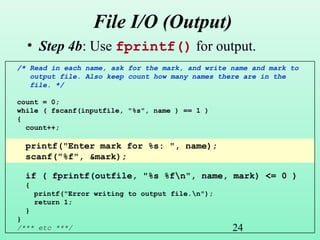
24
File I/O (Output)
• Step 4b: Use fprintf() for output.
/* Read in each name, ask for the mark, and write name and mark to
output file. Also keep count how many names there are in the
file. */
count = 0;
while ( fscanf(inputfile, "%s", name ) == 1 )
{
count++;
printf("Enter mark for %s: ", name);
scanf("%f", &mark);
if ( fprintf(outfile, "%s %fn", name, mark) <= 0 )
{
printf("Error writing to output file.n");
return 1;
}
}
/*** etc ***/
25
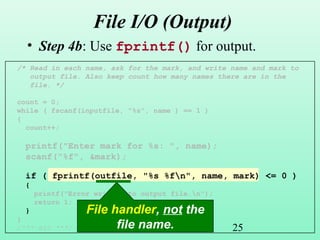
File I/O (Output)
• Step 4b: Use fprintf() for output.
/* Read in each name, ask for the mark, and write name and mark to
output file. Also keep count how many names there are in the
file. */
count = 0;
while ( fscanf(inputfile, "%s", name ) == 1 )
{
count++;
printf("Enter mark for %s: ", name);
scanf("%f", &mark);
if ( fprintf(outfile, "%s %fn", name, mark) <= 0 )
{
printf("Error writing to output file.n");
return 1;
}
}
/*** etc ***/
File handler, not the
file name.
26
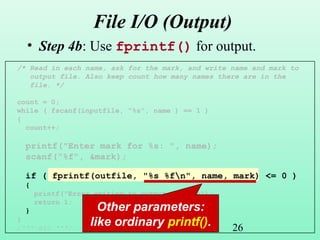
File I/O (Output)
• Step 4b: Use fprintf() for output.
/* Read in each name, ask for the mark, and write name and mark to
output file. Also keep count how many names there are in the
file. */
count = 0;
while ( fscanf(inputfile, "%s", name ) == 1 )
{
count++;
printf("Enter mark for %s: ", name);
scanf("%f", &mark);
if ( fprintf(outfile, "%s %fn", name, mark) <= 0 )
{
printf("Error writing to output file.n");
return 1;
}
}
/*** etc ***/
Other parameters:
like ordinary printf().
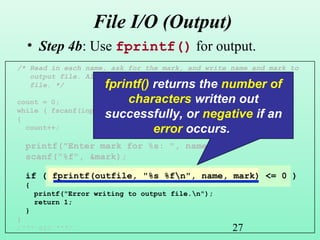
27
/* Read in each name, ask for the mark, and write name and mark to
output file. Also keep count how many names there are in the
file. */
count = 0;
while ( fscanf(inputfile, "%s", name ) == 1 )
{
count++;
printf("Enter mark for %s: ", name);
scanf("%f", &mark);
if ( fprintf(outfile, "%s %fn", name, mark) <= 0 )
{
printf("Error writing to output file.n");
return 1;
}
}
/*** etc ***/
File I/O (Output)
• Step 4b: Use fprintf() for output.
fprintf() returns the number of
characters written out
successfully, or negative if an
error occurs.
28
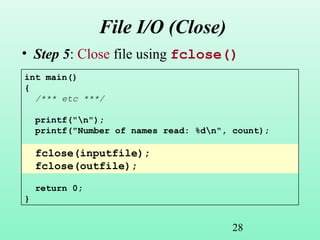
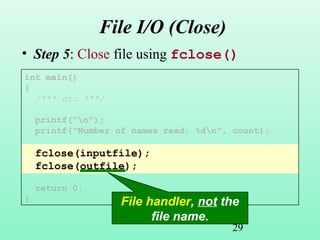
File I/O (Close)
• Step 5: Close file using fclose()
int main()
{
/*** etc ***/
printf("n");
printf("Number of names read: %dn", count);
fclose(inputfile);
fclose(outfile);
return 0;
}
29
File I/O (Close)
• Step 5: Close file using fclose()
int main()
{
/*** etc ***/
printf("n");
printf("Number of names read: %dn", count);
fclose(inputfile);
fclose(outfile);
return 0;
} File handler, not the
file name.
30
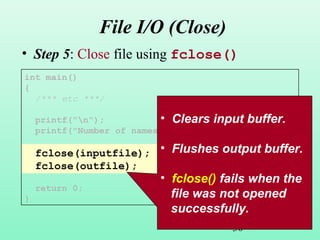
File I/O (Close)
• Step 5: Close file using fclose()
int main()
{
/*** etc ***/
printf("n");
printf("Number of names read: %dn", count);
fclose(inputfile);
fclose(outfile);
return 0;
}
• Clears input buffer.
• Flushes output buffer.
• fclose() fails when the
file was not opened
successfully.
31
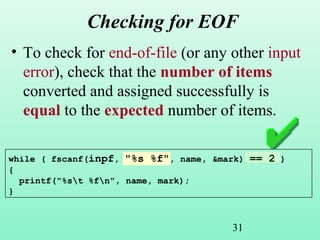
Checking for EOF
• To check for end-of-file (or any other input
error), check that the number of items
converted and assigned successfully is
equal to the expected number of items.
while ( fscanf(inpf, "%s %f", name, &mark) == 2 )
{
printf("%st %fn", name, mark);
}
32
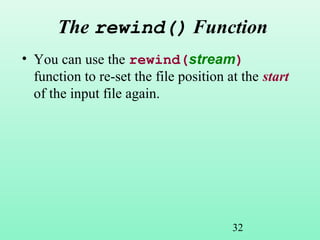
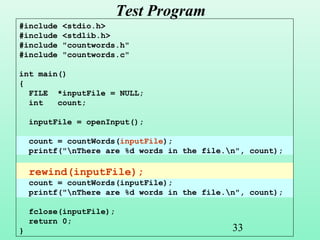
The rewind() Function
• You can use the rewind(stream)
function to re-set the file position at the start
of the input file again.
33
Test Program
#include <stdio.h>
#include <stdlib.h>
#include "countwords.h"
#include "countwords.c"
int main()
{
FILE *inputFile = NULL;
int count;
inputFile = openInput();
count = countWords(inputFile);
printf("nThere are %d words in the file.n", count);
rewind(inputFile);
count = countWords(inputFile);
printf("nThere are %d words in the file.n", count);
fclose(inputFile);
return 0;
}
Thank You
11/12/15

File handling in c

  • 1.
    1 Topics • File Handlingin C • Basic File I/O Functions • Example
  • 2.
    11/12/15 File File – placeon disk where group of related data is stored E.g. your C programs, executables High-level programming languages support file operations Naming Opening Reading Writing Closing
  • 3.
    3 File Handling inC • Files need to be opened before use. – Associate a "file handler" to each file – Modes: read, write, or append • File I/O functions use the file handler (not the filename). • Need to close the file after use. • Basic file handling functions: fopen(), fclose(), fscanf(), fprintf().
  • 4.
    4 File I/O Example •Write a program which: – inputs a list of names from a file called names.lst – counts the number of names in the list – asks a mark for each name in the file – outputs the name and corresponding mark to the file names_marks.dat • Note: the tasks above are not necessarily accomplished in that order.
  • 5.
    5 File I/O (Header) •Step 0: Include stdio.h. #include <stdio.h> int main() { ... return 0; }
  • 6.
    6 File I/O (FilePointer) • Step 1: Declare a file handler (i.e. file pointer) as FILE * for each file. int main() { FILE *inputfile = NULL; FILE *outputfile = NULL; FILE *currentfile = NULL; ... return 0; }
  • 7.
    7 File I/O (Open) •Step 2: Open file using fopen(). int main() { FILE *inputfile = NULL; FILE *outputfile = NULL; FILE *currentfile = NULL; inputfile = fopen(“Names.txt”, “r”); outputfile = fopen(“marks.dat”, “w”); currentfile = fopen(“logFile.txt”, “a”); ... return 0; }
  • 8.
    8 File I/O (Open) •Step 2: Open file using fopen(). int main() { FILE *inputfile = NULL; FILE *outputfile = NULL; FILE *currentfile = NULL; inputfile = fopen(“Names.txt”, “r”); outputfile = fopen(“marks.dat”, “w”); currentfile = fopen(“logFile.txt”, “a”); ... return 0; } File name
  • 9.
    9 File I/O (Open) •Step 2: Open file using fopen(). int main() { FILE *inputfile = NULL; FILE *outputfile = NULL; FILE *currentfile = NULL; inputfile = fopen(“Names.txt”, “r”); outputfile = fopen(“marks.dat”, “w”); currentfile = fopen(“logFile.txt”, “a”); ... return 0; } Mode r : read w : write a : append Warning: The "w" mode overwrites the file, if it exists.
  • 10.
    10 File I/O (Open) •Step 2: Open file using fopen(). int main() { FILE *inputfile = NULL; FILE *outputfile = NULL; FILE *currentfile = NULL; inputfile = fopen(“Names.txt”, “r”); outputfile = fopen(“marks.dat”, “w”); currentfile = fopen(“logFile.txt”, “a”); ... return 0; } Associate a file handler for every file to be used.
  • 11.
    11 File I/O (ErrorCheck) • Step 3: Check if file is opened successfully. int main() { FILE *inputfile; inputfile = fopen(“Names.txt”, “r”); if (inputfile == NULL) { printf(“Unable to open input file.n”); return 1; } ... return 0; }
  • 12.
    12 File I/O (ErrorCheck) • Step 3: Check if file is opened successfully. int main() { FILE *inputfile; inputfile = fopen(“Names.txt”, “r”); if (inputfile == NULL) { printf(“Unable to open input file.n”); return 1; } ... return 0; } File handler becomes NULL when an fopen() error occurs.
  • 13.
    13 File I/O (ErrorCheck) • Step 3: Check if file is opened successfully. int main() { FILE *inputfile; inputfile = fopen(“Names.txt”, “r”); if (inputfile == NULL) { printf(“Unable to open input file.n”); return 1; } ... return 0; } Ends program if inside main ( ) function.
  • 14.
    14 File I/O (Input) •Step 4a: Use fscanf() for input. #include <stdio.h> #define MAXLEN 100 int main() { FILE *inputfile = NULL; char name[MAXLEN]; int count;
  • 15.
    15 File I/O (Input) •Step 4a: Use fscanf() for input. #include <stdio.h> #define MAXLEN 100 int main() { FILE *inputfile = NULL; char name[MAXLEN]; int count; Recall: Macro definition
  • 16.
    16 File I/O (Input) •Step 4a: Use fscanf() for input. /* Assuming "names.lst" contains a list of names, open this file for reading. */ inputfile = fopen("names.lst", "r"); if (inputfile == NULL) { printf("Error opening names file.n"); return 1; }
  • 17.
    17 File I/O (Input) •Step 4a: Use fscanf() for input. /* Read in each name, and keep count how many names there are in the file. */ count = 0; while ( fscanf(inputfile, "%s", name) == 1 ) { count++; printf("%d %sn", count, name); } printf("nNumber of names read: %dn", count); return 0; }
  • 18.
    18 File I/O (Input) •Step 4a: Use fscanf() for input. /* Read in each name, and keep count how many names there are in the file. */ count = 0; while ( fscanf(inputfile, "%s", name) == 1 ) { count++; printf("%d. %sn", count, name); } printf("nNumber of names read: %dn", count); return 0; } Requires the file handler (“stream”), not the file name.
  • 19.
    19 File I/O (Input) •Step 4a: Use fscanf() for input. /* Read in each name, and keep count how many names there are in the file. */ count = 0; while ( fscanf(inputfile, "%s", name) == 1 ) { count++; printf("%d. %sn", count, name); } printf("nNumber of names read: %dn", count); return 0; } Other parameters: like ordinary scanf().
  • 20.
    20 File I/O (Input) •Step 4a: Use fscanf() for input. /* Read in each name, and keep count how many names there are in the file. */ count = 0; while ( fscanf(inputfile, "%s", name) == 1 ) { count++; printf("%d. %sn", count, name); } printf("nNumber of names read: %dn", count); return 0; } fscanf() returns the number of input items converted and assigned successfully .
  • 21.
    21 /* Read ineach name, and keep count how many names there are in the file. */ count = 0; while ( fscanf(inputfile, "%s", name) == 1 ) { count++; printf("%d. %sn", count, name); } printf("nNumber of names read: %dn", count); return 0; } File I/O (Input) • Step 4a: Use fscanf() for input. Used to check if a read or assignment error occured, or end of input file has been reached.
  • 22.
    22 File I/O (Output) •Step 4b: Use fprintf() for output. #include <stdio.h> #define MAXLEN 100 int main() { FILE *inputfile = NULL; FILE *outfile = NULL; char name[MAXLEN]; int count; float mark; /* Assuming "names.lst" contains a list of names, open this file for reading. */ inputfile = fopen("names.lst", "r"); if (inputfile == NULL) { printf("Error opening names file.n"); return 1; }
  • 23.
    23 File I/O (Output) •Step 4b: Use fprintf() for output. /* The output file "names_marks.dat" will contain the list of names and corresponding marks. */ outfile = fopen("names_marks.dat", "w"); if (outfile == NULL) { printf("Error opening output file.n"); return 1; }
  • 24.
    24 File I/O (Output) •Step 4b: Use fprintf() for output. /* Read in each name, ask for the mark, and write name and mark to output file. Also keep count how many names there are in the file. */ count = 0; while ( fscanf(inputfile, "%s", name ) == 1 ) { count++; printf("Enter mark for %s: ", name); scanf("%f", &mark); if ( fprintf(outfile, "%s %fn", name, mark) <= 0 ) { printf("Error writing to output file.n"); return 1; } } /*** etc ***/
  • 25.
    25 File I/O (Output) •Step 4b: Use fprintf() for output. /* Read in each name, ask for the mark, and write name and mark to output file. Also keep count how many names there are in the file. */ count = 0; while ( fscanf(inputfile, "%s", name ) == 1 ) { count++; printf("Enter mark for %s: ", name); scanf("%f", &mark); if ( fprintf(outfile, "%s %fn", name, mark) <= 0 ) { printf("Error writing to output file.n"); return 1; } } /*** etc ***/ File handler, not the file name.
  • 26.
    26 File I/O (Output) •Step 4b: Use fprintf() for output. /* Read in each name, ask for the mark, and write name and mark to output file. Also keep count how many names there are in the file. */ count = 0; while ( fscanf(inputfile, "%s", name ) == 1 ) { count++; printf("Enter mark for %s: ", name); scanf("%f", &mark); if ( fprintf(outfile, "%s %fn", name, mark) <= 0 ) { printf("Error writing to output file.n"); return 1; } } /*** etc ***/ Other parameters: like ordinary printf().
  • 27.
    27 /* Read ineach name, ask for the mark, and write name and mark to output file. Also keep count how many names there are in the file. */ count = 0; while ( fscanf(inputfile, "%s", name ) == 1 ) { count++; printf("Enter mark for %s: ", name); scanf("%f", &mark); if ( fprintf(outfile, "%s %fn", name, mark) <= 0 ) { printf("Error writing to output file.n"); return 1; } } /*** etc ***/ File I/O (Output) • Step 4b: Use fprintf() for output. fprintf() returns the number of characters written out successfully, or negative if an error occurs.
  • 28.
    28 File I/O (Close) •Step 5: Close file using fclose() int main() { /*** etc ***/ printf("n"); printf("Number of names read: %dn", count); fclose(inputfile); fclose(outfile); return 0; }
  • 29.
    29 File I/O (Close) •Step 5: Close file using fclose() int main() { /*** etc ***/ printf("n"); printf("Number of names read: %dn", count); fclose(inputfile); fclose(outfile); return 0; } File handler, not the file name.
  • 30.
    30 File I/O (Close) •Step 5: Close file using fclose() int main() { /*** etc ***/ printf("n"); printf("Number of names read: %dn", count); fclose(inputfile); fclose(outfile); return 0; } • Clears input buffer. • Flushes output buffer. • fclose() fails when the file was not opened successfully.
  • 31.
    31 Checking for EOF •To check for end-of-file (or any other input error), check that the number of items converted and assigned successfully is equal to the expected number of items. while ( fscanf(inpf, "%s %f", name, &mark) == 2 ) { printf("%st %fn", name, mark); }
  • 32.
    32 The rewind() Function •You can use the rewind(stream) function to re-set the file position at the start of the input file again.
  • 33.
    33 Test Program #include <stdio.h> #include<stdlib.h> #include "countwords.h" #include "countwords.c" int main() { FILE *inputFile = NULL; int count; inputFile = openInput(); count = countWords(inputFile); printf("nThere are %d words in the file.n", count); rewind(inputFile); count = countWords(inputFile); printf("nThere are %d words in the file.n", count); fclose(inputFile); return 0; }
  • 34.