File in C ProgrammingFile in C Programming
Contents
 Data Files
 File Types
 File opening and closing
 Data File Type Specifications
 Data File Creating
 Data File Processing
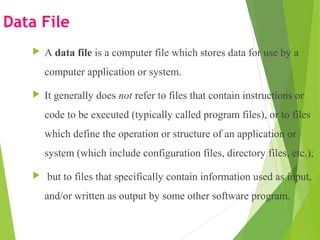
Data File
 A data file is a computer file which stores data for use by a
computer application or system.
 It generally does not refer to files that contain instructions or
code to be executed (typically called program files), or to files
which define the operation or structure of an application or
system (which include configuration files, directory files, etc.);
 but to files that specifically contain information used as input,
and/or written as output by some other software program.
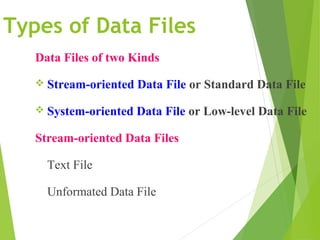
Types of Data Files
Data Files of two Kinds
 Stream-oriented Data File or Standard Data File
 System-oriented Data File or Low-level Data File
Stream-oriented Data Files
Text File
Unformated Data File
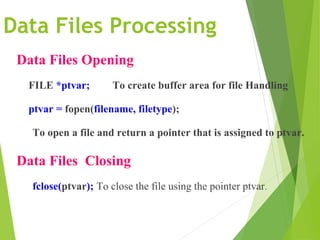
Data Files Processing
Data Files Opening
FILE *ptvar; To create buffer area for file Handling
ptvar = fopen(filename, filetype);
To open a file and return a pointer that is assigned to ptvar.
Data Files Closing
fclose(ptvar); To close the file using the pointer ptvar.
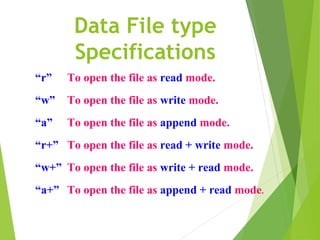
Data File type
Specifications
“r” To open the file as read mode.
“w” To open the file as write mode.
“a” To open the file as append mode.
“r+” To open the file as read + write mode.
“w+” To open the file as write + read mode.
“a+” To open the file as append + read mode.
Data File Processing Functions
fopen() To open a file and return a pointer.
fclose() To close a file with the given pointer.
getchar() To take input from the standard input device.
putchar() To give output to the standard output device.
getc() To take input from the file.
putc() To give output to the file.
fprintf() To send output a data item to the file.
fscanf() To take input a data item from the file.
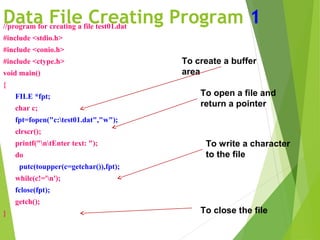
Data File Creating Program 1//program for creating a file test01.dat
#include <stdio.h>
#include <conio.h>
#include <ctype.h>
void main()
{
FILE *fpt;
char c;
fpt=fopen("c:test01.dat","w");
clrscr();
printf("ntEnter text: ");
do
putc(toupper(c=getchar()),fpt);
while(c!='n');
fclose(fpt);
getch();
}
To create a buffer
area
To open a file and
return a pointer
To write a character
to the file
To close the file
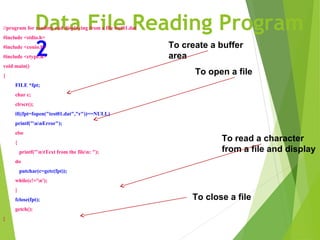
Data File Reading Program
2
//program for reading and displaying from a file test01.dat
#include <stdio.h>
#include <conio.h>
#include <ctype.h>
void main()
{
FILE *fpt;
char c;
clrscr();
if((fpt=fopen("test01.dat","r"))==NULL)
printf("nnError");
else
{
printf("ntText from the filen: ");
do
putchar(c=getc(fpt));
while(c!='n');
}
fclose(fpt);
getch();
}
To create a buffer
area
To open a file
To read a character
from a file and display
To close a file
File in C Programming

File in C Programming

  • 1.
    File in CProgrammingFile in C Programming
  • 3.
    Contents  Data Files File Types  File opening and closing  Data File Type Specifications  Data File Creating  Data File Processing
  • 4.
    Data File  Adata file is a computer file which stores data for use by a computer application or system.  It generally does not refer to files that contain instructions or code to be executed (typically called program files), or to files which define the operation or structure of an application or system (which include configuration files, directory files, etc.);  but to files that specifically contain information used as input, and/or written as output by some other software program.
  • 5.
    Types of DataFiles Data Files of two Kinds  Stream-oriented Data File or Standard Data File  System-oriented Data File or Low-level Data File Stream-oriented Data Files Text File Unformated Data File
  • 6.
    Data Files Processing DataFiles Opening FILE *ptvar; To create buffer area for file Handling ptvar = fopen(filename, filetype); To open a file and return a pointer that is assigned to ptvar. Data Files Closing fclose(ptvar); To close the file using the pointer ptvar.
  • 7.
    Data File type Specifications “r”To open the file as read mode. “w” To open the file as write mode. “a” To open the file as append mode. “r+” To open the file as read + write mode. “w+” To open the file as write + read mode. “a+” To open the file as append + read mode.
  • 8.
    Data File ProcessingFunctions fopen() To open a file and return a pointer. fclose() To close a file with the given pointer. getchar() To take input from the standard input device. putchar() To give output to the standard output device. getc() To take input from the file. putc() To give output to the file. fprintf() To send output a data item to the file. fscanf() To take input a data item from the file.
  • 9.
    Data File CreatingProgram 1//program for creating a file test01.dat #include <stdio.h> #include <conio.h> #include <ctype.h> void main() { FILE *fpt; char c; fpt=fopen("c:test01.dat","w"); clrscr(); printf("ntEnter text: "); do putc(toupper(c=getchar()),fpt); while(c!='n'); fclose(fpt); getch(); } To create a buffer area To open a file and return a pointer To write a character to the file To close the file
  • 10.
    Data File ReadingProgram 2 //program for reading and displaying from a file test01.dat #include <stdio.h> #include <conio.h> #include <ctype.h> void main() { FILE *fpt; char c; clrscr(); if((fpt=fopen("test01.dat","r"))==NULL) printf("nnError"); else { printf("ntText from the filen: "); do putchar(c=getc(fpt)); while(c!='n'); } fclose(fpt); getch(); } To create a buffer area To open a file To read a character from a file and display To close a file