

What is file?
Operation on a file.
Function using in file handling.
Function with example using in file handling.
INTRODUCTIO
N PART
What is file?
A file is a space on the disk where a group of related data is
stored.
Operations on a file
DEFINING A FILE
OPENING A FILE
CLOSING A FILE
WRITING DATA TO FILE
READING DATA FROM A FILE
Functions that helps to perform basic file operations.
fopen( ) - create a new file or open a existing file
fclose( ) - closes a file
fprintf( ) - writes a set of data to a file
fscanf( ) - reads a set of data from a file
fgetc( ) - reads a character from a file
fputc( ) - writes a character to a file
getw( ) - reads a integer from a file
putw( ) - writes a integer to a file
fseek( ) - set the position to desire point
ftell( ) - gives current position in the file
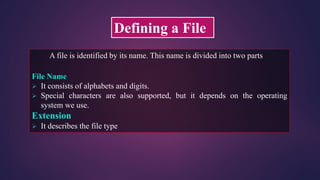
Defining a File
A file is identified by its name. This name is divided into two parts
File Name
 It consists of alphabets and digits.
 Special characters are also supported, but it depends on the operating
system we use.
Extension
 It describes the file type
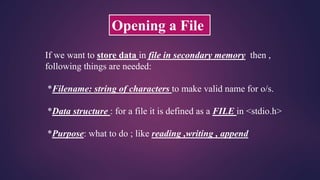
Opening a File
If we want to store data in file in secondary memory then ,
following things are needed:
*Filename: string of characters to make valid name for o/s.
*Data structure : for a file it is defined as a FILE in <stdio.h>
*Purpose: what to do ; like reading ,writing , append
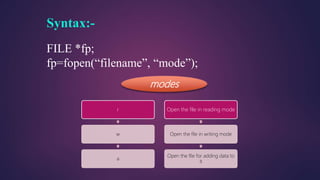
Syntax:-
FILE *fp;
fp=fopen(“filename”, “mode”);
modes
r
w
a
Open the file in reading mode
Open the file in writing mode
Open the file for adding data to
it
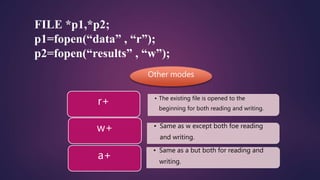
FILE *p1,*p2;
p1=fopen(“data” , “r”);
p2=fopen(“results” , “w”);
Other modes
• The existing file is opened to the
beginning for both reading and writing.
r+
• Same as w except both foe reading
and writing.
w+
• Same as a but both for reading and
writing.
a+
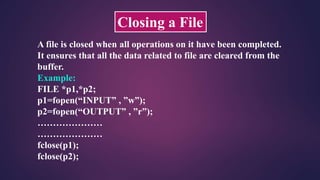
Closing a File
A file is closed when all operations on it have been completed.
It ensures that all the data related to file are cleared from the
buffer.
Example:
FILE *p1,*p2;
p1=fopen(“INPUT” , ”w”);
p2=fopen(“OUTPUT” , ”r”);
…………………
…………………
fclose(p1);
fclose(p2);
fprintf()
&
fscanf()
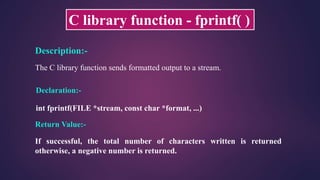
C library function - fprintf( )
Description:-
The C library function sends formatted output to a stream.
Declaration:-
int fprintf(FILE *stream, const char *format, ...)
Return Value:-
If successful, the total number of characters written is returned
otherwise, a negative number is returned.
#include <stdio.h>
#include <conio.h>
void main(){
FILE * fp;
int c;
fp = fopen ("file.txt", “a+");
fprintf(fp, "%s %s %s %d", "We", "are", "in", 2012);
fclose(fp);
fp = fopen("file.txt","r");
while(1){
c = fgetc(fp);
if( feof(fp) ) {
break;}
printf("%c", c);}
fclose(fp);
getch();
}
file.txt
created on
pc
Example using fprintf() function:-
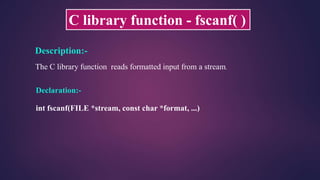
C library function - fscanf( )
Description:-
The C library function reads formatted input from a stream.
Declaration:-
int fscanf(FILE *stream, const char *format, ...)
#include <stdio.h>
#include <conio.h>
void main()
{
char str1[10], str2[10], str3[10];
int year;
FILE * fp;
fp = fopen ("file.txt", "w+");
fputs(“tWe are in 2012n", fp);
rewind(fp);
fscanf(fp, "%s %s %s %dn", str1, str2, str3, &year);
printf("Read String1 |%s|nRead String2 |%s|nRead String3 |%s|nRead Integer |%d|n", str1,str2,str3,year );
fprintf(fp , “nRead String1 |%s|nRead String2 |%s|nRead String3 |%s|nRead Integer |%d|n", str1,str2,str3,year );
fclose(fp);
getch();
}
Example using fscanf() function:-
fgetc()
&
fputc()
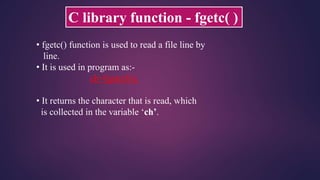
• fgetc() function is used to read a file line by
line.
• It is used in program as:-
ch=fgetc(fs);
• It returns the character that is read, which
is collected in the variable ‘ch’.
C library function - fgetc( )
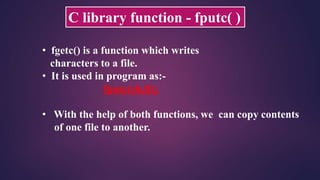
C library function - fputc( )
• fgetc() is a function which writes
characters to a file.
• It is used in program as:-
fputc(ch,ft);
• With the help of both functions, we can copy contents
of one file to another.
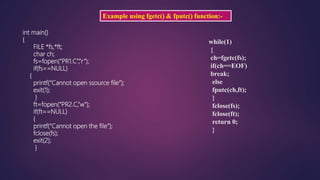
Example using fgetc() & fputc() function:-
int main()
{
FILE *fs,*ft;
char ch;
fs=fopen(“PR1.C”,”r”);
if(fs==NULL)
{
printf(“Cannot open ssource file”);
exit(1);
}
ft=fopen(“PR2.C,”w”);
if(ft==NULL)
{
printf(“Cannot open the file”);
fclose(fs);
exit(2);
}
while(1)
{
ch=fgetc(fs);
if(ch==EOF)
break;
else
fputc(ch,ft);
}
fclose(fs);
fclose(ft);
return 0;
}
putw()
&
getw()
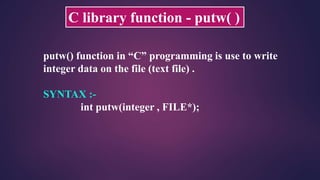
C library function - putw( )
putw() function in “C” programming is use to write
integer data on the file (text file) .
SYNTAX :-
int putw(integer , FILE*);
Example using putw() function:-
Void main()
{
FILE *fp;
fp = fopen(“file1.txt”, “w”);
putw(65,fp);
fclose(fp);
}
C library function - getw( )
 getw() function in “C” programming language is use
to read the integer data from the file.
SYNTAX :-
int getw(FILE*);
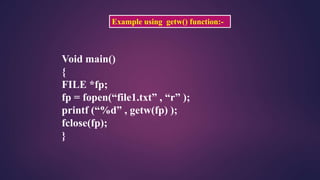
Example using getw() function:-
Void main()
{
FILE *fp;
fp = fopen(“file1.txt” , “r” );
printf (“%d” , getw(fp) );
fclose(fp);
}
fseek()
&
ftell()
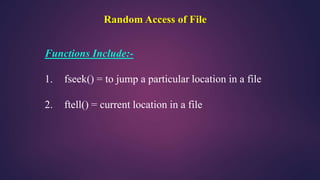
Random Access of File
Functions Include:-
1. fseek() = to jump a particular location in a file
2. ftell() = current location in a file
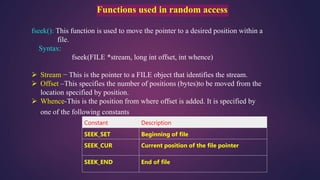
Functions used in random access
fseek(): This function is used to move the pointer to a desired position within a
file.
Syntax:
fseek(FILE *stream, long int offset, int whence)
 Stream − This is the pointer to a FILE object that identifies the stream.
 Offset –This specifies the number of positions (bytes)to be moved from the
location specified by position.
 Whence-This is the position from where offset is added. It is specified by
one of the following constants
Constant Description
SEEK_SET Beginning of file
SEEK_CUR Current position of the file pointer
SEEK_END End of file
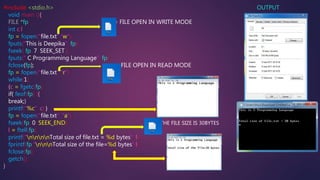
#include <stdio.h> OUTPUT
void main (){
FILE *fp; ; = FILE OPEN IN WRITE MODE
int c,l
fp = fopen("file.txt",“w");
fputs("This is Deepika", fp);
fseek( fp, 7, SEEK_SET );
fputs(" C Programming Language", fp);
fclose(fp); =FILE OPEN IN READ MODE
fp = fopen("file.txt","r");
while(1)
{c = fgetc(fp);
if( feof(fp) ){
break;}
printf("%c", c);}
fp = fopen("file.txt", “a");
fseek(fp, 0, SEEK_END); =THE FILE SIZE IS 30BYTES
l = ftell(fp);
printf("nnnnTotal size of file.txt = %d bytes", l);
fprintf(fp,”nnnTotal size of the file=%d bytes”,l);
fclose(fp);
getch();
}
File handling in c

File handling in c

  • 2.
    What is file? Operationon a file. Function using in file handling. Function with example using in file handling.
  • 3.
  • 4.
    What is file? Afile is a space on the disk where a group of related data is stored. Operations on a file DEFINING A FILE OPENING A FILE CLOSING A FILE WRITING DATA TO FILE READING DATA FROM A FILE
  • 5.
    Functions that helpsto perform basic file operations. fopen( ) - create a new file or open a existing file fclose( ) - closes a file fprintf( ) - writes a set of data to a file fscanf( ) - reads a set of data from a file fgetc( ) - reads a character from a file fputc( ) - writes a character to a file getw( ) - reads a integer from a file putw( ) - writes a integer to a file fseek( ) - set the position to desire point ftell( ) - gives current position in the file
  • 6.
    Defining a File Afile is identified by its name. This name is divided into two parts File Name  It consists of alphabets and digits.  Special characters are also supported, but it depends on the operating system we use. Extension  It describes the file type
  • 7.
    Opening a File Ifwe want to store data in file in secondary memory then , following things are needed: *Filename: string of characters to make valid name for o/s. *Data structure : for a file it is defined as a FILE in <stdio.h> *Purpose: what to do ; like reading ,writing , append
  • 8.
    Syntax:- FILE *fp; fp=fopen(“filename”, “mode”); modes r w a Openthe file in reading mode Open the file in writing mode Open the file for adding data to it
  • 9.
    FILE *p1,*p2; p1=fopen(“data” ,“r”); p2=fopen(“results” , “w”); Other modes • The existing file is opened to the beginning for both reading and writing. r+ • Same as w except both foe reading and writing. w+ • Same as a but both for reading and writing. a+
  • 10.
    Closing a File Afile is closed when all operations on it have been completed. It ensures that all the data related to file are cleared from the buffer. Example: FILE *p1,*p2; p1=fopen(“INPUT” , ”w”); p2=fopen(“OUTPUT” , ”r”); ………………… ………………… fclose(p1); fclose(p2);
  • 11.
  • 12.
    C library function- fprintf( ) Description:- The C library function sends formatted output to a stream. Declaration:- int fprintf(FILE *stream, const char *format, ...) Return Value:- If successful, the total number of characters written is returned otherwise, a negative number is returned.
  • 13.
    #include <stdio.h> #include <conio.h> voidmain(){ FILE * fp; int c; fp = fopen ("file.txt", “a+"); fprintf(fp, "%s %s %s %d", "We", "are", "in", 2012); fclose(fp); fp = fopen("file.txt","r"); while(1){ c = fgetc(fp); if( feof(fp) ) { break;} printf("%c", c);} fclose(fp); getch(); } file.txt created on pc Example using fprintf() function:-
  • 14.
    C library function- fscanf( ) Description:- The C library function reads formatted input from a stream. Declaration:- int fscanf(FILE *stream, const char *format, ...)
  • 15.
    #include <stdio.h> #include <conio.h> voidmain() { char str1[10], str2[10], str3[10]; int year; FILE * fp; fp = fopen ("file.txt", "w+"); fputs(“tWe are in 2012n", fp); rewind(fp); fscanf(fp, "%s %s %s %dn", str1, str2, str3, &year); printf("Read String1 |%s|nRead String2 |%s|nRead String3 |%s|nRead Integer |%d|n", str1,str2,str3,year ); fprintf(fp , “nRead String1 |%s|nRead String2 |%s|nRead String3 |%s|nRead Integer |%d|n", str1,str2,str3,year ); fclose(fp); getch(); } Example using fscanf() function:-
  • 16.
  • 17.
    • fgetc() functionis used to read a file line by line. • It is used in program as:- ch=fgetc(fs); • It returns the character that is read, which is collected in the variable ‘ch’. C library function - fgetc( )
  • 18.
    C library function- fputc( ) • fgetc() is a function which writes characters to a file. • It is used in program as:- fputc(ch,ft); • With the help of both functions, we can copy contents of one file to another.
  • 19.
    Example using fgetc()& fputc() function:- int main() { FILE *fs,*ft; char ch; fs=fopen(“PR1.C”,”r”); if(fs==NULL) { printf(“Cannot open ssource file”); exit(1); } ft=fopen(“PR2.C,”w”); if(ft==NULL) { printf(“Cannot open the file”); fclose(fs); exit(2); } while(1) { ch=fgetc(fs); if(ch==EOF) break; else fputc(ch,ft); } fclose(fs); fclose(ft); return 0; }
  • 20.
  • 21.
    C library function- putw( ) putw() function in “C” programming is use to write integer data on the file (text file) . SYNTAX :- int putw(integer , FILE*);
  • 22.
    Example using putw()function:- Void main() { FILE *fp; fp = fopen(“file1.txt”, “w”); putw(65,fp); fclose(fp); }
  • 23.
    C library function- getw( )  getw() function in “C” programming language is use to read the integer data from the file. SYNTAX :- int getw(FILE*);
  • 24.
    Example using getw()function:- Void main() { FILE *fp; fp = fopen(“file1.txt” , “r” ); printf (“%d” , getw(fp) ); fclose(fp); }
  • 25.
  • 26.
    Random Access ofFile Functions Include:- 1. fseek() = to jump a particular location in a file 2. ftell() = current location in a file
  • 27.
    Functions used inrandom access fseek(): This function is used to move the pointer to a desired position within a file. Syntax: fseek(FILE *stream, long int offset, int whence)  Stream − This is the pointer to a FILE object that identifies the stream.  Offset –This specifies the number of positions (bytes)to be moved from the location specified by position.  Whence-This is the position from where offset is added. It is specified by one of the following constants Constant Description SEEK_SET Beginning of file SEEK_CUR Current position of the file pointer SEEK_END End of file
  • 28.
    #include <stdio.h> OUTPUT voidmain (){ FILE *fp; ; = FILE OPEN IN WRITE MODE int c,l fp = fopen("file.txt",“w"); fputs("This is Deepika", fp); fseek( fp, 7, SEEK_SET ); fputs(" C Programming Language", fp); fclose(fp); =FILE OPEN IN READ MODE fp = fopen("file.txt","r"); while(1) {c = fgetc(fp); if( feof(fp) ){ break;} printf("%c", c);} fp = fopen("file.txt", “a"); fseek(fp, 0, SEEK_END); =THE FILE SIZE IS 30BYTES l = ftell(fp); printf("nnnnTotal size of file.txt = %d bytes", l); fprintf(fp,”nnnTotal size of the file=%d bytes”,l); fclose(fp); getch(); }