Outline
Introduction
Files and Streams
Creating a Sequential Access File
Reading Data from a Sequential Access File
Updating Sequential Access Files
Random Access Files
Creating a Random Access File
Writing Data Randomly to a Random Access File
Reading Data Sequentially from a Random Access File
Example: A Transaction Processing Program
Input/Output of Objects
 Data files can be created, updated, and
processed by C programs
◦ Files are used for permanent storage of large
amounts of data
◦ Storage of data in variables and arrays is only
temporary
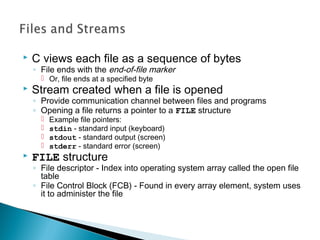
 C views each file as a sequence of bytes
◦ File ends with the end-of-file marker
 Or, file ends at a specified byte
 Stream created when a file is opened
◦ Provide communication channel between files and programs
◦ Opening a file returns a pointer to a FILE structure
 Example file pointers:
 stdin - standard input (keyboard)
 stdout - standard output (screen)
 stderr - standard error (screen)
 FILE structure
◦ File descriptor - Index into operating system array called the open file
table
◦ File Control Block (FCB) - Found in every array element, system uses
it to administer the file
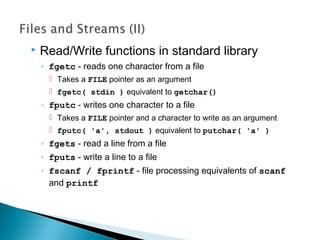
 Read/Write functions in standard library
◦ fgetc - reads one character from a file
 Takes a FILE pointer as an argument
 fgetc( stdin ) equivalent to getchar()
◦ fputc - writes one character to a file
 Takes a FILE pointer and a character to write as an argument
 fputc( 'a', stdout ) equivalent to putchar( 'a' )
◦ fgets - read a line from a file
◦ fputs - write a line to a file
◦ fscanf / fprintf - file processing equivalents of scanf
and printf
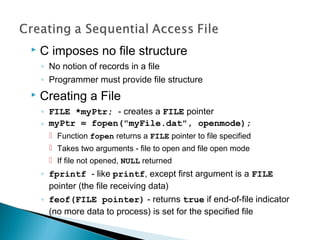
 C imposes no file structure
◦ No notion of records in a file
◦ Programmer must provide file structure
 Creating a File
◦ FILE *myPtr; - creates a FILE pointer
◦ myPtr = fopen("myFile.dat", openmode);
 Function fopen returns a FILE pointer to file specified
 Takes two arguments - file to open and file open mode
 If file not opened, NULL returned
◦ fprintf - like printf, except first argument is a FILE
pointer (the file receiving data)
◦ feof(FILE pointer) - returns true if end-of-file indicator
(no more data to process) is set for the specified file
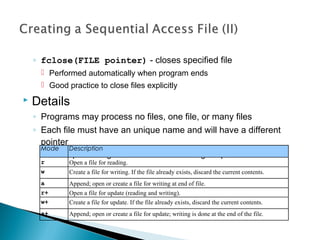
◦ fclose(FILE pointer) - closes specified file
 Performed automatically when program ends
 Good practice to close files explicitly
 Details
◦ Programs may process no files, one file, or many files
◦ Each file must have an unique name and will have a different
pointer
 All file processing must refer to the file using the pointer
Mode Description
r Open a file for reading.
w Create a file for writing. If the file already exists, discard the current contents.
a Append; open or create a file for writing at end of file.
r+ Open a file for update (reading and writing).
w+ Create a file for update. If the file already exists, discard the current contents.
a+ Append; open or create a file for update; writing is done at the end of the file.
1. Initialize variables
and FILE pointer
1.1 Link the pointer to
a file
2. Input data
2.1 Write to file
(fprintf)
3. Close file
1 /* Fig. 11.3: fig11_03.c
2 Create a sequential file */
3 #include <stdio.h>
4
5 int main()
6 {
7 int account;
8 char name[ 30 ];
9 double balance;
10 FILE *cfPtr; /* cfPtr = clients.dat file pointer */
11
12 if ( ( cfPtr = fopen( "clients.dat", "w" ) ) == NULL )
13 printf( "File could not be openedn" );
14 else {
15 printf( "Enter the account, name, and balance.n" );
16 printf( "Enter EOF to end input.n" );
17 printf( "? " );
18 scanf( "%d%s%lf", &account, name, &balance );
19
20 while ( !feof( stdin ) ) {
21 fprintf( cfPtr, "%d %s %.2fn",
22 account, name, balance );
23 printf( "? " );
24 scanf( "%d%s%lf", &account, name, &balance );
25 }
26
27 fclose( cfPtr );
28 }
29
30 return 0;
31 }
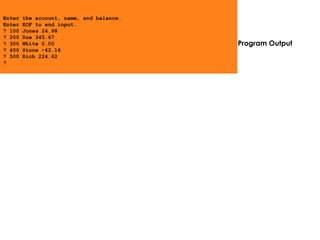
Program Output
Enter the account, name, and balance.
Enter EOF to end input.
? 100 Jones 24.98
? 200 Doe 345.67
? 300 White 0.00
? 400 Stone -42.16
? 500 Rich 224.62
?
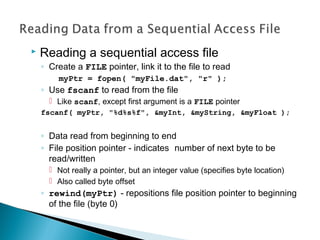
 Reading a sequential access file
◦ Create a FILE pointer, link it to the file to read
myPtr = fopen( "myFile.dat", "r" );
◦ Use fscanf to read from the file
 Like scanf, except first argument is a FILE pointer
fscanf( myPtr, "%d%s%f", &myInt, &myString, &myFloat );
◦ Data read from beginning to end
◦ File position pointer - indicates number of next byte to be
read/written
 Not really a pointer, but an integer value (specifies byte location)
 Also called byte offset
◦ rewind(myPtr) - repositions file position pointer to beginning
of the file (byte 0)
1. Initialize variables
1.1 Link pointer to file
2. Read data (fscanf)
2.1 Print
3. Close file
Program Output
1 /* Fig. 11.7: fig11_07.c
2 Reading and printing a sequential file */
3 #include <stdio.h>
4
5 int main()
6 {
7 int account;
8 char name[ 30 ];
9 double balance;
10 FILE *cfPtr; /* cfPtr = clients.dat file pointer */
11
12 if ( ( cfPtr = fopen( "clients.dat", "r" ) ) == NULL )
13 printf( "File could not be openedn" );
14 else {
15 printf( "%-10s%-13s%sn", "Account", "Name", "Balance" );
16 fscanf( cfPtr, "%d%s%lf", &account, name, &balance );
17
18 while ( !feof( cfPtr ) ) {
19 printf( "%-10d%-13s%7.2fn", account, name, balance );
20 fscanf( cfPtr, "%d%s%lf", &account, name, &balance );
21 }
22
23 fclose( cfPtr );
24 }
25
26 return 0;
27 }
Account Name Balance
100 Jones 24.98
200 Doe 345.67
300 White 0.00
400 Stone -42.16
500 Rich 224.62
1. Initialize variables
2. Open file
2.1 Input choice
2.2 Scan files
3. Print
1 /* Fig. 11.8: fig11_08.c
2 Credit inquiry program */
3 #include <stdio.h>
4
5 int main()
6 {
7 int request, account;
8 double balance;
9 char name[ 30 ];
10 FILE *cfPtr;
11
12 if ( ( cfPtr = fopen( "clients.dat", "r" ) ) == NULL )
13 printf( "File could not be openedn" );
14 else {
15 printf( "Enter requestn"
16 " 1 - List accounts with zero balancesn"
17 " 2 - List accounts with credit balancesn"
18 " 3 - List accounts with debit balancesn"
19 " 4 - End of runn? " );
20 scanf( "%d", &request );
21
22 while ( request != 4 ) {
23 fscanf( cfPtr, "%d%s%lf", &account, name,
24 &balance );
25
26 switch ( request ) {
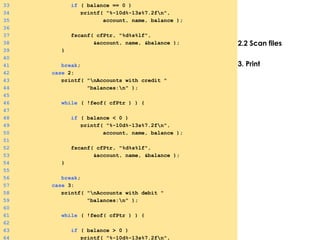
27 case 1:
28 printf( "nAccounts with zero "
29 "balances:n" );
30
31 while ( !feof( cfPtr ) ) {
32
2.2 Scan files
3. Print
33 if ( balance == 0 )
34 printf( "%-10d%-13s%7.2fn",
35 account, name, balance );
36
37 fscanf( cfPtr, "%d%s%lf",
38 &account, name, &balance );
39 }
40
41 break;
42 case 2:
43 printf( "nAccounts with credit "
44 "balances:n" );
45
46 while ( !feof( cfPtr ) ) {
47
48 if ( balance < 0 )
49 printf( "%-10d%-13s%7.2fn",
50 account, name, balance );
51
52 fscanf( cfPtr, "%d%s%lf",
53 &account, name, &balance );
54 }
55
56 break;
57 case 3:
58 printf( "nAccounts with debit "
59 "balances:n" );
60
61 while ( !feof( cfPtr ) ) {
62
63 if ( balance > 0 )
64 printf( "%-10d%-13s%7.2fn",
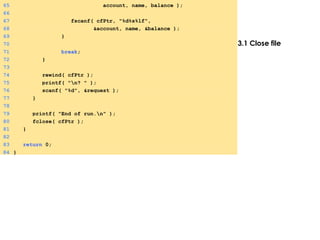
3.1 Close file
65 account, name, balance );
66
67 fscanf( cfPtr, "%d%s%lf",
68 &account, name, &balance );
69 }
70
71 break;
72 }
73
74 rewind( cfPtr );
75 printf( "n? " );
76 scanf( "%d", &request );
77 }
78
79 printf( "End of run.n" );
80 fclose( cfPtr );
81 }
82
83 return 0;
84 }
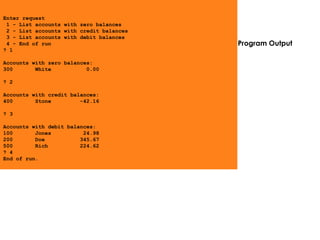
Program Output
Enter request
1 - List accounts with zero balances
2 - List accounts with credit balances
3 - List accounts with debit balances
4 - End of run
? 1
Accounts with zero balances:
300 White 0.00
? 2
Accounts with credit balances:
400 Stone -42.16
? 3
Accounts with debit balances:
100 Jones 24.98
200 Doe 345.67
500 Rich 224.62
? 4
End of run.
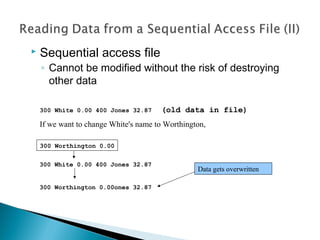
 Sequential access file
◦ Cannot be modified without the risk of destroying
other data
300 White 0.00 400 Jones 32.87 (old data in file)
If we want to change White's name to Worthington,
300 White 0.00 400 Jones 32.87
300 Worthington 0.00ones 32.87
300 Worthington 0.00
Data gets overwritten
 Formatted output
◦ Different representation in files and screen than
internal representation
◦ 1, 34, -890 are all ints, but have different sizes
on disk
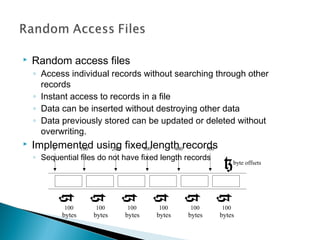
 Random access files
◦ Access individual records without searching through other
records
◦ Instant access to records in a file
◦ Data can be inserted without destroying other data
◦ Data previously stored can be updated or deleted without
overwriting.
 Implemented using fixed length records
◦ Sequential files do not have fixed length records
0 200 300 400 500
byte offsets
}
}
}
}
}
}
}
100
100
bytes
100
bytes
100
bytes
100
bytes
100
bytes
100
bytes
 Data
◦ Data unformatted (stored as "raw bytes") in random
access files
 All data of the same type (ints, for example) use the same
memory
 All records of the same type have a fixed length
 Data not human readable
 Unformatted I/O functions
◦ fwrite - Transfer bytes from a location in memory to
a file
◦ fread - Transfer bytes from a file to a location in
memory
◦ fwrite( &number, sizeof( int ), 1, myPtr );
 &number - Location to transfer bytes from
 sizeof( int ) - Number of bytes to transfer
 1 - For arrays, number of elements to transfer
 In this case, "one element" of an array is being transferred
 myPtr - File to transfer to or from
 fread similar
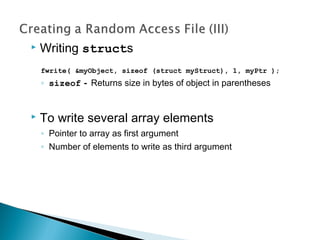
 Writing structs
fwrite( &myObject, sizeof (struct myStruct), 1, myPtr );
◦ sizeof - Returns size in bytes of object in parentheses
 To write several array elements
◦ Pointer to array as first argument
◦ Number of elements to write as third argument
1. Define struct
1.1 Initialize variable
1.2 Initialize struct
2. Open file
2.1 Write to file using
unformatted output
3. Close file
1 /* Fig. 11.11: fig11_11.c
2 Creating a randomly accessed file sequentially */
3 #include <stdio.h>
4
5 struct clientData {
6 int acctNum;
7 char lastName[ 15 ];
8 char firstName[ 10 ];
9 double balance;
10 };
11
12 int main()
13 {
14 int i;
15 struct clientData blankClient = { 0, "", "", 0.0 };
16 FILE *cfPtr;
17
18 if ( ( cfPtr = fopen( "credit.dat", "w" ) ) == NULL )
19 printf( "File could not be opened.n" );
20 else {
21
22 for ( i = 1; i <= 100; i++ )
23 fwrite( &blankClient,
24 sizeof( struct clientData ), 1, cfPtr );
25
26 fclose( cfPtr );
27 }
28
29 return 0;
30 }
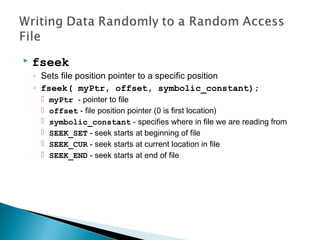
 fseek
◦ Sets file position pointer to a specific position
◦ fseek( myPtr, offset, symbolic_constant);
 myPtr - pointer to file
 offset - file position pointer (0 is first location)
 symbolic_constant - specifies where in file we are reading from
 SEEK_SET - seek starts at beginning of file
 SEEK_CUR - seek starts at current location in file
 SEEK_END - seek starts at end of file
1. Define struct
1.1 Initialize variables
2. Open file
2.1 Input data
2.2 Write to file
1 /* Fig. 11.12: fig11_12.c
2 Writing to a random access file */
3 #include <stdio.h>
4
5 struct clientData {
6 int acctNum;
7 char lastName[ 15 ];
8 char firstName[ 10 ];
9 double balance;
10 };
11
12 int main()
13 {
14 FILE *cfPtr;
15 struct clientData client = { 0, "", "", 0.0 };
16
17 if ( ( cfPtr = fopen( "credit.dat", "r+" ) ) == NULL )
18 printf( "File could not be opened.n" );
19 else {
20 printf( "Enter account number"
21 " ( 1 to 100, 0 to end input )n? " );
22 scanf( "%d", &client.acctNum );
23
24 while ( client.acctNum != 0 ) {
25 printf( "Enter lastname, firstname, balancen? " );
26 fscanf( stdin, "%s%s%lf", client.lastName,
27 client.firstName, &client.balance );
28 fseek( cfPtr, ( client.acctNum - 1 ) *
29 sizeof( struct clientData ), SEEK_SET );
30 fwrite( &client, sizeof( struct clientData ), 1,
31 cfPtr );
32 printf( "Enter account numbern? " );
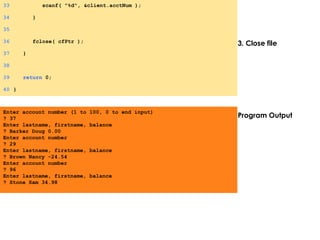
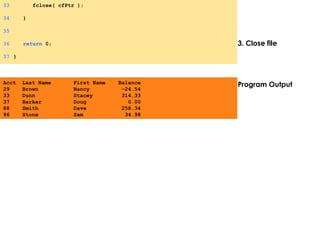
3. Close file
Program Output
33 scanf( "%d", &client.acctNum );
34 }
35
36 fclose( cfPtr );
37 }
38
39 return 0;
40 }
Enter account number (1 to 100, 0 to end input)
? 37
Enter lastname, firstname, balance
? Barker Doug 0.00
Enter account number
? 29
Enter lastname, firstname, balance
? Brown Nancy -24.54
Enter account number
? 96
Enter lastname, firstname, balance
? Stone Sam 34.98
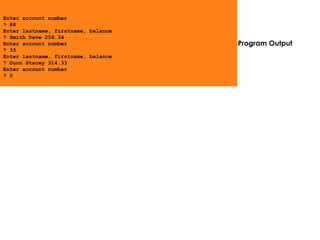
Program Output
Enter account number
? 88
Enter lastname, firstname, balance
? Smith Dave 258.34
Enter account number
? 33
Enter lastname, firstname, balance
? Dunn Stacey 314.33
Enter account number
? 0
 fread
◦ Reads a specified number of bytes from a file into memory
fread( &client, sizeof (struct clientData), 1, myPtr );
◦ Can read several fixed-size array elements
 Provide pointer to array
 Indicate number of elements to read
◦ To read multiple elements, specify in third argument
1. Define struct
1.1 Initialize variables
2. Read (fread)
2.1 Print
1 /* Fig. 11.15: fig11_15.c
2 Reading a random access file sequentially */
3 #include <stdio.h>
4
5 struct clientData {
6 int acctNum;
7 char lastName[ 15 ];
8 char firstName[ 10 ];
9 double balance;
10 };
11
12 int main()
13 {
14 FILE *cfPtr;
15 struct clientData client = { 0, "", "", 0.0 };
16
17 if ( ( cfPtr = fopen( "credit.dat", "r" ) ) == NULL )
18 printf( "File could not be opened.n" );
19 else {
20 printf( "%-6s%-16s%-11s%10sn", "Acct", "Last Name",
21 "First Name", "Balance" );
22
23 while ( !feof( cfPtr ) ) {
24 fread( &client, sizeof( struct clientData ), 1,
25 cfPtr );
26
27 if ( client.acctNum != 0 )
28 printf( "%-6d%-16s%-11s%10.2fn",
29 client.acctNum, client.lastName,
30 client.firstName, client.balance );
31 }
32
3. Close file
Program Output
33 fclose( cfPtr );
34 }
35
36 return 0;
37 }
Acct Last Name First Name Balance
29 Brown Nancy -24.54
33 Dunn Stacey 314.33
37 Barker Doug 0.00
88 Smith Dave 258.34
96 Stone Sam 34.98
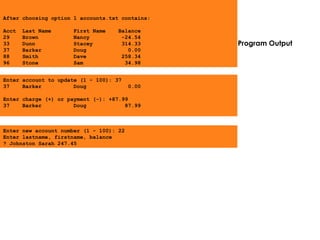
Program Output
Enter account to update (1 - 100): 37
37 Barker Doug 0.00
Enter charge (+) or payment (-): +87.99
37 Barker Doug 87.99
Enter new account number (1 - 100): 22
Enter lastname, firstname, balance
? Johnston Sarah 247.45
After choosing option 1 accounts.txt contains:
Acct Last Name First Name Balance
29 Brown Nancy -24.54
33 Dunn Stacey 314.33
37 Barker Doug 0.00
88 Smith Dave 258.34
96 Stone Sam 34.98

file

  • 1.
    Outline Introduction Files and Streams Creatinga Sequential Access File Reading Data from a Sequential Access File Updating Sequential Access Files Random Access Files Creating a Random Access File Writing Data Randomly to a Random Access File Reading Data Sequentially from a Random Access File Example: A Transaction Processing Program Input/Output of Objects
  • 2.
     Data filescan be created, updated, and processed by C programs ◦ Files are used for permanent storage of large amounts of data ◦ Storage of data in variables and arrays is only temporary
  • 3.
     C viewseach file as a sequence of bytes ◦ File ends with the end-of-file marker  Or, file ends at a specified byte  Stream created when a file is opened ◦ Provide communication channel between files and programs ◦ Opening a file returns a pointer to a FILE structure  Example file pointers:  stdin - standard input (keyboard)  stdout - standard output (screen)  stderr - standard error (screen)  FILE structure ◦ File descriptor - Index into operating system array called the open file table ◦ File Control Block (FCB) - Found in every array element, system uses it to administer the file
  • 4.
     Read/Write functionsin standard library ◦ fgetc - reads one character from a file  Takes a FILE pointer as an argument  fgetc( stdin ) equivalent to getchar() ◦ fputc - writes one character to a file  Takes a FILE pointer and a character to write as an argument  fputc( 'a', stdout ) equivalent to putchar( 'a' ) ◦ fgets - read a line from a file ◦ fputs - write a line to a file ◦ fscanf / fprintf - file processing equivalents of scanf and printf
  • 5.
     C imposesno file structure ◦ No notion of records in a file ◦ Programmer must provide file structure  Creating a File ◦ FILE *myPtr; - creates a FILE pointer ◦ myPtr = fopen("myFile.dat", openmode);  Function fopen returns a FILE pointer to file specified  Takes two arguments - file to open and file open mode  If file not opened, NULL returned ◦ fprintf - like printf, except first argument is a FILE pointer (the file receiving data) ◦ feof(FILE pointer) - returns true if end-of-file indicator (no more data to process) is set for the specified file
  • 6.
    ◦ fclose(FILE pointer)- closes specified file  Performed automatically when program ends  Good practice to close files explicitly  Details ◦ Programs may process no files, one file, or many files ◦ Each file must have an unique name and will have a different pointer  All file processing must refer to the file using the pointer Mode Description r Open a file for reading. w Create a file for writing. If the file already exists, discard the current contents. a Append; open or create a file for writing at end of file. r+ Open a file for update (reading and writing). w+ Create a file for update. If the file already exists, discard the current contents. a+ Append; open or create a file for update; writing is done at the end of the file.
  • 7.
    1. Initialize variables andFILE pointer 1.1 Link the pointer to a file 2. Input data 2.1 Write to file (fprintf) 3. Close file 1 /* Fig. 11.3: fig11_03.c 2 Create a sequential file */ 3 #include <stdio.h> 4 5 int main() 6 { 7 int account; 8 char name[ 30 ]; 9 double balance; 10 FILE *cfPtr; /* cfPtr = clients.dat file pointer */ 11 12 if ( ( cfPtr = fopen( "clients.dat", "w" ) ) == NULL ) 13 printf( "File could not be openedn" ); 14 else { 15 printf( "Enter the account, name, and balance.n" ); 16 printf( "Enter EOF to end input.n" ); 17 printf( "? " ); 18 scanf( "%d%s%lf", &account, name, &balance ); 19 20 while ( !feof( stdin ) ) { 21 fprintf( cfPtr, "%d %s %.2fn", 22 account, name, balance ); 23 printf( "? " ); 24 scanf( "%d%s%lf", &account, name, &balance ); 25 } 26 27 fclose( cfPtr ); 28 } 29 30 return 0; 31 }
  • 8.
    Program Output Enter theaccount, name, and balance. Enter EOF to end input. ? 100 Jones 24.98 ? 200 Doe 345.67 ? 300 White 0.00 ? 400 Stone -42.16 ? 500 Rich 224.62 ?
  • 9.
     Reading asequential access file ◦ Create a FILE pointer, link it to the file to read myPtr = fopen( "myFile.dat", "r" ); ◦ Use fscanf to read from the file  Like scanf, except first argument is a FILE pointer fscanf( myPtr, "%d%s%f", &myInt, &myString, &myFloat ); ◦ Data read from beginning to end ◦ File position pointer - indicates number of next byte to be read/written  Not really a pointer, but an integer value (specifies byte location)  Also called byte offset ◦ rewind(myPtr) - repositions file position pointer to beginning of the file (byte 0)
  • 10.
    1. Initialize variables 1.1Link pointer to file 2. Read data (fscanf) 2.1 Print 3. Close file Program Output 1 /* Fig. 11.7: fig11_07.c 2 Reading and printing a sequential file */ 3 #include <stdio.h> 4 5 int main() 6 { 7 int account; 8 char name[ 30 ]; 9 double balance; 10 FILE *cfPtr; /* cfPtr = clients.dat file pointer */ 11 12 if ( ( cfPtr = fopen( "clients.dat", "r" ) ) == NULL ) 13 printf( "File could not be openedn" ); 14 else { 15 printf( "%-10s%-13s%sn", "Account", "Name", "Balance" ); 16 fscanf( cfPtr, "%d%s%lf", &account, name, &balance ); 17 18 while ( !feof( cfPtr ) ) { 19 printf( "%-10d%-13s%7.2fn", account, name, balance ); 20 fscanf( cfPtr, "%d%s%lf", &account, name, &balance ); 21 } 22 23 fclose( cfPtr ); 24 } 25 26 return 0; 27 } Account Name Balance 100 Jones 24.98 200 Doe 345.67 300 White 0.00 400 Stone -42.16 500 Rich 224.62
  • 11.
    1. Initialize variables 2.Open file 2.1 Input choice 2.2 Scan files 3. Print 1 /* Fig. 11.8: fig11_08.c 2 Credit inquiry program */ 3 #include <stdio.h> 4 5 int main() 6 { 7 int request, account; 8 double balance; 9 char name[ 30 ]; 10 FILE *cfPtr; 11 12 if ( ( cfPtr = fopen( "clients.dat", "r" ) ) == NULL ) 13 printf( "File could not be openedn" ); 14 else { 15 printf( "Enter requestn" 16 " 1 - List accounts with zero balancesn" 17 " 2 - List accounts with credit balancesn" 18 " 3 - List accounts with debit balancesn" 19 " 4 - End of runn? " ); 20 scanf( "%d", &request ); 21 22 while ( request != 4 ) { 23 fscanf( cfPtr, "%d%s%lf", &account, name, 24 &balance ); 25 26 switch ( request ) { 27 case 1: 28 printf( "nAccounts with zero " 29 "balances:n" ); 30 31 while ( !feof( cfPtr ) ) { 32
  • 12.
    2.2 Scan files 3.Print 33 if ( balance == 0 ) 34 printf( "%-10d%-13s%7.2fn", 35 account, name, balance ); 36 37 fscanf( cfPtr, "%d%s%lf", 38 &account, name, &balance ); 39 } 40 41 break; 42 case 2: 43 printf( "nAccounts with credit " 44 "balances:n" ); 45 46 while ( !feof( cfPtr ) ) { 47 48 if ( balance < 0 ) 49 printf( "%-10d%-13s%7.2fn", 50 account, name, balance ); 51 52 fscanf( cfPtr, "%d%s%lf", 53 &account, name, &balance ); 54 } 55 56 break; 57 case 3: 58 printf( "nAccounts with debit " 59 "balances:n" ); 60 61 while ( !feof( cfPtr ) ) { 62 63 if ( balance > 0 ) 64 printf( "%-10d%-13s%7.2fn",
  • 13.
    3.1 Close file 65account, name, balance ); 66 67 fscanf( cfPtr, "%d%s%lf", 68 &account, name, &balance ); 69 } 70 71 break; 72 } 73 74 rewind( cfPtr ); 75 printf( "n? " ); 76 scanf( "%d", &request ); 77 } 78 79 printf( "End of run.n" ); 80 fclose( cfPtr ); 81 } 82 83 return 0; 84 }
  • 14.
    Program Output Enter request 1- List accounts with zero balances 2 - List accounts with credit balances 3 - List accounts with debit balances 4 - End of run ? 1 Accounts with zero balances: 300 White 0.00 ? 2 Accounts with credit balances: 400 Stone -42.16 ? 3 Accounts with debit balances: 100 Jones 24.98 200 Doe 345.67 500 Rich 224.62 ? 4 End of run.
  • 15.
     Sequential accessfile ◦ Cannot be modified without the risk of destroying other data 300 White 0.00 400 Jones 32.87 (old data in file) If we want to change White's name to Worthington, 300 White 0.00 400 Jones 32.87 300 Worthington 0.00ones 32.87 300 Worthington 0.00 Data gets overwritten
  • 16.
     Formatted output ◦Different representation in files and screen than internal representation ◦ 1, 34, -890 are all ints, but have different sizes on disk
  • 17.
     Random accessfiles ◦ Access individual records without searching through other records ◦ Instant access to records in a file ◦ Data can be inserted without destroying other data ◦ Data previously stored can be updated or deleted without overwriting.  Implemented using fixed length records ◦ Sequential files do not have fixed length records 0 200 300 400 500 byte offsets } } } } } } } 100 100 bytes 100 bytes 100 bytes 100 bytes 100 bytes 100 bytes
  • 18.
     Data ◦ Dataunformatted (stored as "raw bytes") in random access files  All data of the same type (ints, for example) use the same memory  All records of the same type have a fixed length  Data not human readable
  • 19.
     Unformatted I/Ofunctions ◦ fwrite - Transfer bytes from a location in memory to a file ◦ fread - Transfer bytes from a file to a location in memory ◦ fwrite( &number, sizeof( int ), 1, myPtr );  &number - Location to transfer bytes from  sizeof( int ) - Number of bytes to transfer  1 - For arrays, number of elements to transfer  In this case, "one element" of an array is being transferred  myPtr - File to transfer to or from  fread similar
  • 20.
     Writing structs fwrite(&myObject, sizeof (struct myStruct), 1, myPtr ); ◦ sizeof - Returns size in bytes of object in parentheses  To write several array elements ◦ Pointer to array as first argument ◦ Number of elements to write as third argument
  • 21.
    1. Define struct 1.1Initialize variable 1.2 Initialize struct 2. Open file 2.1 Write to file using unformatted output 3. Close file 1 /* Fig. 11.11: fig11_11.c 2 Creating a randomly accessed file sequentially */ 3 #include <stdio.h> 4 5 struct clientData { 6 int acctNum; 7 char lastName[ 15 ]; 8 char firstName[ 10 ]; 9 double balance; 10 }; 11 12 int main() 13 { 14 int i; 15 struct clientData blankClient = { 0, "", "", 0.0 }; 16 FILE *cfPtr; 17 18 if ( ( cfPtr = fopen( "credit.dat", "w" ) ) == NULL ) 19 printf( "File could not be opened.n" ); 20 else { 21 22 for ( i = 1; i <= 100; i++ ) 23 fwrite( &blankClient, 24 sizeof( struct clientData ), 1, cfPtr ); 25 26 fclose( cfPtr ); 27 } 28 29 return 0; 30 }
  • 22.
     fseek ◦ Setsfile position pointer to a specific position ◦ fseek( myPtr, offset, symbolic_constant);  myPtr - pointer to file  offset - file position pointer (0 is first location)  symbolic_constant - specifies where in file we are reading from  SEEK_SET - seek starts at beginning of file  SEEK_CUR - seek starts at current location in file  SEEK_END - seek starts at end of file
  • 23.
    1. Define struct 1.1Initialize variables 2. Open file 2.1 Input data 2.2 Write to file 1 /* Fig. 11.12: fig11_12.c 2 Writing to a random access file */ 3 #include <stdio.h> 4 5 struct clientData { 6 int acctNum; 7 char lastName[ 15 ]; 8 char firstName[ 10 ]; 9 double balance; 10 }; 11 12 int main() 13 { 14 FILE *cfPtr; 15 struct clientData client = { 0, "", "", 0.0 }; 16 17 if ( ( cfPtr = fopen( "credit.dat", "r+" ) ) == NULL ) 18 printf( "File could not be opened.n" ); 19 else { 20 printf( "Enter account number" 21 " ( 1 to 100, 0 to end input )n? " ); 22 scanf( "%d", &client.acctNum ); 23 24 while ( client.acctNum != 0 ) { 25 printf( "Enter lastname, firstname, balancen? " ); 26 fscanf( stdin, "%s%s%lf", client.lastName, 27 client.firstName, &client.balance ); 28 fseek( cfPtr, ( client.acctNum - 1 ) * 29 sizeof( struct clientData ), SEEK_SET ); 30 fwrite( &client, sizeof( struct clientData ), 1, 31 cfPtr ); 32 printf( "Enter account numbern? " );
  • 24.
    3. Close file ProgramOutput 33 scanf( "%d", &client.acctNum ); 34 } 35 36 fclose( cfPtr ); 37 } 38 39 return 0; 40 } Enter account number (1 to 100, 0 to end input) ? 37 Enter lastname, firstname, balance ? Barker Doug 0.00 Enter account number ? 29 Enter lastname, firstname, balance ? Brown Nancy -24.54 Enter account number ? 96 Enter lastname, firstname, balance ? Stone Sam 34.98
  • 25.
    Program Output Enter accountnumber ? 88 Enter lastname, firstname, balance ? Smith Dave 258.34 Enter account number ? 33 Enter lastname, firstname, balance ? Dunn Stacey 314.33 Enter account number ? 0
  • 26.
     fread ◦ Readsa specified number of bytes from a file into memory fread( &client, sizeof (struct clientData), 1, myPtr ); ◦ Can read several fixed-size array elements  Provide pointer to array  Indicate number of elements to read ◦ To read multiple elements, specify in third argument
  • 27.
    1. Define struct 1.1Initialize variables 2. Read (fread) 2.1 Print 1 /* Fig. 11.15: fig11_15.c 2 Reading a random access file sequentially */ 3 #include <stdio.h> 4 5 struct clientData { 6 int acctNum; 7 char lastName[ 15 ]; 8 char firstName[ 10 ]; 9 double balance; 10 }; 11 12 int main() 13 { 14 FILE *cfPtr; 15 struct clientData client = { 0, "", "", 0.0 }; 16 17 if ( ( cfPtr = fopen( "credit.dat", "r" ) ) == NULL ) 18 printf( "File could not be opened.n" ); 19 else { 20 printf( "%-6s%-16s%-11s%10sn", "Acct", "Last Name", 21 "First Name", "Balance" ); 22 23 while ( !feof( cfPtr ) ) { 24 fread( &client, sizeof( struct clientData ), 1, 25 cfPtr ); 26 27 if ( client.acctNum != 0 ) 28 printf( "%-6d%-16s%-11s%10.2fn", 29 client.acctNum, client.lastName, 30 client.firstName, client.balance ); 31 } 32
  • 28.
    3. Close file ProgramOutput 33 fclose( cfPtr ); 34 } 35 36 return 0; 37 } Acct Last Name First Name Balance 29 Brown Nancy -24.54 33 Dunn Stacey 314.33 37 Barker Doug 0.00 88 Smith Dave 258.34 96 Stone Sam 34.98
  • 29.
    Program Output Enter accountto update (1 - 100): 37 37 Barker Doug 0.00 Enter charge (+) or payment (-): +87.99 37 Barker Doug 87.99 Enter new account number (1 - 100): 22 Enter lastname, firstname, balance ? Johnston Sarah 247.45 After choosing option 1 accounts.txt contains: Acct Last Name First Name Balance 29 Brown Nancy -24.54 33 Dunn Stacey 314.33 37 Barker Doug 0.00 88 Smith Dave 258.34 96 Stone Sam 34.98