1
Use Case Diagrams
http://www.myassignmenthelp.net/
2
Introduction
 Getting started is the most difficulty part of any
new process.
 In software modelling, the first thing you need
to do is understand what are you going to
model and ultimately develop.
 Creating a highest form details about a
system--use case diagram--is an almost natural
point of origin for the software design.
 A use case diagram is an excellent way to
communicate to management, customers, and
other non-development people what a system
will do when it is completed.
3
University Record System (URS)
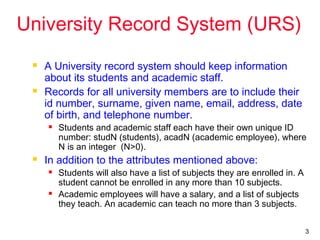
 A University record system should keep information
about its students and academic staff.
 Records for all university members are to include their
id number, surname, given name, email, address, date
of birth, and telephone number.
 Students and academic staff each have their own unique ID
number: studN (students), acadN (academic employee), where
N is an integer (N>0).
 In addition to the attributes mentioned above:
 Students will also have a list of subjects they are enrolled in. A
student cannot be enrolled in any more than 10 subjects.
 Academic employees will have a salary, and a list of subjects
they teach. An academic can teach no more than 3 subjects.
4
Some Actions Supported by URS
 The system should be able to handle
the following commands.
 Add and remove university members
(students, and academic staff)
 Add and Delete subjects
 Assign and Un-assign subjects to students
 Assign and Un-assign subjects to academic
staff.
5
Use Case Diagrams
 Use Case diagrams show the various
activities the users can perform on the
system.
 System is something that performs a
function.
 They model the dynamic aspects of the
system.
 Provides a user’s perspective of the
system.
6
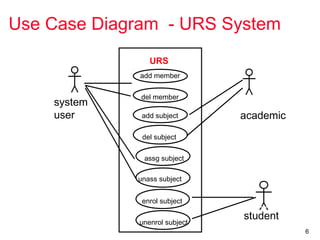
Use Case Diagram - URS System
system
user academic
student
URS
del member
add member
add subject
del subject
assg subject
unass subject
enrol subject
unenrol subject
7
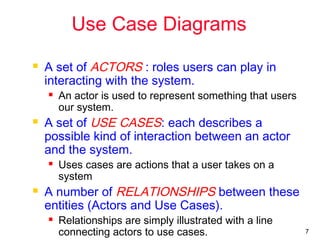
Use Case Diagrams
 A set of ACTORS : roles users can play in
interacting with the system.
 An actor is used to represent something that users
our system.
 A set of USE CASES: each describes a
possible kind of interaction between an actor
and the system.
 Uses cases are actions that a user takes on a
system
 A number of RELATIONSHIPS between these
entities (Actors and Use Cases).
 Relationships are simply illustrated with a line
connecting actors to use cases.
8
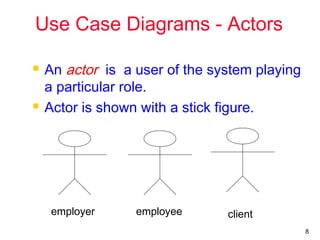
Use Case Diagrams - Actors
 An actor is a user of the system playing
a particular role.
 Actor is shown with a stick figure.
employee clientemployer
9
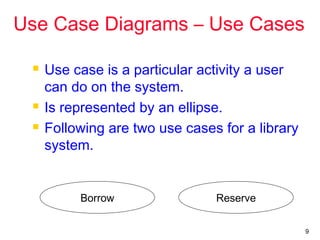
Use Case Diagrams – Use Cases
 Use case is a particular activity a user
can do on the system.
 Is represented by an ellipse.
 Following are two use cases for a library
system.
ReserveBorrow
10
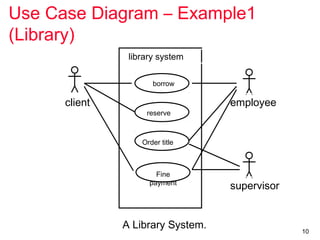
Use Case Diagram – Example1
(Library)
A Library System.
client employee
supervisor
library system
borrow
reserve
Order title
Fine
payment
11
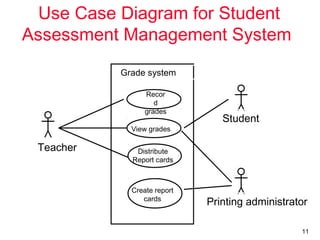
Use Case Diagram for Student
Assessment Management System
Teacher
Student
Printing administrator
Grade system
Recor
d
grades
View grades
Distribute
Report cards
Create report
cards
12
Use Case Vs Scenarios
 Each use case is one or more scenarios.
 Add Subject Use Case :

Scenario 1 : Subject gets added successfully.

Scenario 2 : Adding the subject fails since the
subject is already in the database.
 Enroll Subject Use Case:

Scenario 1 : Student is enrolled for the subject.

Scenario 2 : Enrollment fails since the student is
already enrolled in the subject.
 Each scenario has a sequence of steps.
13
Scenarios
 Each scenario has a sequence of steps.
 Scenario 1 : Student is enrolled for the
subject.

Student chooses the “enroll subject” action.

Check the student has enrolled in less than 10
subjects.

Check if the subject is valid.

Assign the subject to the student.
14
Scenarios
 Each scenario has a sequence of steps.
 Scenario 2 : Enrolling fails since the student
is already enrolled in 10 subjects.

Student chooses the “enroll subject” action.

Check the student has enrolled in less than 10
subjects.

Return an error message to the student.
15
Use Case Diagrams -
Relationships
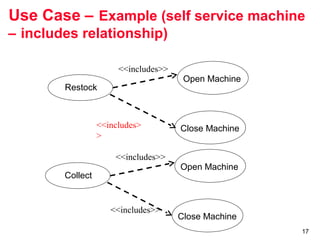
 Inclusion
 Inclusion enables to reuse one use case's steps
inside another use case.
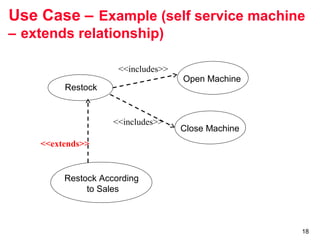
 Extension
 Allows creating a new use case by adding steps to
existing use cases
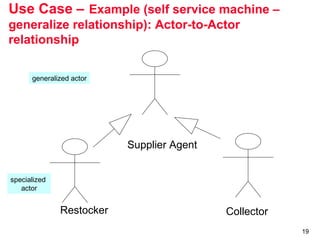
 Generalization
 Allows child use cases to inherit behavior from
parent use cases
16
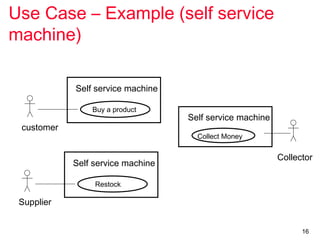
Use Case – Example (self service
machine)
Restock
Supplier
Self service machine
Buy a product
customer
Self service machine
Collect Money
Self service machine
Collector
17
Use Case – Example (self service machine
– includes relationship)
Close Machine
Restock
Close Machine
Open Machine
<<includes>
>
<<includes>>
Collect
Open Machine
<<includes>>
<<includes>>
18
Use Case – Example (self service machine
– extends relationship)
Restock
Close Machine
Open Machine
<<includes>>
<<includes>>
Restock According
to Sales
<<extends>>
19
Use Case – Example (self service machine –
generalize relationship): Actor-to-Actor
relationship
Supplier Agent
Restocker Collector
generalized actor
specialized
actor
20
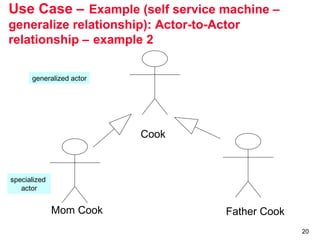
Use Case – Example (self service machine –
generalize relationship): Actor-to-Actor
relationship – example 2
Cook
Mom Cook Father Cook
generalized actor
specialized
actor
21
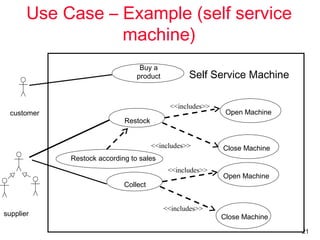
Use Case – Example (self service
machine)
Close Machine
Restock
Close Machine
Open Machine
<<includes>>
<<includes>>
Collect
Open Machine
<<includes>>
<<includes>>
Buy a
product
Restock according to sales
customer
supplier
Self Service Machine
22
From Use Case to Classes
23
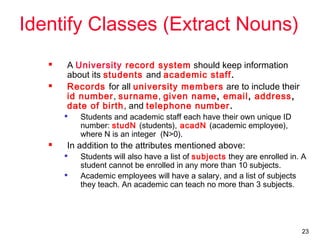
Identify Classes (Extract Nouns)
 A University record system should keep information
about its students and academic staff.
 Records for all university members are to include their
id number, surname, given name, email, address,
date of birth, and telephone number.

Students and academic staff each have their own unique ID
number: studN (students), acadN (academic employee),
where N is an integer (N>0).
 In addition to the attributes mentioned above:

Students will also have a list of subjects they are enrolled in. A
student cannot be enrolled in any more than 10 subjects.

Academic employees will have a salary, and a list of subjects
they teach. An academic can teach no more than 3 subjects.
24
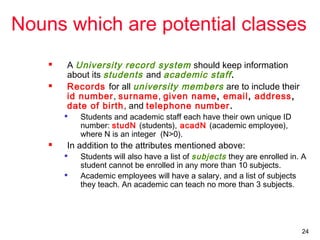
Nouns which are potential classes
 A University record system should keep information
about its students and academic staff.
 Records for all university members are to include their
id number, surname, given name, email, address,
date of birth, and telephone number.

Students and academic staff each have their own unique ID
number: studN (students), acadN (academic employee),
where N is an integer (N>0).
 In addition to the attributes mentioned above:

Students will also have a list of subjects they are enrolled in. A
student cannot be enrolled in any more than 10 subjects.

Academic employees will have a salary, and a list of subjects
they teach. An academic can teach no more than 3 subjects.
25
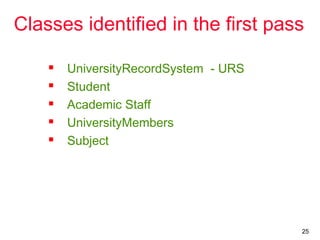
Classes identified in the first pass
 UniversityRecordSystem - URS
 Student
 Academic Staff
 UniversityMembers
 Subject
26
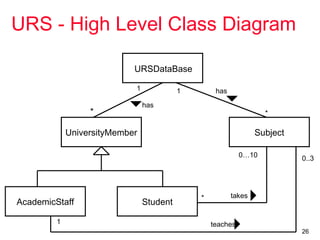
URS - High Level Class Diagram
URSDataBase
UniversityMember
AcademicStaff Student
Subject
1
*
has
1
*
has
teaches
0..3
1
takes*
0…10

Uml use casediagrams assignment help

  • 1.
  • 2.
    2 Introduction  Getting startedis the most difficulty part of any new process.  In software modelling, the first thing you need to do is understand what are you going to model and ultimately develop.  Creating a highest form details about a system--use case diagram--is an almost natural point of origin for the software design.  A use case diagram is an excellent way to communicate to management, customers, and other non-development people what a system will do when it is completed.
  • 3.
    3 University Record System(URS)  A University record system should keep information about its students and academic staff.  Records for all university members are to include their id number, surname, given name, email, address, date of birth, and telephone number.  Students and academic staff each have their own unique ID number: studN (students), acadN (academic employee), where N is an integer (N>0).  In addition to the attributes mentioned above:  Students will also have a list of subjects they are enrolled in. A student cannot be enrolled in any more than 10 subjects.  Academic employees will have a salary, and a list of subjects they teach. An academic can teach no more than 3 subjects.
  • 4.
    4 Some Actions Supportedby URS  The system should be able to handle the following commands.  Add and remove university members (students, and academic staff)  Add and Delete subjects  Assign and Un-assign subjects to students  Assign and Un-assign subjects to academic staff.
  • 5.
    5 Use Case Diagrams Use Case diagrams show the various activities the users can perform on the system.  System is something that performs a function.  They model the dynamic aspects of the system.  Provides a user’s perspective of the system.
  • 6.
    6 Use Case Diagram- URS System system user academic student URS del member add member add subject del subject assg subject unass subject enrol subject unenrol subject
  • 7.
    7 Use Case Diagrams A set of ACTORS : roles users can play in interacting with the system.  An actor is used to represent something that users our system.  A set of USE CASES: each describes a possible kind of interaction between an actor and the system.  Uses cases are actions that a user takes on a system  A number of RELATIONSHIPS between these entities (Actors and Use Cases).  Relationships are simply illustrated with a line connecting actors to use cases.
  • 8.
    8 Use Case Diagrams- Actors  An actor is a user of the system playing a particular role.  Actor is shown with a stick figure. employee clientemployer
  • 9.
    9 Use Case Diagrams– Use Cases  Use case is a particular activity a user can do on the system.  Is represented by an ellipse.  Following are two use cases for a library system. ReserveBorrow
  • 10.
    10 Use Case Diagram– Example1 (Library) A Library System. client employee supervisor library system borrow reserve Order title Fine payment
  • 11.
    11 Use Case Diagramfor Student Assessment Management System Teacher Student Printing administrator Grade system Recor d grades View grades Distribute Report cards Create report cards
  • 12.
    12 Use Case VsScenarios  Each use case is one or more scenarios.  Add Subject Use Case :  Scenario 1 : Subject gets added successfully.  Scenario 2 : Adding the subject fails since the subject is already in the database.  Enroll Subject Use Case:  Scenario 1 : Student is enrolled for the subject.  Scenario 2 : Enrollment fails since the student is already enrolled in the subject.  Each scenario has a sequence of steps.
  • 13.
    13 Scenarios  Each scenariohas a sequence of steps.  Scenario 1 : Student is enrolled for the subject.  Student chooses the “enroll subject” action.  Check the student has enrolled in less than 10 subjects.  Check if the subject is valid.  Assign the subject to the student.
  • 14.
    14 Scenarios  Each scenariohas a sequence of steps.  Scenario 2 : Enrolling fails since the student is already enrolled in 10 subjects.  Student chooses the “enroll subject” action.  Check the student has enrolled in less than 10 subjects.  Return an error message to the student.
  • 15.
    15 Use Case Diagrams- Relationships  Inclusion  Inclusion enables to reuse one use case's steps inside another use case.  Extension  Allows creating a new use case by adding steps to existing use cases  Generalization  Allows child use cases to inherit behavior from parent use cases
  • 16.
    16 Use Case –Example (self service machine) Restock Supplier Self service machine Buy a product customer Self service machine Collect Money Self service machine Collector
  • 17.
    17 Use Case –Example (self service machine – includes relationship) Close Machine Restock Close Machine Open Machine <<includes> > <<includes>> Collect Open Machine <<includes>> <<includes>>
  • 18.
    18 Use Case –Example (self service machine – extends relationship) Restock Close Machine Open Machine <<includes>> <<includes>> Restock According to Sales <<extends>>
  • 19.
    19 Use Case –Example (self service machine – generalize relationship): Actor-to-Actor relationship Supplier Agent Restocker Collector generalized actor specialized actor
  • 20.
    20 Use Case –Example (self service machine – generalize relationship): Actor-to-Actor relationship – example 2 Cook Mom Cook Father Cook generalized actor specialized actor
  • 21.
    21 Use Case –Example (self service machine) Close Machine Restock Close Machine Open Machine <<includes>> <<includes>> Collect Open Machine <<includes>> <<includes>> Buy a product Restock according to sales customer supplier Self Service Machine
  • 22.
    22 From Use Caseto Classes
  • 23.
    23 Identify Classes (ExtractNouns)  A University record system should keep information about its students and academic staff.  Records for all university members are to include their id number, surname, given name, email, address, date of birth, and telephone number.  Students and academic staff each have their own unique ID number: studN (students), acadN (academic employee), where N is an integer (N>0).  In addition to the attributes mentioned above:  Students will also have a list of subjects they are enrolled in. A student cannot be enrolled in any more than 10 subjects.  Academic employees will have a salary, and a list of subjects they teach. An academic can teach no more than 3 subjects.
  • 24.
    24 Nouns which arepotential classes  A University record system should keep information about its students and academic staff.  Records for all university members are to include their id number, surname, given name, email, address, date of birth, and telephone number.  Students and academic staff each have their own unique ID number: studN (students), acadN (academic employee), where N is an integer (N>0).  In addition to the attributes mentioned above:  Students will also have a list of subjects they are enrolled in. A student cannot be enrolled in any more than 10 subjects.  Academic employees will have a salary, and a list of subjects they teach. An academic can teach no more than 3 subjects.
  • 25.
    25 Classes identified inthe first pass  UniversityRecordSystem - URS  Student  Academic Staff  UniversityMembers  Subject
  • 26.
    26 URS - HighLevel Class Diagram URSDataBase UniversityMember AcademicStaff Student Subject 1 * has 1 * has teaches 0..3 1 takes* 0…10