
STUDENT MANAGEMENT
SYSTEM
AN EXTENSION TO HMIS
Developed At:
Developed By:
Raja Biswas (IT-07)
Student ID: ST03IT070016
Project ID: 32
Internal Guide: External Guide:
Mr. Rahul Joshi
Mr. Devendra Thakur
Mr. Dhaval Patel
(BA, TCS - Gandhinagar)
INTRODUCTION
 Definition:
A Student Management System (SMS) for HMIS is
a system that manages the records of student
regarding admission and examination part.
 SMS involves
 Manage fees structure
 Roll number generation
 Fees payment
 Admission seat management
 Exam scheduling
 Result management
 Manage new admission
MOTIVATION
 To meet a solution to manage dental students’
records across hospitals of Govt. of Gujarat for
Hospital Management Information System in 30
districts.
 To overcome existing problems occurring in
maintenance of students’ information
OBJECTIVES
 To manage students’ information during admission
and examination.
 Efficient utilization of human resource.
 To reduce unnecessary paper work in maintaining
students’ information.
APPLICATIONS
 To use for various streams‘ students.
 To gather students’ information.
 Different reports and Queries can be generated
based of vast options related to students, batch,
course, quota, semesters and category and even
for the entire college.
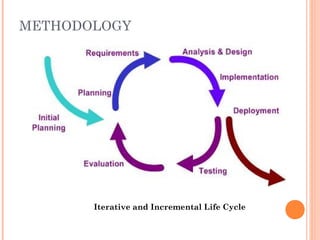
METHODOLOGY
Iterative and Incremental Life Cycle
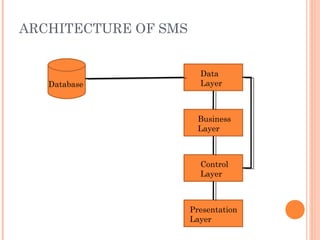
ARCHITECTURE OF SMS
Database
Data
Layer
Control
Layer
Presentation
Layer
Business
Layer
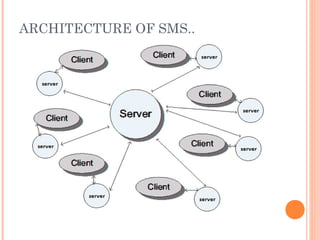
ARCHITECTURE OF SMS..
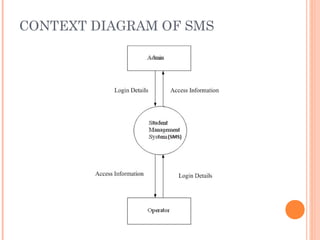
CONTEXT DIAGRAM OF SMS
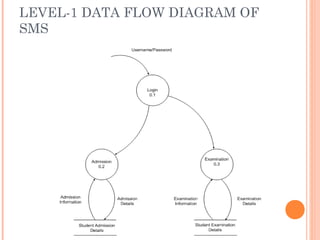
LEVEL-1 DATA FLOW DIAGRAM OF
SMS
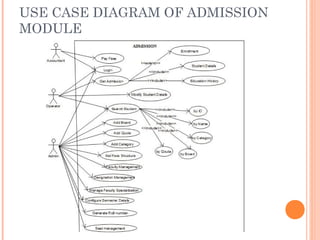
USE CASE DIAGRAM OF ADMISSION
MODULE
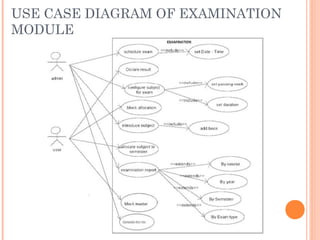
USE CASE DIAGRAM OF EXAMINATION
MODULE
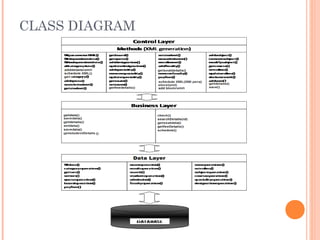
CLASS DIAGRAM
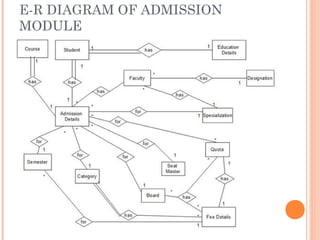
E-R DIAGRAM OF ADMISSION
MODULE
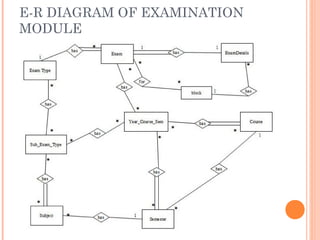
E-R DIAGRAM OF EXAMINATION
MODULE
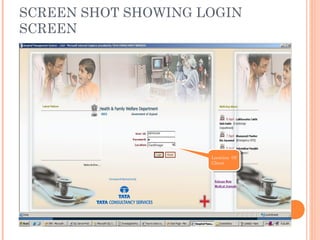
SCREEN SHOT SHOWING LOGIN
SCREEN
Location Of
Client
Location Of
Client
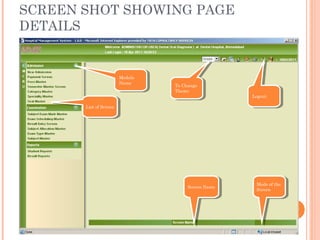
SCREEN SHOT SHOWING PAGE
DETAILS
List of ScreenList of Screen
Module
Name
Module
Name
To Change
Theme
To Change
Theme
LogoutLogout
Screen NameScreen Name Mode of the
Screen
Mode of the
Screen
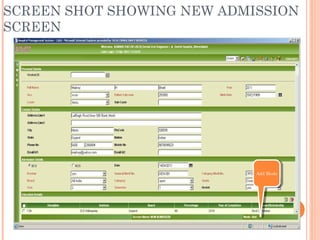
SCREEN SHOT SHOWING NEW ADMISSION
SCREEN
Add ModeAdd Mode
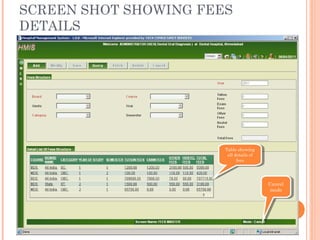
SCREEN SHOT SHOWING FEES
DETAILS
Cancel
mode
Cancel
mode
Table showing
all details of
fees
Table showing
all details of
fees
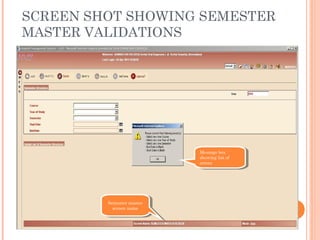
SCREEN SHOT SHOWING SEMESTER
MASTER VALIDATIONS
Message box
showing list of
errors
Message box
showing list of
errors
Semester master
screen name
Semester master
screen name
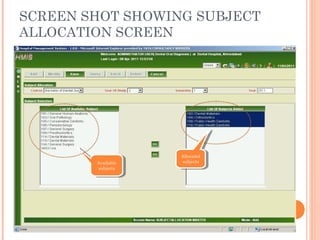
SCREEN SHOT SHOWING SUBJECT
ALLOCATION SCREEN
Available
subjects
Available
subjects
Allocated
subjects
Allocated
subjects
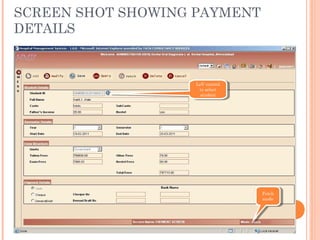
SCREEN SHOT SHOWING PAYMENT
DETAILS
LoV control
to select
student
LoV control
to select
student
Fetch
mode
Fetch
mode
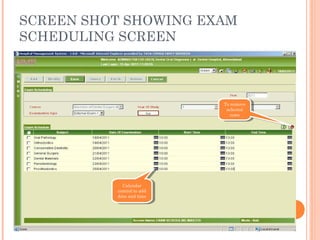
SCREEN SHOT SHOWING EXAM
SCHEDULING SCREEN
To remove
selected
rows
To remove
selected
rows
Calendar
control to add
date and time
Calendar
control to add
date and time
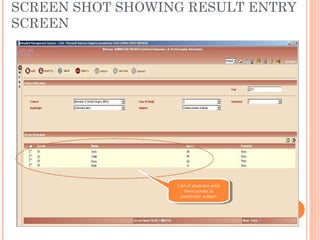
SCREEN SHOT SHOWING RESULT ENTRY
SCREEN
List of students with
their marks in
particular subject
List of students with
their marks in
particular subject
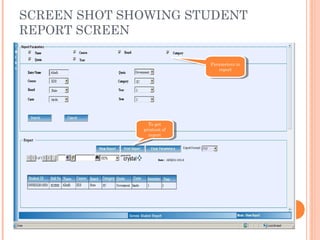
SCREEN SHOT SHOWING STUDENT
REPORT SCREEN
Parameters in
report
Parameters in
report
To get
printout of
report
To get
printout of
report
CONCLUSION
 helpful to perform paperless work and manage
all data
 provides easy, accurate, unambiguous and faster
data access.
FUTURE ENHANCEMENTS
 This Project can be implemented in more than two
languages.
 Other Possible Modules
 Academic
 Attendance Management
 Lab Management
 Library
 Hostel
BIBLIOGRAPHY
 Websites
 http://www.tcs.com
 http://www.msdn.microsoft.com
 http://www.codeguru.com
 http://www.1001tutorials.com
 Books
 Asp.net Professional 1.1 (Wrox Publication)
 Javascript In 21 Days
 VB.net Professional (Wrox Publication)
 Software Engineering - A Practitioner’s Approach
Student management system

Student management system

  • 1.
    STUDENT MANAGEMENT SYSTEM AN EXTENSIONTO HMIS Developed At: Developed By: Raja Biswas (IT-07) Student ID: ST03IT070016 Project ID: 32 Internal Guide: External Guide: Mr. Rahul Joshi Mr. Devendra Thakur Mr. Dhaval Patel (BA, TCS - Gandhinagar)
  • 2.
    INTRODUCTION  Definition: A StudentManagement System (SMS) for HMIS is a system that manages the records of student regarding admission and examination part.  SMS involves  Manage fees structure  Roll number generation  Fees payment  Admission seat management  Exam scheduling  Result management  Manage new admission
  • 3.
    MOTIVATION  To meeta solution to manage dental students’ records across hospitals of Govt. of Gujarat for Hospital Management Information System in 30 districts.  To overcome existing problems occurring in maintenance of students’ information
  • 4.
    OBJECTIVES  To managestudents’ information during admission and examination.  Efficient utilization of human resource.  To reduce unnecessary paper work in maintaining students’ information.
  • 5.
    APPLICATIONS  To usefor various streams‘ students.  To gather students’ information.  Different reports and Queries can be generated based of vast options related to students, batch, course, quota, semesters and category and even for the entire college.
  • 6.
  • 7.
  • 8.
  • 9.
  • 10.
    LEVEL-1 DATA FLOWDIAGRAM OF SMS
  • 11.
    USE CASE DIAGRAMOF ADMISSION MODULE
  • 12.
    USE CASE DIAGRAMOF EXAMINATION MODULE
  • 13.
  • 14.
    E-R DIAGRAM OFADMISSION MODULE
  • 15.
    E-R DIAGRAM OFEXAMINATION MODULE
  • 16.
    SCREEN SHOT SHOWINGLOGIN SCREEN Location Of Client Location Of Client
  • 17.
    SCREEN SHOT SHOWINGPAGE DETAILS List of ScreenList of Screen Module Name Module Name To Change Theme To Change Theme LogoutLogout Screen NameScreen Name Mode of the Screen Mode of the Screen
  • 18.
    SCREEN SHOT SHOWINGNEW ADMISSION SCREEN Add ModeAdd Mode
  • 19.
    SCREEN SHOT SHOWINGFEES DETAILS Cancel mode Cancel mode Table showing all details of fees Table showing all details of fees
  • 20.
    SCREEN SHOT SHOWINGSEMESTER MASTER VALIDATIONS Message box showing list of errors Message box showing list of errors Semester master screen name Semester master screen name
  • 21.
    SCREEN SHOT SHOWINGSUBJECT ALLOCATION SCREEN Available subjects Available subjects Allocated subjects Allocated subjects
  • 22.
    SCREEN SHOT SHOWINGPAYMENT DETAILS LoV control to select student LoV control to select student Fetch mode Fetch mode
  • 23.
    SCREEN SHOT SHOWINGEXAM SCHEDULING SCREEN To remove selected rows To remove selected rows Calendar control to add date and time Calendar control to add date and time
  • 24.
    SCREEN SHOT SHOWINGRESULT ENTRY SCREEN List of students with their marks in particular subject List of students with their marks in particular subject
  • 25.
    SCREEN SHOT SHOWINGSTUDENT REPORT SCREEN Parameters in report Parameters in report To get printout of report To get printout of report
  • 26.
    CONCLUSION  helpful toperform paperless work and manage all data  provides easy, accurate, unambiguous and faster data access.
  • 27.
    FUTURE ENHANCEMENTS  ThisProject can be implemented in more than two languages.  Other Possible Modules  Academic  Attendance Management  Lab Management  Library  Hostel
  • 28.
    BIBLIOGRAPHY  Websites  http://www.tcs.com http://www.msdn.microsoft.com  http://www.codeguru.com  http://www.1001tutorials.com  Books  Asp.net Professional 1.1 (Wrox Publication)  Javascript In 21 Days  VB.net Professional (Wrox Publication)  Software Engineering - A Practitioner’s Approach