Developing for Android TV
Mihai Risca, Application Engineer,
Software & Services Group
Developer Relations Division
2
Agenda
• What are Android TV and the Nexus Player
• How to create/adapt an Android application for Android TV
• How to publish an Android TV application
• Optimizing applications for the Nexus Player
• Q&A
Android TV and the Nexus Player
4
Android TV
• It’s Android
• it’s also Chromecast
• Apps (streaming and others)
• Games (casual and more)
• AOSP compliant
• Leanback Launcher, Google Apps and Play Store
5
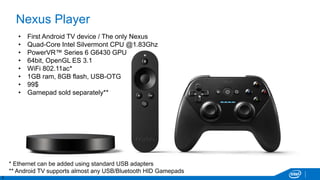
Nexus Player
• First Android TV device / The only Nexus
• Quad-Core Intel Silvermont CPU @1.83Ghz
• PowerVR™ Series 6 G6430 GPU
• 64bit, OpenGL ES 3.1
• WiFi 802.11ac*
• 1GB ram, 8GB flash, USB-OTG
• 99$
• Gamepad sold separately**
* Ethernet can be added using standard USB adapters
** Android TV supports almost any USB/Bluetooth HID Gamepads
Developing for Android TV and the Nexus Player
7
Developing for Android TV
Create a new Android application or add support to an existing one by:
1. Adding/reusing a TV-compatible activity that will receive the leanback intent
2. Integrating TV-specific assets
3. Supporting non-touchscreen input
4. Adapting the UX of your app to Android TV
All this should be done to an existing Android app, so you can support phones,
tablets, and TVs from your same source code and APK.
You can still choose to create a TV-specific APK and upload it as a new
application or as an alternative APK using Play Store “multiple APKs” feature.
8
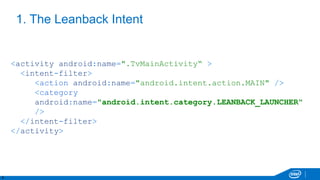
1. The Leanback Intent
<activity android:name=".TvMainActivity“ >
<intent-filter>
<action android:name="android.intent.action.MAIN" />
<category
android:name="android.intent.category.LEANBACK_LAUNCHER"
/>
</intent-filter>
</activity>
9
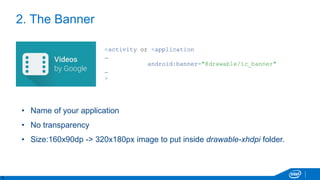
2. The Banner
<activity or <application
…
android:banner="@drawable/ic_banner"
…
>
• Name of your application
• No transparency
• Size:160x90dp -> 320x180px image to put inside drawable-xhdpi folder.
10
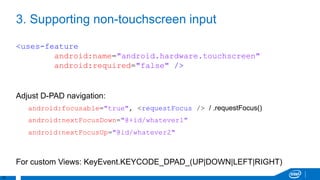
3. Supporting non-touchscreen input
<uses-feature
android:name="android.hardware.touchscreen"
android:required="false" />
Adjust D-PAD navigation:
android:focusable="true", <requestFocus /> / .requestFocus()
android:nextFocusDown="@+id/whatever1"
android:nextFocusUp="@id/whatever2"
For custom Views: KeyEvent.KEYCODE_DPAD_(UP|DOWN|LEFT|RIGHT)
11
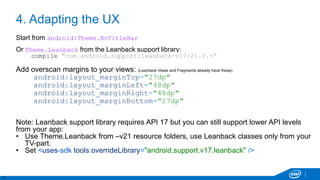
4. Adapting the UX
Start from android:Theme.NoTitleBar
Or Theme.Leanback from the Leanback support library:
compile "com.android.support:leanback-v17:21.0.+“
Add overscan margins to your views: (Leanback Views and Fragments already have these)
android:layout_marginTop="27dp"
android:layout_marginLeft="48dp"
android:layout_marginRight="48dp"
android:layout_marginBottom="27dp"
Note: Leanback support library requires API 17 but you can still support lower API levels
from your app:
• Use Theme.Leanback from –v21 resource folders, use Leanback classes only from your
TV-part.
• Set <uses-sdk tools:overrideLibrary="android.support.v17.leanback" />
12
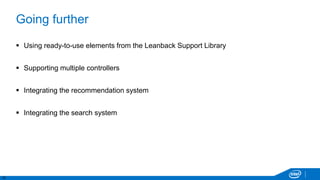
Going further
 Using ready-to-use elements from the Leanback Support Library
 Supporting multiple controllers
 Integrating the recommendation system
 Integrating the search system
Publishing apps to the Android TV Play Store
14
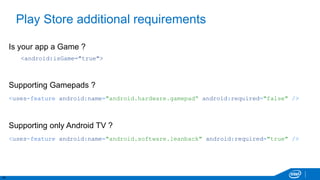
Play Store additional requirements
Is your app a Game ?
<android:isGame="true">
Supporting Gamepads ?
<uses-feature android:name="android.hardware.gamepad“ android:required="false" />
Supporting only Android TV ?
<uses-feature android:name="android.software.leanback" android:required="true" />
15
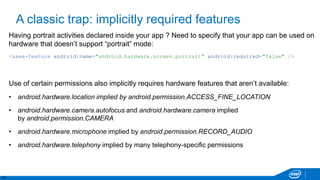
A classic trap: implicitly required features
Having portrait activities declared inside your app ? Need to specify that your app can be used on
hardware that doesn’t support “portrait” mode:
<uses-feature android:name="android.hardware.screen.portrait“ android:required="false" />
Use of certain permissions also implicitly requires hardware features that aren’t available:
• android.hardware.location implied by android.permission.ACCESS_FINE_LOCATION
• android.hardware.camera.autofocus and android.hardware.camera implied
by android.permission.CAMERA
• android.hardware.microphone implied by android.permission.RECORD_AUDIO
• android.hardware.telephony implied by many telephony-specific permissions
16
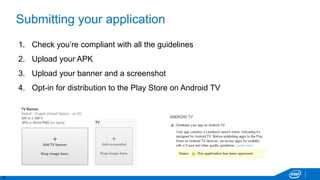
Submitting your application
1. Check you’re compliant with all the guidelines
2. Upload your APK
3. Upload your banner and a screenshot
4. Opt-in for distribution to the Play Store on Android TV
Optimizing apps for the Nexus Player
18
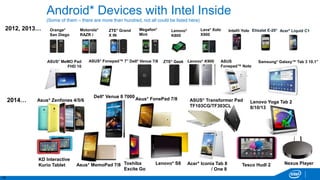
Android* Devices with Intel Inside
(Some of them – there are more than hundred, not all could be listed here)
Motorola*
RAZR i
ZTE* Grand
X IN
Lava* Xolo
X900
Megafon*
Mint
Lenovo*
K800
Orange*
San Diego
2012, 2013…
Lenovo* K900 ASUS
Fonepad™ Note
FHD - 6”
ZTE* Geek Samsung* Galaxy™ Tab 3 10.1”
2014… Asus* Zenfones 4/5/6 ASUS* Transformer Pad
TF103CG/TF303CL
Dell* Venue 8 7000
Intel® Yolo Acer* Liquid C1Etisalat E-20*
ASUS* MeMO Pad
FHD 10
ASUS* Fonepad™ 7” Dell* Venue 7/8
KD Interactive
Kurio Tablet Toshiba
Excite Go
Acer* Iconia Tab 8
/ One 8
Nexus PlayerLenovo* S8Asus* MemoPad 7/8
Asus* FonePad 7/8
Lenovo Yoga Tab 2
8/10/13
Tesco Hudl 2
19
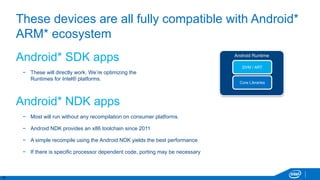
These devices are all fully compatible with Android*
ARM* ecosystem
Android* SDK apps
− These will directly work. We’re optimizing the
Runtimes for Intel® platforms.
Android* NDK apps
− Most will run without any recompilation on consumer platforms.
− Android NDK provides an x86 toolchain since 2011
− A simple recompile using the Android NDK yields the best performance
− If there is specific processor dependent code, porting may be necessary
Android Runtime
Core Libraries
DVM / ART
20
3rd party libraries/engines x86 support
• Game engines/libraries with x86 support:
• Havok Anarchy SDK: android x86 target available
• Unreal Engine 3: android x86 target available
• Marmalade: android x86 target available
• NexPlayer SDK: x86 supported by default in latest releases
• Cocos2Dx: set APP_ABI in Application.mk
• FMOD: x86 lib already included, set ABIs in Application.mk
• AppGameKit: x86 lib included, set ABIs in Application.mk
• libgdx: x86 supported by default in latest releases
• AppPortable: x86 support now available
• Adobe Air: x86 support now available
• Unity: x86 support available in 5.0 beta, soon-to-be released for earlier versions
• …
21
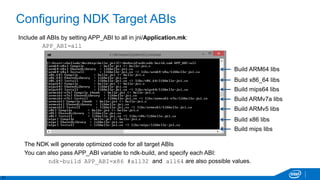
Include all ABIs by setting APP_ABI to all in jni/Application.mk:
APP_ABI=all
The NDK will generate optimized code for all target ABIs
You can also pass APP_ABI variable to ndk-build, and specify each ABI:
ndk-build APP_ABI=x86 #all32 and all64 are also possible values.
Configuring NDK Target ABIs
Build ARM64 libs
Build x86_64 libs
Build mips64 libs
Build ARMv7a libs
Build ARMv5 libs
Build x86 libs
Build mips libs
22
“Fat” APKs
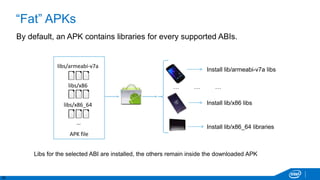
By default, an APK contains libraries for every supported ABIs.
Install lib/armeabi-v7a libs
Install lib/x86 libs
Install lib/x86_64 libraries
libs/x86
libs/x86_64
APK file
…
Libs for the selected ABI are installed, the others remain inside the downloaded APK
… … …
libs/armeabi-v7a
23
Multiple APKs
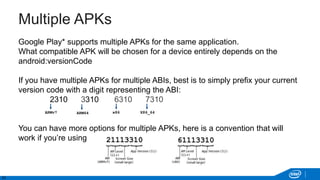
Google Play* supports multiple APKs for the same application.
What compatible APK will be chosen for a device entirely depends on the
android:versionCode
If you have multiple APKs for multiple ABIs, best is to simply prefix your current
version code with a digit representing the ABI:
2310 3310 6310 7310
You can have more options for multiple APKs, here is a convention that will
work if you’re using all of these:
x86ARMv7 ARM64 X86_64
24
Multiple APKs – clean solution with gradle
splits {
abi {
enable true
reset()
include 'x86', 'x86_64', 'armeabi-v7a', 'arm64-v8a'
universalApk true
}
}
// map for the version code
project.ext.versionCodes = ['armeabi': 1, 'armeabi-v7a': 2, 'arm64-v8a': 3, 'mips': 5,
'mips64': 6, 'x86': 8, 'x86_64': 9]
android.applicationVariants.all { variant ->
// assign different version code for each output
variant.outputs.each { output ->
output.versionCodeOverride =
project.ext.versionCodes.get(output.abiFilter, 0) * 1000000 +
android.defaultConfig.versionCode
}
}
25
Uploading Multiple APKs to the store
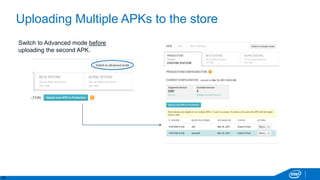
Switch to Advanced mode before
uploading the second APK.
Intel® Tools for Android* apps developers
HAXM, INDE, System Studio, XDK…
27
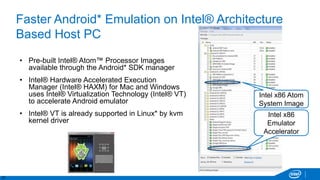
Intel x86
Emulator
Accelerator
Intel x86 Atom
System Image
Faster Android* Emulation on Intel® Architecture
Based Host PC
• Pre-built Intel® Atom™ Processor Images
available through the Android* SDK manager
• Intel® Hardware Accelerated Execution
Manager (Intel® HAXM) for Mac and Windows
uses Intel® Virtualization Technology (Intel® VT)
to accelerate Android emulator
• Intel® VT is already supported in Linux* by kvm
kernel driver
28
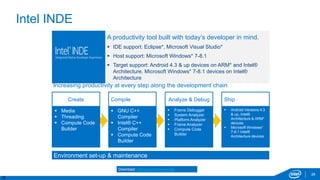
Intel INDE
28
Increasing productivity at every step along the development chain
A productivity tool built with today’s developer in mind.
 IDE support: Eclipse*, Microsoft Visual Studio*
 Host support: Microsoft Windows* 7-8.1
 Target support: Android 4.3 & up devices on ARM* and Intel®
Architecture, Microsoft Windows* 7-8.1 devices on Intel®
Architecture
Environment set-up & maintenance
Analyze & Debug ShipCompileCreate
 Frame Debugger
 System Analyzer
 Platform Analyzer
 Frame Analyzer
 Compute Code
Builder
 Android Versions 4.3
& up, Intel®
Architecture & ARM*
devices.
 Microsoft Windows*
7-8.1 Intel®
Architecture devices
 GNU C++
Compiler
 Intel® C++
Compiler
 Compute Code
Builder
 Media
 Threading
 Compute Code
Builder
Download: intel.com/software/inde
29
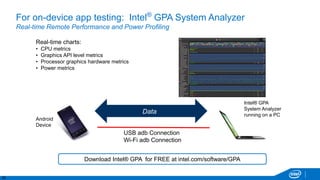
For on-device app testing: Intel®
GPA System Analyzer
Real-time Remote Performance and Power Profiling
Intel® GPA
System Analyzer
running on a PC
Android
Device
USB adb Connection
Wi-Fi adb Connection
Data
Real-time charts:
• CPU metrics
• Graphics API level metrics
• Processor graphics hardware metrics
• Power metrics
Download Intel® GPA for FREE at intel.com/software/GPA
30
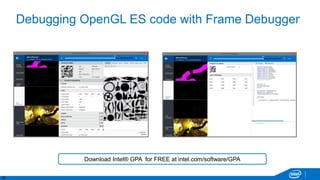
Debugging OpenGL ES code with Frame Debugger
Download Intel® GPA for FREE at intel.com/software/GPA
31
Summary
• Apps submission started only on November 3rd
(good opportunity to bring more visibility to your apps and games)
• Adding Android TV support isn’t necessarily much work
• No need for maintaining a separate APK
• Better x86 apps compatibility is nice to have for your apps/libs/engines
• Intel provides powerful tool suites for Android development
Q&A

[Ultracode Munich Meetup #7] Building Apps for Nexus Player & Android TV

  • 1.
    Developing for AndroidTV Mihai Risca, Application Engineer, Software & Services Group Developer Relations Division
  • 2.
    2 Agenda • What areAndroid TV and the Nexus Player • How to create/adapt an Android application for Android TV • How to publish an Android TV application • Optimizing applications for the Nexus Player • Q&A
  • 3.
    Android TV andthe Nexus Player
  • 4.
    4 Android TV • It’sAndroid • it’s also Chromecast • Apps (streaming and others) • Games (casual and more) • AOSP compliant • Leanback Launcher, Google Apps and Play Store
  • 5.
    5 Nexus Player • FirstAndroid TV device / The only Nexus • Quad-Core Intel Silvermont CPU @1.83Ghz • PowerVR™ Series 6 G6430 GPU • 64bit, OpenGL ES 3.1 • WiFi 802.11ac* • 1GB ram, 8GB flash, USB-OTG • 99$ • Gamepad sold separately** * Ethernet can be added using standard USB adapters ** Android TV supports almost any USB/Bluetooth HID Gamepads
  • 6.
    Developing for AndroidTV and the Nexus Player
  • 7.
    7 Developing for AndroidTV Create a new Android application or add support to an existing one by: 1. Adding/reusing a TV-compatible activity that will receive the leanback intent 2. Integrating TV-specific assets 3. Supporting non-touchscreen input 4. Adapting the UX of your app to Android TV All this should be done to an existing Android app, so you can support phones, tablets, and TVs from your same source code and APK. You can still choose to create a TV-specific APK and upload it as a new application or as an alternative APK using Play Store “multiple APKs” feature.
  • 8.
    8 1. The LeanbackIntent <activity android:name=".TvMainActivity“ > <intent-filter> <action android:name="android.intent.action.MAIN" /> <category android:name="android.intent.category.LEANBACK_LAUNCHER" /> </intent-filter> </activity>
  • 9.
    9 2. The Banner <activityor <application … android:banner="@drawable/ic_banner" … > • Name of your application • No transparency • Size:160x90dp -> 320x180px image to put inside drawable-xhdpi folder.
  • 10.
    10 3. Supporting non-touchscreeninput <uses-feature android:name="android.hardware.touchscreen" android:required="false" /> Adjust D-PAD navigation: android:focusable="true", <requestFocus /> / .requestFocus() android:nextFocusDown="@+id/whatever1" android:nextFocusUp="@id/whatever2" For custom Views: KeyEvent.KEYCODE_DPAD_(UP|DOWN|LEFT|RIGHT)
  • 11.
    11 4. Adapting theUX Start from android:Theme.NoTitleBar Or Theme.Leanback from the Leanback support library: compile "com.android.support:leanback-v17:21.0.+“ Add overscan margins to your views: (Leanback Views and Fragments already have these) android:layout_marginTop="27dp" android:layout_marginLeft="48dp" android:layout_marginRight="48dp" android:layout_marginBottom="27dp" Note: Leanback support library requires API 17 but you can still support lower API levels from your app: • Use Theme.Leanback from –v21 resource folders, use Leanback classes only from your TV-part. • Set <uses-sdk tools:overrideLibrary="android.support.v17.leanback" />
  • 12.
    12 Going further  Usingready-to-use elements from the Leanback Support Library  Supporting multiple controllers  Integrating the recommendation system  Integrating the search system
  • 13.
    Publishing apps tothe Android TV Play Store
  • 14.
    14 Play Store additionalrequirements Is your app a Game ? <android:isGame="true"> Supporting Gamepads ? <uses-feature android:name="android.hardware.gamepad“ android:required="false" /> Supporting only Android TV ? <uses-feature android:name="android.software.leanback" android:required="true" />
  • 15.
    15 A classic trap:implicitly required features Having portrait activities declared inside your app ? Need to specify that your app can be used on hardware that doesn’t support “portrait” mode: <uses-feature android:name="android.hardware.screen.portrait“ android:required="false" /> Use of certain permissions also implicitly requires hardware features that aren’t available: • android.hardware.location implied by android.permission.ACCESS_FINE_LOCATION • android.hardware.camera.autofocus and android.hardware.camera implied by android.permission.CAMERA • android.hardware.microphone implied by android.permission.RECORD_AUDIO • android.hardware.telephony implied by many telephony-specific permissions
  • 16.
    16 Submitting your application 1.Check you’re compliant with all the guidelines 2. Upload your APK 3. Upload your banner and a screenshot 4. Opt-in for distribution to the Play Store on Android TV
  • 17.
    Optimizing apps forthe Nexus Player
  • 18.
    18 Android* Devices withIntel Inside (Some of them – there are more than hundred, not all could be listed here) Motorola* RAZR i ZTE* Grand X IN Lava* Xolo X900 Megafon* Mint Lenovo* K800 Orange* San Diego 2012, 2013… Lenovo* K900 ASUS Fonepad™ Note FHD - 6” ZTE* Geek Samsung* Galaxy™ Tab 3 10.1” 2014… Asus* Zenfones 4/5/6 ASUS* Transformer Pad TF103CG/TF303CL Dell* Venue 8 7000 Intel® Yolo Acer* Liquid C1Etisalat E-20* ASUS* MeMO Pad FHD 10 ASUS* Fonepad™ 7” Dell* Venue 7/8 KD Interactive Kurio Tablet Toshiba Excite Go Acer* Iconia Tab 8 / One 8 Nexus PlayerLenovo* S8Asus* MemoPad 7/8 Asus* FonePad 7/8 Lenovo Yoga Tab 2 8/10/13 Tesco Hudl 2
  • 19.
    19 These devices areall fully compatible with Android* ARM* ecosystem Android* SDK apps − These will directly work. We’re optimizing the Runtimes for Intel® platforms. Android* NDK apps − Most will run without any recompilation on consumer platforms. − Android NDK provides an x86 toolchain since 2011 − A simple recompile using the Android NDK yields the best performance − If there is specific processor dependent code, porting may be necessary Android Runtime Core Libraries DVM / ART
  • 20.
    20 3rd party libraries/enginesx86 support • Game engines/libraries with x86 support: • Havok Anarchy SDK: android x86 target available • Unreal Engine 3: android x86 target available • Marmalade: android x86 target available • NexPlayer SDK: x86 supported by default in latest releases • Cocos2Dx: set APP_ABI in Application.mk • FMOD: x86 lib already included, set ABIs in Application.mk • AppGameKit: x86 lib included, set ABIs in Application.mk • libgdx: x86 supported by default in latest releases • AppPortable: x86 support now available • Adobe Air: x86 support now available • Unity: x86 support available in 5.0 beta, soon-to-be released for earlier versions • …
  • 21.
    21 Include all ABIsby setting APP_ABI to all in jni/Application.mk: APP_ABI=all The NDK will generate optimized code for all target ABIs You can also pass APP_ABI variable to ndk-build, and specify each ABI: ndk-build APP_ABI=x86 #all32 and all64 are also possible values. Configuring NDK Target ABIs Build ARM64 libs Build x86_64 libs Build mips64 libs Build ARMv7a libs Build ARMv5 libs Build x86 libs Build mips libs
  • 22.
    22 “Fat” APKs By default,an APK contains libraries for every supported ABIs. Install lib/armeabi-v7a libs Install lib/x86 libs Install lib/x86_64 libraries libs/x86 libs/x86_64 APK file … Libs for the selected ABI are installed, the others remain inside the downloaded APK … … … libs/armeabi-v7a
  • 23.
    23 Multiple APKs Google Play*supports multiple APKs for the same application. What compatible APK will be chosen for a device entirely depends on the android:versionCode If you have multiple APKs for multiple ABIs, best is to simply prefix your current version code with a digit representing the ABI: 2310 3310 6310 7310 You can have more options for multiple APKs, here is a convention that will work if you’re using all of these: x86ARMv7 ARM64 X86_64
  • 24.
    24 Multiple APKs –clean solution with gradle splits { abi { enable true reset() include 'x86', 'x86_64', 'armeabi-v7a', 'arm64-v8a' universalApk true } } // map for the version code project.ext.versionCodes = ['armeabi': 1, 'armeabi-v7a': 2, 'arm64-v8a': 3, 'mips': 5, 'mips64': 6, 'x86': 8, 'x86_64': 9] android.applicationVariants.all { variant -> // assign different version code for each output variant.outputs.each { output -> output.versionCodeOverride = project.ext.versionCodes.get(output.abiFilter, 0) * 1000000 + android.defaultConfig.versionCode } }
  • 25.
    25 Uploading Multiple APKsto the store Switch to Advanced mode before uploading the second APK.
  • 26.
    Intel® Tools forAndroid* apps developers HAXM, INDE, System Studio, XDK…
  • 27.
    27 Intel x86 Emulator Accelerator Intel x86Atom System Image Faster Android* Emulation on Intel® Architecture Based Host PC • Pre-built Intel® Atom™ Processor Images available through the Android* SDK manager • Intel® Hardware Accelerated Execution Manager (Intel® HAXM) for Mac and Windows uses Intel® Virtualization Technology (Intel® VT) to accelerate Android emulator • Intel® VT is already supported in Linux* by kvm kernel driver
  • 28.
    28 Intel INDE 28 Increasing productivityat every step along the development chain A productivity tool built with today’s developer in mind.  IDE support: Eclipse*, Microsoft Visual Studio*  Host support: Microsoft Windows* 7-8.1  Target support: Android 4.3 & up devices on ARM* and Intel® Architecture, Microsoft Windows* 7-8.1 devices on Intel® Architecture Environment set-up & maintenance Analyze & Debug ShipCompileCreate  Frame Debugger  System Analyzer  Platform Analyzer  Frame Analyzer  Compute Code Builder  Android Versions 4.3 & up, Intel® Architecture & ARM* devices.  Microsoft Windows* 7-8.1 Intel® Architecture devices  GNU C++ Compiler  Intel® C++ Compiler  Compute Code Builder  Media  Threading  Compute Code Builder Download: intel.com/software/inde
  • 29.
    29 For on-device apptesting: Intel® GPA System Analyzer Real-time Remote Performance and Power Profiling Intel® GPA System Analyzer running on a PC Android Device USB adb Connection Wi-Fi adb Connection Data Real-time charts: • CPU metrics • Graphics API level metrics • Processor graphics hardware metrics • Power metrics Download Intel® GPA for FREE at intel.com/software/GPA
  • 30.
    30 Debugging OpenGL EScode with Frame Debugger Download Intel® GPA for FREE at intel.com/software/GPA
  • 31.
    31 Summary • Apps submissionstarted only on November 3rd (good opportunity to bring more visibility to your apps and games) • Adding Android TV support isn’t necessarily much work • No need for maintaining a separate APK • Better x86 apps compatibility is nice to have for your apps/libs/engines • Intel provides powerful tool suites for Android development
  • 32.

Editor's Notes

  • #5 And this is Android-Lollipop, you need to properly use JNI since ART is the only runtime and is more touchy than Dalvik. For D-pad navigation: use android:nextFocusUp Down Left Right in layout views use <requestFocus />
  • #6 And this is Android-Lollipop, you need to properly use JNI since ART is the only runtime and is more touchy than Dalvik. For D-pad navigation: use android:nextFocusUp Down Left Right in layout views use <requestFocus />
  • #12 And this is Android-Lollipop, you need to properly use JNI since ART is the only runtime and is more touchy than Dalvik. For D-pad navigation: use android:nextFocusUp Down Left Right in layout views use <requestFocus />
  • #13 Recommendations are notifications with a specific group named “recommendation”
  • #17 Manual approval
  • #19 First phone on the market was out in May 2012 This list isn’t exhaustive, there are even more devices available (more than 100) For dev platforms: Source Code and BSP: https://github.com/android-ia Builds and Documentation: https://01.org/android-ia MinnowBoard MAX: $99: Intel® Atom E3815 (single-core, 1.46 GHz) $129: Intel® Atom E3825 (dual-core, 1.33 GHz) Intel NUC DN2820FYKH 125 €: Intel® Celeron N2820 (dual-core, 2.13GHz) Dell Venue 8 7000 is the finest tablet as of now, with only 6mm
  • #22 If you include an application.mk file in your jni folder with all the CPU ABI then you can just run the script ndk-build with no arg.
  • #23 Credit: GDC presentation APP_ABI=“ x86 armeabi” can be also directly passed to the ndk-build command. APP_ABI=all also works to target all available binaries.
  • #24 For example, order the version codes so that the x86 APK has the highest version code, followed by ARMv7, then ARMv5TE. Thus x86 binaries will be preferred for x86 devices and ARMv7 binaries preferred for ARMv7 devices. Intel suggests using a version code with at least 8 digits. Integers that represent the supported configurations are in the higher order bits, and the version name (from android:versionName) is in the lower order bits. For example, when the application version name is 3.1.0, the recommended version code for ARMv7 ABI and an API level 11 APK would be 21100310. As another example, when the application version name is 3.1.0, version code for X86 and an API level 11 APK would be 61100310. The first digit indicates the supported ABI, the second and third digits are reserved for the API level, the fourth and fifth digits are for either screen sizes or GL texture formats (not used in these examples), and the last three digits are for the application's version number (3.1.0). Figure 1 shows two examples that are split based solely on the ABI with the same platform version (API Level), screen size, and application version. Source: developper.android.com Remember that downgrade isn’t supported ! That’s why having proper versioncode is really important.
  • #26 The APK information on the right will be the same if you are in advanced mode or simple mode. You can have the feeling it’s replacing your previous APK at this moment. In fact, if you are in advanced mode it will only be added to your APKs list as you want it.
  • #28  Intel works daily with Google to ensure things like our system images are linked to by the SDK Manager. Today we have Gingerbread, Ice Cream Sandwich, Jelly-Bean and KitKat system images available for the emulator. In February ‘12, we unveiled the Intel Hardware-Accelerated Execution Manager which speeds up Android emulation significantly for any Android developer using an IA-based host PC on Windows, Mac or Linux. Google was so impressed that they decided to show it off in their keynotes at the March Game Developer Conference and the May AnDevCon. Whether you’re coding in Dalvik Java or C/C++ (for NDK apps), and regardless of whether you’re targeting ARM or IA-based smartphones or tablets, this solution will deliver a far superior Android emulation experience for faster testing and debug of your Android apps.
  • #30 Plug for the demo night for the live demos of Emulator and GPA 1min
  • #31 Plug for the demo night for the live demos of Emulator and GPA 1min