Intel® Software and Service Group, Developer Product Division
DevelopingMulti-OSNativeMobile
ApplicationswithIntel®INDEPeng Tu, Ph.D. Intel® INDE Chief Architect, Sravanthi Venkata, Senior Software Engineer,
Dmitry Rizshkov, Software Architect
Intel® Software and Service Group, Developer Product Division
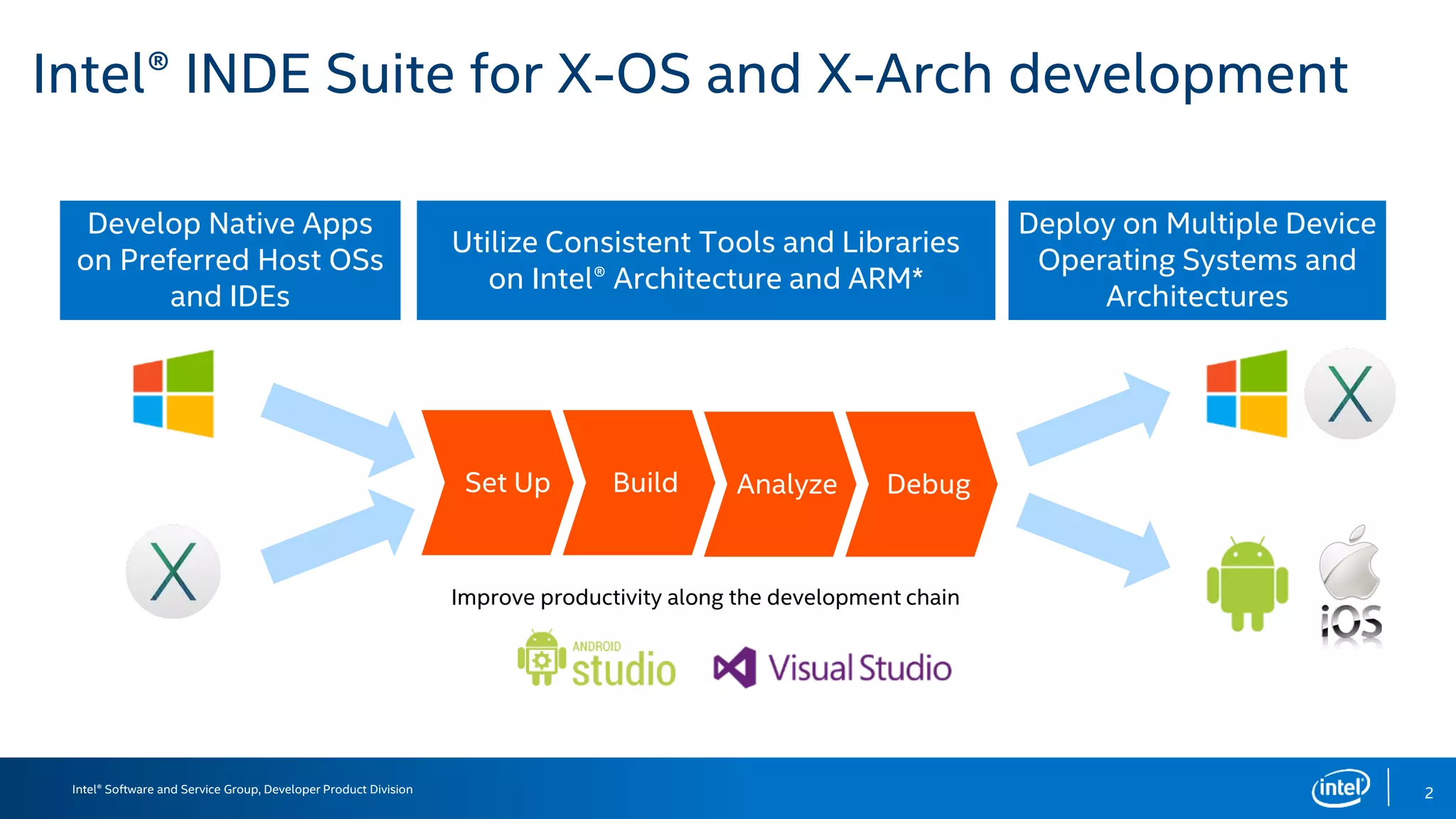
Intel® INDE Suite for X-OS and X-Arch development
Deploy on Multiple Device
Operating Systems and
Architectures
Develop Native Apps
on Preferred Host OSs
and IDEs
Utilize Consistent Tools and Libraries
on Intel® Architecture and ARM*
Set Up Build Analyze Debug
Improve productivity along the development chain
2
Intel® Software and Service Group, Developer Product Division
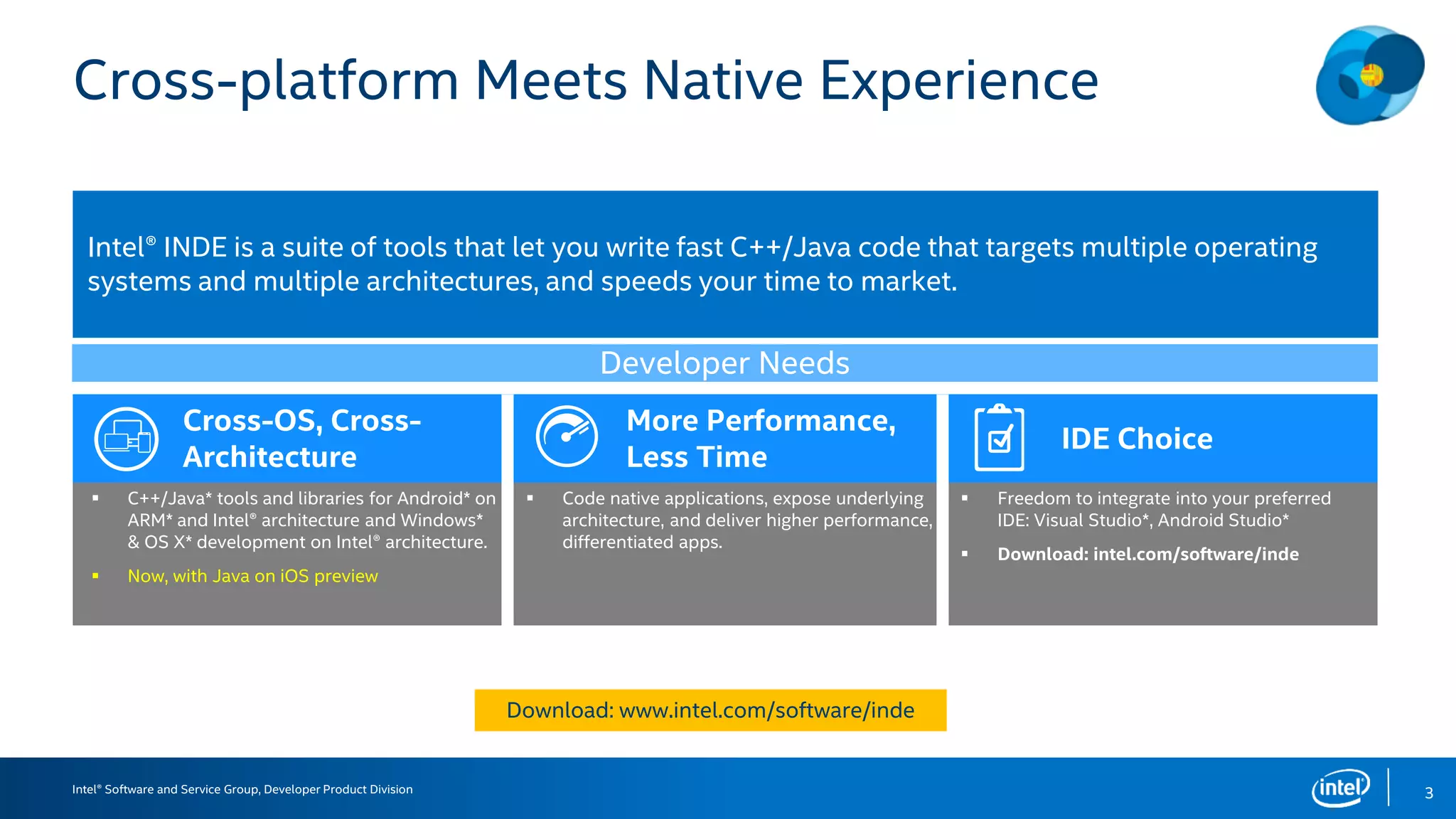
Cross-platform Meets Native Experience
Cross-OS, Cross-
Architecture
More Performance,
Less Time
IDE Choice
 C++/Java* tools and libraries for Android* on
ARM* and Intel® architecture and Windows*
& OS X* development on Intel® architecture.
 Now, with Java on iOS preview
 Code native applications, expose underlying
architecture, and deliver higher performance,
differentiated apps.
 Freedom to integrate into your preferred
IDE: Visual Studio*, Android Studio*
 Download: intel.com/software/inde
Intel® INDE is a suite of tools that let you write fast C++/Java code that targets multiple operating
systems and multiple architectures, and speeds your time to market.
Developer Needs
3
Download: www.intel.com/software/inde
Intel® Developer Product Division, Software and Service Group
IntroducingMulti-OSengine,ANew
FeatureofINTEL®INDE
Java*ProgrammingforNativeIOS*APPS
4
Intel® Software and Service Group, Developer Product Division
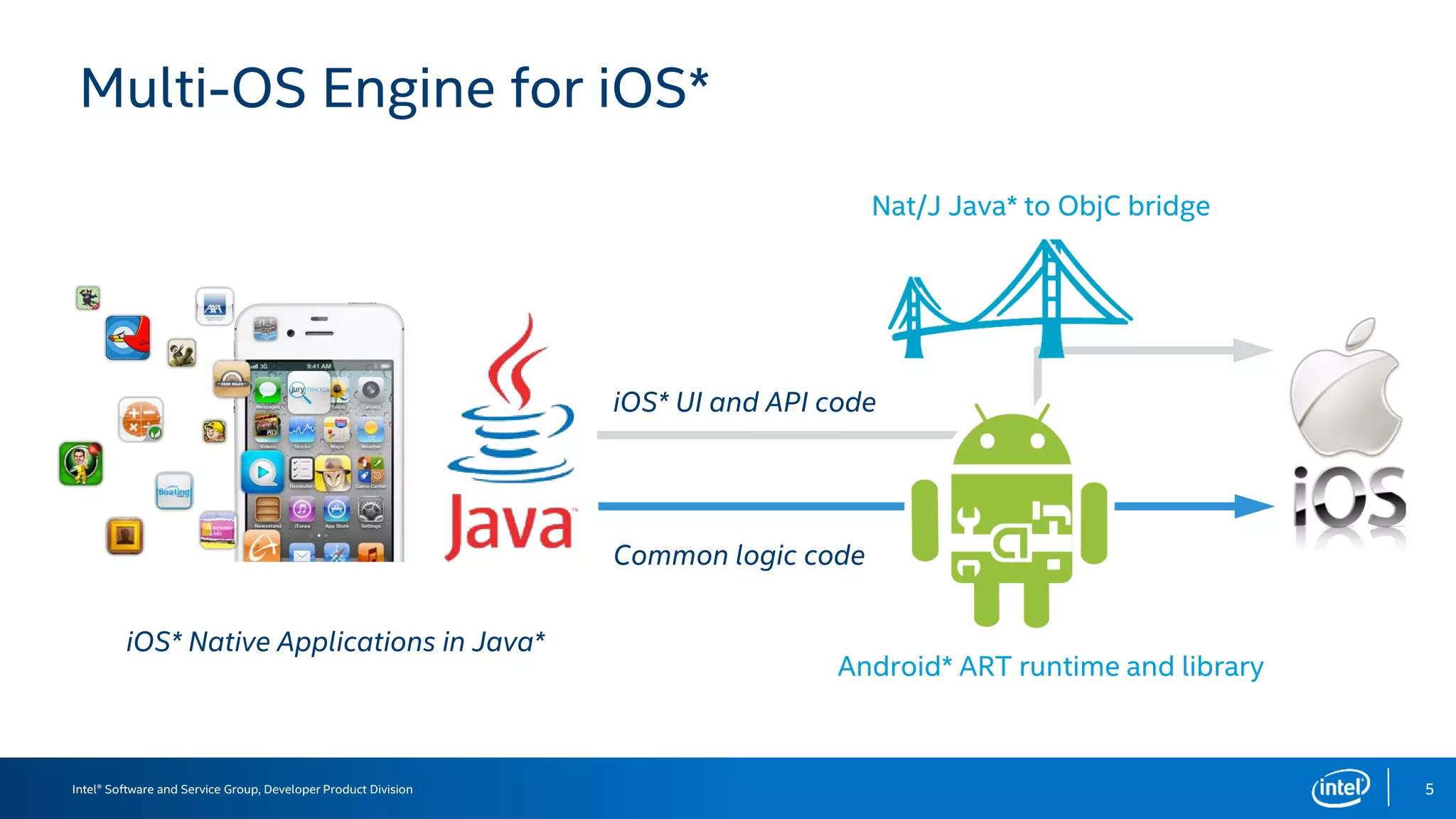
Multi-OS Engine for iOS*
5
Common logic code
iOS* UI and API code
iOS* Native Applications in Java*
Android* ART runtime and library
Nat/J Java* to ObjC bridge
Intel® Software and Service Group, Developer Product Division
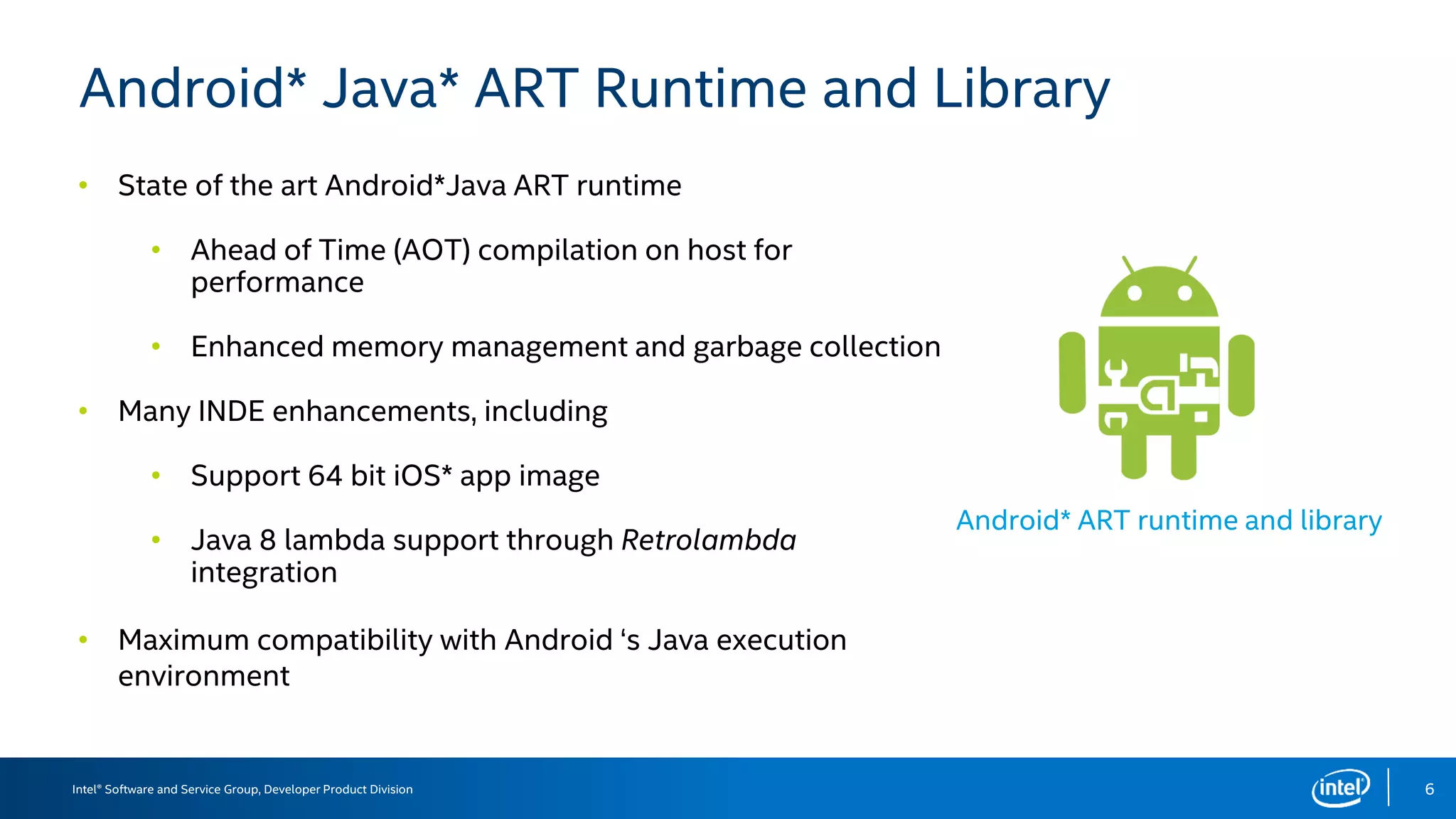
Android* Java* ART Runtime and Library
6
Android* ART runtime and library
•
•
•
•
•
•
•
Intel® Software and Service Group, Developer Product Division
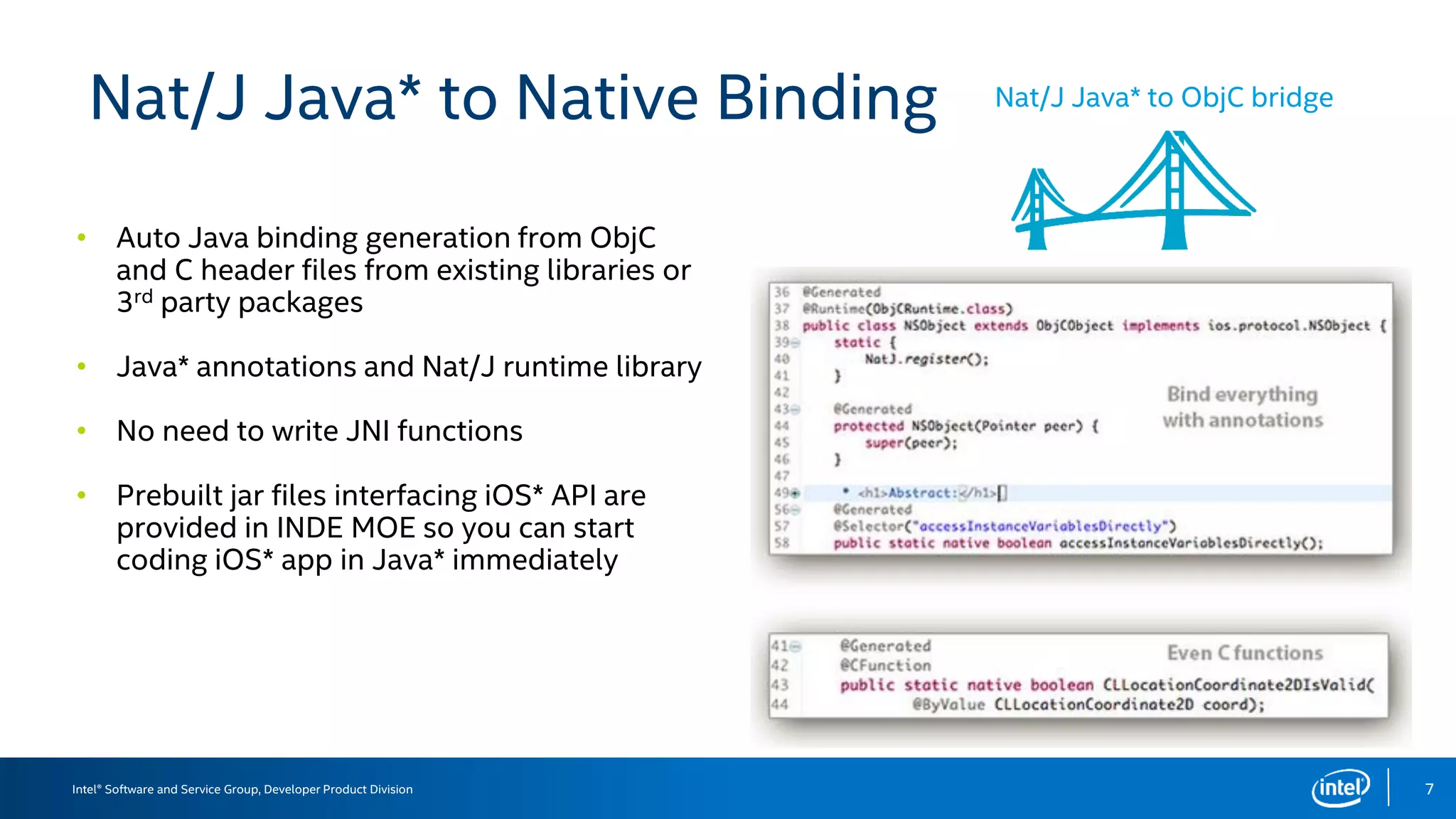
Nat/J Java* to Native Binding
•
•
•
•
7
Nat/J Java* to ObjC bridge
Intel® Software and Service Group, Developer Product Division
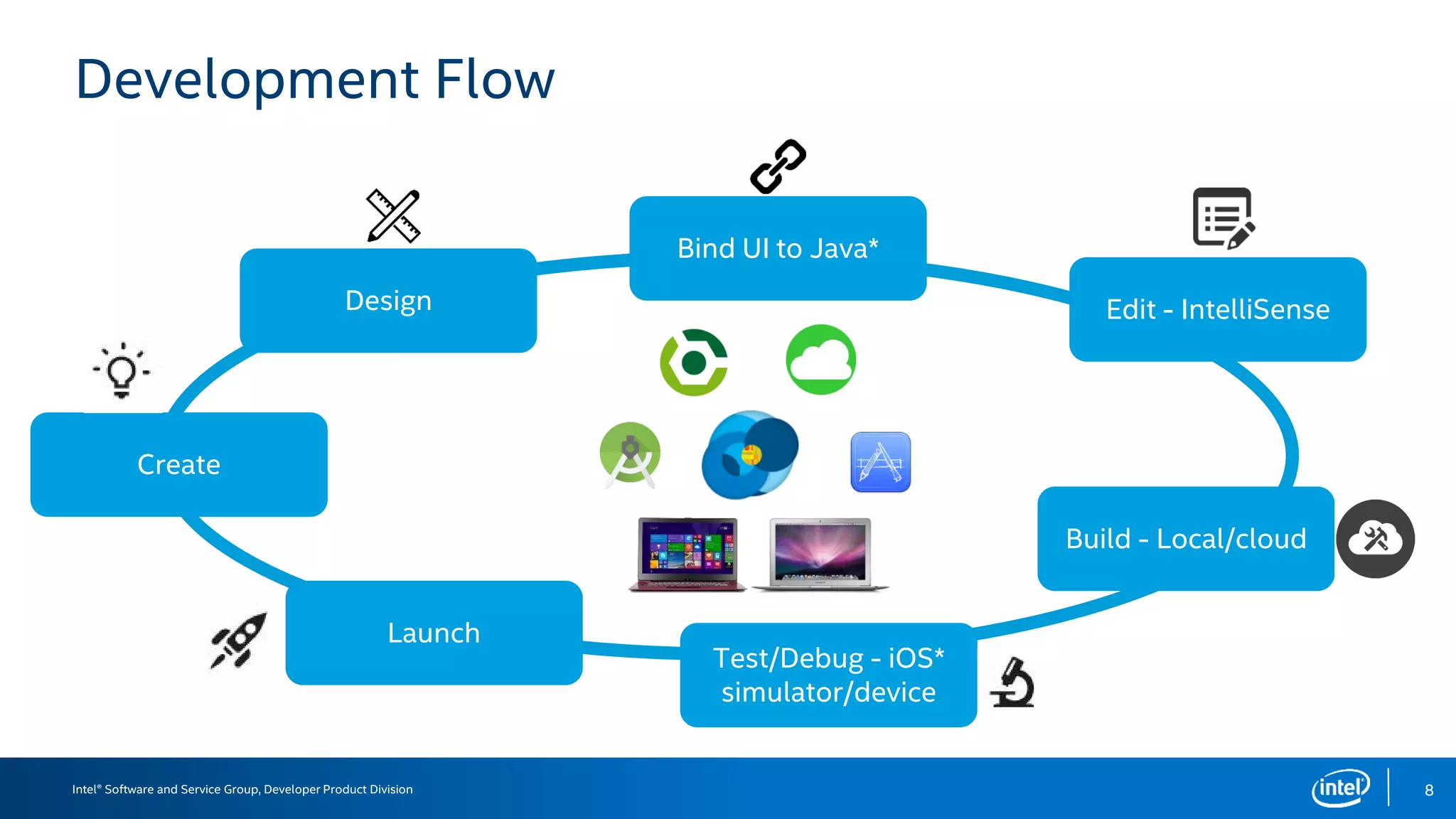
Development Flow
8
Create
Design
Bind UI to Java*
Edit - IntelliSense
Build - Local/cloud
Test/Debug - iOS*
simulator/device
Launch
Intel® Software and Service Group, Developer Product Division
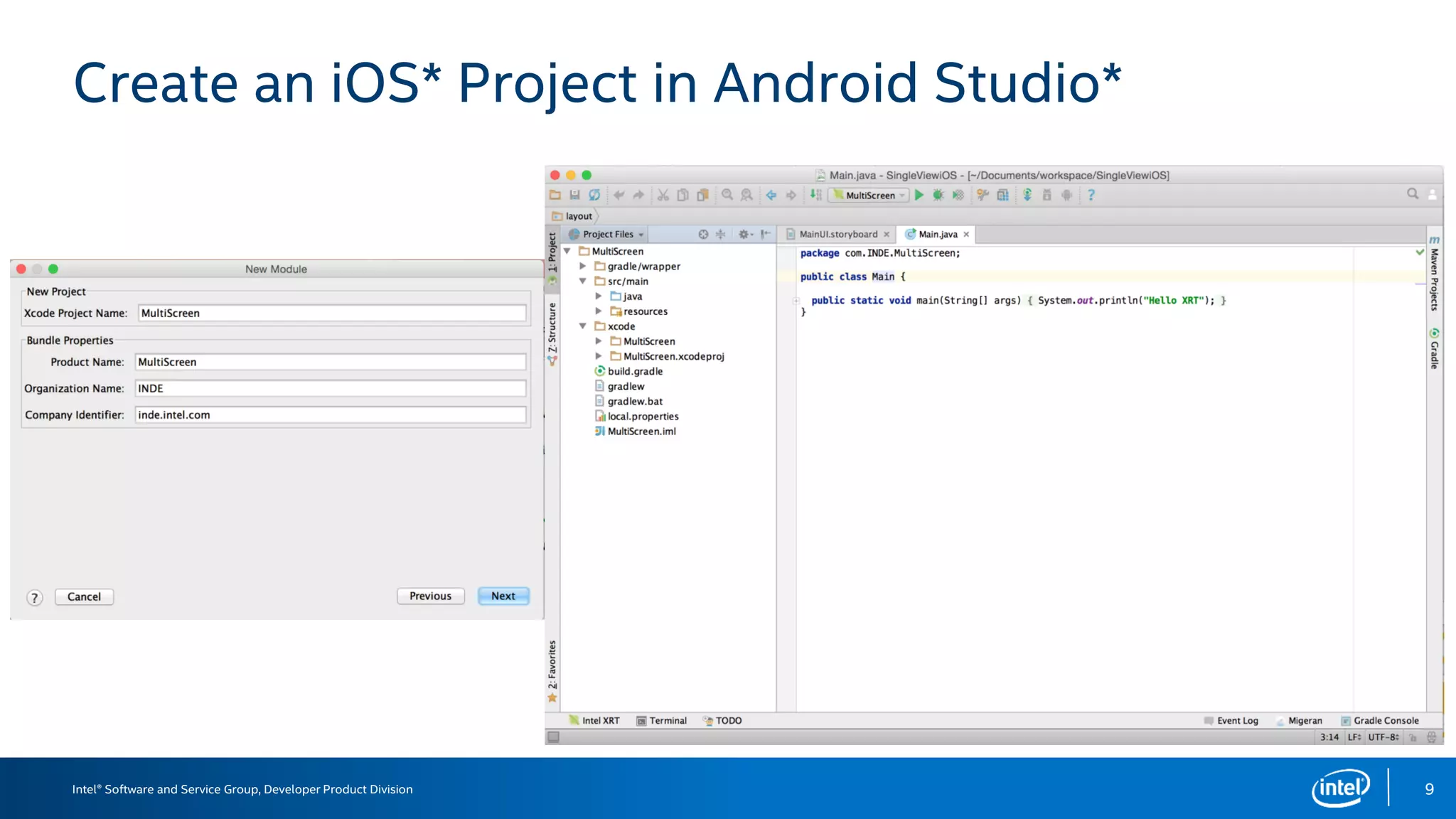
Create an iOS* Project in Android Studio*
9
Intel® Software and Service Group, Developer Product Division
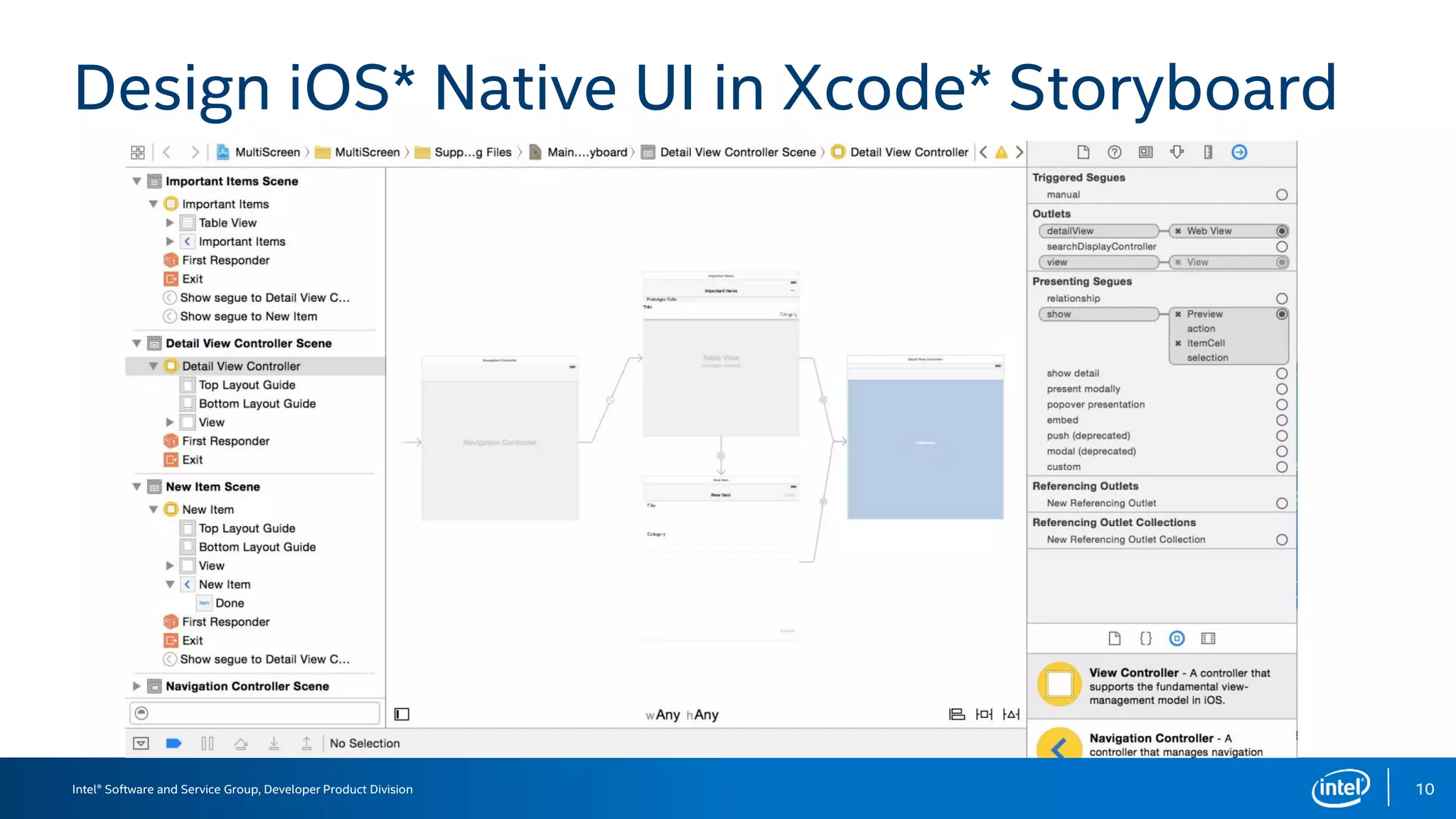
Design iOS* Native UI in Xcode* Storyboard
10
Intel® Software and Service Group, Developer Product Division
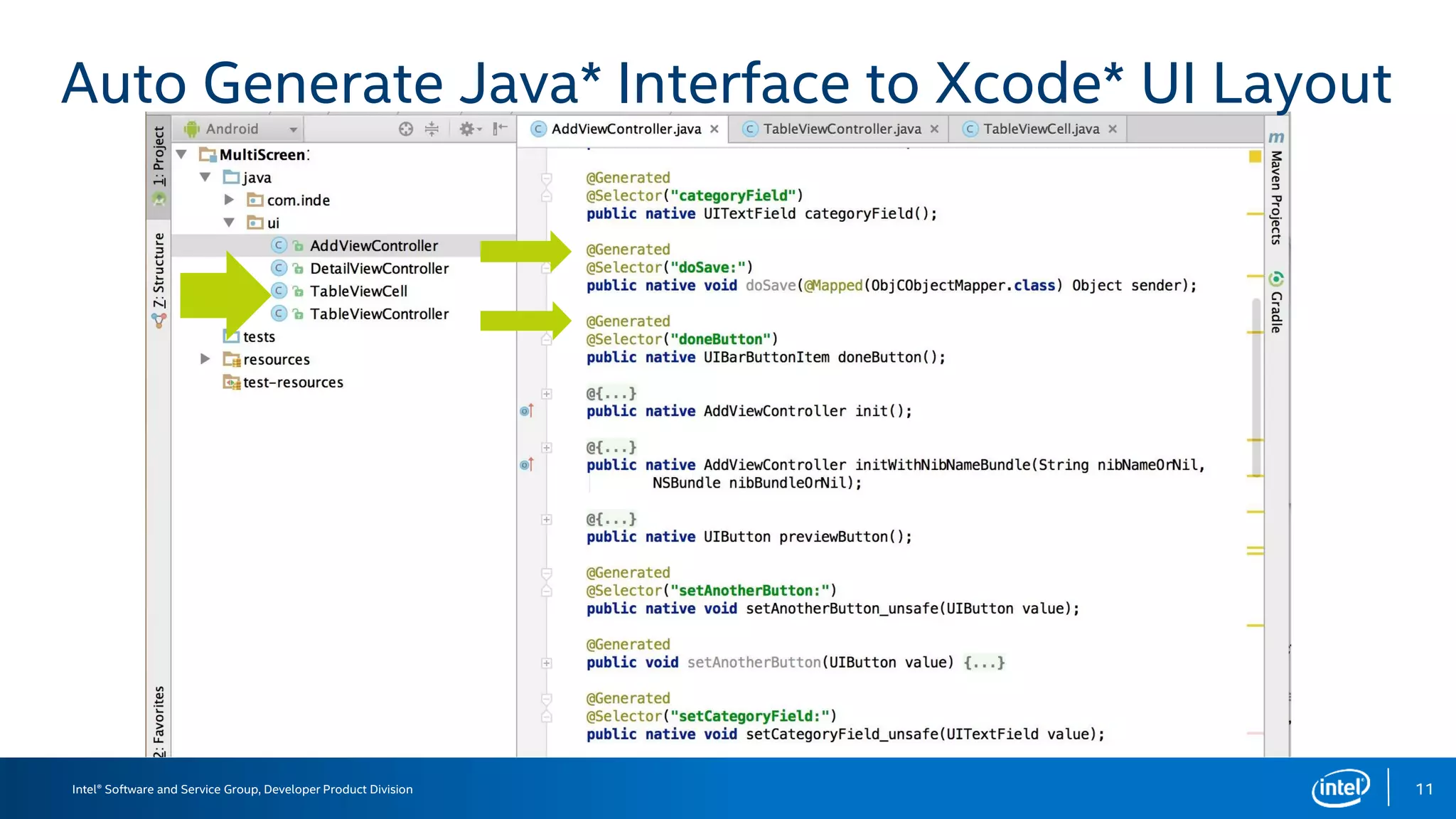
Auto Generate Java* Interface to Xcode* UI Layout
11
Intel® Software and Service Group, Developer Product Division
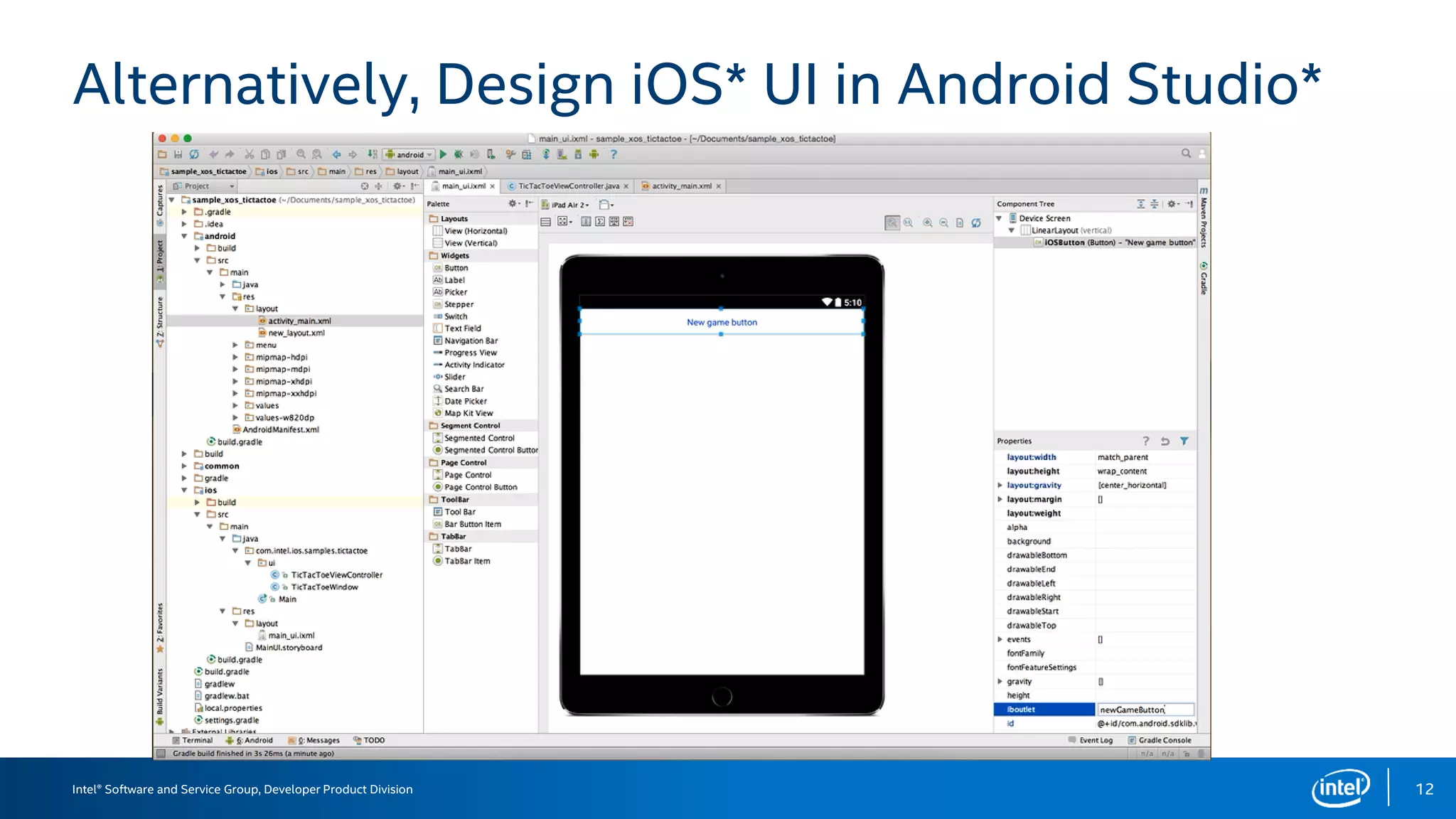
Alternatively, Design iOS* UI in Android Studio*
12
Intel® Software and Service Group, Developer Product Division
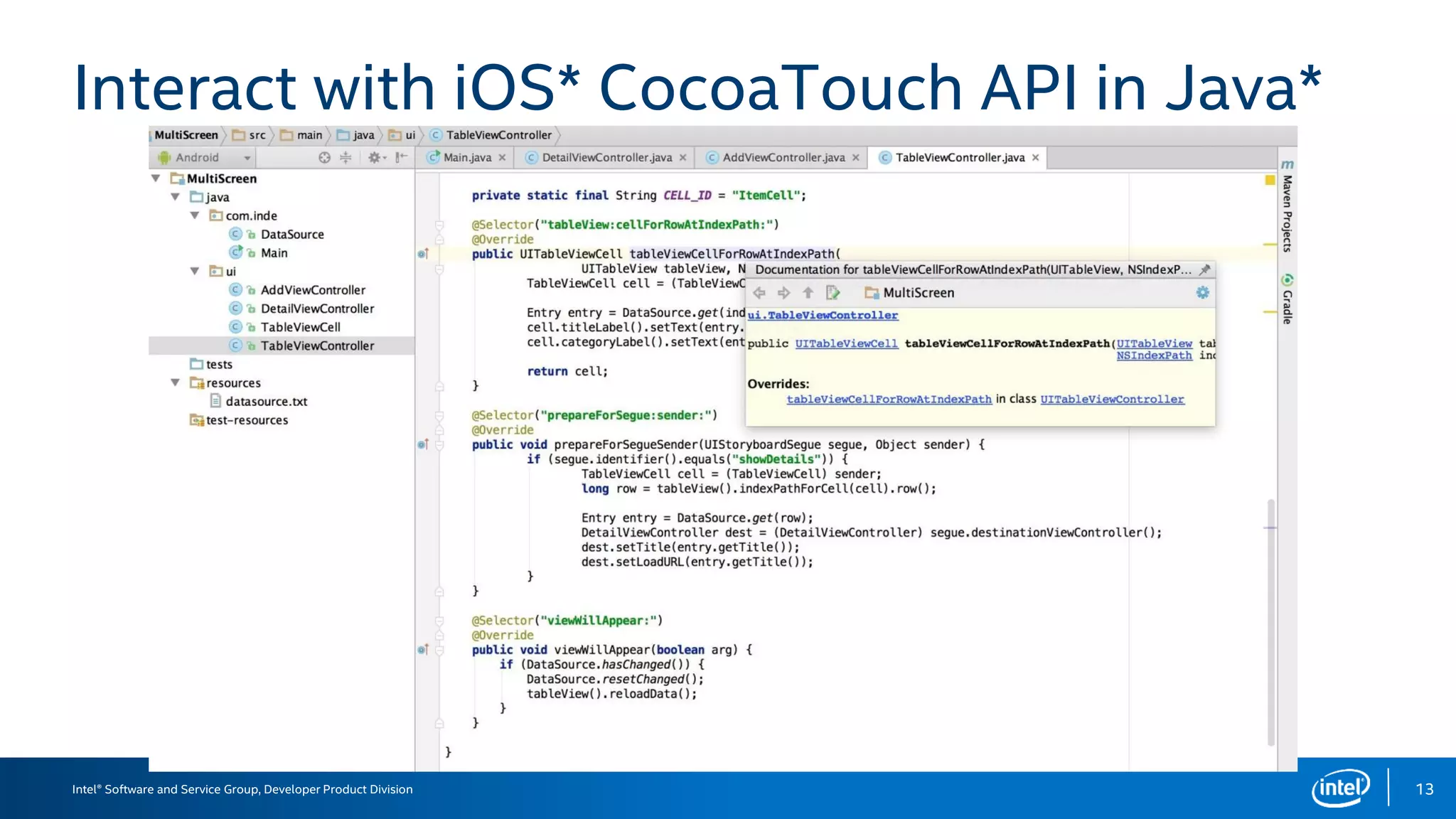
Interact with iOS* CocoaTouch API in Java*
13
Intel® Software and Service Group, Developer Product Division
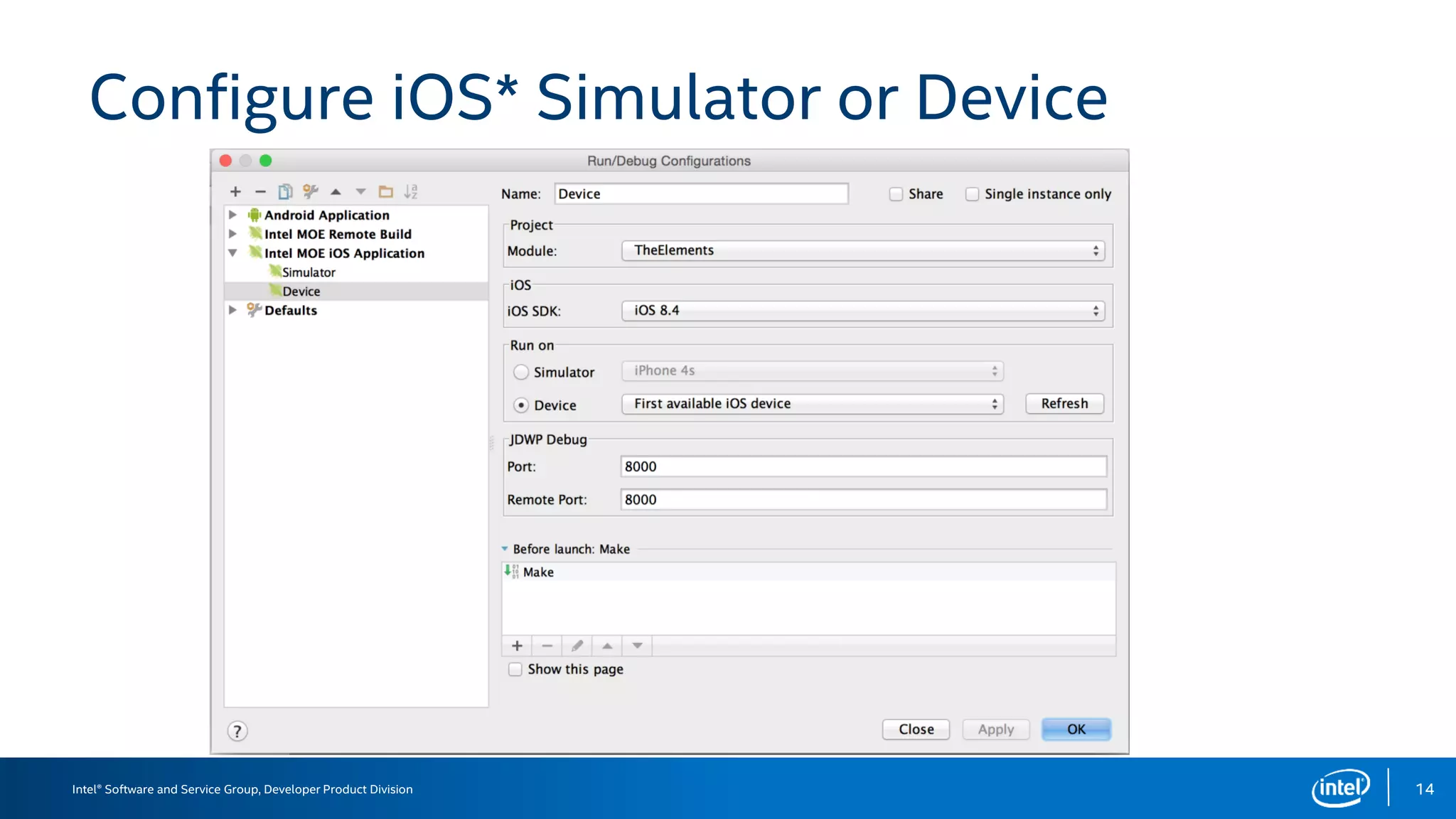
Configure iOS* Simulator or Device
14
Intel® Software and Service Group, Developer Product Division
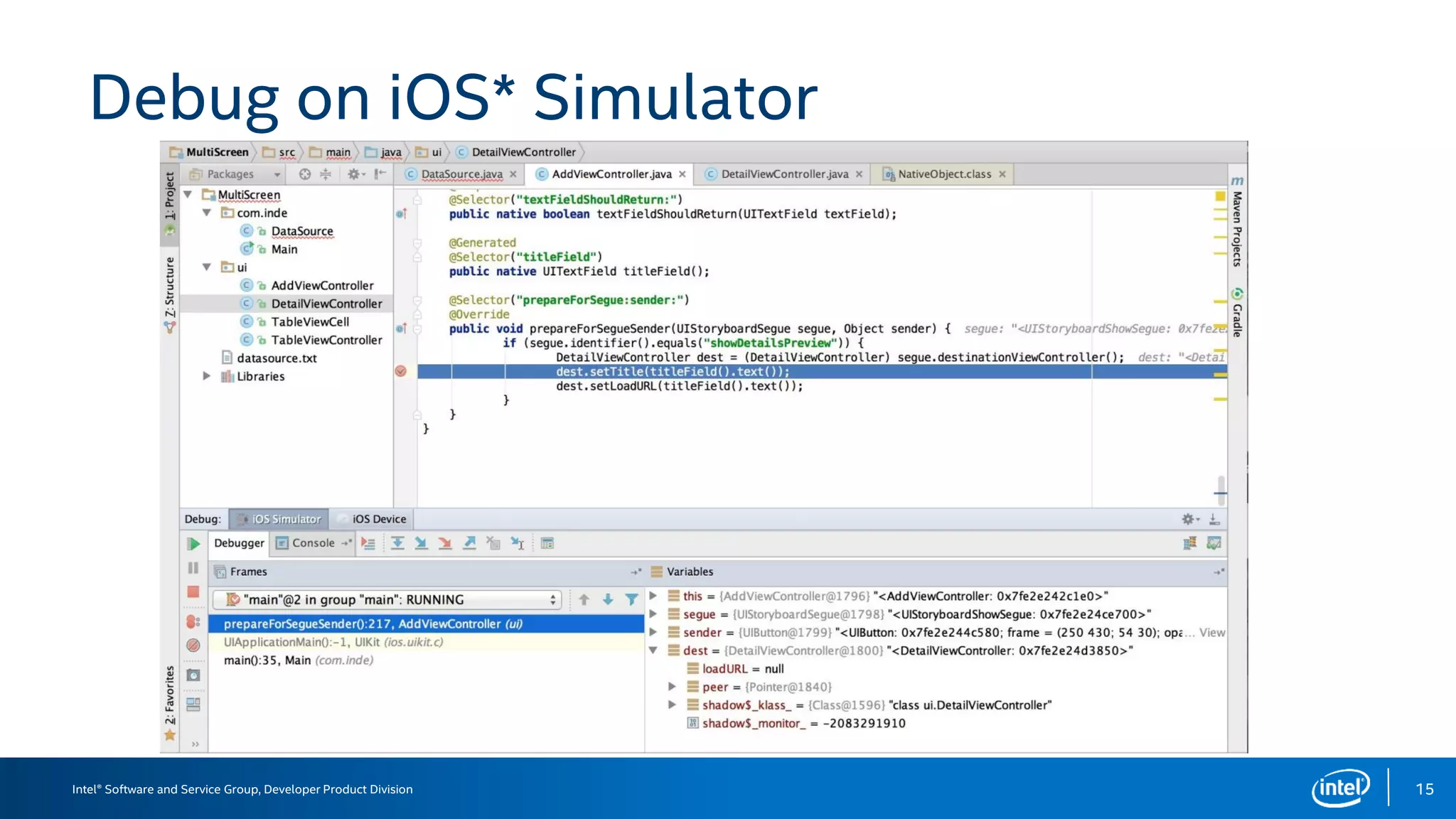
Debug on iOS* Simulator
15
Intel® Software and Service Group, Developer Product Division
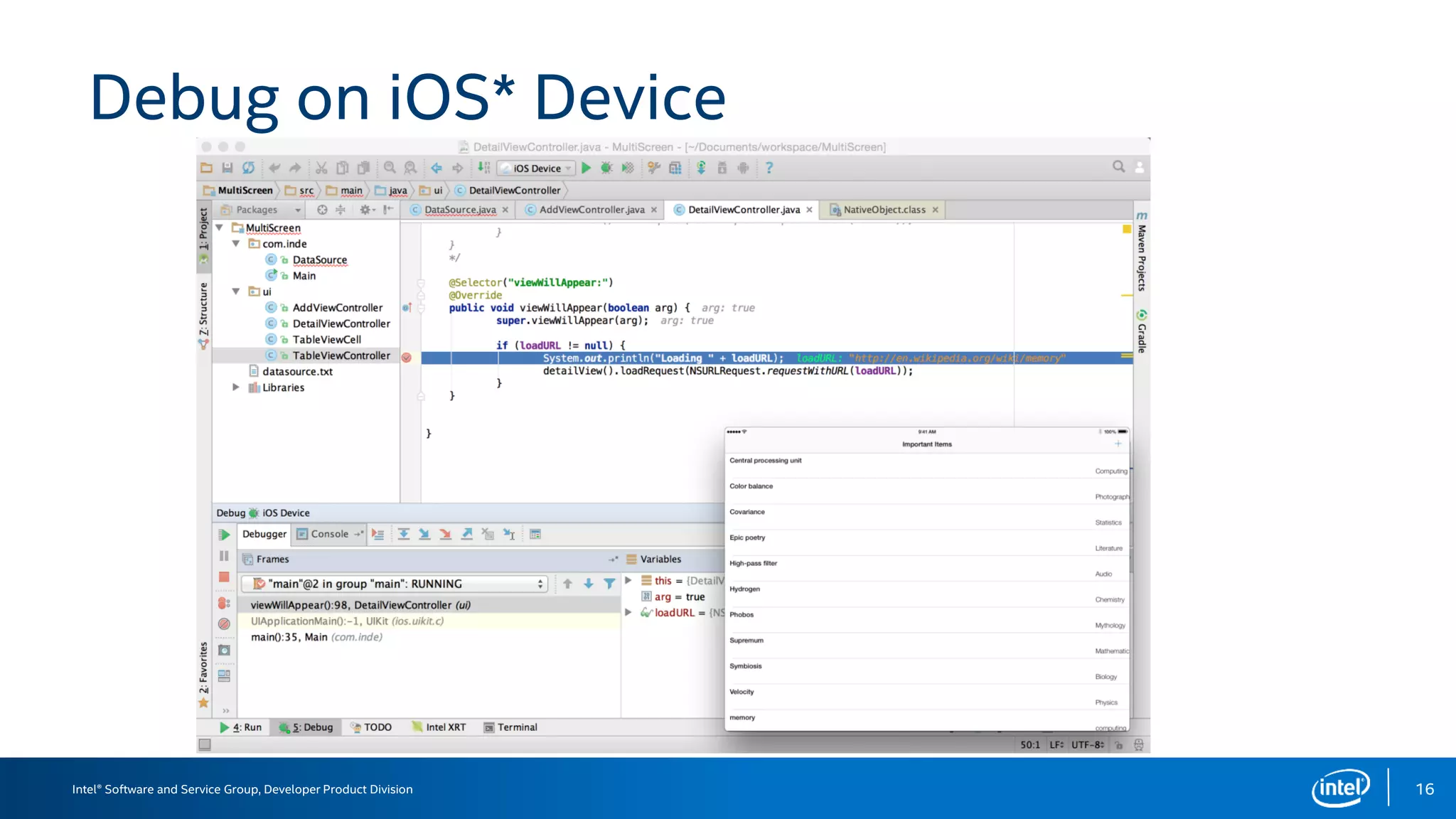
Debug on iOS* Device
16
Intel® Software and Service Group, Developer Product Division
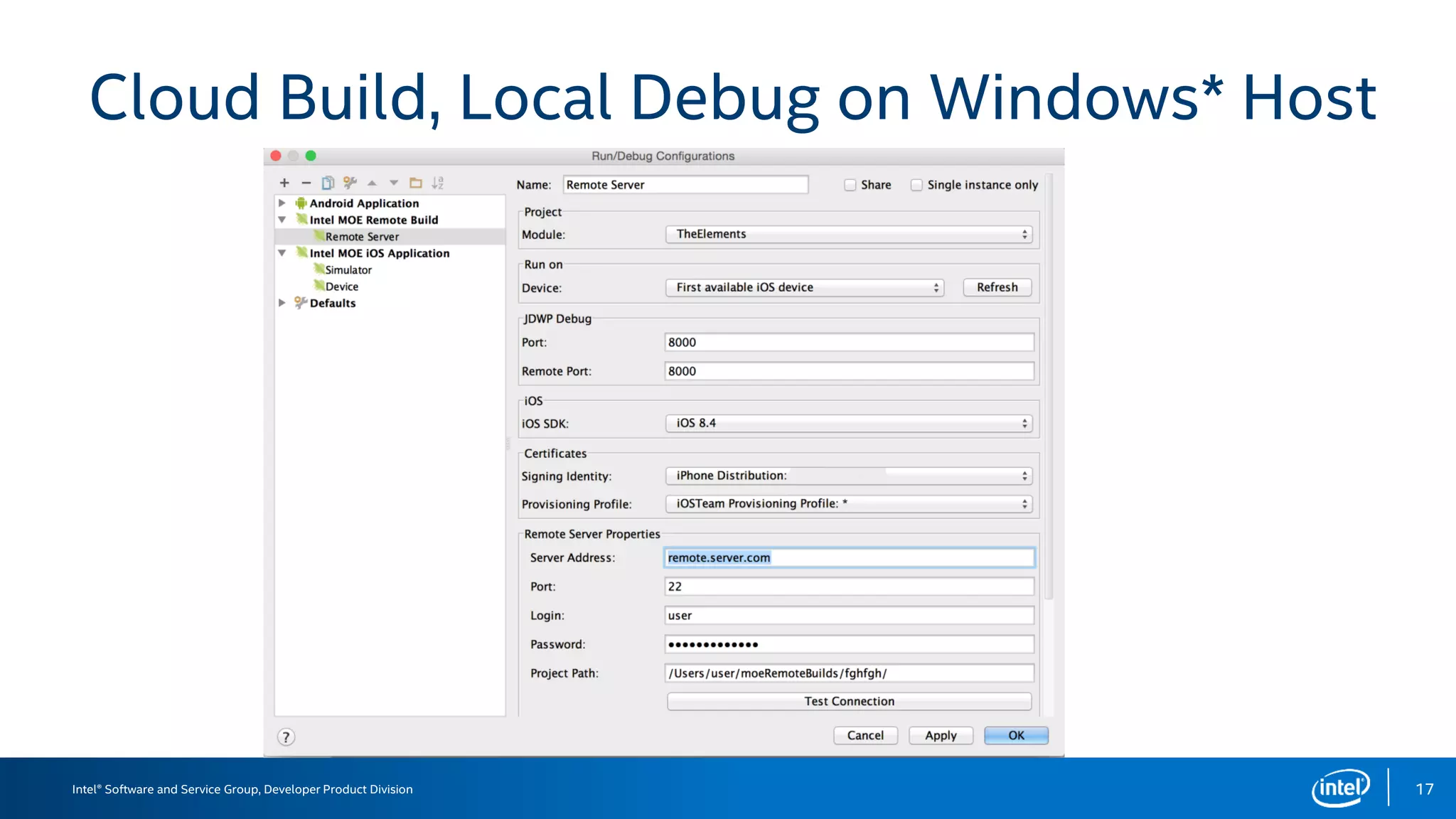
Cloud Build, Local Debug on Windows* Host
17
Intel® Software and Service Group, Developer Product Division
INDE MOE for iOS* Demo
Demo of building an iOS* application using Android Studio*
1) Project creation
2) UI design and Java coding
3) Debug and run on iOS* simulator
4) Debug and run on iOS* device
5) Cloud build and local on device debugging on Windows* host
18
Intel® Software and Service Group, Developer Product Division
Guidelines for Targeting Multiple OS
1) Separate the application backend logic from its frontend UI
• Share the backend common data model
• Make target specific modules for UI and device access
• Make them separately testable and reusable
2) Use Nat/J generator to expose 3rd party ObjC and C library interface to your
Java* application
3) Use an APK analysis tool such as Migeran’s analyzer
(http://analyzer.migeran.com/) for detailed analysis and guidance.
19
Intel® Software and Service Group, Developer Product Division
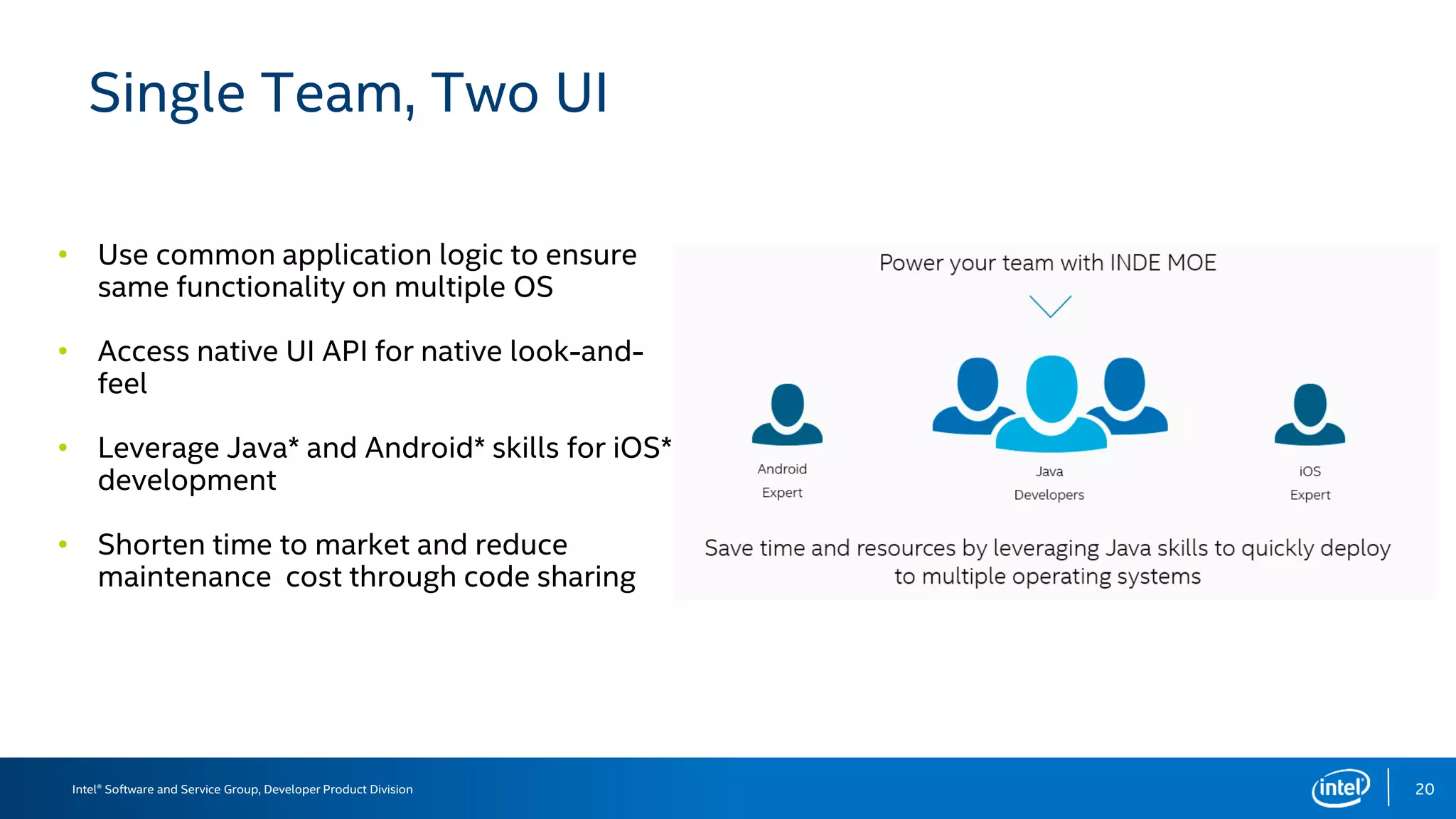
Single Team, Two UI
•
•
•
•
20
Intel® Software and Service Group, Developer Product Division
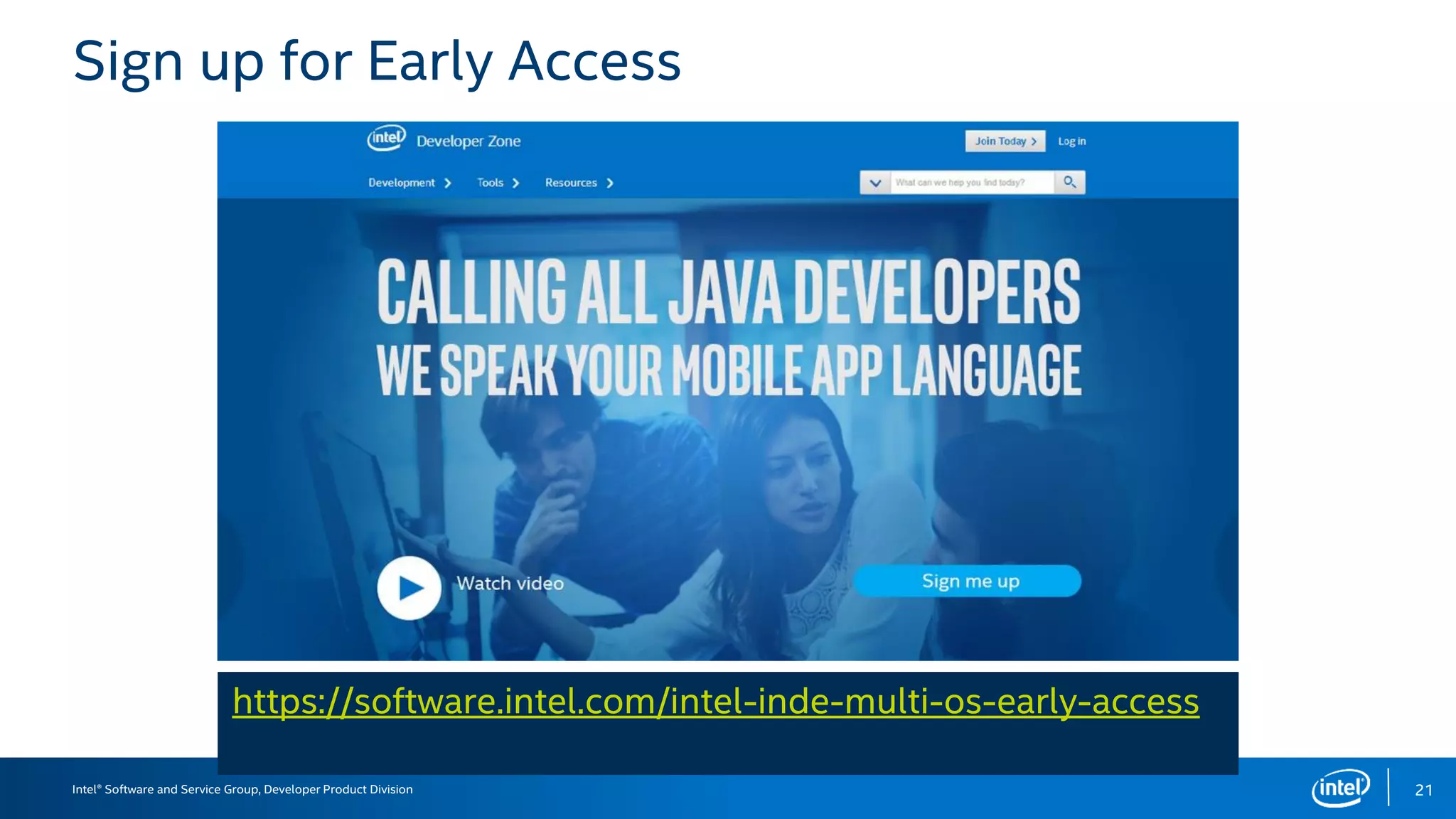
Sign up for Early Access
21
https://software.intel.com/intel-inde-multi-os-early-access
Intel® Developer Product Division, Software and Service Group
SUMMARY
22
Intel® Software and Service Group, Developer Product Division
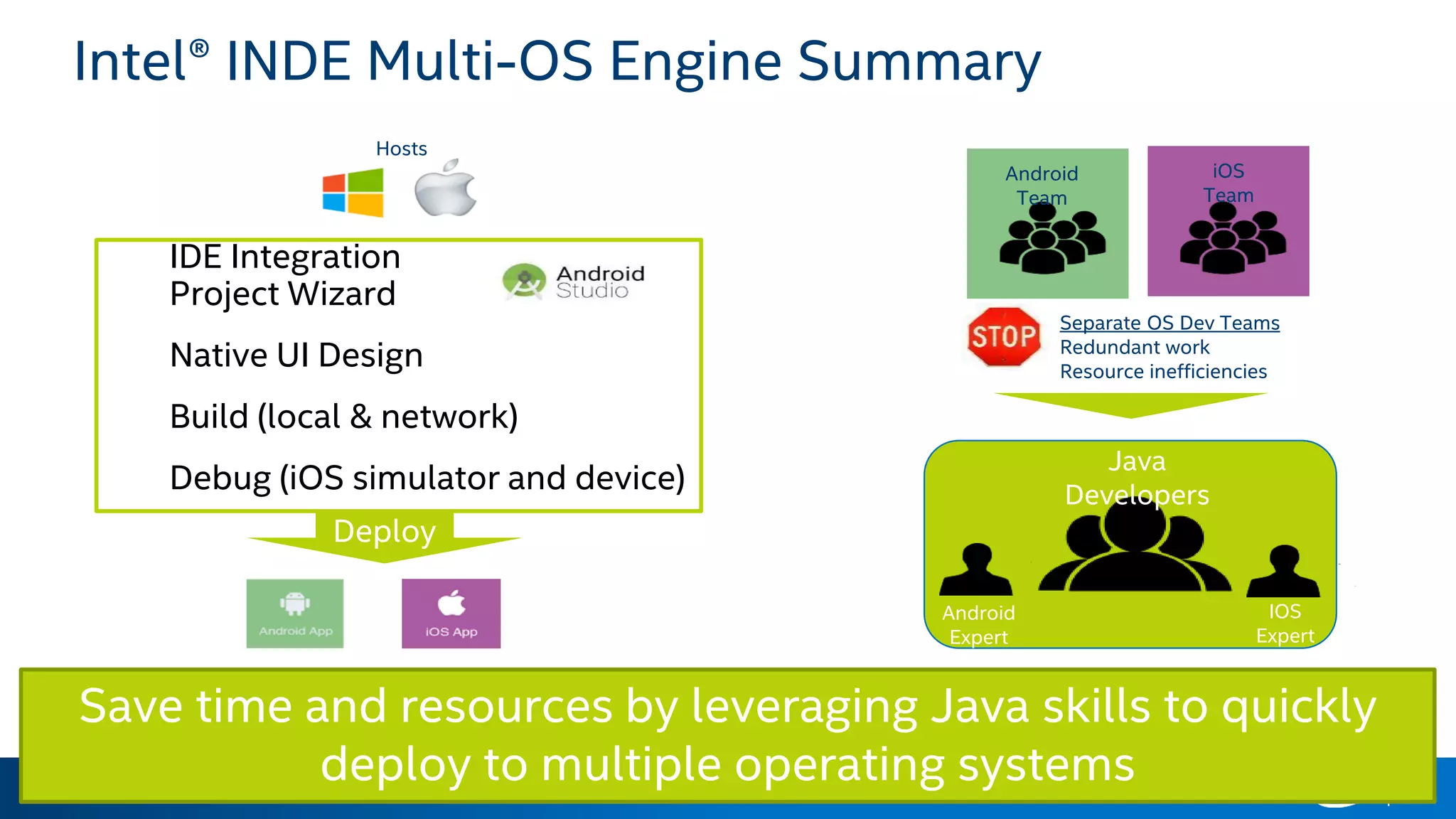
IDE Integration
Project Wizard
Native UI Design
Build (local & network)
Debug (iOS simulator and device)
23
Intel® INDE Multi-OS Engine Summary
Deploy
Hosts
Save time and resources by leveraging Java skills to quickly
deploy to multiple operating systems
Android
Team
iOS
Team
Java
Developers
Android
Expert
IOS
Expert
Separate OS Dev Teams
Redundant work
Resource inefficiencies
Intel® Software and Service Group, Developer Product Division
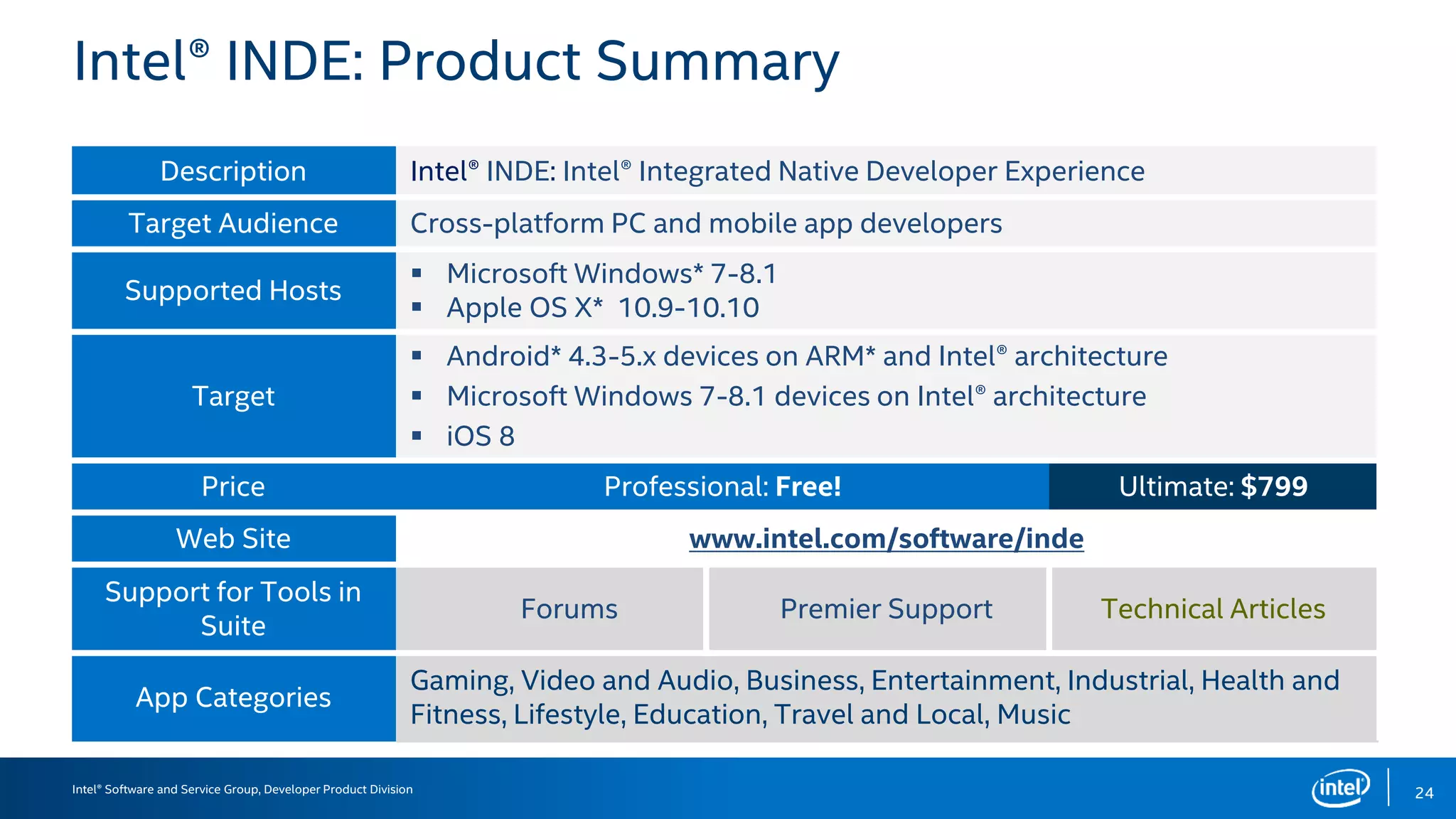
Intel® INDE: Product Summary
Description Intel® INDE: Intel® Integrated Native Developer Experience
Target Audience Cross-platform PC and mobile app developers
Supported Hosts
 Microsoft Windows* 7-8.1
 Apple OS X* 10.9-10.10
Target
 Android* 4.3-5.x devices on ARM* and Intel® architecture
 Microsoft Windows 7-8.1 devices on Intel® architecture
 iOS 8
Price Professional: Free! Ultimate: $799
Web Site www.intel.com/software/inde
Support for Tools in
Suite
Forums Premier Support Technical Articles
App Categories
Gaming, Video and Audio, Business, Entertainment, Industrial, Health and
Fitness, Lifestyle, Education, Travel and Local, Music
24
Intel® Software and Service Group, Developer Product Division
Intel® Integrated Native
Developer Experience 2015
Get Coding NOW –
intel.com/software/inde
– Download Professional Edition
– Evaluate Ultimate Edition
Follow us – @IntelINDE
Contact us – INDE@Intel.com
2525
Intel® Software and Service Group, Developer Product Division 26
Intel® Software and Service Group, Developer Product Division
Legal Disclaimer and Optimization Notice
INFORMATION IN THIS DOCUMENT IS PROVIDED “AS IS”. NO LICENSE, EXPRESS OR IMPLIED, BY ESTOPPEL OR OTHERWISE, TO ANY
INTELLECTUAL PROPERTY RIGHTS IS GRANTED BY THIS DOCUMENT. INTEL ASSUMES NO LIABILITY WHATSOEVER AND INTEL DISCLAIMS
ANY EXPRESS OR IMPLIED WARRANTY, RELATING TO THIS INFORMATION INCLUDING LIABILITY OR WARRANTIES RELATING TO FITNESS
FOR A PARTICULAR PURPOSE, MERCHANTABILITY, OR INFRINGEMENT OF ANY PATENT, COPYRIGHT OR OTHER INTELLECTUAL PROPERTY
RIGHT.
Software and workloads used in performance tests may have been optimized for performance only on Intel microprocessors. Performance
tests, such as SYSmark and MobileMark, are measured using specific computer systems, components, software, operations and functions. Any
change to any of those factors may cause the results to vary. You should consult other information and performance tests to assist you in
fully evaluating your contemplated purchases, including the performance of that product when combined with other products.
© ,2014, Intel Corporation. All rights reserved. Intel, the Intel logo, Atom, Cilk, VTune, the Look Inside. logo, and Look Inside. are trademarks of
Intel Corporation in the U.S. and other countries.
OpenCL and the OpenCL logo are trademarks of Apple Inc. used by permission by Khronos.
Optimization Notice
Intel’s compilers may or may not optimize to the same degree for non-Intel microprocessors for optimizations that are not unique to Intel microprocessors.
These optimizations include SSE2, SSE3, and SSSE3 instruction sets and other optimizations. Intel does not guarantee the availability, functionality, or
effectiveness of any optimization on microprocessors not manufactured by Intel. Microprocessor-dependent optimizations in this product are intended for
use with Intel microprocessors. Certain optimizations not specific to Intel microarchitecture are reserved for Intel microprocessors. Please refer to the
applicable product User and Reference Guides for more information regarding the specific instruction sets covered by this notice.
Notice revision #20110804
27
Placeholder Footer Copy / BU Logo or Name Goes Here

Developing Multi-OS Native Mobile Applications with Intel INDE

  • 1.
    Intel® Software andService Group, Developer Product Division DevelopingMulti-OSNativeMobile ApplicationswithIntel®INDEPeng Tu, Ph.D. Intel® INDE Chief Architect, Sravanthi Venkata, Senior Software Engineer, Dmitry Rizshkov, Software Architect
  • 2.
    Intel® Software andService Group, Developer Product Division Intel® INDE Suite for X-OS and X-Arch development Deploy on Multiple Device Operating Systems and Architectures Develop Native Apps on Preferred Host OSs and IDEs Utilize Consistent Tools and Libraries on Intel® Architecture and ARM* Set Up Build Analyze Debug Improve productivity along the development chain 2
  • 3.
    Intel® Software andService Group, Developer Product Division Cross-platform Meets Native Experience Cross-OS, Cross- Architecture More Performance, Less Time IDE Choice  C++/Java* tools and libraries for Android* on ARM* and Intel® architecture and Windows* & OS X* development on Intel® architecture.  Now, with Java on iOS preview  Code native applications, expose underlying architecture, and deliver higher performance, differentiated apps.  Freedom to integrate into your preferred IDE: Visual Studio*, Android Studio*  Download: intel.com/software/inde Intel® INDE is a suite of tools that let you write fast C++/Java code that targets multiple operating systems and multiple architectures, and speeds your time to market. Developer Needs 3 Download: www.intel.com/software/inde
  • 4.
    Intel® Developer ProductDivision, Software and Service Group IntroducingMulti-OSengine,ANew FeatureofINTEL®INDE Java*ProgrammingforNativeIOS*APPS 4
  • 5.
    Intel® Software andService Group, Developer Product Division Multi-OS Engine for iOS* 5 Common logic code iOS* UI and API code iOS* Native Applications in Java* Android* ART runtime and library Nat/J Java* to ObjC bridge
  • 6.
    Intel® Software andService Group, Developer Product Division Android* Java* ART Runtime and Library 6 Android* ART runtime and library • • • • • • •
  • 7.
    Intel® Software andService Group, Developer Product Division Nat/J Java* to Native Binding • • • • 7 Nat/J Java* to ObjC bridge
  • 8.
    Intel® Software andService Group, Developer Product Division Development Flow 8 Create Design Bind UI to Java* Edit - IntelliSense Build - Local/cloud Test/Debug - iOS* simulator/device Launch
  • 9.
    Intel® Software andService Group, Developer Product Division Create an iOS* Project in Android Studio* 9
  • 10.
    Intel® Software andService Group, Developer Product Division Design iOS* Native UI in Xcode* Storyboard 10
  • 11.
    Intel® Software andService Group, Developer Product Division Auto Generate Java* Interface to Xcode* UI Layout 11
  • 12.
    Intel® Software andService Group, Developer Product Division Alternatively, Design iOS* UI in Android Studio* 12
  • 13.
    Intel® Software andService Group, Developer Product Division Interact with iOS* CocoaTouch API in Java* 13
  • 14.
    Intel® Software andService Group, Developer Product Division Configure iOS* Simulator or Device 14
  • 15.
    Intel® Software andService Group, Developer Product Division Debug on iOS* Simulator 15
  • 16.
    Intel® Software andService Group, Developer Product Division Debug on iOS* Device 16
  • 17.
    Intel® Software andService Group, Developer Product Division Cloud Build, Local Debug on Windows* Host 17
  • 18.
    Intel® Software andService Group, Developer Product Division INDE MOE for iOS* Demo Demo of building an iOS* application using Android Studio* 1) Project creation 2) UI design and Java coding 3) Debug and run on iOS* simulator 4) Debug and run on iOS* device 5) Cloud build and local on device debugging on Windows* host 18
  • 19.
    Intel® Software andService Group, Developer Product Division Guidelines for Targeting Multiple OS 1) Separate the application backend logic from its frontend UI • Share the backend common data model • Make target specific modules for UI and device access • Make them separately testable and reusable 2) Use Nat/J generator to expose 3rd party ObjC and C library interface to your Java* application 3) Use an APK analysis tool such as Migeran’s analyzer (http://analyzer.migeran.com/) for detailed analysis and guidance. 19
  • 20.
    Intel® Software andService Group, Developer Product Division Single Team, Two UI • • • • 20
  • 21.
    Intel® Software andService Group, Developer Product Division Sign up for Early Access 21 https://software.intel.com/intel-inde-multi-os-early-access
  • 22.
    Intel® Developer ProductDivision, Software and Service Group SUMMARY 22
  • 23.
    Intel® Software andService Group, Developer Product Division IDE Integration Project Wizard Native UI Design Build (local & network) Debug (iOS simulator and device) 23 Intel® INDE Multi-OS Engine Summary Deploy Hosts Save time and resources by leveraging Java skills to quickly deploy to multiple operating systems Android Team iOS Team Java Developers Android Expert IOS Expert Separate OS Dev Teams Redundant work Resource inefficiencies
  • 24.
    Intel® Software andService Group, Developer Product Division Intel® INDE: Product Summary Description Intel® INDE: Intel® Integrated Native Developer Experience Target Audience Cross-platform PC and mobile app developers Supported Hosts  Microsoft Windows* 7-8.1  Apple OS X* 10.9-10.10 Target  Android* 4.3-5.x devices on ARM* and Intel® architecture  Microsoft Windows 7-8.1 devices on Intel® architecture  iOS 8 Price Professional: Free! Ultimate: $799 Web Site www.intel.com/software/inde Support for Tools in Suite Forums Premier Support Technical Articles App Categories Gaming, Video and Audio, Business, Entertainment, Industrial, Health and Fitness, Lifestyle, Education, Travel and Local, Music 24
  • 25.
    Intel® Software andService Group, Developer Product Division Intel® Integrated Native Developer Experience 2015 Get Coding NOW – intel.com/software/inde – Download Professional Edition – Evaluate Ultimate Edition Follow us – @IntelINDE Contact us – INDE@Intel.com 2525
  • 26.
    Intel® Software andService Group, Developer Product Division 26
  • 27.
    Intel® Software andService Group, Developer Product Division Legal Disclaimer and Optimization Notice INFORMATION IN THIS DOCUMENT IS PROVIDED “AS IS”. NO LICENSE, EXPRESS OR IMPLIED, BY ESTOPPEL OR OTHERWISE, TO ANY INTELLECTUAL PROPERTY RIGHTS IS GRANTED BY THIS DOCUMENT. INTEL ASSUMES NO LIABILITY WHATSOEVER AND INTEL DISCLAIMS ANY EXPRESS OR IMPLIED WARRANTY, RELATING TO THIS INFORMATION INCLUDING LIABILITY OR WARRANTIES RELATING TO FITNESS FOR A PARTICULAR PURPOSE, MERCHANTABILITY, OR INFRINGEMENT OF ANY PATENT, COPYRIGHT OR OTHER INTELLECTUAL PROPERTY RIGHT. Software and workloads used in performance tests may have been optimized for performance only on Intel microprocessors. Performance tests, such as SYSmark and MobileMark, are measured using specific computer systems, components, software, operations and functions. Any change to any of those factors may cause the results to vary. You should consult other information and performance tests to assist you in fully evaluating your contemplated purchases, including the performance of that product when combined with other products. © ,2014, Intel Corporation. All rights reserved. Intel, the Intel logo, Atom, Cilk, VTune, the Look Inside. logo, and Look Inside. are trademarks of Intel Corporation in the U.S. and other countries. OpenCL and the OpenCL logo are trademarks of Apple Inc. used by permission by Khronos. Optimization Notice Intel’s compilers may or may not optimize to the same degree for non-Intel microprocessors for optimizations that are not unique to Intel microprocessors. These optimizations include SSE2, SSE3, and SSSE3 instruction sets and other optimizations. Intel does not guarantee the availability, functionality, or effectiveness of any optimization on microprocessors not manufactured by Intel. Microprocessor-dependent optimizations in this product are intended for use with Intel microprocessors. Certain optimizations not specific to Intel microarchitecture are reserved for Intel microprocessors. Please refer to the applicable product User and Reference Guides for more information regarding the specific instruction sets covered by this notice. Notice revision #20110804 27
  • 28.
    Placeholder Footer Copy/ BU Logo or Name Goes Here